Managing Oracle databases means keeping an eye on storage and recovery. Archive logs are vital for point-in-time recovery, but if left unchecked, they can fill up disk space fast and cause headaches. That's why knowing how to delete expired archivelog all is a must for every Oracle administrator. In this guide, we’ll break down what archive logs are, why you need to delete expired ones, explore common causes of expiration issues, and show you step-by-step how to do it using RMAN and SQL*Plus—including tips on automating these tasks.
What Are Archive Logs in Oracle?
Archive logs are copies of redo log files that Oracle creates when the database runs in archive log mode. These logs record every change made to the database—no matter how small. If you ever need to recover your database to a specific point in time after a failure or mistake, archive logs make it possible by replaying changes up until that moment.
Oracle stores these files in a designated directory—often called the Fast Recovery Area (FRA)—or another location set by your configuration. As transactions occur throughout each day or night cycle, new archive logs appear quickly. Over time they can consume significant disk space if not managed well.
If you’re unsure whether your database uses archive log mode or want to check its status quickly:
SQL> SELECT log_mode FROM v$database;
This command returns either ARCHIVELOG or NOARCHIVELOG. Only databases running in ARCHIVELOG mode generate these critical files.
How Archive Logs Support Recovery?
Archive logs play a central role in disaster recovery strategies. When combined with full backups taken at regular intervals (daily or weekly), they let you restore lost data right up until just before an incident occurred—such as accidental deletion or corruption from software bugs.
Without archived redo logs available during restore operations, you may only be able to recover data up until your last backup—not beyond it. That's why careful management of these files is so important for any business relying on Oracle databases.
Why Delete Expired Archivelogs?
Expired archive logs are files that Oracle’s Recovery Manager (RMAN) believes should exist—but are missing from disk storage locations where they once lived. This usually happens when someone deletes them manually at the operating system level or through scripts outside of RMAN’s control.
Keeping expired entries in the RMAN repository can cause confusion during audits or troubleshooting sessions because RMAN will report missing files that no longer exist anywhere on disk. It can also lead to failed backups since RMAN expects those files as part of its cataloged history—and wastes valuable space inside control files tracking non-existent objects.
Regularly deleting expired archive logs keeps your backup catalog clean and ensures smooth recovery operations without unnecessary warnings or errors popping up during routine maintenance windows.
Method 1. Delete Expired Archivelog All with RMAN
Using RMAN is the most reliable way to manage and delete expired archive logs because it tracks all backups and archived redo entries within its own repository catalog.
Before deleting any expired archive logs with DELETE EXPIRED ARCHIVELOG ALL, always crosscheck them first! The CROSSCHECK ARCHIVELOG ALL command tells RMAN which archived redo entries listed in its repository actually exist on disk right now; any missing ones get marked as “expired.”
Here’s how you do it:
1. Open a terminal window on your server
2. Connect to RMAN as the target database:
rman target /
3. Crosscheck all archived redo entries:
RMAN> CROSSCHECK ARCHIVELOG ALL;
4. Review which ones have been marked as expired:
RMAN> LIST EXPIRED ARCHIVELOG ALL;
5. Delete all references to those missing/expired entries from the repository:
RMAN> DELETE EXPIRED ARCHIVELOG ALL;
6. If you want no confirmation prompt (for scripting), use:
RMAN> DELETE NOPROMPT EXPIRED ARCHIVELOG ALL;
After running these commands, references to missing archived redo entries vanish from both control file catalogs and external recovery catalogs if used—but remember: this does not remove any actual files from disk since those were already deleted elsewhere!
Want extra peace of mind? Rerun
RMAN> LIST EXPIRED ARCHIVELOG ALL;
to confirm there are no more lingering expired records after cleanup completes.
Method 2. Delete Expired Archivelog All with SQL Plus
While Recovery Manager is preferred for managing archivelogs directly within Oracle environments—you may sometimes need SQL*Plus tools instead when identifying where archives live on disk prior to manual intervention.
However: You cannot delete expired archivelogs from the repository using SQLPlus alone! Only use SQLPlus for discovery purposes; actual cleanup still requires returning back into an active RMAN session afterward.
Here’s how SQL*Plus fits into this workflow:
1. Connect via privileged user account:
sqlplus / as sysdba
2. Check current archiving status plus destination path(s):
SQL> ARCHIVE LOG LIST;
This shows whether archiving is enabled—and where new archives land.
3. For precise directory details run:
SQL> SHOW PARAMETER RECOVERY;
Look specifically at db_recovery_file_dest value—it points toward FRA location if configured.
4. If old archives were deleted manually at OS level (outside of Oracle tools), exit SQL*Plus now.
5. Return back into Recovery Manager session:
rman target /
6. Run crosscheck then delete steps shown earlier under Method 1 above!
Remember: Always update both sides—the filesystem and internal catalogs—to avoid future confusion about what exists versus what doesn’t inside your environment!
Enterprise Database Backup Solution: Vinchin Backup & Recovery
Once you've ensured proper management of expired archivelogs, safeguarding your Oracle environment with comprehensive backups becomes essential for business continuity and compliance needs. Vinchin Backup & Recovery delivers professional enterprise-level protection across today’s mainstream databases—including Oracle, MySQL, SQL Server, MariaDB, PostgreSQL, PostgresPro, and TiDB—with robust support tailored especially for Oracle users seeking advanced features such as incremental backup, advanced source-side compression, batch database backup, data retention policy options including GFS retention policy, and integrity check capabilities among others. These features collectively optimize storage usage while streamlining automated cycles and strengthening data reliability throughout every stage of operation.
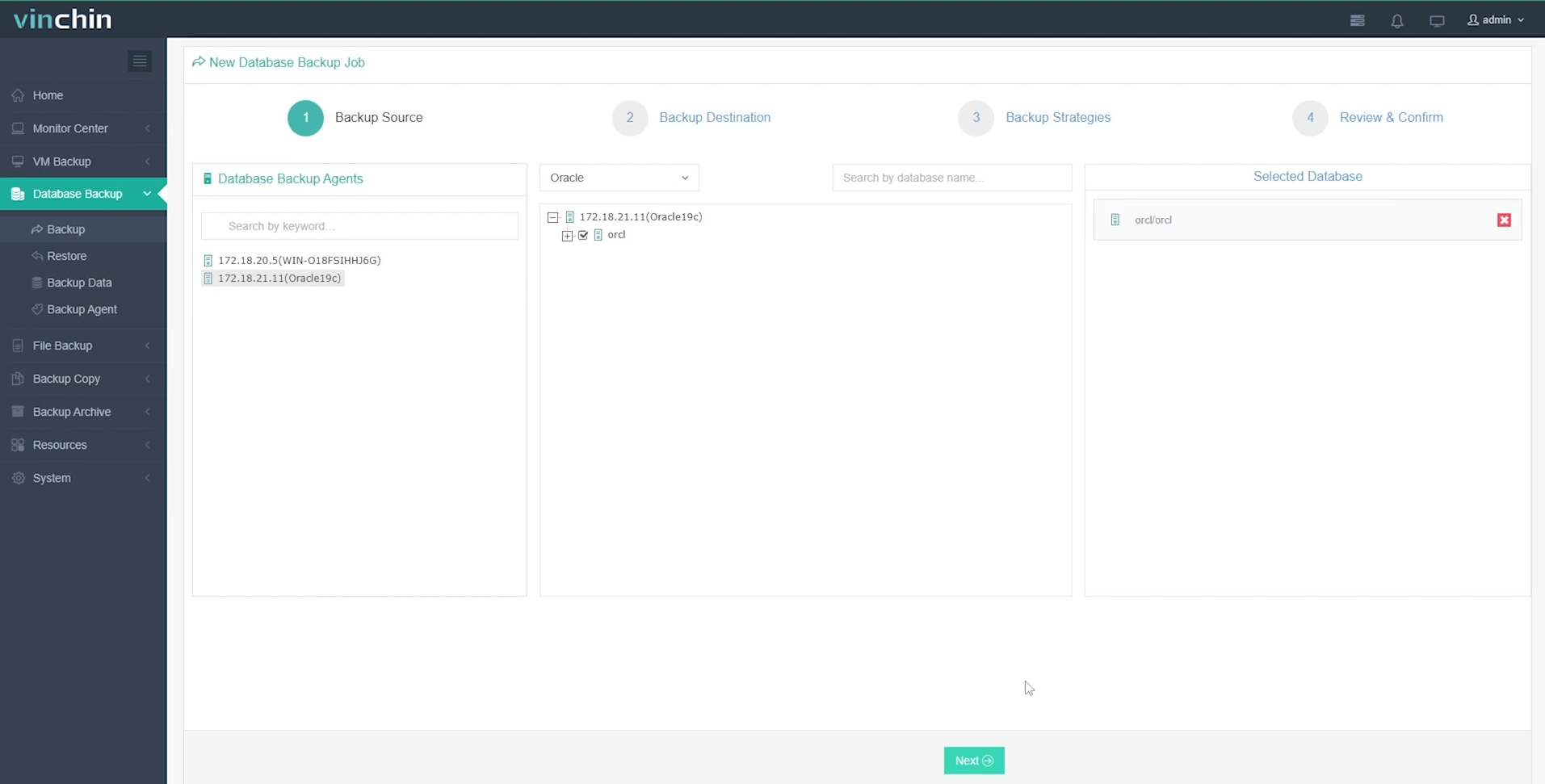
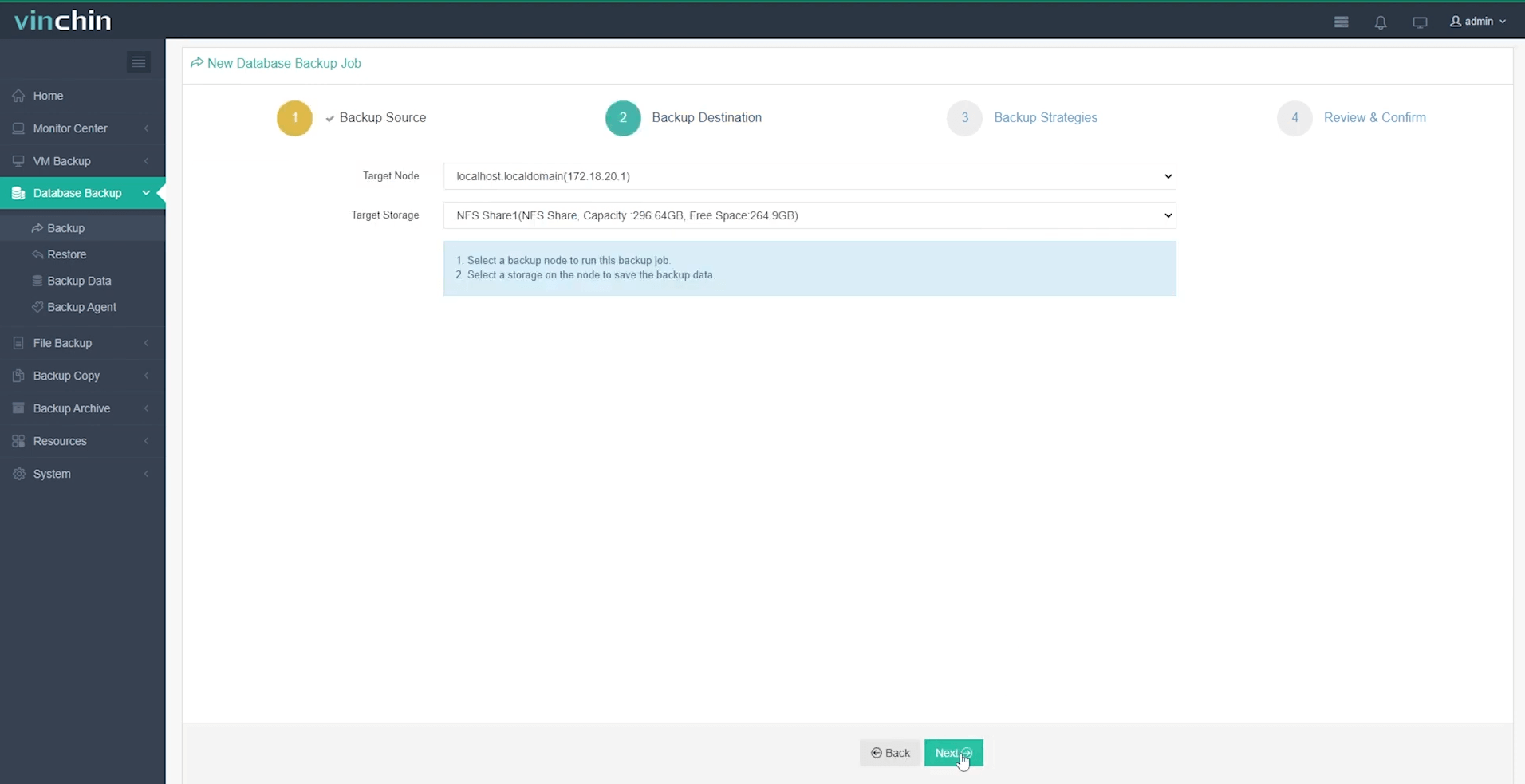
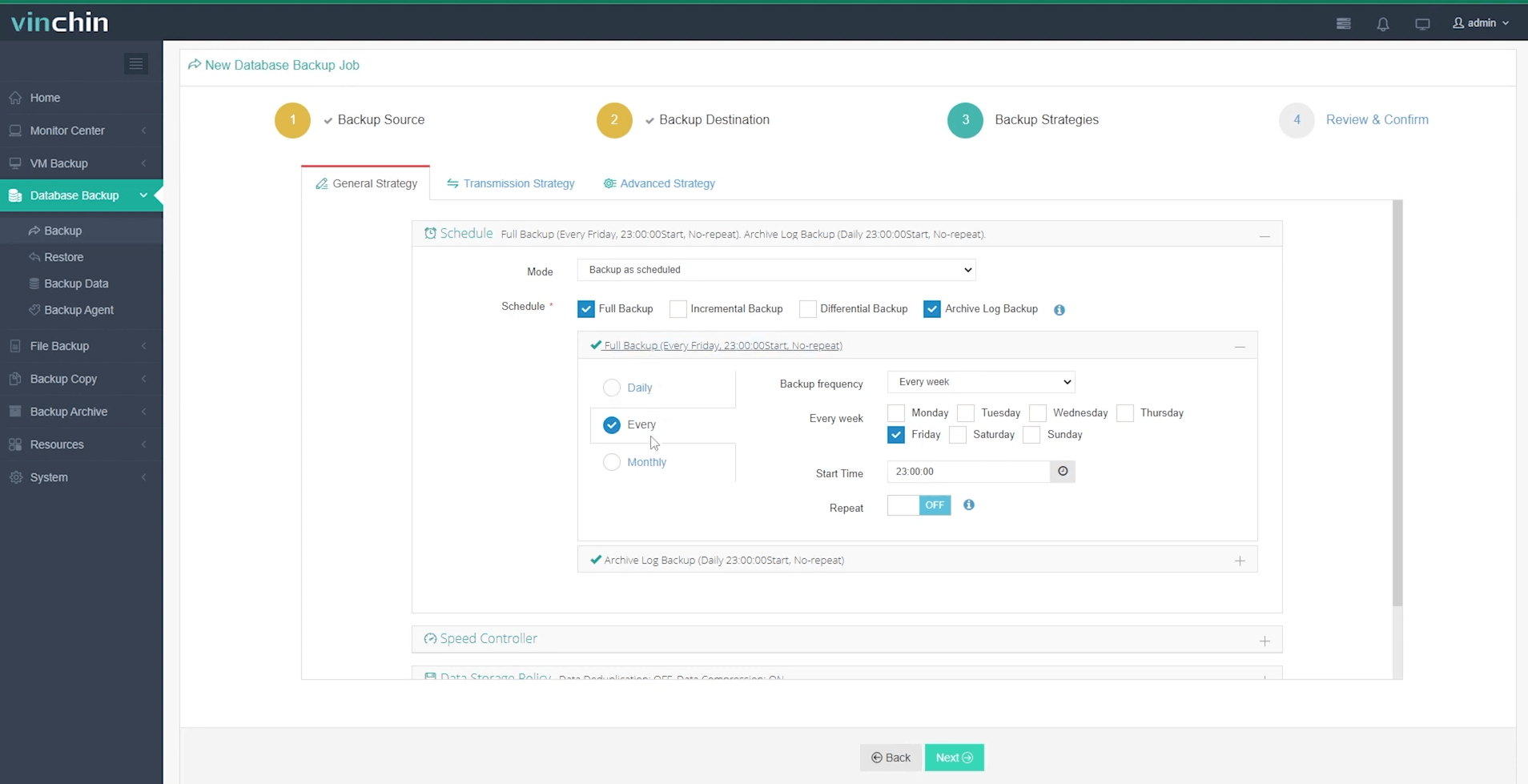
The intuitive web console makes creating an Oracle backup straightforward:
Step 1: Select the Oracle database to back up
Step 2: Choose your preferred backup storage
Step 3: Define a tailored backup strategy
Step 4: Submit the job

Vinchin Backup & Recovery has earned global recognition among enterprises for reliability and ease-of-use—try their fully featured 60-day free trial today by clicking below!
Delete Expired Archivelog All FAQs
Q1: Can deleting expired archivelogs affect my ability to perform point-in-time recovery?
A1: No; only missing physical log files impact recovery—not their absence from catalogs after being marked “expired.”
Q2: How often should I schedule automated cleanup jobs?
A2: Most admins run daily cleanups overnight but adjust frequency based on transaction volume/storage capacity needs.
Q3: What should I do if crosschecking finds many unexpected expirations?
A3: Investigate recent manual deletions/scripts; review audit trails then re-align procedures so future removals update both filesystem and catalog together.
Conclusion
Managing archive logs keeps your Oracle environment healthy long-term.Regularly running delete expired archivelog all ensures clean repositories plus smooth recoveries.For complete protection,Vinchin delivers powerful yet simple enterprise-grade backups trusted worldwide.Try their free trial today!









