Enterprises running ZStack face unique challenges when planning disaster recovery. Virtualized environments demand solutions that can restore services fast, protect against ransomware, and scale as workloads grow. A reliable backup tool must deliver consistent results even during hardware failures or cyberattacks. For example, if a critical VM hosting customer data fails due to storage corruption or malware infection, IT teams need assurance that they can recover it quickly without losing recent transactions. According to the Ponemon Institute’s 2022 report on downtime costs, an average minute of unplanned outage can cost thousands of dollars in lost revenue and productivity. Choosing proven backup software is not just about ticking boxes—it directly impacts business survival.
Why Disaster Recovery Matters in Enterprise Environments
Disaster recovery forms the backbone of enterprise IT resilience by ensuring systems can bounce back from unexpected events. Enterprises depend on predictable recoverability to maintain trust among customers and partners.
● Business Resilience
A robust disaster recovery plan keeps operations running after hardware failures, natural disasters, or cyberattacks. Without it, organizations risk extended outages that disrupt services for hours or days—potentially causing irreversible damage to reputation and customer relationships.
● Regulatory Compliance
Many industries require strict adherence to data protection standards such as GDPR or HIPAA. Failing to meet these requirements due to inadequate DR measures may result in heavy fines or legal action.
● Financial Impact Mitigation
The financial consequences of downtime are severe; studies show that even brief outages can cost enterprises tens of thousands per hour. Reliable disaster recovery helps minimize these losses by enabling rapid restoration of critical systems.
● Data Integrity Assurance
Disasters often lead to partial data loss or corruption. Effective DR ensures you can restore clean copies of files or entire virtual machines—preserving business records and preventing compliance violations caused by missing information.
● Operational Stability
When disaster strikes, having tested procedures allows IT teams to act decisively rather than scrambling for ad-hoc fixes. This stability supports long-term growth by reducing uncertainty around technology risks.
How To Choose The Best ZStack Backup Solution for Disaster Recovery?
Selecting a backup solution for ZStack requires careful evaluation across several dimensions. Enterprises should focus on features that guarantee quick restores, strong automation, scalability across growing workloads, comprehensive reporting for audits, and proven reliability under real-world stress conditions.
● Automated Failover Orchestration
Automated failover reduces human error during crises by triggering predefined workflows when primary systems go down. For example, if a production VM fails due to ransomware encryption overnight, automated orchestration spins up its replica at a secondary site within minutes—ensuring minimal disruption without manual intervention.
● Granular Restore Options
Granular restore lets administrators recover individual files instead of full VMs when only part of the system is affected—for instance, restoring accidentally deleted invoices without rolling back an entire accounting server’s state. This flexibility saves time while minimizing collateral data loss.
● Scalability Across Workloads
As businesses expand their infrastructure—adding new VMs or migrating workloads between clouds—the backup solution must keep pace without degrading performance. Scalable tools handle hundreds of simultaneous backups efficiently so growth never outpaces protection capabilities.
● Comprehensive Reporting & Audit Readiness
Detailed logs showing every backup job’s status help organizations prove compliance during audits. For example, healthcare providers may need monthly reports demonstrating encrypted backups were completed successfully—a requirement under HIPAA regulations.
● Proven Reliability Under Stress
Backup software must work flawlessly even during large-scale incidents like datacenter power outages or mass ransomware attacks targeting multiple servers at once. Look for solutions validated through independent testing or real-world case studies showing successful restores after catastrophic failures.
Vinchin Backup & Recovery: Enterprise-Grade Protection for ZStack
For organizations seeking robust protection for ZStack environments and other mainstream virtualization platforms (15+ supported), Vinchin Backup & Recovery stands out as an enterprise-level virtual machine backup solution trusted worldwide by both SMBs and large enterprises alike. It delivers agentless backups tailored specifically for ZStack alongside VMware, Hyper-V, Proxmox, oVirt, OLVM, RHV, XCP-ng, XenServer, OpenStack—and more—making it ideal for hybrid infrastructures with diverse hypervisors.
Key features include instant recovery (so you can rapidly resume service after failure), LAN-free backup (enabling high-speed transfers without burdening production networks), incremental backup (to optimize storage use), granular restore (recover only what you need), and advanced scheduling/policy management (automate complex retention rules). Together these capabilities ensure fast RTO/RPOs while simplifying compliance and operational efficiency across your environment.
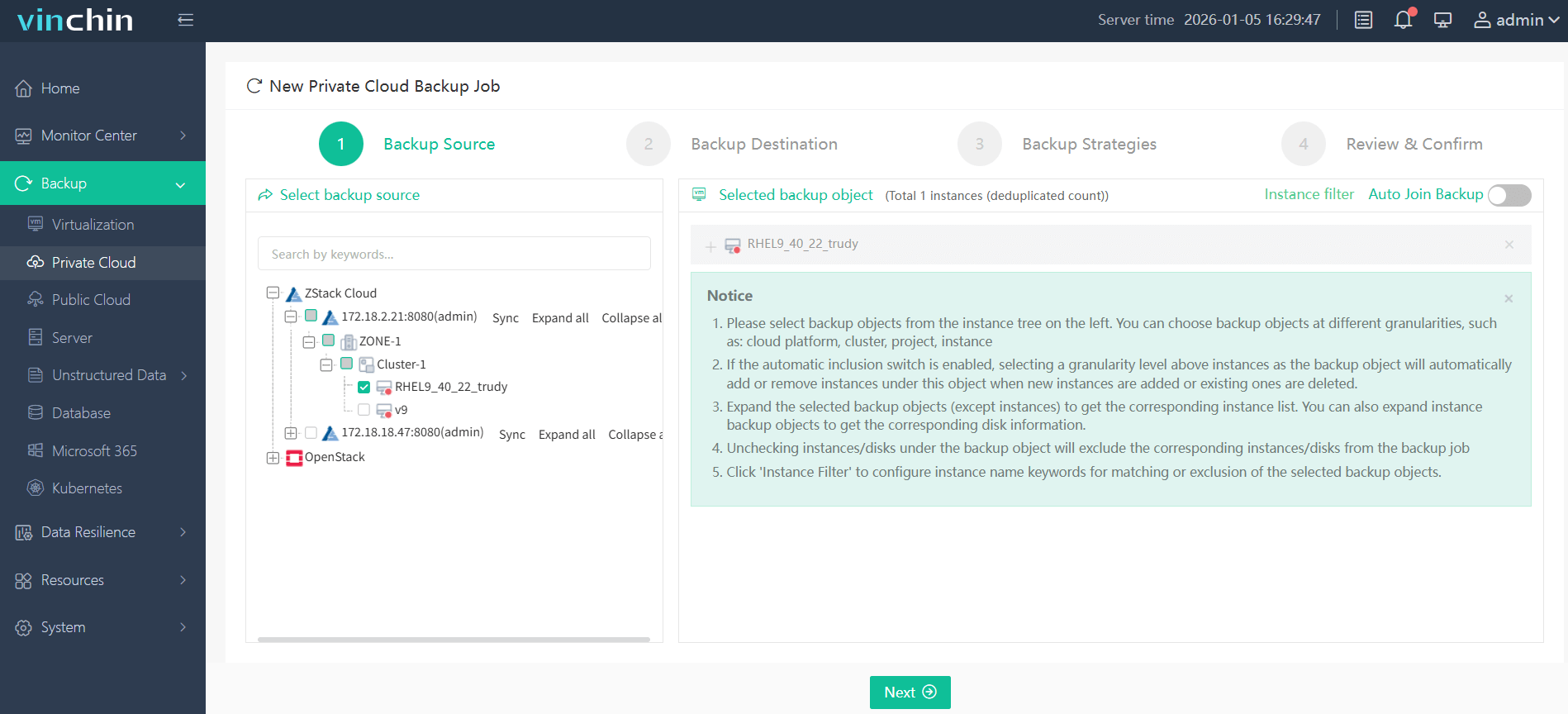
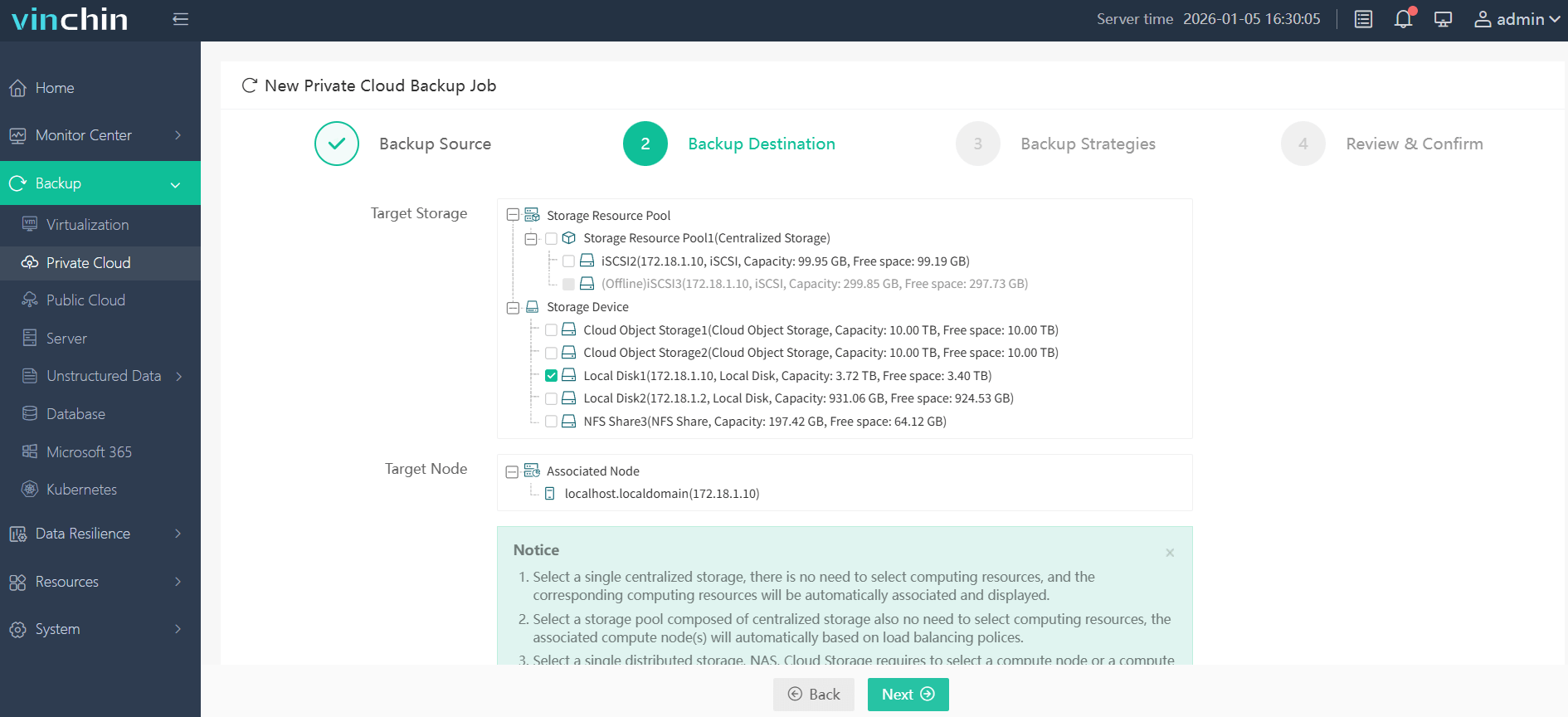
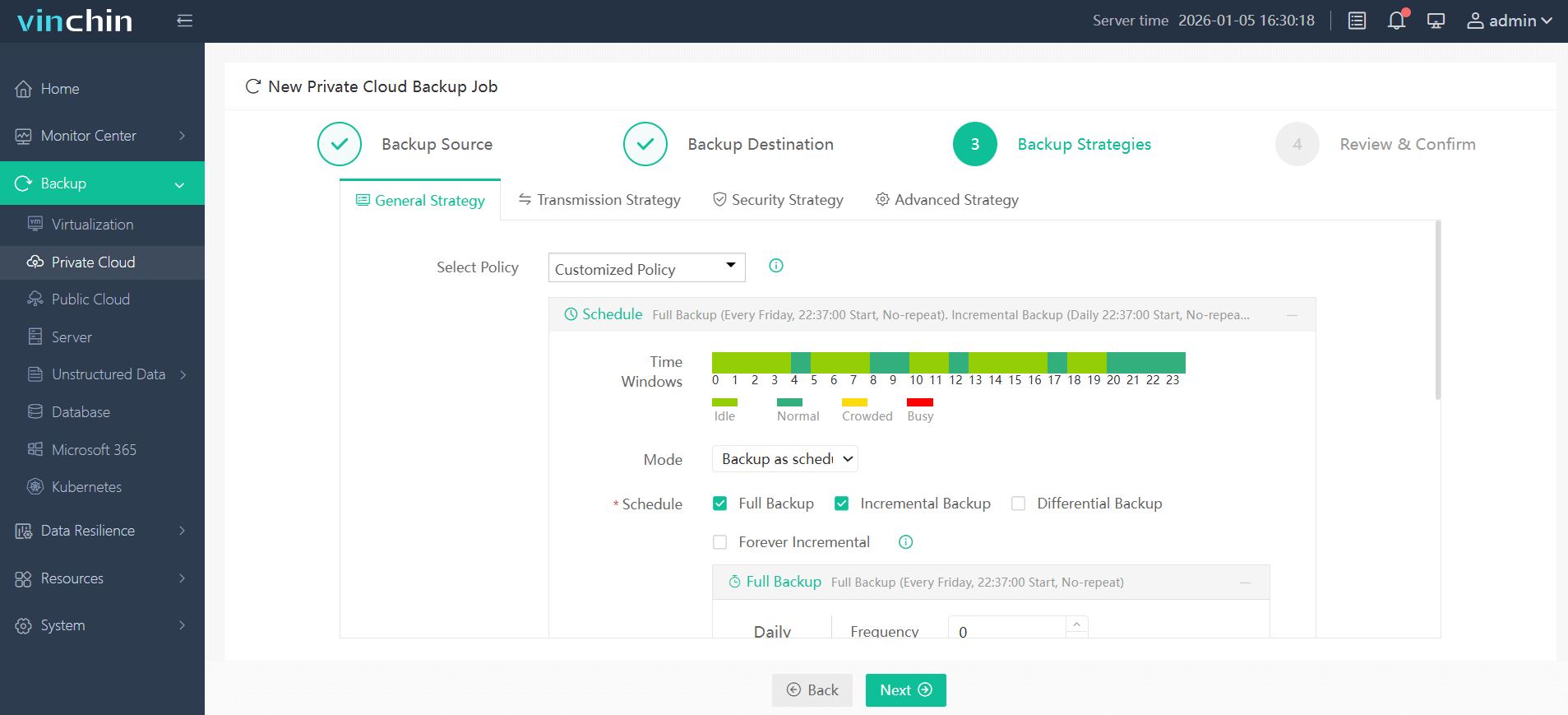
Using the intuitive Vinchin Backup & Recovery web console makes protecting your ZStack VMs straightforward:
Step 1: Select the ZStack VM to back up.
Step 2: Choose the backup storage.
Step 3: Configure the backup strategy.
Step 4: Submit the job.
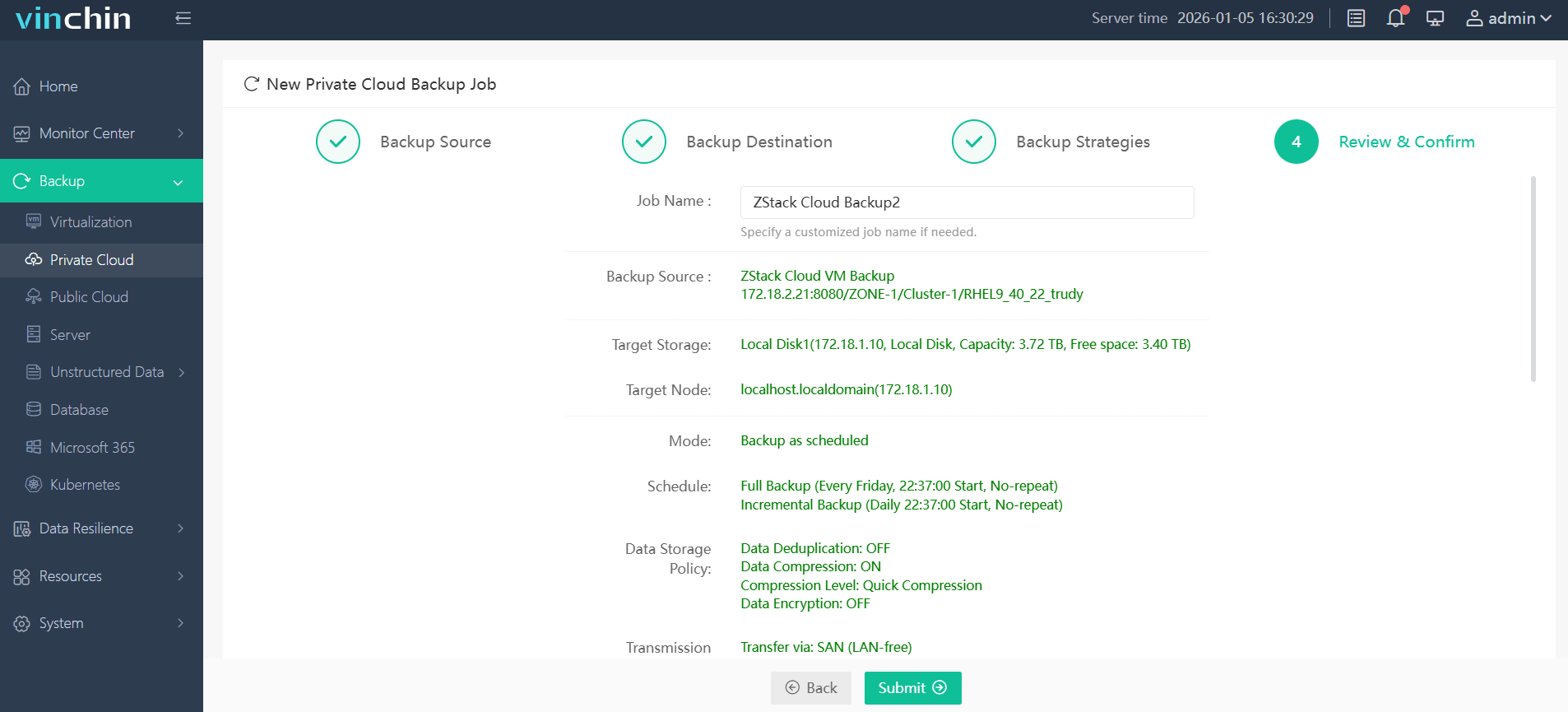
Recognized globally with top ratings from thousands of customers across 100+ countries/regions—Vinchin Backup & Recovery offers a 60-day full-featured free trial so you can experience enterprise-grade data protection firsthand; click below to get started.
Best ZStack Backup Software FAQs
Q1: What makes a backup solution reliable for ZStack disaster recovery?
A1: Reliability depends on automated restores supported by integrity checks (like checksum verification), rapid failover capabilities measured by RTO/RPO metrics, plus documented success in large-scale deployments—even under stress from cyberattacks or hardware failure scenarios.
Q2: How does scalability impact disaster recovery planning?
A2: Scalable solutions adapt seamlessly as infrastructure grows—handling more VMs without slowing down backups/restores during emergencies so performance remains steady regardless of workload size expansion over time.
Q3: Are compliance requirements addressed by modern backup tools?
A3: Yes; leading solutions provide audit trails tracking every operation plus encryption at rest/in transit per regulatory mandates like GDPR/HIPAA—and offer retention policies tailored for legal hold periods required during audits.
Q4: Can one solution cover multi-platform environments?
A4: Yes; some enterprise tools—including Vinchin—support multiple virtualization platforms alongside ZStack within unified dashboards so admins manage all workloads centrally instead of juggling separate products.
Conclusion
Reliable disaster recovery protects business continuity when incidents strike unexpectedly—Vinchin Backup & Recovery offers robust features like agentless backup plus instant VM restoration so enterprises using ZStack stay resilient no matter what happens next.