Oracle Linux Virtualization Manager (OLVM) has become a core part of many enterprise data centers. As organizations virtualize more workloads, backup strategies must keep pace with growing complexity and scale. Agentless and incremental backup methods are now standard requirements for modern IT teams because they simplify operations while protecting critical data assets.
Agentless backup means you do not need to install software on every virtual machine (VM). This reduces management overhead and lowers security risks by minimizing attack surfaces. Incremental backup captures only changed data since the last job, which saves storage space and shortens backup windows—a crucial benefit as VM counts rise into the hundreds or thousands.
Industry standards such as ISO/IEC 27040 emphasize efficient data protection practices that minimize operational impact while ensuring recoverability. Oracle’s own documentation recommends regular backups using both full and incremental approaches to meet compliance needs. By choosing solutions that support agentless and incremental backups, enterprises can achieve reliable recovery points without complex deployments or excessive resource consumption.
Why Agentless & Incremental Backup Matters in Enterprise Environments
Agentless and incremental backups are essential in today’s fast-paced enterprise environments where uptime, efficiency, and compliance are non-negotiable. These technologies help IT teams manage large-scale virtualization platforms like Oracle OLVM with less effort while reducing risk.
● Reduced Operational Overhead
Agentless backup eliminates the need to deploy or update agents on every VM across your infrastructure. This streamlines setup processes—especially important when managing hundreds of VMs—and reduces human error during installation or upgrades. Without agents running inside guest operating systems, there is also less chance of conflicts with other applications or system updates.
● Lower Security Risks
By avoiding agent installations on VMs, you reduce potential vulnerabilities that attackers could exploit through outdated or misconfigured software components. Centralized control over backup operations further limits exposure by keeping sensitive credentials off individual machines.
● Faster Backups with Less Storage Use
Incremental backups capture only new or changed blocks since the previous job—often called “delta changes.” This approach dramatically cuts down on both network traffic during transfers and storage consumption over time. Enterprises can run frequent backups without impacting production workloads or exceeding storage budgets.
● Improved Compliance Readiness
Many regulations require organizations to maintain up-to-date copies of business-critical data while demonstrating consistent recovery capabilities through testing. Agentless solutions make it easier to automate these processes at scale; incremental methods ensure restore points are current without overwhelming resources.
● Simplified Disaster Recovery Planning
With agentless architecture and efficient incremental jobs, disaster recovery becomes more predictable. You can schedule frequent backups—even hourly—without disrupting users or applications. In case of failure, restores complete faster because there is less data to process compared to repeated full backups.
These benefits combine to create a robust foundation for enterprise-grade protection in any Oracle OLVM environment.
How To Choose The Best Oracle OLVM Backup Solution for Agentless & Incremental Backups?
Selecting an effective Oracle OLVM backup solution requires careful evaluation against several key criteria beyond just basic functionality. A well-chosen platform should fit seamlessly into your existing workflows while scaling alongside business growth.
A strong candidate offers true agentless architecture so you never have to touch individual VMs during deployment or maintenance cycles—a major advantage for lean IT teams managing sprawling environments from a central location.
Scalability matters as well: look for solutions proven in large-scale settings capable of handling hundreds—or even thousands—of VMs without bottlenecks. Integration with enterprise authentication systems (like LDAP or Active Directory) ensures secure access controls across departments; built-in reporting tools help demonstrate compliance during audits.
Reliability is paramount: check user reviews for evidence that restores work quickly under pressure—not just in test labs but real-world incidents where downtime costs money.
● True Agentless Architecture
A genuine agentless solution interacts directly with hypervisor APIs such as those provided by Oracle OLVM rather than requiring guest-level installs inside each VM. This minimizes administrative effort throughout the lifecycle—from initial rollout through ongoing patching—and avoids compatibility issues when operating systems change versions over time.
● Robust Incremental Backup Support
The best platforms offer multiple types of incremental jobs—including forever-forward incrementals—to optimize both speed and retention flexibility as your dataset grows larger year after year.
● Seamless Scalability
As your organization adds more workloads onto Oracle OLVM clusters, ensure your chosen tool supports horizontal expansion without performance drops—whether backing up dozens or thousands of VMs simultaneously across multiple nodes in different locations worldwide.
● Enterprise Integration & Reporting
Look for integration options with identity management tools (LDAP/SAML), centralized dashboards showing job status at-a-glance, customizable alerting policies via email/SMS/webhooks—and exportable reports suitable for auditors reviewing regulatory compliance efforts annually or quarterly as required by law.
● Proven Restore Capabilities
No matter how advanced a solution appears on paper, its value comes down to one thing: successful restores when disaster strikes—whether recovering an entire VM after ransomware hits or restoring just one lost file from last week’s snapshot within minutes instead of hours.
Vinchin Backup & Recovery: Enterprise-Level Protection for Oracle OLVM
For organizations seeking robust protection for their Oracle OLVM environments, Vinchin Backup & Recovery stands out as a professional enterprise-level virtual machine backup solution supporting more than 15 mainstream virtualization platforms—including VMware, Hyper-V, Proxmox, oVirt, RHV, XCP-ng, XenServer, OpenStack, ZStack and others—with deep integration for Oracle OLVM scenarios. With features like instant recovery, CBT tracking on supported platforms including OLVM itself, LAN-free transfer paths for rapid throughput on compatible infrastructures, comprehensive deduplication/compression routines and multi-threaded transmission engines working together behind an intuitive web console interface—the result is fast protection cycles that minimize disruption yet deliver dependable RTO/RPO outcomes even under heavy load.
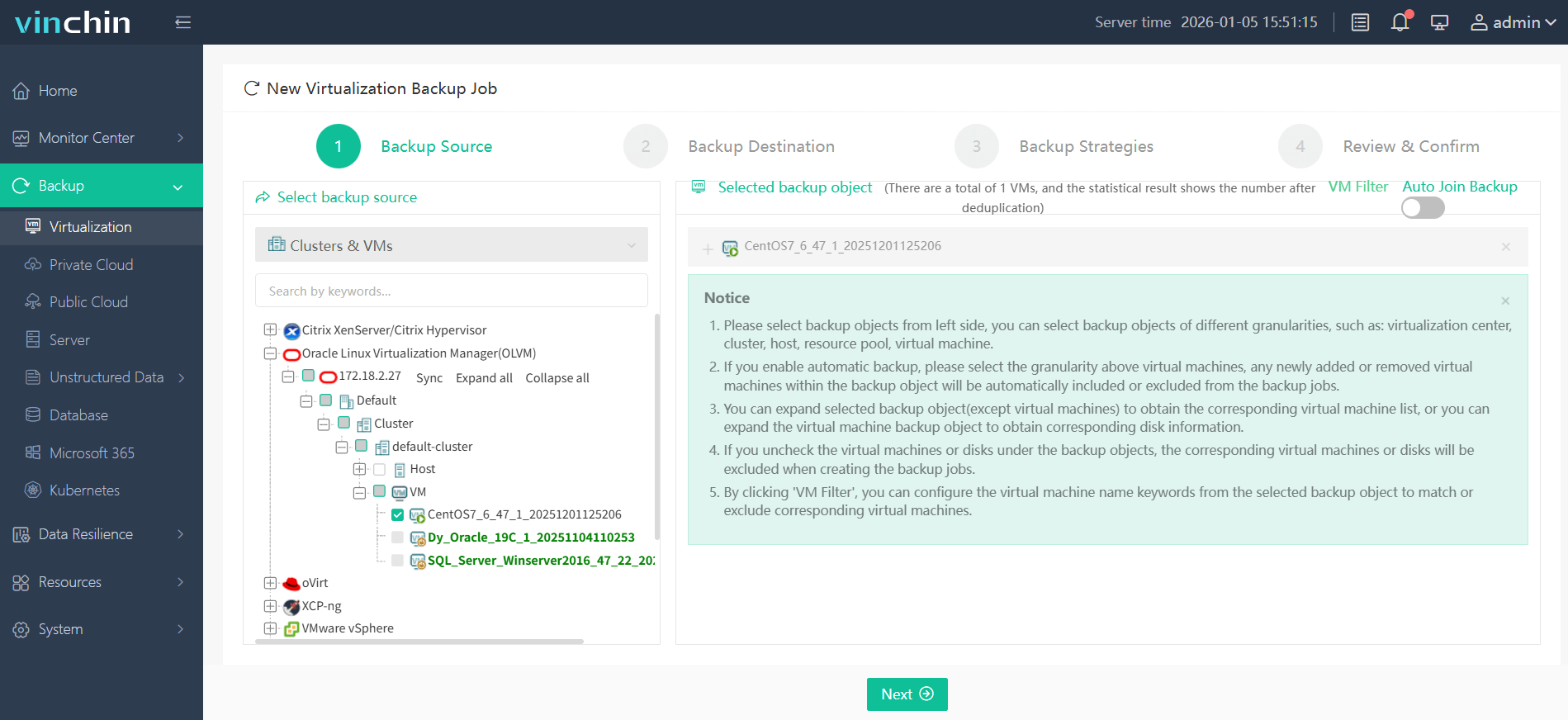
Backing up an Oracle OLVM VM using Vinchin Backup & Recovery is straightforward thanks to its easy-to-navigate web console:
Step 1: Select the Oracle OLVM VM you wish to back up.
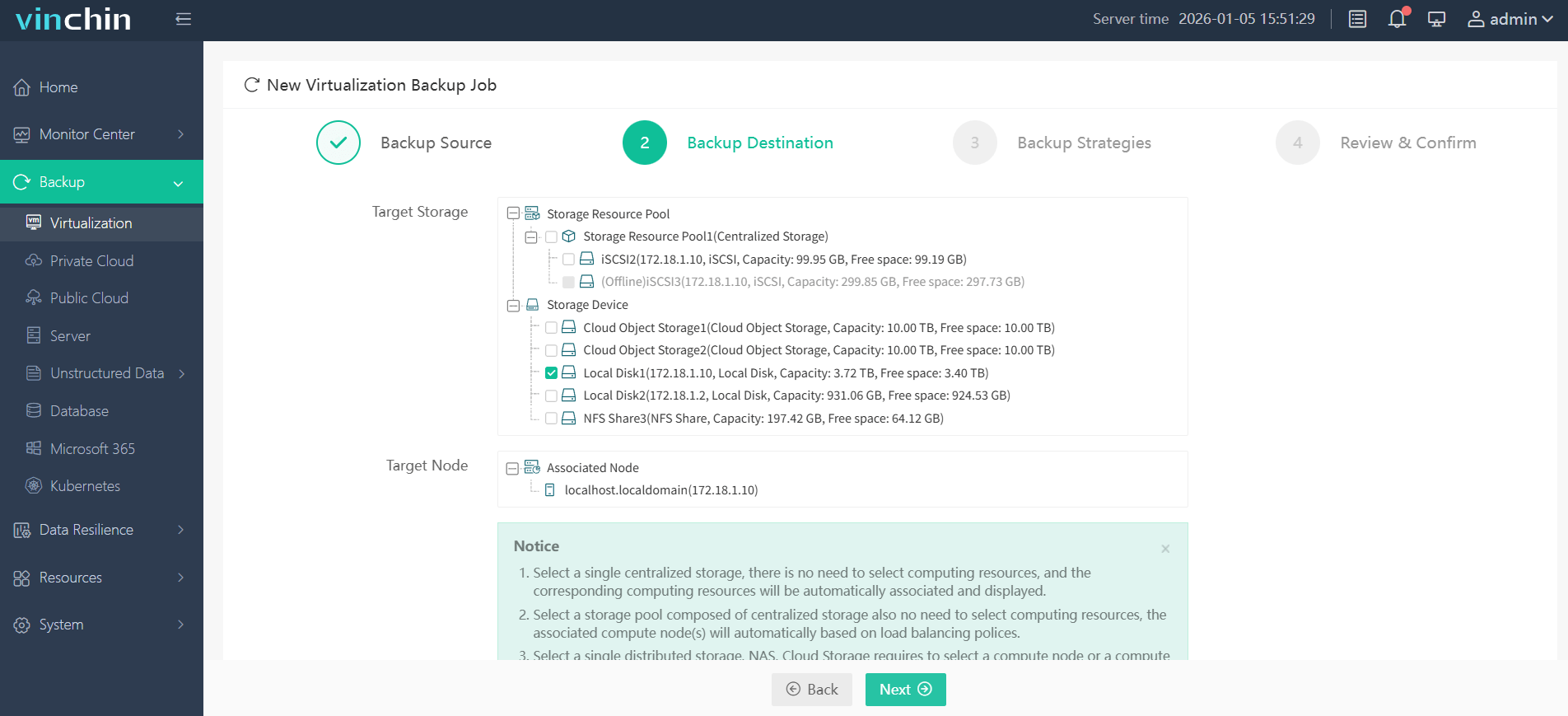
Step 2: Choose your preferred backup storage target.
Step 3: Configure a custom strategy including schedule type (full/incremental/differential), retention policy and encryption if needed.

Step 4: Submit the job—it runs automatically per your defined parameters.

Recognized globally among leading enterprise data-protection vendors—with high customer satisfaction ratings—Vinchin Backup & Recovery offers a fully functional free trial valid 60 days; click below to experience it firsthand.
Best Oracle OLVM Backup Software FAQs
Q1: Is agentless backup secure enough for enterprise use?
Yes; modern solutions like Vinchin rely on secure API connections between their management server(s) and hypervisors rather than installing code inside guest OSs—which keeps attack surfaces small and maintenance simple. Encryption standards such as AES‑256 protect all transferred/stored data against unauthorized access throughout its lifecycle.
Q2: How does incremental backup affect recovery time?
Incremental methods speed up daily operations by transferring only delta changes since the last job—but they also enable rapid restores thanks to synthetic full technology that reconstructs complete images from chains of incrementals plus one base copy. Most users experience much shorter RTOs compared to traditional nightly fulls.
Q3: Can these solutions scale as our environment grows?
Absolutely; leading platforms like Vinchin handle hundreds—or even thousands—of concurrent VM jobs across distributed sites using multi-threaded engines optimized for parallel processing. Adding new hosts/storage targets rarely impacts performance due to dynamic load balancing built into their architectures.
Q4: What if compliance requires frequent restore testing?
Top-tier products provide automated verification tools that periodically mount/test recent snapshots behind-the-scenes so admins receive alerts if anything fails before an audit occurs. With features like instant sandbox restores available via web UI buttons (“Test Restore”), meeting regulatory mandates becomes routine instead of disruptive.
Conclusion
Choosing an agentless solution with true incremental support cuts costs while boosting resilience across any size deployment—making compliance simpler too.Vinchin delivers these benefits reliably so enterprises stay protected no matter how fast they grow.