XCP-ng is an open-source virtualization platform built on Xen Project technology. It powers many enterprise data centers because it is reliable and cost-effective. Protecting workloads on XCP-ng requires backup solutions that do not slow down systems or create extra work for IT teams. Agentless and incremental backup features help meet these needs by reducing complexity while keeping data safe.
Agentless backups work directly through the hypervisor’s APIs without installing software inside each virtual machine (VM). Incremental backups only copy changed data blocks since the last backup job. Together, these features make large-scale VM protection practical for businesses of all sizes.
Why Agentless & Incremental Backups Matter in Enterprise Environments
Agentless and incremental backups are now standard expectations in modern IT environments. They offer clear benefits over older methods that relied on agents or full-image copies every time.
● Reduced Complexity
Agentless backup eliminates the need to install or update software inside every VM. This reduces administrative overhead for IT staff who manage hundreds or thousands of VMs across multiple hosts. By working at the hypervisor level using native APIs like those provided by XCP-ng, agentless solutions also lower compatibility risks during upgrades.
● Lower Performance Impact
Running backup agents inside VMs can consume CPU cycles and memory that should serve business applications instead. With agentless technology, there is no extra process running within guest operating systems—so production workloads remain fast even during backup windows.
● Faster Backup Windows
Incremental backups only transfer new or changed data blocks since the last successful job. This approach dramatically reduces network traffic compared to full backups that copy everything each time. According to industry benchmarks, incremental strategies can cut storage usage by up to 80% versus nightly fulls in dynamic environments.
● Efficient Storage Use
By storing only unique changes between backups—and often combining this with deduplication—incremental methods minimize disk space requirements in backup repositories. This helps organizations control costs as their VM footprint grows.
● Improved Recovery Times
When disaster strikes, restoring from incremental chains is much faster than rehydrating from multiple full images. Many solutions use Changed Block Tracking (CBT) at the hypervisor layer to identify exactly which blocks have changed between snapshots—speeding both backup creation and recovery operations.
● Simplified Compliance Management
Meeting regulatory mandates such as GDPR or HIPAA often means proving you can restore specific files quickly while maintaining audit trails of access events. Agentless incremental solutions provide detailed logs without exposing sensitive guest OS credentials or requiring risky manual steps.
Without these features, enterprises face longer maintenance windows, higher infrastructure costs due to excess storage needs, slower restores after outages, and greater risk of failing audits due to incomplete records or missed recovery objectives.
How To Choose The Best XCP-ng Backup Solution for Agentless & Incremental Backups?
Choosing a robust XCP-ng backup solution involves more than just checking off feature boxes—it requires understanding how each capability supports your operational goals.
● Native Agentless Integration
Look for solutions that connect directly to XCP-ng through its management interfaces rather than relying on scripts or third-party plugins inside VMs. Native integration ensures seamless discovery of new VMs as they are created and avoids version conflicts during platform updates.
● True Incremental Backup Support via CBT
Verify that your chosen software uses Changed Block Tracking (CBT) at the hypervisor level—not just file-level differencing within guest OSes—to capture only modified disk sectors between jobs. Hypervisor-based CBT enables faster jobs with less impact on running services because it tracks changes outside of individual VMs.
● Scalable Centralized Management
As environments grow from dozens to hundreds—or even thousands—of VMs across clusters, centralized dashboards become essential for scheduling jobs and monitoring status at scale. Automation tools such as policy-based job assignment reduce manual effort when onboarding new workloads into protection plans.
● Granular Restore Capabilities
The ability to recover not just entire VMs but also individual files or application objects minimizes downtime after accidental deletions or targeted attacks like ransomware incidents. Granular restore options let you meet strict Recovery Point Objectives (RPOs) without rolling back whole systems unnecessarily.
● Comprehensive Security & Compliance Features
Backup data must be protected both at rest and in transit using strong encryption algorithms such as AES-256. Role-based access controls prevent unauthorized users from viewing sensitive information stored in archives; detailed audit logs support forensic investigations if needed later on.
These criteria ensure your investment delivers real value—not just today but as your infrastructure evolves over time.
Vinchin Backup & Recovery: Enterprise-Grade Protection for XCP-ng
For organizations seeking advanced protection for XCP-ng environments, Vinchin Backup & Recovery offers a professional enterprise-level virtual machine backup solution supporting over 15 mainstream virtualization platforms—including first-class support for XCP-ng alongside VMware, Hyper-V, Proxmox, oVirt, OLVM, RHV, XenServer, OpenStack, ZStack and more.
Vinchin Backup & Recovery delivers agentless architecture with robust incremental backup capabilities tailored for XCP-ng users; key features include Changed Block Tracking (CBT), LAN-free backup options where supported, granular restore functionality, powerful deduplication/compression technologies, and secure data encryption—all designed to maximize efficiency while minimizing resource consumption and ensuring compliance readiness across diverse infrastructures.
The intuitive web console makes protecting your environment straightforward:
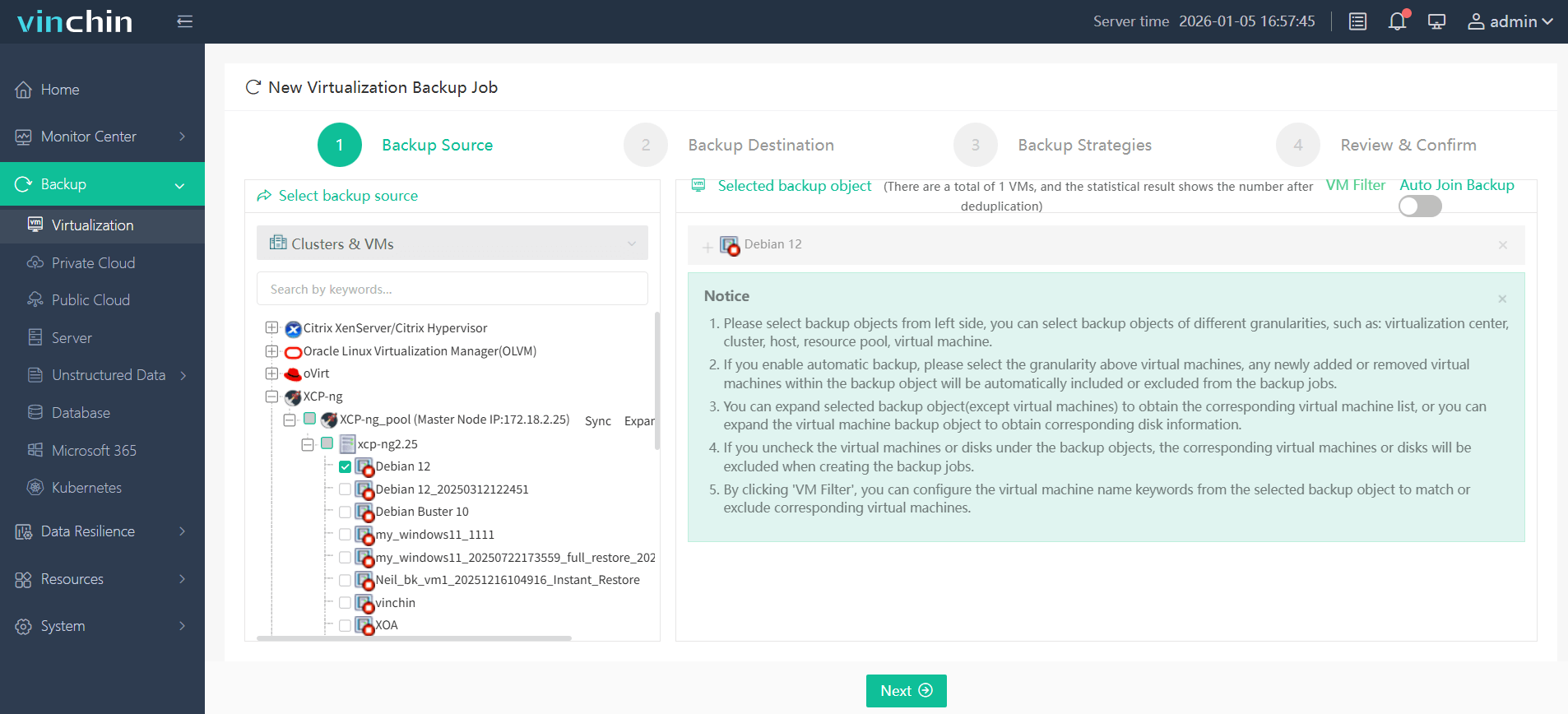
Step 1: Select the XCP-ng VM to back up;
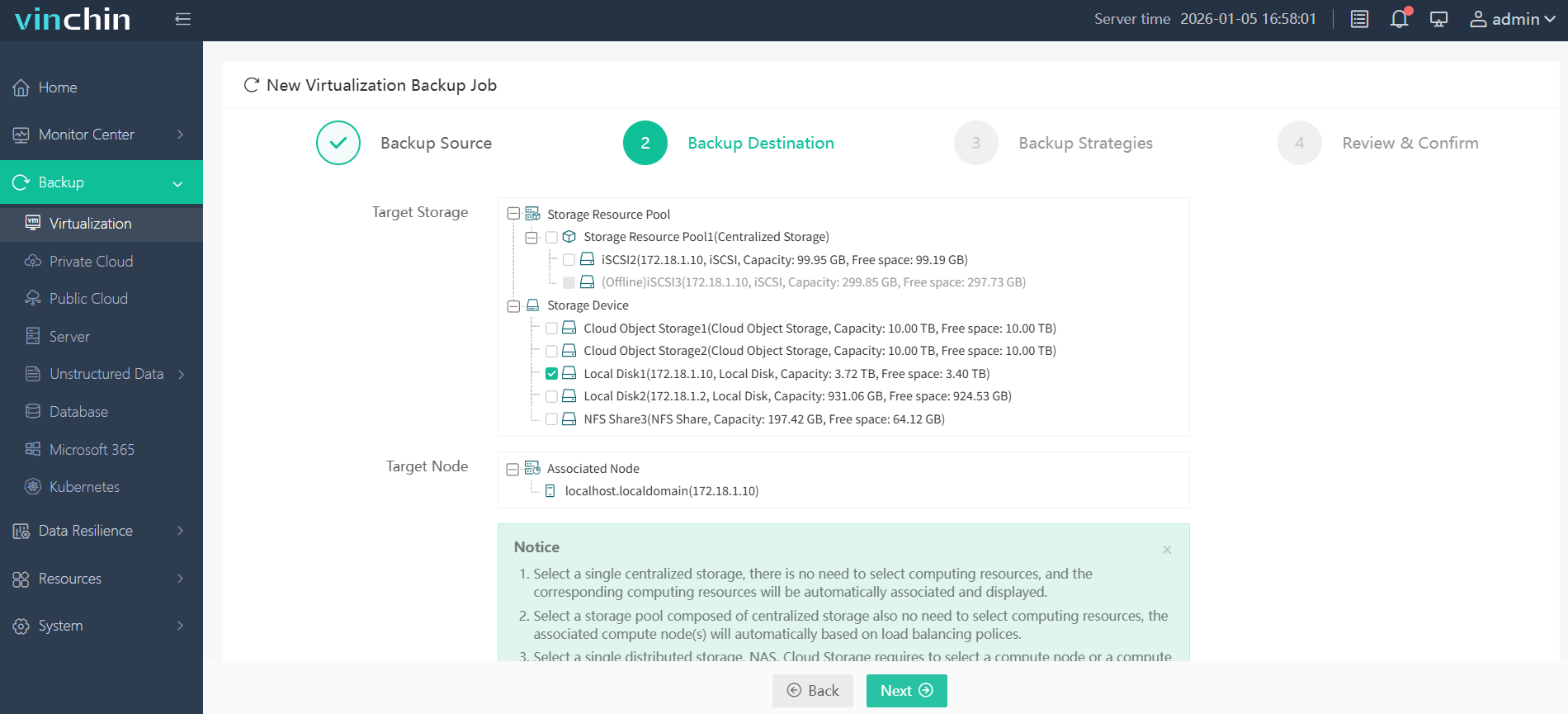
Step 2: Choose the target storage;
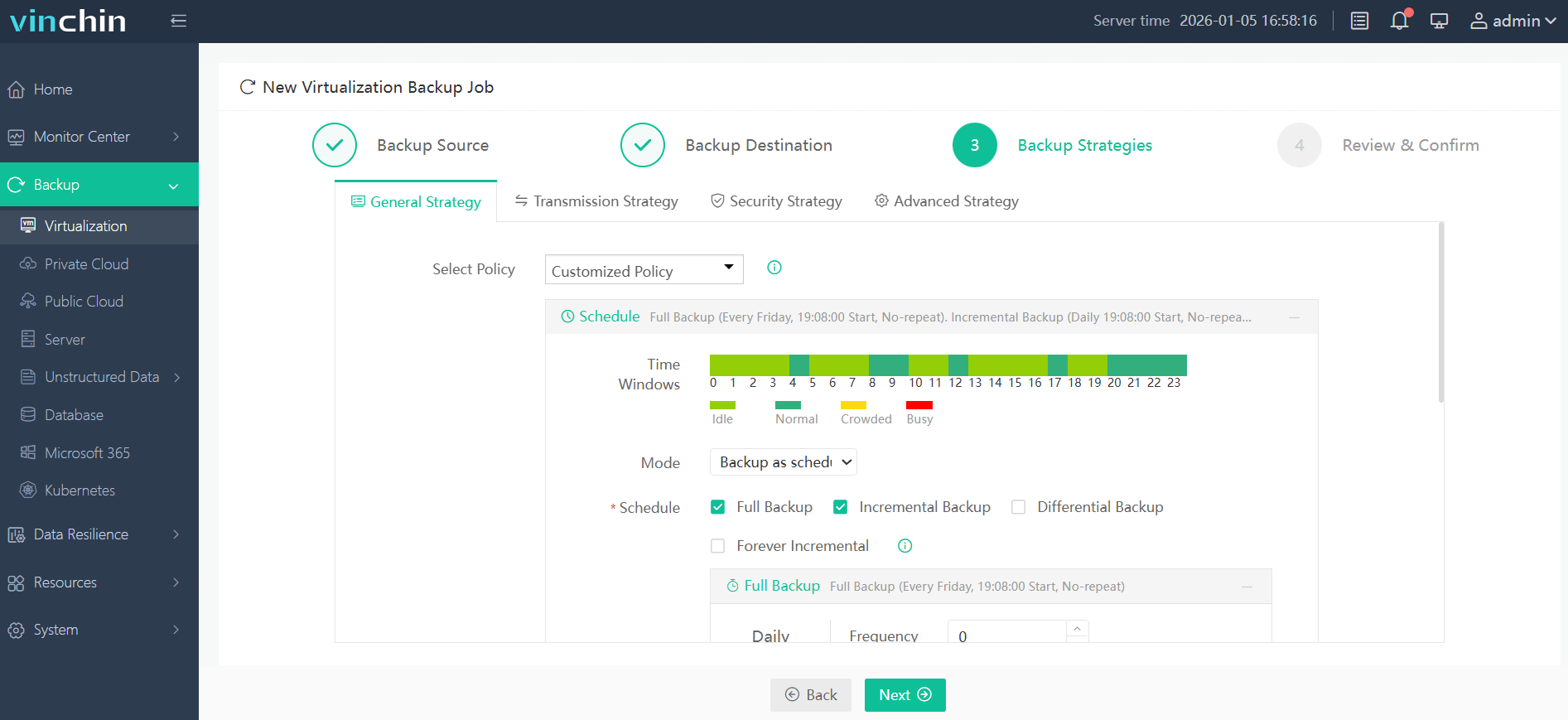
Step 3: Configure a flexible strategy;
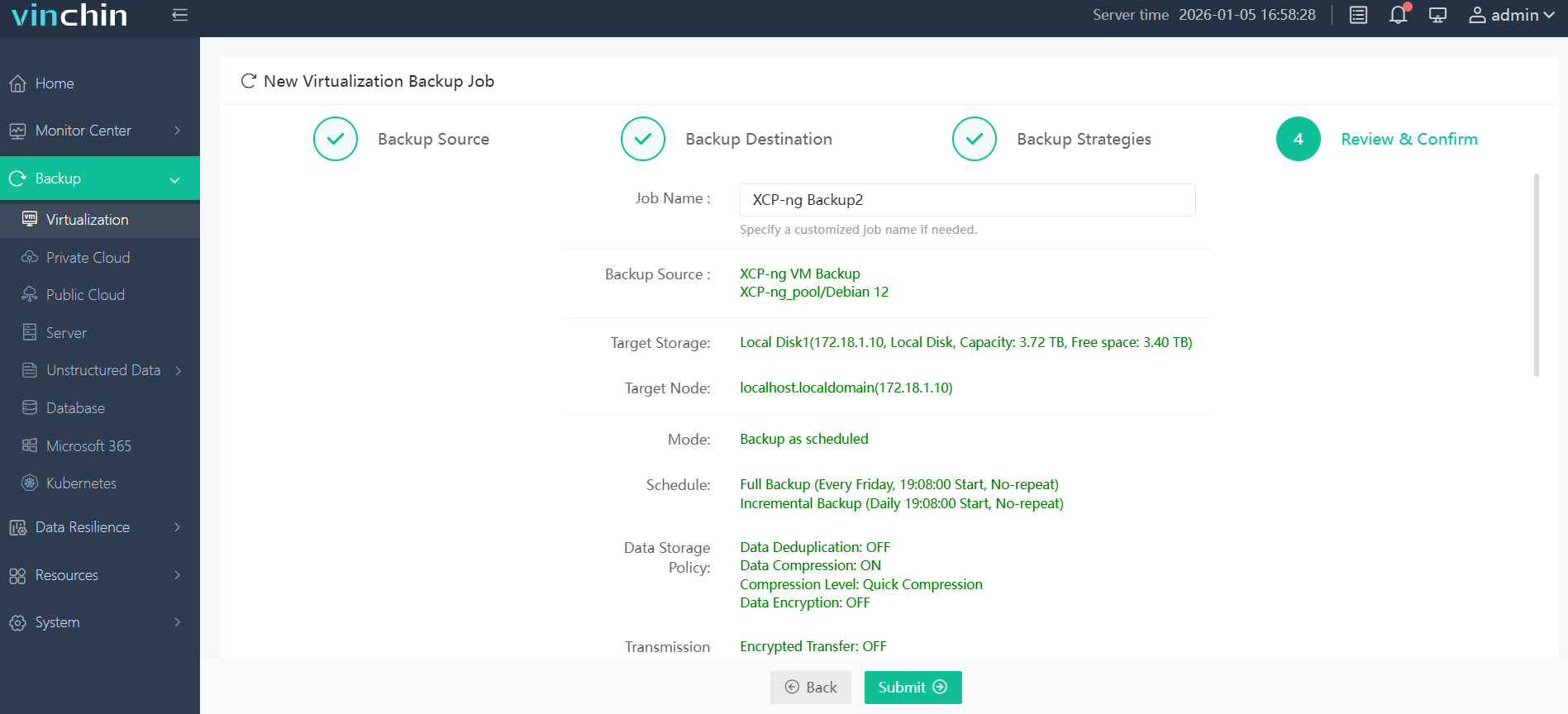
Step 4: Submit the job.
Recognized globally with top ratings from thousands of enterprise customers worldwide—try Vinchin Backup & Recovery free for 60 days with all features enabled by clicking below.
Best XCP-ng Backup Software FAQs
Q1: What makes agentless backup especially valuable for protecting XCP-ng virtual machines?
Agentless backup leverages hypervisor APIs so there is no need for separate software installations inside each VM—a major benefit when managing large fleets of servers spread across different operating systems or cloud platforms.
Q2: How do incremental backups improve efficiency compared with traditional full-backup approaches?
Incremental methods track only what has changed since previous runs using technologies like Changed Block Tracking (CBT). This reduces network load during transfers while saving significant storage space over time—a crucial advantage when backing up high-volume transactional databases or busy file servers daily.
Q3: How do leading solutions manage scalability for growing XCP-ng environments?
Leading platforms offer centralized management consoles where administrators schedule jobs across many hosts simultaneously; automation rules assign new VMs into existing policies automatically; resource-efficient processing ensures performance does not degrade even as protected workloads multiply; some integrate seamlessly with scale-out storage architectures so capacity grows alongside demand without bottlenecks forming at any single node.
Q4: What security measures help ensure compliance when backing up sensitive workloads?
Strong encryption protects all stored copies both “at rest” on disk arrays/tape libraries/cloud buckets—and “in transit” over internal networks/WAN links; role-based permissions restrict who may view/manage archives; immutable logs record every operation performed so auditors can verify chain-of-custody easily if required by regulations such as HIPAA/GDPR/SOX.
Conclusion
Selecting an enterprise-ready solution supporting true agentless integration plus efficient incrementals strengthens operational resilience while controlling total cost of ownership—delivering measurable value long-term.








