Disaster recovery is not just another IT task—it is a business necessity that protects your operations from unexpected events like hardware failure, ransomware attacks, or natural disasters. Downtime can cost thousands of dollars per hour according to Gartner research. Regulatory frameworks such as GDPR, HIPAA, or SOC 2 require organizations to safeguard data integrity and availability at all times. Reliable disaster recovery ensures you meet these requirements by providing fast restores and verified backups when every second counts.
Why Disaster Recovery Matters in Enterprise Environments
A strong disaster recovery plan forms the backbone of enterprise IT resilience by minimizing risk from outages or attacks.
● Operational Continuity keeps your business running even when servers fail or cyberattacks strike. Without reliable DR processes in place, critical applications may remain offline for hours or days—leading to lost revenue and customer trust.
● Regulatory Compliance helps you avoid fines by meeting legal obligations set by GDPR, HIPAA, SOC 2, or other industry-specific standards that demand regular data protection measures and documented recovery procedures.
● Data Integrity Assurance means your organization can recover accurate information after incidents like accidental deletions or corruption—essential for audits or legal discovery.
● Reputation Protection shields your brand from negative publicity caused by prolonged downtime or data loss events that could erode stakeholder confidence.
● Financial Risk Reduction lowers potential losses tied to service interruptions by ensuring rapid restoration of systems through tested backup strategies.
How To Choose The Best XCP-ng Backup Solution for Disaster Recovery?
Selecting an XCP-ng backup solution requires careful evaluation of features that guarantee reliability during crises while supporting long-term growth.
● Automated Backup Verification ensures each backup completes successfully without manual checks—so you know your data is recoverable before disaster strikes. This reduces human error and supports low Recovery Point Objective (RPO) targets.
● Restore Accuracy guarantees restored virtual machines are consistent with their original state thanks to solutions integrating with XCP-ng’s VSS-like backup API for application-consistent snapshots.
● Deep Scheduling & Retention Policies automate routine tasks so backups run on time—even across hundreds of VMs—while maintaining only what you need based on compliance rules or business needs.
● Scalability & Performance allow seamless expansion as workloads grow; look for architecture supporting proxy servers or load balancing to maintain speed when protecting large environments.
● Security Features Like Immutability & Encryption protect against ransomware threats by making backups unchangeable after creation (immutability) and unreadable without proper keys (encryption).
● Compliance Support Through Reporting & Audit Trails provides evidence during regulatory reviews that your organization follows best practices around data protection—a must-have for passing audits smoothly.
When evaluating options, consider whether your current solution meets these criteria—or if gaps exist that could put operations at risk during a crisis.
Vinchin Backup & Recovery: Enterprise-Grade Protection for XCP-ng
For organizations seeking robust protection across diverse virtual environments, Vinchin Backup & Recovery stands out as an enterprise-level VM backup solution supporting over 15 mainstream virtualization platforms—including prioritized support for XCP-ng alongside VMware, Hyper-V, Proxmox, oVirt/OLVM/RHV, XenServer, OpenStack, ZStack and more. This broad compatibility makes it ideal for mixed-infrastructure enterprises needing unified management. Key features relevant to XCP-ng users include incremental backup with Changed Block Tracking (CBT), LAN-free backup for efficient transfers within datacenters, granular restore capabilities down to file level, advanced deduplication/compression to optimize storage use, and end-to-end encryption safeguarding sensitive data throughout its lifecycle—all designed to maximize efficiency while minimizing risk and resource consumption.
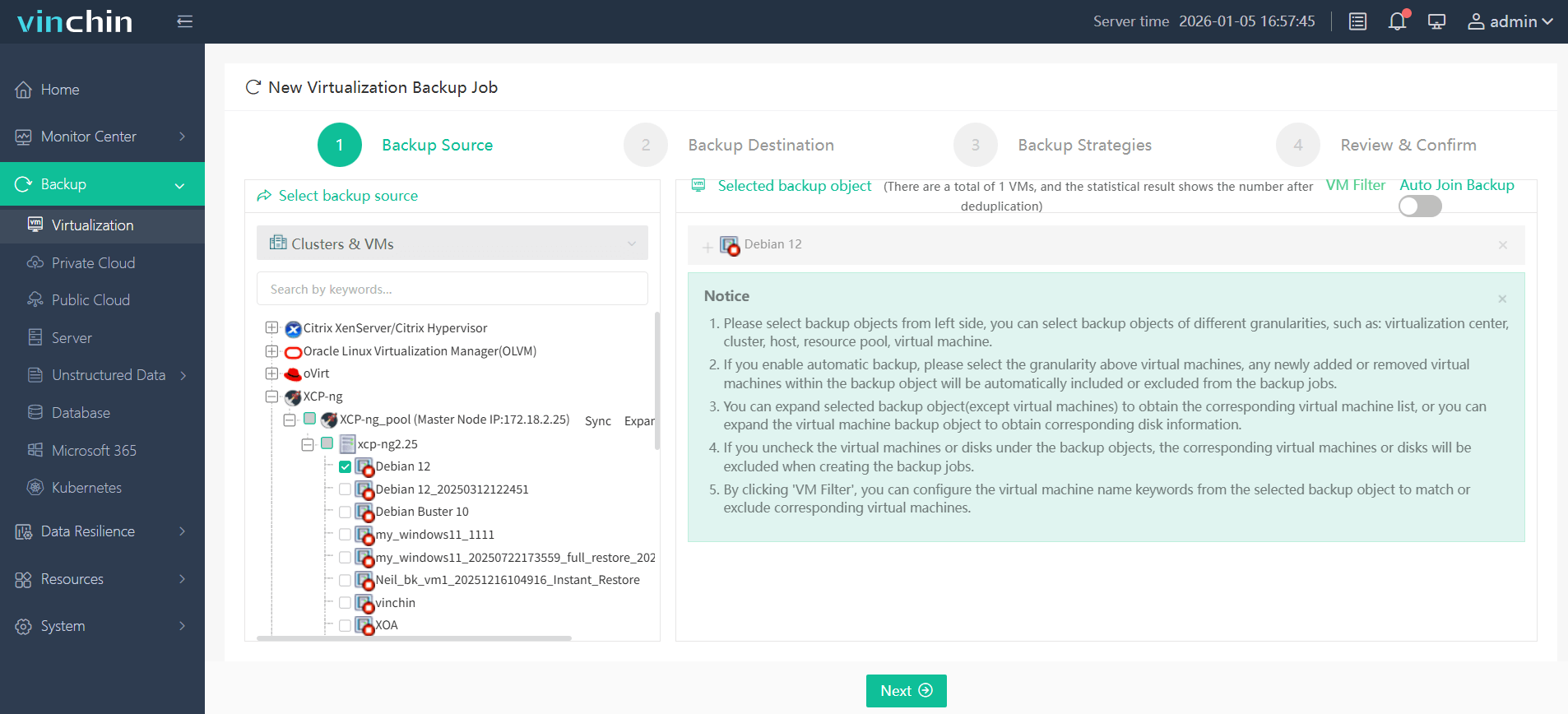
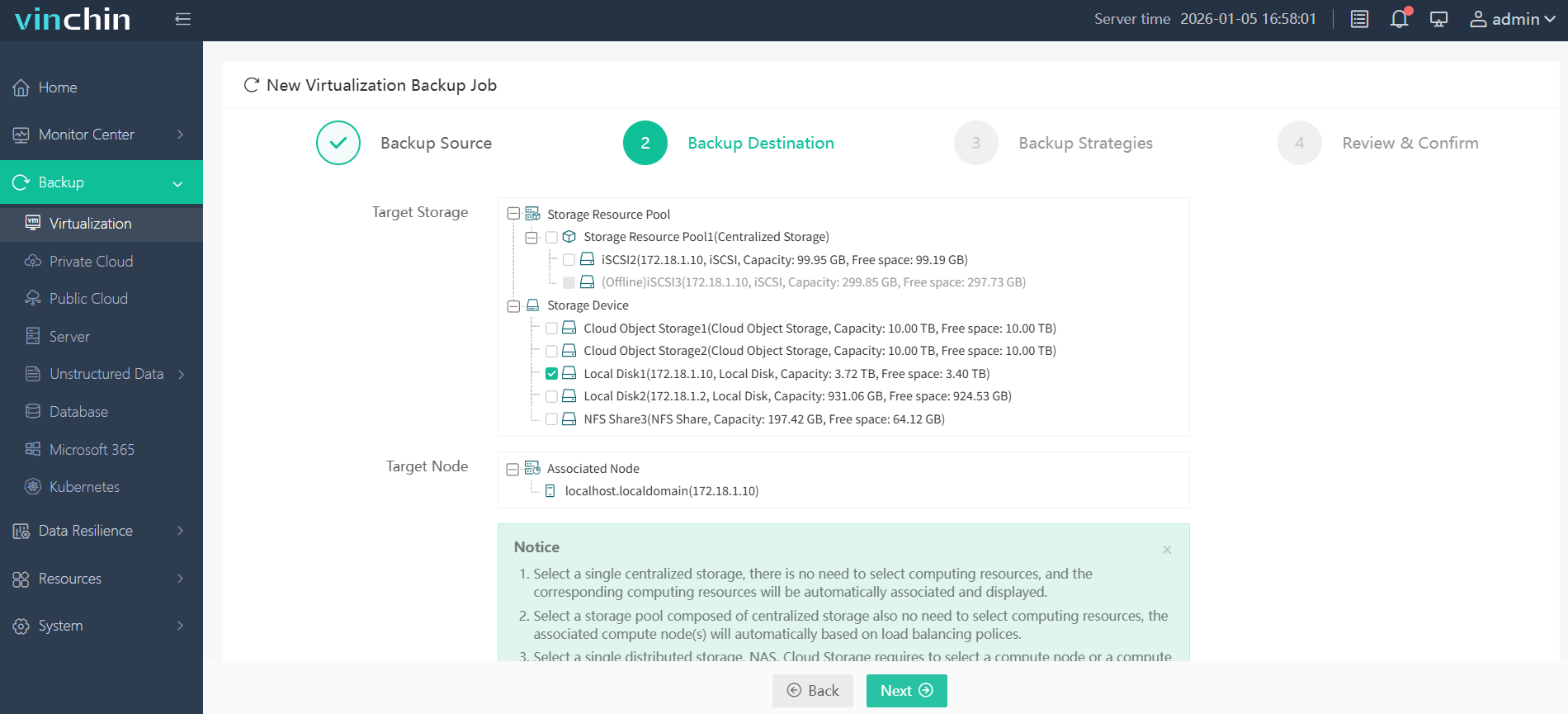
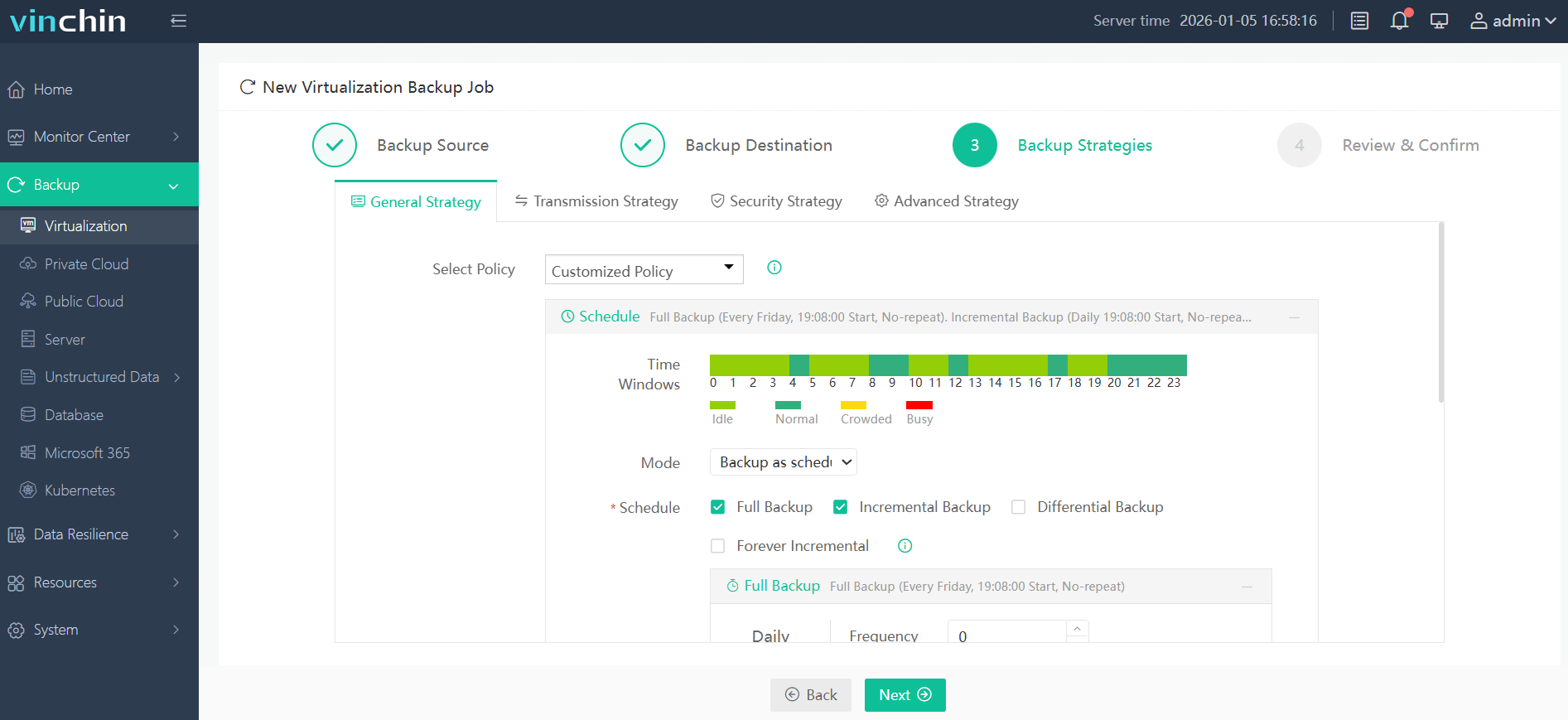
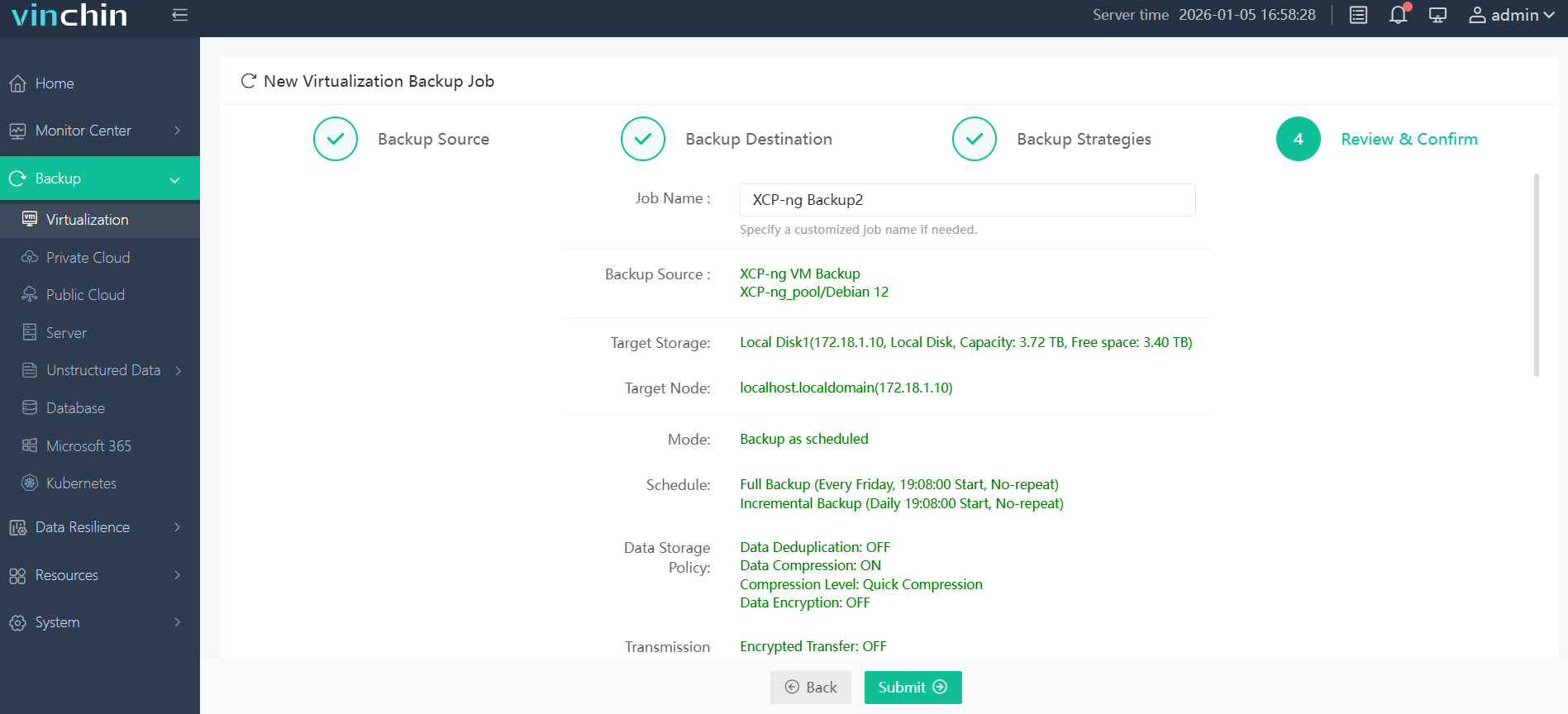
Vinchin Backup & Recovery offers an intuitive web console so setup is simple:
Step 1: Select the XCP-ng VM to back up
Step 2: Choose the backup storage
Step 3: Configure the backup strategy
Step 4: Submit the job
With global recognition among enterprise customers and top ratings in independent reviews, Vinchin Backup & Recovery delivers trusted protection worldwide. Try all features free for 60 days—click below to download now!
Best XCP-ng Backup Software FAQs
Q1: What makes a backup solution reliable for disaster recovery?
A1: Automated verification of backups combined with fast restore options ensures data remains intact—and recoverable—when needed most during an emergency event such as hardware failure or cyberattack.
Q2: How does immutability protect against ransomware?
A2: Immutability prevents malware from modifying or deleting backup files once written; this keeps critical recovery data safe even if production systems are compromised.
Q3: How does a backup solution maintain performance as an XCP-ng environment scales to hundreds of VMs?
A3: Scalable solutions use distributed architecture—including proxy servers or load balancing—to handle high volumes efficiently without bottlenecks so large deployments remain protected at optimal speeds regardless of size increases over time.
Q4: Does it support compliance requirements?
A4: Comprehensive reporting tools plus detailed audit trails help organizations demonstrate adherence to regulations like GDPR/HIPAA/SOC 2—making both internal reviews and external audits easier.
Conclusion
A reliable disaster recovery solution minimizes downtime and safeguards critical data assets under pressure. Choosing proven technology built around automation and security ensures operational continuity no matter what challenges arise.








