Reliable disaster recovery for Sangfor HCI means more than just bouncing back from outages. It protects against cyberattacks, hardware failures, accidental deletions, and data corruption. The right backup software ensures you meet strict Recovery Time Objectives (RTOs) and Recovery Point Objectives (RPOs), keeping your business running smoothly even during major disruptions. With regulatory demands rising and downtime costs soaring—Gartner estimates average downtime costs at $5,600 per minute—choosing robust backup software is now a strategic priority for every enterprise.
Why Disaster Recovery Matters in Enterprise Environments
Disaster recovery forms the backbone of enterprise IT resilience. It safeguards critical systems so organizations can recover quickly from unexpected events. Without a reliable plan in place, businesses face extended outages that erode customer trust and revenue streams.
● Minimizing Downtime
Downtime disrupts operations across departments—from sales to finance—and can halt production lines or digital services entirely. According to Gartner’s research on downtime costs, even brief interruptions can result in significant financial losses.
● Preventing Data Loss
Data loss not only impacts day-to-day work but also puts sensitive information at risk. Whether caused by ransomware or accidental deletion, lost data may be impossible to recreate without proper backups.
● Meeting Compliance Requirements
Regulations such as GDPR or HIPAA require strict controls over data retention and recovery processes. Failure to comply can lead to hefty fines or legal action.
● Protecting Reputation
A single incident of prolonged unavailability can damage brand reputation permanently. Customers expect seamless service—even during disasters—so enterprises must prove their ability to recover fast.
The National Institute of Standards and Technology (NIST) Cybersecurity Framework highlights disaster recovery as essential for maintaining business continuity. Enterprises that invest in proven solutions gain peace of mind knowing they are prepared for any scenario.
How To Choose The Best Sangfor HCI Backup Solution for Disaster Recovery?
Selecting backup software is about matching technology with real-world needs—not just ticking boxes on a feature list. A strong solution should automate protection tasks while delivering fast restores under pressure. Look for tools that simplify management yet scale as your environment grows.
● Automated Backup Scheduling
Automated scheduling ensures backups run consistently without manual oversight. This reduces human error risk while guaranteeing up-to-date copies are always available when needed.
● Instant VM Recovery
Instant VM recovery allows entire virtual machines to be restored within minutes after failure or attack—minimizing disruption to users or applications relying on those systems.
● Granular Restore Options
Granular restore enables you to recover specific items such as a single Microsoft Exchange email or an individual SQL Server database table instead of rolling back an entire VM—a huge time saver during partial incidents.
● Built-in Ransomware Defense
Features like immutable storage prevent attackers from altering backup files while encryption keeps sensitive data safe both at rest and in transit—critical defenses against modern ransomware threats.
● Scalability
As workloads increase across multiple clusters or sites, scalable solutions maintain performance without adding complexity—supporting everything from small test labs to petabyte-scale production environments seamlessly.
● Compliance Support
Audit-ready reporting tools help demonstrate adherence to regulations by tracking who accessed what data when—and flexible retention policies ensure records are kept only as long as required by law or policy.
● Integration Simplicity
Simple deployment options let IT teams roll out protection quickly using intuitive interfaces like drag-and-drop job setup screens rather than complex scripts—reducing training time while improving reliability day-to-day.
Ensure the solution supports your evolving needs, is operationally efficient, and meets your business's protection requirements now—and into the future—as infrastructure changes over time.
Vinchin Backup & Recovery: Enterprise-Grade Protection for Sangfor HCI
For organizations seeking advanced protection for Sangfor HCI environments, Vinchin Backup & Recovery offers a professional enterprise-level virtual machine backup solution supporting over 15 mainstream virtualization platforms—including VMware, Hyper-V, Proxmox, oVirt, OLVM, RHV, XCP-ng, XenServer, OpenStack, ZStack and more—with broad compatibility ideal for hybrid infrastructures. Key features relevant to Sangfor HCI include agentless full/incremental/forever-incremental/differential backups; granular restore; deduplication and compression; V2V migration; throttling policy; GFS retention policy; multi-thread transmission; cloud/tape archive; plus LAN-free backup support for optimal speed and efficiency on supported platforms. These capabilities ensure rapid recovery times while reducing storage costs and simplifying compliance management.
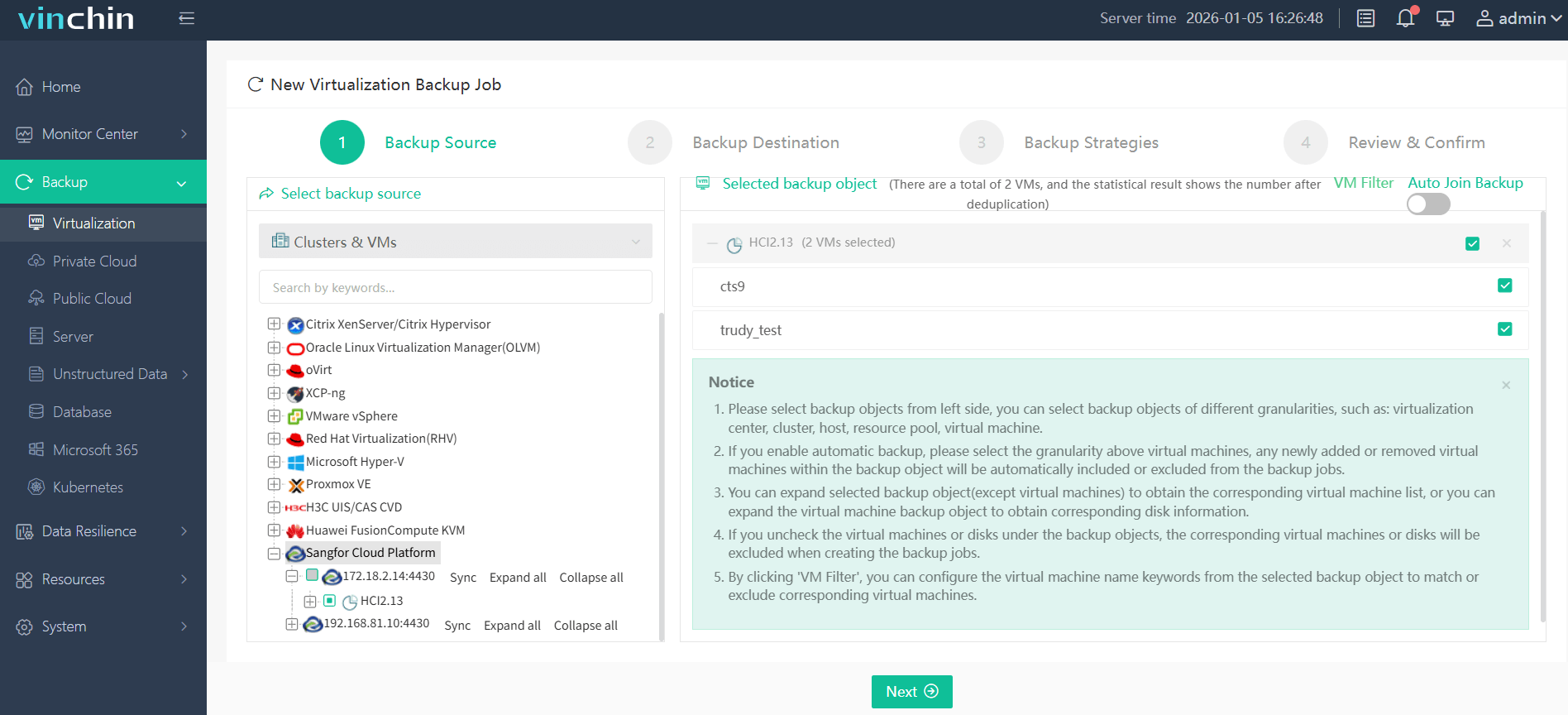
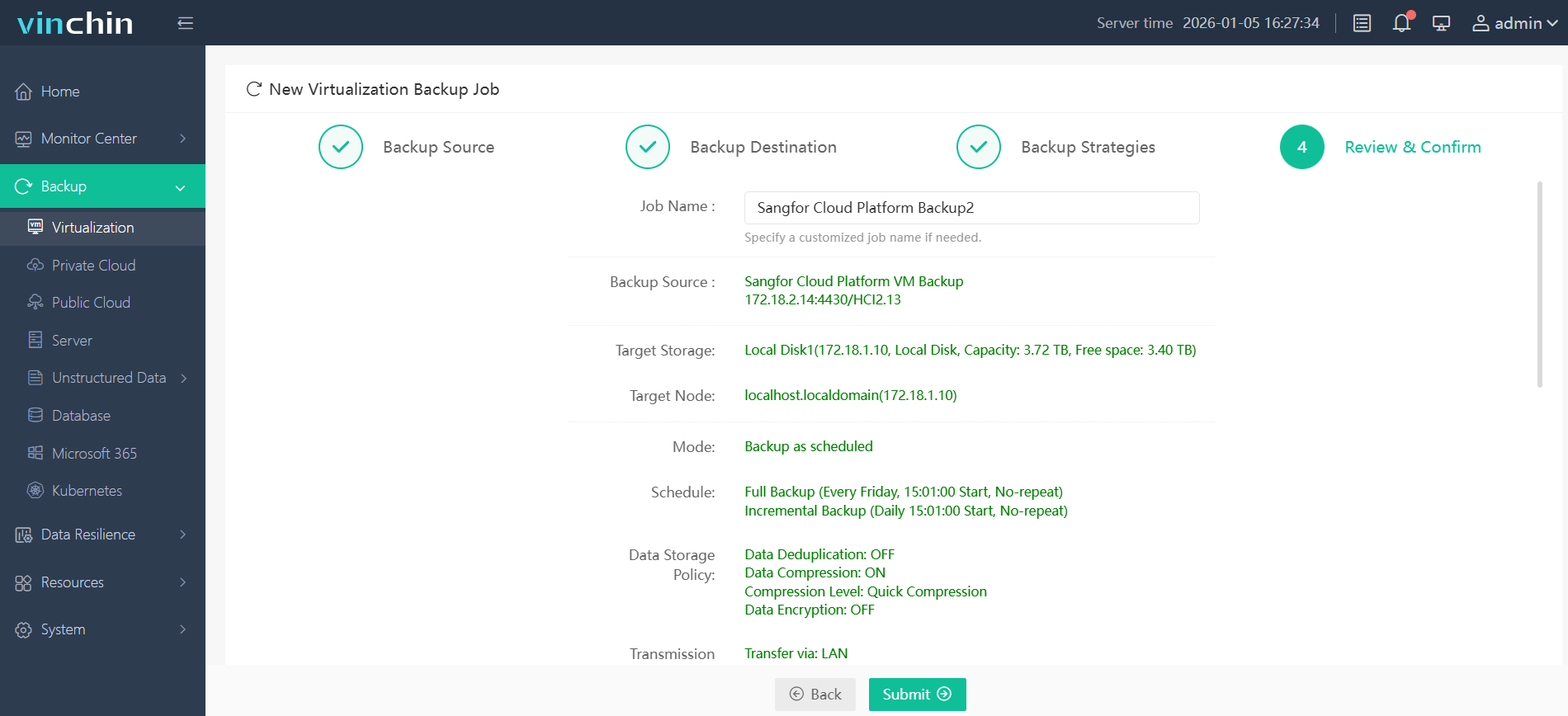
With its intuitive web console interface, backing up a Sangfor HCI VM using Vinchin Backup & Recovery involves four straightforward steps:
Step 1: Select the Sangfor HCI VM to back up;
Step 2: Choose the backup storage location;

Step 3: Configure the desired backup strategy;

Step 4: Submit the job.
Recognized globally with top ratings from thousands of customers across industries,Vinchin Backup & Recovery offers a 60-day full-featured free trial—click below to experience leading enterprise data-protection firsthand.
Best Sangfor HCI Backup Software FAQs
Q1: What makes a backup solution reliable for disaster recovery?
A1: Reliability depends on automated scheduling that eliminates missed backups; rapid verified restores measured by low RTOs (Recovery Time Objectives) so systems come online fast; low RPOs (Recovery Point Objectives) limiting how much recent data could be lost; built-in ransomware protections; plus evidence of successful real-world recoveries under pressure—all backed by regular testing routines confirming readiness when needed most.
Q2: How does scalability affect disaster recovery planning?
A2: Scalable solutions grow alongside expanding workloads without introducing bottlenecks—ensuring consistent levels of protection whether managing dozens of VMs today or thousands tomorrow.
Q3: Is compliance support necessary in backup software?
A3: Yes—compliance features enforce legal obligations around recordkeeping through audit trails showing who accessed what data when plus configurable retention rules matching industry standards so nothing gets deleted too soon—or kept longer than allowed.
Q4: Can one solution protect multiple virtualization platforms?
A4: Leading solutions offer broad platform support enabling centralized management across hybrid infrastructures—including public/private clouds—which simplifies administration through unified dashboards/policies while reducing errors compared with juggling separate tools per environment.
Conclusion
The right solution ensures recoveries are not just fast but verified—turning disaster recovery from a plan into proven capability ready whenever needed most.









