Protecting business-critical applications on Sangfor HCI means keeping downtime to an absolute minimum. Every minute of outage can cost thousands in lost revenue and damage your reputation. Reliable backup software ensures that when disaster strikes, whether hardware failure, ransomware attack, or human error, your systems bounce back fast. Essential features like instant restore and granular recovery help maintain business continuity. For organizations bound by strict compliance standards, dependable backup is not just a best practice but a regulatory requirement.
Why Maximizing Uptime Matters in Enterprise Environments
Maintaining uptime is vital for any enterprise relying on digital infrastructure. Even brief interruptions can disrupt workflows and customer experiences. Industry studies show that unplanned outages lead to significant financial loss and erode trust among clients and partners. Regulatory bodies often require proof of data protection measures; failing to meet these standards can result in fines or legal action. Enterprises running critical workloads on Sangfor HCI need robust solutions that minimize risk and ensure operational resilience.
● Financial Impact
Downtime directly affects revenue streams. When core applications go offline even briefly, businesses may lose sales opportunities or halt essential services. For example, e-commerce platforms risk abandoned transactions during outages.
● Reputation Damage
Customers expect seamless service availability around the clock. Extended downtime can cause frustration and prompt clients to seek alternatives. Over time, repeated incidents harm brand reputation.
● Compliance Risks
Many industries face strict regulations regarding data protection and availability. Failure to provide timely access to records during audits or investigations could result in penalties or loss of certification.
● Operational Disruption
Critical processes depend on continuous access to applications hosted on Sangfor HCI environments. Outages force teams into manual workarounds that slow productivity and increase error rates.
● Data Integrity Concerns
Without reliable backups, recovering from failures becomes uncertain. Data corruption or incomplete restores may compromise sensitive information needed for daily operations.
How to Choose the Best Sangfor Hci Backup Solution for Maximizing Uptime?
Selecting effective Sangfor HCI backup software involves more than checking off basic requirements, it demands careful evaluation of how well each solution supports rapid recovery while scaling with your environment’s growth.
A strong backup solution should deliver high-speed recovery options tailored for virtualized workloads on Sangfor HCI platforms. Meeting tight Recovery Time Objectives (RTOs) is crucial so users regain access quickly after disruptions.
● High-Speed Recovery Capabilities
Solutions offering instant VM restore allow entire virtual machines to come online within minutes after failure events occur. Granular file-level recovery lets administrators retrieve individual files without restoring full VMs—a key advantage when only specific data is needed urgently.
● Automation Features
Automated scheduling reduces manual intervention by ensuring regular backups run according to policy-defined intervals set through intuitive interfaces like bold “Schedule” buttons found in modern management consoles. Policy-based automation also minimizes human error during routine tasks.
● Scalability Across Workloads
As organizations grow their virtual environments on Sangfor HCI clusters, backup solutions must scale seamlessly without degrading performance or extending backup windows beyond acceptable limits.
● Deep Integration with Sangfor HCI APIs
Native integration ensures consistent snapshots at both VM and application levels using built-in APIs provided by Sangfor HCI architecture. This approach guarantees application-consistent backups even for complex workloads such as databases running inside VMs.
● Comprehensive Reporting & Alerting Tools
Robust reporting dashboards display real-time status updates about completed jobs while proactive alerts notify IT staff about potential issues before they escalate into major incidents, helping teams stay ahead of risks rather than reacting after problems arise.
Choosing a solution that meets these criteria helps enterprises safeguard uptime while supporting compliance initiatives across regulated industries like finance or healthcare.
Vinchin Backup & Recovery: Enterprise-Grade Protection for Sangfor HCI
For enterprises seeking robust protection for their Sangfor HCI environments, Vinchin Backup & Recovery delivers comprehensive support across over 15 mainstream virtualization platforms, including VMware, Hyper-V, XenServer, oVirt/OLVM/RHV, Proxmox VE, OpenStack, ZStack, XCP-ng and stands out as an enterprise-level virtual machine backup solution designed for diverse infrastructures.
With agentless operation and deep compatibility with leading hypervisors such as Sangfor HCI itself, Vinchin Backup & Recovery offers features like incremental backup, scheduled backup policies, LAN-free backup (on supported platforms), granular restore capabilities, and advanced data deduplication/compression technology, all optimized for efficient resource usage and rapid recovery times.
The intuitive web console makes protecting your environment straightforward:
Step 1: Select the Sangfor HCI VM you wish to back up
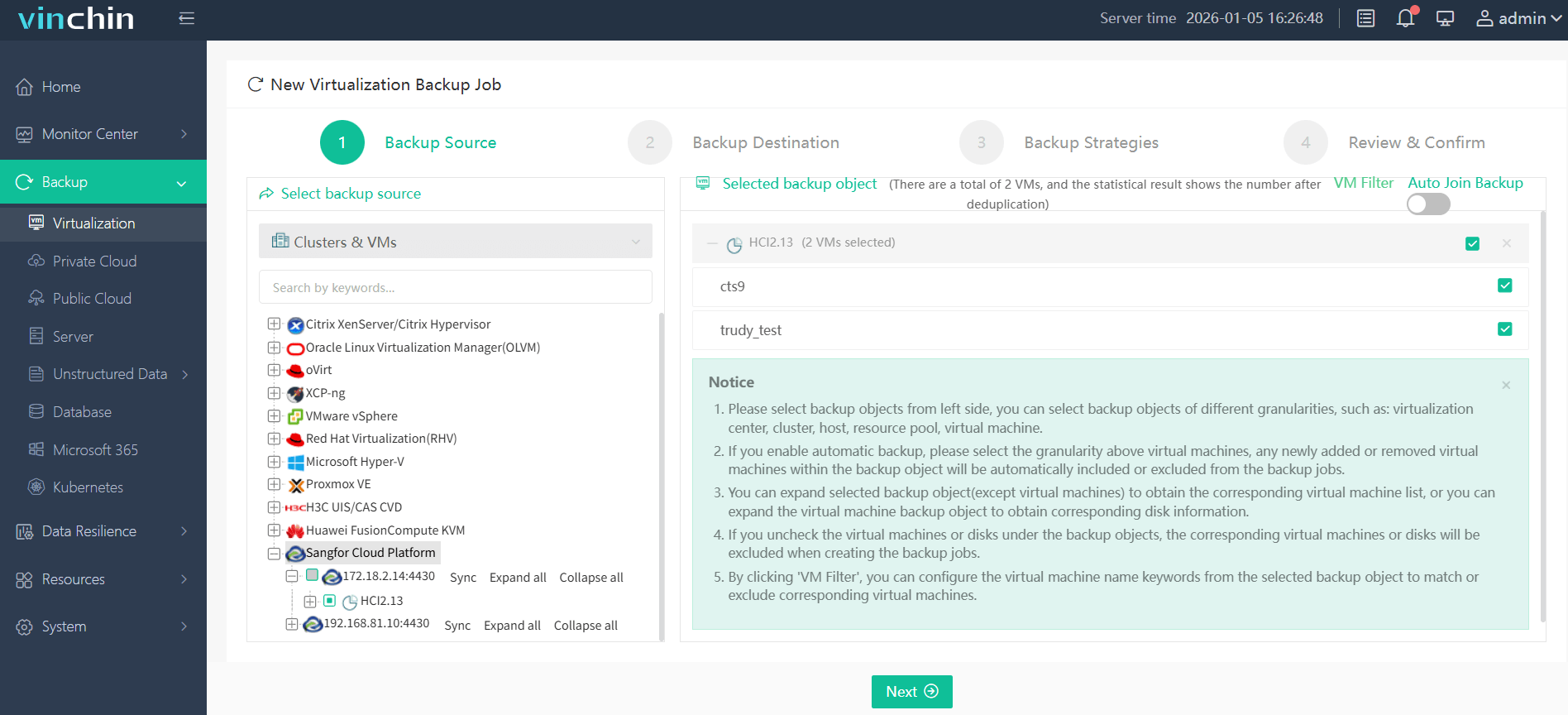
Step 2: Choose the desired backup storage location

Step 3: Configure your preferred strategy (such as schedule/frequency)

Step 4: Submit the job
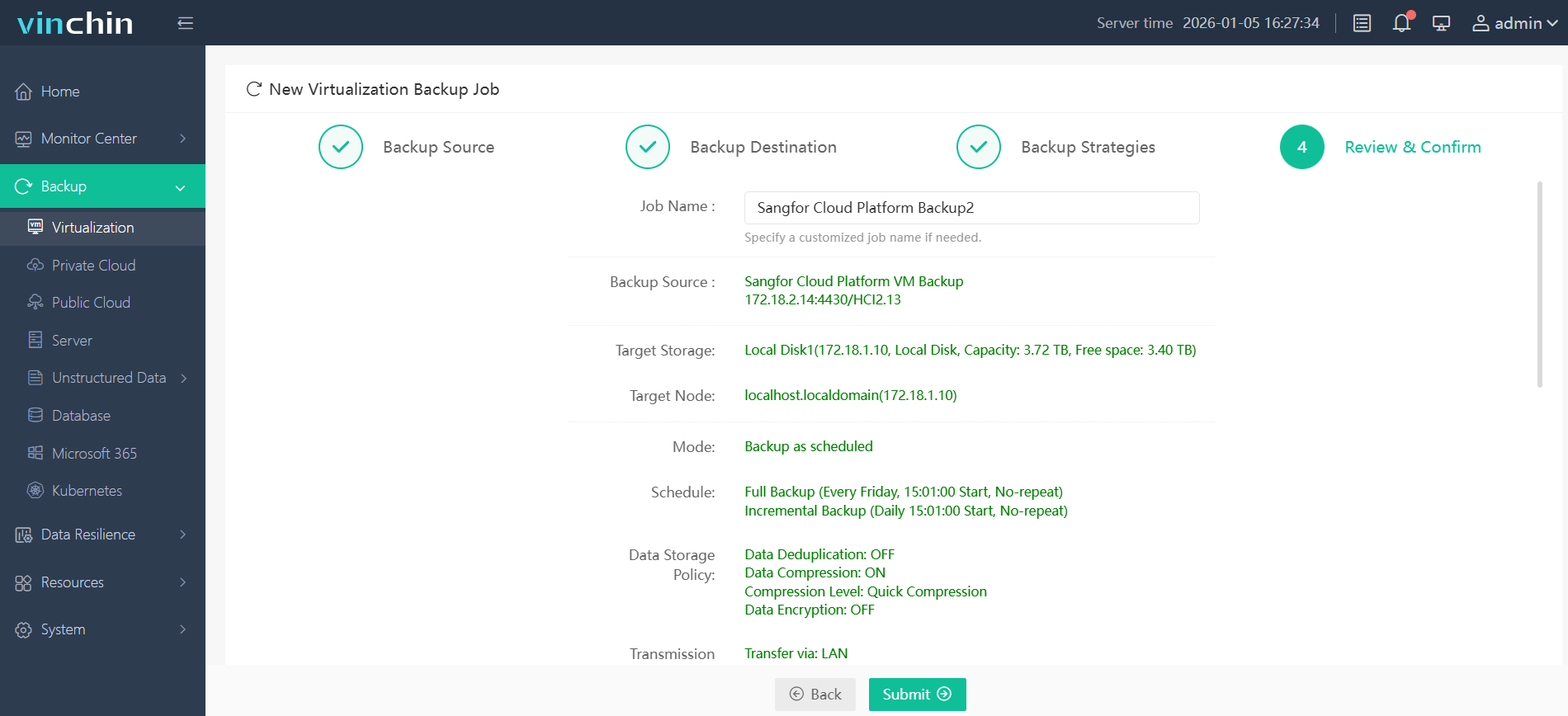
Vinchin Backup & Recovery enjoys global recognition among enterprise users thanks to its reliability and rich feature set; try it free with a 60-day full-featured trial by clicking the download button below.
Best Sangfor HCI Backup Software FAQs
Q1: What features ensure maximum uptime in a Sangfor HCI backup solution?
Look for instant VM restore capabilities through bold “Instant Restore” buttons; automated failover processes; granular file-level recovery; strong ransomware defense; deep integration with native APIs; scalable architecture; comprehensive reporting tools; all designed to support rapid restoration without disrupting production workloads.
Q2: How does integration with Sangfor HCI affect reliability?
Deep integration leverages native snapshot technologies within the hyperconverged platform so backups remain consistent at both system image level (VM) and application layer (databases/files). This reduces complexity during setup while improving reliability compared with generic approaches lacking direct API support from Sangfor’s ecosystem.
Q3: Is scalability important when selecting a backup solution?
Yes; scalability ensures continued protection as your environment grows across multiple nodes/clusters without slowing down job completion times or increasing resource consumption unnecessarily. This is a must-have feature especially in large-scale deployments common among enterprises adopting hyperconverged infrastructure models[^8].
Q4: How do advanced reporting tools reduce risk?
Comprehensive dashboards provide real-time insights into job status/completion rates alongside historical trends analysis which helps identify recurring issues early before they impact service delivery/uptime targets required under most SLAs/regulatory frameworks governing mission-critical IT operations today.
Q5: How does the backup solution handle application-consistent backups for databases like SQL Server or Oracle running on Sangfor HCI VMs?
Application-consistent backups leverage built-in quiescence mechanisms via guest interaction tools provided by hypervisor APIs ensuring transactional integrity even during live snapshots, which is critical when protecting databases such as Microsoft SQL Server/Oracle where point-in-time consistency prevents data corruption upon restoration attempts later.
Conclusion
Reliable backup software keeps business-critical apps available even during disasters by enabling rapid restores with minimal disruption, helping enterprises avoid costly downtime while meeting compliance needs. A reliable backup solution for Sangfor HCI like Vinchin is sure to maximizes uptime and reduce data loss to large extent.