Agentless, image-based backup with instant recovery stands out as the best method to minimize downtime for enterprise workloads in Red Hat Virtualization environments. This approach works by capturing entire virtual machines at the hypervisor level—using APIs like libvirt—without installing agents inside each VM. Instant recovery lets you boot VMs directly from backup storage, so services resume within minutes instead of waiting for full data restoration.
Minimizing downtime is essential for business continuity and meeting service-level agreements (SLAs). Prolonged outages can lead to lost revenue, missed deadlines, compliance failures, and reputational harm. According to Gartner’s IT Key Metrics Data 2024 report, large enterprises face average losses of $5,600 per minute during unplanned IT downtime.
Why Minimizing Downtime Matters in Enterprise Environments
Downtime affects both finances and operations across all departments. Every minute offline means lost productivity, delayed projects, dissatisfied customers, and potential regulatory penalties—especially in sectors handling sensitive data or critical services. Even brief interruptions can disrupt workflows company-wide and erode customer trust.
A robust backup strategy reduces these risks by ensuring fast restoration after incidents like hardware failure or cyberattacks. Enterprises must restore systems quickly to maintain compliance with industry standards such as ISO/IEC 27001 or GDPR requirements. Reliable backups help organizations avoid extended outages that could otherwise result in fines or legal action.
How To Choose The Best Red Hat Virtualization Backup Solution for Minimizing Downtime?
Selecting a backup solution that minimizes downtime requires careful attention to several key factors proven to speed up recovery while reducing complexity. These features ensure your organization can restore critical workloads rapidly when disaster strikes.
● Agentless Backups
Agentless technology operates at the hypervisor layer using native APIs such as libvirt rather than requiring software inside each VM. This reduces system overhead and avoids compatibility issues between guest operating systems or applications. By centralizing control outside individual VMs, agentless solutions simplify deployment and ongoing management across large environments.
● Image-Level Protection with Instant Recovery
Image-based backups capture complete VM states—including configuration files, disk data, memory snapshots—and store them as unified images on backup storage. With instant recovery capabilities built-in, you can power on a VM directly from this image without first copying it back to production storage. This drastically cuts restoration time compared to traditional methods that require lengthy rehydration processes before users regain access.
● Application-Consistent Snapshots
Application-consistent snapshots coordinate with running applications (such as databases) through tools like Microsoft VSS or pre-freeze/post-thaw scripts to flush transactions before creating backups. This ensures restored VMs are free from data corruption or incomplete records—a crucial factor when recovering transactional systems where integrity matters most.
● Scalability and Centralized Management
Backup solutions should scale seamlessly as your virtualization environment grows—whether adding more hosts or increasing workload density—without degrading performance or complicating administration tasks. Centralized management consoles allow administrators to orchestrate restores across many VMs simultaneously while maintaining clear audit trails for compliance reporting.
● Granular Restore Options
The ability to recover individual files or application items (like emails) instead of restoring whole VMs helps resolve minor incidents faster while keeping unaffected services online. Granular restore options reduce disruption during partial failures such as accidental file deletions or targeted ransomware attacks affecting only specific directories.
● Automated Scheduling and Reporting
Automated scheduling ensures regular backups run according to policy without manual intervention—even overnight or during off-hours—to keep protection current at all times. Built-in reporting tools provide visibility into job status, success rates, retention periods, and compliance posture so teams can address gaps proactively before they impact operations.
Testing actual recovery times (RTOs) should be part of any evaluation process since real-world performance may vary depending on infrastructure load or network conditions.
Vinchin Backup & Recovery: Enterprise-Grade Protection for Red Hat Virtualization
For organizations seeking robust protection of their Red Hat Virtualization workloads, Vinchin Backup & Recovery offers an enterprise-level virtual machine backup solution supporting over 15 mainstream platforms—including RHV/oVirt/OLVM alongside VMware, Hyper-V, Proxmox, XCP-ng, XenServer, OpenStack, ZStack and more. Vinchin Backup & Recovery delivers agentless image-based backups tailored for RHV environments; it also provides instant recovery capabilities, CBT support, LAN-free backup options, SpeedKit acceleration and a comprehensive suite of advanced features available across all supported hypervisors: full/incremental/differential backups; granular restore; deduplication/compression; scheduled policies; encryption; cloud/tape archive; GFS retention; multi-thread transmission; V2V migration; throttling policy; data verification and more.
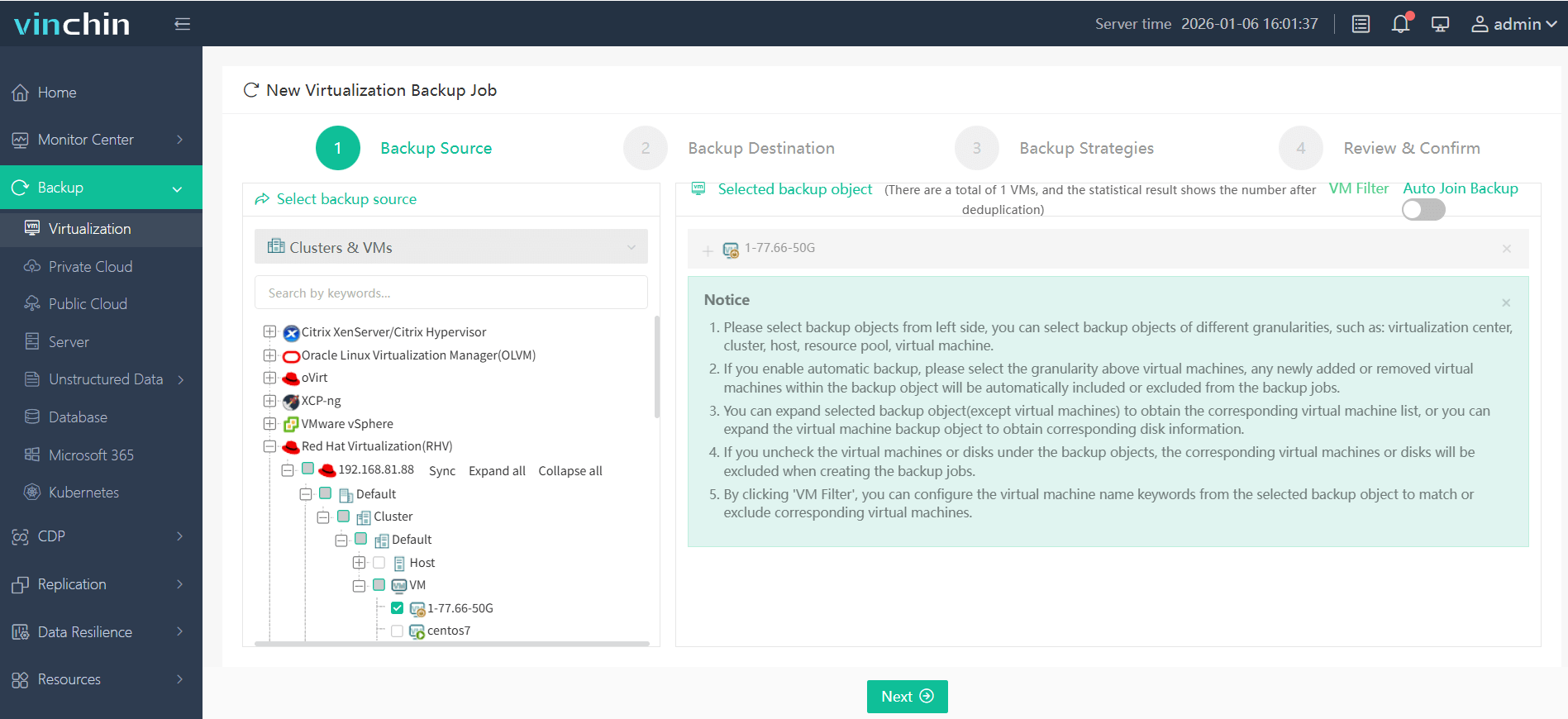
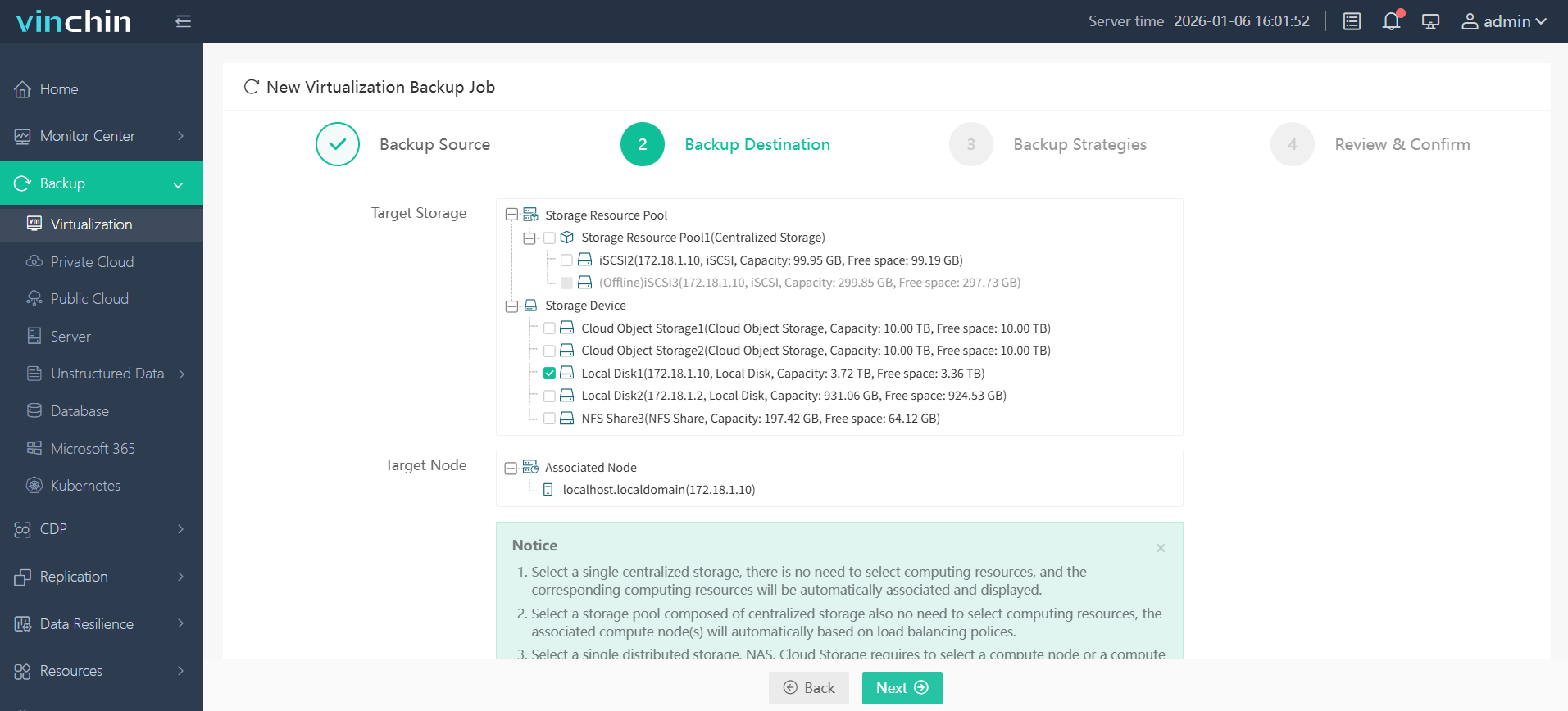
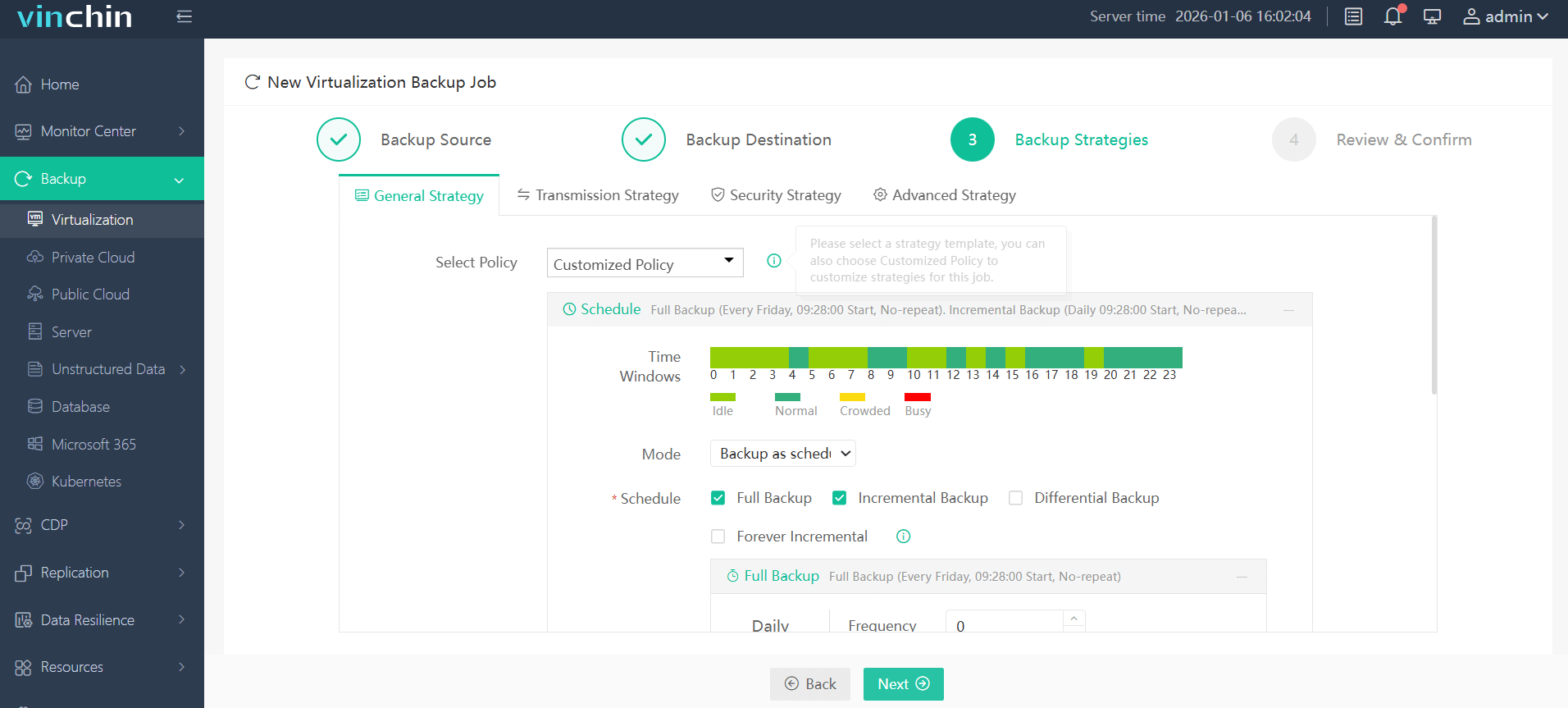
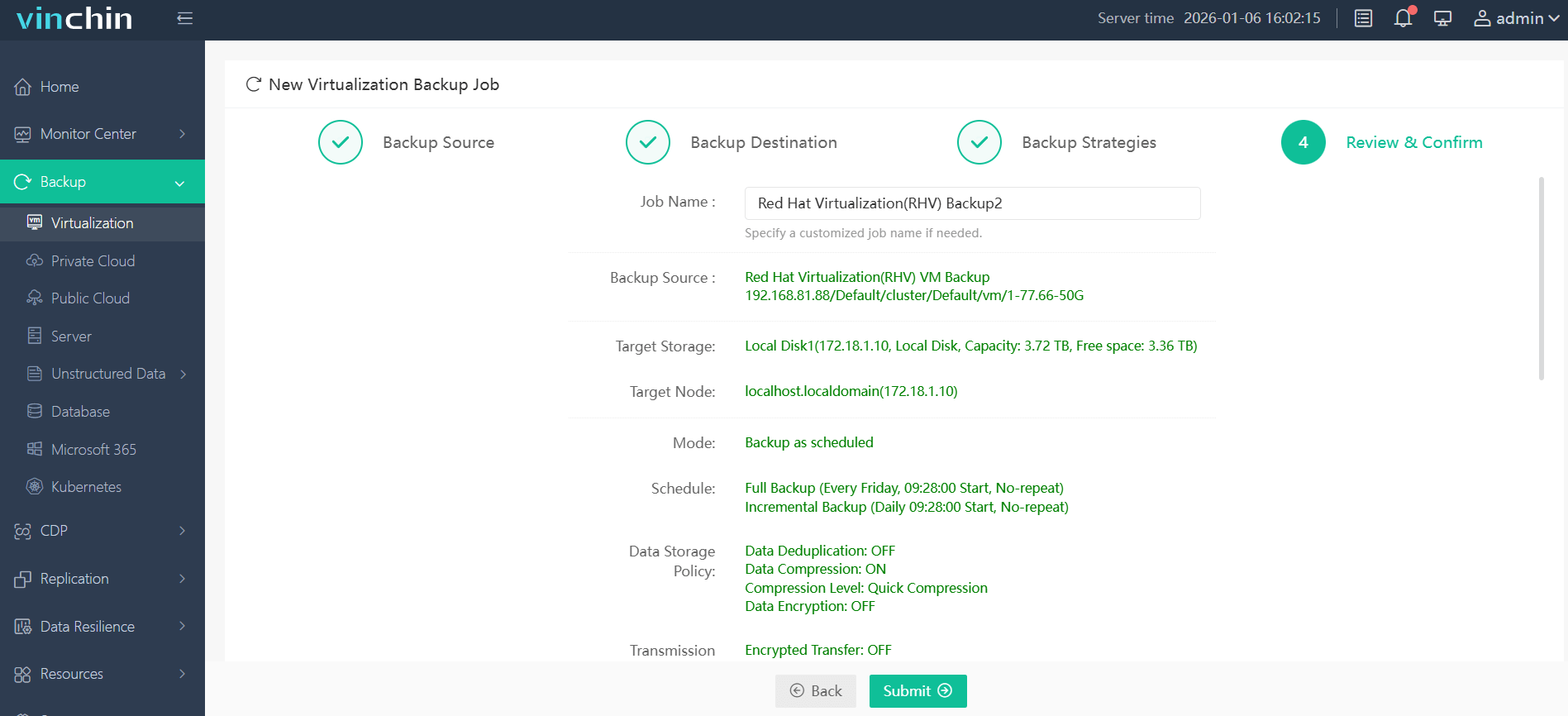
With its intuitive web console interface, backing up your Red Hat Virtualization VM using Vinchin Backup & Recovery involves just four steps:
Step 1: Select the RHV/oVirt/OLVM VM(s) you wish to protect;
Step 2: Choose your preferred backup storage location (local disk/cloud/tape);
Step 3: Configure your desired strategy including schedule type/frequency/data retention/encryption options;
Step 4: Submit the job—ensuring reliable protection with minimal effort required from IT staff.
Recognized globally by thousands of enterprise customers with top ratings in industry reviews, Vinchin Backup & Recovery offers a fully featured 60-day free trial—click below to get started today!
Best Red Hat Virtualization Backup Software FAQs
1. What backup method offers the fastest recovery?
Agentless image-based backups with instant recovery minimize restoration time compared to file-level methods because you can bring a VM online within minutes rather than hours required by traditional approaches.
2. How does application consistency affect downtime?
Application-consistent snapshots prevent data corruption during restores by ensuring all transactions are committed before backup creation; this guarantees reliable uptime after failures—a must-have for databases and transactional systems.
3. Is scalability important when minimizing downtime?
Yes; scalable solutions handle growth without performance loss so expanding environments do not increase risk of extended outages—the right system keeps pace no matter how many workloads you add over time.
4. Does centralized management impact recovery speed?
Centralized management streamlines response times by enabling faster orchestration of restores across multiple workloads; monitoring scheduling restoring—all happen from one interface which speeds up incident response dramatically versus siloed tools.
5. How do incremental backups contribute to minimizing downtime?
Incremental backups capture only changes made since the last backup session which shortens both backup windows and restoration times; smaller data sets mean less network traffic quicker job completion—and faster return-to-service if disaster strikes.
Conclusion
Choosing an agentless image-based solution with instant recovery ensures rapid restoration of enterprise workloads while keeping business disruption minimal—protecting both uptime commitments and organizational reputation every day.










