Maximizing uptime for business-critical applications in OpenStack environments depends on backup software that delivers fast recovery and reliable protection. The right solution must meet strict Recovery Time Objectives (RTO) and Recovery Point Objectives (RPO), ensuring minimal data loss and rapid restoration. Reliable backup tools help avoid these losses by restoring services quickly after failures or attacks. Choosing a robust solution is essential for keeping operations smooth and compliant.
Why Maximizing Uptime Matters in Enterprise Environments
Maintaining high uptime is vital for every enterprise running critical workloads on OpenStack. Even brief interruptions can disrupt workflows, halt transactions, or damage customer trust.
● Financial Impact of Downtime
Downtime leads to direct revenue loss. Gartner estimates that IT downtime costs large organizations thousands of dollars per minute. These losses accumulate rapidly during outages affecting core business systems.
● Reputation Risk
Service disruptions erode customer confidence. When clients cannot access key applications or data, they may turn to competitors or lose faith in your brand’s reliability.
● Compliance Obligations
Many industries face strict regulations around data availability and disaster recovery. Failing to restore services quickly can result in fines or legal action, especially in finance or healthcare sectors where uptime is mandated by law.
● Operational Disruption
Extended outages slow productivity across departments. Employees may be unable to access files or applications needed for daily tasks until systems are restored.
Reliable backup solutions reduce these risks by enabling swift recovery from hardware failures, cyberattacks, or accidental deletions, ensuring business continuity at all times.
How to Choose the Best Openstack Backup Solution for Maximizing Uptime
Selecting an effective Openstack backup solution requires focusing on features that directly impact uptime and recovery speed. Each feature should address real-world challenges faced by IT teams managing complex cloud environments.
● Proven Recovery Speed and Reliability
A strong solution delivers instant VM recovery and granular file restores with low RTO/RPO values. For example, being able to recover a database server within minutes ensures minimal disruption when incidents occur.
● Scalability
Backup systems must handle growing workloads without performance drops. As your OpenStack environment expands, adding more VMs or storage, the software should scale seamlessly while maintaining quick backups and restores.
● Automation
Automated scheduling reduces manual effort and human error. With policy-driven backups running regularly behind the scenes, you ensure consistent protection even as infrastructure changes over time.
● Security Controls
Modern threats like ransomware target backup repositories as well as production data. Look for solutions offering end-to-end encryption (in transit and at rest), role-based access control (RBAC), multi-factor authentication (MFA), and immutable backups that cannot be altered by attackers.
● Platform Compatibility
Seamless integration with OpenStack APIs, including Nova compute nodes, Cinder block storage volumes, Swift object storage buckets, Neutron network configurations is crucial. This ensures complete coverage of all components without manual intervention or risky workarounds.
When evaluating options, consider how each feature supports your organization’s specific needs: Can you restore mission-critical VMs within your required SLA? Does the tool protect all layers of your OpenStack stack? Will it adapt as you grow into hybrid cloud models?
For further guidance on best practices in cloud backup selection see NIST SP 800-209 Cloud Computing Security Guidelines.
Vinchin Backup & Recovery: Enterprise-Grade Protection for OpenStack
For organizations seeking robust protection of their OpenStack workloads alongside other virtualized environments such as VMware, Hyper-V, Proxmox VE and more than 15 mainstream platforms, Vinchin Backup & Recovery stands out as a professional enterprise-level virtual machine backup solution.
It offers agentless full VM protection tailored for complex infrastructures like OpenStack clouds while supporting advanced features including LAN-free backup for efficient data transfer; incremental backup strategies; forever-incremental mode; granular restore; V2V migration; scheduled policies; deduplication/compression; GFS retention policy; throttling policy; multi-thread transmission; comprehensive encryption; cloud/tape archiving; and VM backup verification, all designed to optimize reliability and minimize downtime across diverse environments.
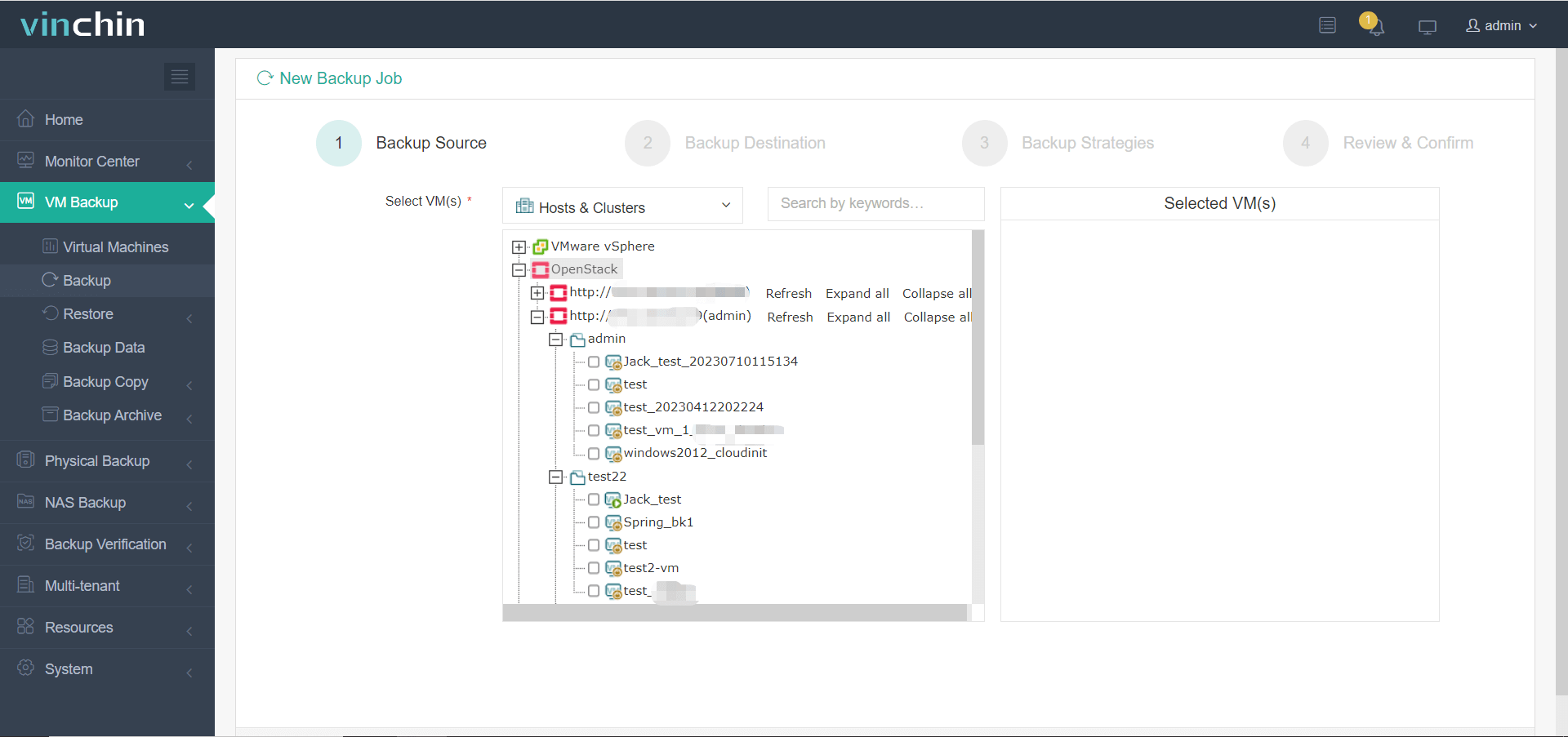
With Vinchin Backup & Recovery’s intuitive web console interface:
Step 1: Select the OpenStack VM to back up
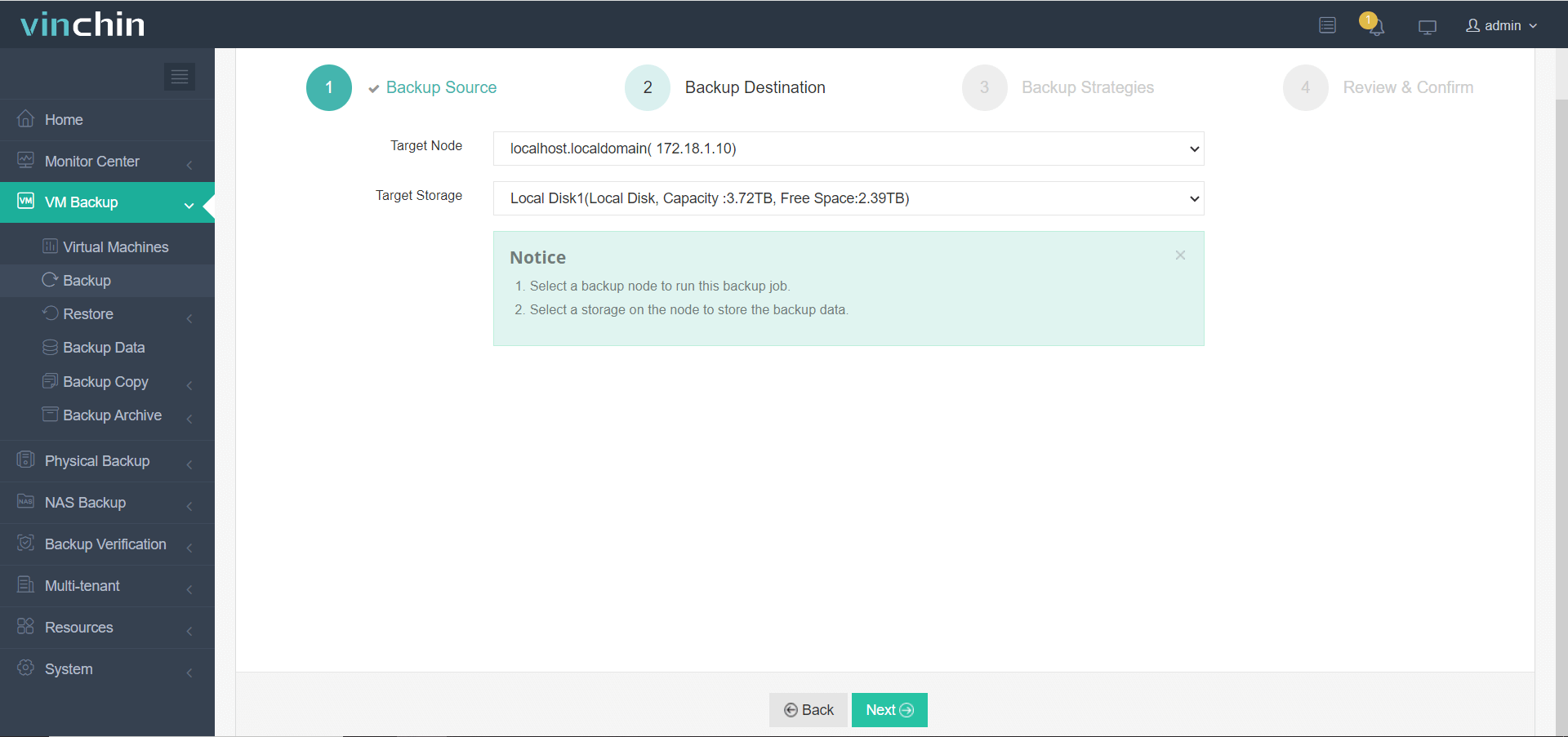
Step 2: Choose the desired backup storage
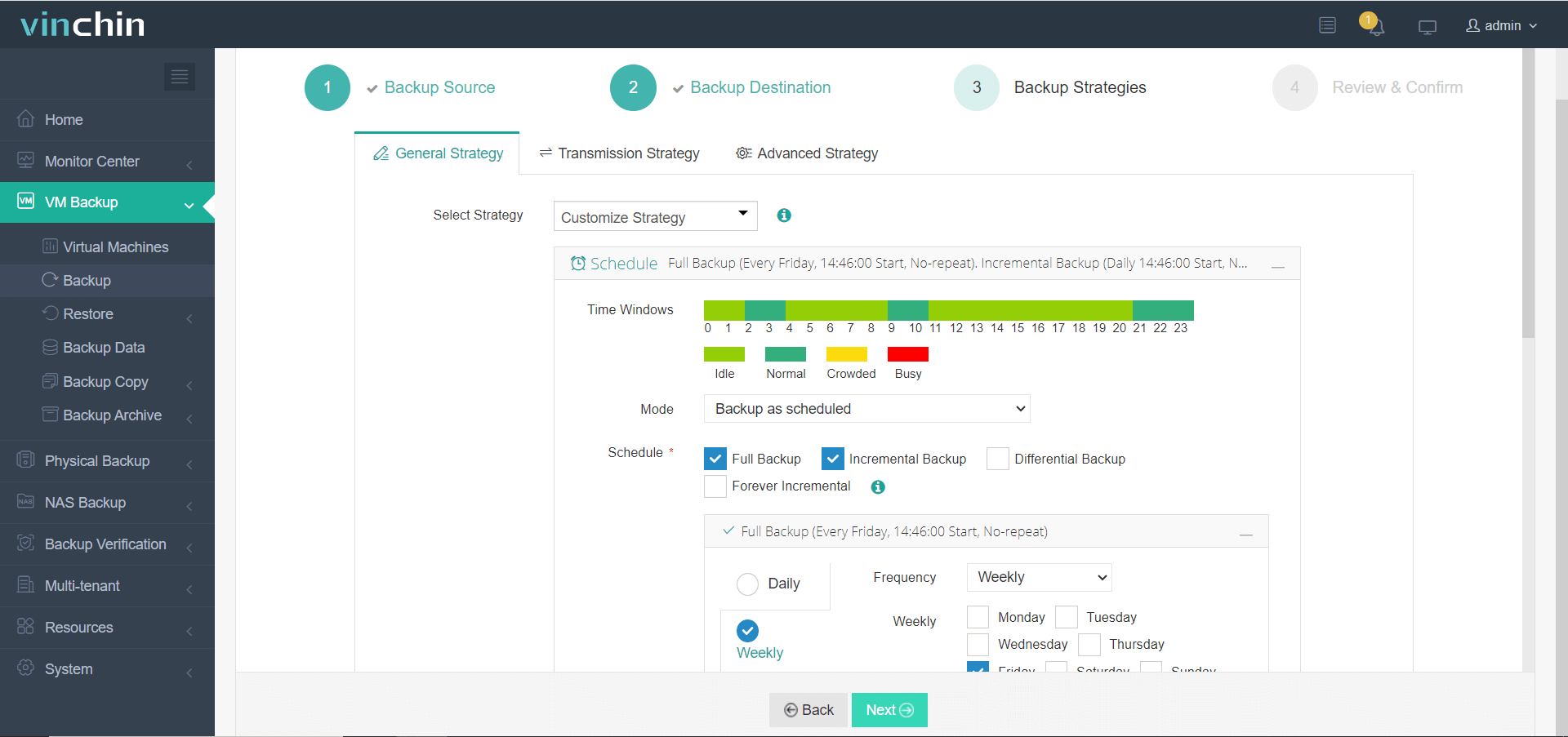
Step 3: Configure a suitable backup strategy
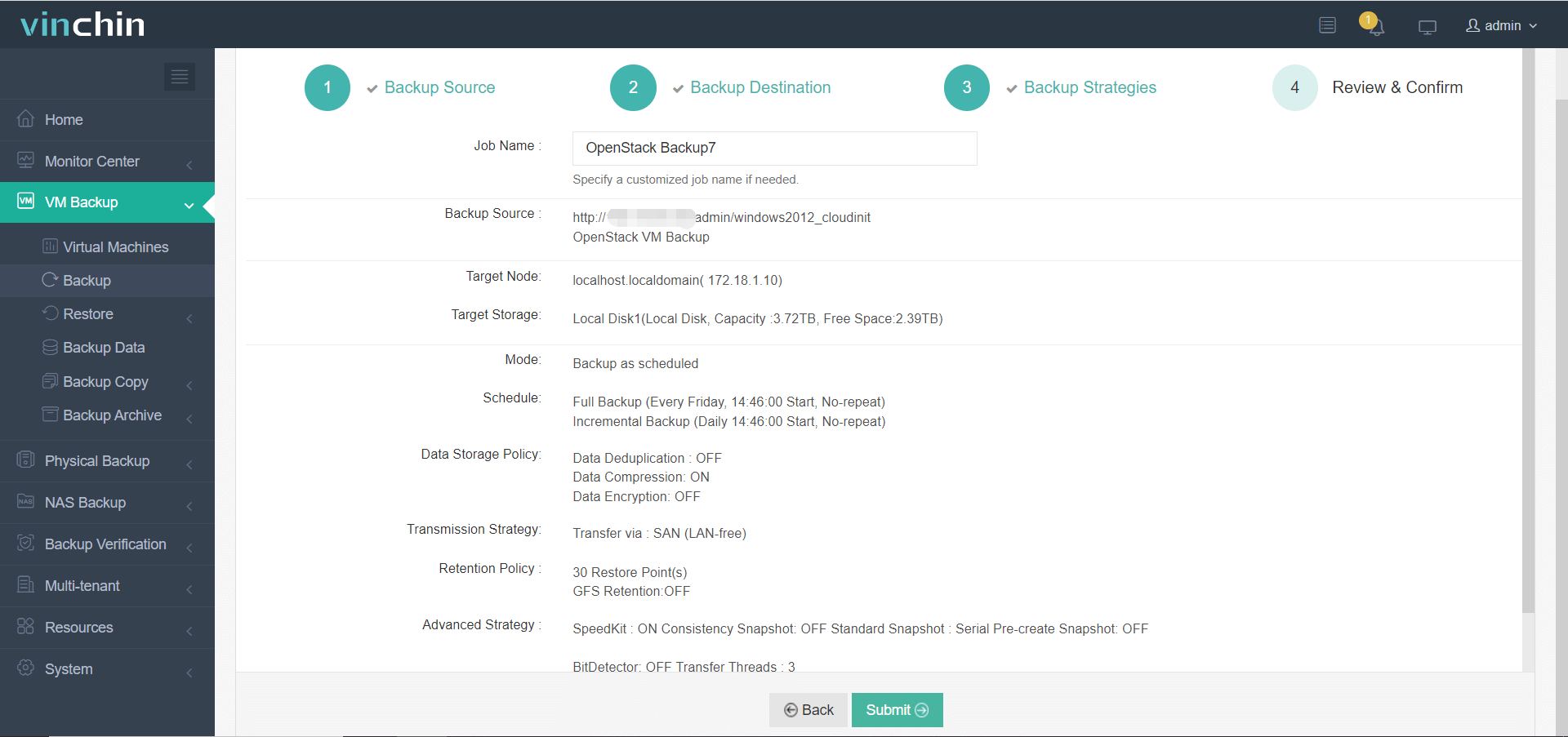
Step 4: Submit the job, making enterprise-grade protection straightforward even at scale
Recognized globally with top ratings among enterprise users,Vinchin Backup & Recovery offers a 60-day full-featured free trial; click below to experience industry-leading data protection firsthand!
Best OpenStack Backup Software FAQs
Q1: How does backup software affect application uptime?
Fast backup tools use native OpenStack APIs to capture consistent snapshots of VMs while they run live workloads. Instant recovery functions let administrators bring critical services online within minutes after failure, minimizing service interruption compared to traditional methods that require lengthy restores from tape archives.
Q2: What risks arise from slow or unreliable restores?
Delayed restores increase downtime risk leading to lost revenue missed SLAs potential regulatory violations if sensitive data remains unavailable too long; unreliable processes may also cause incomplete recoveries resulting in permanent data loss which undermines trust among customers partners regulators alike.
Q3: Is automation important in maximizing uptime?
Yes; automated scheduling ensures regular point-in-time copies are always available without manual oversight while scripted disaster recovery plans enable rapid failover execution reducing human error speeding up incident response times significantly especially during major outages when every second counts.
Q4: Does scalability matter when choosing an OpenStack backup solution?
Absolutely; scalable platforms accommodate growing numbers of virtual machines users datasets without bottlenecks allowing organizations expand their clouds confidently knowing their protection strategy keeps pace operational demands now future growth scenarios too.
Conclusion
Choosing effective OpenStack backup software minimizes costly downtime while supporting continuous business operations. Vinchin Backup & Recovery delivers proven resilience trusted by enterprises worldwide.









