Ransomware attacks have become relentless across every industry. Businesses using H3C CAS or UIS platforms face unique risks because these environments often host critical workloads. Attackers target backup systems as much as production data. If backups are encrypted or deleted, recovery becomes impossible without paying a ransom.
The best defense is a backup tool that combines immutable storage, rapid restore options, and threat detection tailored for virtualized infrastructure like H3C CAS/UIS. These features help ensure your business can recover quickly from an attack while meeting compliance needs.
Why Ransomware Protection Matters in Enterprise Environments
Ransomware can cripple operations by locking essential files or entire systems until payment is made. According to IBM’s 2023 Cost of a Data Breach Report, the average cost of recovering from such an incident exceeds $4 million USD. Enterprises must act before disaster strikes.
● Business Continuity at Stake
A ransomware attack can halt all business processes instantly. When core applications go offline—finance systems, customer databases—work stops across departments. Without reliable backup protection designed for ransomware resilience, downtime stretches from hours into days or weeks.
● Financial Losses Mount Quickly
Beyond ransom payments themselves, costs include lost revenue during outages and expenses tied to forensic investigations and system rebuilds. Insurance may not cover everything if you lack proper safeguards in place.
● Reputational Damage Is Immediate
Customers lose trust when services are unavailable or their data is compromised. News of breaches spreads fast through media channels and social networks. Restoring confidence takes far longer than restoring data.
● Compliance Violations Bring Legal Risk
Regulations like GDPR require organizations to protect sensitive information even during cyberattacks. Failure to maintain secure backups could result in fines or legal action if personal data becomes inaccessible or exposed due to ransomware.
● Unrecoverable Backups Compound Disaster
Attackers now target backup repositories directly using advanced tactics documented by MITRE ATT&CK. If your backups are encrypted along with production data—or worse yet deleted—you may have no way back except paying criminals.
How To Choose The Best H3C CAS/UIS Backup Solution for Ransomware Protection?
Selecting the right backup solution means looking beyond basic file copies or simple snapshots. You need tools built specifically to withstand modern ransomware tactics targeting both primary workloads and secondary storage layers within virtualized environments like H3C CAS/UIS.
Immutable Storage
Immutability locks down backup files so they cannot be altered or erased—even if malware gains admin access inside your environment. This ensures you always have clean copies available for recovery after an attack.
Integrated Threat Detection
Modern solutions monitor backup activity patterns for signs of compromise such as unusual encryption attempts or mass deletions. Early alerts let IT teams respond before damage spreads further into your infrastructure.
Granular Recovery Options
Being able to restore just what you need—like rolling back only one corrupted database file instead of an entire VM—minimizes downtime and avoids overwriting unaffected data during recovery efforts.
Scalability Across Workloads
As businesses grow their virtual machine footprint on H3C platforms, the chosen tool must scale seamlessly without performance bottlenecks or complex reconfiguration steps each time new VMs come online.
Compliance Support With Retention Policies & Audit Trails
Backup software should enforce retention rules automatically while logging all actions taken on protected data sets—a requirement under frameworks like NIST CSF Section PR.IP.
Centralized Management Console
Unified dashboards make it easier for administrators to apply consistent security policies across multiple clusters or sites while reducing human error risk during urgent restores after incidents occur.
Vinchin Backup & Recovery: Enterprise-Grade Protection for H3C CAS/UIS
For organizations running H3C CAS/UIS environments, Vinchin Backup & Recovery delivers professional enterprise-level VM protection with support for over 15 mainstream virtualization platforms—including VMware, Hyper-V, Proxmox, oVirt, OLVM, RHV, XCP-ng, XenServer, OpenStack, ZStack and more—with dedicated compatibility for H3C CAS/UIS scenarios. Key features such as immutable backups, instant recovery, LAN-free backup (supported on H3C CAS/UIS), scheduled backup policies, and granular restore provide robust defense against ransomware threats while ensuring operational continuity and compliance requirements are met efficiently.
With Vinchin Backup & Recovery’s intuitive web console interface, backing up your virtual machines is straightforward:
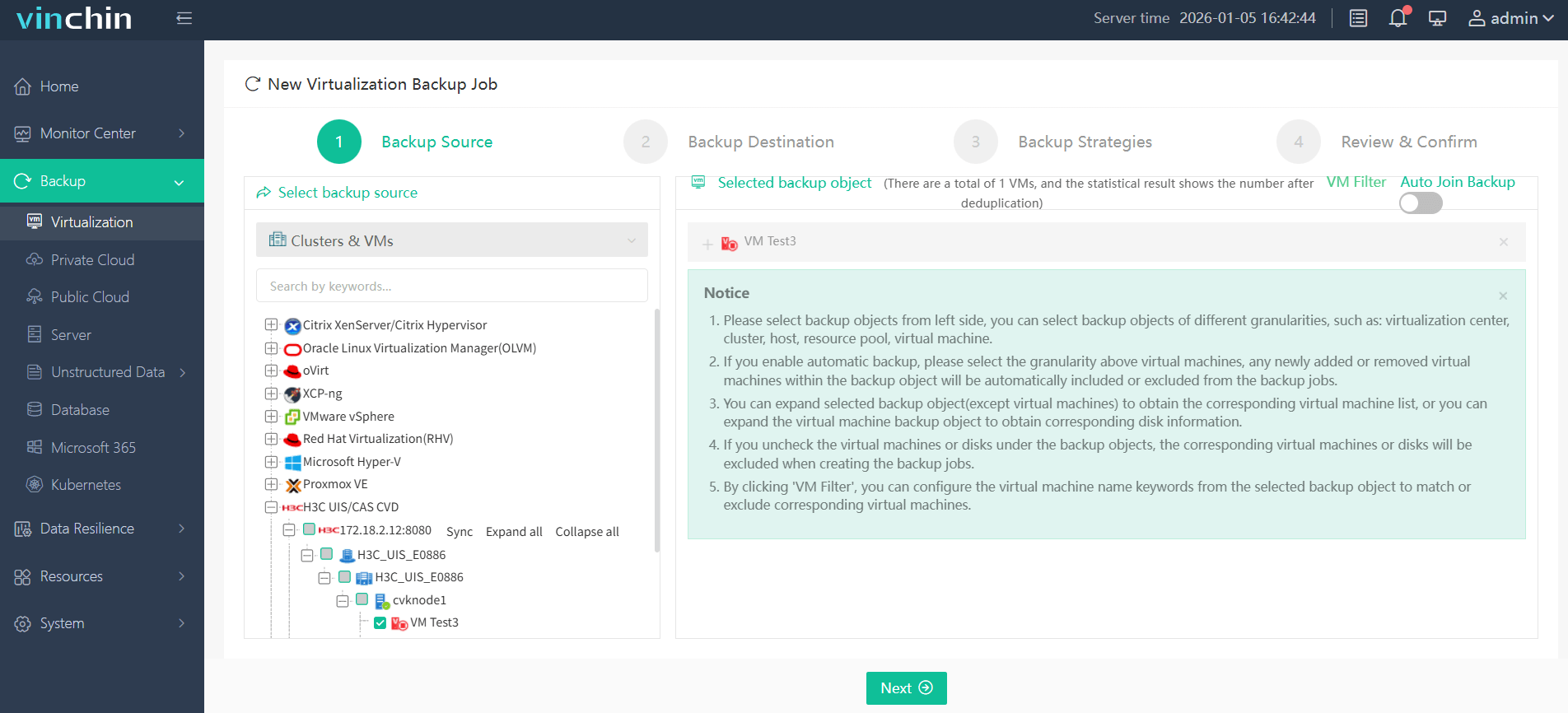
Step 1: Select the H3C CAS/UIS VM to back up.
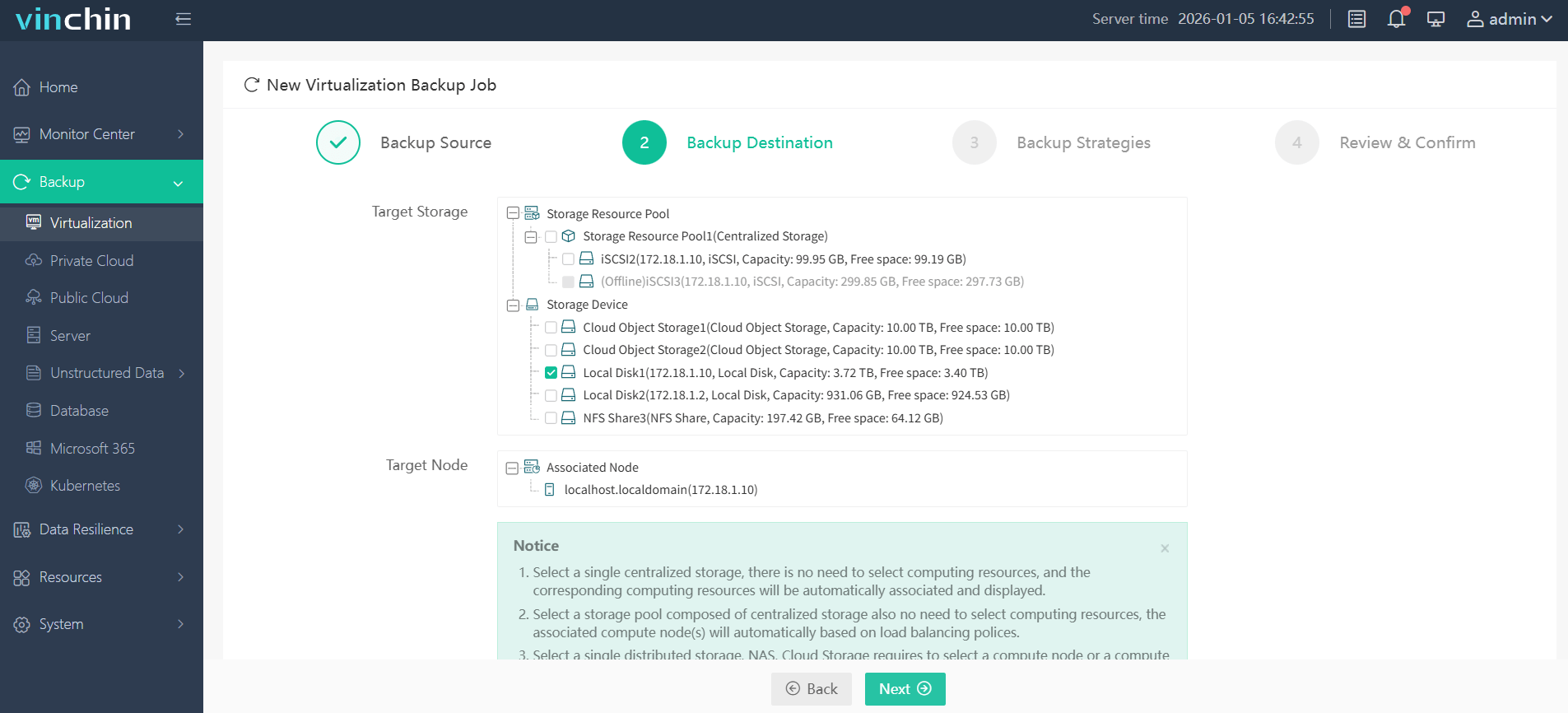
Step 2: Choose the desired backup storage.
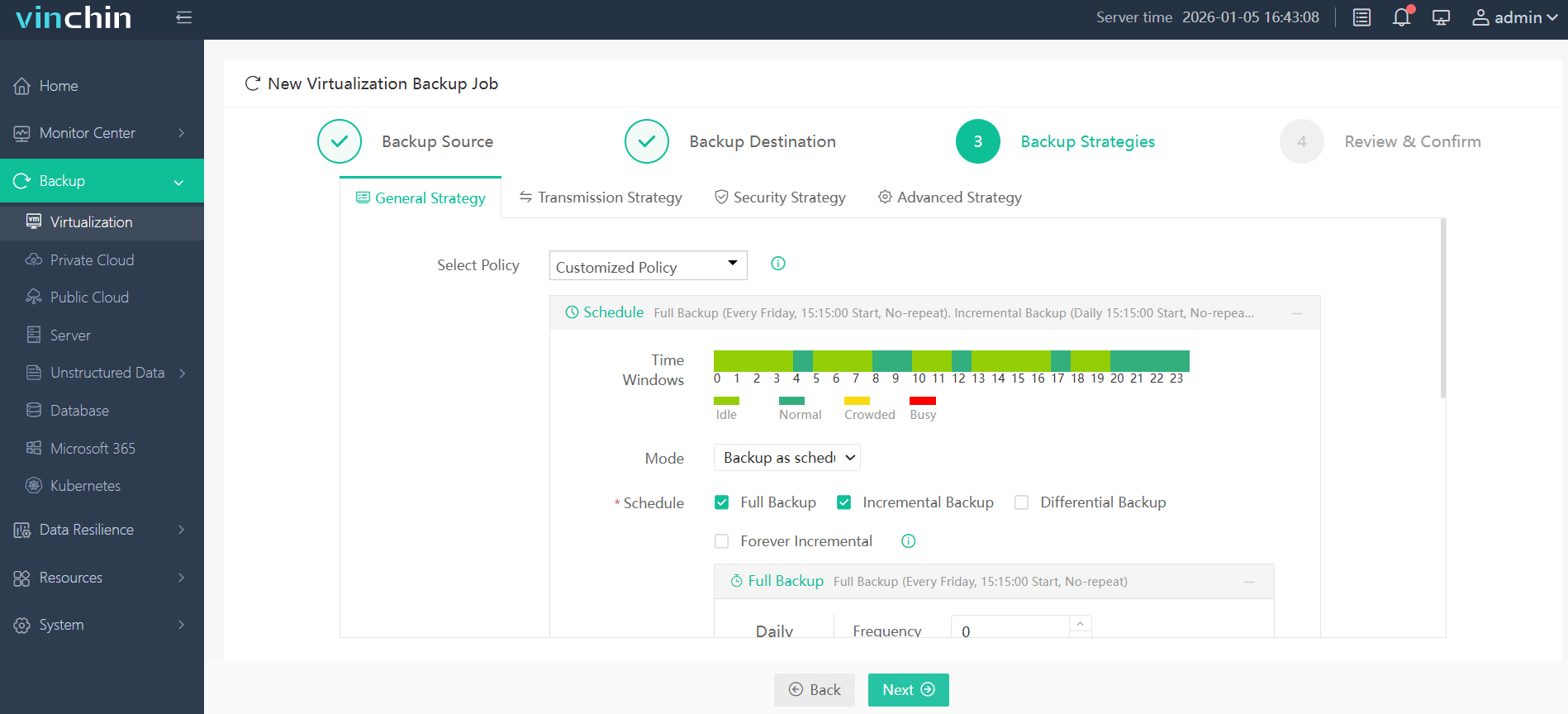
Step 3: Configure your preferred backup strategy.
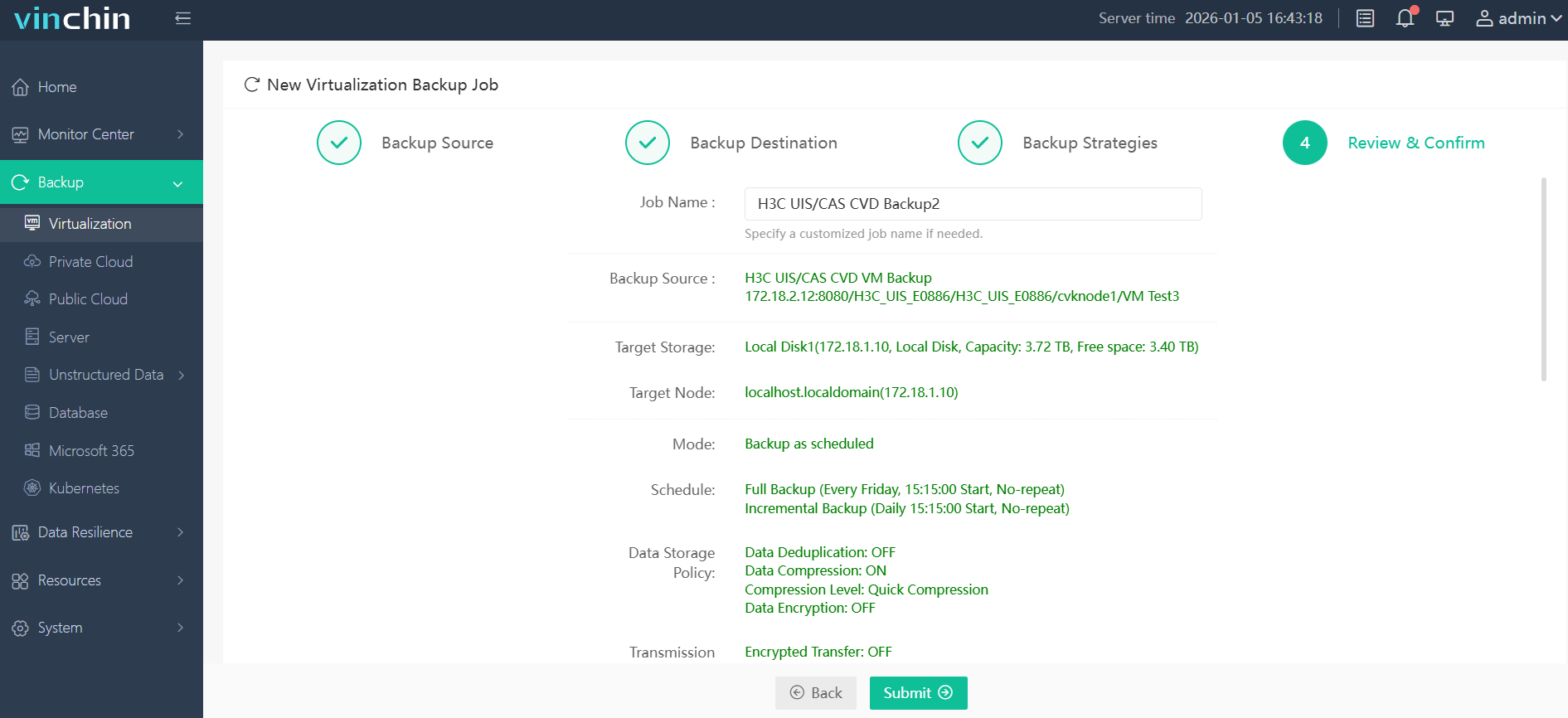
Step 4: Submit the job with a single click.
Trusted globally by thousands of enterprises with top ratings in independent reviews—try Vinchin Backup & Recovery free for 60 days with full functionality; click below to get started!
Best H3C CAS/UIS Backup Software FAQs
Q1: Does the solution offer true immutability against ransomware?
Immutable storage prevents any modification or deletion of backup data by ransomware; this keeps your backups safe even if attackers breach other defenses.
Q2: How quickly can we recover after a ransomware attack?
Near-instant recovery at both file-level (such as restoring one document) and system-level (full VM rollback) minimizes downtime so operations resume fast after an incident.
Q3: Is regulatory compliance maintained during ransomware events?
Robust solutions enforce retention policies automatically while keeping audit trails intact throughout attacks; this helps meet industry regulations like GDPR without interruption.
Q4: Can the solution scale with our expanding infrastructure?
Scalable architecture protects new VMs as they’re added; there’s no need to overhaul existing setups when growing your environment over time.
Conclusion
Choosing strong immutable backups plus rapid restore features ensures resilience against ransomware in any H3C CAS/UIS deployment—protecting both business continuity and compliance every day.