Introduction
Choosing the right backup solution is vital for any IT environment. If you use Proxmox Virtual Environment, understanding Proxmox Backup Server requirements helps you protect your data and avoid costly mistakes. Let's break down what you need for a reliable, high-performing backup setup.
What Are Proxmox Backup Server Requirements?
Proxmox Backup Server requirements are the minimum and recommended hardware, software, storage, and network specifications needed to install and run PBS. Meeting these ensures your backups are safe, fast, and reliable, whether you're testing or running in production.
Hardware Requirements for Proxmox Backup Server
Hardware forms the backbone of your backup server's performance and reliability. For evaluation or testing purposes, you need at least a 64-bit CPU (x86-64 or AMD64) with two or more cores, 2 GB RAM, at least 8 GB of disk space for the OS alone (plus additional space for backups), and a network card.
For production environments where stability matters most, Proxmox recommends using a modern AMD or Intel 64-bit CPU with at least four cores. You should have a minimum of 4 GB RAM dedicated to the operating system plus at least 1 GB extra RAM per terabyte of storage managed by PBS, especially if using ZFS due to its memory demands. For storage reliability:
Use either hardware RAID with battery-backed write cache (BBU) on non-ZFS file systems such as ext4 or xfs,
Or deploy redundant ZFS setups like mirrors or RAID-Z without underlying hardware RAID.
Redundant multi-Gigabit network interface cards help ensure high availability and throughput in demanding environments.
Software and OS Prerequisites
Software compatibility is just as important as hardware when deploying Proxmox Backup Server. PBS runs on Debian 64-bit systems, specifically, Debian 12 (Bookworm) is recommended today.
For an easy setup experience, use the official PBS ISO, it installs a tuned Debian 12 system pre-configured with all required packages for PBS operation. Alternatively, you can install PBS on top of an existing Debian system by following the official repository guide from Proxmox.
To access the web interface securely from anywhere in your environment, use an up-to-date browser such as Firefox, Chrome, Microsoft Edge (current version), or Safari (current year's release). Keeping browsers current ensures full compatibility with all features.
If installing on an existing Debian host rather than using the ISO image directly from Proxmox's website or mirror servers:
Make sure your system is fully updated before installation,
Choose supported file systems like ZFS (for advanced integrity), ext4 (for simplicity), or xfs (for scalability).
Remember: ZFS offers robust data protection but requires more memory than other file systems.
Storage and Network Considerations
Storage design has a direct impact on backup speed and reliability, and so does your network configuration! For storing backups efficiently:
Enterprise SSDs deliver high input/output operations per second (IOPS) along with better durability compared to consumer drives,
If using HDDs instead of SSDs due to budget constraints or capacity needs, add a metadata cache via ZFS special device mirror to boost performance,
Always separate disks used by your operating system from those used by datastores, this prevents OS activity from interfering with backup throughput,
Plan initial storage size based on total VM data volume plus retention policy needs, thanks to built-in deduplication technology in PBS actual usage may be less than raw sums, but always leave extra headroom!
As a practical rule-of-thumb: allocate between 1.5–2 times your source VM data size initially, adjust upward depending on how many restore points you want kept online simultaneously, and expect deduplication ratios between roughly 2:1 up to even 5:1 depending on workload patterns.
When choosing file systems:
ZFS provides advanced features like snapshots plus bit rot protection but uses more RAM,
ext4/xfs offer solid alternatives if memory resources are limited,
Never layer ZFS atop hardware RAID controllers, this can lead to silent corruption risks!
On networking:
Redundant multi-Gigabit NICs improve both resilience against failure as well as aggregate bandwidth available during large-scale restores, or when backing up many VMs concurrently.
For larger deployments aiming at short backup windows? Consider upgrading links between hosts/PBS servers/datastores up to at least 10GbE speeds.
Is your infrastructure ready for heavy nightly traffic? Also consider enabling jumbo frames (MTU 9000) across all interfaces involved in backup flows, this reduces CPU overhead per packet transfer especially over fast links.
Optimizing Your Proxmox Backup Environment
Optimizing your environment ensures smooth operation day after day, even under load spikes! In production settings always dedicate physical hardware exclusively for running PBS rather than sharing it with unrelated workloads, this avoids resource contention issues during critical jobs like restores after outages.
If deploying large datastores, or relying heavily upon ZFS, add extra RAM beyond minimum recommendations since ARC caching directly impacts read/write speeds under real-world conditions.
Enterprise-grade SSDs outperform consumer models not only through higher sustained throughput but also lower risk of sudden failures mid-backup cycle, a key consideration when uptime matters most!
Within the web-based management console schedule regular verification jobs alongside garbage collection tasks:
Verification checks confirm ongoing integrity across all stored chunks,
Garbage collection must be run periodically so expired/pruned backups actually free up disk space thanks to deduplication logic,
Use built-in prune simulator tools before finalizing retention policies so you don't accidentally delete critical restore points too soon!
And never trust untested processes: simulate both full restores plus granular recoveries before going live in production environments, you don't want surprises during disaster recovery scenarios!
Scaling out? Multiple independent instances can synchronize datastores offsite via built-in replication mechanisms, improving both redundancy against site-level disasters as well as overall service availability within distributed organizations.
How Can You Back Up Proxmox Workloads Using Vinchin?
For administrators seeking robust protection of their virtualized workloads, including those running on Proxmox VE, a comprehensive enterprise-level solution is essential. Vinchin Backup & Recovery stands out as a professional VM backup platform supporting over fifteen mainstream virtualization environments such as Proxmox VE, VMware vSphere/ESXi, Hyper-V, oVirt/OLVM/RHV, XCP-ng/XenServer, OpenStack, ZStack and more. With broad compatibility across diverse infrastructures including leading platforms like Proxmox VE itself, Vinchin Backup & Recovery delivers unified management capabilities tailored for complex hybrid IT landscapes.
Among its extensive feature set designed for enterprise needs are forever incremental backup strategies that optimize storage efficiency over time, powerful deduplication and compression technologies that minimize both disk consumption and network traffic, V2V migration tools enabling seamless cross-platform workload movement, granular restore options allowing precise recovery down to individual files within VM backups, plus strong data encryption combined with advanced storage protection mechanisms that guard against ransomware threats, all working together to ensure operational continuity while simplifying daily administration tasks.
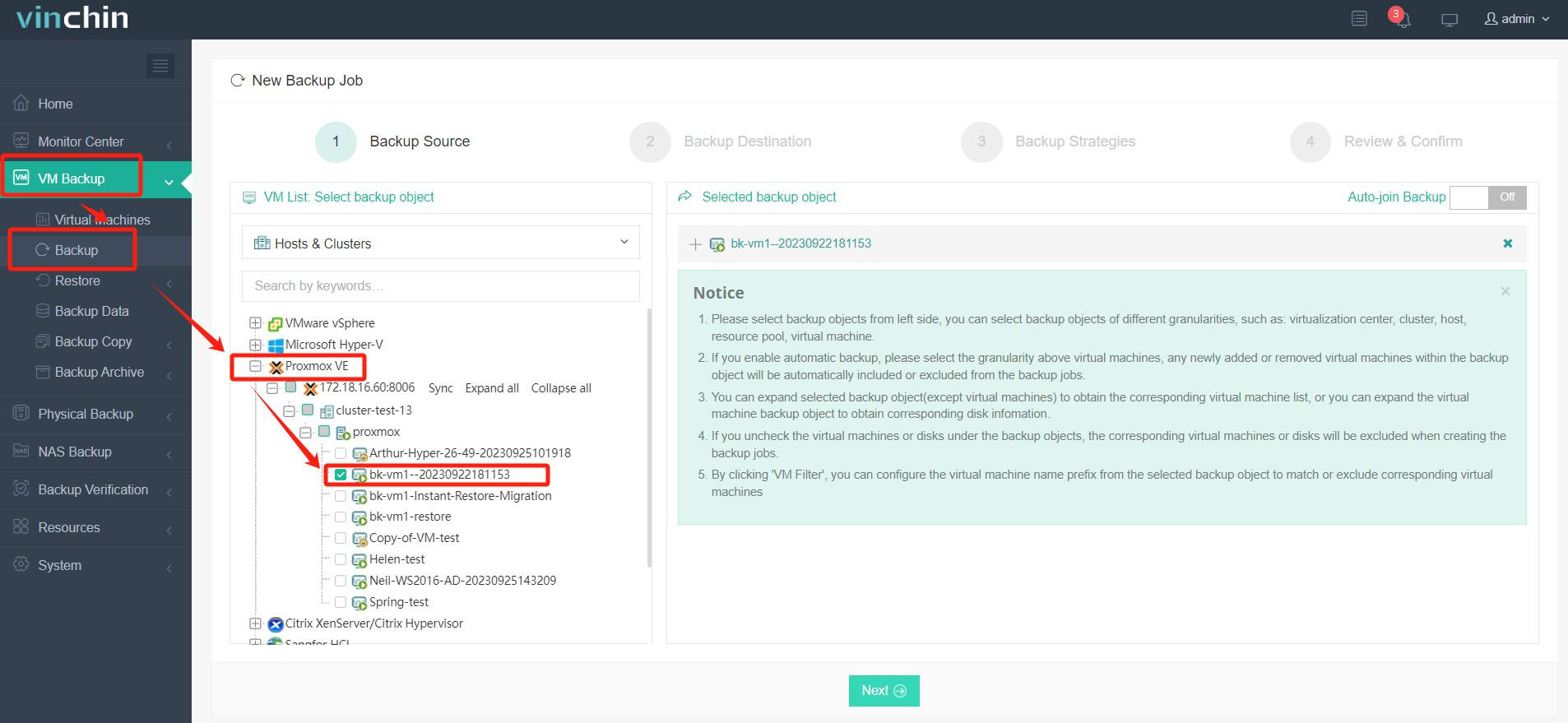
The intuitive web console makes safeguarding virtual machines straightforward. To back up a Proxmox VM using Vinchin Backup & Recovery:
Step 1: Select the Proxmox VM to back up
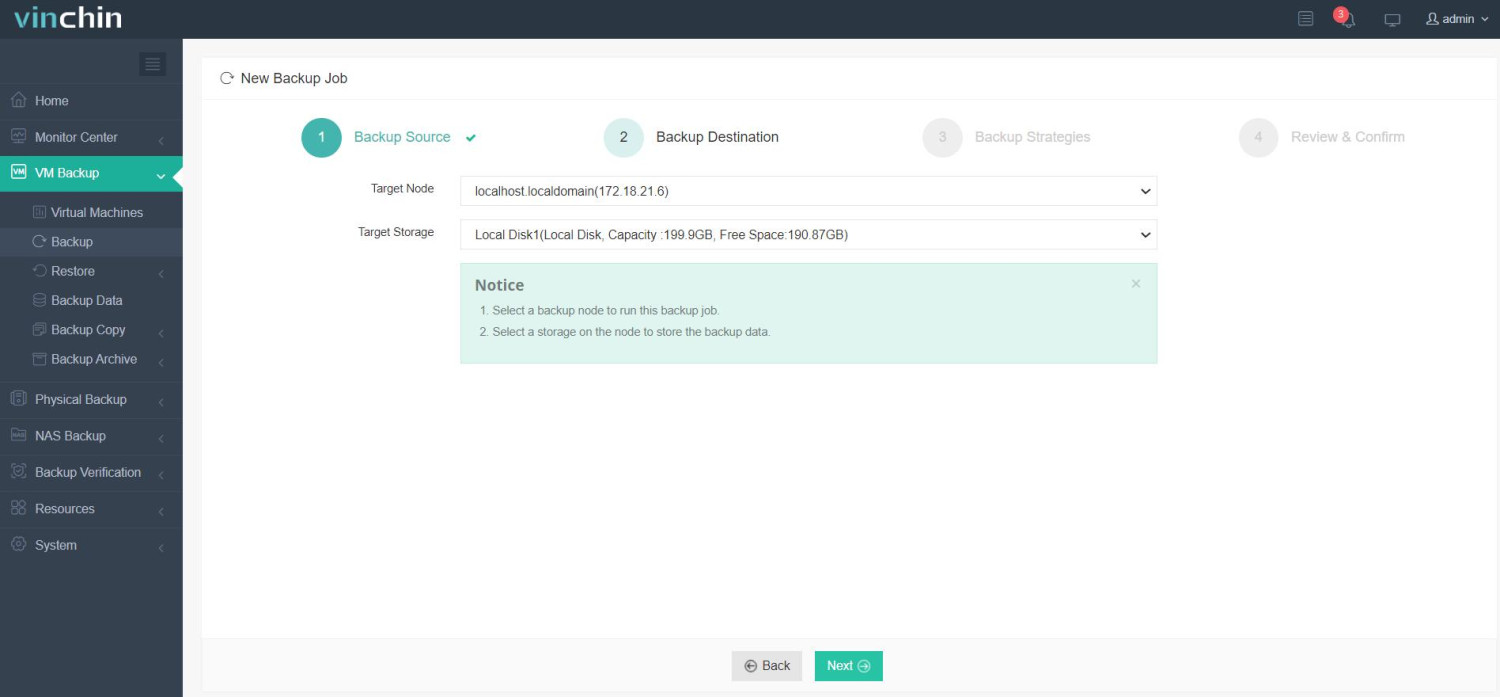
Step 2: Choose the desired backup storage location
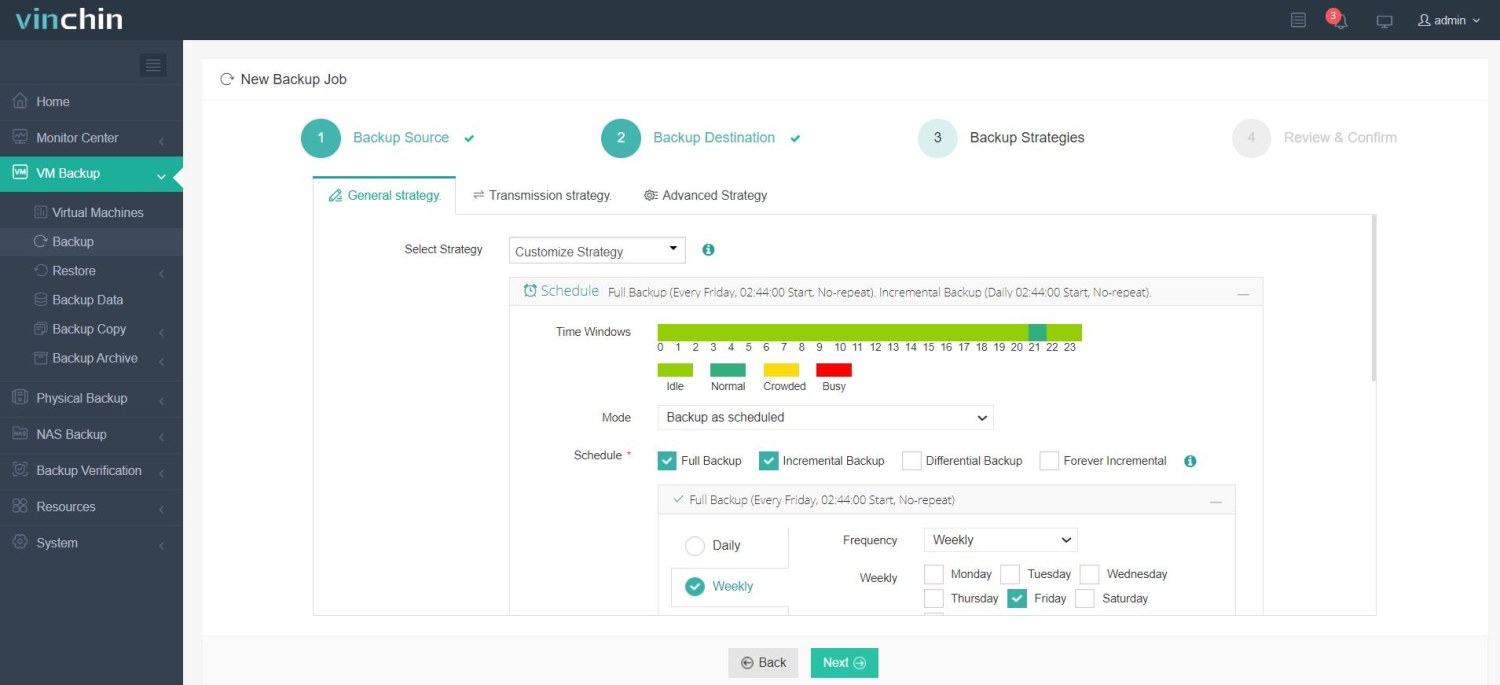
Step 3: Configure appropriate backup strategies including scheduling and retention
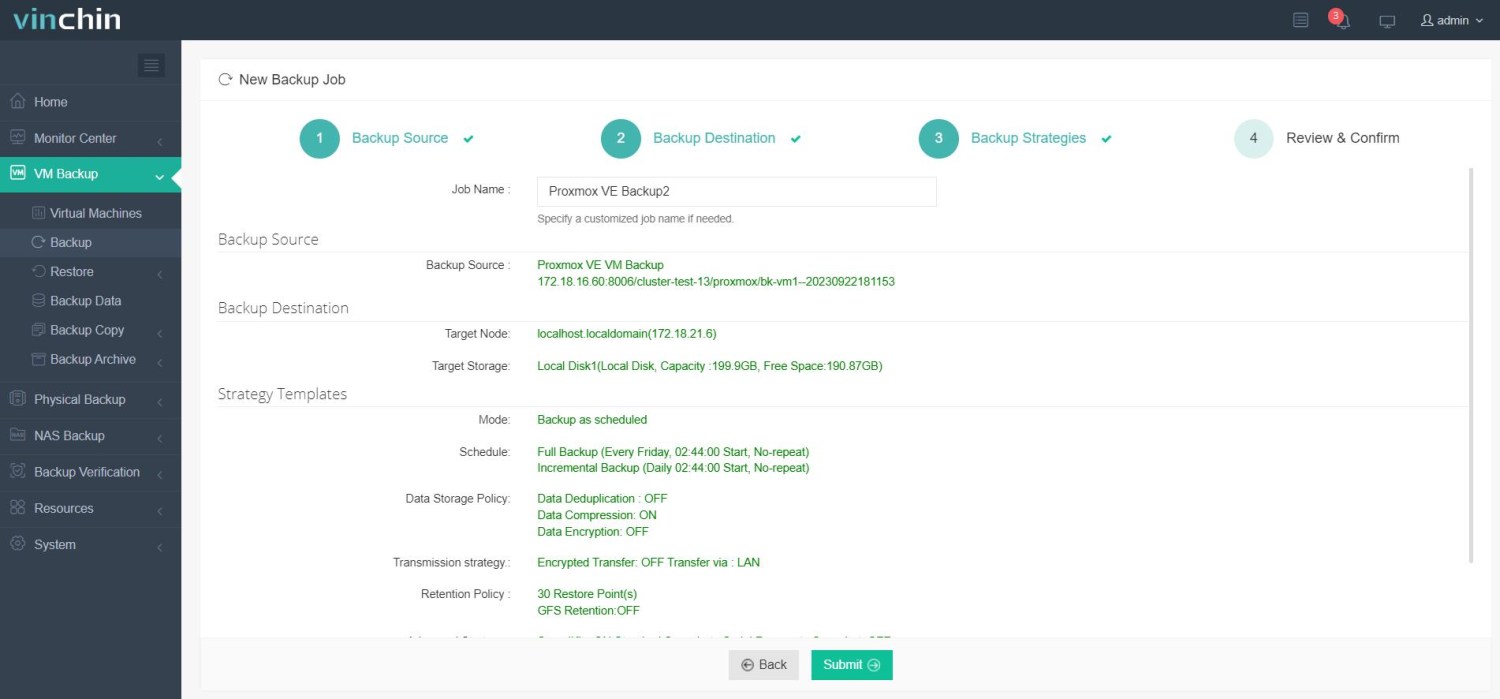
Step 4: Submit the job
Thousands worldwide rely on Vinchin Backup & Recovery's proven reliability, with top ratings among enterprise users globally. Experience every feature free for sixty days by starting your trial now!
Proxmox Backup Server Requirements FAQs
Q1: Can I run Proxmox Backup Server on a virtual machine?
Yes, but dedicated physical hardware gives best performance/reliability in production settings.
Q2: How much storage should I allocate for backups?
Start with about twice total source VM data then adjust based on retention/deduplication results leaving room future growth/safety margin.
Q3: What's best file system choice for my datastore?
ZFS offers strongest integrity/extensive features but ext4/xfs work well if RAM limited/you prefer simpler management style.
Q4: How much network bandwidth do I need?
Small labs manage fine with single Gigabit Ethernet link, but production sites benefit greatly from ten Gigabit connections/dedicated VLANs isolating heavy traffic loads during peak windows.
Conclusion
Meeting proper Proxmox Backup Server requirements keeps backups safe efficient scalable no matter organization size or complexity level achieved! With correct planning/data protection practices, including solutions like Vinchin, you're ready handle any disaster confidently while keeping downtime minimal every step way!