Enterprises depend on Proxmox for virtualization because it delivers flexibility and performance. Protecting these workloads is critical. Downtime can disrupt business operations, erode customer trust, and lead to financial loss. The backup method that best minimizes downtime uses an agentless, image-based approach with incremental backups and application-aware processing. This method captures entire virtual machines quickly without installing extra software inside each VM. It also ensures data consistency for databases and applications.
Every minute of downtime can cost thousands of dollars in lost productivity or revenue. Quick recovery is not just about convenience—it’s about meeting service-level agreements (SLAs) and maintaining compliance with regulations like GDPR or HIPAA. Efficient backup strategies reduce risk while supporting business continuity. Choosing the right backup method means your services stay available even when disaster strikes.
Why Minimizing Downtime Matters in Enterprise Environments
Downtime has far-reaching consequences beyond IT inconvenience. For enterprises running mission-critical workloads on Proxmox clusters, even short interruptions can trigger cascading failures across departments or customer-facing systems.
● Direct impact on revenue
Lost uptime translates into lost sales opportunities or halted production lines. According to Gartner research, the average cost of IT downtime exceeds $5,600 per minute for large organizations.
● Damage to reputation and customer trust
Extended outages frustrate customers who expect always-on digital services. A single incident can drive users to competitors—especially if sensitive data becomes inaccessible during peak demand periods.
● Compliance risks
Many industries must meet strict regulatory requirements for data protection and availability (e.g., healthcare under HIPAA). Failure to restore systems promptly may result in fines or legal action.
● Operational disruption
Unplanned downtime forces staff into manual workarounds that slow productivity. Recovery delays can affect everything from payroll processing to supply chain management.
Choosing a backup solution that restores services fast helps avoid these pitfalls while supporting long-term business growth.
How To Choose The Best Proxmox Backup Solution for Minimizing Downtime?
Selecting a Proxmox backup solution involves balancing speed, reliability, scalability, and ease of use. Enterprises need methods that protect data without slowing down daily operations—and recover quickly when needed most.
● Agentless backups simplify deployment
Agentless solutions do not require installing software inside every VM. This reduces system overhead and avoids compatibility issues with guest operating systems or applications. Fewer moving parts mean less maintenance for IT teams.
● Image-based incremental backups accelerate recovery
Image-based backups capture the full state of a VM—including configuration files, disk contents, memory state—so you can restore everything as it was at any point in time. Incremental backups only copy changes since the last job rather than duplicating all data every time. This saves storage space while speeding up both backup creation and restoration processes.
For example: If you back up a 1TB VM but only 10GB changed since yesterday’s run, incremental mode copies just those changes instead of reprocessing all 1TB again.
● Application-aware processing ensures consistency
Some enterprise apps—like Microsoft SQL Server or Oracle Database—require special handling during backup so transactions are captured safely without corruption. Application-aware solutions coordinate with guest agents to quiesce databases before snapshotting VMs so restores are reliable every time.
● Automation reduces human error
Automated scheduling lets you set regular jobs once then forget them; retention policies manage old backups automatically so you never run out of space unexpectedly. These features ensure consistent protection even as your environment grows larger over time.
● Scalability supports future growth
A good solution handles hundreds—or thousands—of VMs across multiple nodes without bottlenecks as your infrastructure expands. Centralized management consoles help monitor jobs from one place instead of juggling separate tools per cluster node.
● Instant recovery options minimize service interruption
Features like instant VM restore let you boot virtual machines directly from compressed backup images stored on secondary storage devices—even before full data transfer completes, conceptually similar). Users regain access within minutes while background processes finish restoring remaining blocks behind the scenes.
By focusing on these capabilities when evaluating products—or configuring native tools—you maximize uptime while reducing operational headaches for your team.
Vinchin Backup & Recovery: Enterprise-Level Protection Across Virtualization Platforms
To address complex enterprise needs, Vinchin Backup & Recovery stands out as a professional virtual machine backup solution supporting over 15 mainstream virtualization environments—including Proxmox, VMware, Hyper-V, oVirt, OLVM, RHV, XCP-ng, XenServer, OpenStack, ZStack and more. For organizations relying on Proxmox VE clusters alongside diverse hypervisors, this unified platform streamlines protection across hybrid infrastructures without added complexity.
Among its robust feature set are agentless image-based backups tailored for Proxmox environments; LAN-free backup support enables rapid transfers; forever-incremental scheduling optimizes storage usage; granular restore allows precise file-level recoveries; strong encryption safeguards sensitive information throughout the process—all contributing to minimized downtime and reliable compliance.
With Vinchin Backup & Recovery’s intuitive web console interface:
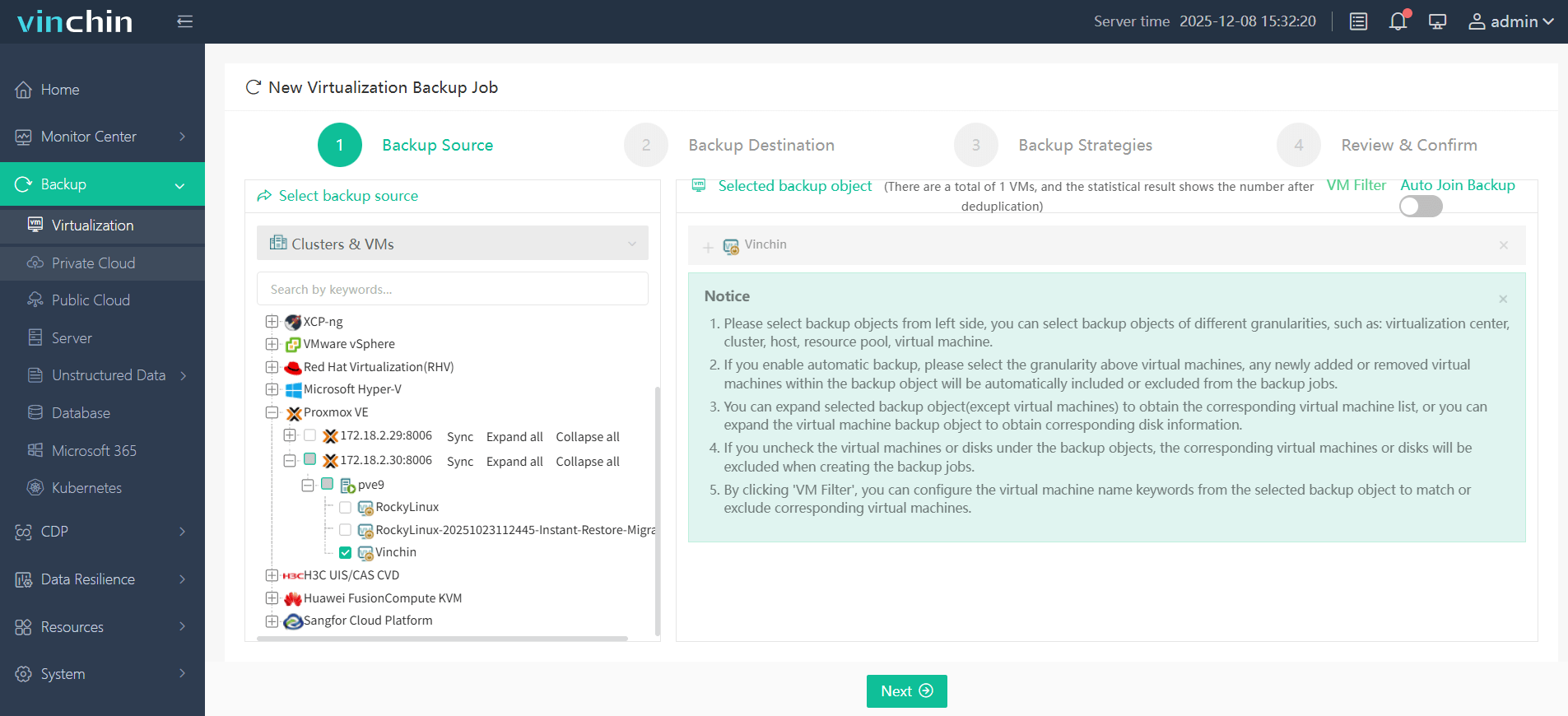
Step 1: Select the Proxmox VM to back up.
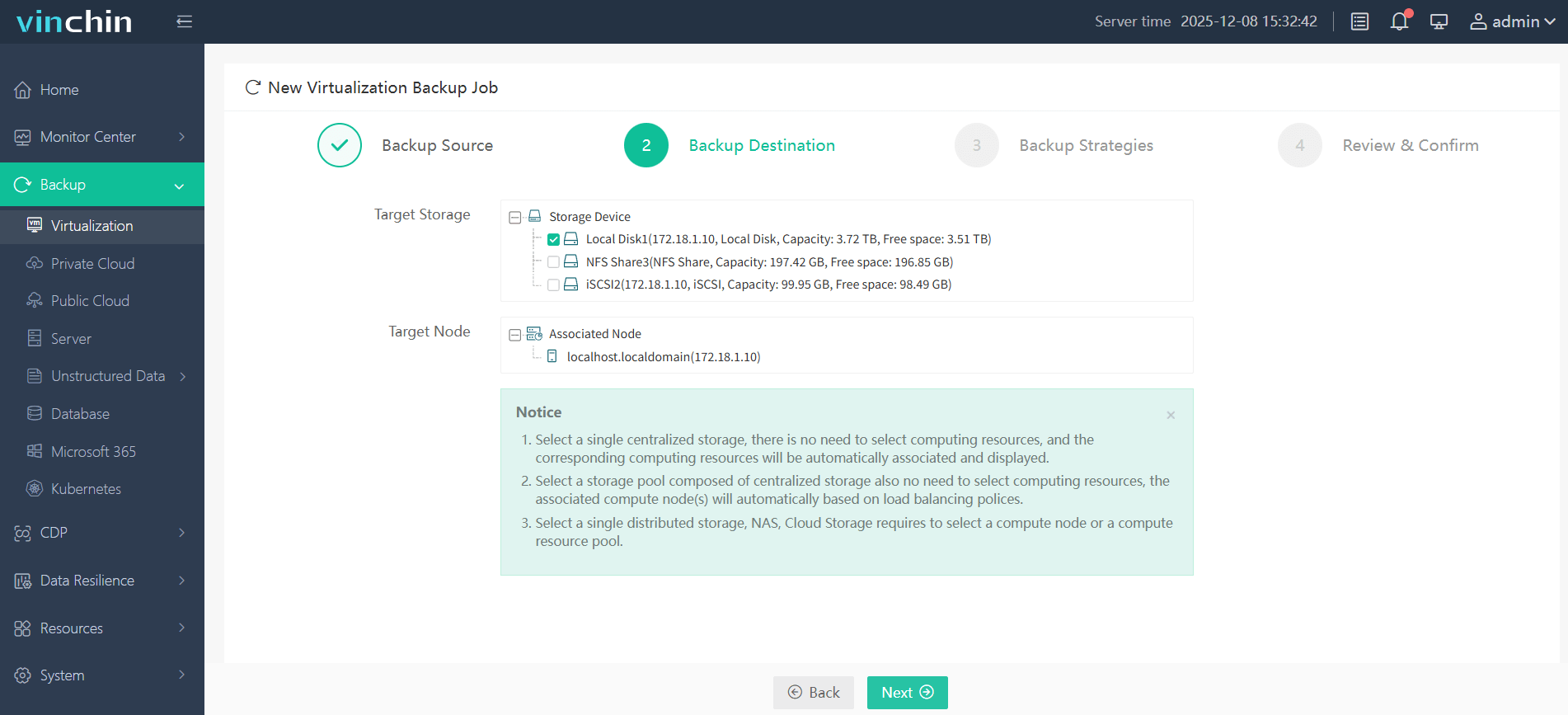
Step 2: Choose the backup storage.
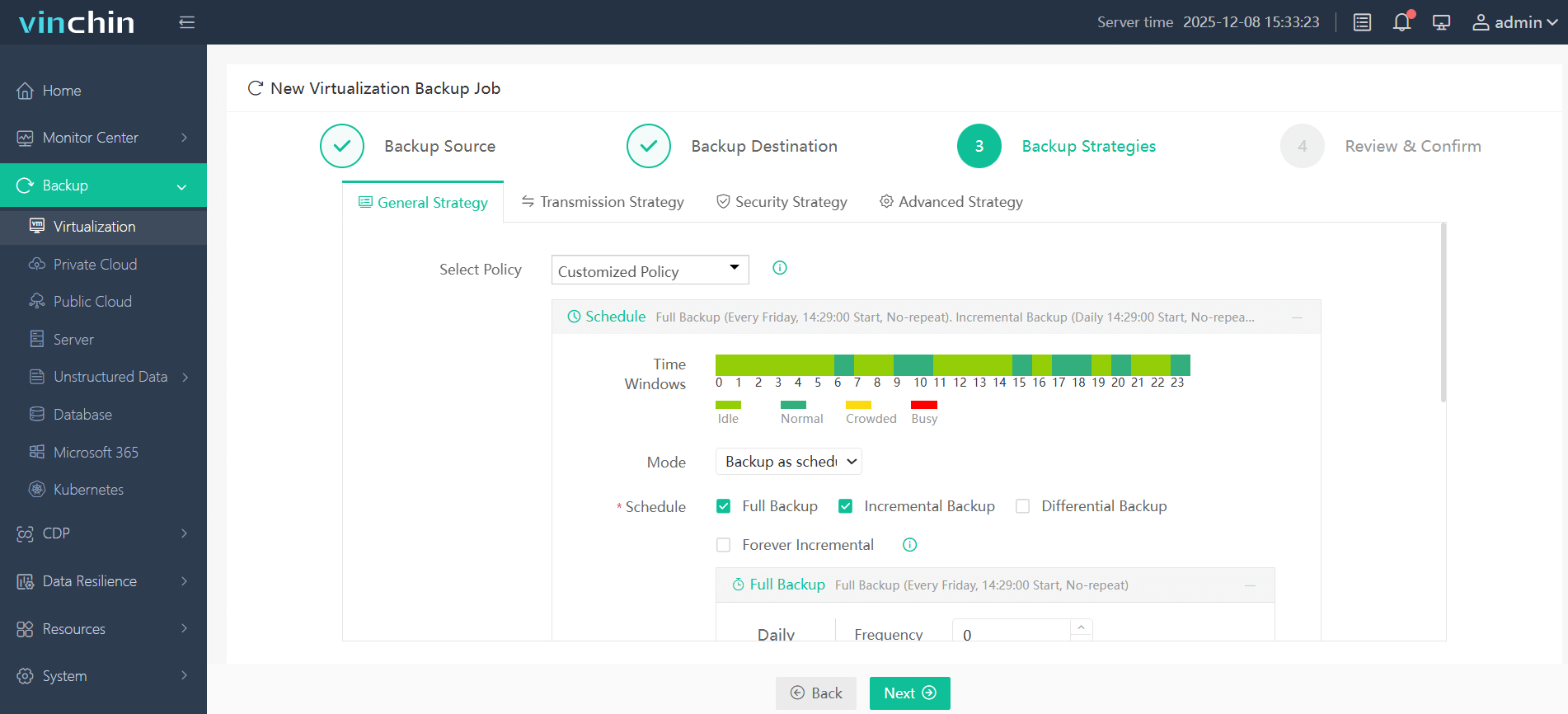
Step 3: Configure the backup strategy.
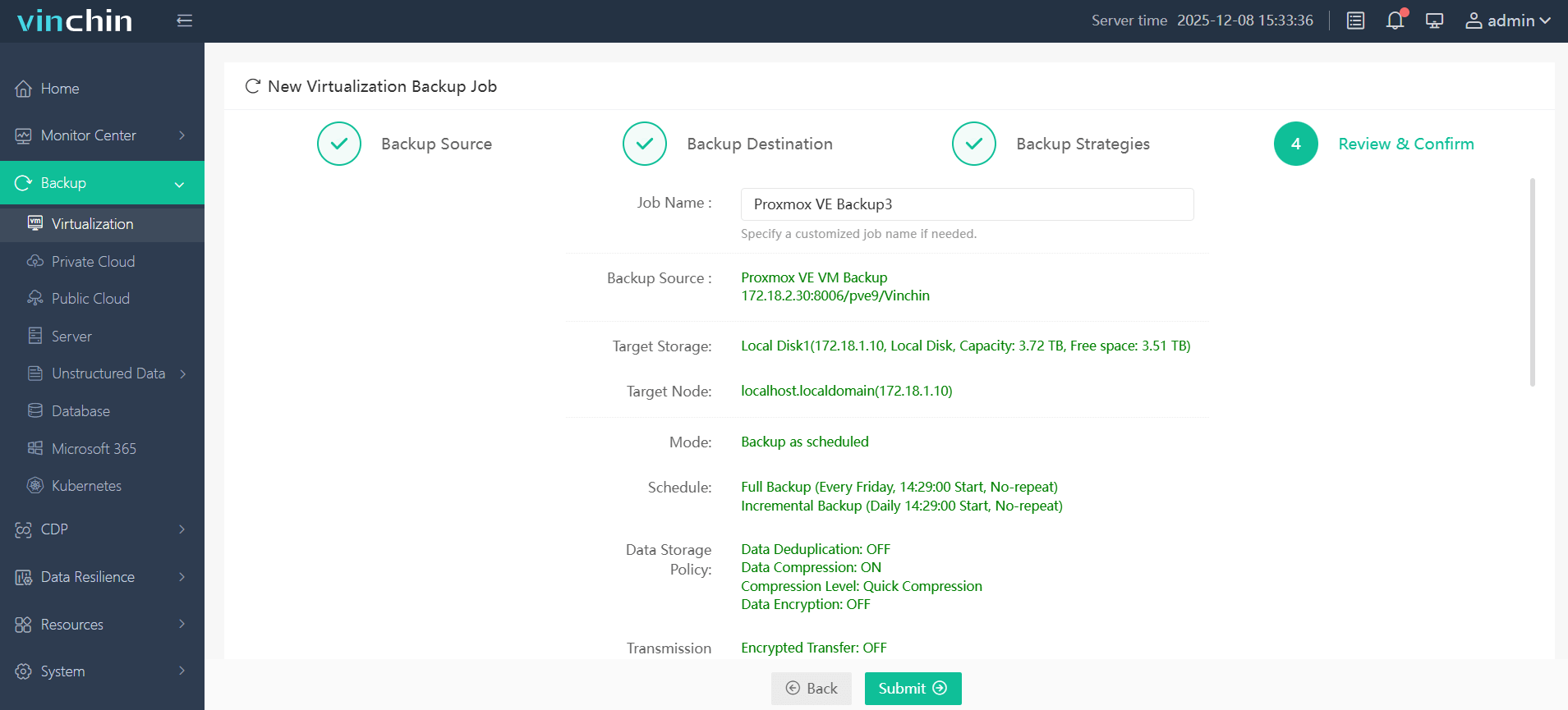
Step 4: Submit the job.
Recognized globally by thousands of enterprises with top ratings in industry reviews—Vinchin Backup & Recovery offers a fully featured 60-day free trial so you can experience its power firsthand; click below to get started!
Best Proxmox Backup Software FAQs
Q1: What makes agentless backup preferable in enterprise Proxmox environments?
Agentless backup reduces resource consumption by avoiding extra software installation inside each VM while simplifying deployment across large clusters. With fewer components involved there’s less chance of conflicts during upgrades—and less ongoing maintenance required by IT staff.
Q2: How does incremental backup help minimize downtime?
Incremental backups only capture changes made since the previous job rather than duplicating entire disks every cycle—which dramatically speeds both creation/restoration steps especially at scale (>100GB+ datasets). In Proxmox environments using PBS or compatible third-party tools enables near-continuous protection without saturating network links.
Q3: Why is application-aware processing important?
Application-aware processing coordinates snapshot timing between hypervisor layer plus internal app/database states ensuring no pending transactions get lost/corrupted mid-stream—a must-have feature when protecting SQL servers/exchange mailboxes etc., where simple crash-consistent images might otherwise fail upon rollback attempts.
Q4: Can instant VM restore further reduce downtime?
Yes; instant VM restore allows rapid resumption of services directly from compressed image files stored remotely/local NAS appliances bypassing lengthy full-copy transfers upfront so users regain access within minutes even if terabytes remain queued behind-the-scenes—a lifesaver during major incidents impacting multiple hosts simultaneously.
Conclusion
The right Proxmox backup method uses agentless technology combined with image-based incremental workflows plus application awareness—all working together—to keep enterprise workloads online through almost any failure scenario while minimizing costly disruptions along the way.









