Enterprises today depend on data for every decision and operation. Regular full and incremental backups are essential to protect this data from loss or corruption. As threats like ransomware grow and regulations tighten, organizations must adopt strong backup strategies for platforms such as Oracle OLVM to ensure business continuity.
The Importance of Enterprise Data Protection
Data protection is a core business requirement in modern enterprises. Every transaction, customer interaction, or internal process relies on accurate information being available at all times. Without reliable backups, companies risk losing critical records due to hardware failures, cyberattacks, or human error.
● Business Continuity
Losing access to key data can halt operations across departments. This leads to missed deadlines, lost revenue opportunities, and dissatisfied customers who may turn elsewhere if services are unavailable.
● Regulatory Compliance
Many industries face strict legal obligations regarding data retention and recovery capabilities. Failure to meet these standards can result in heavy fines or even legal action against an organization.
● Reputation Management
A single incident of unrecoverable data loss can damage an enterprise’s reputation for years. Customers expect their information to be safe; any breach of trust is hard to repair.
● Operational Efficiency
Efficient backup strategies reduce downtime during incidents by enabling quick restores from recent copies rather than forcing teams to rebuild lost work from scratch.
By prioritizing enterprise-grade data protection through regular backups, organizations safeguard their future growth while meeting both operational needs and external expectations.
Why This Matters for Enterprise Operations
Regularly scheduled full and incremental Oracle OLVM backups form the backbone of resilient IT operations in large organizations. These practices help maintain service availability even when disaster strikes.
● Reduced Risk of Irreversible Data Loss
Skipping regular full and incremental Oracle OLVM backups exposes businesses to permanent loss after events like ransomware attacks or disk failures. Once overwritten or encrypted without a backup copy available, critical files may never be recovered.
● Minimized Downtime During Recovery
Having up-to-date full images combined with frequent incrementals allows IT teams to restore systems quickly. This minimizes costly downtime that disrupts workflows across sales, finance, HR, or production lines.
● Support for Recovery Point Objective (RPO) & Recovery Time Objective (RTO)
Enterprises set RPOs as the maximum acceptable amount of lost data measured in time, and RTOs as the target duration for restoring service after disruption. Regular incremental backups lower RPO by capturing changes frequently; efficient restoration processes keep RTO within business targets.
● Improved Auditability & Compliance Readiness
Scheduled backup jobs create logs that auditors can review as proof of compliance with industry mandates such as GDPR Article 32 or HIPAA Security Rule requirements.
By maintaining disciplined backup routines tailored for Oracle OLVM environments, including both full baseline images and granular incrementals, enterprises reduce exposure to operational interruptions while supporting regulatory demands.
What Makes a Good Oracle OLVM Backup Strategy?
A robust Oracle OLVM backup strategy balances reliability with efficiency so businesses can recover quickly without wasting resources. It should scale easily as workloads grow while providing detailed control over what gets backed up, and when to align with evolving security policies and compliance needs.
A well-designed plan typically includes weekly or monthly full backups paired with daily or more frequent, and incremental jobs that capture ongoing changes. Synthetic full backups, where new “full” copies are created from existing incrementals can further optimize storage use without sacrificing recovery speed.
Decision-makers should weigh several factors:
● Restore Speed
Fast recovery is vital when outages occur unexpectedly. Solutions offering instant restore options allow services to resume within minutes instead of hours. This is a crucial advantage during high-pressure incidents where every second counts.
● Storage Efficiency
Incremental backups store only changed blocks since the last job rather than duplicating entire datasets each time. Deduplication further reduces space requirements by eliminating redundant information across multiple VMs or snapshots, making it a major benefit in large-scale deployments where storage costs add up quickly.
● Compliance Alignment
Automated scheduling ensures consistent protection intervals while generating auditable logs needed for regulatory reviews (see GDPR Article 32 for specific requirements). Retention policies help enforce how long different types of data must be kept before secure deletion per industry guidelines like SOX or PCI DSS.
● Adaptability & Scalability
As infrastructure expands, adding new virtual machines (VMs), clusters, or storage arrays, the backup solution should adapt seamlessly without complex reconfiguration steps that slow down IT teams’ response times during rapid growth phases.
For example: A global retailer running hundreds of OLVM VMs might schedule synthetic full backups every Sunday night (when activity is lowest) plus hourly incrementals throughout weekdays so they always have recent restore points ready if something goes wrong mid-shift on Monday morning.
This approach delivers comprehensive coverage while keeping network traffic manageable, even as environments scale into thousands of VMs over time.
Vinchin Backup & Recovery: Enterprise-Level VM Protection Across Virtualization Platforms
To address the challenges faced by enterprises using Oracle OLVM and other virtualization solutions, including VMware, Hyper-V, Proxmox, oVirt/RHV, XCP-ng/XenServer, OpenStack, ZStack and more, Vinchin Backup & Recovery provides professional-grade virtual machine backup capabilities supporting over 15 mainstream platforms.
For Oracle OLVM users, Vinchin provides agentless VM backup with centralized management through an intuitive web console. It supports full, incremental, differential, and scheduled backup modes for flexible data protection.
To improve backup and recovery efficiency, the solution also includes CBT-based incremental backup, deduplication, granular restore, cloud/tape archiving, and GFS retention policies, helping enterprises reduce storage usage and strengthen disaster recovery readiness.
Backing up Oracle OLVM VMs with Vinchin Backup & Recovery is straightforward:
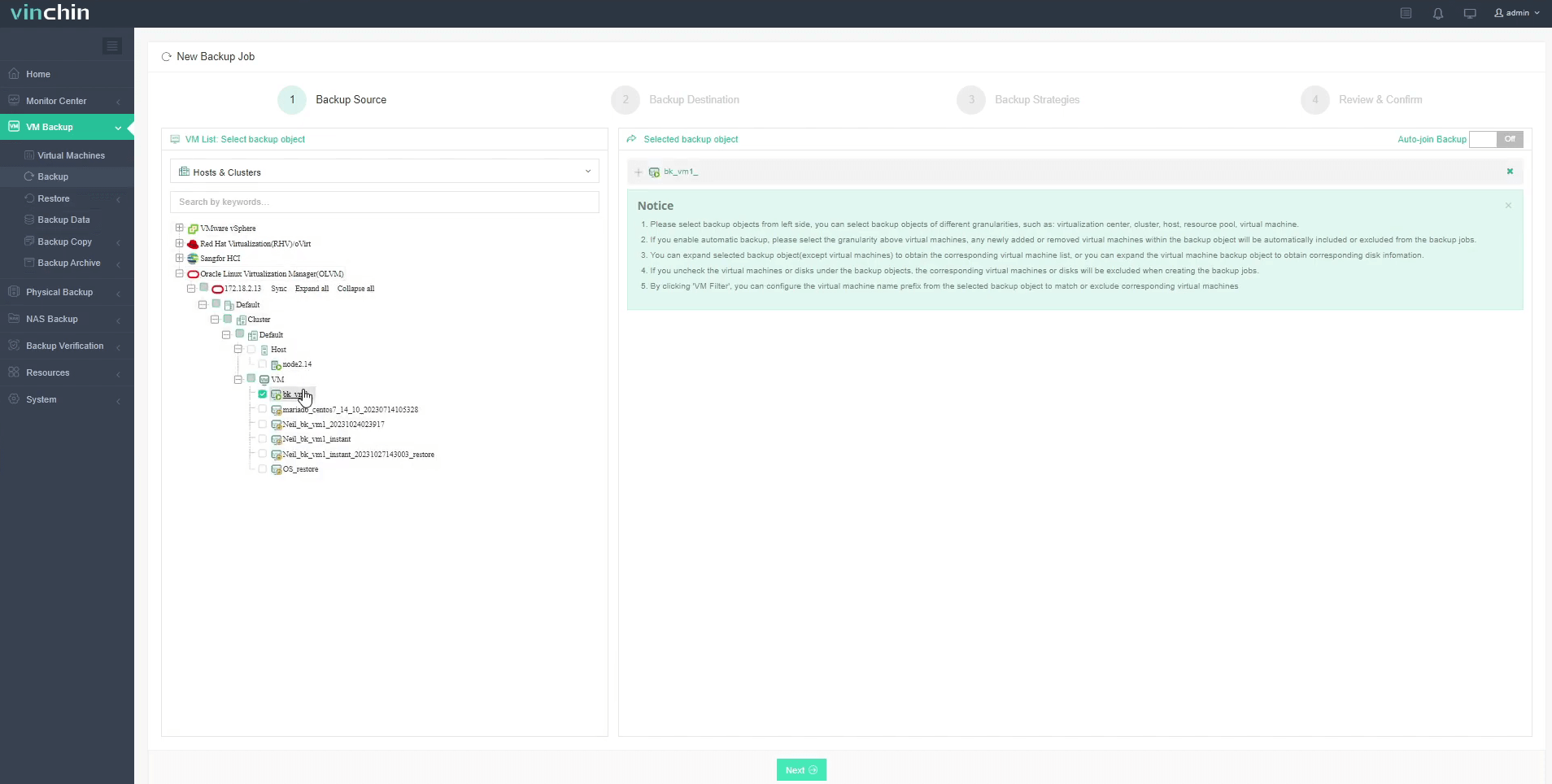
Step 1: Select the Oracle OLVM VM to back up
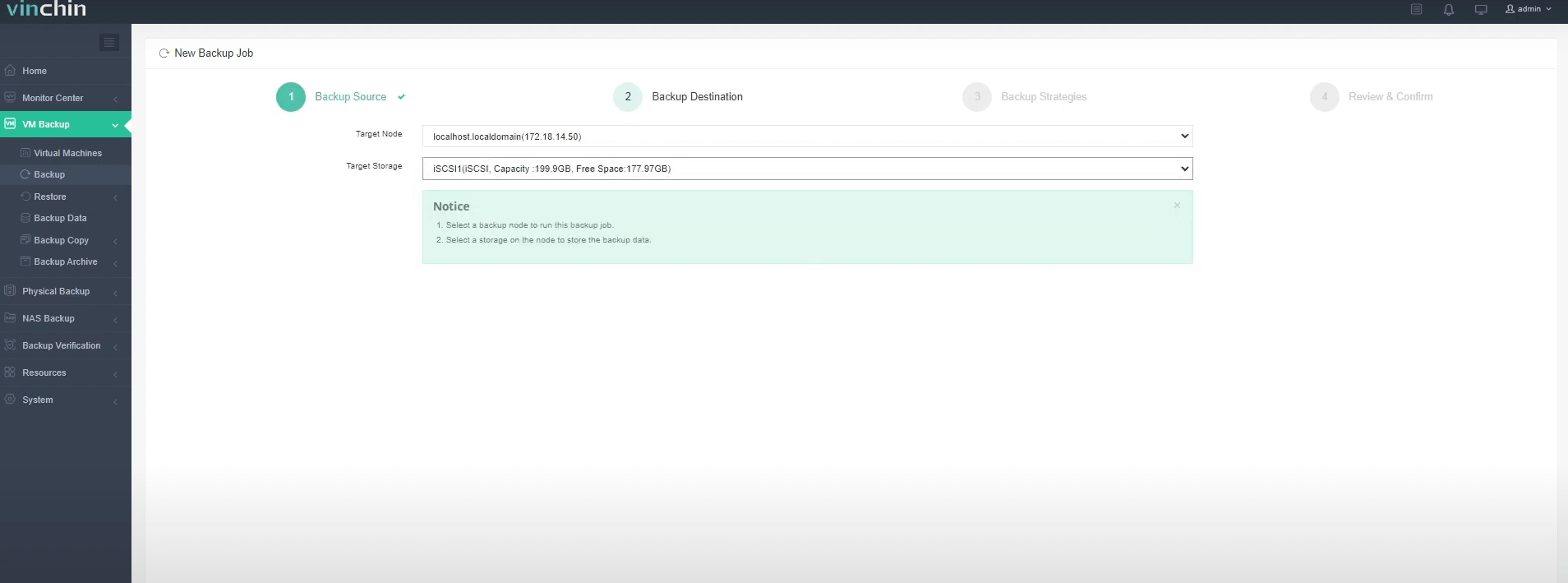
Step 2: Choose the backup storage
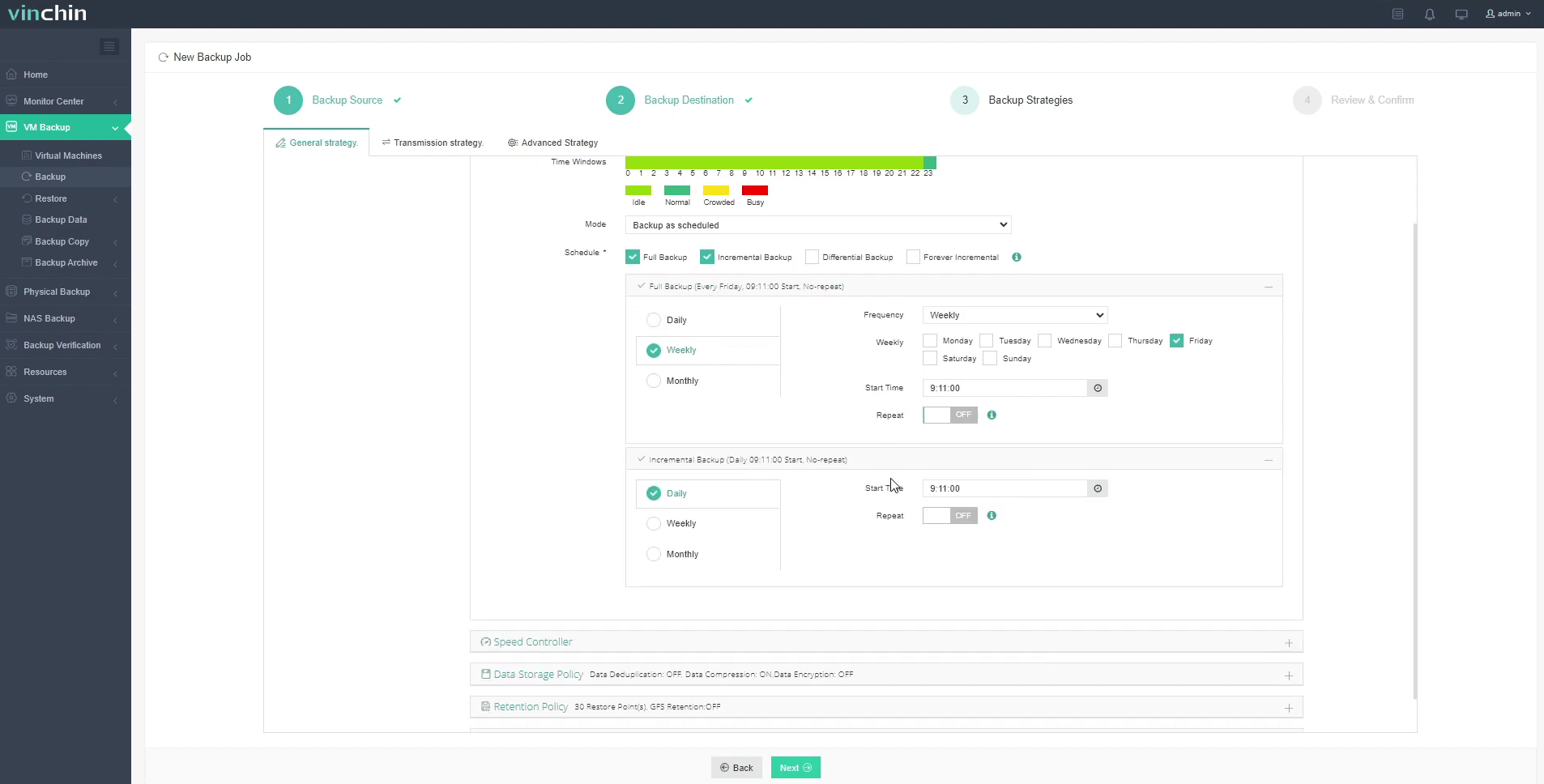
Step 3: Configure the backup strategy
Step 4: Submit the job

With its global reputation among enterprise users and top-rated support team worldwide, Vinchin Backup & Recovery stands out as a trusted choice for robust VM protection. Try it free for 60 days with all features unlocked!
Best Oracle OLVM Backup Software FAQs
Q1: How often should we run full versus incremental backups?
Full backups are typically scheduled weekly or monthly based on workload size; incremental backups run daily, or even every few hours for dynamic environments where frequent changes occur. Many enterprises retain seven days’ worth of incrementals alongside four weeks’ worth of fulls so they can roll back precisely as needed if issues arise midweek.
Q2: Does regular backup scheduling affect system performance?
Modern solutions minimize impact by leveraging snapshot technology along with off-peak scheduling options whenever possible so production workloads remain unaffected during most jobs.
Q3: Are both full and incremental backups needed?
Yes; combining periodic full images, which serve as baseline restore points with frequent incrementals ensures you capture all ongoing changes efficiently without consuming excessive storage space.
Q4: How does this support compliance requirements?
Scheduled jobs generate audit-ready logs showing exactly when each VM was protected, which is a key requirement under frameworks, and automated retention policies guarantee old copies are deleted securely once no longer required by law.
Q5: Can I restore individual files from an OLVM VM backup?
With Vinchin, granular (file-level) restore is supported; you can recover specific files without rolling back entire VMs.
Q6: Does Vinchin support offsite or cloud backup for OLVM?
Yes; you can archive or back up OLVM data directly into cloud repositories or remote sites for disaster recovery readiness.
Conclusion
Consistent scheduling of full and incremental Oracle OLVM backups helps reduce downtime, minimize data loss risks, and support compliance requirements. A reliable backup strategy also improves recovery efficiency and strengthens business continuity against failures, ransomware, and unexpected disruptions.