Modern businesses rely on digital systems to deliver products and services every day. VMware environments often run these core workloads: customer databases, financial records, email servers, and more. If you skip regular backups for VMware virtual machines (VMs), you expose your business to serious risks: data loss, long outages, lost revenue, legal trouble, and lasting damage to your reputation.
Industry standards stress that organizations must protect information assets through robust backup strategies (see Annex A 12.3.1 – Information backup). Regulatory bodies worldwide expect companies to maintain recoverable copies of critical data at all times.
The stakes are high since the global average cost of a data breach reached $4.45 million last year, which is a record high driven by operational disruption and customer churn after incidents. Let’s examine why failing to back up VMware can threaten both business reputation and revenue.
The Importance of VMware Data Protection
A strong VMware backup plan shields your business from unexpected disasters, hardware failures, cyberattacks like ransomware, accidental deletions by staff or software bugs, all can strike without warning.
● Mission-critical workloads depend on VM availability
VMware hosts applications that drive daily operations: ERP systems process orders; CRM platforms manage customers; file servers store contracts and intellectual property. Without reliable backups in place, any failure could erase years of work in seconds.
● Data loss leads directly to business closure or severe losses
Research shows that about 60% of small businesses suffering major data loss shut down within six months. Larger enterprises face even higher costs. IBM reports an average breach cost exceeding $4 million per incident when factoring in downtime recovery expenses, legal fees for non-compliance with privacy laws like GDPR or HIPAA (IBM Cost of a Data Breach Report 2025), lost productivity during outages, customer compensation payments, regulatory fines and most damagingly loss of trust.
● Backup is essential for compliance with industry regulations
Regulations such as GDPR require organizations to ensure ongoing confidentiality and availability of personal data (GDPR Article 32). Failure to restore lost records during audits can result in heavy penalties or lawsuits (European Commission GDPR Guidelines). Many industries also mandate specific retention periods for sensitive information; only robust backup solutions make this possible.
A comprehensive VMware backup strategy does much more than save files; it preserves your ability to serve customers reliably while meeting legal obligations across regions.
Why This Matters for Enterprise Operations
Losing access to VMs disrupts every part of enterprise operations from sales teams unable to reach clients due to email server failures to finance departments locked out from accounting systems during payroll runs.
● Extended downtime destroys customer confidence
Every minute your systems are offline means orders go unprocessed; support tickets pile up unanswered; partners cannot access shared resources; employees lose productivity waiting for IT fixes instead of serving clients or innovating new products. IT downtime costs average $5,600 per minute for large enterprises, which is a figure that quickly adds up during prolonged outages caused by missing backups.
● Lost data triggers contractual penalties or regulatory fines
Many service agreements include uptime guarantees backed by financial penalties if targets aren’t met due to preventable outages like failed restores after ransomware attacks or hardware faults. In regulated sectors such as healthcare or finance where patient records or transaction logs must be retained securely for years. Failure means not just lost revenue but also steep fines from authorities like HIPAA enforcement agencies (U.S Department of Health & Human Services - HIPAA Enforcement Highlights).
● Reputational harm lingers long after technical issues are fixed
News travels fast when companies lose control over sensitive information, even brief incidents can lead customers to switch providers permanently if they feel their trust has been broken. Studies show nearly one-third of organizations experiencing significant data loss see permanent customer attrition rates above 20%. Rebuilding brand reputation takes years and some never fully recover market share after publicized breaches.
Downtime isn’t just an inconvenience; it’s a direct threat to revenue streams and long-term survival in competitive markets where reliability matters most.
What Makes a Good VMware Backup Strategy?
A well-designed VMware backup solution ensures rapid recovery from any disaster scenario while minimizing risk exposure across growing virtual environments.
A good strategy focuses on several key pillars:
Reliability: Backups must complete successfully every time without errors even under heavy load conditions common in enterprise vSphere clusters. Features like Changed Block Tracking (CBT) help speed up incremental backups while reducing impact on production workloads.
Scalability: As VM counts grow into hundreds or thousands across multiple datacenters or hybrid cloud deployments, the solution should scale seamlessly without bottlenecks in storage throughput or management overhead.
Security: Backups need protection against modern threats like ransomware targeting both live VMs and stored copies. Encryption at rest/in transit plus immutable storage options ensure attackers cannot tamper with recovery points even if they gain admin access elsewhere in the environment.
Compliance: Automated retention policies help enforce industry-specific requirements around how long certain types of records must be kept before deletion, critical for passing audits under frameworks such as SOX (Sarbanes-Oxley Act) or PCI DSS (Payment Card Industry Data Security Standard).
Ease of Management: Centralized dashboards allow IT teams to configure schedules (“Daily Full + Hourly Incremental”), monitor job status (“Backup Job History”), receive alerts (“Email Notifications”), test restores regularly (“Instant VM Recovery”), all through intuitive interfaces designed for quick action under pressure, not complex scripting during emergencies.
Recovery Time Objectives (RTOs) define how quickly you need services restored after an outage; Recovery Point Objectives (RPOs) set limits on acceptable data loss measured in minutes/hours since last successful backup job completed. Effective strategies minimize both metrics so business resumes fast with minimal disruption visible outside IT departments.
Vinchin Backup & Recovery: Enterprise-Level VM Protection Across Platforms
To address today’s demanding enterprise requirements, Vinchin Backup & Recovery provides professional-grade virtual machine backup tailored for diverse infrastructures, including leading platforms such as VMware, Hyper-V, Proxmox, oVirt, OLVM, RHV, XCP-ng, XenServer, OpenStack, ZStack and more (15+ environments). For VMware users especially, it delivers advanced features including quiesced snapshot support for application-consistent backups and HotAdd technology enabling efficient disk access during jobs. Key capabilities such as Changed Block Tracking accelerate incremental backups while LAN-free backup reduces network load by transferring data directly between storage devices within supported architectures.
Among its many strengths are instant recovery options that minimize downtime following failures; granular restore functions allowing precise file-level retrieval; robust deduplication and compression optimizing storage usage; flexible scheduling automating protection routines; plus built-in encryption safeguarding sensitive information throughout the lifecycle.
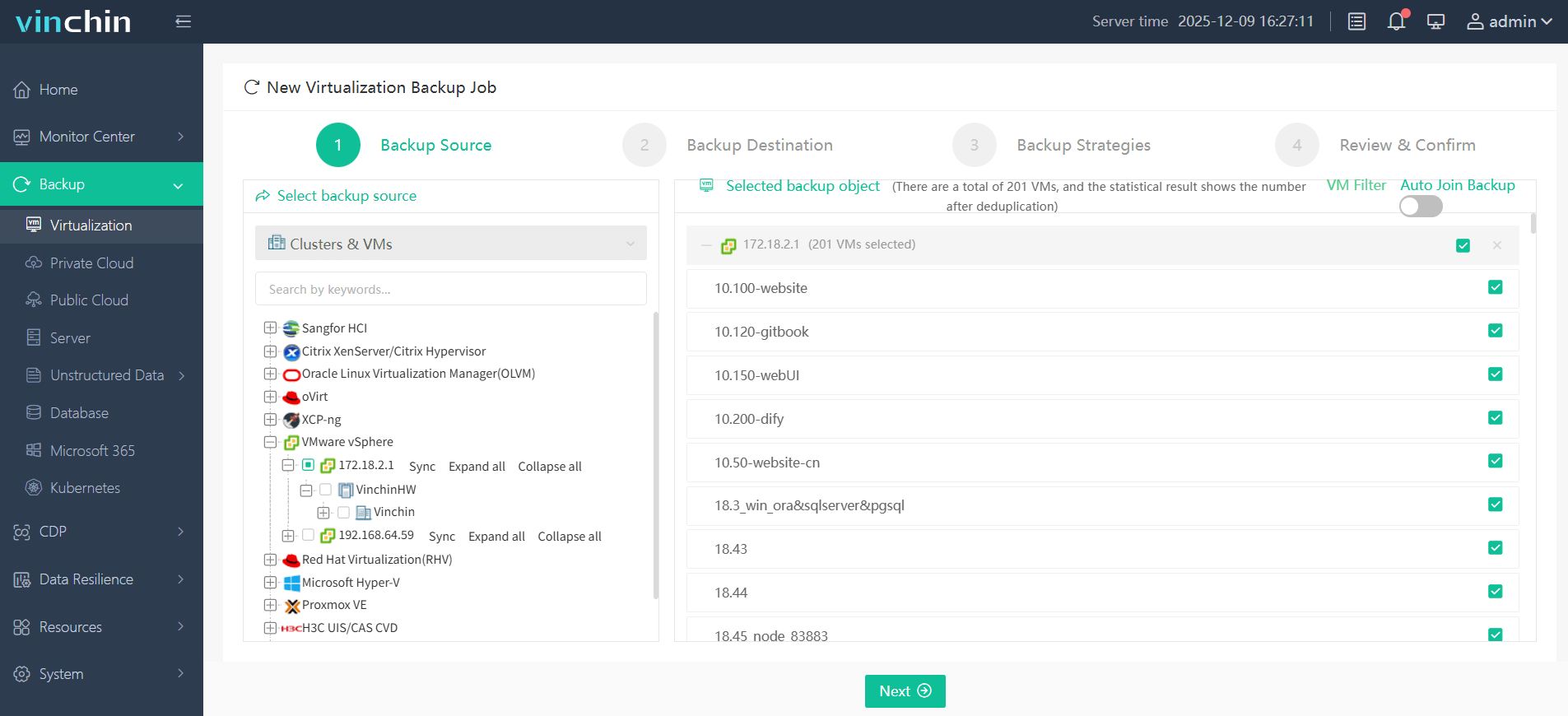
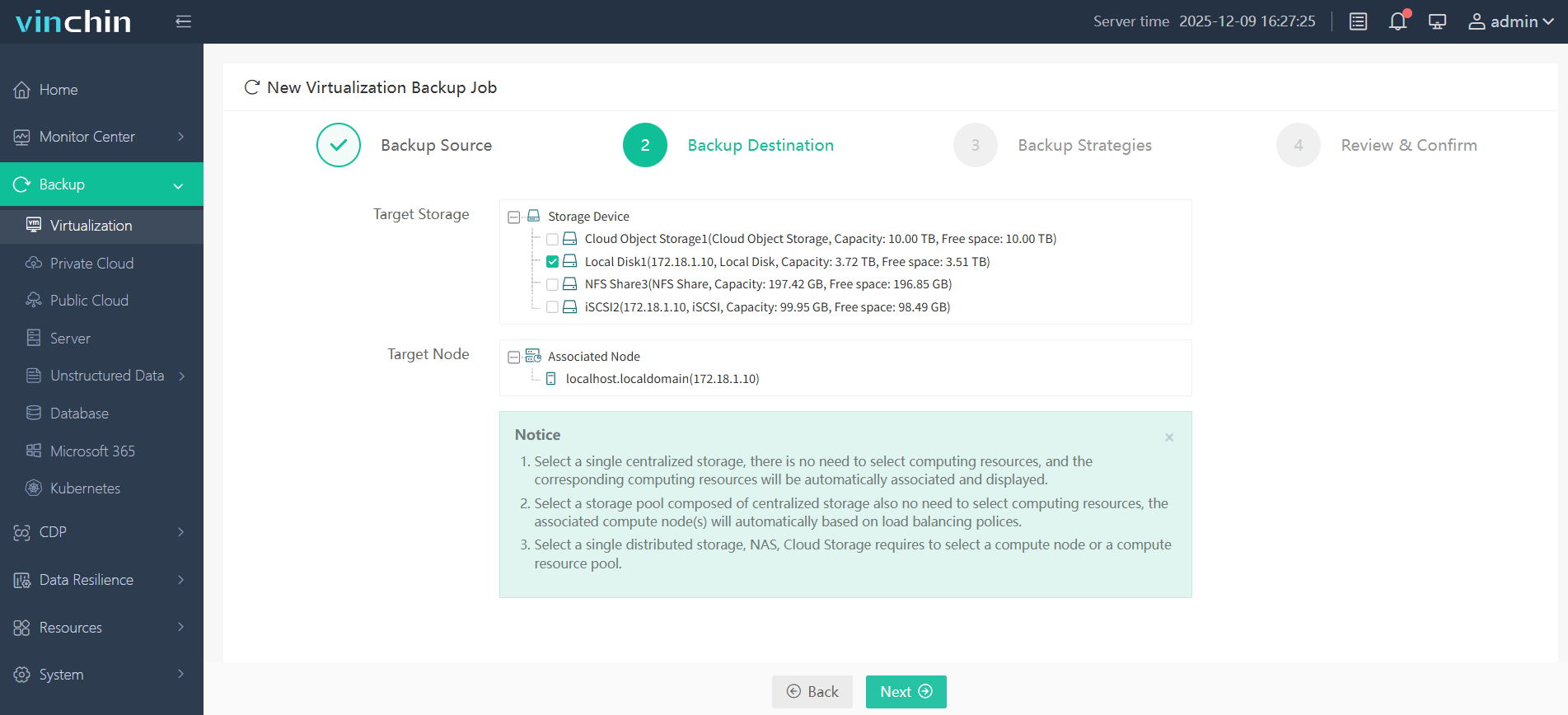
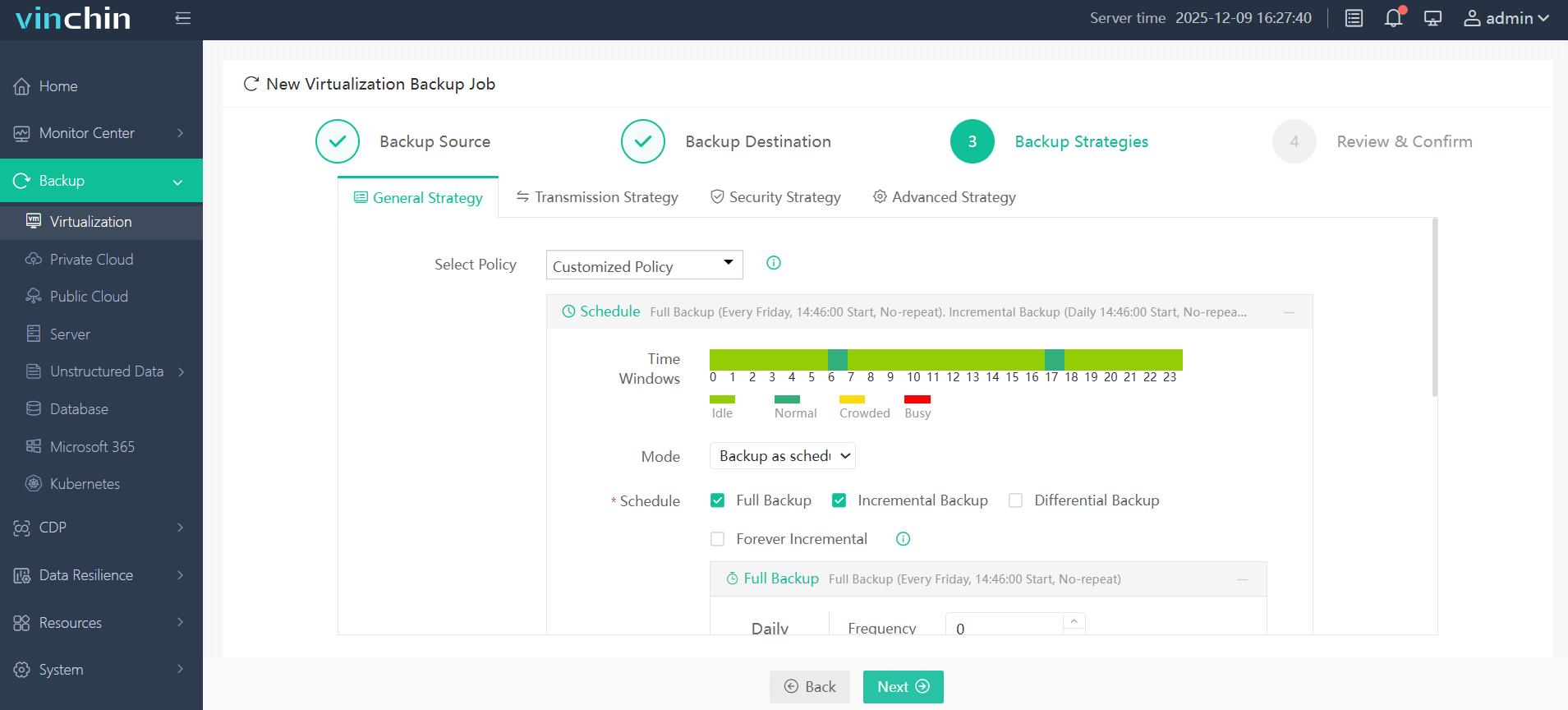
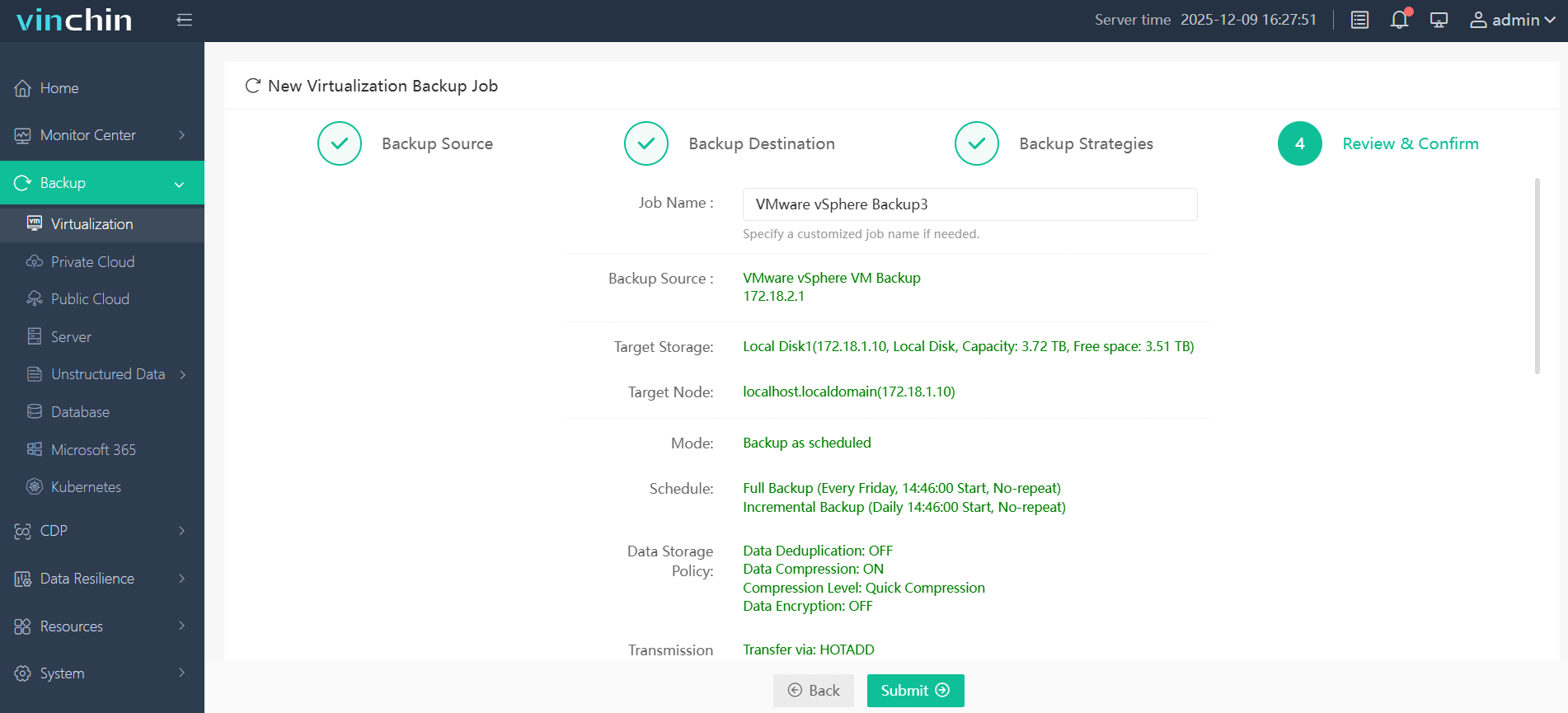
With Vinchin Backup & Recovery’s intuitive web console interface, it's easy to backup VMware VMs:
Step 1: Select the VMware VM you wish to back up
Step 2: Choose appropriate backup storage
Step 3: Configure desired backup strategy
Step 4: Submit the job with one click
Recognized globally among enterprise users with top ratings and a strong customer base, Vinchin Backup & Recovery offers a full-featured free trial valid for 60 days so you can experience its powerful protection firsthand.
Best VMware Backup Software FAQs
Q1: What are the main risks if I don’t back up my VMware environment?
Unplanned outages may cause permanent data loss that disrupts services for customers or partners while leading directly to significant financial losses through downtime costs ($5K+/minute), missed contracts due to SLA violations and even regulatory fines if required records become unrecoverable after incidents occur.
Q2: How does backup software support regulatory compliance?
Backup solutions enable restoration capabilities required under laws like GDPR Article 32 (“security measures including restoring availability/access”) by keeping protected copies available throughout mandated retention periods even during audits/investigations when proof-of-restoration is needed.
Q3: Can modern solutions protect against ransomware targeting VMs?
Yes; they offer features such as immutable storage so attackers cannot modify/delete previous restore points even if they compromise admin credentials elsewhere; instant recovery tools allow clean versions restored within minutes so operations resume quickly despite encryption attempts.
Conclusion
Neglecting proper VMware backups exposes businesses directly to costly disruptions from lost revenue streams through extended downtime to lasting reputational harm among customers who expect reliability above all else.









