Hyper-V powers many business-critical systems in today’s digital world. Companies rely on this Microsoft virtualization platform to keep data available around the clock. If you skip regular Hyper-V backups, you risk more than just lost files. You face operational chaos, angry customers, regulatory trouble, and financial loss. Industry standards demand strong backup strategies for resilience. Customers expect reliability every time they interact with your services. Regulators require proof that you can protect sensitive data. Failing at any of these points puts your entire business at risk.
The Importance of Business Continuity Protection
Business continuity means keeping operations running even when disaster strikes. It is not just a buzzword; it is essential for survival in modern enterprise IT environments. When hardware fails or ransomware hits your Hyper-V VMs, only a solid backup plan lets you recover fast enough to avoid major losses.
● Minimizing Downtime: Every minute of downtime costs money and erodes trust. According to IBM’s 2025 Cost of a Data Breach Report (source), average breach costs reached $4.45 million last year, much of it due to lost productivity and customer churn.
● Protecting Sensitive Information: Losing customer or business data can trigger legal action or fines under regulations like GDPR or HIPAA. Backups help meet these strict requirements by ensuring data can be restored quickly if compromised.
● Ensuring Regulatory Compliance: Many industries require companies to keep records safe for years. Without reliable backups of Hyper-V VMs hosting databases or email servers, you may fail audits or face penalties during investigations.
A robust business continuity plan does three things well: it reduces downtime; protects sensitive information from loss; ensures compliance with industry rules. These pillars support ongoing service delivery even when unexpected events threaten normal operations.
Why This Matters for Enterprise Operations
Losing access to Hyper-V workloads disrupts everything from payroll processing to online sales portals. Even small incidents like accidental file deletion or failed software updates can snowball into full-blown crises without proper backups in place.
● Operational Downtime Directly Impacts Revenue: A ransomware attack that encrypts dozens of VMs could take weeks to rebuild if no recent backup exists. During this time, missed SLAs lead to penalty fees while frustrated customers look elsewhere for reliable service providers.
● Reputational Damage Can Be Permanent: Aon’s 2025 Global Cyber Risk Report (Aon report summary) found companies suffering cyber incidents tied to reputation risk saw shareholder value drop by an average of 27%. Once trust is broken through news headlines about outages or leaked data, it rarely returns fully.
● Regulatory Fines Add Up Quickly: Regulators now demand proof that businesses can recover critical systems after failures or attacks. Inability to produce required records during audits or worse yet losing them entirely can result in steep fines or lawsuits that drain resources further.
These risks are not theoretical; they happen every day across industries worldwide. Businesses unable to restore key services promptly often lose both revenue streams and long-term market position.
What Makes a Good Hyper-V Backup Strategy?
A good Hyper-V backup strategy goes beyond copying files; it ensures complete recovery with minimal disruption when disaster strikes. Effective plans combine technology best practices with clear processes tailored for virtualized environments like Hyper-V.
● Consistent Recoverability: Reliable backups must be tested regularly through restore drills so you know they work before an emergency hits. Application-aware backups using Volume Shadow Copy Service (VSS) ensure transactional consistency for databases and other critical workloads.
● Rapid Restoration (RTO/RPO Alignment): Recovery Time Objective (RTO) defines how quickly systems must be restored; Recovery Point Objective (RPO) sets how much recent data loss is acceptable. Your backup solution should meet these targets based on business needs so users experience little interruption during recovery efforts.
● Data Integrity Through Application Awareness: Backups should capture consistent states even while applications run live, for example using VSS integration to avoid corruption upon restore.
● Risk Mitigation via Offsite & Immutable Copies: Following the 3-2-1 rule keep three copies on two types of media with one offsite and is vital against threats like ransomware that target local storage. Immutable storage prevents attackers from deleting or altering backup files once written, which is a key defense against modern malware strains (CISA Ransomware Guide).
● Scalability & Centralized Management: As organizations grow their VM fleets across multiple hosts or sites, centralized management tools become crucial for tracking jobs and automating schedules without manual intervention, reducing human error while improving audit readiness.
● Alignment With Security Policies & Compliance Needs: Your approach should adapt as regulations change over time, for example updating retention periods as new privacy laws emerge and integrate seamlessly into broader security frameworks already in place within your organization.
Snapshots alone do not count as true backups because they depend on primary storage; if that fails due to hardware issues or malware attacks both VM data and snapshots vanish together. Only dedicated backup solutions provide offsite redundancy needed for real disaster recovery scenarios.
Vinchin Backup & Recovery: Enterprise-Level Virtual Machine Protection Across Platforms
To address complex enterprise requirements, Vinchin Backup & Recovery delivers professional-grade virtual machine protection supporting over 15 mainstream virtualization platforms, including Hyper‑V, VMware, Proxmox, oVirt, OLVM, RHV, XCP-ng, XenServer, OpenStack, ZStack and more with special focus on seamless integration for large-scale Hyper‑V deployments.
Key features such as SpeedKit acceleration technology, LAN-free backup options where supported (including Hyper‑V), forever-incremental backup modes, granular restore capabilities and robust GFS retention policies empower IT teams with flexible scheduling and rapid recovery while optimizing resource use and compliance readiness.
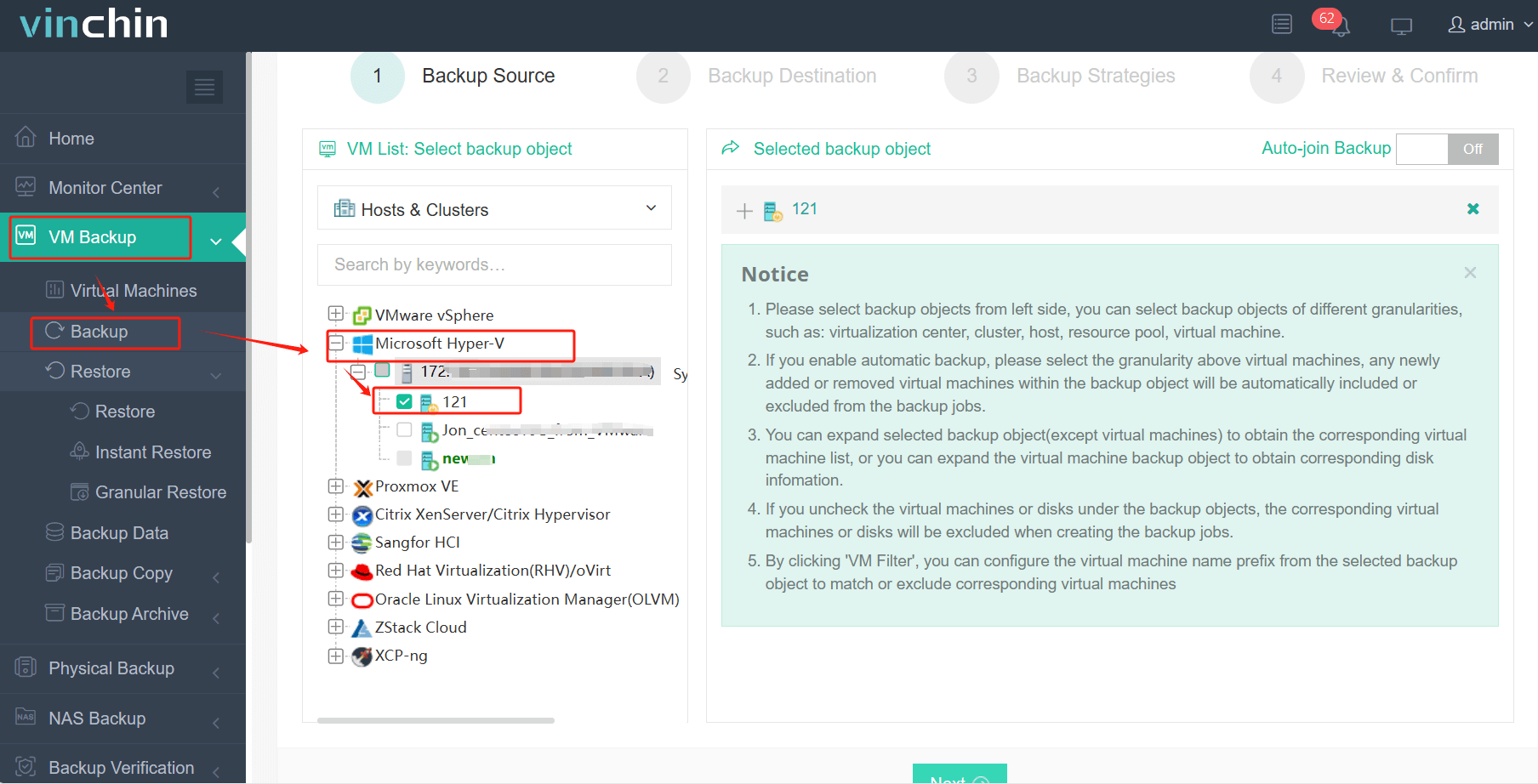
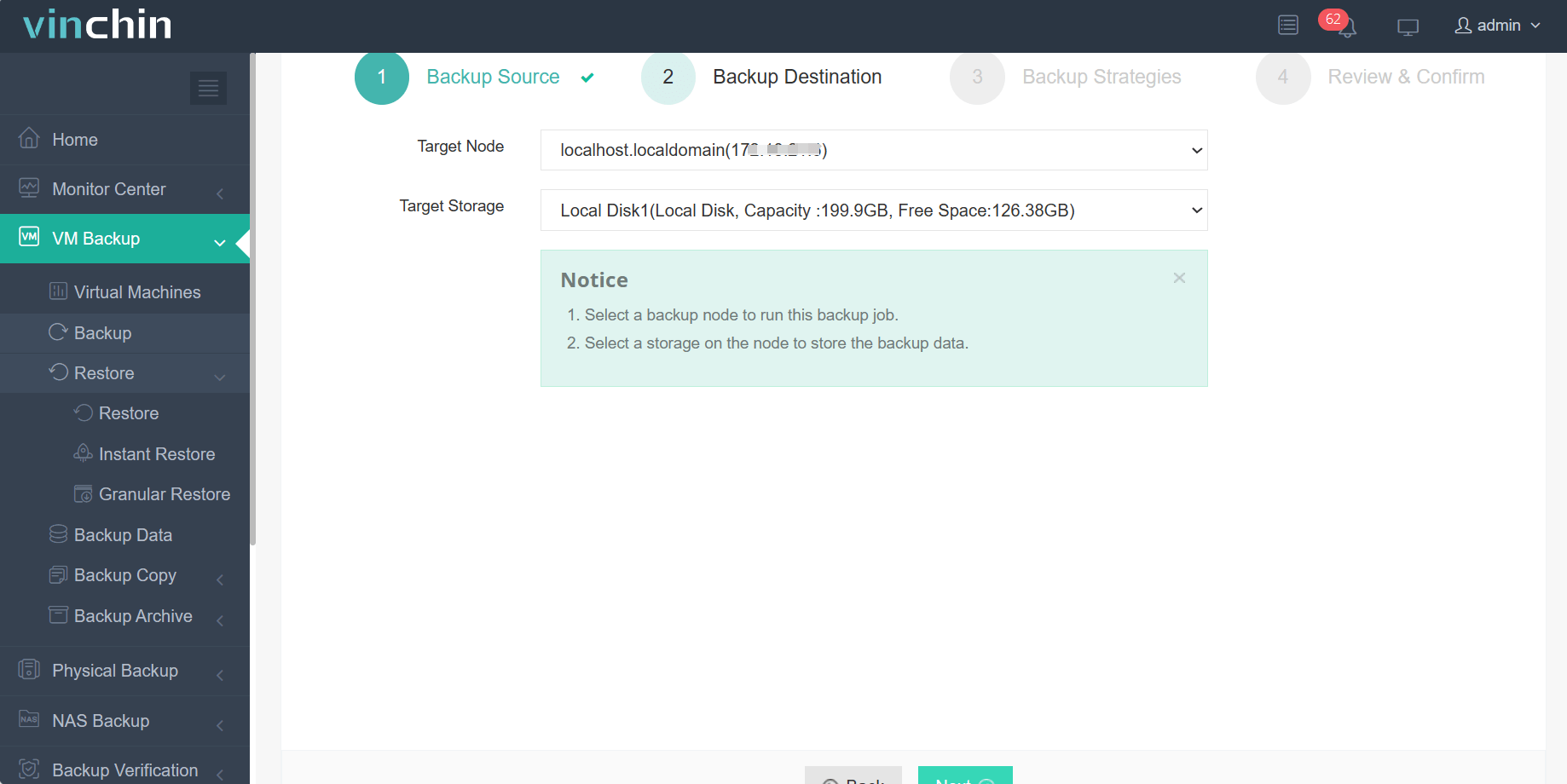
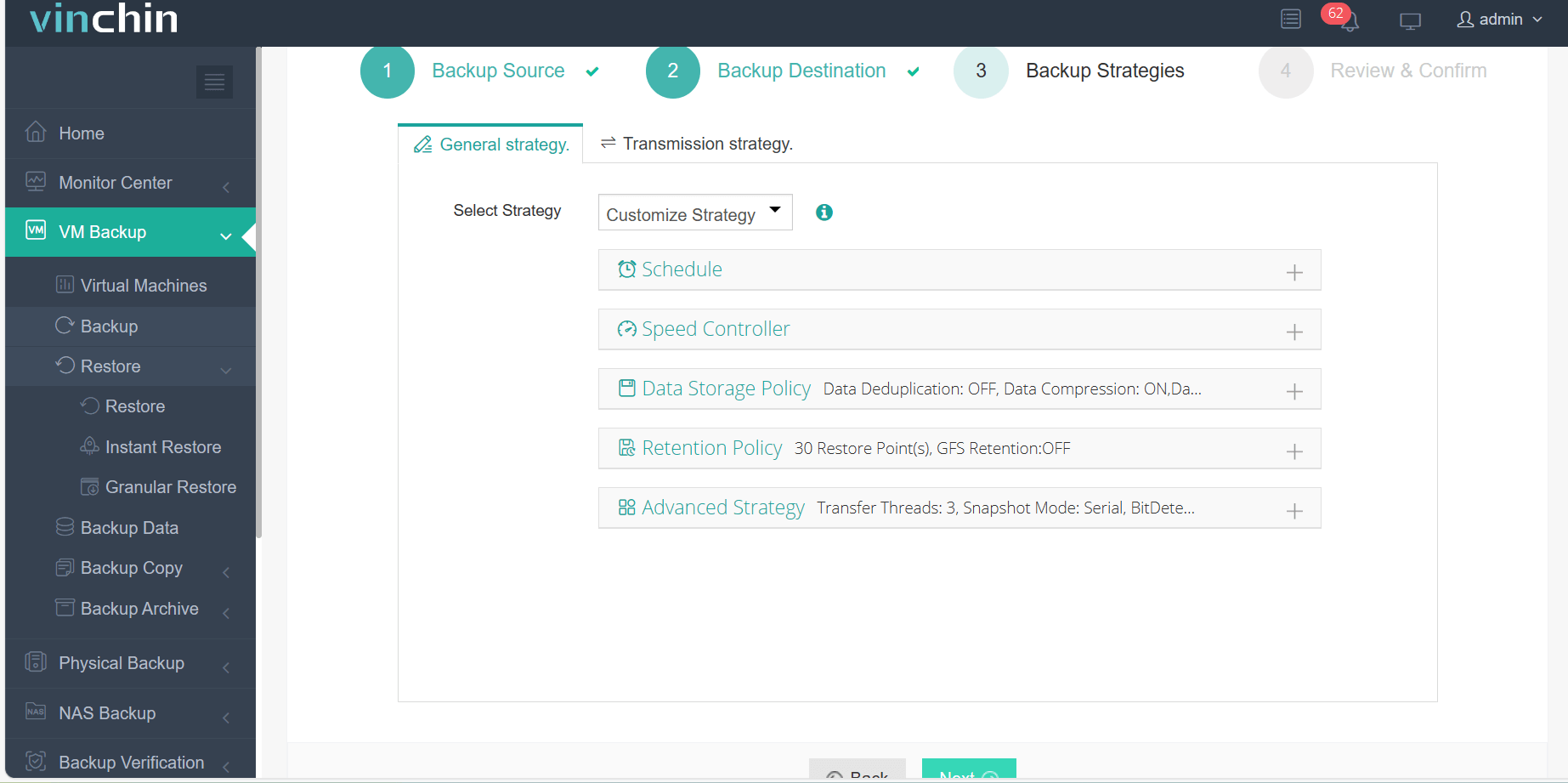
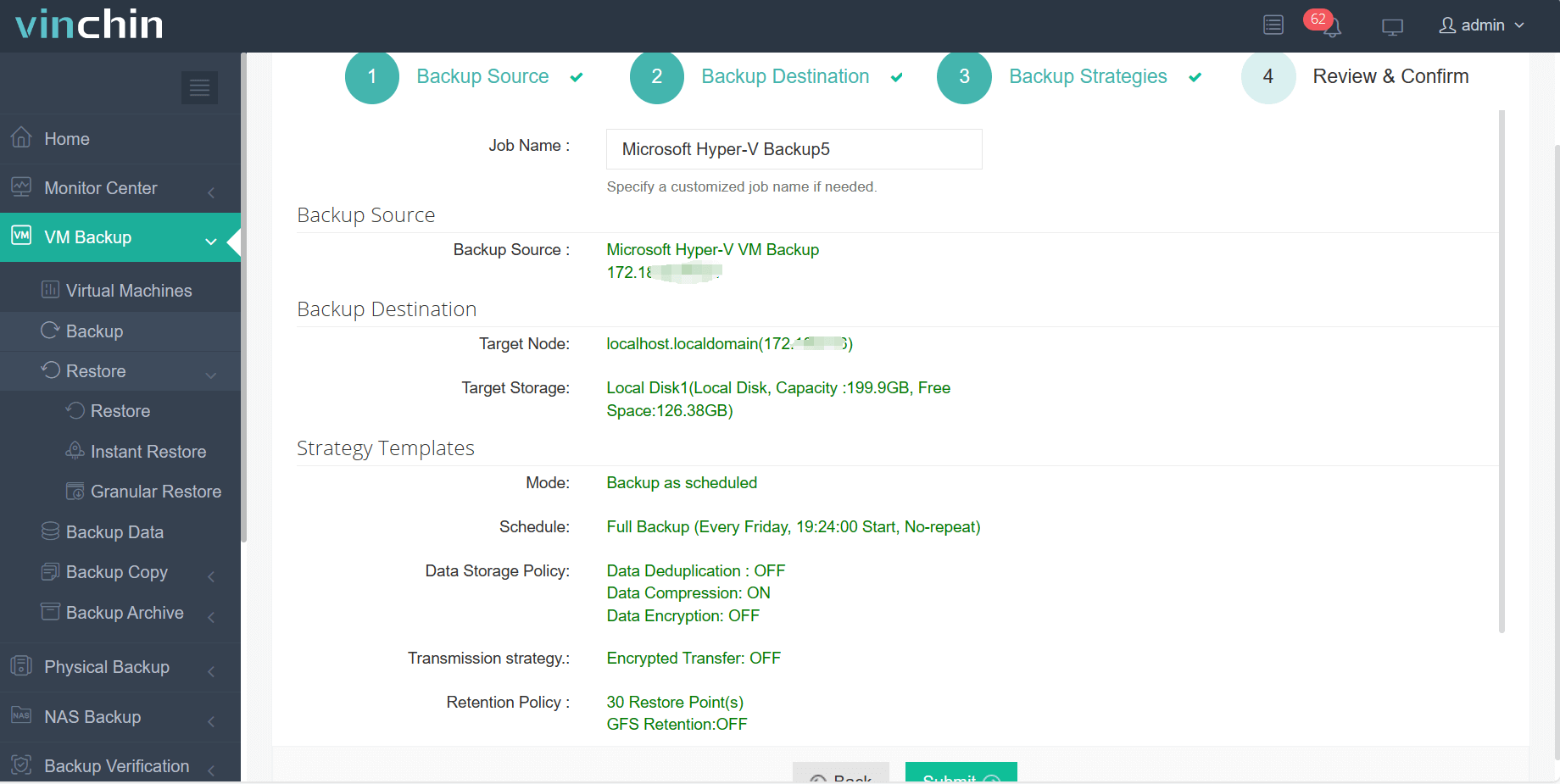
The intuitive web console makes protecting a Hyper‑V VM straightforward:
Step 1: Select the Hyper‑V VM to back up
Step 2: Choose the backup storage
Step 3: Configure the backup strategy
Step 4: Submit the job
Recognized globally by thousands of enterprises and rated highly by industry experts,Vinchin Backup & Recovery offers a full-featured free trial for 60 days; click below to get started today.
Best Hyper-V Backup Software FAQs
Q1: What risks do enterprises face without dedicated Hyper-V backups?
Unprotected VMs are vulnerable to data loss from outages, ransomware attacks targeting local disks or accidental deletions by staff members who lack granular restore options through native tools alone, which leads directly to costly downtime plus lasting reputational damage among clients who expect always-on services backed by robust safeguards against failure scenarios documented in industry reports.
Q2: How does automated backup improve business resilience?
Automation reduces human error by enforcing consistent schedules aligned with defined RPOs so no critical workload gets skipped even during busy periods and speeds up recovery after incidents since IT teams spend less time troubleshooting missed jobs while restoring affected systems faster thanks to pre-tested workflows built into leading platforms like Vinchin Backup & Recovery which centralize policy management across large-scale deployments per Gartner recommendations.
Q3: Can a single solution support both compliance needs and operational efficiency?
Yes; modern platforms such as Vinchin combine policy-driven automation, including role-based access controls with detailed audit trails covering every action taken within their interfaces so organizations can demonstrate regulatory compliance easily during audits while optimizing IT workflows through centralized dashboards designed specifically around enterprise requirements outlined in frameworks like ISO 27001.
Conclusion
Neglecting regular Hyper-V backups exposes businesses to preventable losses from extended downtime through regulatory fines to permanent brand damage few recover from fully. For a reliable Hyper-V backup solution, opt for Vinchin to achieve business continuity and stable revenue increasement.









