ZStack is an open-source cloud management platform built on KVM virtualization technology. It provides flexible APIs that allow organizations to manage virtual machines at scale across private or hybrid clouds. As enterprises deploy critical workloads on ZStack VMs, ensuring robust data protection becomes essential—not just for operational continuity but also for meeting strict regulatory requirements.
Data loss can cripple business operations. For IT teams managing ZStack environments, backup is not enough unless it includes secure offsite replication. This means your backups must travel safely to remote locations—encrypted during transit and storage—to withstand disasters or attacks that could compromise your primary data center. Regulatory frameworks such as HIPAA (for healthcare), GDPR (for European personal data), or SOX (for financial reporting) demand strong controls over how long data is retained and how quickly it can be restored after an incident.
Understanding why secure offsite replication matters—and what features make a backup solution compliant—helps you avoid costly mistakes while protecting your business from downtime or penalties.
Why Secure Offsite Replication Matters in Enterprise Environments
Secure offsite replication protects your organization against threats that local backups alone cannot address. By sending encrypted copies of your ZStack VM backups to remote sites or cloud storage, you create a safety net that ensures business continuity even if your main infrastructure fails.
● Protection Against Physical Site Disasters: Localized events such as fires, floods, earthquakes, or power outages can destroy both production systems and onsite backups at once. Offsite replication ensures you have recoverable copies stored far from harm's way.
● Defense Against Hardware Failure: Even redundant hardware setups are vulnerable to catastrophic failures—think simultaneous disk crashes or controller malfunctions—that could wipe out all locally stored data.
● Mitigation of Malicious Cyberattacks: Ransomware and other targeted attacks often seek out backup repositories within the same network as production systems. By replicating encrypted backups offsite over secure channels like VPNs or SSL/TLS connections, you reduce exposure to these threats.
● Compliance With Industry Regulations: Laws such as HIPAA require healthcare providers to store patient records securely—even during transfer between locations—and maintain them for set periods. GDPR mandates similar controls for personal data processed by EU organizations. Failing audits due to insecure backup practices can result in heavy fines or legal action.
● Faster Recovery After Disaster: Offsite replicated backups enable rapid restoration of services from alternate locations when disaster strikes. This minimizes downtime—a key metric in most compliance frameworks—and keeps critical applications available for users who depend on them.
Secure offsite replication is not just about ticking boxes; it is about building resilience into your IT strategy so you can recover quickly no matter what happens locally.
How To Choose The Best ZStack Backup Solution for Secure Offsite Replication
Selecting backup software for ZStack involves more than checking compatibility lists—it requires evaluating whether each solution meets enterprise security standards while supporting regulatory compliance needs across industries like finance or healthcare.
A reliable solution should automate backup transfers to geographically distant sites using encrypted channels; enforce granular retention policies; provide centralized oversight; scale easily; and adapt quickly as new compliance rules emerge.
● Automated Offsite Transfer: Look for solutions that schedule regular transfers of VM backups from primary storage to remote sites without manual intervention. Automation reduces human error—a leading cause of failed replications—and guarantees consistent protection across all workloads regardless of staff availability or turnover rates.
● End-to-End Encryption: Ensure every byte sent between source and destination is protected using strong encryption algorithms such as AES-256. Data should remain encrypted both during transmission (“in transit”) via protocols like SSL/TLS and while sitting idle (“at rest”) on secondary storage devices at the remote location.
● Customizable Retention Policies: Different types of information may require different retention periods based on legal mandates—for example: financial records versus user profiles versus system logs. Your chosen platform should let administrators define unique retention schedules per job so old versions are purged automatically when they expire but critical archives remain accessible until their mandated deletion date arrives.
● Centralized Management Dashboard: A unified interface helps IT teams monitor ongoing replications in real time; receive alerts if jobs fail; review detailed logs; generate audit-ready reports showing compliance status; and troubleshoot issues before they escalate into outages—all from one place rather than juggling multiple tools or spreadsheets.
● Scalability & Compatibility: As businesses grow—or regulations change—their backup infrastructure must keep pace without requiring disruptive migrations or forklift upgrades. Solutions designed around modular architectures let you add capacity incrementally (e.g., more nodes) while maintaining seamless integration with evolving security standards like multi-factor authentication (MFA) or immutable storage options.
Choosing wisely now prevents expensive rework later when auditors come calling—or when disaster recovery plans are put to the test under real-world conditions.
Vinchin Backup & Recovery: Enterprise-Grade Protection for ZStack
For organizations seeking advanced protection in KVM-based environments like ZStack, Vinchin Backup & Recovery delivers comprehensive enterprise-level VM backup capabilities across 15+ mainstream virtualization platforms—including VMware, Hyper-V, Proxmox, oVirt, OLVM, RHV, XCP-ng, XenServer, OpenStack, and especially ZStack itself. Its broad compatibility makes it ideal for mixed-infrastructure scenarios where seamless integration is crucial.
Among its extensive feature set tailored for demanding enterprise needs are agentless full/incremental/differential backups with deduplication and compression; LAN-free backup support specifically optimized for ZStack environments; granular restore options enabling precise file-level recovery; flexible GFS retention policy management aligned with regulatory mandates; and robust V2V migration tools facilitating smooth workload mobility between platforms—all designed to maximize efficiency while minimizing risk.
With Vinchin Backup & Recovery’s intuitive web console, backing up a ZStack VM takes just four steps:
Step 1: Select the ZStack VM to back up.
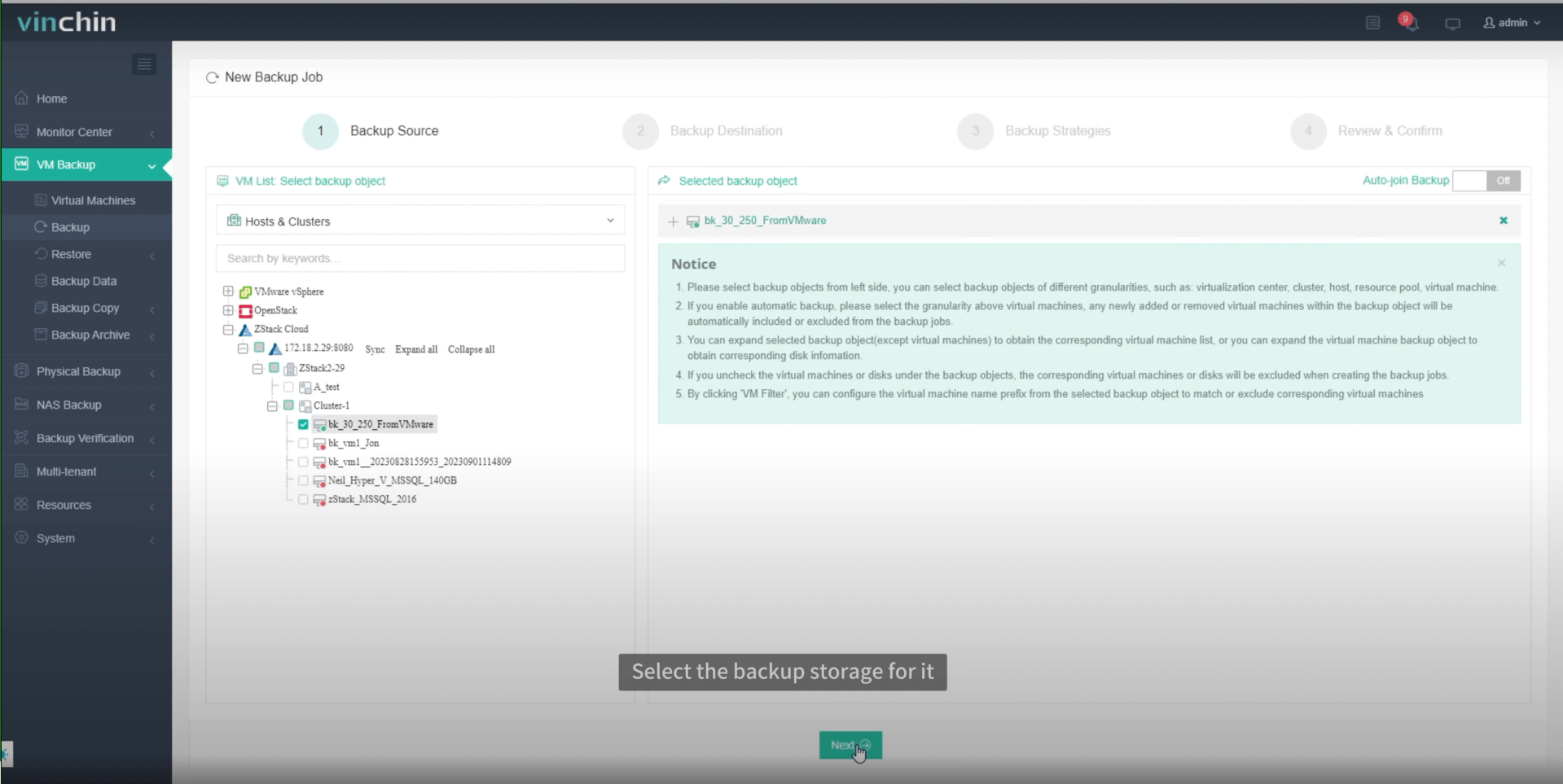
Step 2: Choose the backup storage.

Step 3: Configure the backup strategy.
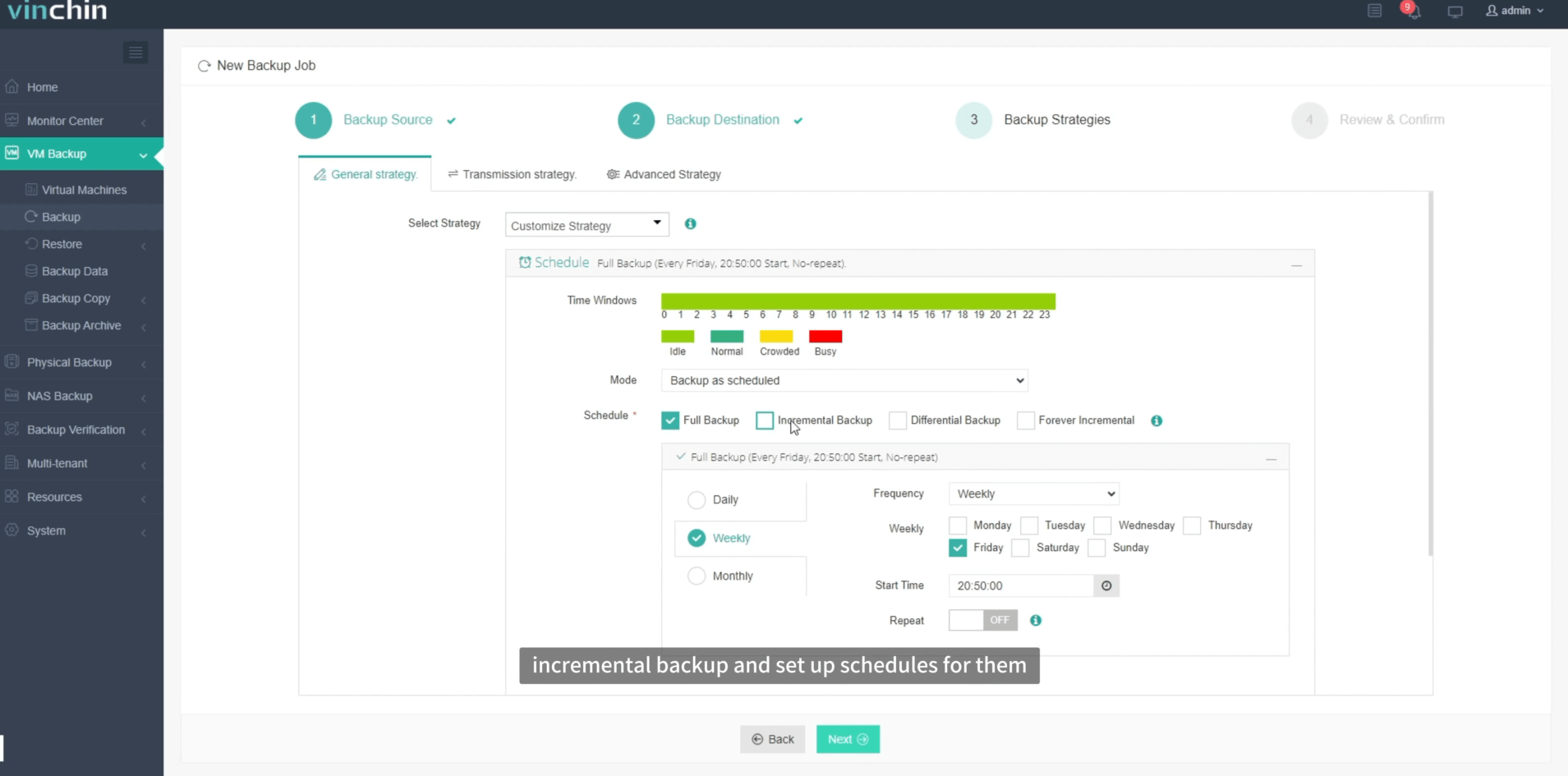
Step 4: Submit the job.
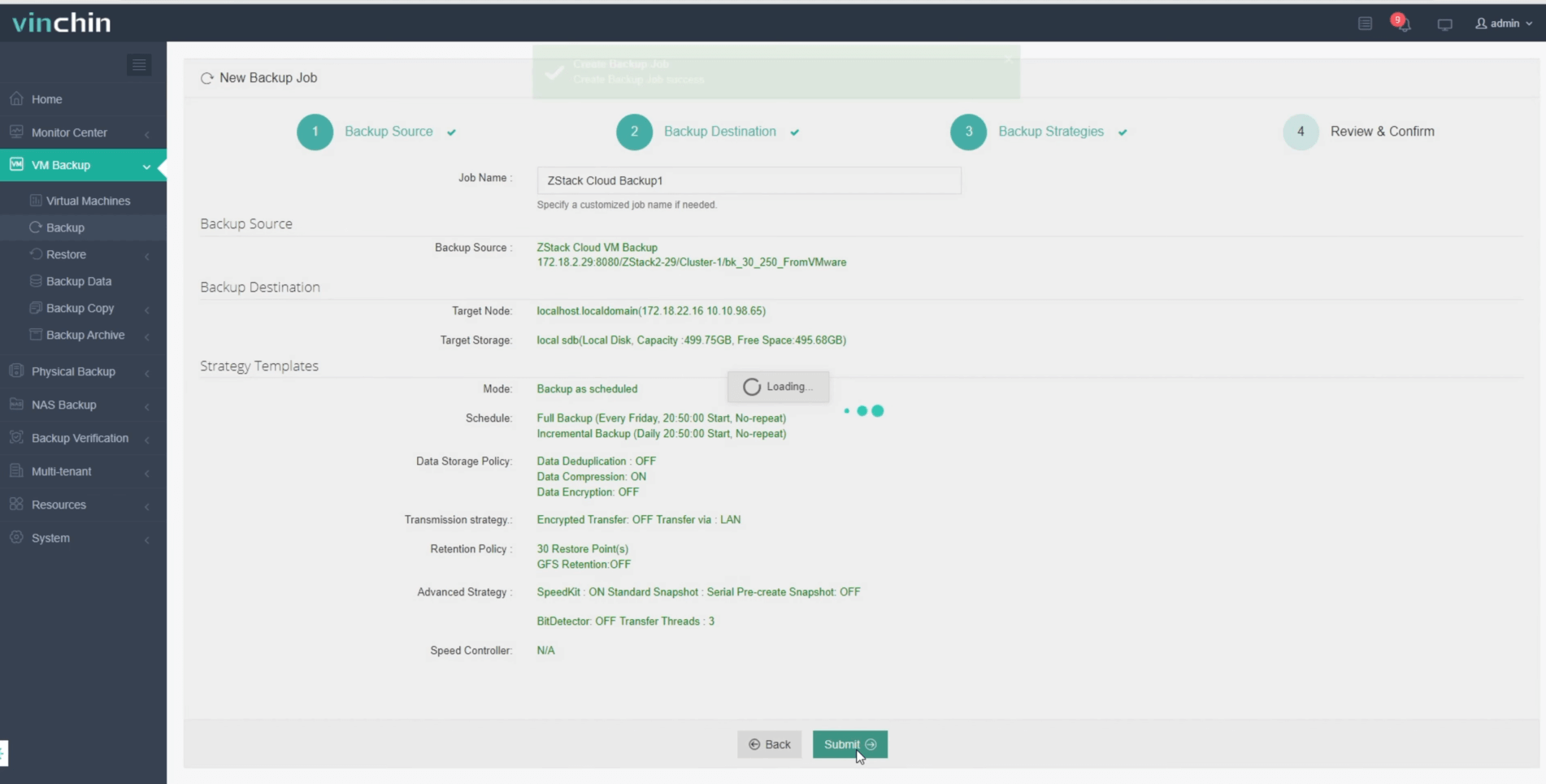
Recognized globally by thousands of customers with top ratings in independent reviews, Vinchin Backup & Recovery offers a fully featured 60-day free trial—experience trusted enterprise-grade data protection today by clicking the download button below!
Best ZStack Backup Software FAQs
Q1: Does enterprise-grade software support encrypted offsite replication by default?
Enterprise-class solutions should offer configurable encryption options that protect data both during transfer (“in transit”) via protocols like SSL/TLS—and while stored remotely (“at rest”). For example,Vinchin Backup & Recovery utilizes AES-256 encryption by default throughout its offsite copy process.
Q2: Can retention policies be customized based on different compliance needs?
Most advanced platforms allow administrators granular control over retention settings per workload type—enabling automatic deletion according to industry-specific mandates such as those found in HIPAA,GDRP,and SOX. Vinchin offers policy-based retention configuration tailored per job requirement, to help ensure ongoing regulatory alignment without manual intervention.
Q3: How does centralized management improve risk oversight?
Centralized dashboards consolidate monitoring across all protected assets—making it easier detect failed jobs,gather historical logs,and produce audit-ready reports.This visibility enables proactive troubleshooting before small problems become major incidents. Vinchin delivers this through its Unified Web Console which tracks every task end-to-end,in real time.
Conclusion
Selecting a ZStack backup solution with secure automated offsite replication safeguards resilience while meeting strict regulations. Solutions like Vinchin deliver proven enterprise-grade protection, minimizing risk, enabling fast recovery, and helping maintain continuous compliance—even under pressure from audits or unexpected disasters.









