Modern IT teams need backup tools that work hand-in-hand with their virtualization management consoles. This integration brings all backup tasks into one place, making life easier for administrators. It also helps organizations enforce policies, speed up recovery times, and keep operations running smoothly even as environments grow larger and more complex.
Integration is not just about convenience. When backup software connects directly to your management console, you gain centralized control over your virtual machines (VMs) and their data protection. This means fewer mistakes, faster responses to incidents, and better compliance with industry standards. For enterprises managing hundreds or thousands of VMs across multiple hosts, having everything in one dashboard is essential for efficiency.
The best XCP-ng backup tools offer this level of integration by using APIs like XenAPI or plugin frameworks built into the virtualization platform. These connections allow backup solutions to discover VMs automatically, apply policies at scale, monitor job status in real time, and trigger restores—all without switching between different interfaces or risking configuration drift.
Why Integration with Virtualization Management Consoles Matters in Enterprise Environments?
Seamless integration between backup tools and virtualization management consoles is a game-changer for enterprise IT teams. It allows organizations to manage backups within existing workflows while reducing complexity and risk.
● Centralized Control Reduces Human Error: Managing backups from the same interface used for VM administration ensures consistency across all operations. Administrators can set policies once and apply them everywhere without jumping between separate systems. This unified approach lowers the chance of missing critical steps or misconfiguring jobs—a common source of data loss during disasters.
● Unified Visibility Improves Oversight: With integrated dashboards showing both VM health and backup status side-by-side, teams get a complete picture of their environment at a glance. They can spot issues early—such as failed backups or unprotected VMs—and take action before problems escalate.
● Faster Recovery Minimizes Downtime: When disaster strikes—be it hardware failure or ransomware attack—integrated solutions enable rapid restores directly from the management console. There’s no need to coordinate between different teams or wait for manual intervention; recovery becomes part of routine operations.
● Streamlined Compliance Simplifies Audits: Regulatory requirements often demand detailed records of data protection activities. Integrated reporting tools collect logs from both VM operations and backups in one place, making audits straightforward while ensuring nothing slips through the cracks.
● Reduced Operational Overhead Saves Time: By eliminating duplicate tasks (like manually mapping VMs between systems), integrated solutions free up staff for higher-value work. Automation features further reduce day-to-day effort required to maintain reliable backups across large infrastructures.
Technical integration usually relies on APIs such as XenAPI, which let third-party tools communicate securely with XCP-ng’s core services. Some platforms also support plugin architectures that extend functionality without disrupting core operations—a key advantage when scaling out enterprise deployments.
How To Choose The Best XCP-ng Backup Solution for Console Integration?
Choosing an XCP-ng backup solution that integrates well with your virtualization management console requires careful evaluation of several factors beyond basic compatibility. A strong choice will support growth while minimizing operational risks.
A good starting point is checking whether the solution offers native support for your chosen management console via direct API calls or certified plugins. This ensures seamless communication between systems without custom scripting or unreliable workarounds.
● Scalability Ensures Future-Proofing: As environments grow—from dozens to hundreds (or thousands) of VMs—the backup tool must handle increasing workloads without performance bottlenecks. Look for solutions tested in large-scale deployments that can manage multi-host clusters efficiently through centralized scheduling engines.
● Automation Drives Consistency: Automated policy enforcement reduces manual intervention by applying schedules, retention rules, encryption settings, and storage targets uniformly across all protected assets. Advanced automation may include auto-discovery of new VMs so nothing gets left behind during rapid expansion.
● Role-Based Access Control Protects Data: Granular permissions restrict who can view reports, modify configurations, initiate restores—or even see certain VMs—in line with organizational security policies like least privilege access.
● Audit-Ready Reporting Supports Compliance: Built-in reporting modules generate unified logs covering both VM activity and backup events—essential for passing regulatory audits such as GDPR or HIPAA reviews. Some solutions export reports automatically on schedule so auditors always have up-to-date evidence at hand.
● Vendor Support Maintains Compatibility: Virtualization platforms evolve rapidly; regular updates introduce new features but may break unsupported integrations if vendors lag behind on patches or certifications. Choose providers known for responsive support channels who commit publicly to ongoing compatibility testing against current releases of XCP-ng and its ecosystem components.
Some trade-offs exist: deep integration may create dependencies on specific versions of management consoles; if those consoles go offline due to maintenance or outages, some advanced functions could become temporarily unavailable until connectivity is restored—a factor worth considering when designing high availability strategies.
Vinchin Backup & Recovery: Enterprise-Grade Protection for XCP-ng
For organizations seeking robust protection tailored specifically to XCP-ng environments alongside other mainstream hypervisors such as VMware, Hyper-V, Proxmox VE, oVirt/OLVM/RHV, XenServer/Citrix Hypervisor, OpenStack, ZStack and more (15+ total), Vinchin Backup & Recovery stands out as an enterprise-level virtual machine backup solution designed for seamless integration with virtualization management consoles. Its comprehensive feature set includes full/incremental/differential backups; LAN-free transfer; CBT-based fast incremental jobs; instant recovery; deduplication/compression; granular restore; cloud/tape archive; scheduled automation; GFS retention policy; data encryption; multi-thread transmission; V2V migration—and more—to meet demanding business continuity needs across diverse infrastructures.
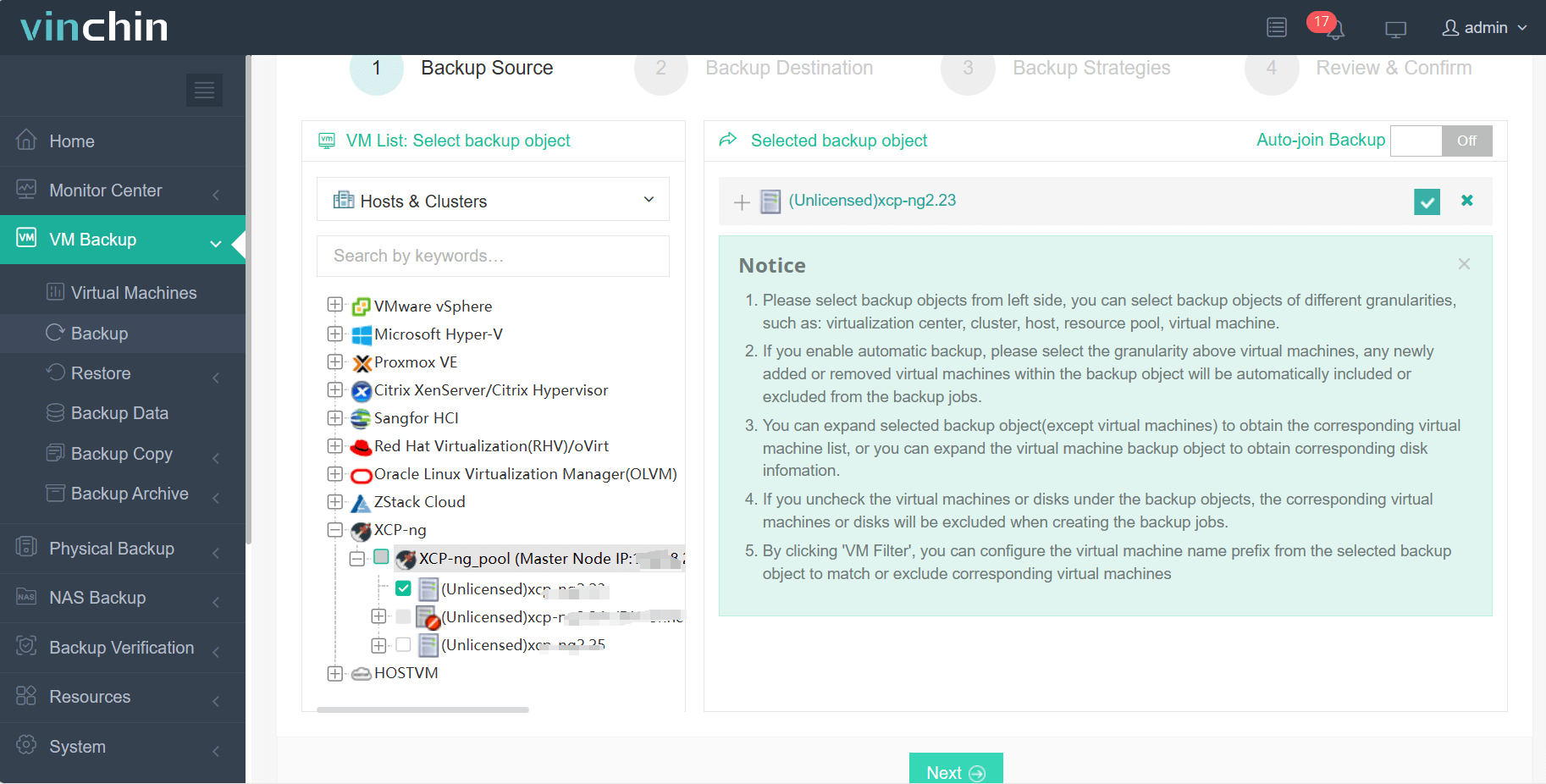
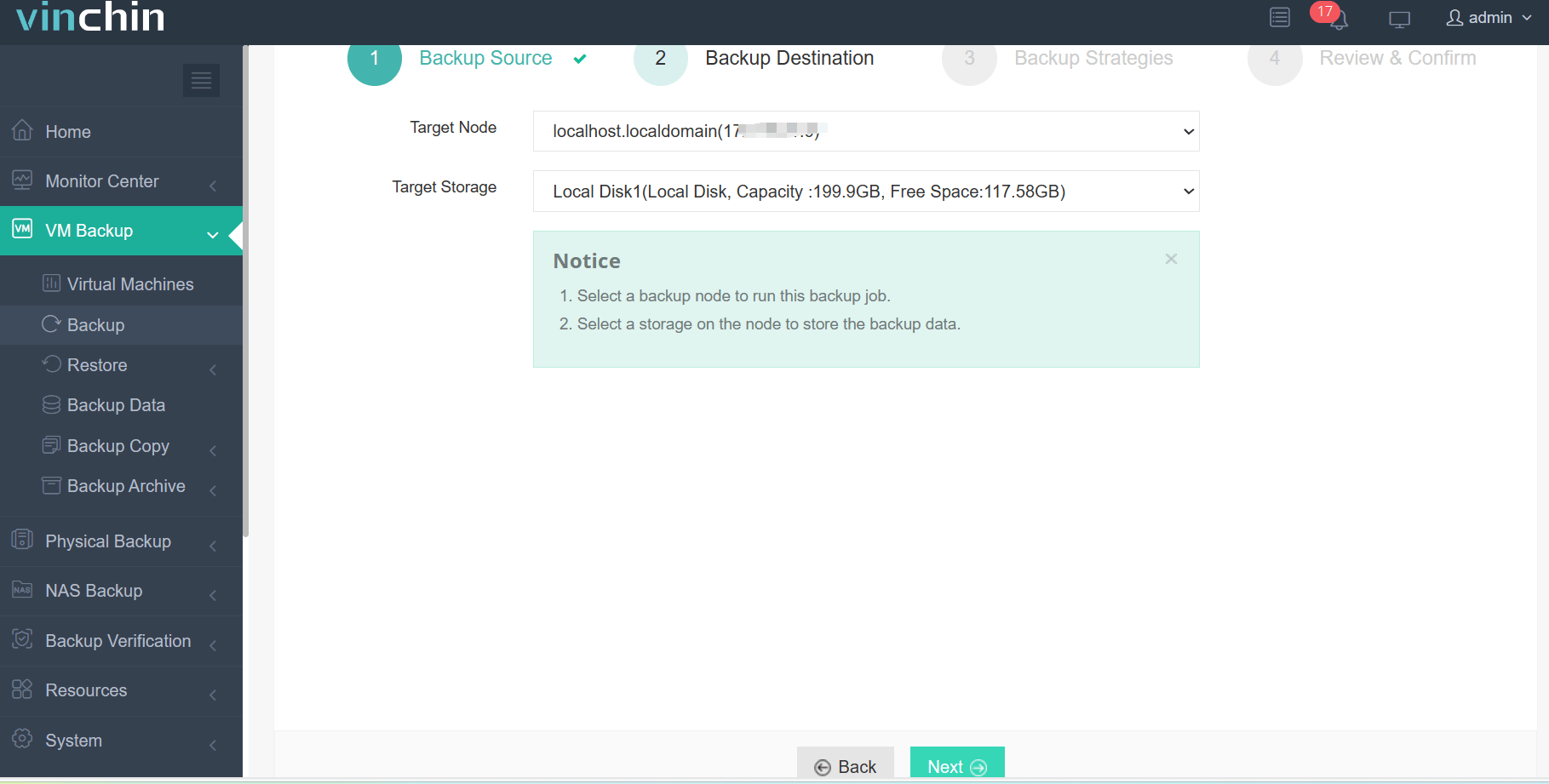
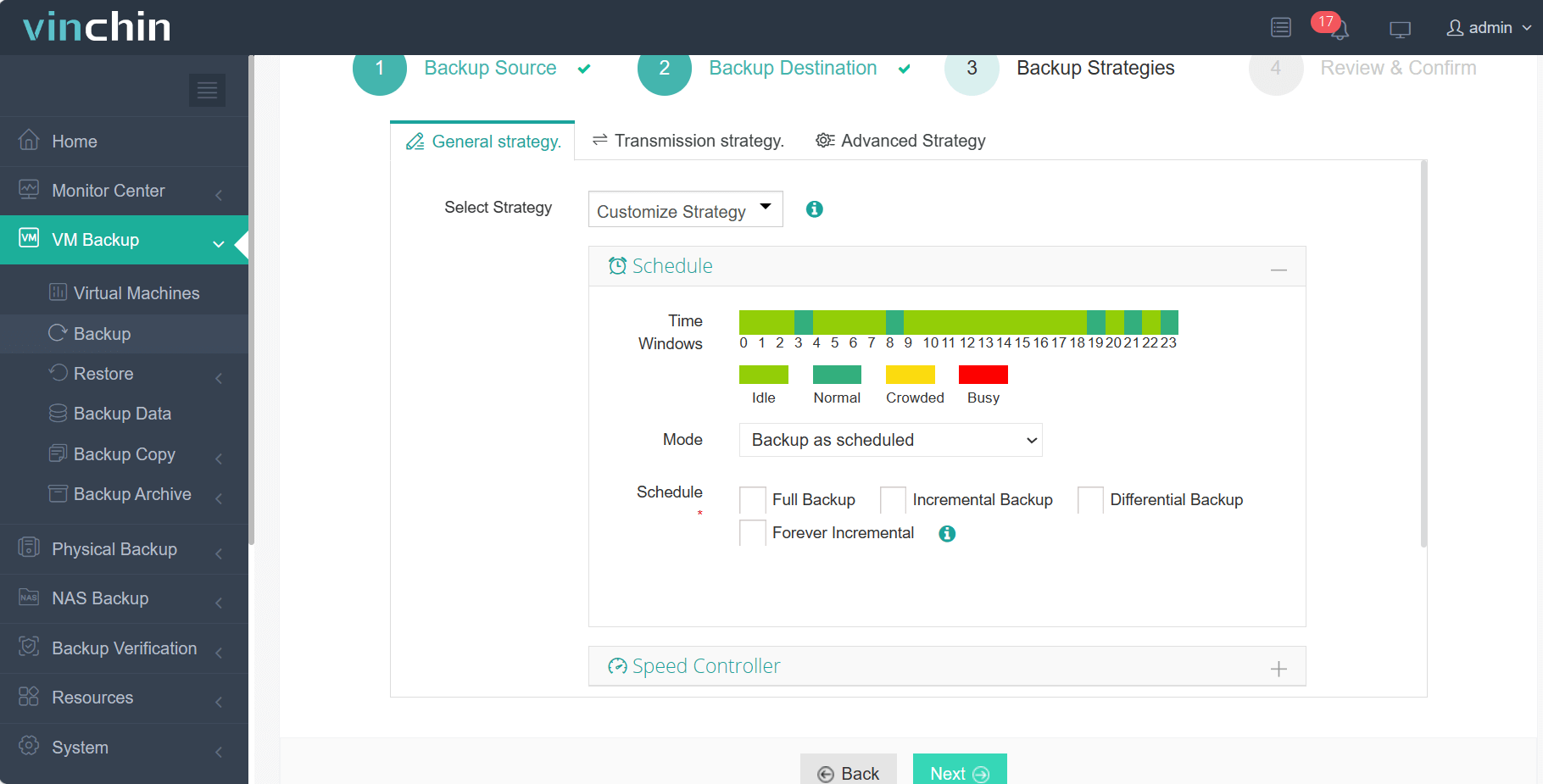
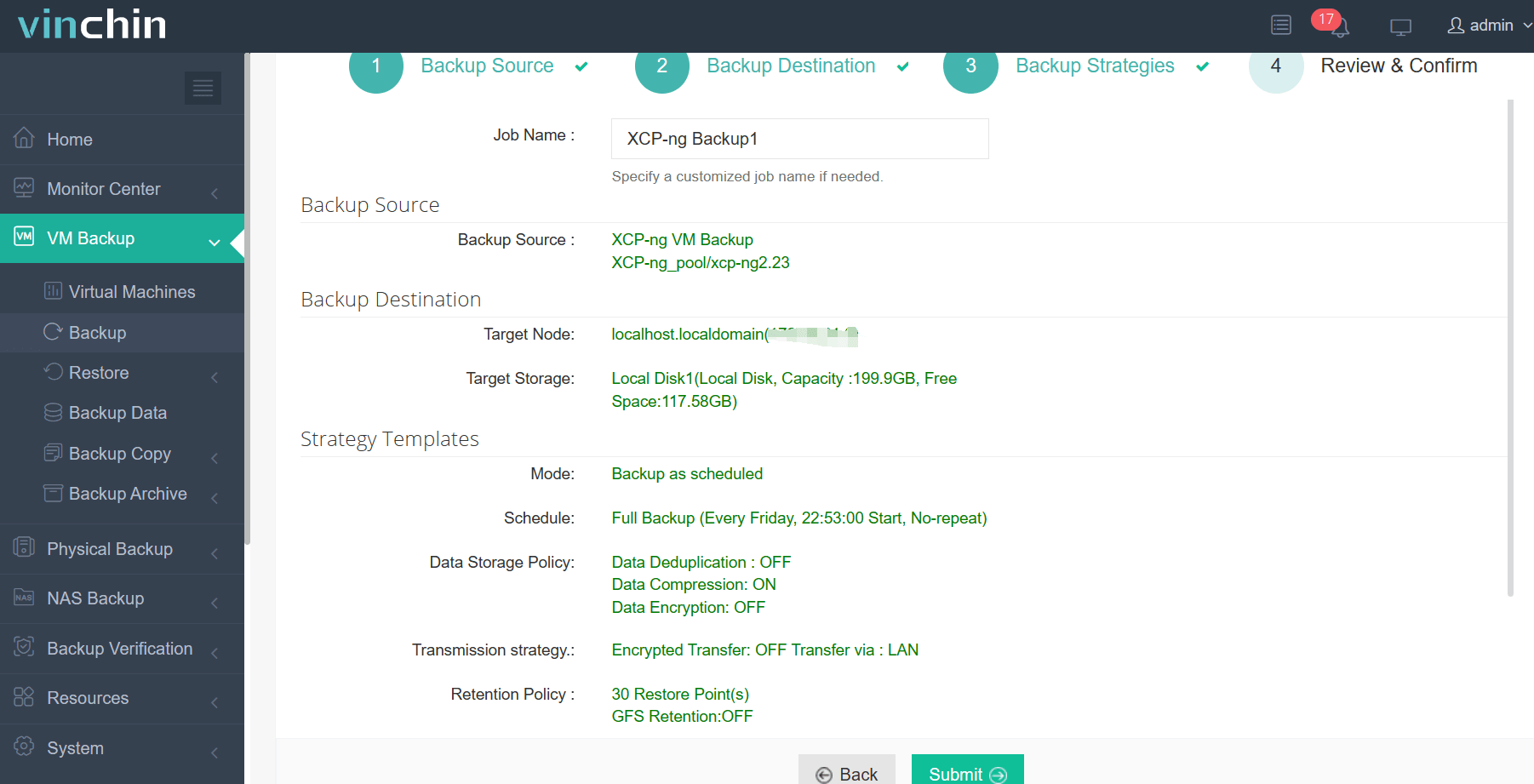
Vinchin Backup & Recovery features an intuitive web console that simplifies every step:
Step 1: Select the XCP‑ng VM to back up;
Step 2: Choose the backup storage;
Step 3: Configure the backup strategy;
Step 4: Submit the job.
Trusted globally by enterprises—with top ratings—Vinchin Backup & Recovery offers a 60-day full-featured free trial so you can experience its power firsthand—click below to download now.
Best XCP-ng Backup Software FAQs
Q1: Why is console integration critical in enterprise XCP-ng backups?
It enables centralized control over backup operations while reducing manual errors improving compliance tracking efficiency across large environments.
Q2: Does integration affect scalability?
Yes—integrated solutions scale more efficiently by leveraging existing infrastructure controls allowing seamless growth without sacrificing performance or oversight capabilities.
Q3: How does integrated reporting help compliance?
It provides unified logs audit trails required by regulatory standards such as GDPR HIPAA making it easier to demonstrate adherence during official reviews without extra manual effort collecting disparate records from multiple sources.
Q4: What risks arise from non-integrated tools?
Fragmented management increases error rates complicates disaster recovery planning introduces unnecessary delays during incident response potentially leading to longer downtimes lost productivity increased exposure during audits.
Conclusion
Integrated XCP-ng backups ensure business continuity resilience simplify compliance empower IT teams deliver reliable results every day.








