Large-scale ZStack environments power critical workloads in finance, healthcare, telecoms, and cloud service providers. These infrastructures often support hundreds or thousands of virtual machines (VMs) running around the clock. ZStack’s distributed architecture enables high availability but also increases backup complexity. Fast and efficient backups are essential to avoid bottlenecks that can disrupt business operations.
Backup window refers to how long it takes to complete a full data protection cycle. In large deployments, this window can stretch into hours if not managed well. Extended backup windows slow down applications and risk missing recovery objectives. According to Gartner’s research on IT downtime costs, every minute of downtime can cost enterprises thousands of dollars.
Why Reducing Backup Window Matters in Enterprise Environments
Shortening the backup window is crucial for enterprise IT teams managing mission-critical systems. A streamlined backup process helps maintain system performance while ensuring data safety.
● Minimized Business Disruption: Long backup windows can degrade application performance or even cause outages during peak hours. For example, hospitals need electronic health records available 24/7; any slowdown could impact patient care.
● Reduced Risk of Data Loss: Prolonged backups increase exposure to data loss between cycles. If a failure occurs mid-backup or before completion, recent changes may not be protected.
● Improved Compliance: Many industries must meet strict recovery time objectives (RTO) and recovery point objectives (RPO). Regulations like GDPR or HIPAA require timely recoverability of sensitive information. Failing these standards risks legal penalties.
● Enhanced Business Continuity: Shorter backup windows mean faster restores after incidents such as ransomware attacks or hardware failures. This supports robust disaster recovery plans that keep businesses operational with minimal interruption.
By reducing backup duration in large-scale ZStack environments, organizations protect their reputation while meeting regulatory demands and customer expectations.
How To Choose The Best ZStack Backup Solution for Reducing Backup Window
Selecting an effective ZStack backup solution requires careful evaluation of features that directly impact speed and scalability in enterprise settings.
● High-Performance Data Transfer: Solutions should offer LAN-free transfer methods that move data over dedicated storage networks instead of congesting production LANs. This approach keeps business traffic flowing smoothly while backups run in parallel.
● Incremental Forever Strategies: Incremental forever backup means after one full backup, only changed data blocks are captured during subsequent jobs. Unlike traditional differential backups—which grow larger over time—incremental forever minimizes both time spent backing up and storage used. For example, protecting a VM farm with daily incremental jobs ensures quick cycles without repeated full transfers.
● Parallel Processing Capabilities: Modern solutions leverage multi-threading to run several backup tasks simultaneously across multiple nodes or servers. This parallelism drastically reduces total job duration when safeguarding hundreds of VMs at once—a necessity for cloud providers scaling out infrastructure rapidly.
● Scalability Through Node Expansion: As your environment grows from dozens to thousands of VMs across sites or clusters, your backup tool must scale too. Centralized management consoles combined with easy node expansion let you add resources seamlessly without reconfiguring existing jobs or policies.
● Automation Features: Automated scheduling ensures regular protection without manual intervention—even during off-hours—and retention policies help manage storage by deleting outdated restore points automatically. Automation also simplifies compliance reporting since logs prove consistent execution over time.
● Robust Recovery Options: Meeting RTO/RPO targets depends on flexible restore capabilities—from single-file retrievals after accidental deletions to instant VM recoveries following major outages. Granular restore functions save time by avoiding unnecessary full VM restores when only a file is needed.
Choosing a solution with these attributes ensures your organization meets its uptime commitments while keeping operational overhead low—key factors in modern enterprise IT strategy.
Vinchin Backup & Recovery: Enterprise-Grade Protection for ZStack
To address the challenges faced by enterprises using ZStack virtualization at scale, Vinchin Backup & Recovery delivers professional-grade VM protection across more than 15 mainstream platforms—including VMware, Hyper-V, Proxmox VE, oVirt/RHV/OLVM, XCP-ng/XenServer, OpenStack, and especially ZStack itself—making it highly versatile for diverse IT landscapes found in financial services, healthcare institutions, telecom operators, and cloud providers alike.
Key features relevant for demanding ZStack environments include LAN-free backup (for Ceph-based setups), SpeedKit technology enabling incremental forever strategies similar to CBT tracking efficiency on other hypervisors, granular restore options for precise file-level recovery within VMs without restoring entire images, powerful deduplication and compression engines that optimize storage usage while accelerating both backups and restores overall efficiency; plus robust automation tools supporting scheduled tasks and retention policies.
With Vinchin Backup & Recovery’s intuitive web console interface:
Step 1: Select the ZStack VM to back up.
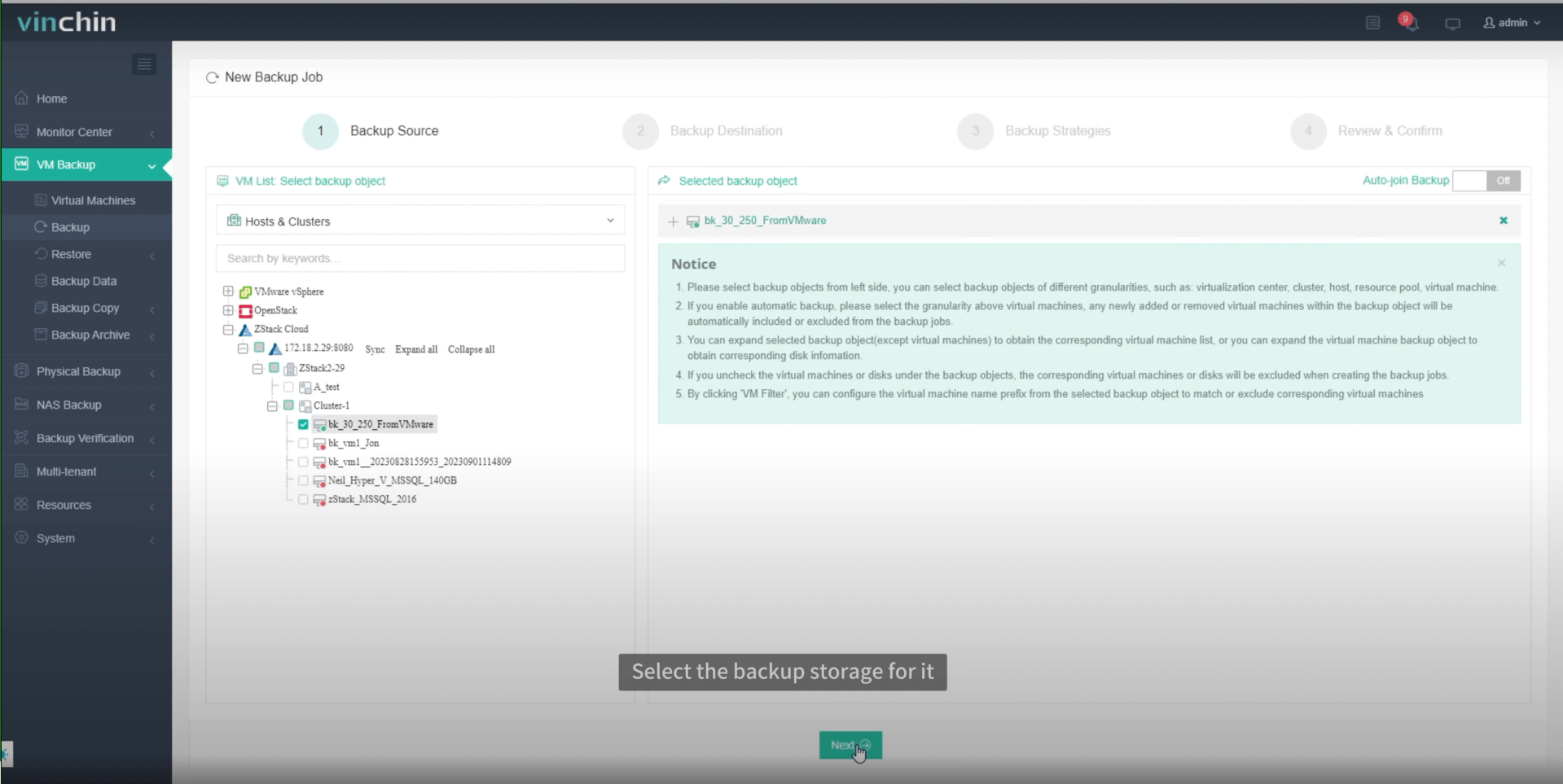
Step 2: Choose the backup storage.

Step 3: Configure the backup strategy.
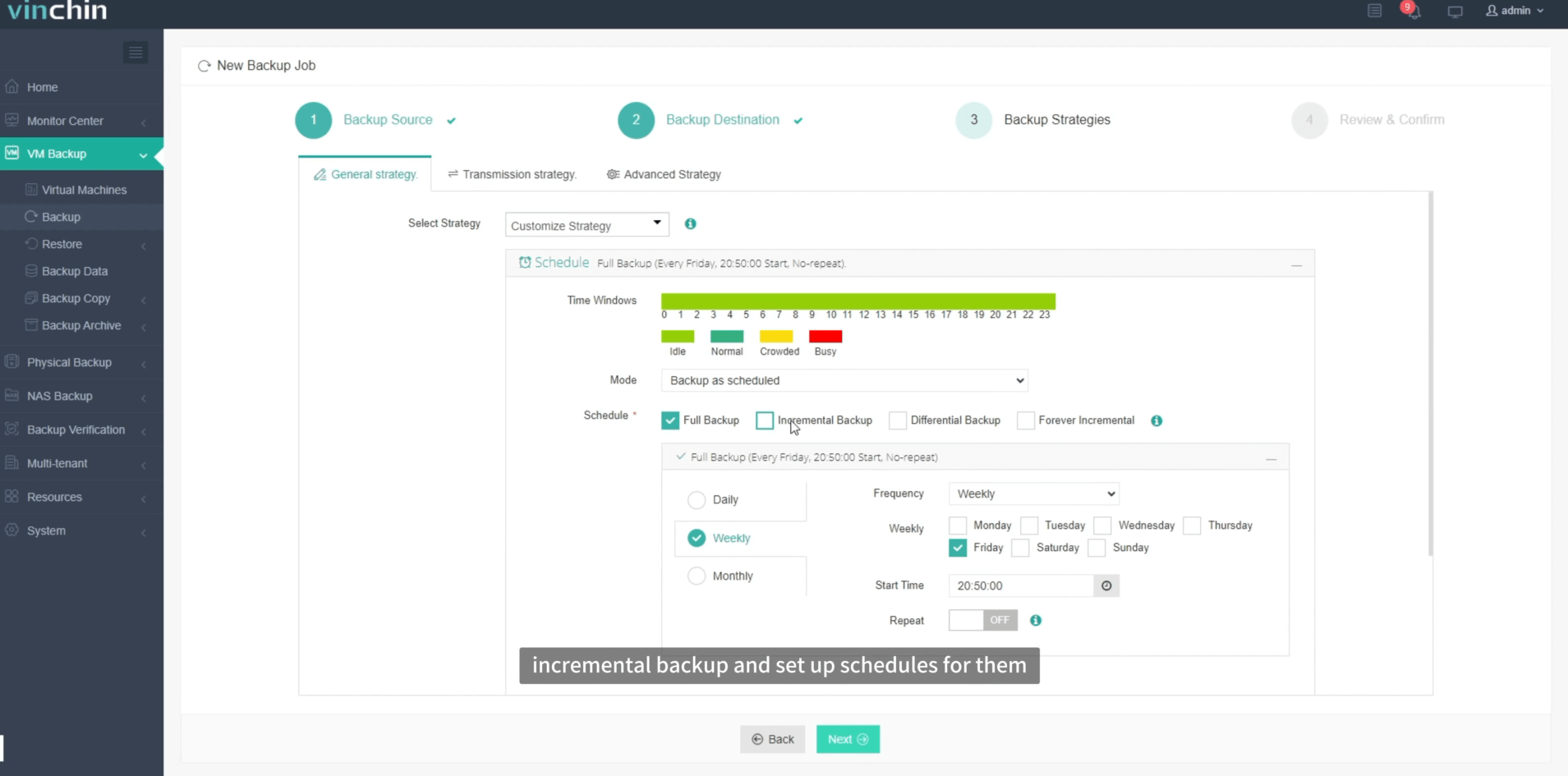
Step 4: Submit the job.
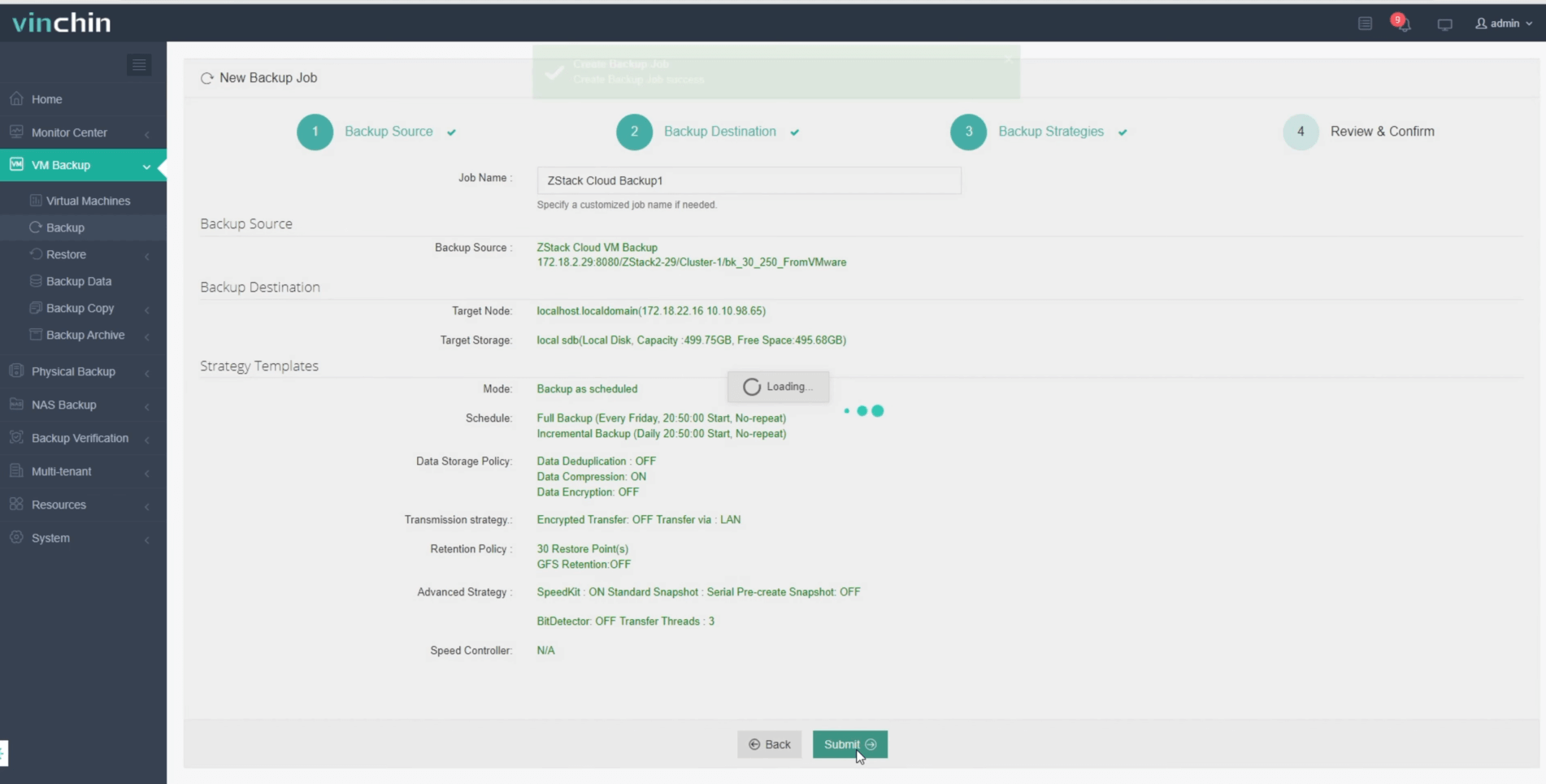
Recognized globally among enterprise users—with top ratings and a strong customer base—Vinchin Backup & Recovery offers a 60-day fully featured free trial so you can experience its advanced capabilities firsthand; click below to get started.
Best ZStack Backup Software FAQs
Q1: How does reducing the backup window benefit large-scale enterprises?
Shorter windows minimize disruption to production systems while helping meet strict uptime SLAs common in sectors like finance or healthcare where continuous access matters most.
Q2: What risks arise from long or unreliable backup windows?
Extended durations increase chances of missed RTO/RPO targets which may violate regulations such as GDPR or HIPAA depending upon industry involved; they also raise likelihood lost revenue due unplanned downtime events.
Q3: Can Vinchin scale with growing ZStack deployments?
Yes—backup node expansion allows seamless scaling alongside centralized management tools making growth straightforward regardless underlying infrastructure size.
Q4: Does Vinchin support automation of complex schedules?
Absolutely—automated scheduling plus retention policy configuration ensure consistent protection requiring minimal manual oversight even across highly dynamic virtualized landscapes.
Conclusion
Vinchin Backup & Recovery shortens your ZStack backup window while supporting fast restores at scale—helping enterprises stay resilient through reliable protection tailored specifically toward demanding virtualized environments everywhere.










