A leading Hyper-V VM backup software for secure offsite replication typically delivers encrypted transfers, automated workflows, and strong compliance controls. These features help organizations keep data safe from threats while meeting strict regulatory demands. Secure offsite replication ensures that business-critical information remains available even during disasters or cyberattacks.
Enterprises face growing risks from ransomware, hardware failures, natural disasters, and human error. Data loss can halt operations or lead to costly fines if sensitive information is exposed. Regulatory frameworks such as GDPR in Europe or HIPAA in healthcare require not only regular backups but also secure handling of protected data at every stage—storage, transfer, access, and recovery.
Key criteria for a secure and compliant solution include robust encryption methods like AES-256 both in transit and at rest; automation to reduce manual errors; granular access controls; audit trails for accountability; scalability to handle growth; vendor certifications (such as SOC 2 or ISO 27001); and support for immutable storage against ransomware. By focusing on these elements when choosing Hyper-V backup software, IT teams can ensure their disaster recovery plans align with legal standards while minimizing operational risk.
Why Secure Offsite Replication Matters in Enterprise Environments?
Secure offsite replication forms a critical part of any enterprise’s disaster recovery strategy. It provides assurance that vital systems can be restored quickly after an incident without exposing sensitive data to unauthorized parties or violating compliance mandates.
● Ensures Business Continuity
Maintaining uninterrupted access to essential applications is vital for modern enterprises. Secure offsite replication guarantees that even if your primary site becomes unavailable due to fire, flood, power outage—or targeted attacks like ransomware—you have a recent copy of your virtual machines stored safely elsewhere. This approach reduces downtime from days or weeks to hours or minutes depending on your recovery plan.
● Protects Against Data Breaches
Data breaches often result from weak security during backup transfers or storage. Using strong encryption protocols like AES-256, recognized by NIST as a gold standard for protecting sensitive government data, ensures that intercepted backups remain unreadable without proper keys. Enterprises avoid reputational damage by preventing unauthorized disclosure of customer records or intellectual property.
● Meets Regulatory Requirements
Compliance regulations demand more than just having backups—they require proof that those backups are handled securely throughout their lifecycle. For example, GDPR Article 32 mandates “the ability to restore availability in a timely manner” plus “encryption of personal data.” HIPAA requires covered entities to implement safeguards against unauthorized access during transmission. Secure offsite replication helps demonstrate adherence through auditable logs and documented procedures.
● Reduces Operational Risk
Operational risk increases when backup processes rely on manual steps prone to human error—missed schedules mean missing restore points when you need them most. Automated policy-driven replication ensures consistency across all VMs regardless of scale. Centralized monitoring lets administrators detect issues early before they impact recoverability.
● Supports Audit Readiness
Audits are now routine across industries subject to privacy laws or industry standards (PCI DSS for payment card data; SOX for financial reporting). Auditors expect detailed evidence showing how organizations protect backup copies—including who accessed them and when changes occurred. Solutions offering granular role-based access control (RBAC) with immutable logs make it easy to pass audits without scrambling for documentation at the last minute.
How To Choose The Best Hyper-V Backup Solution for Secure Offsite Replication?
Selecting effective Hyper-V VM backup software involves evaluating several key capabilities beyond basic file copying routines. Each feature should contribute directly toward security assurance and regulatory alignment while supporting efficient day-to-day operations.
● End-to-End Encryption
Encryption must cover both transfer (“in transit”) between sites/clouds and storage (“at rest”) within repositories so attackers cannot read stolen files even if they breach defenses. Look for solutions certified under recognized standards such as FIPS 140-2 validation which confirms cryptographic modules meet federal requirements.
● Automation Capabilities
Automated scheduling eliminates reliance on staff remembering manual tasks—backups run according to defined policies set by administrators based on business needs (hourly/daily/weekend cycles). Policy-driven automation also enables consistent retention enforcement: old copies expire automatically per compliance rules rather than piling up indefinitely.
● Granular Access Controls & Audit Trails
Role-based permissions restrict who can view/manage backups down to individual users/groups—critical when multiple departments share infrastructure but only certain staff should handle regulated workloads (e.g., HR vs Finance). Detailed audit trails log every action taken within the system: creation/deletion/restoration events plus login attempts provide forensic evidence during investigations or audits.
● Scalability & Performance Optimization
Backup solutions must scale horizontally as VM counts grow—from dozens today into hundreds/thousands tomorrow—without bottlenecks slowing down protection jobs or restores during emergencies. Features like incremental forever backups minimize network load by transferring only changed blocks since last snapshot instead of full images each time. Deduplication/compression further optimize bandwidth/storage use so costs stay predictable even at enterprise scale.
● Vendor Compliance Certifications & Support Options
Leading vendors often hold third-party certifications such as SOC 2 Type II (security/privacy controls audited annually) or ISO 27001 (information security management best practices). These attestations offer extra confidence that internal processes match what’s promised in marketing materials—and may be required by procurement teams before purchase approval. Responsive support channels ensure rapid resolution if issues arise mid-recovery window—a crucial factor under tight SLAs.
Vinchin Backup & Recovery: Enterprise-Grade Protection for Hyper-V
For enterprises seeking robust protection of their Hyper-V environments, Vinchin Backup & Recovery stands out as a professional-grade virtual machine backup solution supporting over fifteen mainstream virtualization platforms—including Hyper-V, VMware, Proxmox VE, oVirt, OLVM, RHV, XCP-ng, XenServer, OpenStack, ZStack and more. With broad compatibility across diverse infrastructures commonly found in large organizations and service providers alike, it delivers reliable coverage whether you operate solely on Hyper-V or manage hybrid/multi-hypervisor deployments at scale.
Vinchin Backup & Recovery offers advanced features such as agentless full/incremental/differential backups tailored for enterprise needs; LAN-free backup options maximize speed while reducing network strain; instant recovery minimizes downtime after incidents; CBT accelerates incremental jobs where supported; deduplication/compression optimizes storage efficiency—all contributing toward fast restores and cost-effective long-term retention strategies without sacrificing security or compliance readiness.
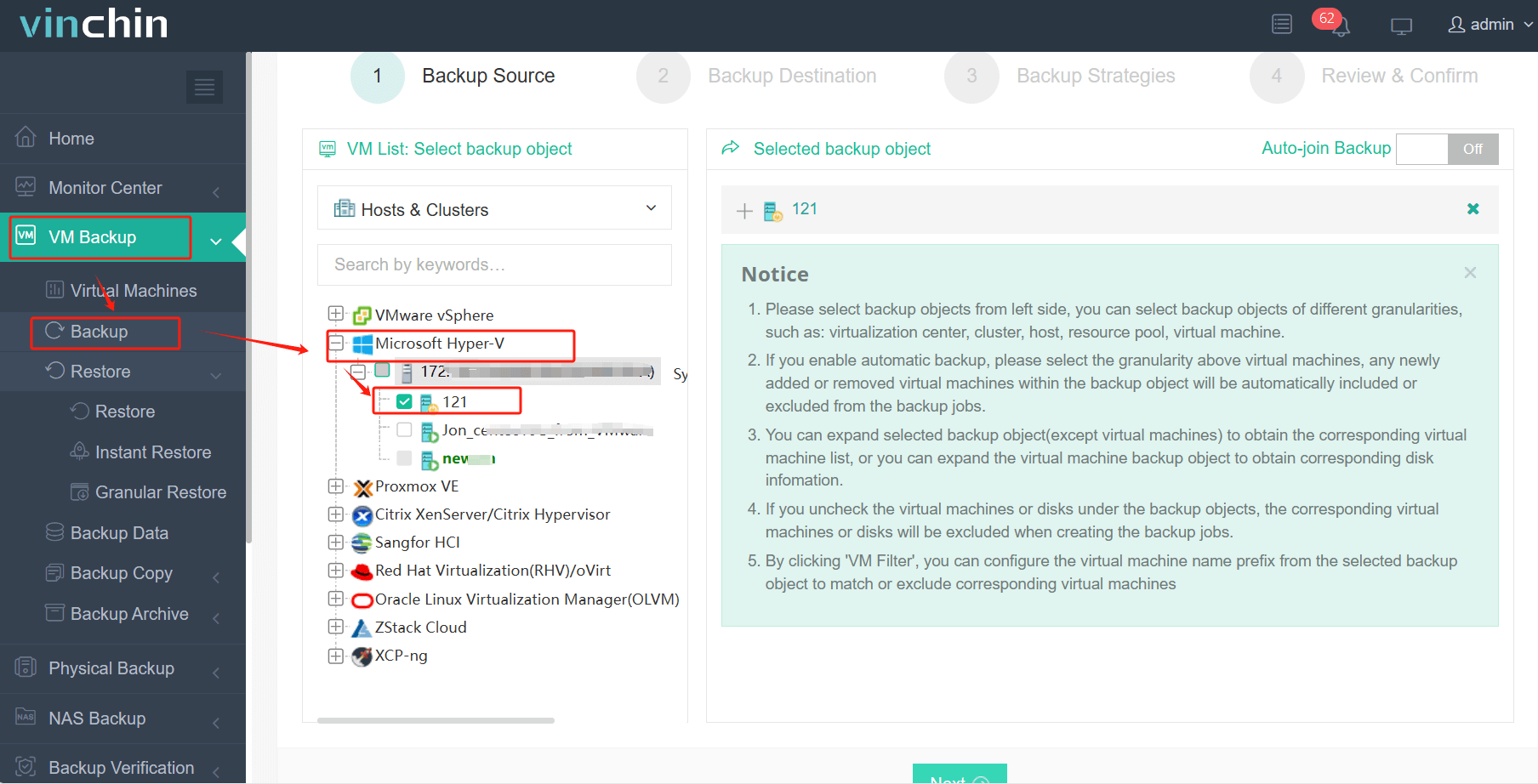
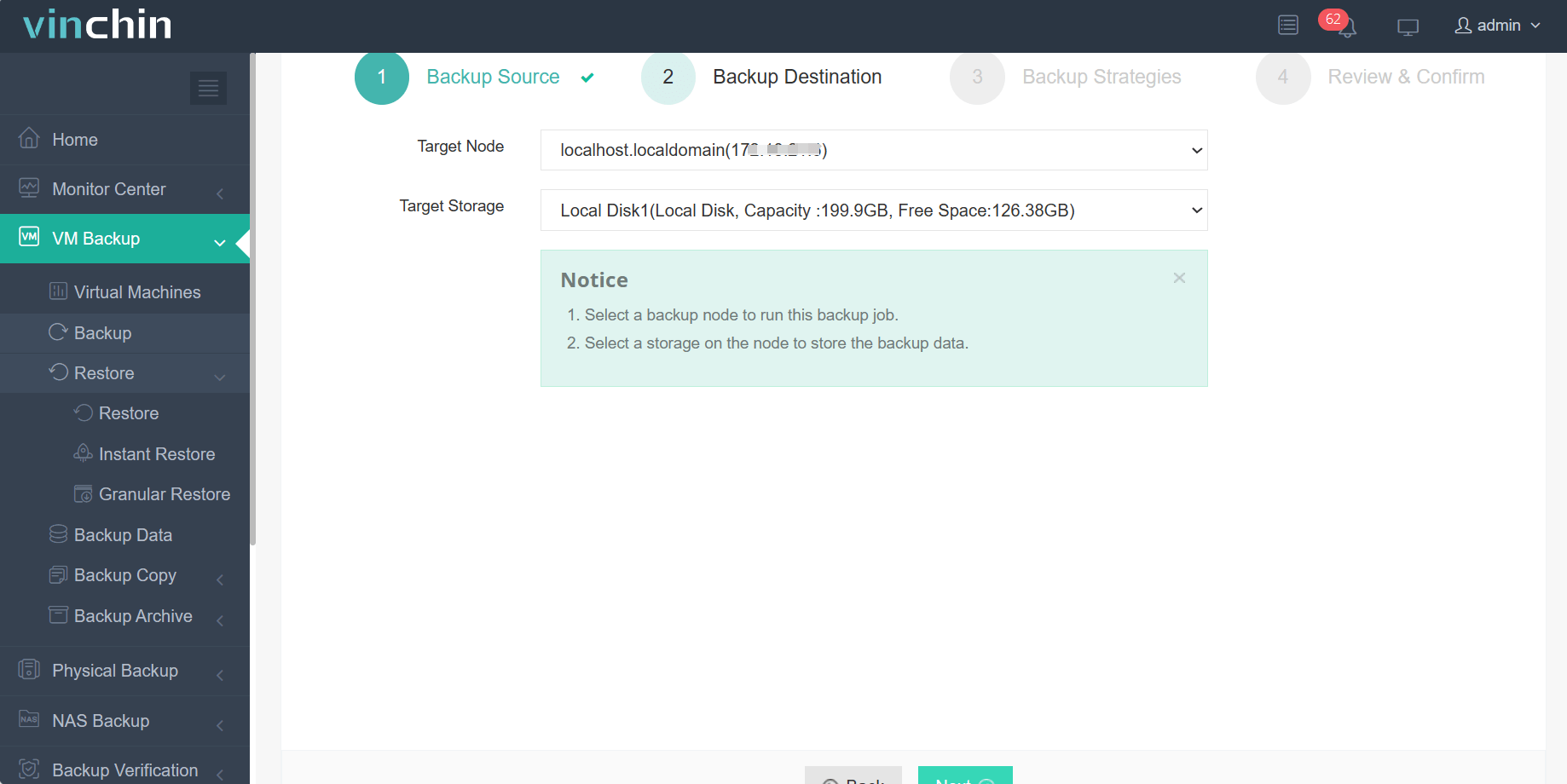
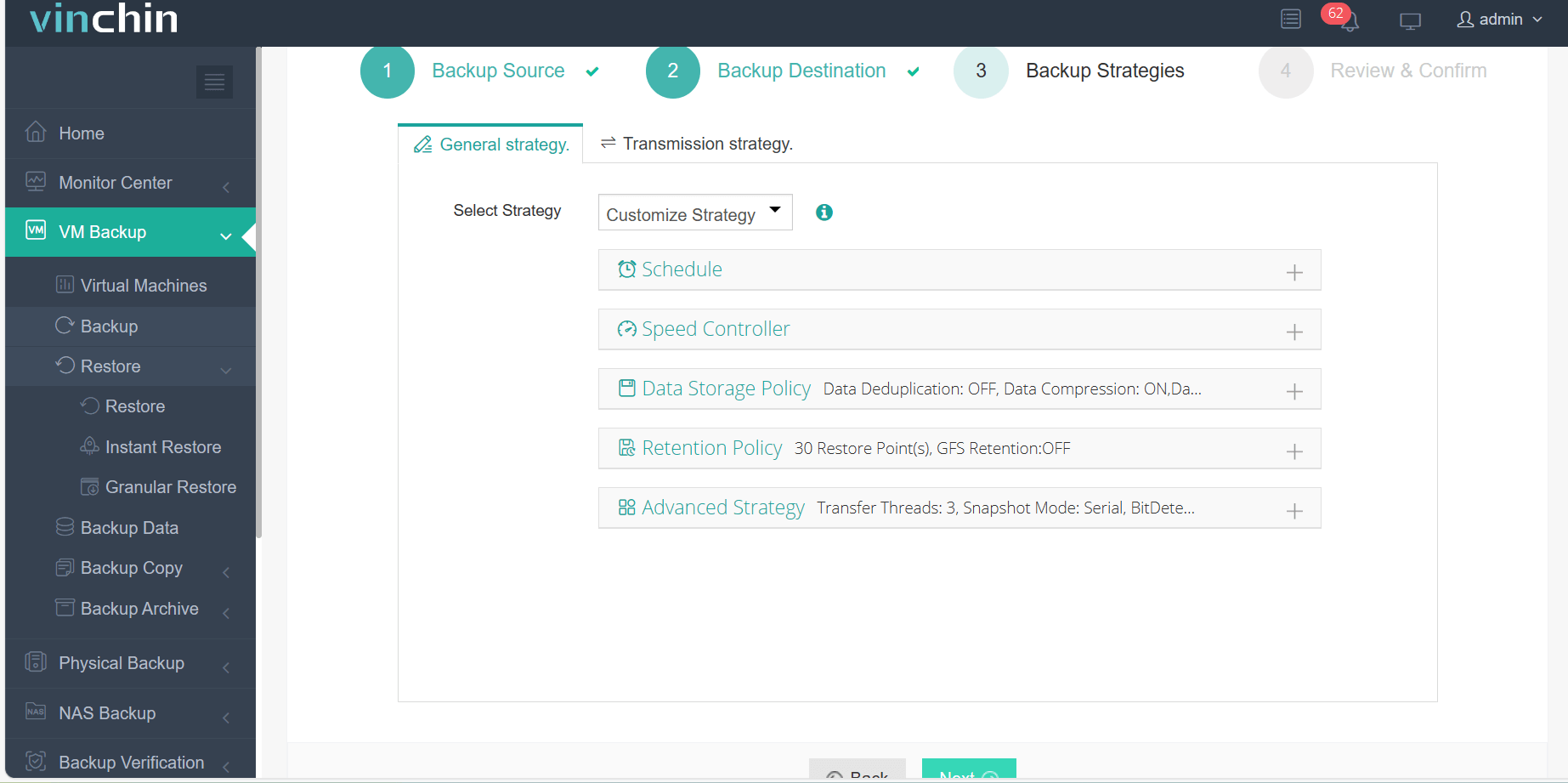
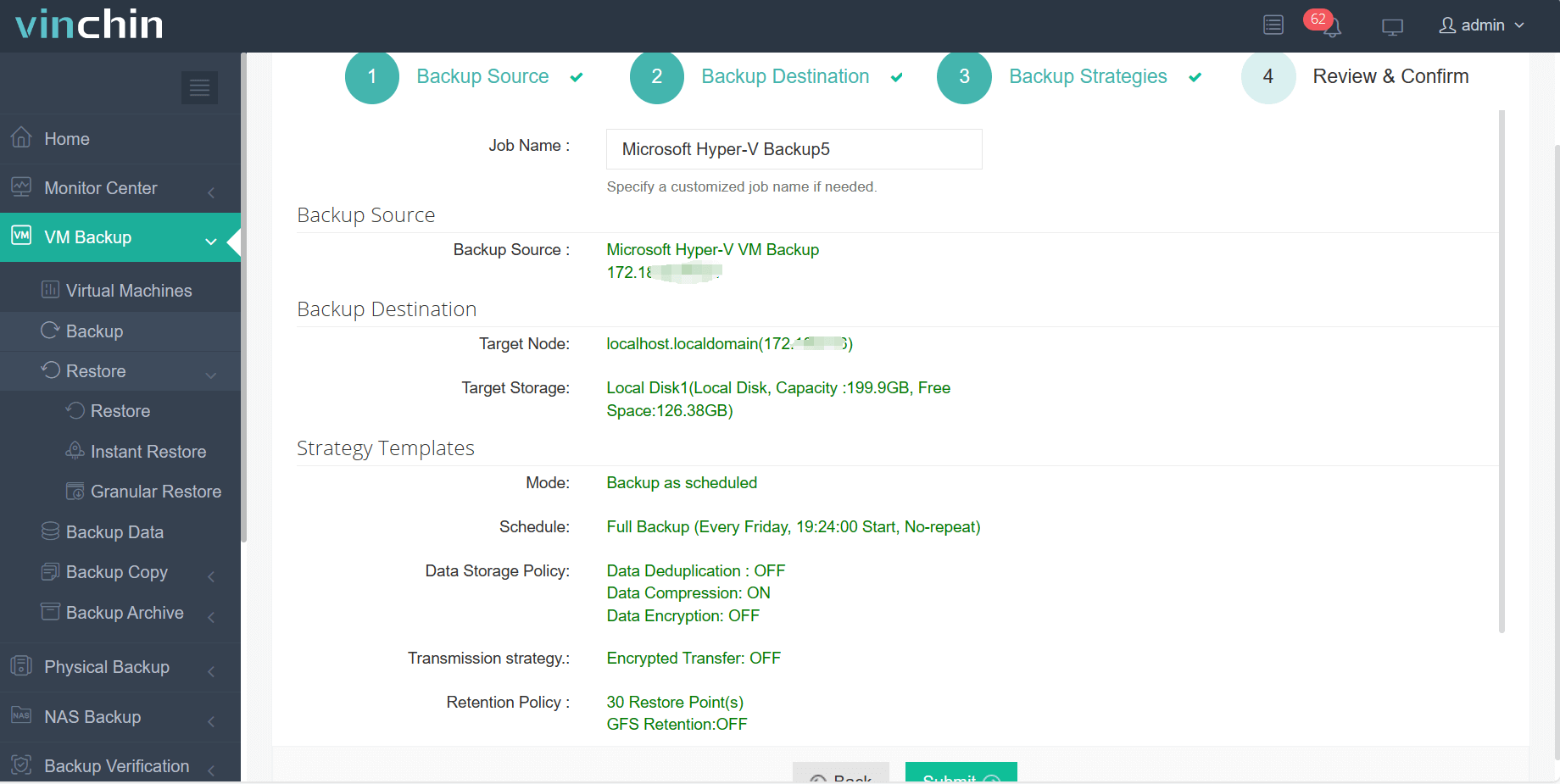
The intuitive web console makes operation straightforward:
Step 1: Select the Hyper-V VM to back up.
Step 2: Choose the backup storage.
Step 3: Configure the backup strategy.
Step 4: Submit the job.
Globally trusted by thousands of organizations—with top ratings from industry analysts—Vinchin Backup & Recovery offers a fully featured free trial valid for 60 days so you can evaluate its capabilities firsthand before committing further.
Best Hyper-V Backup Software FAQs
Q1: Does secure offsite replication impact backup speed?
Encryption may introduce slight overhead during processing but modern solutions offset this using compression algorithms plus incremental updates—which means only changed blocks move after initial full copy completes. As a result performance remains high without sacrificing security benefits required under most regulations.
Q2: How does the solution ensure regulatory compliance?
A compliant solution provides end-to-end encrypted transfers/storage combined with detailed logging/audit trails supporting frameworks like GDPR or HIPAA Security Rule. Granular RBAC enforces least privilege principles so only authorized personnel interact with protected workloads.
Q3: Can the system scale as our VM footprint grows?
Yes; leading platforms are designed around horizontal scaling principles allowing seamless expansion across large virtual environments without degrading performance/manageability over time—even as new hosts/clusters join existing infrastructure pools.
Conclusion
The right Hyper-V backup solution delivers robust protection—enabling enterprises to maintain business continuity while avoiding costly downtime or regulatory penalties through secure automated offsite replication aligned with industry best practices.









