Protecting Hyper-V virtual machines is essential for business continuity. The best backup software does this without slowing down your production systems. Modern solutions use agentless backups and application-aware technology to keep resource usage low. Advanced data reduction methods further reduce strain on your infrastructure. This means users stay productive even when backups run.
In large organizations, performance dips during backup windows can cause missed service levels or compliance problems. Efficient backup tools lower operational risk while supporting fast recovery. Keeping production VMs responsive ensures smooth business operations at all times.
Why Minimal Impact Backup Matters in Enterprise Environments?
Backup jobs that overload resources can disrupt critical applications and user access. Even small slowdowns may lead to missed SLAs or costly downtime events. According to Gartner, every minute of unplanned downtime costs businesses thousands of dollars. In regulated industries, performance issues during backups can trigger compliance violations.
● Preserves Application Performance: When a VM runs a vital workload—such as an ERP system or customer database—a heavy-handed backup job can make it sluggish or unresponsive. This affects productivity across departments relying on those services.
● Reduces Risk of Downtime: Unoptimized backups may cause bottlenecks that lead to outages or force administrators to pause protection jobs altogether. Consistent VM responsiveness helps avoid these risks and supports continuous operations.
● Supports Compliance Requirements: Many regulations demand high availability for key systems. If backups interfere with uptime guarantees or audit trails due to excessive resource use, organizations face penalties or reputational harm.
● Lowers Operational Costs: Performance degradation often leads IT teams to invest in extra hardware just to offset inefficient backups—a costly workaround compared to choosing optimized software from the start.
Minimal-impact backup strategies help organizations meet their service commitments while keeping infrastructure costs under control.
How To Choose The Best Hyper-V Backup Solution for Minimal Impact on Production VM Performance?
Selecting effective Hyper-V backup software requires careful evaluation of architecture and features that directly affect production workloads. Understanding how different approaches interact with Hyper-V environments helps you make informed decisions that protect both data integrity and system speed.
● Agentless Architecture Minimizes Overhead: Agentless solutions do not require installing additional software inside each VM guest OS. Instead, they leverage host-level APIs such as Volume Shadow Copy Service (VSS) writers built into Windows Server Hyper-V roles. This reduces CPU and memory consumption within VMs themselves—freeing up resources for core business tasks rather than background processes.
For example, using agent-based methods might mean running multiple agents across dozens of VMs—each consuming RAM and processing power during every scheduled job. Agentless designs centralize control at the hypervisor level instead.
● Native Integration With Hyper-V APIs Ensures Consistency: Backup tools should work seamlessly with native APIs like Microsoft’s VSS framework for application-consistent snapshots. By coordinating snapshot creation through these interfaces, modern solutions capture complete VM states—including open files and active databases—without pausing workloads unnecessarily or risking incomplete data sets.
This approach allows transactional applications such as SQL Server or Exchange Server running inside VMs to be backed up safely without lengthy interruptions.
● Advanced Data Reduction Lowers Storage Load: Features like inline deduplication remove duplicate blocks before writing them to storage; compression shrinks data size further. These technologies cut down on disk I/O during both full and incremental backups—which means less stress on shared storage arrays or network links serving your production environment.
For instance, if ten similar VMs share common operating system files but only one copy is stored thanks to deduplication, overall read/write activity drops sharply during protection cycles.
● Granular Scheduling Controls Prevent Resource Contention: Flexible scheduling lets you run intensive jobs outside peak hours—or throttle bandwidth so that daytime operations remain unaffected by background tasks. Some tools offer per-job throttling settings so you can fine-tune how much CPU/network capacity any single process consumes at once.
This flexibility is crucial in global enterprises where “off-hours” differ by region; administrators need precise controls rather than simple nightly batch windows.
● Scalable Architecture Handles Growth Without Bottlenecks: As virtual environments expand from dozens to hundreds of VMs across clusters or sites, your chosen solution must distribute workload efficiently. Scalable platforms balance traffic between nodes so no single server becomes a choke point—even as demands increase over time due to organic growth or mergers/acquisitions.
A well-chosen solution adapts smoothly as your infrastructure evolves—ensuring ongoing protection without sacrificing speed.
Vinchin Backup & Recovery: Enterprise-Grade Protection for Hyper-V
For organizations seeking robust protection for Microsoft Hyper-V environments, Vinchin Backup & Recovery offers professional virtual machine protection with robust centralized monitoring capabilities. Supporting stands out as a professional enterprise-level virtual machine backup solution supporting more than 15 mainstream virtualization platforms—including VMware, Proxmox, oVirt, OLVM, RHV, XCP-ng, XenServer, OpenStack, ZStack, among others—with comprehensive support for Hyper-V scenarios specifically highlighted here. Vinchin Backup & Recovery offers agentless operation leveraging native APIs for efficient integration with each platform’s unique capabilities while minimizing impact on production workloads across diverse infrastructures.
Key features include incremental backup, SpeedKit acceleration technology (for rapid data transfer), LAN-free backup options (to offload network traffic), granular restore capabilities (for item-level recovery), and advanced deduplication/compression—all designed to optimize storage efficiency and ensure reliable recoverability with minimal disruption.
The intuitive Vinchin web console streamlines workflow management:
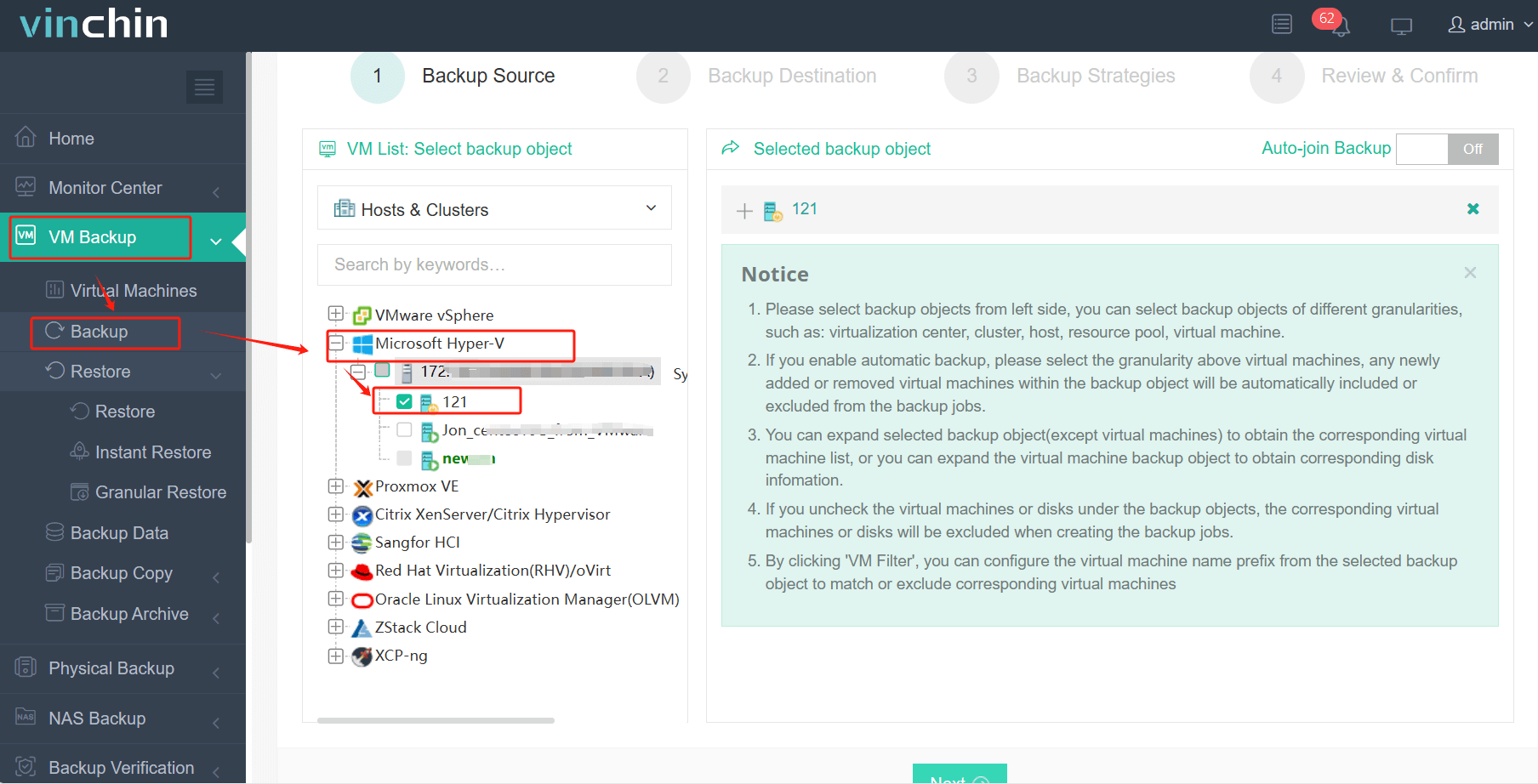
Step 1: Select the Hyper-V VM to back up.
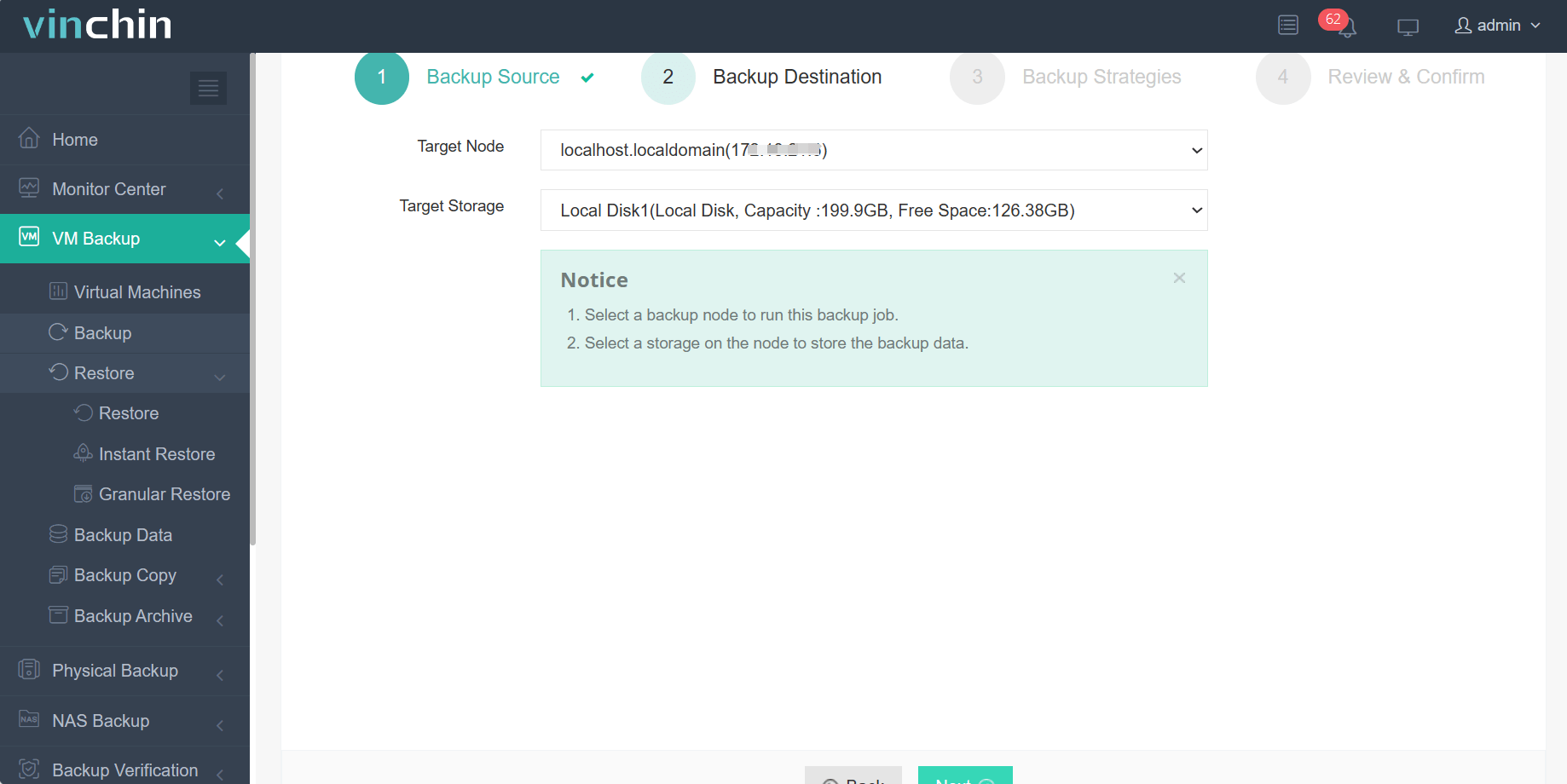
Step 2: Choose the backup storage.
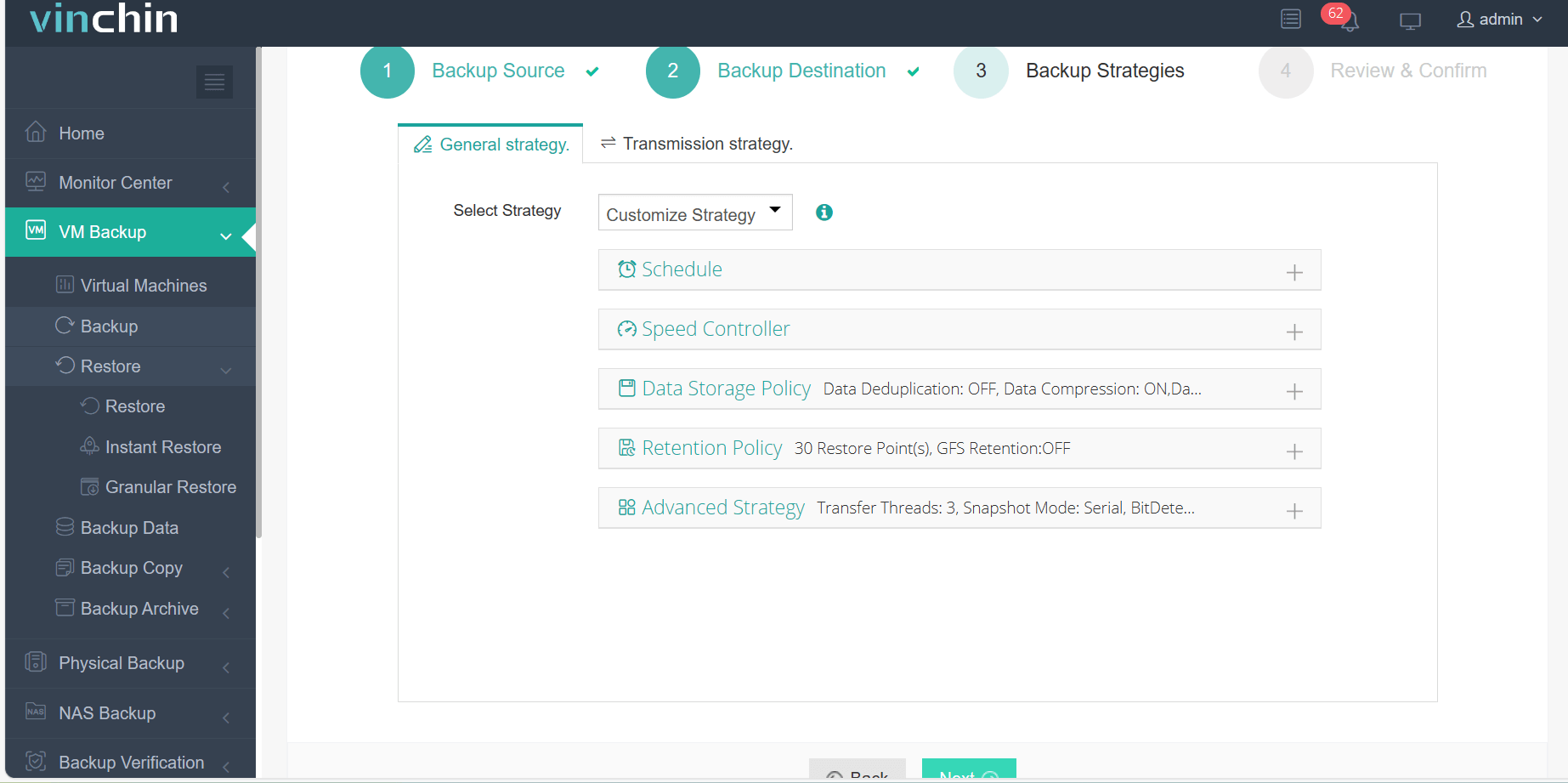
Step 3: Configure the backup strategy.
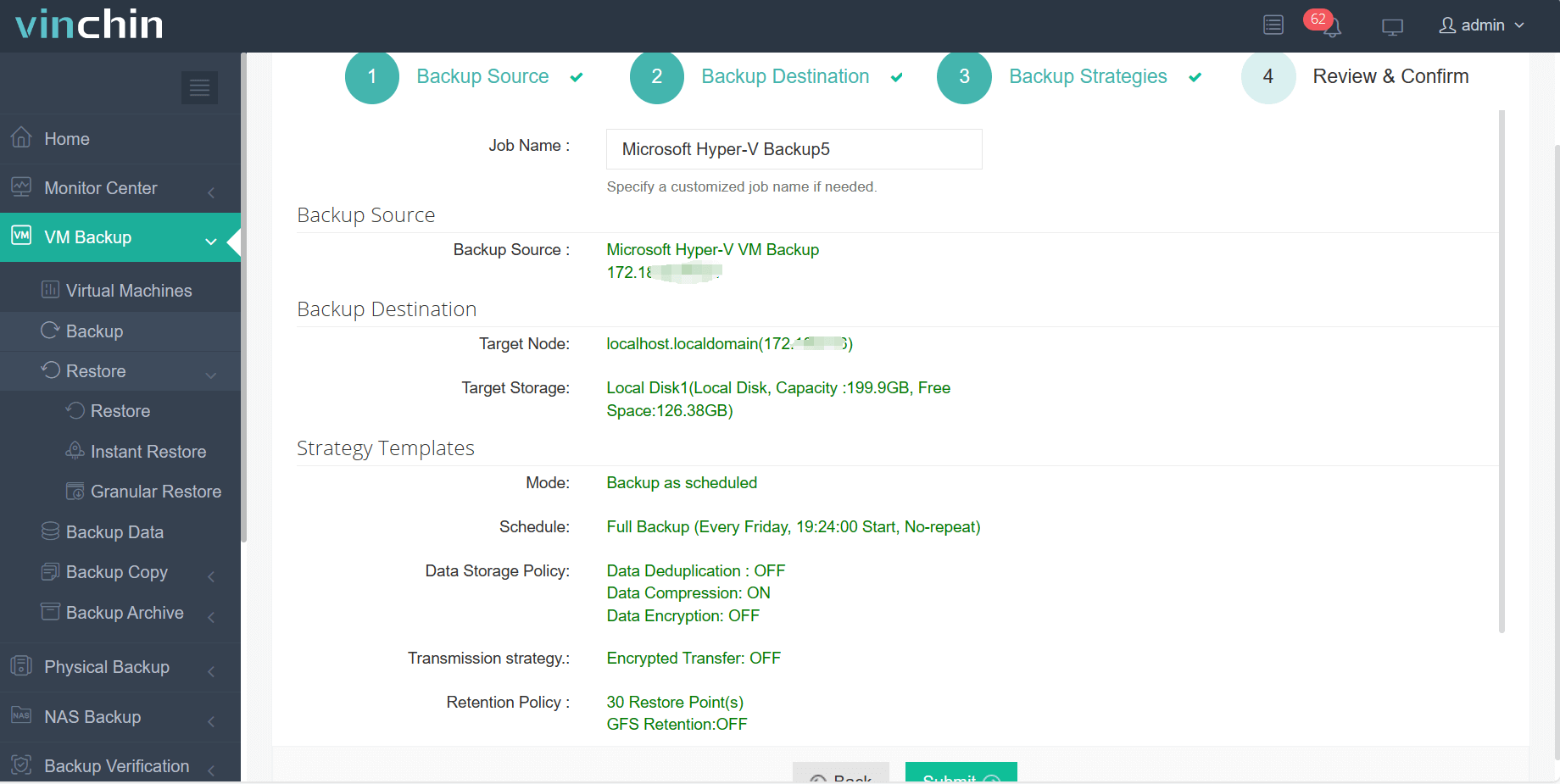
Step 4: Submit the job.
Trusted globally by thousands of enterprises—and consistently top-rated—Vinchin Backup & Recovery offers a 60-day full-featured free trial so you can experience its powerful capabilities firsthand; click below to get started today!
Best Hyper-V Backup Software FAQs
Q1: How does agentless backup reduce impact on running VMs?
Agentless backup uses host-level integration with technologies like Microsoft’s Volume Shadow Copy Service (VSS) requestor instead of installing agents inside each guest OS. This approach lowers CPU/memory usage within individual virtual machines while still capturing consistent snapshots through native APIs—keeping workloads responsive throughout protection cycles.
Q2: Can advanced data reduction further lower performance impact?
Yes; deduplication eliminates redundant blocks before writing them out while compression shrinks overall dataset size. Both techniques decrease disk I/O demands during full/incremental jobs—which minimizes load on shared storage arrays serving live production systems.
Q3: Is application consistency maintained without affecting performance?
Modern solutions integrate tightly with Microsoft’s VSS framework, enabling crash-consistent—and often application-consistent—backups even when databases are active inside protected VMs; this avoids long pauses/disruptions seen with legacy approaches.
Conclusion
Efficiently protecting Hyper-V workloads requires smart software choices that minimize disruption while maximizing reliability—so business keeps moving forward without missing a beat.








