Large-scale H3C CAS/UIS environments(Cloud Automation System) and UIS (Unified Infrastructure System) deployments power many enterprise data centers today. These platforms run hundreds or thousands of virtual machines that handle critical business operations around the clock. Protecting this data through regular backups is essential for business continuity, disaster recovery, and compliance.
Backup windows—the time it takes to complete a backup—become a major concern as environments grow. Long backup jobs can disrupt production workloads, increase risk of data loss, and make it harder to meet strict recovery objectives set by industry standards like RTO (Recovery Time Objective) and RPO (Recovery Point Objective). According to Gartner, enterprises should aim for short backup windows to minimize operational impact. Choosing an efficient backup tool is key for keeping your systems safe without slowing down your business.
Why Reducing Backup Window Matters in Enterprise Environments
A short description:
Reducing the backup window is vital for large organizations using H3C CAS/UIS because it keeps systems available while protecting against data loss. Fast backups help IT teams avoid resource contention, maintain compliance, and deliver reliable restores when needed.
● Business Continuity
Shorter backup windows mean mission-critical applications remain online during protection tasks. When backups finish quickly, users experience fewer slowdowns or interruptions during business hours.
● Reduced Operational Risk
Efficient backups lower exposure to threats like ransomware or accidental deletion between jobs. If a system fails before a long-running backup completes, recent changes may be lost—putting compliance at risk.
● Meeting Compliance Requirements
Many regulations require organizations to prove they can restore data within specific timeframes (RTO/RPO). Slow backups make it hard to meet these targets or pass audits from regulators such as ISO 27001.
● Resource Optimization
Fast backups reduce strain on network bandwidth and storage devices by limiting how long resources are tied up moving large volumes of data.
● Scalability for Growth
As virtual machine counts rise into the hundreds or thousands in H3C environments, only solutions designed for scale can keep pace without extending the backup window beyond acceptable limits.
How To Choose The Best H3C CAS/UIS Backup Solution for Reducing Backup Window
A short description:
Selecting a fast backup solution requires careful evaluation of architecture, scalability features, efficiency technologies like deduplication or incremental strategies, scheduling flexibility, security controls, and ease of management—all tailored for large-scale H3C deployments.
● Scalability & High Throughput
The solution must handle growing numbers of VMs without bottlenecks. Look for horizontal scaling capabilities such as distributed nodes that process multiple jobs in parallel across clusters or datastores—a must-have when protecting hundreds of terabytes daily.
● Advanced Deduplication & Incremental Backups
Technologies like global deduplication eliminate duplicate blocks across all VMs before writing to storage; forever incremental strategies copy only changed blocks after an initial full job. This reduces both network load and total job duration dramatically compared to traditional full+incremental cycles.
● Flexible Scheduling Options
The ability to schedule jobs outside peak usage hours—or trigger them based on custom events—lets you avoid conflicts with production workloads while meeting organizational SLAs.
● Strong Security Controls
Encryption at rest/in transit ensures sensitive information stays protected throughout its lifecycle; role-based access control helps enforce internal policies during audits or investigations.
● Centralized Management & Monitoring
Unified web consoles simplify oversight by letting administrators configure policies once then monitor all sites from a single dashboard—saving valuable staff time each week while reducing human error risk.
For example: A forever incremental approach means after one full VM image is captured initially (which may take several hours), subsequent jobs transfer only new or changed disk blocks—often shrinking nightly job times from hours down to minutes even at petabyte scale.
Vinchin Backup & Recovery: Enterprise-Grade Protection for H3C CAS/UIS
When seeking robust protection specifically tailored for H3C CAS/UIS environments, Vinchin Backup & Recovery stands out as an enterprise-level virtual machine backup solution supporting over 15 mainstream virtualization platforms—including H3C CAS/UIS alongside VMware, Hyper-V, Proxmox, oVirt, OLVM, RHV, XCP-ng, XenServer, OpenStack, ZStack and more. Designed with complex infrastructures in mind, Vinchin Backup & Recovery delivers advanced features that directly address the challenges faced by large-scale deployments: LAN-free backup ensures dedicated traffic isolation; SpeedKit accelerates incremental processing; forever-incremental strategies minimize workload; granular restore enables precise recovery; and comprehensive deduplication/compression optimizes storage use. Together these capabilities significantly reduce your overall backup window while maintaining reliability and scalability across vast VM estates.
Vinchin Backup & Recovery’s intuitive web console makes safeguarding your environment straightforward:
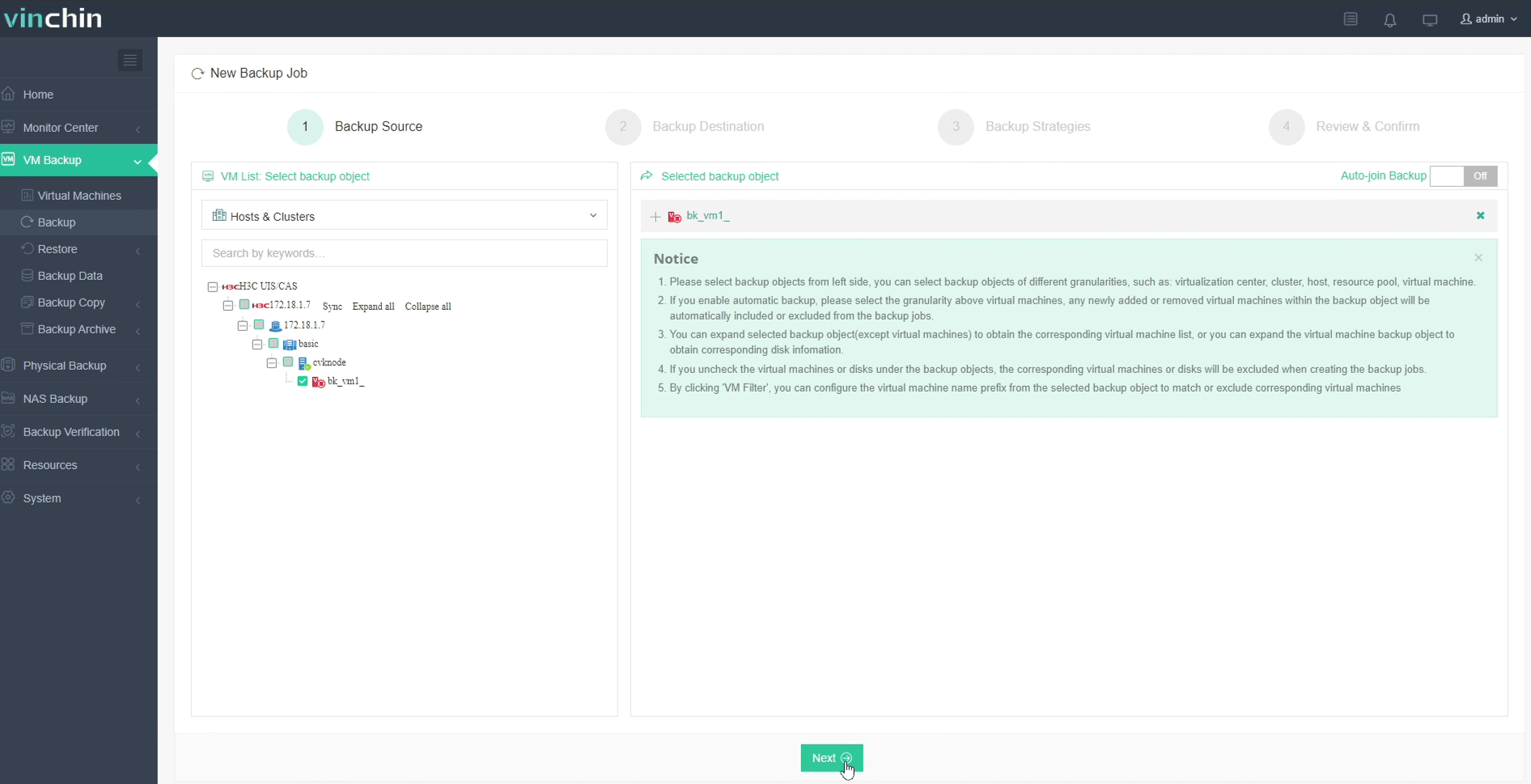
Step 1: Select the H3C CAS/UIS VM to back up
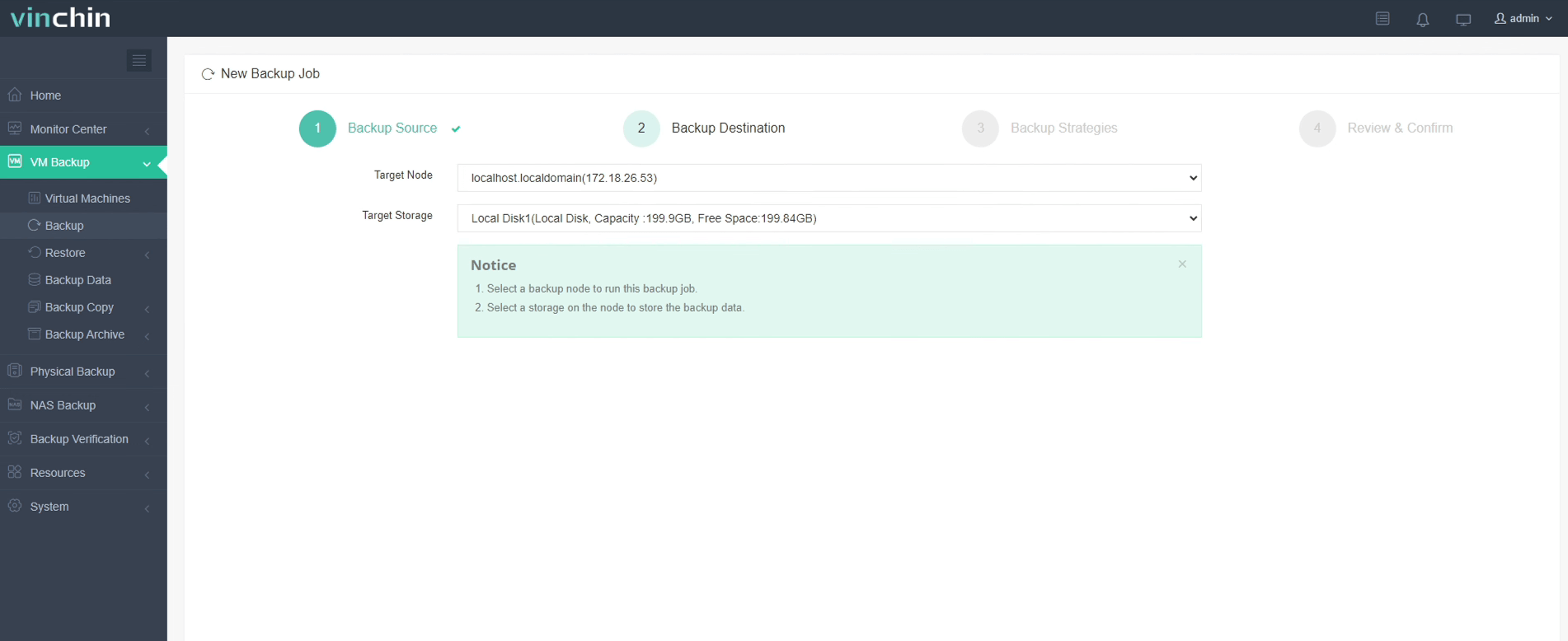
Step 2: Choose the backup storage
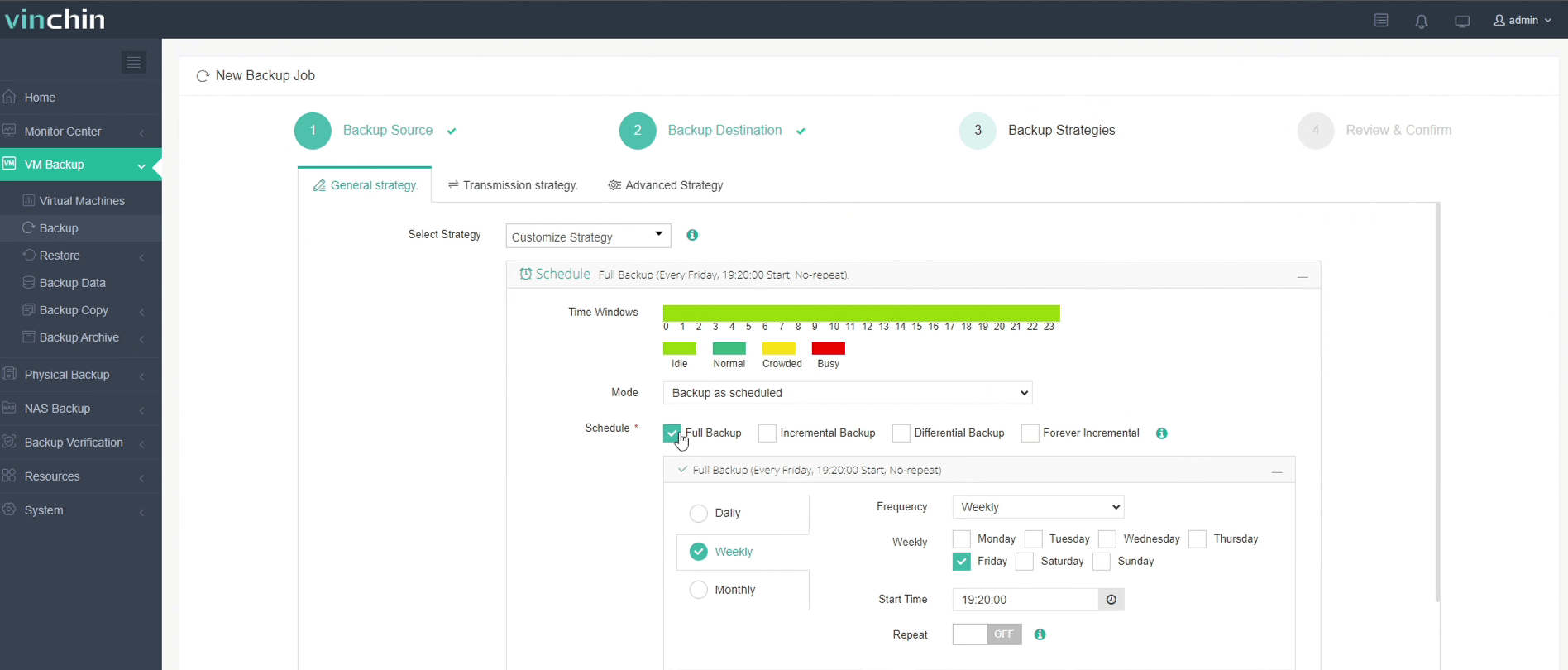
Step 3: Configure the backup strategy
Step 4: Submit the job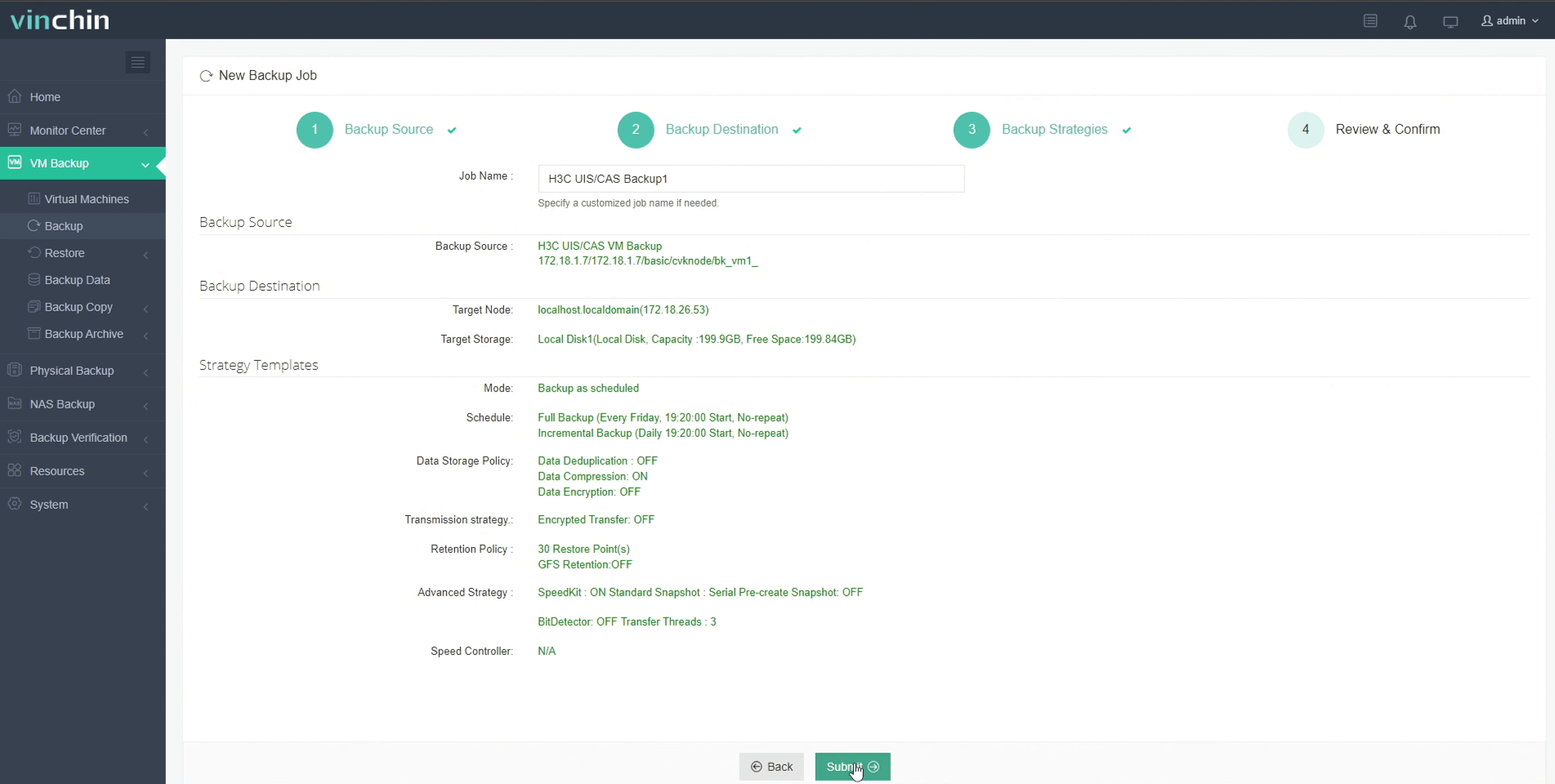
Recognized globally with top ratings from enterprise customers worldwide—and trusted by leading brands—Vinchin Backup & Recovery offers a 60-day full-featured free trial so you can experience its power firsthand. Click below to get started!
Best H3C CAS/UIS Backup Software FAQs
Q1: How does reducing the backup window benefit large-scale H3C deployments?
Shorter windows limit impact on production systems improve availability help meet strict recovery time (RTO) point objectives (RPO). Fast completion also lowers risk from overlapping operations during peak hours which could degrade user experience or delay restores after failures occur.
Q2: What risks arise from extended backup operations?
Long-running jobs increase chances that new changes go unprotected until next cycle raising potential loss if disaster strikes mid-process They also consume bandwidth/storage longer causing slowdowns elsewhere Missed SLAs may lead auditors/regulators questioning compliance posture especially under frameworks like ISO 27001.
Q3: Can Vinchin scale with growing H3C CAS/UIS environments?
Yes Architecture supports horizontal scaling via additional nodes Each node processes part of workload—by cluster hypervisor datastore etc.—so expanding coverage simply means adding hardware not reconfiguring everything Centralized management keeps oversight simple even at massive scale
Conclusion
Efficiently shrinking your backup window safeguards uptime reduces risk meets enterprise demands at any scale Select solutions built specifically for high-throughput scalable protection—and keep critical services running strong









