Modern enterprise IT relies on virtualization platforms like H3C CAS (Cloud Automation System) and UIS (Unified Infrastructure System) to run critical workloads. As virtual environments grow more complex, protecting data becomes harder. Integrated backup tools that work directly with virtualization management consoles are now essential. They help automate protection tasks, reduce manual errors, and ensure fast recovery when disaster strikes.
Integration between backup solutions and management consoles streamlines operations. It lets IT teams manage backups from the same interface they use for daily administration. This approach saves time, improves visibility, and supports compliance efforts across large infrastructures. Choosing a tool that offers this level of integration is key for reliable data protection in any organization.
Why Integration with Virtualization Management Consoles Matters in Enterprise Environments?
Backup integration with virtualization management consoles brings significant operational benefits to enterprises managing large or dynamic virtual infrastructures. By connecting backup workflows directly to the console layer, organizations gain automation, better visibility into protected assets, and stronger control over policy enforcement—all critical for meeting business continuity goals.
● Automation of Workload Discovery
Integrated backup tools can automatically detect all virtual machines (VMs) and workloads managed by H3C CAS or UIS consoles. This means new VMs are included in protection policies without manual updates or oversight from administrators. Automated discovery reduces gaps in coverage as environments change.
● Consistent Policy Enforcement
When you apply backup rules through an integrated console connection, those policies extend across your entire infrastructure instantly. This ensures every VM follows the same retention schedules and security standards—helping maintain regulatory compliance while reducing administrative overhead.
● Faster Recovery Operations
Console-integrated solutions can quickly identify which workloads are affected during an incident by leveraging real-time inventory data from the management platform. This speeds up restoration processes because IT staff do not need to search multiple systems or reconcile asset lists manually.
● Reduced Operational Risk
Manual coordination between separate systems increases risk of missed VMs or inconsistent backups. With direct integration, these risks drop since all actions occur within a unified interface—minimizing human error and ensuring no workload is left unprotected.
● Simplified Auditing and Compliance
Centralized control makes it easier to generate audit trails showing which assets were backed up when—and who performed each action. This transparency helps organizations prove compliance during internal reviews or external audits.
Without strong integration between backup software and virtualization management consoles, enterprises face higher costs due to duplicated effort, longer recovery times after incidents, increased risk of non-compliance fines, and greater complexity as their environments scale.
How To Choose The Best H3C CAS/UIS Backup Solution for Console Integration?
Selecting a robust backup solution for H3C CAS/UIS requires careful analysis of technical features that enable seamless console integration while supporting scalability and security needs typical in enterprise settings. Understanding what true API-level connectivity looks like helps avoid products that only offer partial support or require excessive manual configuration.
● Native API-Level Integration
Look for solutions that connect using official APIs provided by H3C CAS/UIS. These APIs allow real-time communication between your backup tool and the virtualization platform’s core services—enabling instant detection of new VMs or changes in resource allocation without extra plugins or scripts.
● Scalability Across Large Environments
A good solution must handle hundreds or thousands of VMs efficiently as your infrastructure grows over time. Features such as multi-threaded processing engines or distributed architecture prevent performance bottlenecks during peak activity periods—ensuring backups complete within defined windows even at scale.
● Strong Security Controls
Enterprise-grade tools should include delegated access controls so only authorized users can manage backups; role-based permissions let you assign specific rights based on job function; detailed audit logs track every action taken within the system for accountability. These measures help meet both internal governance standards and external regulatory requirements.
● Granular Recovery Flexibility
The ability to restore individual files from inside a VM image—or recover an entire VM cluster if needed—gives organizations flexibility during disaster recovery scenarios. Flexible restore options mean you can address both minor user errors (like accidental file deletion) as well as major outages affecting whole applications quickly.
By focusing on these criteria when evaluating potential solutions—and confirming compatibility with your current version of H3C CAS/UIS—you ensure long-term reliability while minimizing future migration headaches if your environment evolves further down the line.
H3C CAS/UIS Built-In Backup Capabilities and Console Integration
H3C CAS (Cloud Automation System) and UIS (Unified Infrastructure System) provide native backup features designed for ease-of-use within their own management interfaces. These built-in functions suit smaller deployments but may have practical limits when scaling up beyond basic requirements.
Administrators perform full/incremental/differential VM backups directly from the main console interface using agentless technology—no need to install extra software inside each guest OS instance. You can schedule regular jobs via calendar settings under “Backup Tasks,” trigger ad-hoc runs using “Start Backup,” monitor progress through “Task List,” configure storage targets under “Backup Storage,” or review results via “Reports.”
For small-scale setups—typically fewer than three VMs or less than 1 TB total data—the built-in module covers most needs efficiently without noticeable performance impact. However, larger installations may encounter slower job completion times due to limited parallelism; centralized reporting also becomes harder as asset counts rise above this threshold.
Built-in features support intra-cluster replication (protecting against node failure), inter-cluster transfers (for geographic redundancy), periodic scheduling (“Daily” / “Weekly”), manual triggers (“Immediate Backup”), local disk targets (“Local Storage”), shared network file systems (“NFS/CIFS”), external SAN/NAS devices (“External Storage”), plus FTP server destinations—all selectable via dropdown menus in the UI’s storage configuration panel.
For mid-sized businesses needing advanced functions like compression/deduplication (to save bandwidth/storage space), remote site replication (for DR), faster restores after outages (lower RTO/RPO), UIS integrates optional modules such as its cloud appliance add-on—which remains accessible through standard console tabs like “Appliance Management.” Open interfaces also allow third-party integrations via RESTful APIs so you can centralize VM protection under one pane-of-glass administration.
Recovery Point Objective (RPO)—the maximum acceptable amount of lost data measured in time—and Recovery Time Objective (RTO)—how quickly systems must be restored after failure—can often be reduced from hours down to minutes depending on hardware/network speed plus chosen configuration options.
Vinchin Backup & Recovery: Enterprise-Grade Protection for H3C CAS/UIS
To address advanced enterprise needs for H3C CAS/UIS environments, Vinchin Backup & Recovery delivers professional-grade virtual machine protection with deep support for over 15 mainstream virtualization platforms—including robust compatibility with H3C CAS/UIS itself. By integrating natively with these platforms’ management consoles via official APIs, Vinchin Backup & Recovery enables automated workload discovery alongside streamlined policy application across all detected VMs without requiring agents inside guest operating systems.
Key features relevant to enterprise users include LAN-free backup for efficient data transfer within large-scale deployments; scheduled incremental backups; granular restore capabilities; comprehensive data deduplication/compression; and secure role-based access controls—all designed to maximize efficiency while minimizing risk.
Using Vinchin Backup & Recovery’s intuitive web console simplifies operations:
The intuitive web console makes protecting your environment straightforward:
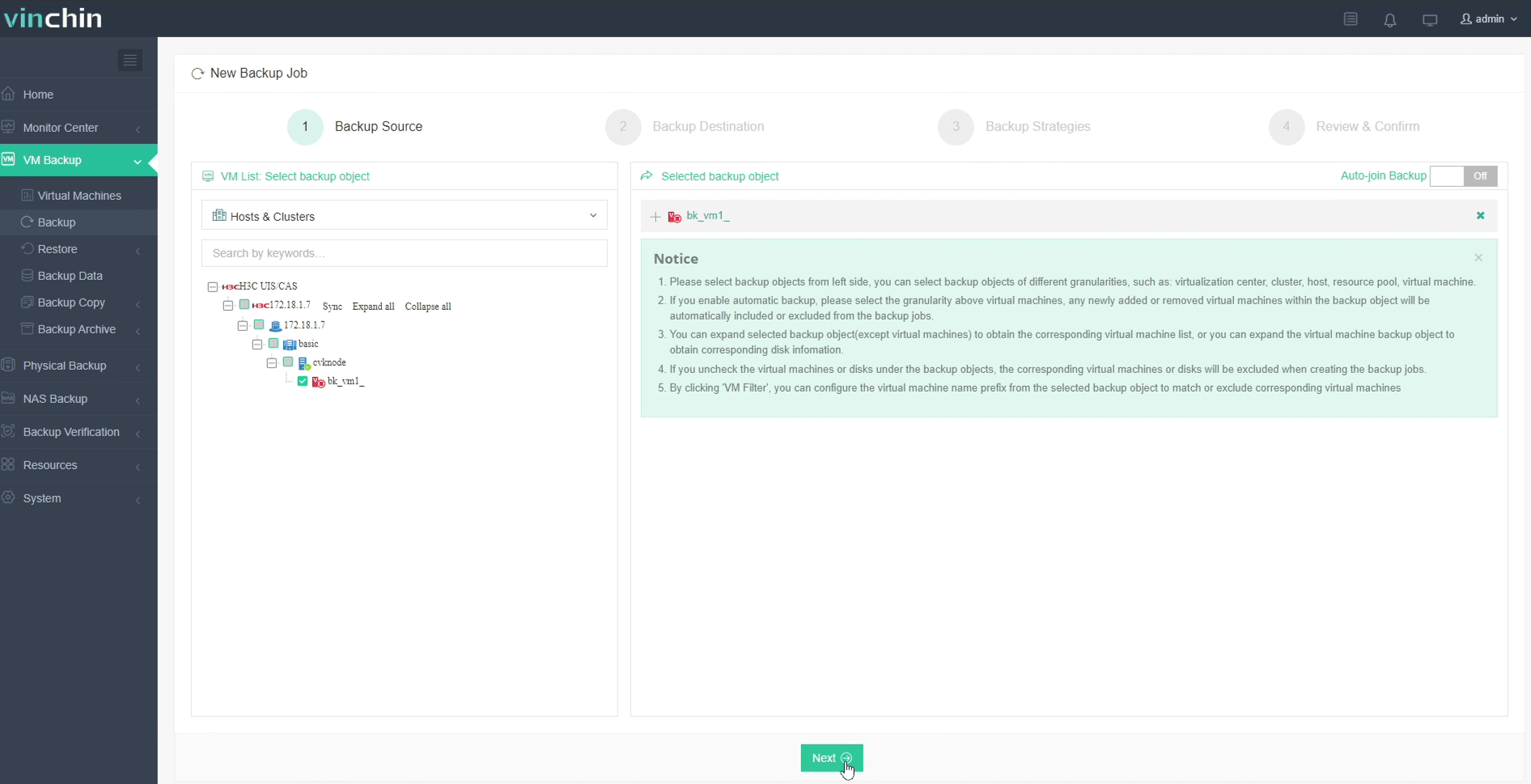
Step 1: Select the H3C CAS/UIS VM to back up
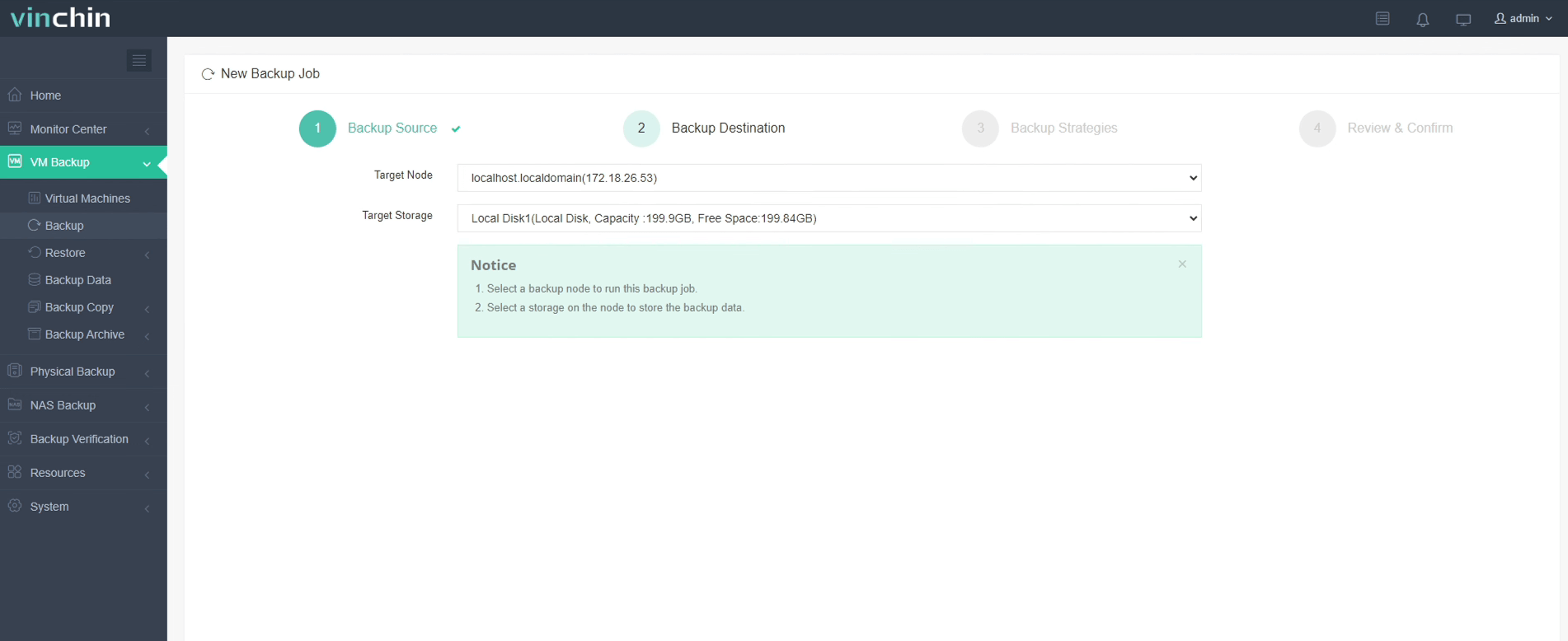
Step 2: Choose the backup storage
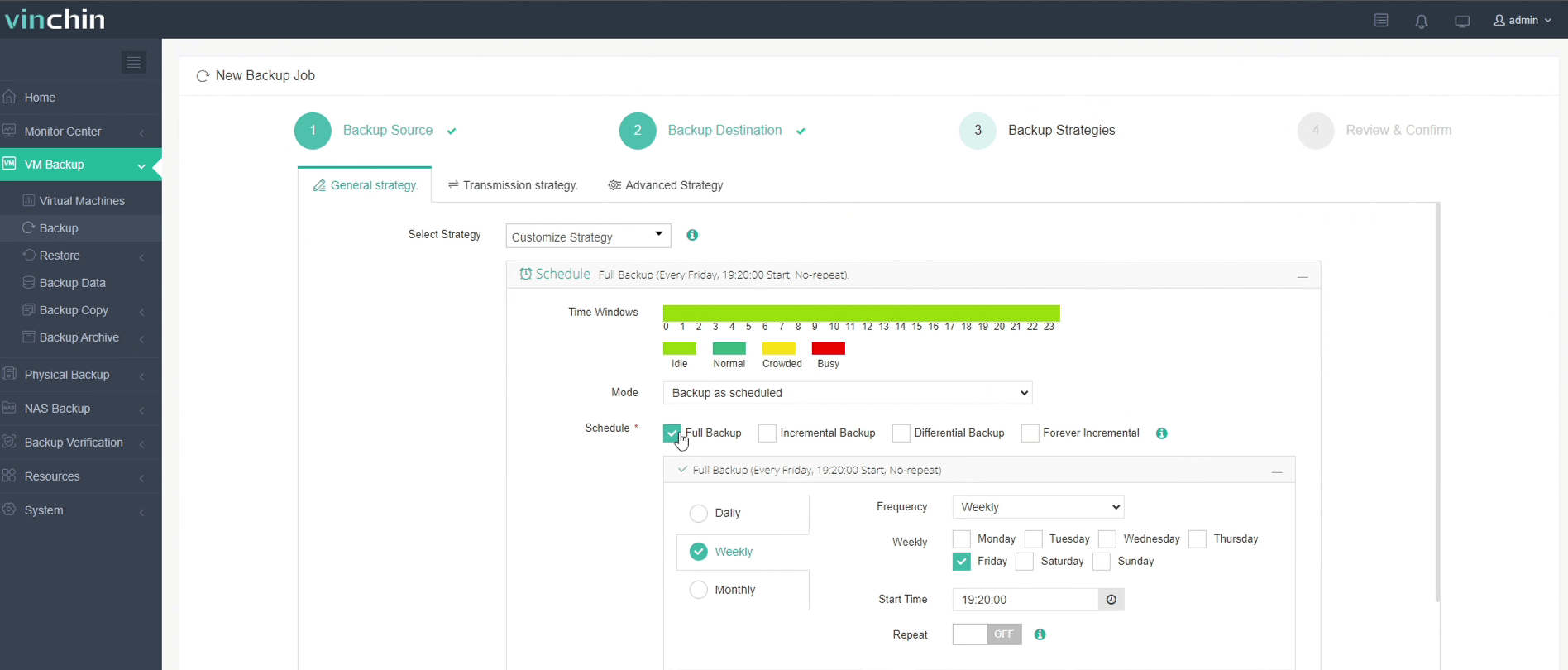
Step 3: Configure the backup strategy
Step 4: Submit the job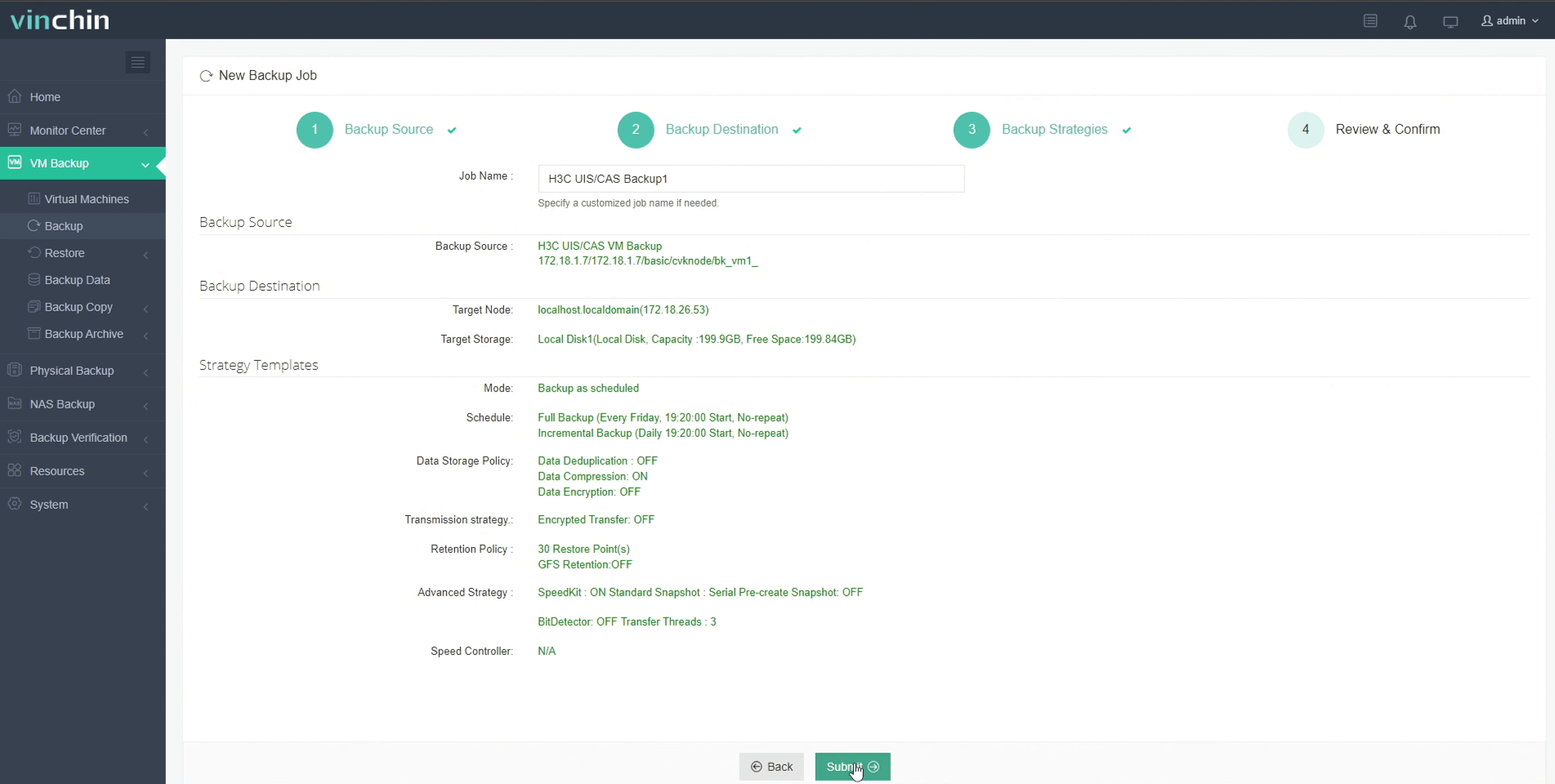
Recognized globally by thousands of customers with top ratings in independent reviews, Vinchin Backup & Recovery offers a 60-day full-featured free trial—click below to get started today!
Best H3C CAS/UIS Backup Software FAQs
Q: Why is console integration important in H3C CAS/UIS backup tools?
It ensures automatic workload detection along with consistent policy enforcement while reducing manual errors across virtual environments managed by these platforms.
Q: Does console-integrated backup improve compliance?
Yes; it centralizes auditing processes within one system view so proof-of-protection reports become easier during regulatory reviews.
Q: Can integrated solutions scale as our environment grows?
Enterprise-grade tools are designed specifically for efficient scaling—they maintain high performance regardless of increasing numbers of protected VMs.
Q: How does integration affect recovery speed?
Integration accelerates identification of affected workloads following incidents so restoration actions proceed faster compared to disconnected approaches.
Q: Does console integration require specific versions of H3C CAS or UIS?
Most modern integrations depend on recent releases supporting open RESTful APIs; always check vendor documentation before deploying any new solution alongside existing infrastructure versions.
Conclusion
Choosing tightly integrated backup software ensures reliable protection while cutting downtime risk across growing virtual infrastructures—a smart move for any enterprise running on H3C platforms.









