Data is at the heart of every business operation today. Losing it can mean lost revenue, lost trust, or even lost jobs. That’s why backup isn’t just a best practice—it’s essential. Among many backup options available today, the tape backup drive remains a trusted tool for long-term data protection. But why do so many organizations still rely on tape in an age dominated by cloud and flash storage? Let’s explore what makes tape backup drives unique.
What Is a Tape Backup Drive?
A tape backup drive is a device that reads from and writes data onto magnetic tape cartridges. Unlike hard drives or SSDs that allow random access—jumping straight to any file—a tape backup drive stores data sequentially along the length of the tape. This means you must wind through other data to reach what you want. While this results in slower retrieval times for individual files compared to disk-based systems, it offers high capacity and reliability for large-scale backups.
Tape backup drives are widely used for archiving critical information, disaster recovery planning, and meeting compliance requirements where records must be kept safe for years or decades. The most common format today is Linear Tape-Open (LTO). Modern LTO drives can store up to 18TB of uncompressed data per cartridge—and even more with compression enabled.
Tape drives come in several forms: standalone units suitable for small offices; autoloaders that handle multiple tapes automatically; or large-scale libraries designed for enterprise environments with hundreds of cartridges managed by robotic arms.
It’s worth noting that LTO technology continues to advance rapidly. The current LTO roadmap projects future generations like LTO-10 will offer even greater capacities—ensuring that tape remains relevant as data volumes grow year after year.
This sequential access method makes tape ideal when backing up large blocks of contiguous data but less efficient if you need frequent restores of small files scattered across different locations on the media.
Why Choose Tape Backup Drives
Why do organizations continue investing in tape backup drives when faster options exist? The answer lies in their unique blend of benefits tailored for long-term storage needs.
First, cost efficiency stands out. Storing massive amounts of infrequently accessed data on tapes costs far less per terabyte than using disks or cloud services—especially over many years.
Second comes durability. When stored correctly under controlled conditions, magnetic tapes can last 30 years or longer—outliving most spinning disks or solid-state devices by a wide margin.
Third is security through physical isolation. Once removed from its drive, a tape becomes completely offline—a state known as an “air gap.” This physical separation creates an immutable barrier against ransomware attacks or malware outbreaks targeting networked storage systems. For organizations facing strict regulatory requirements around sensitive information retention (such as healthcare or finance), this air gap provides peace of mind that digital threats cannot reach archived backups stored offsite.
Fourth is compliance support. Many regulations require businesses to keep records accessible yet secure over extended periods—sometimes decades! Tape backup drives make it easy to meet these mandates without incurring ongoing costs associated with always-on disk arrays or recurring cloud fees.
Fifth comes energy efficiency: tapes consume no power when idle because they don’t spin like hard disks nor require constant cooling like server racks filled with SSDs—a win both financially and environmentally!
Of course, there are trade-offs too:
Accessing specific files can be slow due to sequential reading;
Initial investments in hardware may be higher than basic disk setups;
And managing physical media requires careful tracking—including labeling tapes accurately, transporting them securely offsite, and maintaining well-defined rotation schedules so nothing gets lost or overwritten accidentally.
But when balanced against their strengths, tape backup drives remain one of the smartest choices available for archiving, disaster recovery, and regulatory compliance in modern IT environments.
How Tape Backup Drives Work
Understanding how a tape backup drive works helps you get more value from this technology—and avoid common pitfalls along the way.
At its core, a tape drive writes streams of digital information onto magnetic particles coated along a plastic ribbon inside each cartridge. When you start a backup job, the drive loads your chosen cartridge, positions its read/write head at the beginning, then steadily moves both head and ribbon together to record new data linearly across the surface.
Modern models use advanced error correction codes (ECC) plus built-in compression algorithms to maximize usable capacity while minimizing risk from bit errors caused by dust or wear over time. For example: an LTO-9 cartridge holds up to 18TB natively—or about 45TB if compression is enabled during writing! Drives connect via SAS (Serial Attached SCSI), Fibre Channel, or sometimes USB interfaces depending on model type and deployment scale required by your organization’s infrastructure needs.
You can operate these devices manually—inserting/removing cartridges yourself—or automate everything using autoloaders/libraries equipped with robotic arms capable of handling dozens/hundreds simultaneously without human intervention except during scheduled maintenance windows!
Most enterprises rely on specialized software solutions to orchestrate backups across servers/applications/databases; these tools track which files reside where among many tapes stored onsite/offsite; they also manage scheduling policies so nothing important gets missed during routine operations!
Some newer models support Linear Tape File System (LTFS), which lets users treat each cartridge almost like an external USB hard drive: you simply drag-and-drop folders/files directly using standard operating system tools instead of proprietary utilities!
This makes restoring single documents much easier—even if you don’t have access anymore to original application servers used during initial backups!
The Data Streaming Process
Efficient operation depends heavily on maintaining steady high-speed streams between source systems and your tape backup drive.
If incoming data slows down too much—or arrives unevenly—the drive may have to pause frequently (“back-hitching”)or repeatedly reposition its heads (“shoe-shining”).
Both behaviors increase mechanical wear-and-tear while reducing overall throughput dramatically!
To avoid these issues: ensure your network/storage subsystems deliver consistent bandwidth during scheduled jobs; consider staging large datasets onto fast local disks before transferring them en masse onto tapes whenever possible!
Proper tuning here pays big dividends over time—increased reliability plus lower maintenance costs due fewer premature failures caused by excessive stop/start cycles inside delicate mechanisms!
LTFS for File-Level Accessibility
Linear Tape File System (LTFS) represents one major leap forward making modern tapes friendlier than ever before!
By formatting each cartridge with open-standard metadata structures readable natively under Windows/Linux/MacOS platforms alike—users gain direct file/folder browsing capabilities similar those found on USB thumbdrives/external HDDs!
No longer must admins rely solely upon proprietary catalogues maintained within legacy applications just locate/restore individual items quickly/easily.
Instead: mount any LTFS-formatted volume directly then copy/paste whatever needed right back into production workflows instantly!
This innovation greatly simplifies day-to-day management tasks especially helpful smaller teams lacking dedicated storage specialists onsite full-time!
Restoring from traditional non-LTFS archives still involves loading correct cartridge(s), seeking appropriate positions based upon index tables maintained elsewhere (often within central management consoles), then streaming requested bytes back out toward destination servers/users requesting them originally.
While slower than disk/cloud alternatives under certain scenarios—this process remains highly reliable provided proper documentation/tracking procedures followed throughout lifecycle every asset entrusted care organization-wide!
Protect Your Data with Vinchin
Vinchin Backup & Recovery supports both physical and virtual tape libraries as backup storage options, allowing you to store backups on a reliable, long-lasting medium. It supports several types of tape libraries and standlone drives including LTO6 - LTO9, IBM, Hewlett Packard Enterprise, DELL and Quantum.
Vinchin focuses on virtual machine backup, recovery and migration, and supports more than 10 popular virtualization platforms, such as VMware, Hyper-V, Proxmox, XenServer, oVirt, XCP-ng, etc. With Vinchin, you can easily copy and archive important backup data to tape libraries for long-term retention.
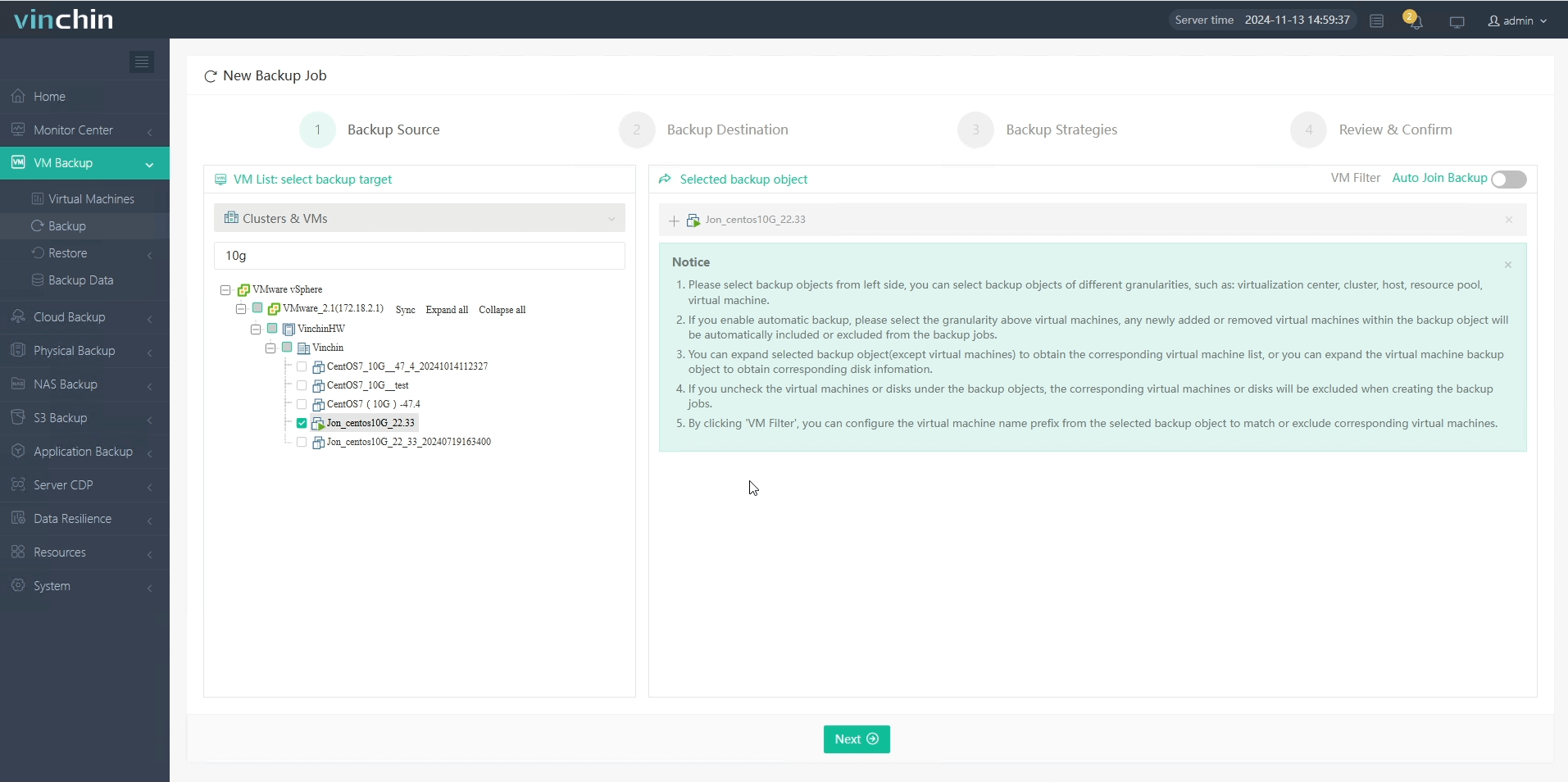
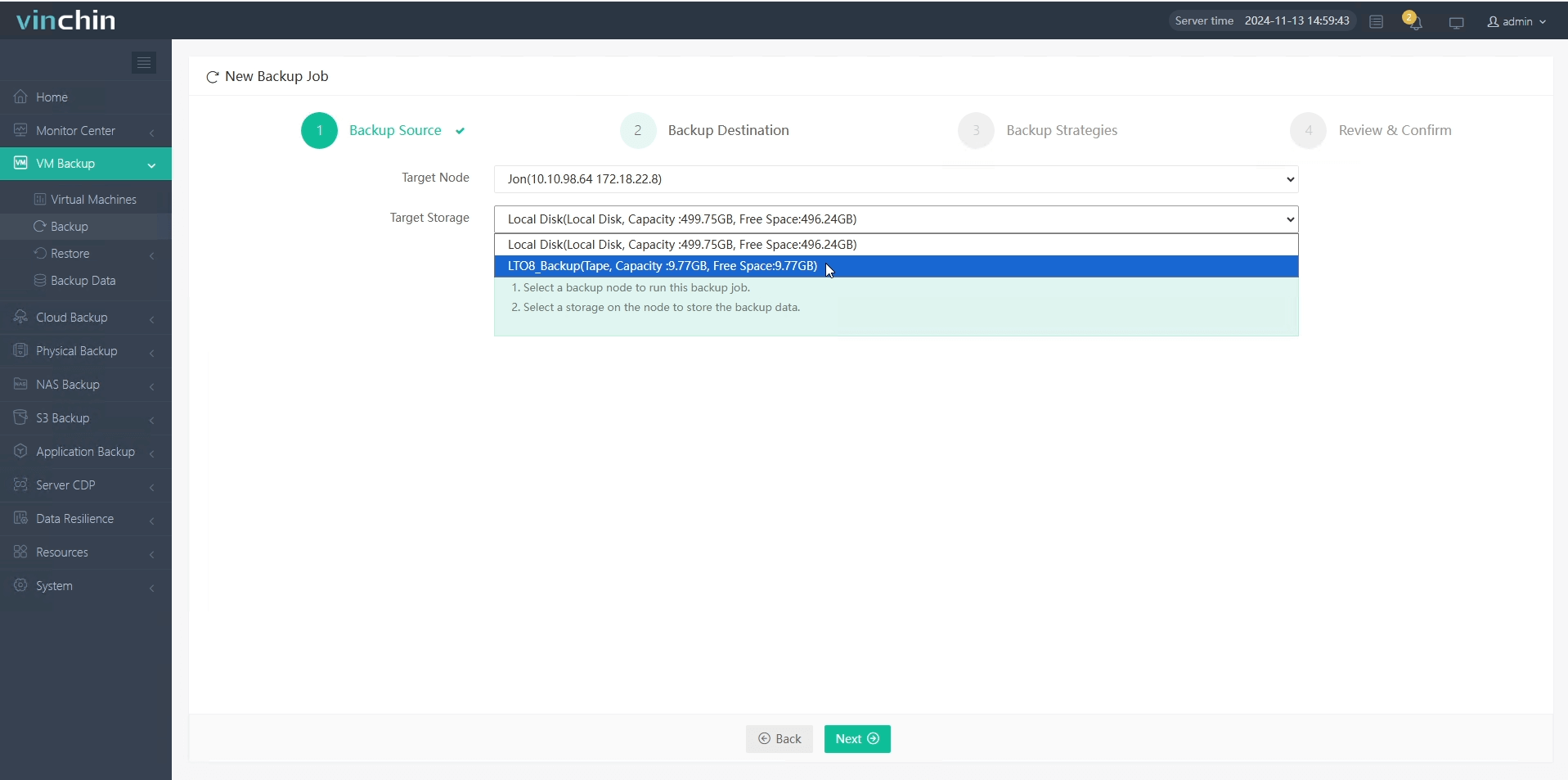
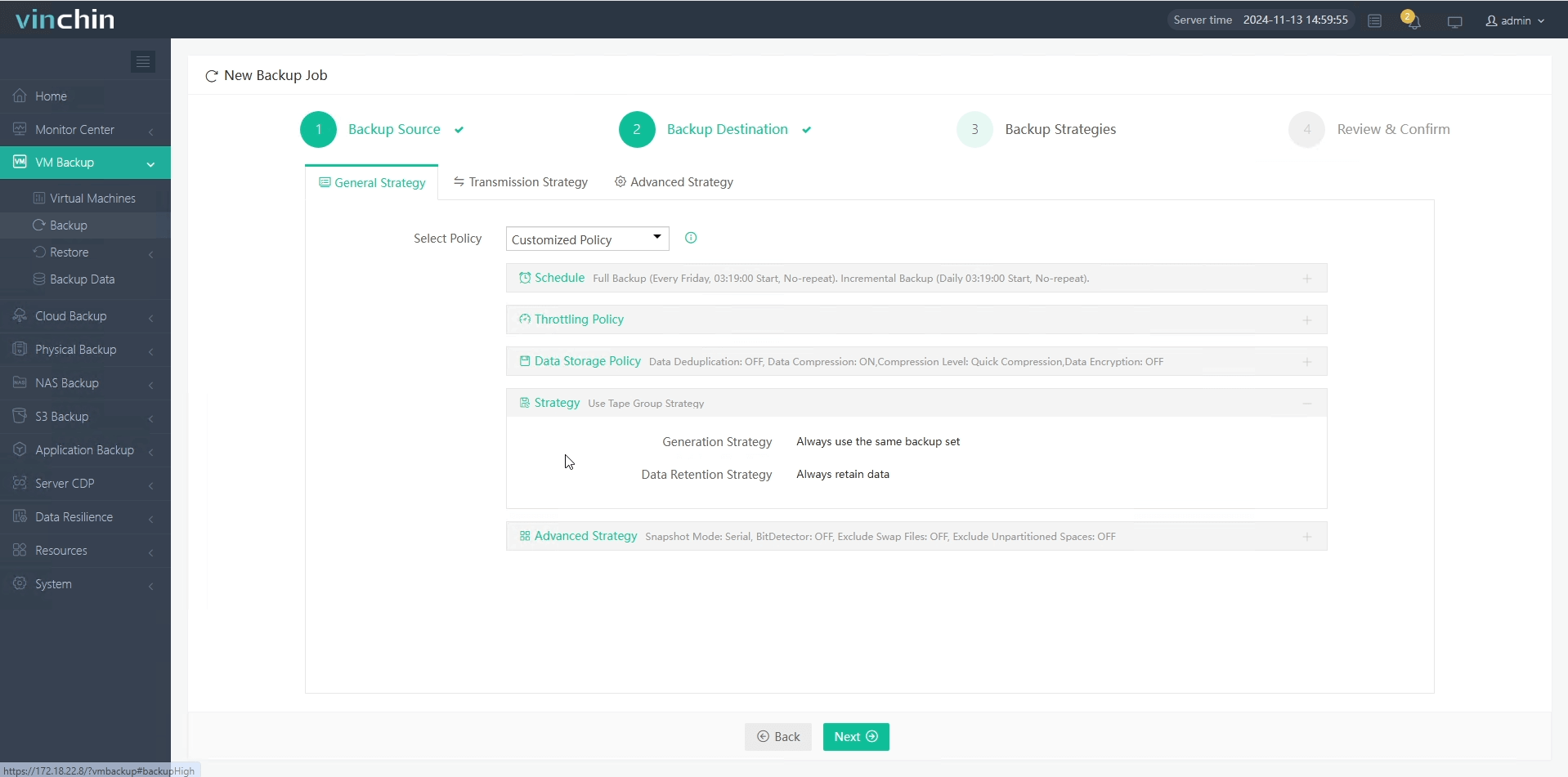
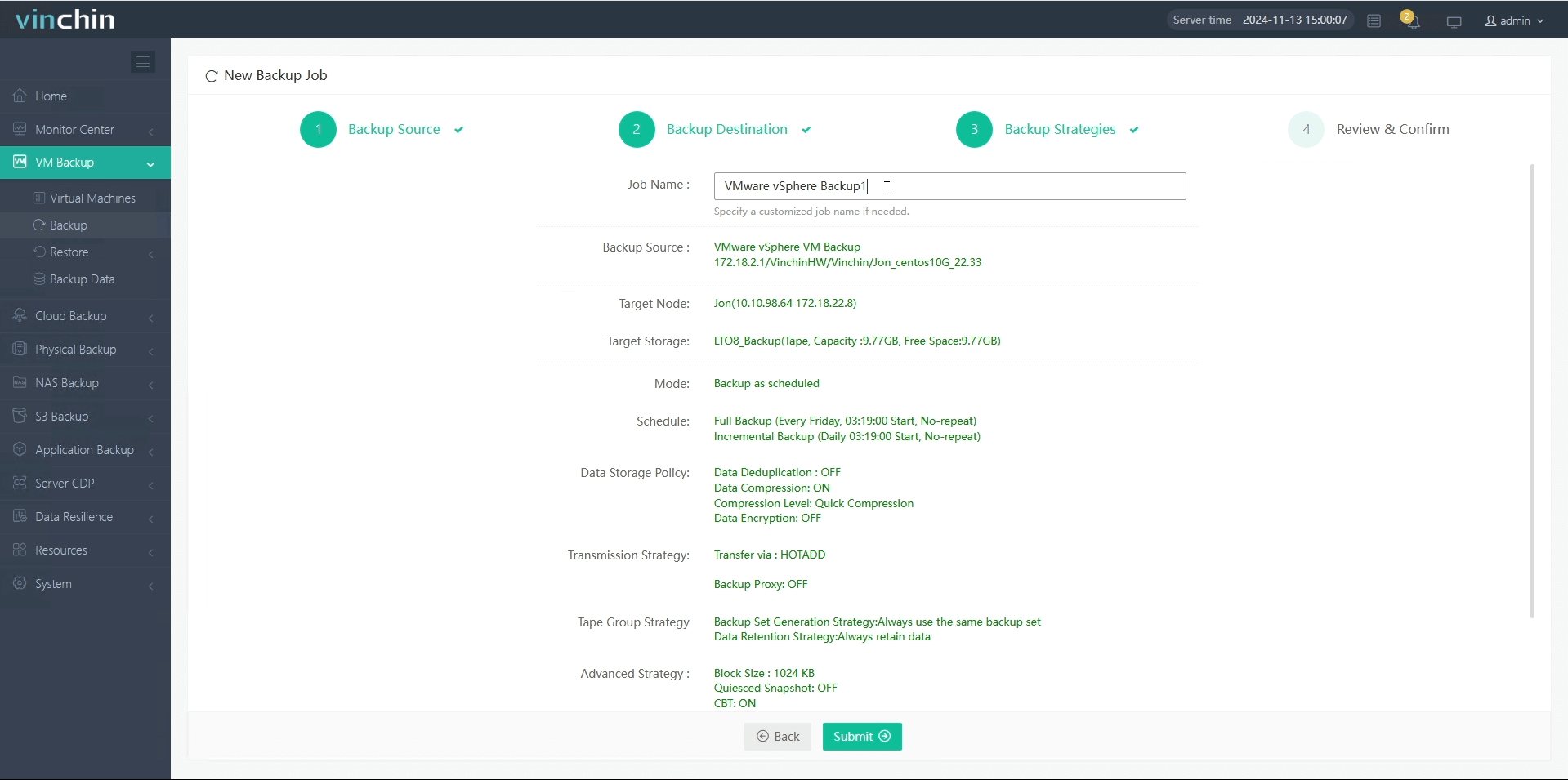
It takes you 4 steps to back up virtual machines to tape storage using Vinchin Backup & Recovery:
1.Select the virtual machine to be backed up.
2.Select the backup storage for it.
3.Configure the backup strategies.
4.Submit the job.
You can click the download button below to try it for 60 days for free and experience more features.
Tape Backup Drive FAQs
Q1: Can I migrate archived tapes between different generations of LTO drives?
Most newer LTO drives provide backward compatibility with two previous generations; check manufacturer specs before planning migrations between formats.
Q2: What should I do if my automated library fails mid-backup?
Pause all jobs > Inspect robotics status via LIBRARY CONTROL PANEL > Re-seat affected cartridges > Resume operations once errors clear > Review logs afterward for root cause analysis
Q3: How does encryption work with my existing compliance policies?
Enable hardware encryption via TAPE DRIVE SETTINGS menu; ensure keys are managed according to internal audit standards so only authorized personnel access protected archives.
Conclusion
Tape backup drives remain reliable tools offering low-cost long-term protection thanks their durability security energy savings—all vital traits amid growing cyber risks today! With Vinchin supporting seamless integration managing complex environments becomes straightforward regardless team size skill level involved!













