Ransomware attacks have made headlines worldwide—crippling hospitals, shutting down pipelines, and costing businesses billions each year. These threats are growing fast, targeting organizations of every size. So when you ask “ransomware what is,” you’re asking one of today’s most urgent IT questions. Let’s break it down from basics to advanced protection.
What Is Ransomware?
Ransomware is malicious software that locks your files or systems until you pay a ransom—usually in cryptocurrency (Trend Micro). If you refuse to pay, attackers may destroy your data or leak it online. This threat can strike anyone: individuals at home or large enterprises with thousands of users.
There are two main types:
Modern ransomware often uses “double extortion.” Attackers threaten not just to keep your data locked but also to publish sensitive information if you do not pay up—or even launch DDoS attacks against your company website.
A new trend called “Ransomware-as-a-Service” (RaaS) has made things worse. Criminals now rent out ready-made ransomware tools to others for a share of the profits. This means even people with little technical skill can launch powerful attacks against businesses everywhere.
How Ransomware Attacks Work
Understanding how ransomware works helps you defend against it better. Attacks usually follow several key stages—but attackers keep inventing new tricks all the time.
Initial Access Vectors
Attackers need a way into your network first. Most often, they use phishing emails that trick users into clicking bad links or opening infected attachments. But there are other ways too:
Some criminals brute-force weak passwords on remote desktop services.
Others exploit unpatched software vulnerabilities.
Drive-by downloads can infect users who visit compromised websites.
Supply chain compromises inject malware into trusted software updates.
Once inside, attackers may steal credentials so they can move deeper into your systems without raising alarms.
Encryption and Impact
After gaining access, ransomware spreads across local drives and network shares—sometimes even cloud storage mapped as folders on user machines. It looks for valuable file types like databases, documents, images—even backups themselves!
To avoid detection by security tools:
You might notice strange file extensions added to documents or see error messages when trying to open them.
When encryption finishes, a ransom note appears on screen demanding payment—often threatening higher ransoms if you delay or warning that stolen data will be leaked publicly unless paid quickly.
In advanced cases:
Some groups even contact customers directly to pressure companies into paying up fast!
Why Ransomware Is a Serious Threat
Why does everyone fear ransomware? Because its impact goes far beyond lost files—it can bring entire organizations to their knees overnight.
Here’s why this threat is so serious:
Data loss: Without clean backups kept offline or protected from tampering, years of business records could vanish forever.
Downtime: Systems may stay offline for days—or weeks—as teams scramble to recover operations.
Financial impact: Demands often reach millions; recovery costs include legal fees, hardware replacement, consulting help—and sometimes regulatory fines if sensitive data leaks out.
Reputation damage: Customers lose trust when their private info gets exposed online; partners may hesitate to do business again after an incident.
Legal risks: Data breaches trigger lawsuits and government investigations; paying ransoms could violate sanctions if attackers belong to banned groups.
Beyond these points: productivity drops sharply during recovery; supply chains stall; intellectual property theft puts future projects at risk; some victims face repeat attacks after paying once!
Law enforcement agencies—including the FBI—strongly advise never paying ransoms because there’s no guarantee criminals will return your data safely.
How to Prevent Ransomware Attacks?
Stopping ransomware starts long before an attack hits—with smart planning and layered defenses across people, processes, and technology.
Prevention works best when everyone plays a part:
Train staff regularly so they recognize phishing attempts right away—and know never to click suspicious links or attachments.
Use email filtering tools that block dangerous messages before reaching inboxes; sandbox unknown attachments so malware cannot run unchecked.
For stronger technical controls:
Apply application whitelisting so only approved programs run on critical servers; block everything else by default.
Enforce least privilege access: give users only what they need—not full admin rights everywhere!
Network segmentation helps too: split off vital systems from general office networks so infections cannot spread easily between departments or locations.
Comprehensive and Simplified Approach to Ransomware Protection with Vinchin
In contrast, Vinchin Backup & Recovery offers a much simpler and more efficient cloud backup service. Vinchin's cloud backup not only comes with robust security features such as real-time monitoring technology and encrypted data transmission to ensure the security of the backup process, but its system is also very easy to install and manage without the need for additional hardware or complex configurations.
Additionally, Vinchin supports the 3-2-1 backup strategy, ensuring that business data is backed up on multiple types of storage media, with at least one copy stored offsite. Even if local storage is affected by a ransomware attack, the cloud backup copy ensures that data remains secure and recoverable.
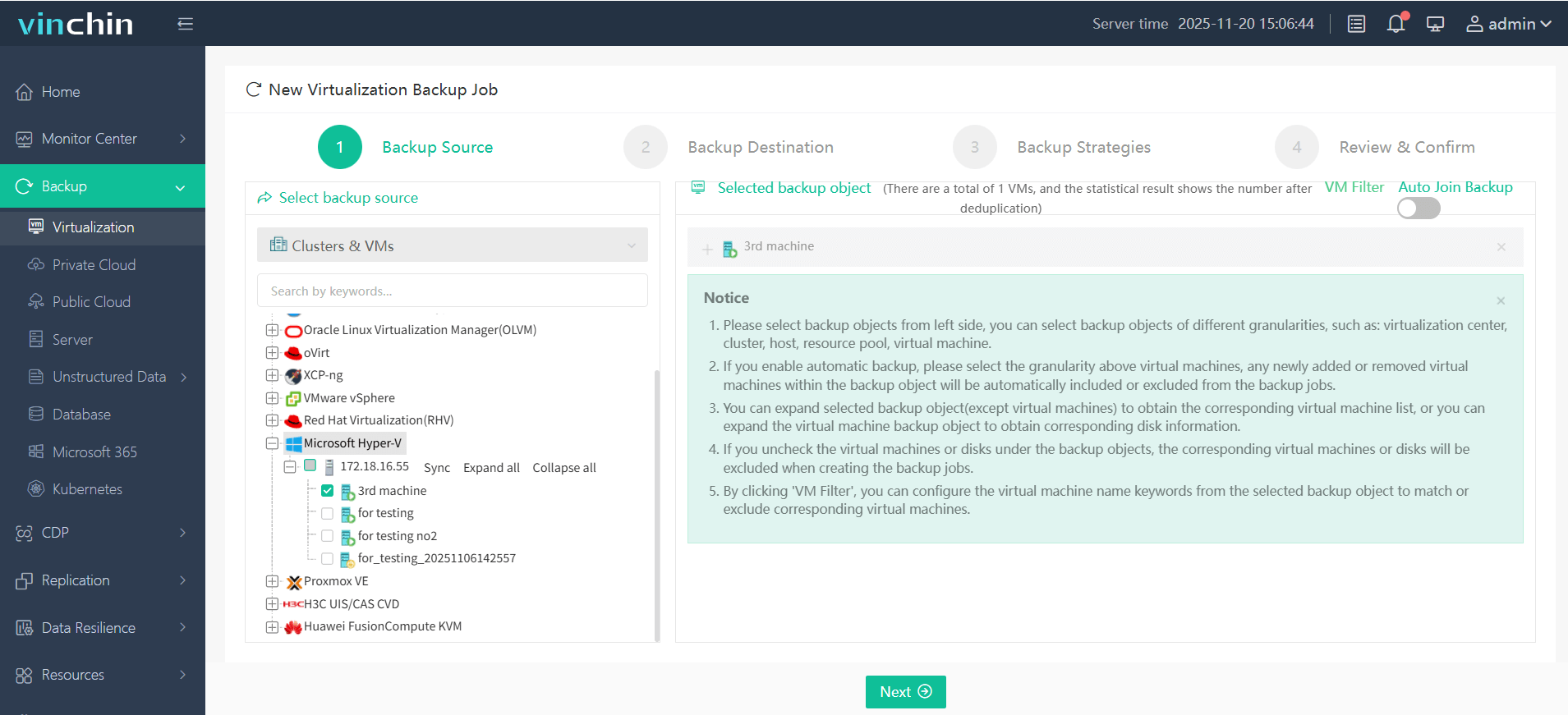
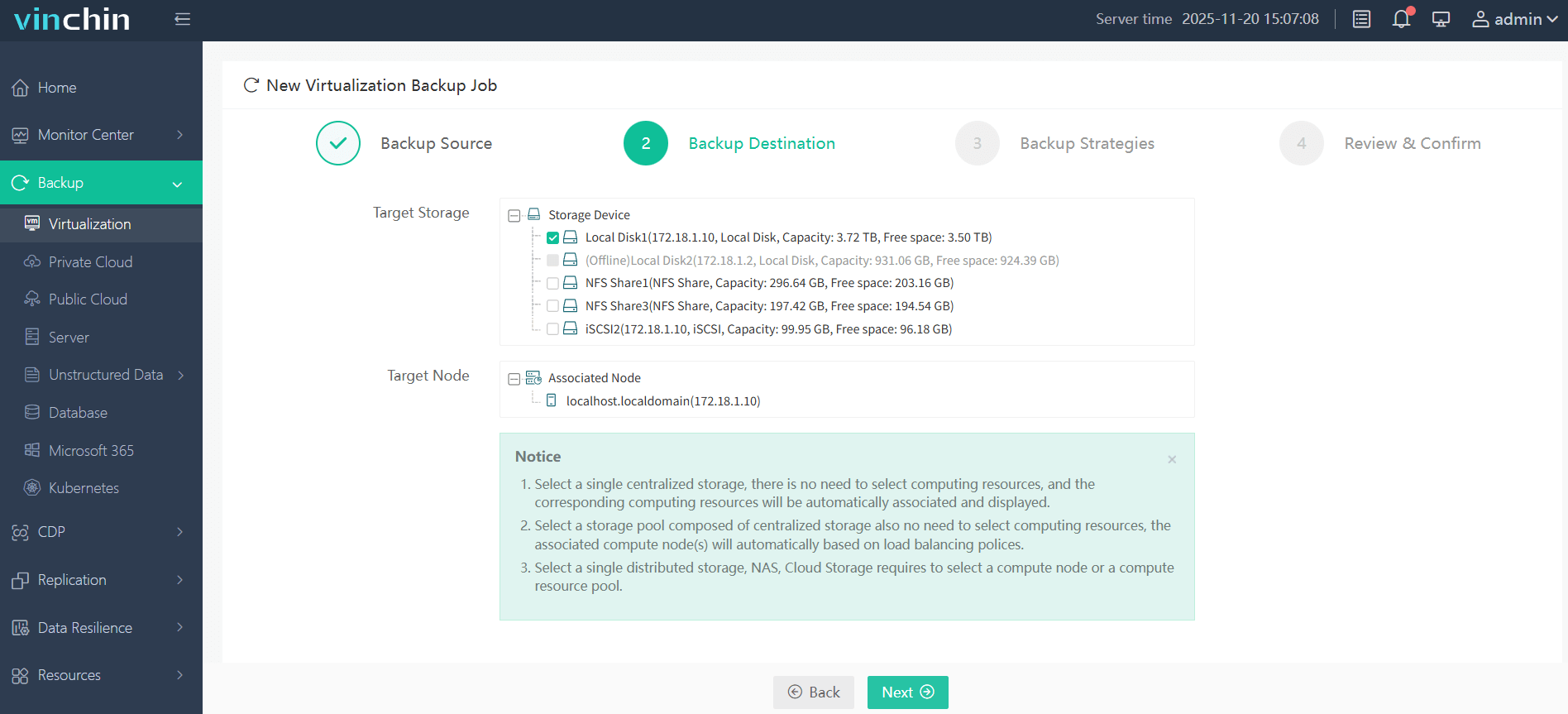
Vinchin Backup & Recovery's operation is very simple, just a few simple steps.
1. Just select VMs on the host
2. Then select backup destination
3. Select strategies
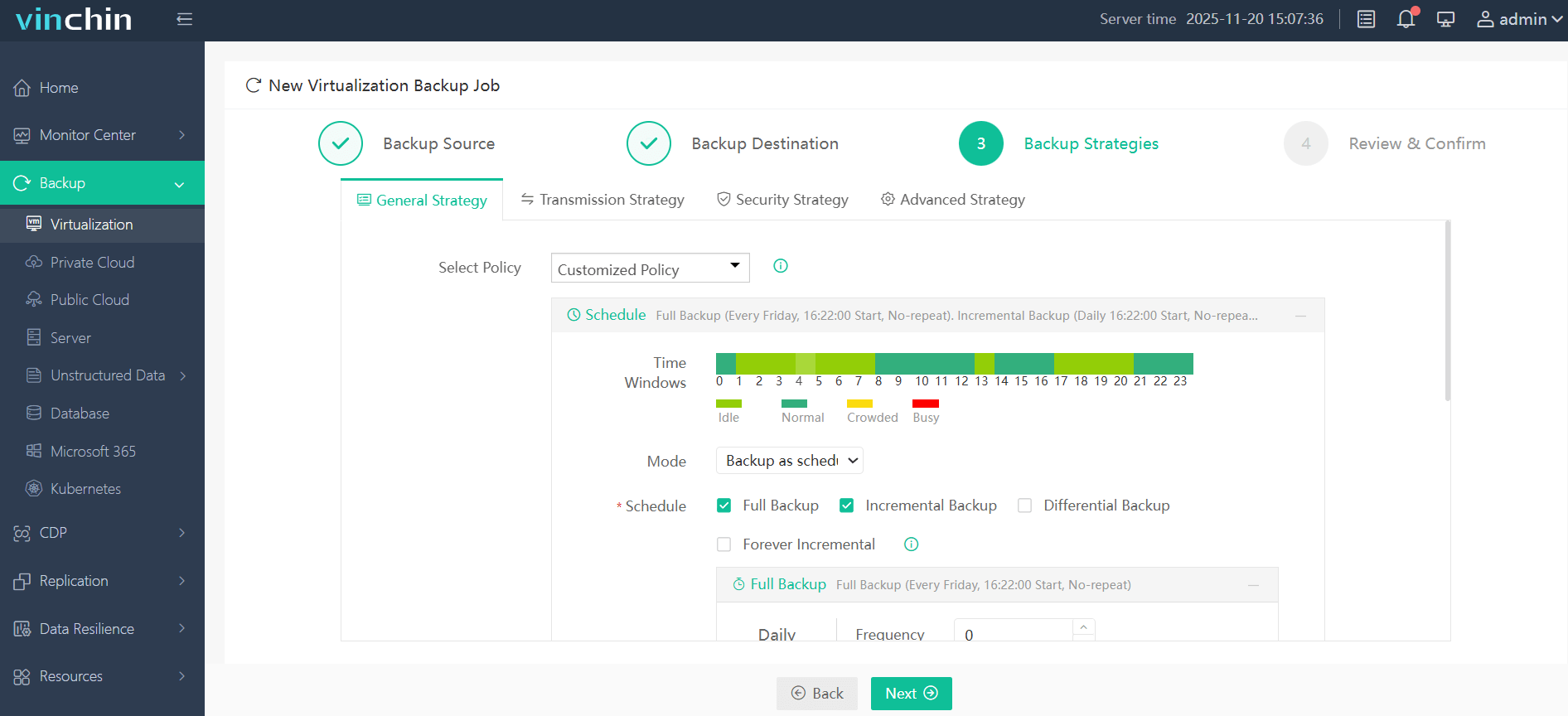
4. Finally submit the job
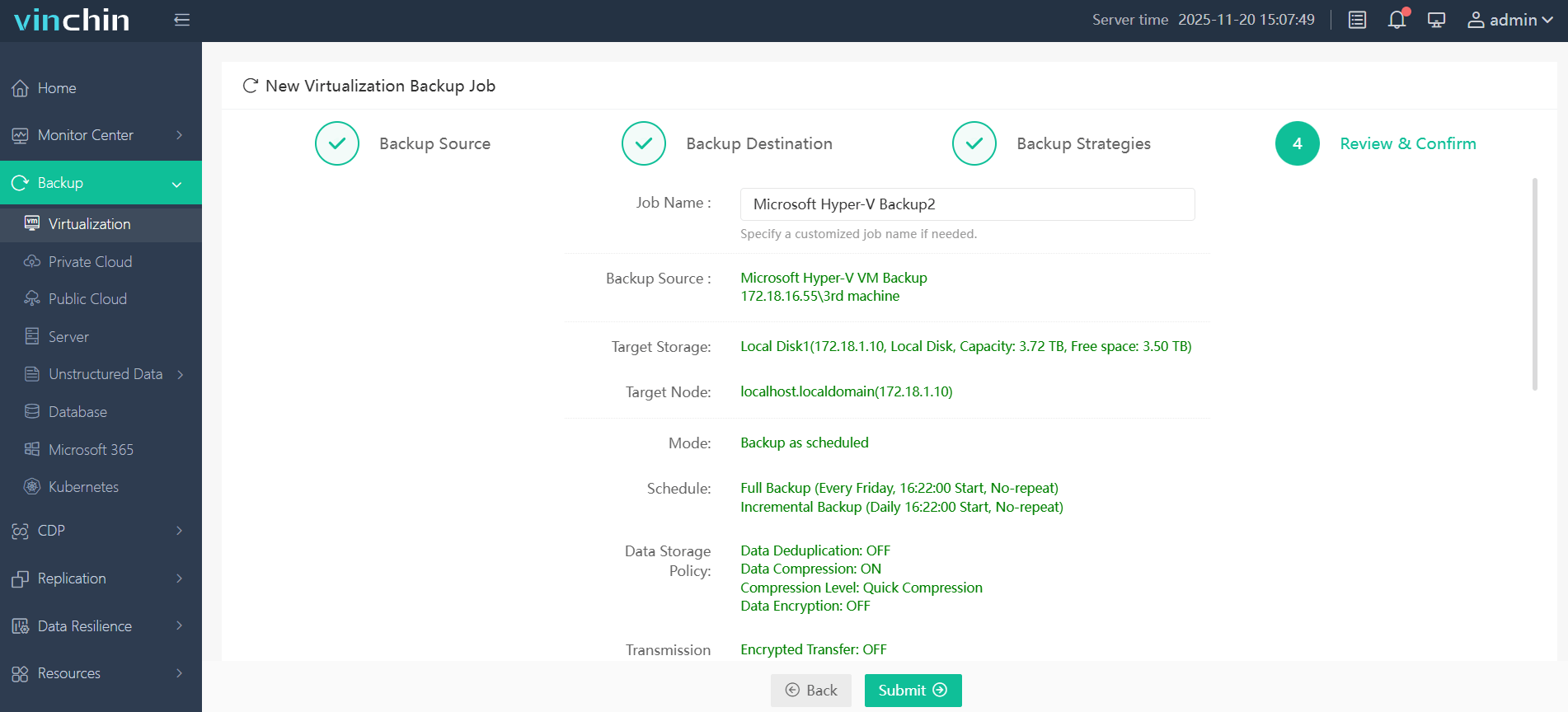
Therefore, Vinchin Backup & Recovery is an ideal choice for most businesses when selecting a cloud backup solution. It not only simplifies the backup process but also enhances data security, making it especially effective for protecting against ransomware attacks.
Vinchin offers a free 60-day trial, allowing businesses to experience its full functionality in a real-world environment. To learn more and take advantage of this opportunity, please reach out to Vinchin directly.
Ransomware What Is FAQs
Q1: Can ransomware spread between virtual machines within my hypervisor?
A1: Yes—it can move laterally if shared folders exist between VMs; always segment networks tightly inside hosts too.
Q2: Does immutable storage really stop ransomware?
A2: Yes—with true immutability enabled, ransomware cannot alter or delete stored backups—even if it gains admin access.
Q3: How should I test my disaster recovery plan against ransomware?
A3: Restore sample backups regularly in an isolated lab environment using CLEAN SYSTEMS > VERIFY DATA INTEGRITY > DOCUMENT RESULTS
Q4: What does "ransomware what is" mean when searching security alerts?
A4: It refers to the presence of malicious software that demands payment to unlock files or restore access to critical systems.
Conclusion
Ransomware remains one of today’s top cyber threats—with severe consequences if left unchecked. Strong defense requires both preventionand testedrecovery plans. Vinchin delivers reliable backups to help you recover fast and stay secure. Try it free and protect your business now.