How to Do Incremental Restore Using Proxmox Backup Server
This guide explains how PBS incremental restore works and provides step-by-step instructions to restore VMs through the Proxmox VE web interface and CLI. It also covers common restore issues and best practices for reliable recovery.
What Is Incremental Restore in Proxmox Backup Server?
How to Restore a VM from Proxmox Backup Server Step By Step
Common Proxmox Backup Server Incremental Restore Issues and Solutions
Best Practices for Reliable Incremental Restore with PBS
Vinchin Backup & Recovery: Enterprise Alternative for Proxmox Incremental Restore
Frequently Asked Questions
Conclusion
Proxmox Backup Server (PBS) supports efficient restore operations through its snapshot-based recovery, chunk-level storage, metadata indexing, and deduplication architecture. However, PBS does not provide a separate “Incremental Restore” mode or command. Instead, incremental restore describes the way PBS efficiently reconstructs a workload by retrieving the required backup chunks from a selected snapshot.
What Is Incremental Restore in Proxmox Backup Server?
Incremental restore in Proxmox Backup Server refers to an efficient recovery process that restores workloads by retrieving the required backup chunks from a selected snapshot instead of processing the entire backup dataset.
In PBS, restore efficiency mainly depends on:
Backup snapshots: provide recovery points for VMs and containers.
Chunk-based storage: divides backup data into smaller chunks for efficient retrieval.
Deduplication: avoids storing or processing identical data blocks repeatedly.
Metadata indexing: identifies the chunks required for a specific snapshot.
How Does Incremental Restore Work in PBS?
When restoring a VM or container, PBS does not copy the entire backup image. Instead, it reconstructs the workload by retrieving the required data chunks referenced by the selected snapshot.
The restore workflow is:
Select Backup Snapshot
        ↓
Read Snapshot Metadata
        ↓
Identify Required Chunks
        ↓
Retrieve Chunks from Datastore
        ↓
Rebuild VM or Container
        ↓
Start Recovered Workload
During this process, PBS:
Uses snapshot metadata to locate the data required for the selected recovery point.
Retrieves the required chunks referenced by the selected snapshot from the datastore.
Reconstructs the VM disk or container data on the target storage.
Starts and validates the recovered workload after restoration.
Because PBS snapshots share identical chunks through deduplication, the system avoids unnecessary duplicate data processing and improves restore efficiency, especially for large VMs or environments with multiple recovery points.
Incremental Backup vs Incremental Restore
Incremental backup and incremental restore are related concepts but solve different problems.
Feature
Incremental Backup
Incremental Restore
Purpose
Reduce backup size and backup window
Improve recovery efficiency
Process
Stores changed blocks after the initial backup
Retrieves required blocks from existing snapshots
Happens during
Backup creation
Recovery
Main benefit
Lower storage usage
Faster and more efficient restore
How to Restore a VM from Proxmox Backup Server Step By Step
Although Proxmox Backup Server uses incremental backup data and deduplication technology to optimize the restore process, administrators still need to select the correct recovery point and configure restore settings when recovering a VM. The following steps show how to restore a VM from PBS backups.
Method 1: Restore a VM from PBS Backup Through Proxmox VE Web Interface
The Proxmox VE web interface provides a simple way to restore VMs from PBS backups. During recovery, PBS automatically retrieves the required data chunks referenced by the selected snapshot.
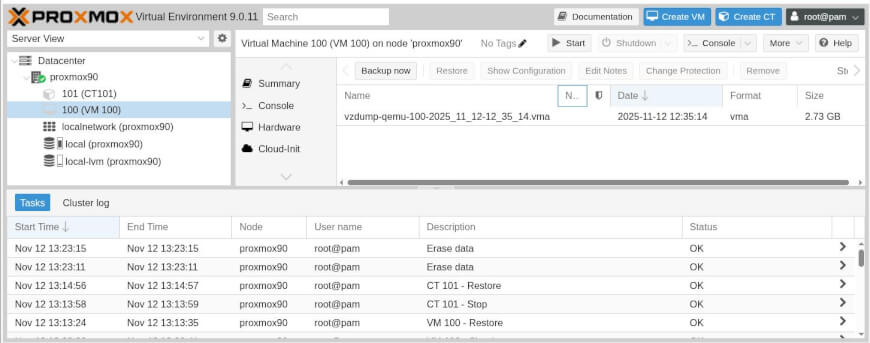
Step 1: Select the Recovery Snapshot
Before starting the recovery process, confirm that the PBS datastore is available and select the snapshot containing the required recovery point.
In the Proxmox VE web interface:
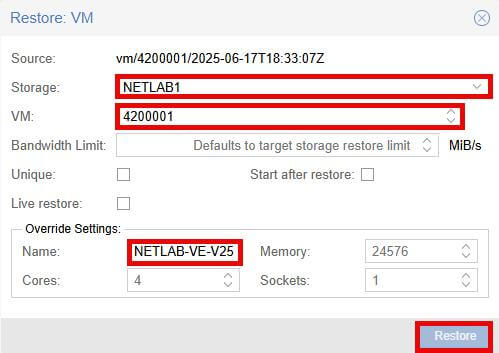
1. Go to Datacenter → Storage → PBS datastore.
2. Open the Backup section.
3. Select the VM snapshot and click Restore.
When choosing a snapshot:
Select the latest healthy snapshot for normal recovery.
Choose a snapshot before the failure event for disaster recovery.
Use application-consistent backups for critical workloads.
The selected snapshot determines the recovery point, and PBS uses snapshot metadata to identify the required data chunks.
Step 2: Configure Restore Parameters
Configure the target environment before starting the restore task.
Important settings include:
Target Node: Select the Proxmox VE node for the recovered VM.
Target Storage: Choose the destination storage for VM disks.
VM ID: Specify the ID for the restored VM. Use a new ID if the original VM still exists.
Network Configuration: Review network settings to avoid conflicts after recovery.
After confirming the settings, start the restore task.
Step 3: Monitor the Restore Process
After starting the restore task, monitor the recovery progress in the Proxmox VE web interface.
Check the task status to confirm:
The restore process completes successfully.
No storage, permission, or network errors occur.
The restored VM appears correctly on the target Proxmox VE node.
If the restore fails, review the Proxmox VE task log and PBS datastore status to identify possible issues.
Step 4: Validate the Recovered VM
After restoration completes, verify that the VM is ready for use.
Check:
VM Boot Status
Operating system starts successfully.
Virtual disks are detected correctly.
Network Connectivity
Network interfaces work properly.
IP configuration is correct.
Application Availability
Required services start normally.
Business data is accessible.
Validation ensures the VM is operational rather than only successfully restored.
Method 2: Restore VM from PBS Backup Using Command Line
For automated recovery or bulk restoration, administrators can use Proxmox VE CLI tools.
Restore a VM:
qmrestore <backup-file> <vmid>
Restore a container:
pct restore <vmid> <backup-file>
Administrators can also check available PBS snapshots:
proxmox-backup-client snapshot list
PBS uses the same chunk-based restore mechanism regardless of whether recovery is performed through the GUI or command line.
Common Proxmox Backup Server Incremental Restore Issues and Solutions
Although PBS automatically handles incremental restore by retrieving required chunks from the selected snapshot, recovery efficiency and success can still be affected by datastore health, snapshot availability, and infrastructure performance.
1. Incremental Restore Takes Longer Than Expected
Possible causes:
Large amount of changed data between recovery points.
Slow PBS datastore performance.
Limited network bandwidth between PBS and Proxmox VE.
Target storage cannot write restored data fast enough.
Solutions:
Check PBS datastore performance.
Verify network throughput.
Ensure target storage has sufficient I/O capability.
Schedule restore tasks during lower workload periods.
2. PBS Cannot Find the Required Recovery Snapshot
Possible causes:
Snapshot was removed by retention policies.
PBS datastore is unavailable.
Backup verification failed.
Solutions:
Confirm the PBS datastore connection.
Check available snapshots.
Review retention settings.
Run PBS verify jobs regularly.
3. Incremental Restore Requires More Data Than Expected
Possible causes:
Large changes occurred between backup snapshots.
Deduplication cannot eliminate newly modified data blocks.
The selected recovery point contains extensive changes.
Solutions:
Select an appropriate recovery snapshot.
Monitor VM change rates.
Maintain regular backup schedules to reduce recovery gaps.
4. Restored VM Cannot Boot After Incremental Restore
Possible causes:
Recovery snapshot does not contain a consistent application state.
VM configuration changed after backup.
Disk or boot configuration mismatch.
Solutions:
Restore from another verified snapshot.
Use application-consistent backups for critical workloads.
Verify VM hardware configuration after restore.
Best Practices for Reliable Incremental Restore with PBS
1. Maintain Regular Backup Snapshots
PBS incremental restore depends on available snapshots and their referenced data chunks. Regular backup schedules ensure that recent recovery points are available when restoration is required.
2. Run Verify Jobs to Ensure Snapshot Integrity
PBS restores workloads based on snapshot metadata and stored chunks. Regular verification helps detect corrupted backup data before a recovery event.
3. Monitor PBS Datastore Performance
Restore efficiency depends on datastore read performance, network bandwidth, and target storage write performance. Monitoring these components helps maintain predictable recovery speed.
4. Use Application-Consistent Backups for Critical Workloads
Incremental restore can reconstruct VM data correctly, but data consistency still depends on backup consistency. For databases and critical applications, use guest agents or application-aware backup methods.
5. Regularly Test Incremental Restore
Restore testing verifies that:
Snapshots are available.
Required chunks can be retrieved.
Recovered workloads start successfully.
Vinchin Backup & Recovery: Enterprise Alternative for Proxmox Incremental Restore
While Proxmox Backup Server provides efficient backup and recovery capabilities for Proxmox environments, organizations operating multiple virtualization platforms often need a centralized strategy to protect workloads across heterogeneous infrastructures.
Vinchin Backup & Recovery provides centralized backup management and flexible recovery across different virtualization platforms. Key capabilities include:
Cross-platform VM backup and recovery: protect workloads across environments such as Proxmox VE, VMware vSphere, Microsoft Hyper-V, and other platforms from a unified console.
Efficient incremental backup and recovery workflows: reduce backup windows and storage consumption by transferring only changed data after the initial backup.
Granular recovery options: restore complete VMs, virtual disks, or individual files based on different recovery requirements.
Disaster recovery support: improve business continuity through flexible backup, recovery, and workload protection strategies.
The following tutorial video introduces how to backup and restore a Proxmox VM in Vinchin Backup & Recovery:
For organizations managing mixed virtualization infrastructures, a centralized backup and recovery solution can reduce operational complexity and provide more consistent protection across environments. Download the 60-day free trial to extend the incremental restore beyond Proxmox.
Q1: Does Proxmox Backup Server support incremental restore?
Yes. Proxmox Backup Server supports incremental restore efficiency through snapshot-based recovery, chunk-level storage, and deduplication. However, PBS does not provide a separate incremental restore mode because the system automatically retrieves the required chunks from the selected snapshot.
Q2: Does PBS restore the entire backup or only changed data?
PBS does not restore only changed data between backup versions. Instead, it reconstructs the selected snapshot by retrieving the chunks referenced by that recovery point.
Q3: Is incremental restore faster than full restore in PBS?
In many cases, PBS can restore workloads more efficiently than traditional full restore methods because it avoids unnecessary duplicate data processing through chunk-based storage and deduplication. Actual restore speed still depends on VM size, storage performance, network bandwidth, and datastore workload.
Q4: Why is my PBS incremental restore slow?
Restore speed depends on datastore performance, network bandwidth, VM size, amount of changed data, and target storage capability. Deduplication improves efficiency, but large amounts of modified data may still require more data retrieval.
Conclusion
Proxmox Backup Server enables efficient incremental restore through snapshot-based recovery, chunk-level storage, and deduplication. Although PBS does not provide a separate incremental restore mode, it automatically retrieves the required data chunks to rebuild workloads efficiently. Regular restore testing, backup verification, and recovery planning help ensure reliable data protection and minimize downtime.
Our website uses cookies to enhance your browsing experience. By continuing to use our site, you consent to the use of cookies.
Please review our Cookie Policy for more details on how we use cookies and how you can manage your preferences.