What Is Proxmox Backup Deduplication?
Backup deduplication is a storage optimization technique that eliminates duplicate data before it is written to disk.
Instead of saving every backup as a complete copy, the backup software identifies identical data blocks and stores them only once. Future backups simply reference the existing data.
How does Proxmox Backup Server Deduplication Work?
PBS uses content-defined chunking (CDC) instead of fixed-size blocks. This is an important distinction.
Rather than dividing every file into equal-sized blocks, PBS dynamically determines chunk boundaries based on the data itself.
The process works as follows:
1. VM data is read during backup.
2. Data is divided into variable-sized chunks.
3. Each chunk receives a cryptographic hash.
4. PBS checks whether that hash already exists.
5. Existing chunks are referenced.
6. Only new chunks are stored.
Several advantages are provided:
Higher deduplication ratios
Better handling of file modifications
Efficient incremental backups
Reduce storage growth over time
How Much Storage Can Deduplication Save?
Actual savings depend on workload characteristics.
Typical environments experience results similar to the following:
Environment | Typical Deduplication Saving |
Windows Server fleet | 70-90% |
Linux virtual machines | 60-85% |
VDI environments | 80-95% |
Database servers | 20-50% |
Frequently changing application servers | 40-70% |
The more similar the virtual machines are, the greater the deduplication ratio.
Long-term retention also increases storage efficiency because only changed chunks are added over time.
Real-World Deduplication Ratios: What to Expect
One of the most common questions in the Proxmox community is “Why isn’t my deduplication ratio higher?” The answer is almost always workload composition.
Based on data from the Proxmox Support Forum, cloud-PBS providers, and backup sizing tools across the ecosystem, here’s a practical breakdown:
Workload Type | Typical Dedup Factor |
Homogeneous Linux VMs (same base OS) | 10x-30x+ |
Mixed Windows Server fleet (same base image) | 8x-15x |
Mixed/heterogeneous VM environments | 4x-7x |
Heavy database workloads (higher change rate) | 2x-5x |
Highly compressed or encrypted source data | 1.2x-2x |
The more your VMs share common OS bases and application stacks, the better your ratio.
Where Native Proxmox Backup Deduplication Has Limits
PBS is purpose-built for Proxmox VE, and within that context it’s excellent. But there are real scenarios where organizations need more:
1. Multi-hypervisor environments. Most enterprises don’t run Promxox exclusively. If your infrastructure includes VMware vSphere, Hyper-V, or XenServer alongside Proxmox VE, PBS doesn’t back up those platforms. You end up managing separate backup systems, each with their own storage pool, and no cross-platform deduplication.
2. Cross-platform VM migration. Teams migrating workloads between hypervisors (say, from VMware to Proxmox after the Broadcom acquisition) need tools that handle the transition gracefully, not just PBS pointing at Proxmox-native storage.
3. Enterprise compliance and reporting. PBS is powerful but administratively lean. Organizations subject to audit requirements, HIPAA, PCI DSS, and SOC 2 need centralized reporting, RBAC with fine-grained permissions, and formal verification workflows that go beyond what PBS provides out of the box.
4. Cloud archival and 3-2-1-1-0 compliance. While PBS added S3 datastore support in recent versions, integrating it into a complete 3-2-1 or 3-2-1-1-0 backup architecture with object locking for immutability requires additional configuration and tooling.
Enterprise-Grade Deduplication for Proxmox and Beyond
For organizations that need more than PBS alone can provide, Vinchin Backup & Recovery is one of the few enterprise backup solutions with deep, native Proxmox integration alongside support for 15+ other virtualization platforms.
Vinchin’s data reduction stack for Proxmox environments includes:
Deduplication and compression are applied at the backup job level, reducing storage footprint across both incremental and full backups.
Changed Block Tracking (CBT) for Proxmox VE, which ensures only modified disk blocks are transferred during incremental backups, keeping daily backup windows small even for multi-TB VMs.
Unified management console for Proxmox VE, VMware vSphere, Hyper-V, oVirt/RHV, Oracle OLVM, XenServer, KVM, OpenStack, ZStack, and more, all from a single interface.
Instant VM recovery that mounts backup data via NFS and boots a failed VM in approximately 15 seconds, directly addressing tight RTO requirements
Ransomware protection through backup storage, write-protection, and encryption, giving organizations a recoverable copy that ransomware cannot reach
Proxmox backup deduplication steps:
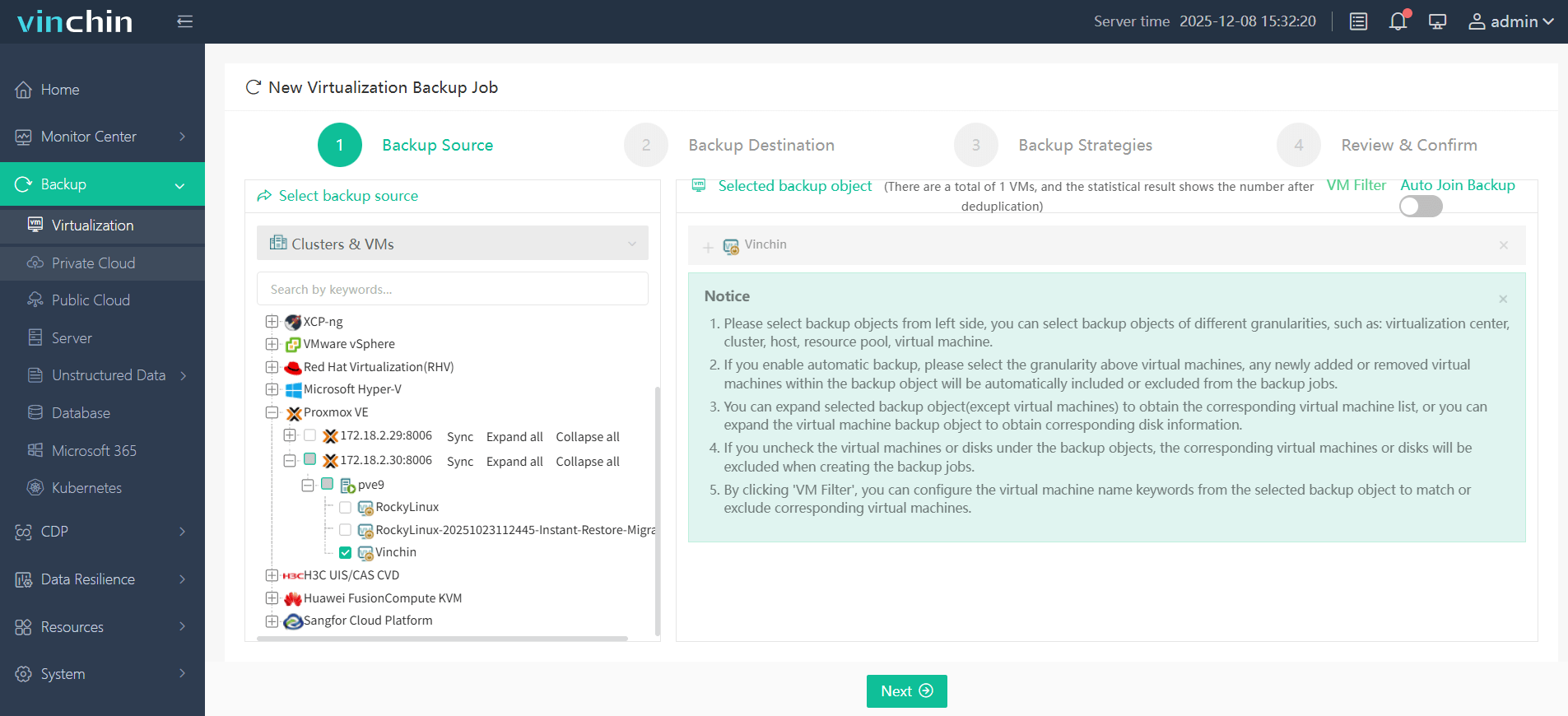
Step 1. Choose the Proxmox VM as the source under Backup > Virtualization.
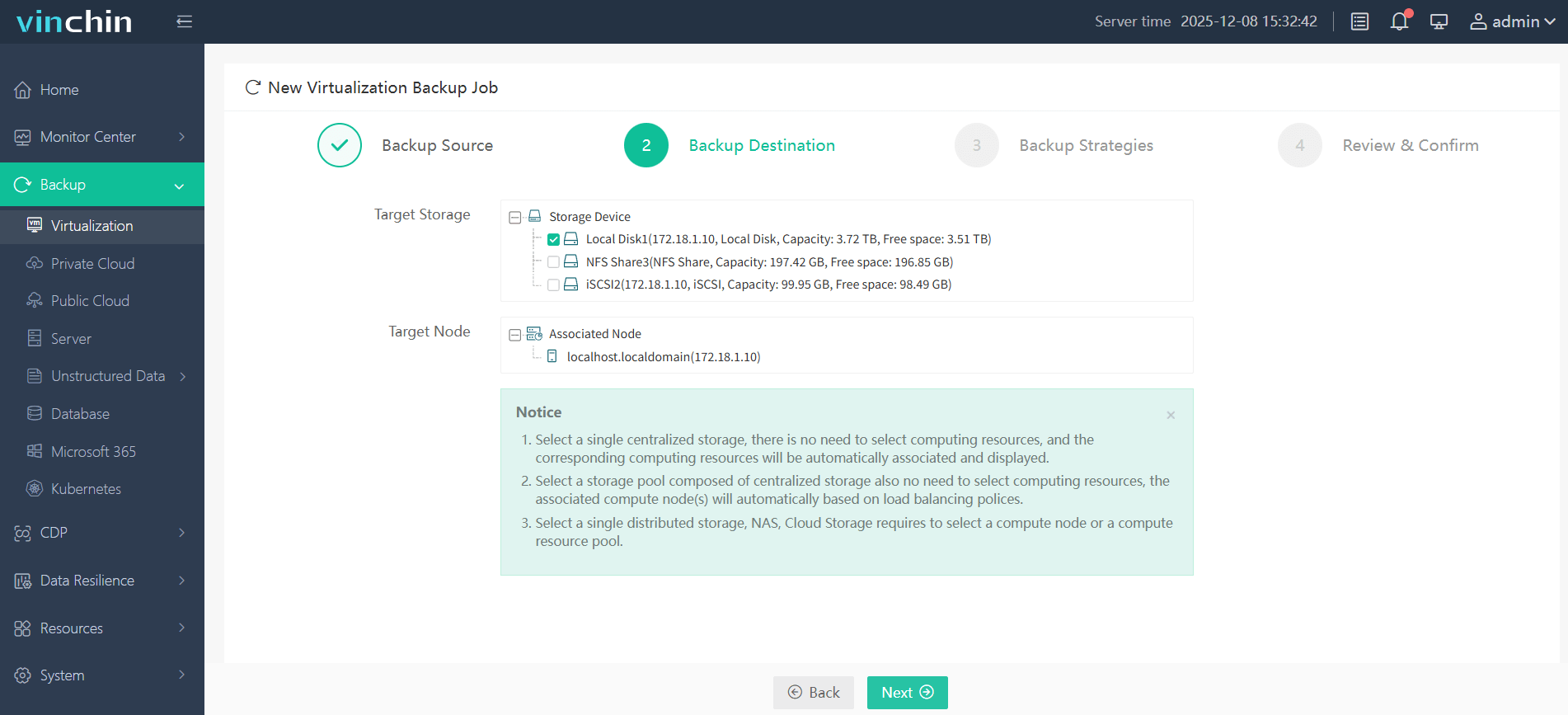
Step 2. Choose the backup destination you want.
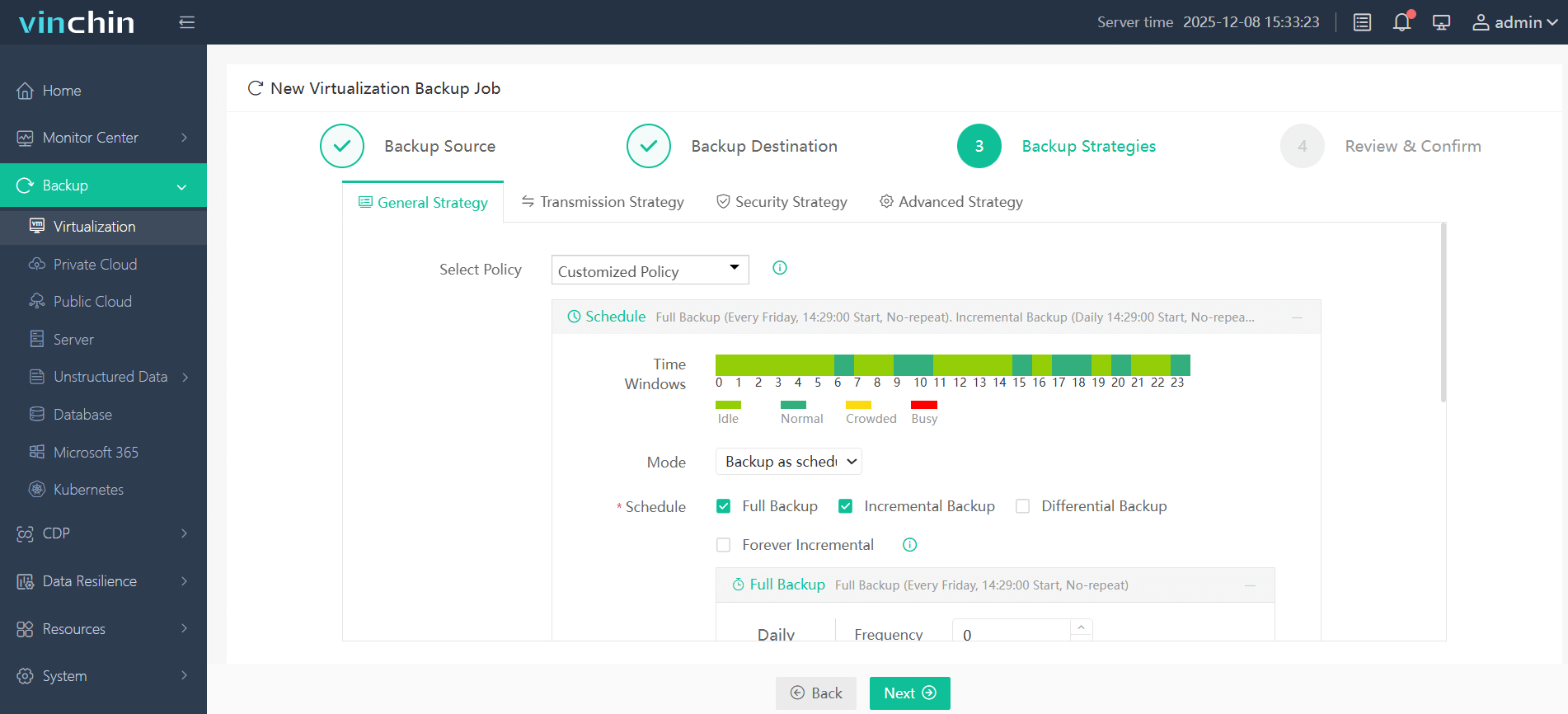
Step 3. Configure the backup strategies, you can open the data deduplication in the Data Storage Policy.
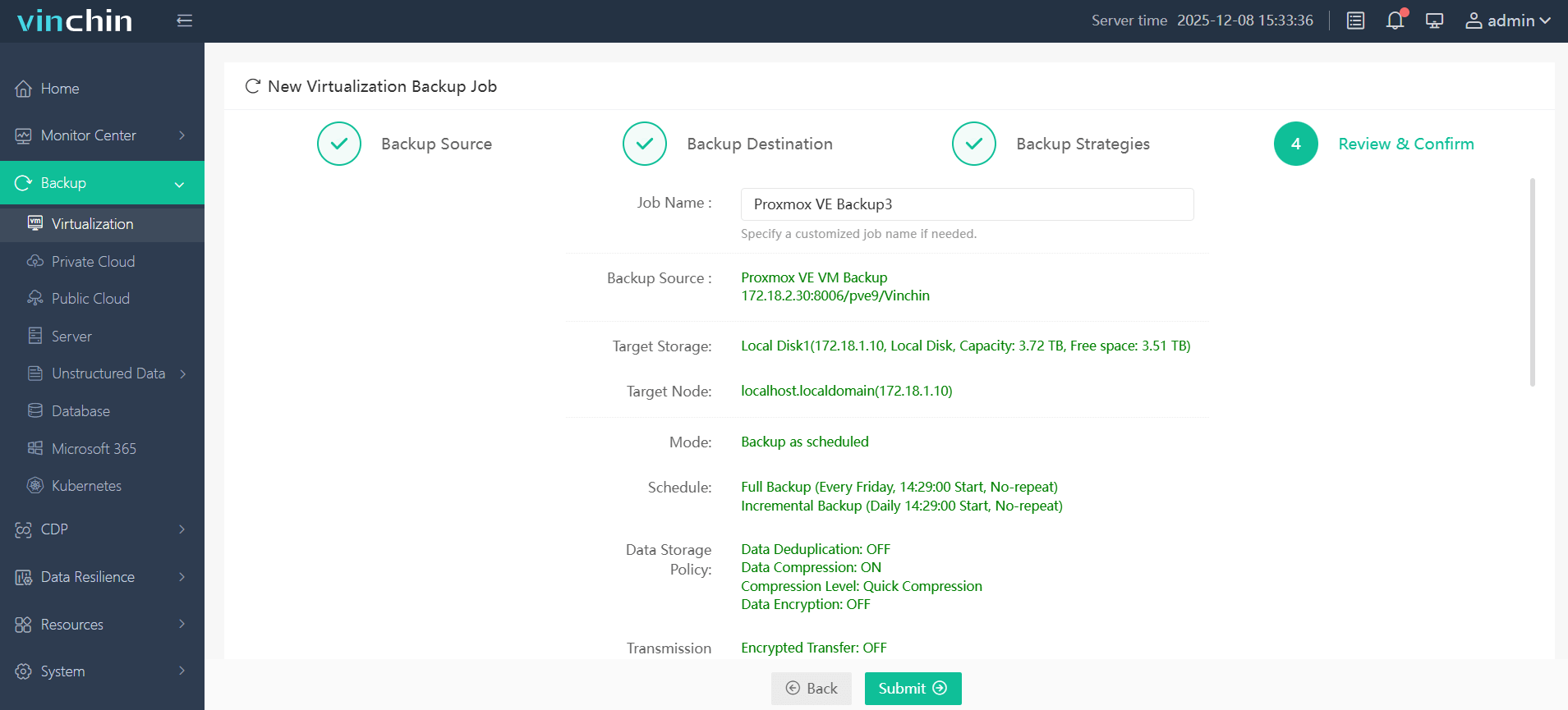
Step 4. Confirm your settings, and then click Submit.
For teams evaluating backup solutions for mixed-platform environments, Vinchin offers a fully functional 60-day free trial with no VM count restrictions during the trial period.
FAQs about Proxmox Backup Deduplication
Q1: Does Proxmox VE include deduplication by default?
No. Deduplication is provided by Proxmox Backup Server (PBS), not by Proxmox VE itself. If backups are stored on a standard directory, NFS share, or CIFS/SMB storage, deduplication is not available.
Q2: Is deduplication performed across all backup versions?
Yes. PBS uses global chunk-level deduplication, allowing identical chunks to be reused across different backup versions, virtual machines, and backup jobs.
Q3: Does encryption disable deduplication?
No. PBS performs deduplication before encryption.
Conclusion
Smarter backups start with smarter storage. Whether you're relying on PBS for Proxmox or scaling to a hybrid infrastructure with Vinchin, deduplication is the key to reducing costs, improving efficiency, and keeping your data protected without unnecessary overhead.