When managing Oracle database, you may see the RMAN-08137 warning during backup or archivelog deletion tasks. This message can puzzle even experienced administrators—especially if you do not use Data Guard or GoldenGate replication. Why does RMAN refuse to delete certain archived logs? If left unresolved, this warning can fill up your archive log directory fast and threaten database availability.
In this article, we explain what causes RMAN-08137, how to diagnose its source at beginner through advanced levels, and proven ways to resolve it without risking data loss.
What Is RMAN 08137 Error?
The RMAN-08137 error appears as:
RMAN-08137: WARNING: archived log not deleted, needed for standby or upstream capture process
This warning means that RMAN did not delete one or more archived logs because they are still needed by a standby database (Data Guard) or an upstream capture process (such as Oracle GoldenGate). While not fatal by itself, this error can cause your archive log storage to fill up quickly if ignored.
Why Does RMAN 08137 Occur?
RMAN-08137 usually happens when Oracle’s deletion policy detects that archived logs are still required elsewhere in your environment. Common reasons include:
Data Guard Standby: Logs have not yet been applied on a standby database.
GoldenGate/Streams: An upstream capture process needs these logs for replication.
Orphaned Capture Processes: A registered capture process remains in the database even if it is no longer active.
Misconfigured Deletion Policy: Your archivelog deletion policy may be set too conservatively—keeping logs until they are shipped/applied to standby or consumed by a capture process.
If you recently cloned a database or changed replication settings but forgot to unregister old processes or update policies, you might see this error even if you do not actively use Data Guard or GoldenGate now.
Method 1: Checking Archive Log Dependencies
Before deleting any archived logs with RMAN, always verify whether other processes depend on them. Skipping this step risks breaking replication or losing recoverability.
First, check if there are any gaps in Data Guard log application using:
SELECT THREAD#, LOW_SEQUENCE#, HIGH_SEQUENCE# FROM V$ARCHIVE_GAP;
If results show missing sequences between primary and standby databases, those logs must stay until synchronization completes.
Next, review which archived logs have not been deleted:
SELECT SEQUENCE#, FIRST_TIME, NEXT_TIME FROM V$ARCHIVED_LOG WHERE DELETED = 'NO' ORDER BY SEQUENCE#;
This helps identify exactly which files are being retained—and when they were created—so you can trace their consumers.
To see current archivelog deletion policy settings in RMAN:
RMAN> SHOW ALL;
If your policy includes phrases like APPLIED ON STANDBY or SHIPPED TO STANDBY, then RMAN waits until all standbys confirm receipt/application before deleting those logs from disk.
You can adjust the policy temporarily if needed:
RMAN> CONFIGURE ARCHIVELOG DELETION POLICY TO SHIPPED TO STANDBY;
After changing the policy (if appropriate), try deleting old archives again:
RMAN> DELETE NOPROMPT ARCHIVELOG ALL COMPLETED BEFORE 'SYSDATE-1';
Once finished—and after confirming all systems are healthy—restore your original deletion policy:
RMAN> CONFIGURE ARCHIVELOG DELETION POLICY TO NONE;
Always double-check that no critical system relies on these archives before making changes!
Method 2: Diagnosing Capture Processes & Standby Synchronization
Capture processes such as GoldenGate Extracts often block archivelog deletion—even after their jobs end—if they remain registered in Oracle metadata tables. Similarly, lagging standbys can hold up deletions indefinitely.
Begin by listing all registered capture processes:
SELECT CAPTURE_NAME, STATUS FROM DBA_CAPTURE;
If you find unused captures (for example from decommissioned replication setups), unregister them using their management tool’s commands—for GoldenGate users:
GGSCI> DBLOGIN USERIDALIAS <alias>
GGSCI> UNREGISTER EXTRACT <extract_name> DATABASE
For Streams-based environments (rare today), consult official documentation before removing entries from DBA_CAPTURE directly.
Next step: Check Data Guard apply status so you know whether standbys lag behind primary production:
SELECT PROCESS, STATUS, THREAD#, SEQUENCE#, BLOCK#, BLOCKS FROM V$MANAGED_STANDBY WHERE PROCESS IN ('MRP0','RFS');Look for high apply lag values; these mean standbys need time to catch up before safe log removal.
To identify exactly which sequence numbers are pending application on each destination:
SELECT DEST_ID AS "Dest", STATUS AS "Status", APPLIED_SCN AS "Applied SCN" FROM V$ARCHIVE_DEST_STATUS WHERE STATUS='VALID';
Compare these numbers against current SCN values from V$DATABASE to spot delays quickly.
After unregistering unused captures and verifying all standbys have caught up—or after correcting configuration errors—you should be able to retry archivelog deletions successfully via RMAN as shown above.
Method 3: Preventing Future RMAN-08137 Errors Through Proactive Monitoring
Prevention saves time compared to troubleshooting under pressure later! Here’s how admins at every level can avoid recurring issues with archive log accumulation:
Beginner:
Set up regular checks of free space in archive destinations using Enterprise Manager Cloud Control dashboards—or query directly:
SELECT NAME AS "Archive Dest", SPACE_LIMIT - SPACE_USED AS "Free Space MB" FROM V$RECOVERY_FILE_DEST;
Intermediate:
Schedule daily reports of un-applied archive sequences across all known standbys/capture processes using scripts based on earlier queries.
Advanced:
Automate alerts when archive retention exceeds thresholds by integrating Oracle alerting features with external monitoring tools (like email/SMS notifications). Also monitor apply lag metrics continuously so bottlenecks get flagged early—not after disks fill up!
Finally: Periodically audit registered capture processes via DBA_CAPTURE table reviews; remove obsolete entries promptly whenever topology changes occur.
How to Protect Oracle Database with Vinchin Backup & Recovery
After resolving the RMAN-08137 error and ensuring stable operations, implementing reliable backups is essential for ongoing protection. Vinchin Backup & Recovery is a professional enterprise-level solution supporting most mainstream databases—including Oracle first and foremost—as well as MySQL, SQL Server, MariaDB, PostgreSQL, PostgresPro, and TiDB.
For Oracle environments specifically, it delivers robust features such as batch database backup capabilities, flexible data retention policies including GFS retention options, cloud backup and tape archiving support for offsite safety, restore-to-new-server functionality for disaster recovery scenarios, and integrity check mechanisms that validate backup usability—all designed to automate management while maximizing reliability and efficiency.
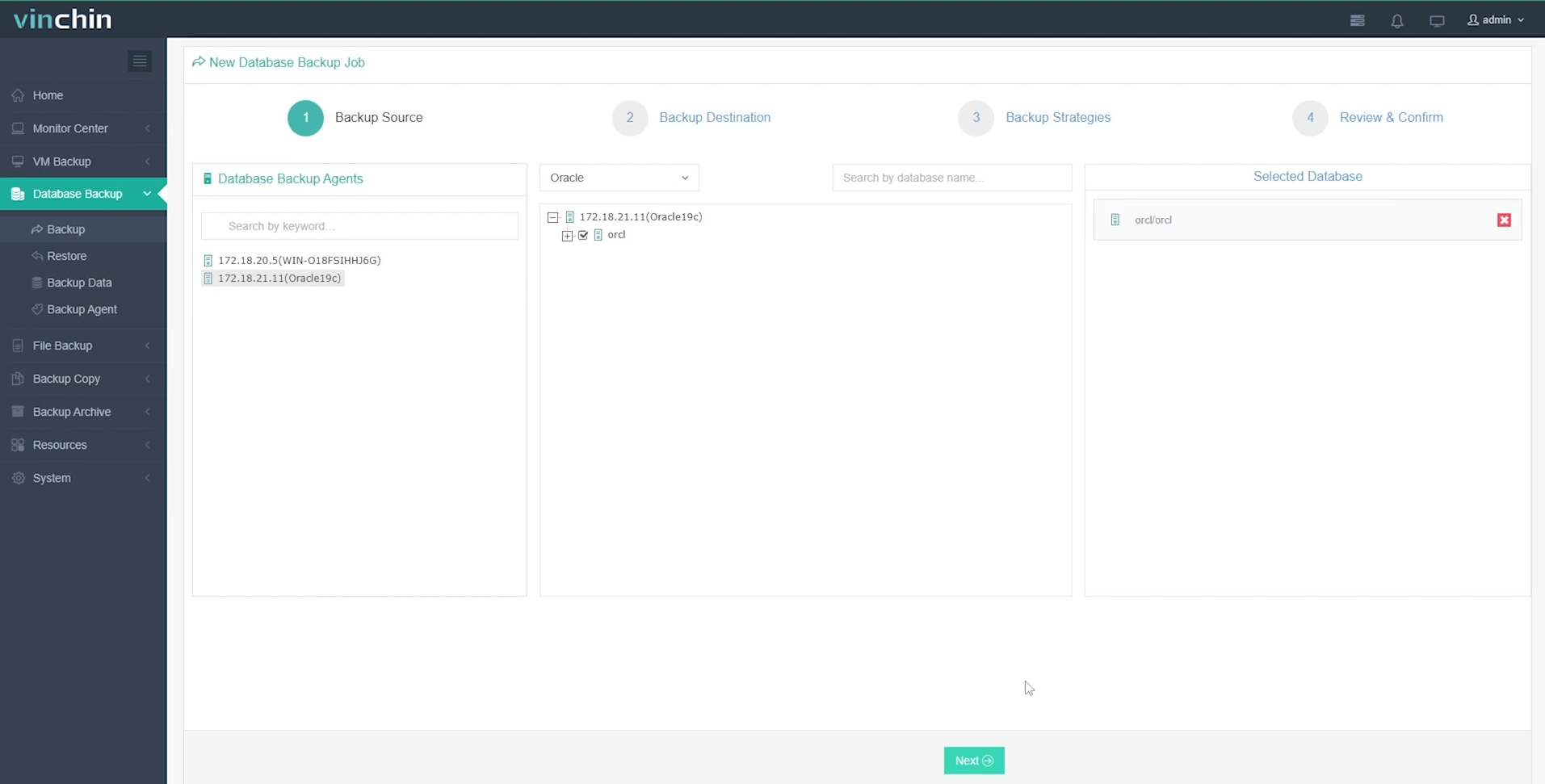
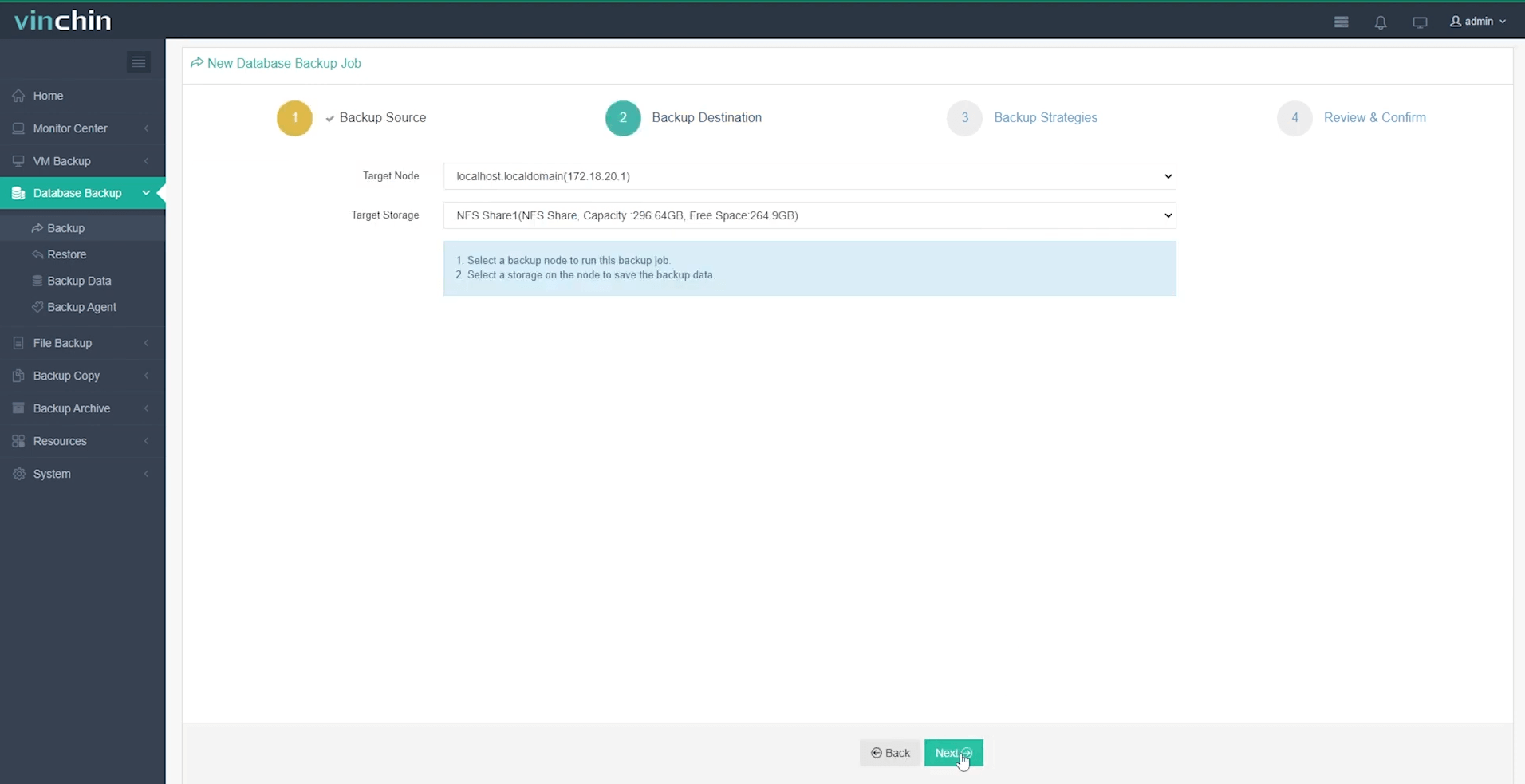
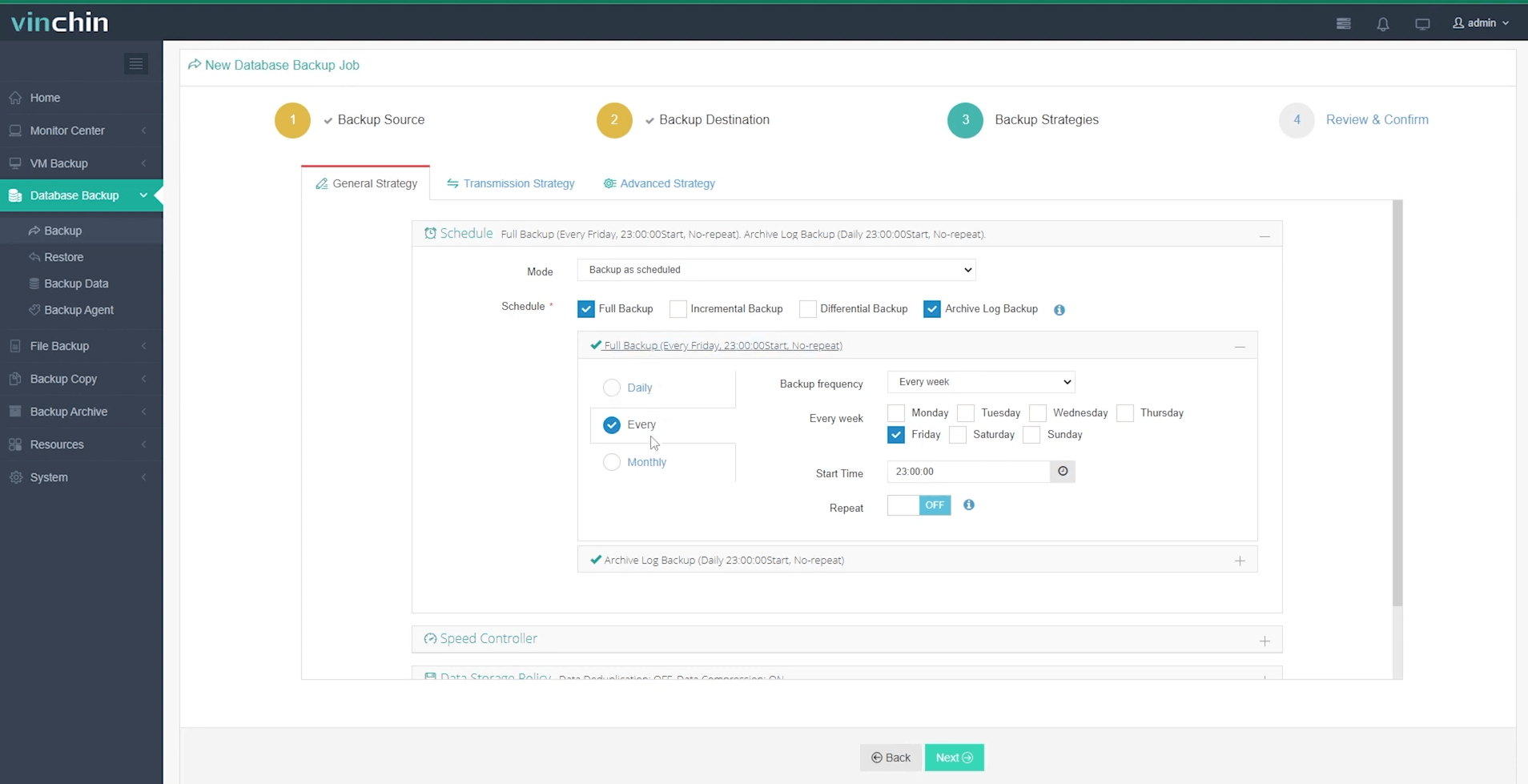
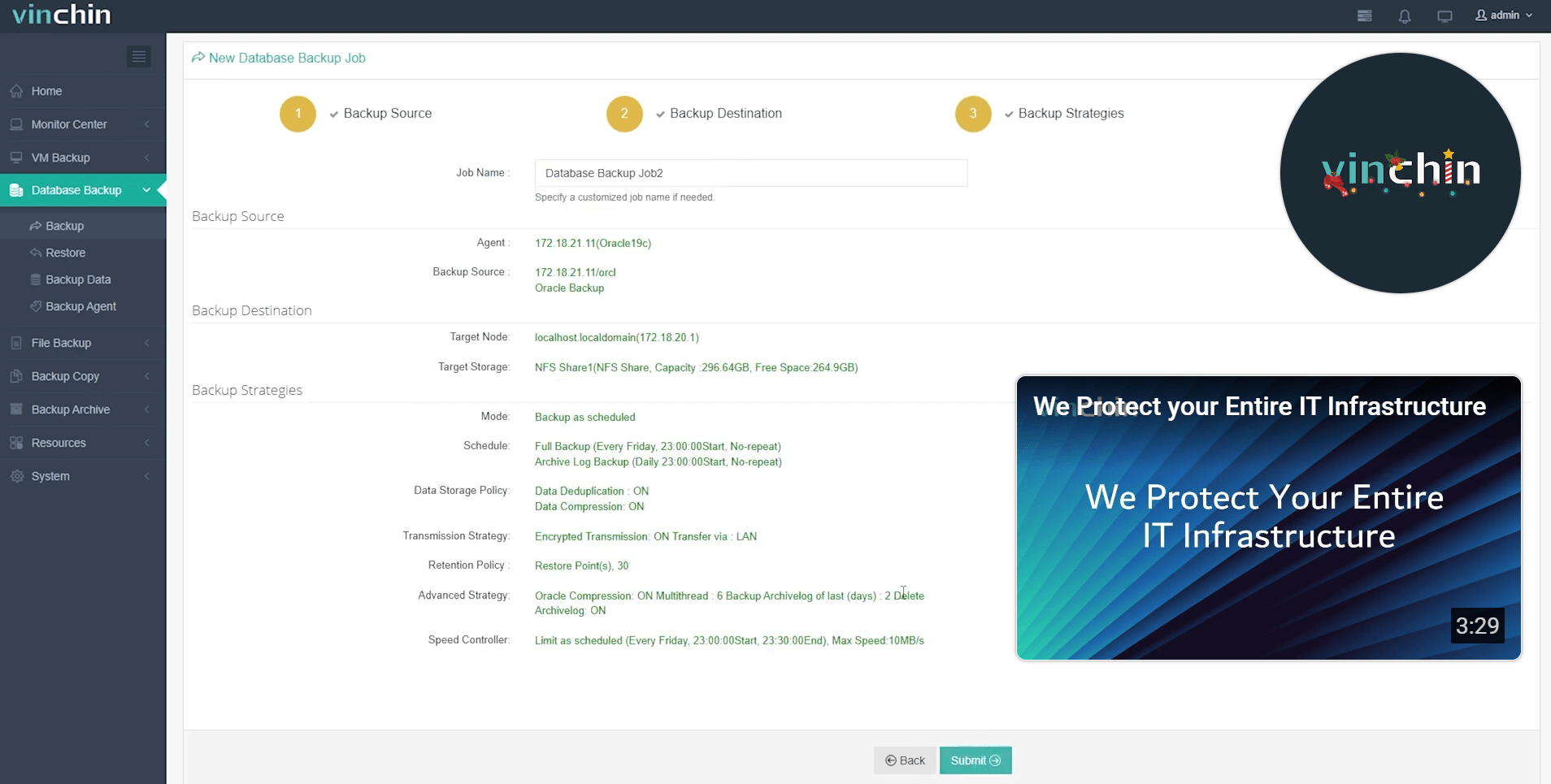
With its intuitive web console interface backing up an Oracle database takes just four steps:
Step 1: Select the Oracle database to back up
Step 2: Choose your preferred backup storage
Step 3: Define a tailored backup strategy
Step 4: Submit the job
Vinchin Backup & Recovery is trusted globally by thousands of organizations for its reliability and ease of use—try its full-featured capabilities free for 60 days by clicking the download button below!
RMAN 08137 FAQs
Q1: Can I ignore an RMAN-08137 warning if my environment never used Data Guard?
A1: No; orphaned capture registrations may still exist—always check DBA_CAPTURE before ignoring warnings.
Q2: How do I pinpoint exactly what blocks my archivelog deletions?
A2: Query both DBA_CAPTURE for extract/capture status AND V$ARCHIVE_DEST_STATUS plus V$MANAGED_STANDBY for standby lags; compare sequence numbers carefully across sources.
Q3: What should I do if forced deletion breaks my standby?
A3: Recreate affected standby databases using fresh backups—then resynchronize archives from primary as soon as possible.
Conclusion
The RMAN-08137 error challenges many Oracle administrators but becomes manageable once you understand its root causes—capture dependencies,deletion policies,and synchronization lags.Vinchin makes protecting your Oracle data easy,reliable,and efficient.Try it free today!









