Managing Oracle database backups is a critical task for any operations administrator. Over time, backup files can consume large amounts of storage space. This makes it necessary to delete old or unneeded backups in a safe way. Oracle's Recovery Manager (RMAN) gives you powerful tools to handle this process efficiently. But deleting backups is not just about freeing up disk space—it also keeps your recovery environment clean and reliable.
In this article, we’ll explain what it means to delete backup in RMAN, why it matters for your recovery plan, and how you can do it both manually and automatically. We’ll walk through beginner steps before moving into advanced techniques. If you want practical advice on managing Oracle backups with confidence—or need to refine your current process—you’re in the right place.
What Is Delete Backup in RMAN?
When people talk about “delete backup RMAN,” they mean removing backup files from disk as well as their records from the RMAN repository. This includes full database backups, incremental backups, archived redo logs, or even image copies managed by RMAN.
Using the DELETE command inside RMAN does more than erase physical files from storage; it also updates both the control file and any connected recovery catalog so that your records stay accurate (Oracle Database Backup and Recovery User's Guide 19c). This prevents confusion during restores or audits because obsolete entries are cleaned up at once.
You can target specific types of data—like only archived logs or certain backup sets—or remove everything older than a set date. By keeping these records tidy, you avoid wasted storage while making sure only valid restore points remain available.
Why Delete Backup in RMAN?
Deleting old backups in RMAN serves several important goals beyond saving disk space. First, it helps keep your backup environment organized so that only useful data remains available for restores or disaster recovery tasks.
If you let expired or unnecessary backups pile up:
Storage devices may fill up quickly
Backups may take longer due to cluttered directories
You risk confusion when choosing restore points
Some maintenance jobs might fail if there’s no room left
By regularly deleting expired or obsolete items using built-in commands like DELETE EXPIRED or DELETE OBSOLETE, you reduce these risks while ensuring compliance with company retention policies. It’s safer than deleting files directly at the operating system level because RMAN tracks all changes internally—helping prevent accidental loss of needed data.
Method 1 Manual Deletion Using RMAN Commands
Manual deletion gives you direct control over which Oracle database backups get removed—and when. This approach works well if you need to target specific sets of data rather than rely on automatic cleanup routines.
Always use RMAN’s own DELETE command instead of erasing files through Windows Explorer or Linux shell commands like rm. If you skip this step and delete outside of RMAN, its repository will become out-of-sync until you run a crosscheck operation—a common source of errors during audits or restores.
Here’s how to manually delete backups using standard RMAN commands:
1. Connect to RMAN:
Open a terminal window then type rman target / to connect as an administrator.
2. List Existing Backups (Optional):
To see what’s stored now—including dates/tags—run LIST BACKUP;.
3. Delete Specific Backups:
DELETE BACKUP;
DELETE BACKUPSET <set_number>;
DELETE BACKUP TAG = '<tag_name>';
DELETE ARCHIVELOG ALL;
DELETE BACKUP COMPLETED BEFORE 'SYSDATE-7';
4. Suppress Confirmation Prompts (Optional):
By default, each delete asks for confirmation—skip this by adding NOPROMPT:
DELETE NOPROMPT BACKUP;
5. Handle Expired Files:
If someone deleted files outside of RMAN already:
6. Remove Obsolete Backups:
Clean out anything no longer needed per retention policy using:
DELETE OBSOLETE;
Before running any destructive command like DELETE OBSOLETE or DELETE ARCHIVELOG ALL, double-check which objects will be affected using preview options such as REPORT OBSOLETE or LIST ARCHIVELOG ALL FIRST TIME ‘SYSDATE–30’. Remember—deleting is permanent!
Method 2. Automated Deletion with Retention Policies
Automating Backup Cleanup with RMAN
Automating deletion is a best practice for long-term environments where manual cleanup isn’t practical weekly or even monthly. When retention policies are configured correctly, RMAN automatically identifies objects that are safe to purge based on redundancy (number of backups kept) or recovery window (days retained).
Retention Policy Basics
A retention policy tells Oracle how many backups must be kept or how far back recovery should be possible to meet business requirements.
1. Set by recovery window (days):
CONFIGURE RETENTION POLICY TO RECOVERY WINDOW OF 7 DAYS;
This keeps enough backups to recover the database to any point within the last 7 days.
2. Set by redundancy count (number of copies):
CONFIGURE RETENTION POLICY TO REDUNDANCY 2;
This keeps the last 2 full backups (and their dependent incremental backups).
Executing Cleanup
After new backups finish, remove obsolete objects safely with:
DELETE OBSOLETE;
This command deletes all backups and associated archive logs that are no longer required by your retention policy.
Preview Before Deletion
To see what would be deleted without actually removing anything:
REPORT OBSOLETE;
This is a great safeguard to avoid surprises before running DELETE OBSOLETE.
Integrating with Backup Scripts and Scheduling
Most organizations automate routine maintenance tasks using scripts scheduled via cron jobs (Linux/Unix) or Task Scheduler (Windows). Here’s how integration works:
Suppose your nightly job script ends with:
rman target / <<EOF
BACKUP DATABASE PLUS ARCHIVELOG;
DELETE NOPROMPT OBSOLETE;
EXIT;
EOF
Automated Cleanup of Outdated Backup Objects in Oracle
Automatic Deletion by Retention Rules
After each successful backup cycle, outdated objects are automatically removed according to the retention policy configured. This ensures your storage is not cluttered with obsolete backups.
Centralized Logging for Monitoring
For better tracking, redirect RMAN output logs to a central location. Example:
SPOOL LOG TO '/var/log/rman_cleanup.log';
Start this at the beginning of your RMAN session and review weekly using tools like grep to detect unexpected errors or warnings related to deletions.
Test Policies in Non-Production First
Before deploying new retention policies in production, test them against non-production clones. This avoids accidentally impacting critical systems.
Retention Scope Considerations
Retention settings are global by default but can be overridden per database in multi-instance clusters. Always document any changes clearly.
Flash Recovery Area (FRA) Behavior
If using FRA, Oracle will automatically remove obsolete files when free space drops below thresholds. To verify what gets deleted, query:
SELECT * FROM V$RECOVERY_FILE_DEST;
Periodic verification ensures nothing is removed unexpectedly.
How Vinchin Backup & Recovery Simplifies Oracle Database Protection
Beyond native tools like RMAN, enterprise environments often require broader protection strategies across multiple platforms such as Oracle, MySQL, SQL Server, MariaDB, PostgreSQL, PostgresPro, and TiDB databases—with Oracle being especially relevant here given our focus topic. Vinchin Backup & Recovery delivers professional-grade database protection supporting all these mainstream systems seamlessly under one solution.
Key features include incremental backups for efficient storage use on Oracle databases, advanced source-side compression for faster processing and reduced network load on supported platforms like Oracle and SQL Server, batch database backup management across instances, flexible data retention policies including GFS support for compliance needs, and robust integrity checks ensuring recoverability at all times—all designed to streamline complex enterprise requirements into manageable workflows.
The web console offers exceptional simplicity:
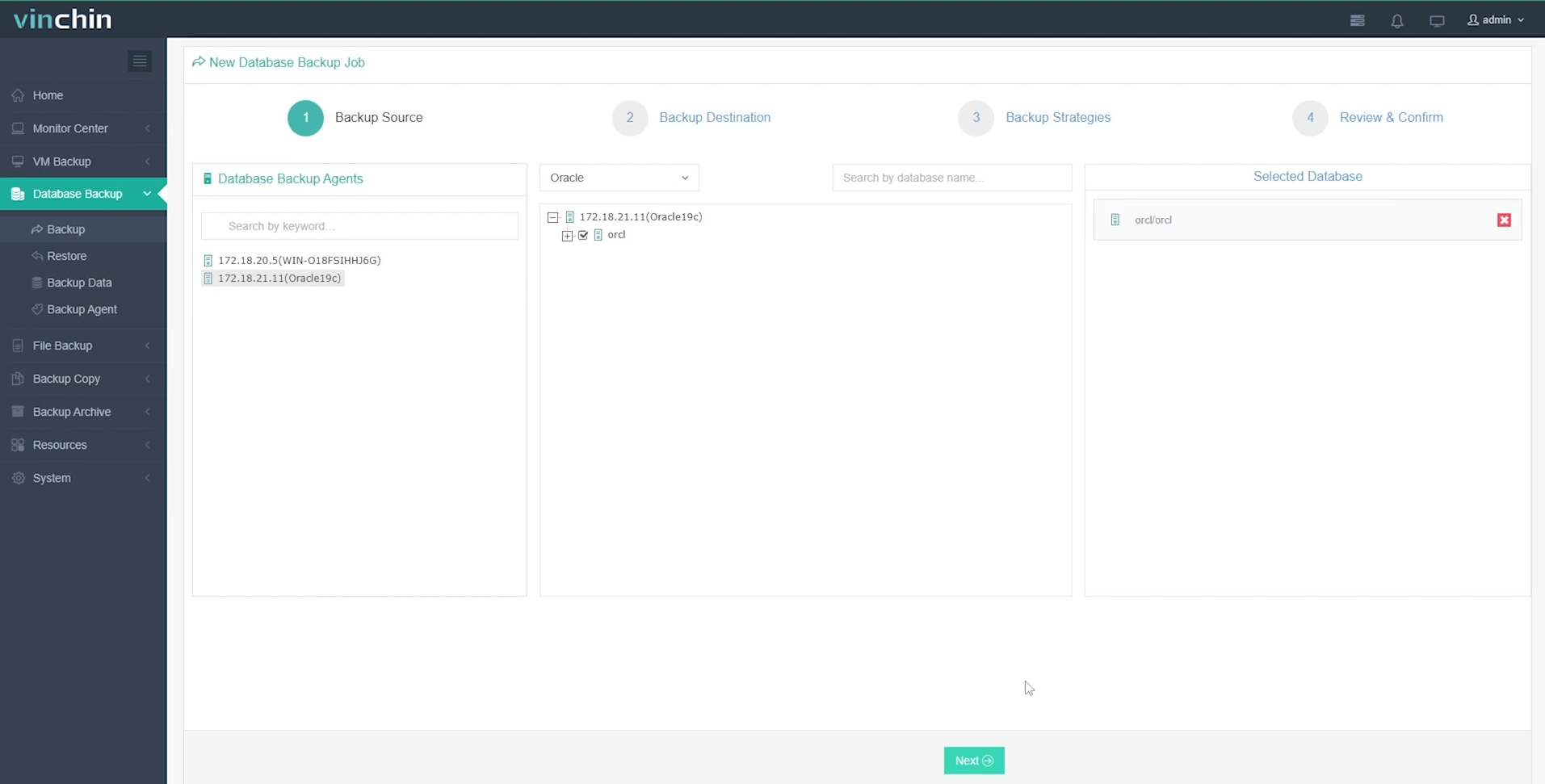
Step 1: Select the Oracle database to back up
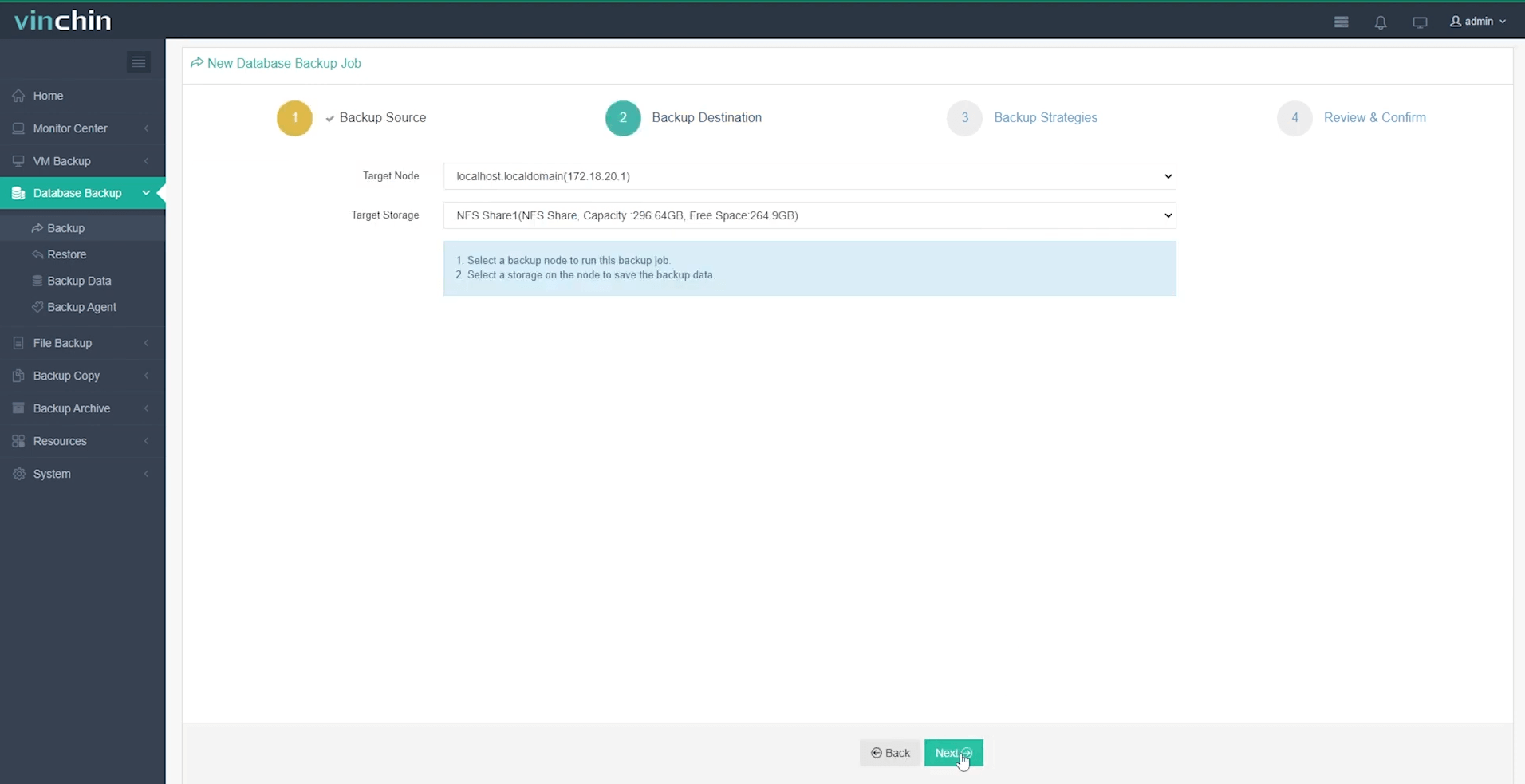
Step 2: Choose your preferred backup storage
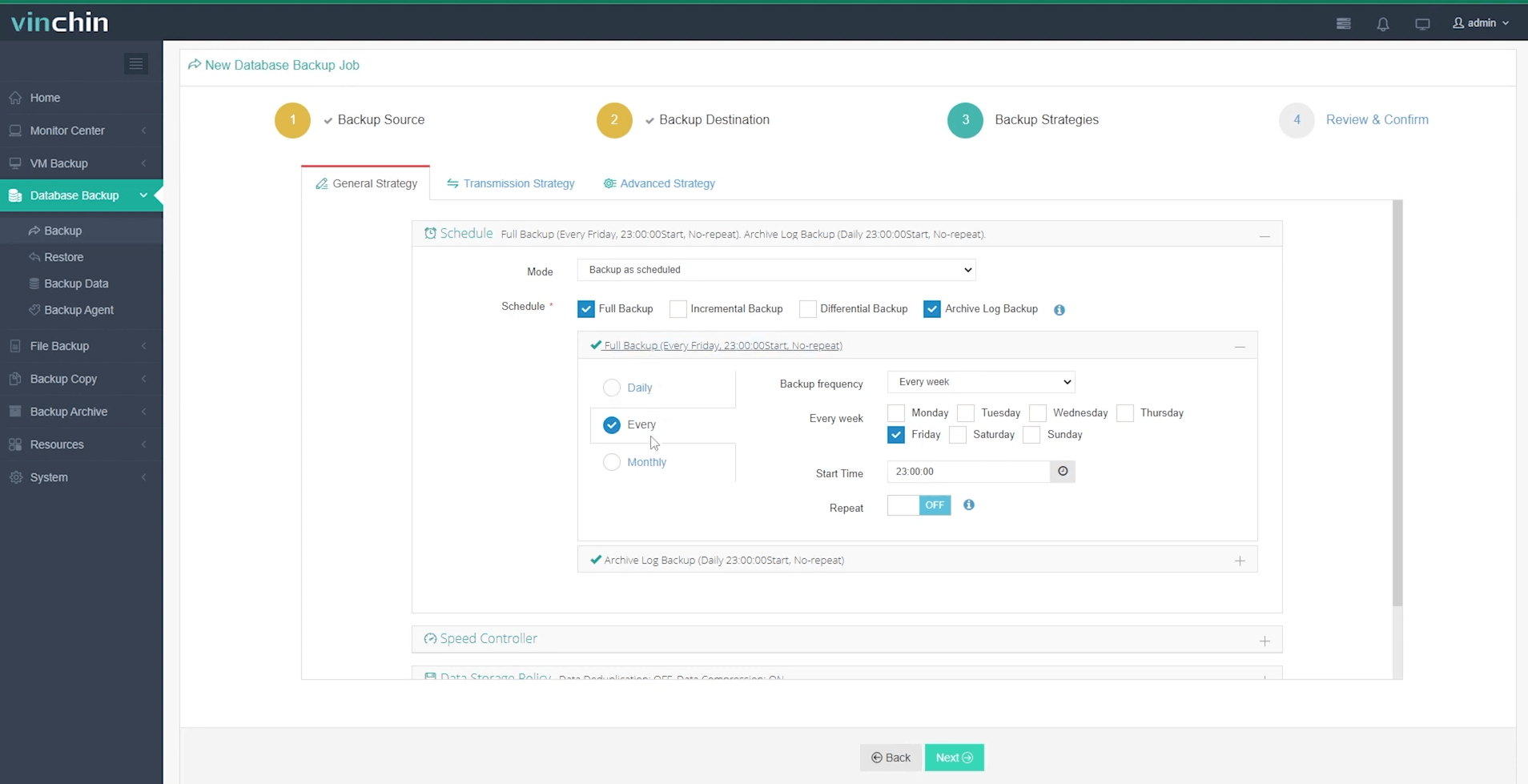
Step 3: Define a tailored backup strategy
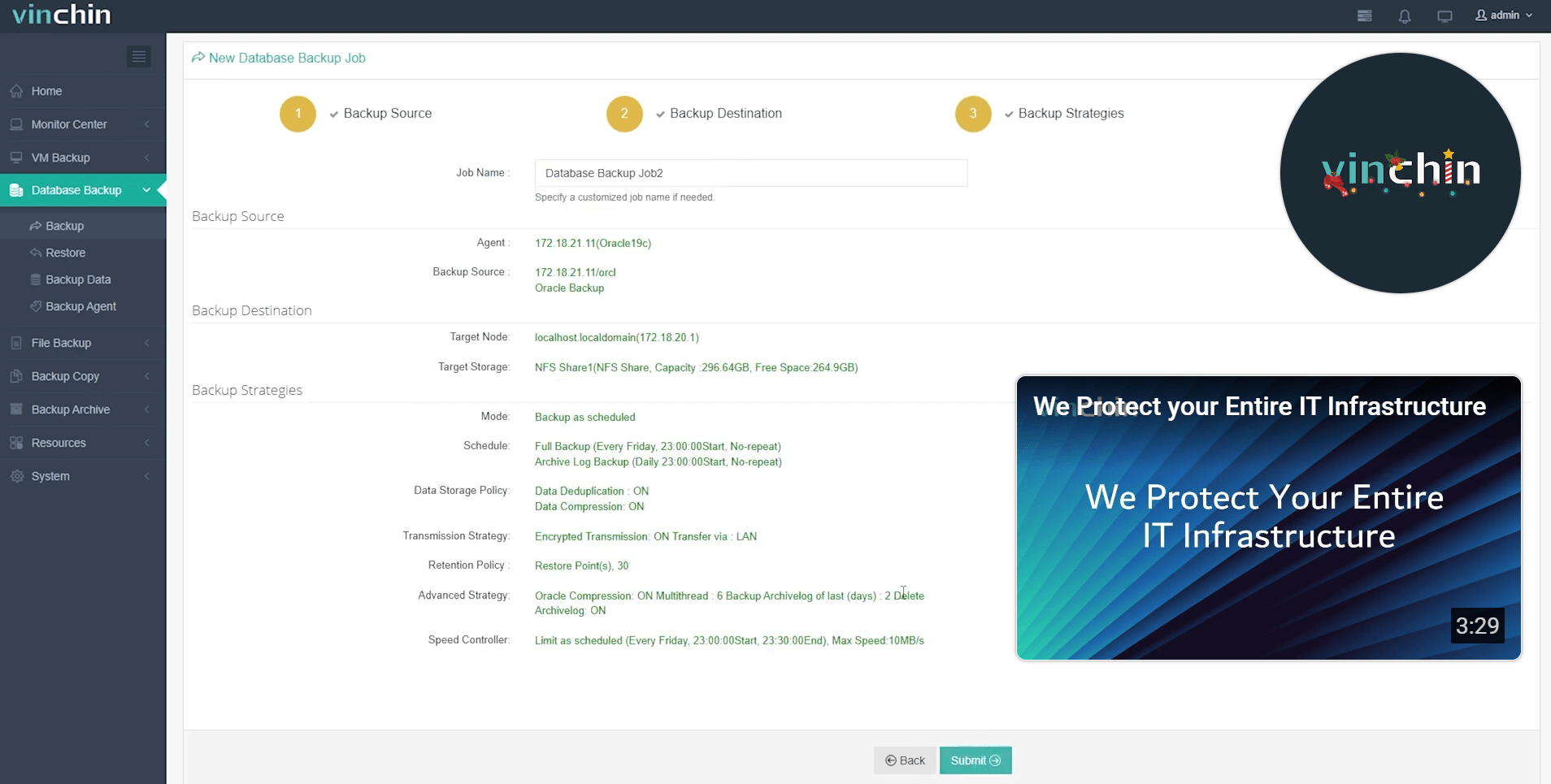
Step 4: Submit the job
Vinchin Backup & Recovery is trusted worldwide by thousands of enterprises for reliability and top-rated support services.
Experience its power risk-free with a 60-day full-featured trial—click Download now!
Delete Backup RMAN FAQs
Q1: Can I safely delete old archive logs if my last full backup covers them?
A1: Only if those archive logs aren’t needed for point-in-time recovery within your defined retention window—they may still be required otherwise.
Q2: What should I do if DELETE OBSOLETE doesn’t remove expected files?
A2: Check that your retention policy matches actual business requirements—and verify recent successful full/incremental runs exist covering desired periods before rerunning DELETE OBSOLETE again.
Q3: How do I schedule automated cleanup after nightly jobs?
A3: Add DELETE NOPROMPT OBSOLETE at end of each script then schedule execution via CRON JOBS (Linux/Unix) or TASK SCHEDULER (Windows).
Conclusion
Deleting old backups in RMAN keeps storage healthy while protecting restore capabilities long-term. Both manual commands and automated policies have their place depending on environment size. For streamlined management across platforms try Vinchin’s user-friendly solution today—it makes complex protection easy!









