Managing Oracle backups is a daily task for database administrators. One command that often comes up is crosscheck archivelog all. But what does it really do, and when should you use it? In this article, we’ll break down the concept, show you how to run it safely in different environments, and explain how to interpret its results at every skill level. We’ll also discuss best practices—including troubleshooting tips—and how Vinchin can help you protect your Oracle databases.
What Is Crosscheck Archivelog All?
The crosscheck archivelog all command is part of Oracle’s Recovery Manager (RMAN) utility—a core tool for backup management since Oracle 8i (Oracle Documentation). It checks every archived redo log recorded in the RMAN repository against actual files on disk or tape storage. If a log file is missing from its expected location—perhaps due to manual deletion or hardware failure—RMAN marks it as EXPIRED in its catalog. If the log exists where expected, it remains AVAILABLE.
This process keeps your backup records accurate by ensuring RMAN knows which logs are truly available for recovery operations like restore or point-in-time recovery (PITR). Without regular crosschecks, you risk relying on outdated information during critical restores.
Why Use Crosscheck Archivelog All?
Why bother running this command? Over time, archived logs may be deleted manually or moved outside of RMAN’s control—for example during storage migrations or routine maintenance tasks. When this happens without updating RMAN’s repository using proper commands like DELETE ARCHIVELOG, your catalog becomes out of sync with reality.
If you try to restore or back up using outdated information about archive logs’ locations or availability, you might run into errors—or worse yet—think you have logs that are actually gone forever! Running crosscheck archivelog all helps avoid these surprises by updating RMAN’s internal records so they reflect only what is truly present on disk or tape.
How to Run Crosscheck Archivelog All in RMAN?
Running this command is straightforward—but let’s walk through each step carefully so nothing gets missed along the way.
First: open a terminal window on your server with access privileges high enough for database administration tasks (usually SYSDBA). Start an RMAN session:
rman target /
You may need additional connection parameters if working remotely; consult your DBA policies if unsure about authentication methods.
Once at the RMAN> prompt enter:
CROSSCHECK ARCHIVELOG ALL;
RMAN will now scan every archived redo log listed in its repository catalog—comparing their recorded locations against actual files found on disk/tape storage devices configured via channels (ALLOCATE CHANNEL).
For each log file:
Sample output looks like:
validation succeeded for archived log archived log file name=/u01/app/oracle/arch/arch1_5_1086532269.dbf
validation failed for archived log archived log file name=/u01/app/oracle/arch/arch1_20_1086532269.dbf
You can run this command as often as needed—especially after manual deletions or infrastructure changes—but remember that frequent scans over very large catalogs may take significant time and system resources.
Pre-Execution Checks and Permissions
Before running any crosscheck operation:
Confirm you have SYSDBA privileges; otherwise some archive destinations may be inaccessible.
Ensure no conflicting jobs (like active backups/restores) are running; simultaneous operations can cause lock contention.
Check free space on both source disks/tapes and temp directories used by RMAN processes.
Following these steps prevents interruptions mid-scan—and avoids misleading results due to transient errors!
How to Interpret Crosscheck Archivelog All Results?
After running crosscheck archivelog all, review output messages carefully within your terminal session—or query statuses directly from within RMAN using SQL-like syntax later if desired.
Logs marked as AVAILABLE exist at their expected location(s) per current configuration—they’re ready for use in future backups/restores without issue!
Logs marked as EXPIRED, however… require attention:
These files cannot be used unless restored from another source such as offsite tape vaults/cloud archives.
Their presence in catalog but absence on physical media means attempted restores will fail unless resolved first!
To list expired archive logs explicitly:
LIST EXPIRED ARCHIVELOG ALL;
To clean up obsolete entries from repository metadata:
DELETE EXPIRED ARCHIVELOG ALL;
This removes only references inside RMAN—not actual files—from disk/tape storage systems themselves! Always double-check before deleting anything permanently outside controlled procedures.
Protecting Your Oracle Database with Vinchin Backup & Recovery
Beyond keeping archive logs synchronized, robust protection of your entire Oracle environment requires an enterprise-grade solution designed specifically for modern databases like Oracle, MySQL, SQL Server, MariaDB, PostgreSQL, PostgresPro, and TiDB—with particular focus here on Oracle support. Vinchin Backup & Recovery delivers professional-level features including incremental backups, batch database backup capabilities, advanced source-side compression options tailored for select platforms such as Oracle itself, flexible retention policies including GFS retention strategies, and seamless cloud backup plus tape archiving integration—all engineered to maximize reliability while minimizing administrative overhead and storage costs.
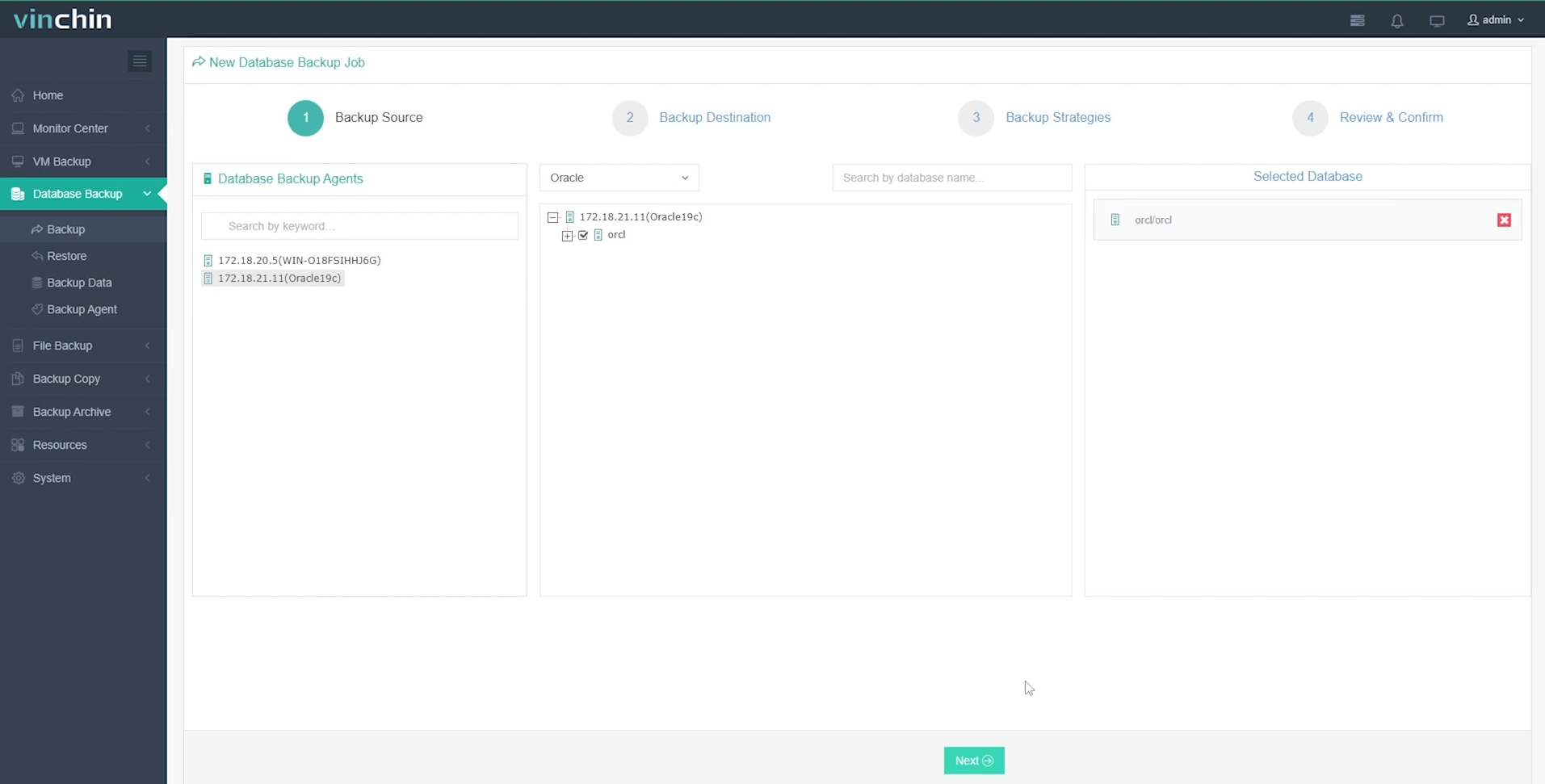
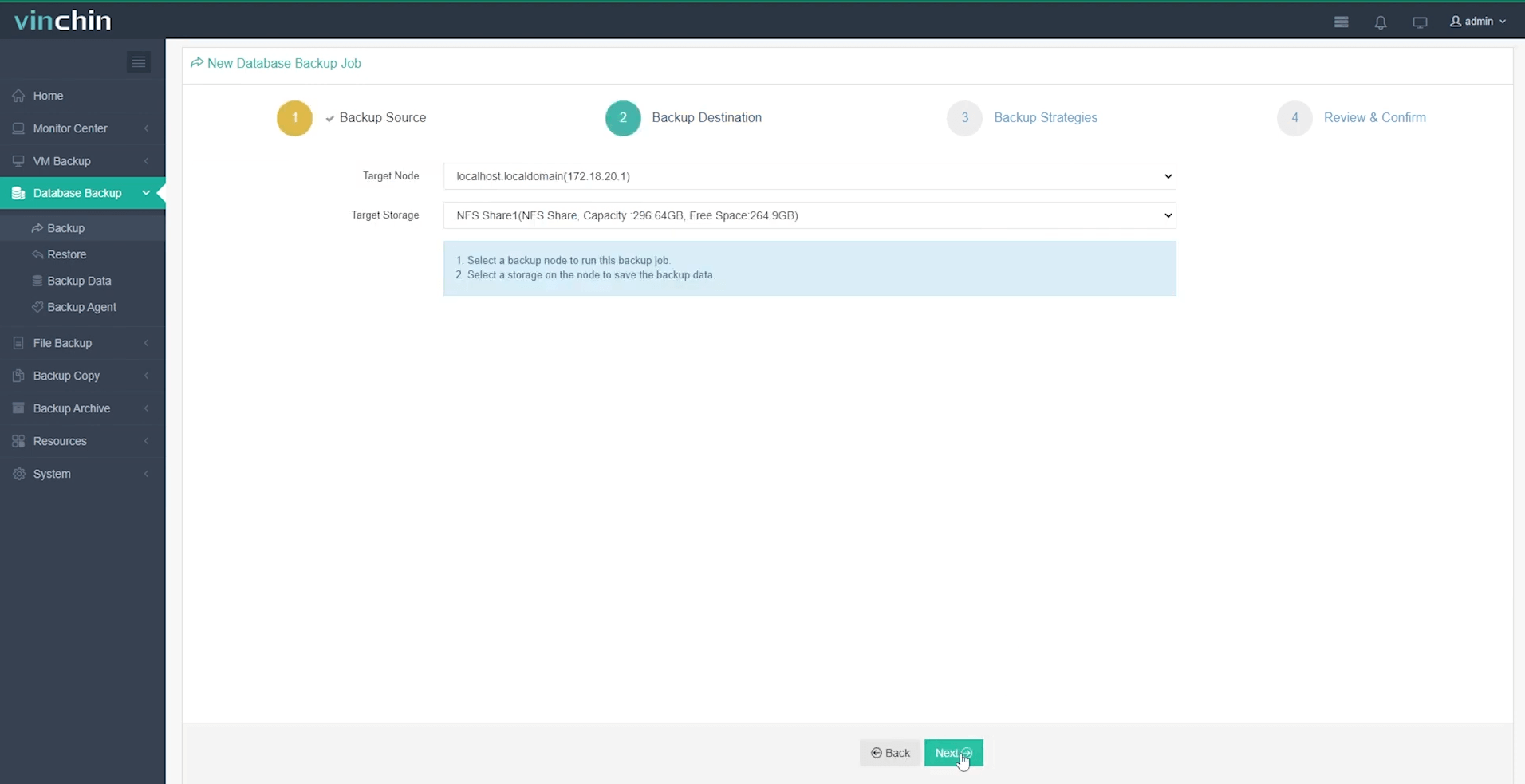
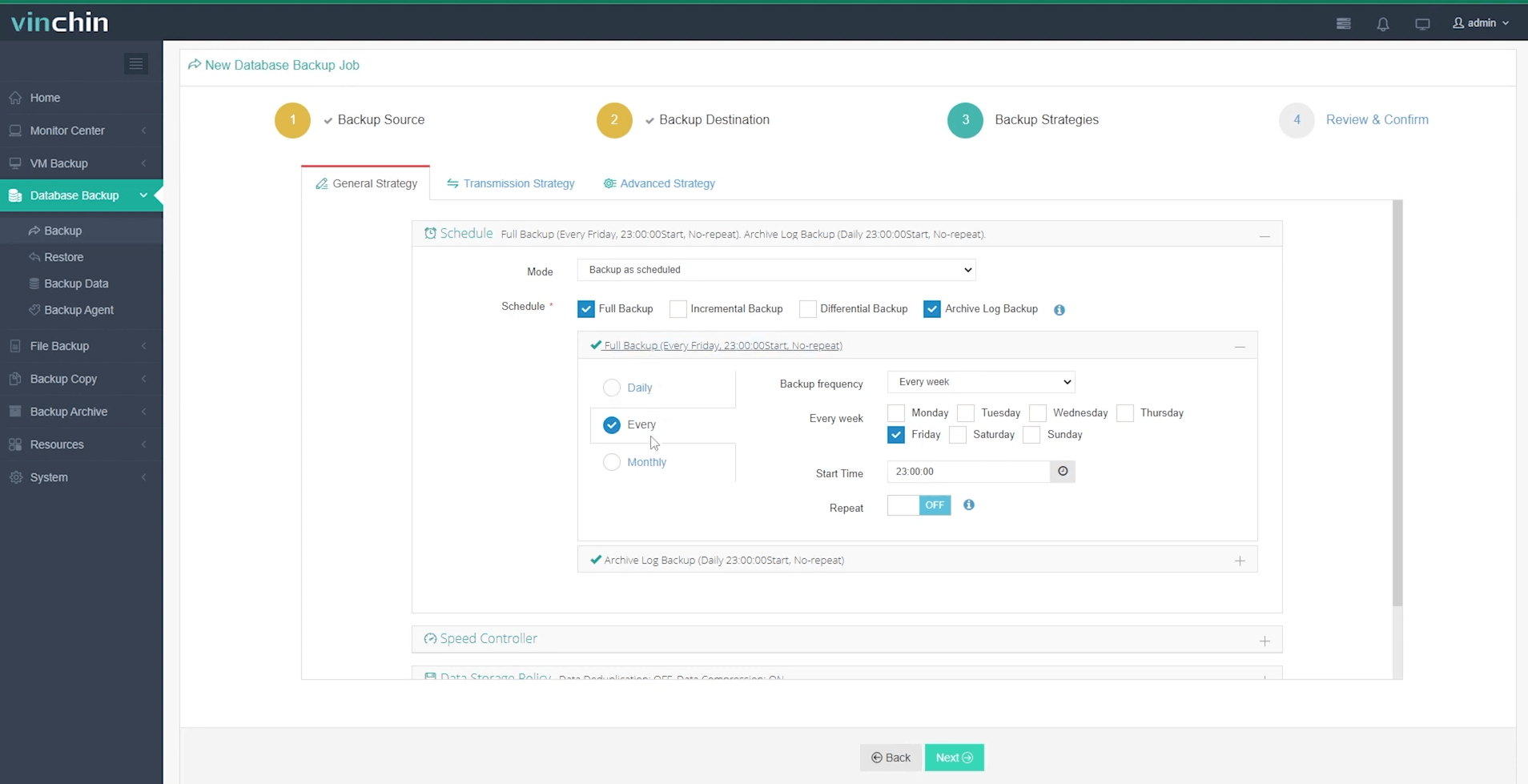
With Vinchin Backup & Recovery's intuitive web console interface, safeguarding your Oracle data typically takes just four streamlined steps:
Step 1: Select the Oracle database to back up
Step 2: Choose your preferred backup storage
Step 3: Define a tailored backup strategy
Step 4: Submit the job

Recognized globally by thousands of organizations and consistently top-rated by users worldwide, Vinchin Backup & Recovery offers a fully functional 60-day free trial—click below to experience enterprise-class data protection firsthand.
Crosscheck Archivelog All FAQs
Q1: Can I automate CROSSCHECK ARCHIVELOG ALL across multiple databases?
A1: Yes; use shell scripts combined with scheduling tools like cron jobs while ensuring secure credentials management throughout deployment environments.
Q2: Will CROSSCHECK remove my archive log files from disk?
A2: No; CROSSCHECK only updates status within RMAN's repository—it never deletes physical files directly unless paired with DELETE commands afterward.
Q3: What should I do if CROSSCHECK reports "expired" but my storage shows files exist?
A3: Verify directory permissions match those expected by Oracle processes then rerun CROSSCHECK ARCHIVELOG ALL again.
Conclusion
Keeping archive logs synchronized ensures smooth recoveries when disaster strikes—and avoids nasty surprises mid-restoration! The crosscheck archivelog all command gives DBAs confidence their catalogs reflect reality at every stage of operations planning or incident response cycles alike—for complete peace-of-mind protection consider adding Vinchin's powerful solutions today!









