Kubernetes has become the backbone of modern IT infrastructure. While many organizations run it in the cloud, more teams now choose to deploy Kubernetes on premise. Why? This guide explains what on-premise Kubernetes means, why it matters today, how you can deploy it using three proven methods—and how to protect your workloads once they’re running.
What is Kubernetes On Premise?
Kubernetes on premise means running your Kubernetes cluster on hardware you own—inside your data center or server room—instead of relying on a public cloud provider. This approach gives you full control over every layer of your environment.
Kubernetes itself is platform-agnostic; it can run anywhere from a single office server to a large-scale production cluster in an enterprise data center. But deploying kubernetes on premise brings unique challenges compared to managed cloud services.
Many organizations use hybrid approaches too—combining on-premise clusters with cloud resources—to meet specific business needs or regulatory requirements.
Why Choose On-Premise Kubernetes?
Running kubernetes on premise offers several advantages that appeal to enterprises across industries. Let’s look at some key reasons why teams make this choice.
First, compliance and data privacy are easier when you control where data lives physically. Industries like healthcare and finance often require strict governance over sensitive information.
Second, deploying kubernetes on premise helps avoid vendor lock-in by giving you flexibility to move workloads as needed without being tied to one provider’s ecosystem.
Third, if you already own hardware or have sunk costs in existing infrastructure, running clusters locally can be more cost-effective over time than paying ongoing cloud fees.
Integration with legacy systems is also simpler when everything runs inside your network perimeter. And by keeping workloads close to users or critical data sources, you can optimize performance while reducing latency.
Finally, some organizations want full control over security policies—including networking rules and storage management—which is only possible when managing everything yourself.
Common Challenges and Mitigations
While there are clear benefits to kubernetes on premise deployments, there are also hurdles that admins should plan for up front.
Managing physical hardware means dealing with power failures or hardware aging—a risk not present in most clouds. Networking complexity increases too; configuring firewalls so nodes communicate securely across required ports (like 6443 for API server traffic) takes careful planning.
Storage provisioning can be tricky if local disks fail or shared storage isn’t robust enough for persistent volumes. Load balancing requires either dedicated appliances or open-source solutions that may need extra tuning onsite.
Monitoring becomes more hands-on since there’s no built-in dashboard from a cloud provider—you’ll need tools like Prometheus or Grafana set up internally.
To mitigate these issues:
Use redundant power supplies and regular hardware checks.
Document firewall rules thoroughly.
Invest in reliable shared storage solutions.
Set up internal monitoring early.
With good planning and automation tools like Ansible or Terraform for repeatable setups, these challenges become manageable even at scale.
Method 1: Deploying Kubernetes On Premise with kubeadm
Kubeadm is the official tool from the Kubernetes project for bootstrapping clusters quickly and reliably. It suits administrators who want hands-on control but appreciate guided setup steps along the way.
Before starting deployment with kubeadm:
Prepare at least two servers (one control plane node plus one worker) running Ubuntu 20.04 LTS.
Each machine should have at least 2 GiB RAM; give extra memory to the control plane if possible.
Ensure all nodes have network connectivity between them.
Install containerd as your container runtime (Docker support has been deprecated).
Open required ports such as 6443, 2379–2380, 10250, 10251, 10252 between nodes so components communicate properly.
Here’s how you deploy kubernetes on premise using kubeadm:
1. Install prerequisites
Update package indexes:
   sudo apt-get update
   sudo apt-get install -y apt-transport-https ca-certificates curl
Add Google Cloud public signing key:
sudo curl -fsSLo /usr/share/keyrings/kubernetes-archive-keyring.gpg https://packages.cloud.google.com/apt/doc/apt-key.gpg
Add repository line matching Ubuntu 20.04 (“focal”):
echo "deb [signed-by=/usr/share/keyrings/kubernetes-archive-keyring.gpg] https://apt.kubernetes.io/ kubernetes-focal main" | sudo tee /etc/apt/sources.list.d/kubernetes.list
2. Install kubelet, kubeadm & kubectl
   sudo apt-get update
   sudo apt-get install -y kubelet kubeadm kubectl
   sudo apt-mark hold kubelet kubeadm kubectl
3. Disable swap
    sudo swapoff -a
    sudo sed -i '/ swap / s/^/#/' /etc/fstab
4. Initialize control plane
Run this command only on the master node:
sudo kubeadm init --pod-network-cidr=10.244.0.0/16
After initialization completes:
    mkdir -p $HOME/.kube
    sudo cp -i /etc/kubernetes/admin.conf $HOME/.kube/config
    sudo chown $(id -u):$(id -g) $HOME/.kube/config
5. Install pod network add-on
For example (using Flannel):
kubectl apply -f https://raw.githubusercontent.com/coreos/flannel/master/Documentation/kube-flannel.yml
6. Join worker nodes
Run the join command provided by kubeadm init output—on each worker node:
sudo kubeadm join <control-plane-ip>:6443 --token <token> --discovery-token-ca-cert-hash sha256:<hash>
7. Verify all nodes show Ready
kubectl get nodes
After setting up your cluster with kubeadm, always confirm everything works as expected before moving workloads into production.
Start by checking basic cluster health:
kubectl cluster-info
kubectl get pods --all-namespaces
All system pods should be running without errors; no CrashLoopBackOff states should appear after a few minutes of uptime.
Next, test scheduling by deploying a simple nginx pod:
kubectl create deployment nginx --image=nginx
kubectl get pods -l app=nginx
If pods enter Running state quickly across different nodes—that’s a good sign!
Monitor resource usage using kubectl top nodes if metrics-server is installed; this helps spot imbalances early.
Method 2: Deploying Kubernetes On Premise with Rancher
Rancher provides an intuitive web interface that simplifies managing multiple clusters—including those deployed entirely within your own infrastructure walls.
It’s ideal if you want centralized management without deep command-line work every day—or if you plan to operate several clusters at once across different sites or departments.
To deploy kubernetes on premise using Rancher:
1. Install Rancher Server
On a dedicated Linux host (or VM), launch Rancher via Docker:
sudo docker run -d --restart=unless-stopped -p 80:80 -p 443:443 rancher/rancher:latest
Make sure Docker Engine is installed beforehand!
2. Access Rancher Web UI
Open https://<rancher-server-ip> in any browser; set an admin password during first login.
3. Add New Cluster
Click Add Cluster, then select Custom option for bare-metal/on-prem deployments.
4. Configure Options
Choose desired Kubernetes version; pick network provider (like Canal); review security settings such as RBAC roles.
5. Register Nodes
Rancher will generate registration commands tailored per role—run these directly on each intended node (control plane/etcd/workers).
6. Wait For Provisioning
Watch progress live through Rancher's dashboard until all components report healthy status indicators.
7. Manage & Monitor
Deploy applications right from Rancher's UI; manage persistent storage classes; enforce access controls—all visually.
Rancher makes scaling out easy later too—just register new servers anytime through its wizard-driven menus.
Method 3: Deploying Kubernetes On Premise with Kubespray
Kubespray automates complex deployments using Ansible playbooks—a great fit if you want fine-grained configuration options out-of-the-box plus support for high availability setups from day one.
To use Kubespray:
1. Prepare Inventory File
List IP addresses of all planned nodes inside an Ansible inventory file (hosts.yaml). Assign roles clearly—at least one master/control-plane plus workers.
2. Install Prerequisites
On your admin workstation:
sudo apt-get update && sudo apt-get install -y python3-pip git sshpass python3-setuptools python3-netaddr
pip3 install --user ansible==2.*
Check Kubespray documentation regularly since supported Ansible versions may change!
3. Clone Kubespray Repository
git clone https://github.com/kubernetes-sigs/kubespray.git
cd kubespray
pip3 install -r requirements.txt
4. Copy Sample Inventory & Edit Hosts
cp -rfp inventory/sample inventory/mycluster
nano inventory/mycluster/hosts.yaml
5. Run Playbook To Deploy Cluster
ansible-playbook -i inventory/mycluster/hosts.yaml --become --become-user=root cluster.yml
6. Access Your Cluster
The generated admin.conf file inside inventory/mycluster/artifacts lets you connect via kubectl. Copy it safely onto client machines needing access.
Kubespray supports advanced features like multi-master HA topologies out-of-the-box—and lets experienced admins customize almost every aspect of networking/storage/plugins during initial setup.
Protecting Your On-Premise Kubernetes Cluster with Vinchin Backup & Recovery
After successfully deploying your Kubernetes on premise environment, ensuring robust backup and disaster recovery becomes essential for operational resilience and compliance needs alike. Vinchin Backup & Recovery stands out as an enterprise-grade solution purpose-built for protecting containerized workloads in self-managed environments like yours.
Vinchin Backup & Recovery delivers comprehensive protection through features such as full/incremental backups at multiple granularities (including cluster-, namespace-, application-, PVC-, and resource-level), policy-based scheduling alongside flexible one-off jobs, secure encrypted transmission and storage of backup data, cross-cluster restore capabilities—even across heterogeneous versions—and intelligent automation that streamlines routine backup tasks while minimizing manual intervention overall benefits include simplified operations, improved reliability during restores/migrations, and strong alignment with enterprise security standards.
Vinchin Backup & Recovery offers an intuitive web console where backing up any Kubernetes environment typically takes just four steps:
Step 1 — Select the backup source;

Step 2 — Choose backup storage;
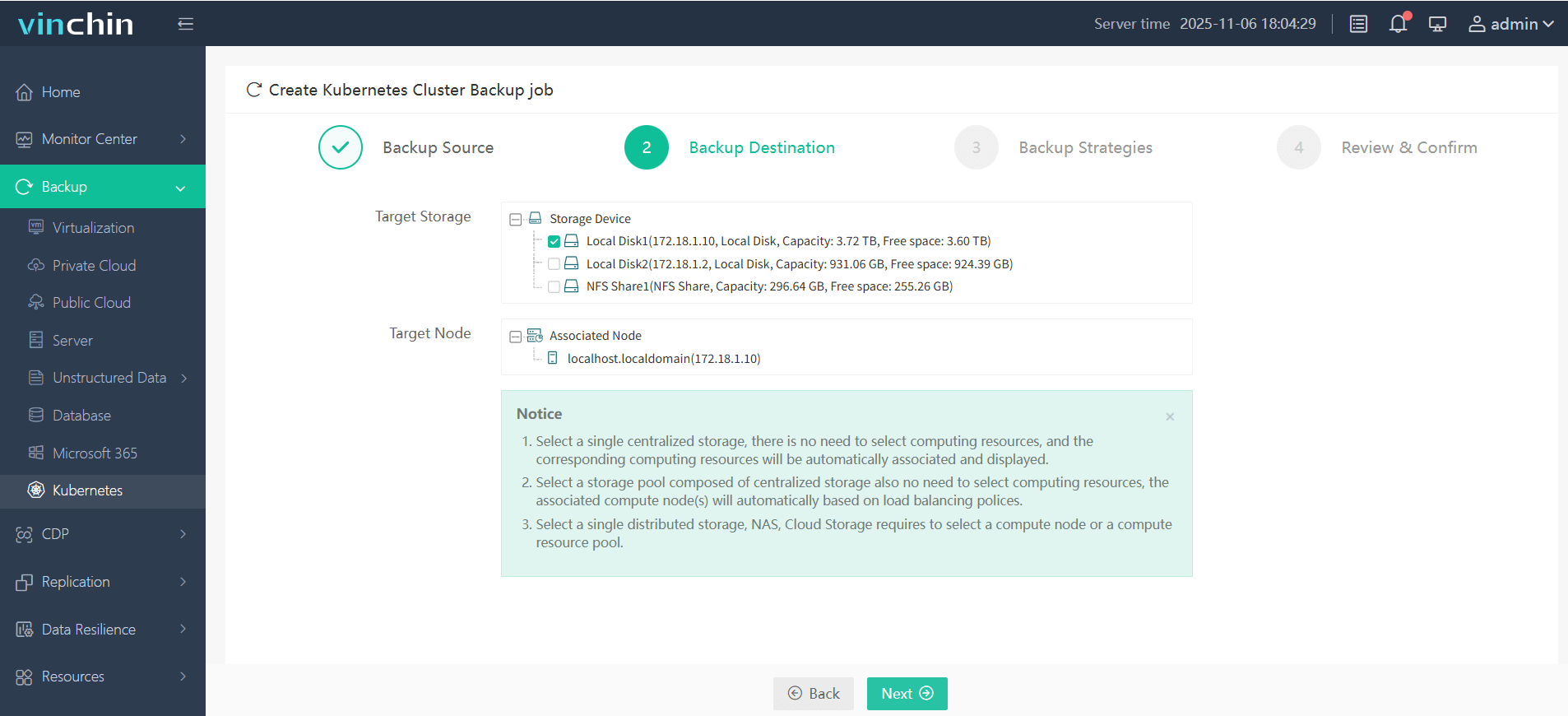
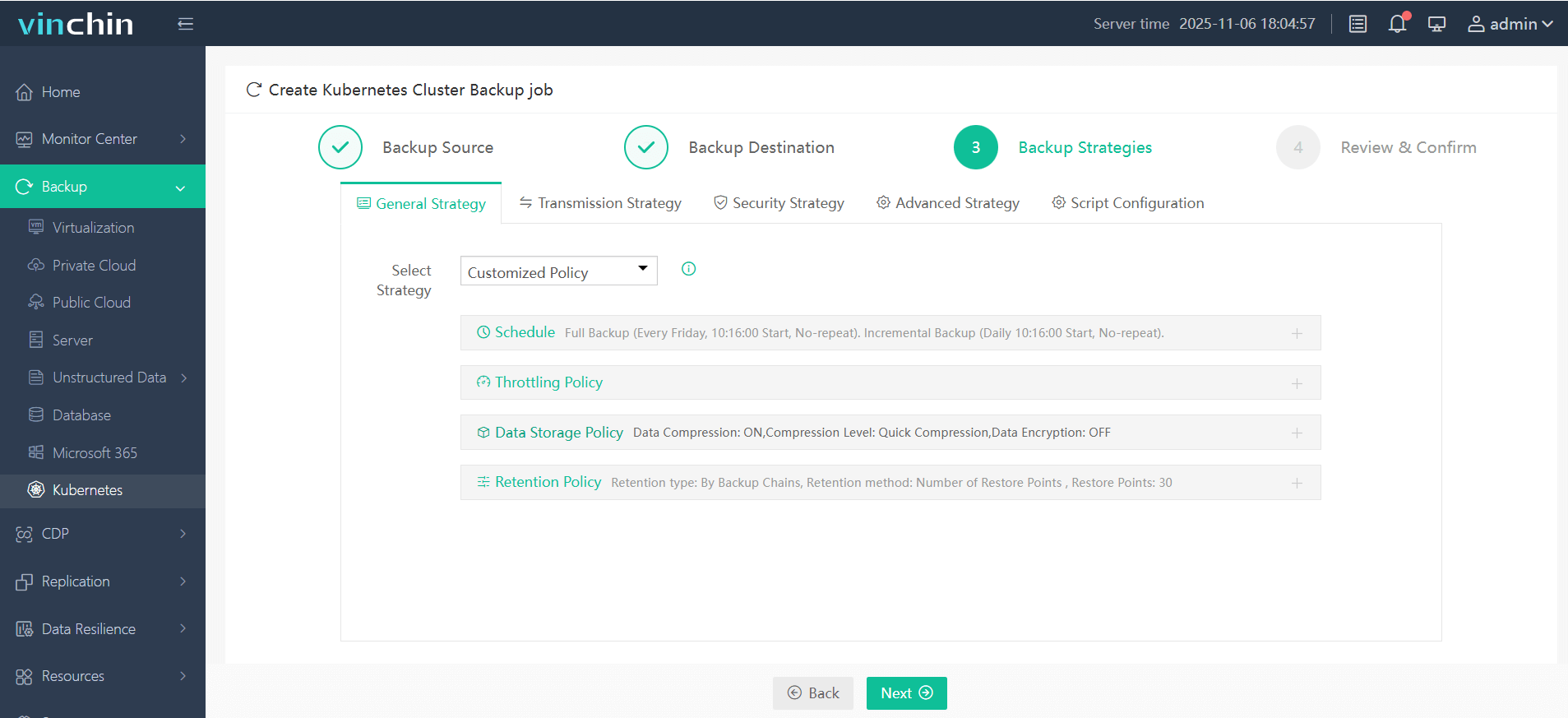
Step 3 — Define backup strategy;
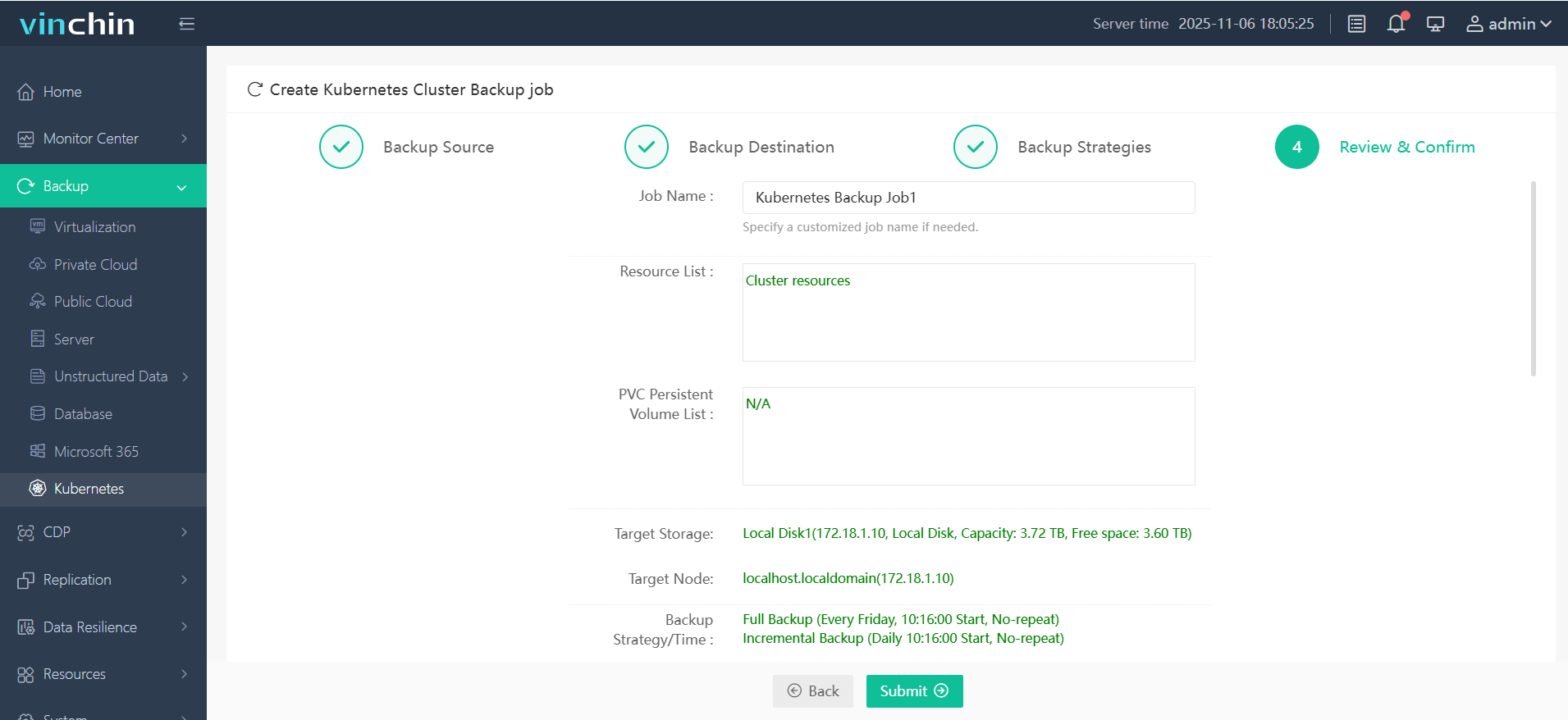
Step 4 — Submit the job.
Trusted globally by thousands of enterprises—with top ratings from industry analysts—Vinchin Backup & Recovery offers a fully featured free trial valid for 60 days so you can experience its powerful protection firsthand before making any commitment.
Kubernetes On Premise FAQs
Q1: Can I migrate my existing cloud-based Kubernetes workloads to an on-premise cluster?
A1: Yes—you can export manifests plus persistent volume snapshots from cloud clusters then import them into your local environment using standard tools like kubectl.
Q2: How do I update Kubernetes on premise without downtime?
A2: Perform rolling upgrades—start by upgrading control plane nodes sequentially while monitoring health checks closely before updating worker nodes next.
Q3: What’s the best way to back up persistent volumes in Kubernetes on premise?
A3: Use backup software supporting PVC-level backups—for example Vinchin—to ensure both application consistency and rapid recovery times when restoring data locally.
Conclusion
Kubernetes on premise gives operations teams unmatched control over compliance and performance while integrating smoothly into existing environments—even legacy ones! Whether deploying via kubeadm's CLI simplicity or leveraging powerful automation tools like Kubespray/Rancher dashboards—you have options tailored for any scale-out scenario imaginable today! For reliable backup protection try Vinchin free—it keeps mission-critical apps safe wherever they run!












