Enterprises running workloads on ZStack require reliable backup strategies to prevent downtime and data loss. Even short outages can disrupt operations and impact revenue.
The most effective way to minimize risk is by using an agentless, image-based backup method with instant recovery, enabling virtual machines (VMs) to be restored within minutes and ensuring business continuity with minimal disruption.
As a widely used open-source cloud platform, ZStack supports large-scale enterprise deployments, but growing environments also increase risks from hardware failures, ransomware, and accidental data loss. A strong backup strategy is therefore essential not only for data protection but also for maintaining service availability during unexpected incidents.
Why Enterprise Needs Minimal Downtime?
Downtime affects every part of an organization—from lost sales to damaged customer trust. Enterprises must protect their workloads against unexpected interruptions if they want to stay competitive.
● Direct Financial Impact
Unplanned outages cost money fast. When critical systems go offline—even briefly—employees cannot work efficiently. Customers may abandon transactions or switch providers altogether. According to Gartner, average downtime costs thousands of dollars per minute for large organizations.
● Compliance Risks
Many industries face strict regulations around data availability and recovery times. If you cannot restore data quickly after an incident, you may face fines or legal action during audits.
● Reputation Damage
Customers expect constant access to services. Extended outages can erode trust built over years. News of disruptions spreads fast on social media and review platforms—potentially causing long-term harm even after systems are restored.
● Operational Disruption
When backups take too long to restore—or fail entirely—business processes grind to a halt. Employees lose access to essential applications like email or databases until IT teams resolve issues.
A weak backup strategy magnifies these problems by increasing both outage duration and risk of permanent data loss. Enterprises need solutions that bring services back online fast while meeting regulatory demands for audit trails and reporting.
Key requirements for an effective ZStack backup solution
A strong backup solution should simplify operations, maximize uptime, and ensure fast recovery across all workloads. It should also support automation, secure data handling, and scalable protection for growing enterprise environments.
Agentless Backup Reduces Overhead
Agentless backup uses native ZStack APIs instead of installing agents inside VMs. This reduces resource usage, avoids compatibility issues during upgrades, and minimizes maintenance overhead across large environments.
Instant Recovery Minimizes Downtime
Instant recovery enables VMs to boot directly from backup files without full restoration. This helps restore critical services within minutes and significantly reduces RTO during outages or ransomware incidents.
Scalability Supports Enterprise Growth
A centralized backup system can manage hundreds or thousands of VMs from a single console. Automation and scheduling help ensure consistent protection across distributed and fast-growing environments.
Deduplication Optimizes Storage Efficiency
Deduplication removes redundant data blocks across backups, reducing storage consumption and lowering long-term backup costs, especially in environments with similar VM images.
Encryption Protects Data Security
Encryption ensures backup data remains secure during transfer and storage, helping meet compliance requirements and protecting against unauthorized access or physical theft.
Granular Restore Improves Flexibility
Granular recovery allows IT teams to restore individual files or application items without rolling back entire VMs, improving recovery speed and reducing operational disruption.
These capabilities together form a comprehensive ZStack backup strategy that reduces downtime, improves efficiency, and ensures resilient protection for enterprise workloads in cloud environments.
Vinchin Backup & Recovery: Enterprise-Level Backup Solution for ZStack
To address these challenges effectively, Vinchin Backup & Recovery stands out as an enterprise-level virtual machine backup solution supporting ZStack alongside more than 15 mainstream virtualization platforms including VMware, Hyper-V, Proxmox, oVirt, OLVM, RHV, XCP-ng, XenServer, OpenStack and others. For ZStack users specifically, Vinchin Backup & Recovery delivers agentless image-based protection with features such as LAN-free backup support for efficient data transfer within local networks; instant recovery enabling rapid VM restoration; flexible scheduling options; advanced deduplication/compression; granular restore capabilities; plus robust encryption ensuring security at every stage—all accessible through one unified web console interface.
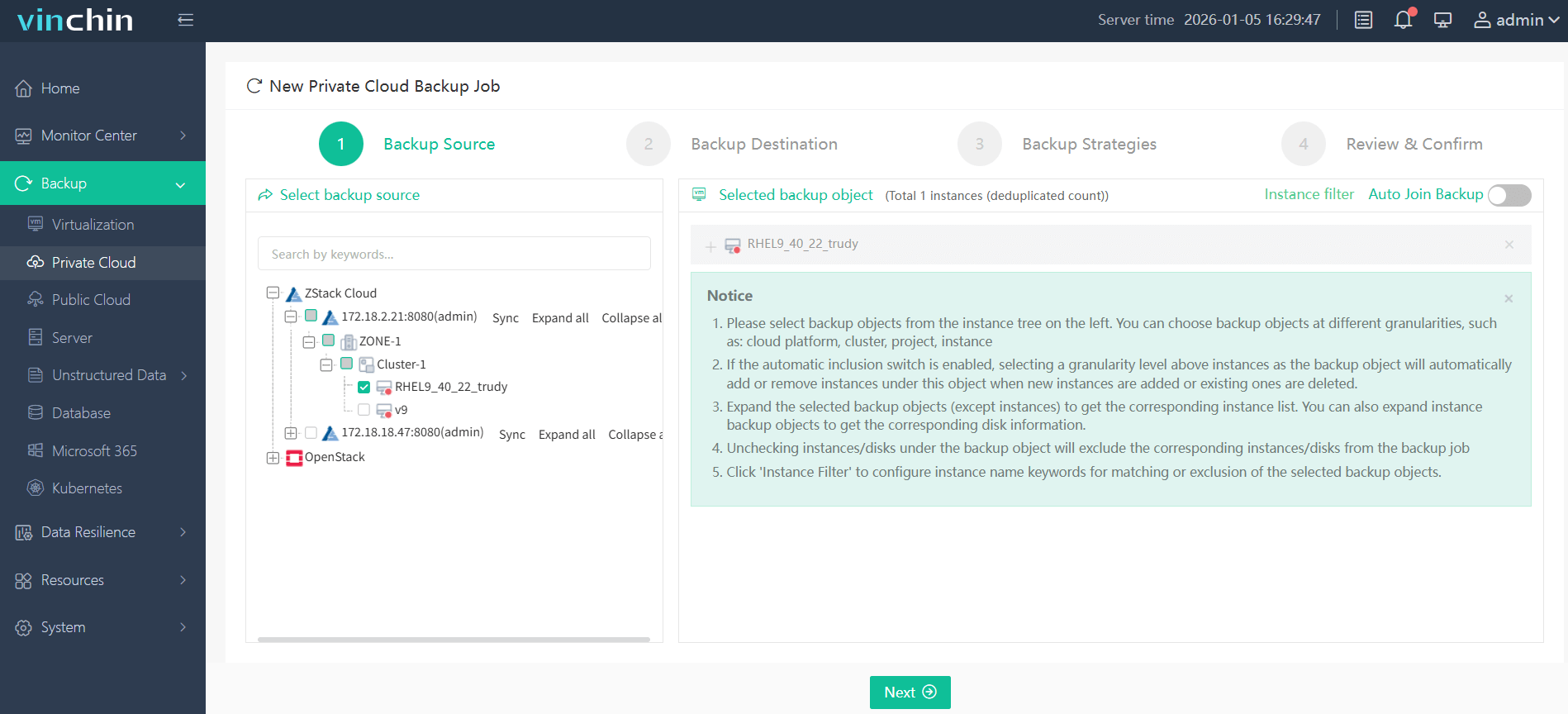
Backing up a ZStack VM using Vinchin Backup & Recovery is straightforward thanks to its intuitive web console:
Step 1: Select the ZStack VM you wish to protect.
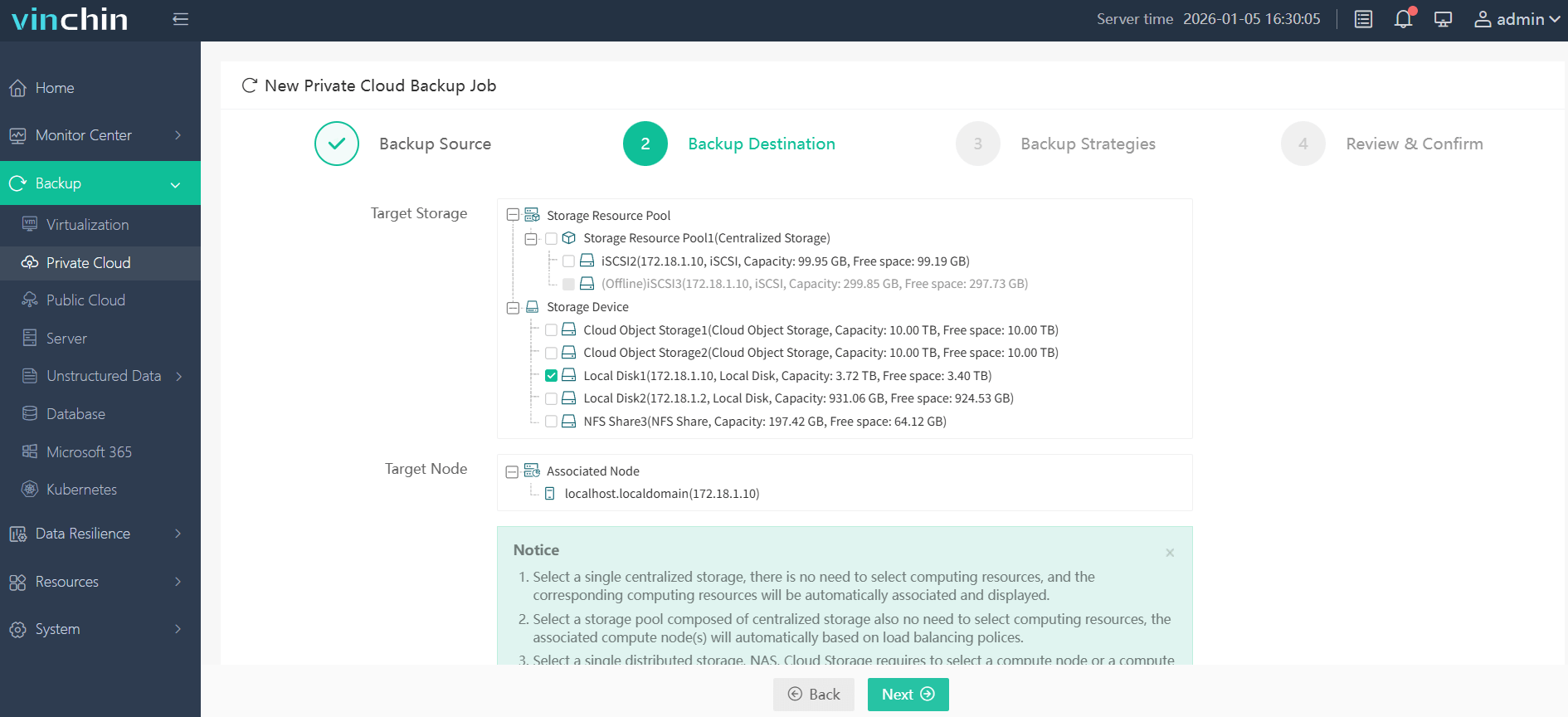
Step 2: Choose your preferred backup storage location.
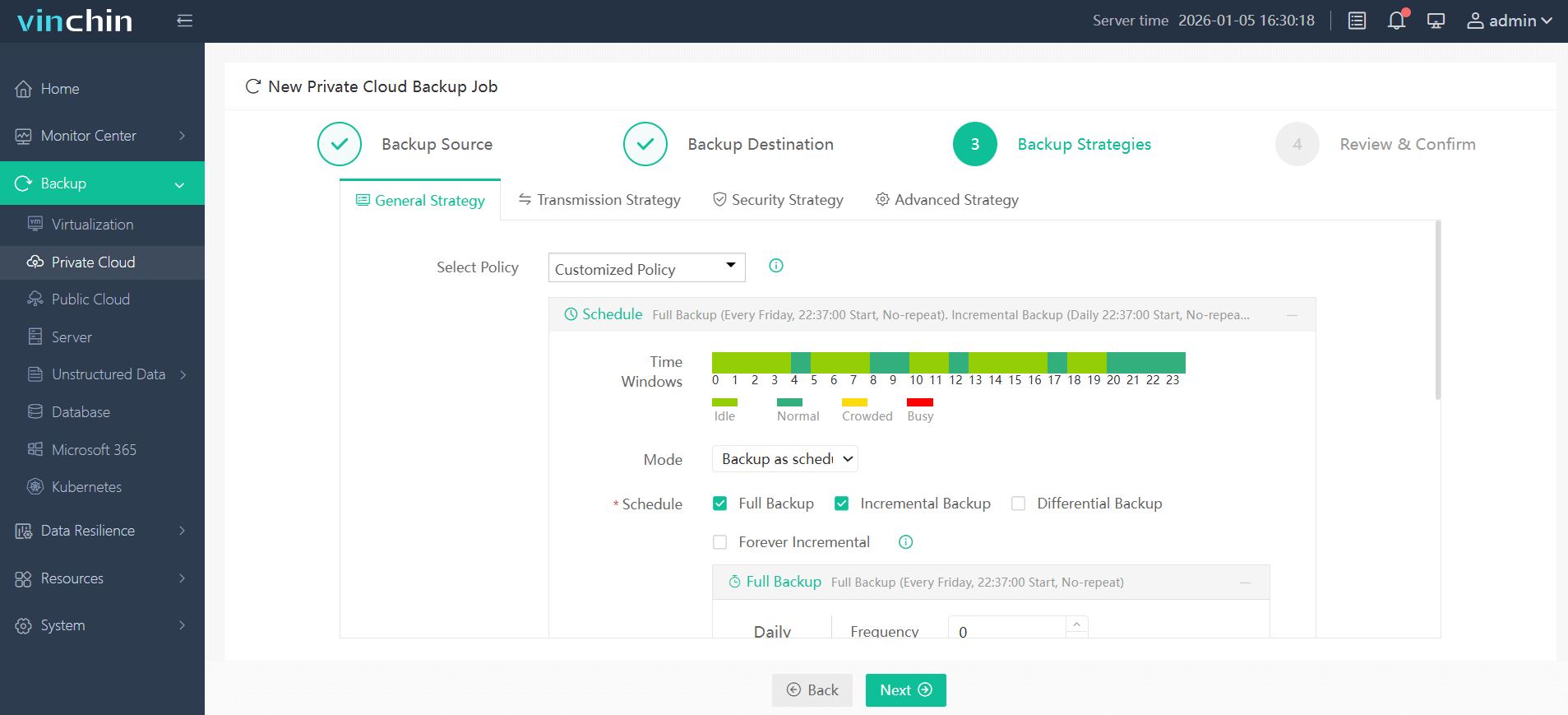
Step 3: Configure scheduling and retention strategies tailored for your environment.
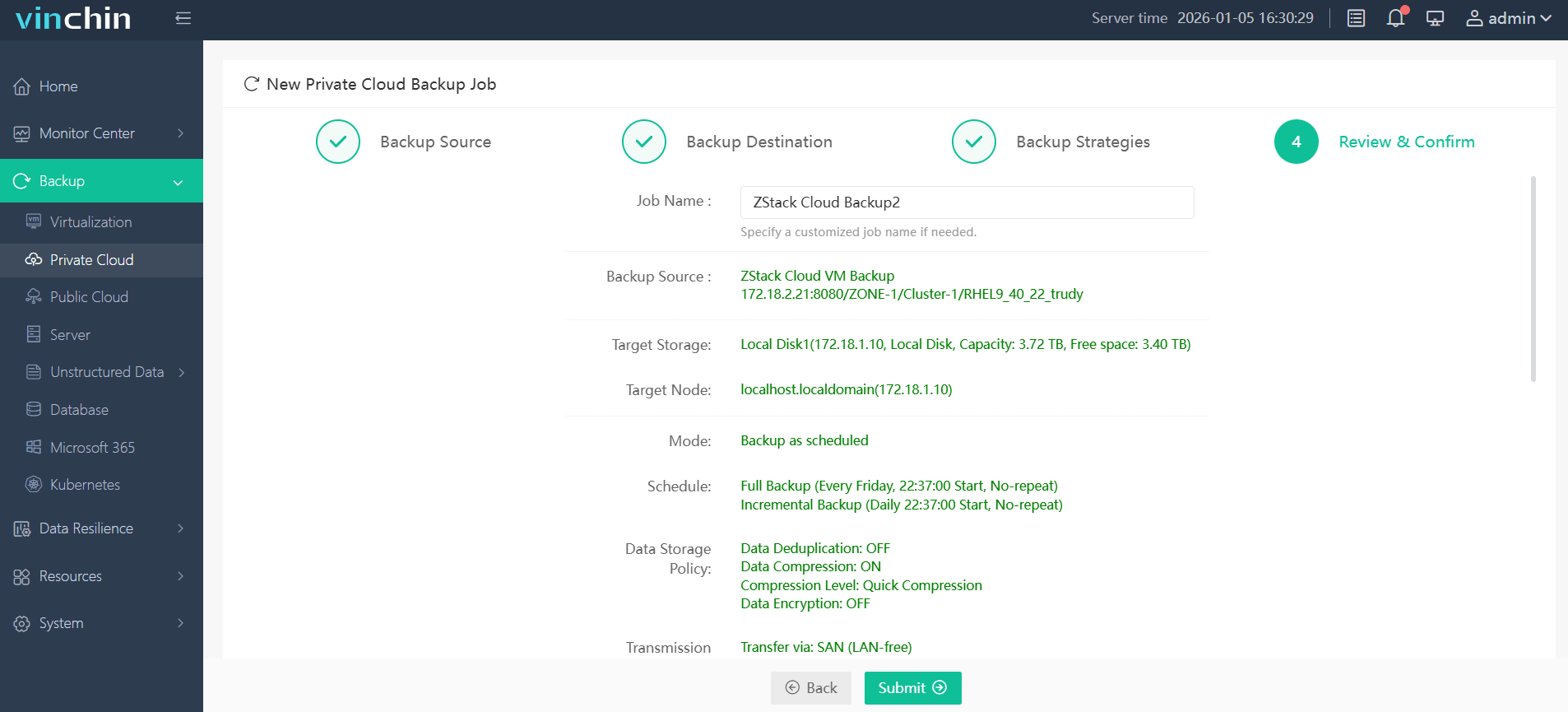
Step 4: Submit the job—the process runs automatically thereafter.
Trusted globally by thousands of organizations—with top ratings from industry analysts—you can try Vinchin Backup & Recovery free for 60 days with all features enabled by clicking the download button below.
Best ZStack Backup Software FAQs
Q1: What makes agentless backup preferable for minimizing downtime?
Agentless backup leverages native ZStack APIs instead of requiring extra software inside each VM. This streamlines deployment while reducing resource usage on production servers—which leads directly to faster restores with fewer compatibility issues overall compared with legacy agent-based approaches still used elsewhere sometimes today!
Q2: How does instant recovery impact business continuity?
Instant recovery allows workloads—including mission-critical databases/web servers—to resume almost immediately following major incidents such as ransomware attacks/hardware failures/etc., since affected VMs boot straight off compressed archive images stored locally/remotely until background processes finish copying everything back fully behind-the-scenes automatically afterward too! This meets strict RTO goals found commonly within modern enterprise SLAs everywhere now!
Q3: Can these solutions scale effectively alongside growing ZStack workloads?
Yes! Modern enterprise-grade tools support horizontal scaling via centralized dashboards capable managing hundreds/thousands individual nodes simultaneously regardless underlying hardware/software mix involved underneath—all without sacrificing performance/stability thanks advanced automation/scheduling logic built-in natively nowadays! Industry benchmarks confirm leading products routinely protect multi-petabyte datasets reliably year-after-year worldwide already!
Q4: Is compliance maintained during rapid restores?
Enterprise-class solutions log/audit every restore operation performed—including user identity/timestamp/details—for regulatory review later if needed under frameworks like GDPR. Following NIST guidelines ensures traceable evidence exists proving all activities comply fully even amid urgent incident response scenarios demanding quick turnaround times always!
Conclusion
Agentless image-based backups with instant recovery minimize downtime on ZStack clouds while meeting compliance needs efficiently—ensuring resilient operations through any disruption using Vinchin Backup & Recovery's proven platform trusted worldwide today!









