Protecting enterprise workloads on H3C CAS/UIS means keeping systems online even when disaster strikes. A ransomware attack can lock critical files in seconds. Hardware failures or accidental deletions can halt business operations without warning. The best way to minimize downtime is through agentless, image-based backup paired with instant VM recovery. This method restores services within minutes so users barely notice any disruption.
Downtime is not just an inconvenience—it can break service level agreements (SLAs), damage your reputation, and lead to heavy financial losses. According to Gartner, the average cost of IT downtime is $5,600 per minute. Choosing the right backup method protects both your data and your business continuity.
Why Minimizing Downtime Matters in Enterprise Environments
Minimizing downtime is essential for enterprises that depend on always-on digital services. Even brief outages can disrupt workflows across departments and impact customer trust.
● Financial Impact
Unplanned outages often result in lost revenue, missed transactions, or delayed projects. For example, if an e-commerce site goes down during peak hours due to server failure or cyberattack, sales stop instantly until recovery completes.
● Compliance Risks
Many industries must meet strict regulatory standards for uptime and data protection (such as GDPR or HIPAA). Extended downtime may lead to compliance violations or legal penalties if you cannot restore critical systems quickly enough.
● Operational Disruption
When core applications like databases or email servers go offline—even briefly—employees lose access to vital information. This stalls productivity across teams until IT restores normal operations.
● Reputation Damage
Customers expect reliable service around the clock. Frequent or prolonged outages erode trust and may drive clients toward competitors who promise better reliability.
For these reasons, fast recovery from any incident is not just a technical goal but a fundamental business requirement.
How To Choose The Best H3C CAS/UIS Backup Solution for Minimizing Downtime?
Selecting an effective backup solution involves more than just copying data—it’s about meeting strict Recovery Time Objectives (RTO) and Recovery Point Objectives (RPO). RTO defines how quickly you must restore services after an outage; RPO sets how much recent data you can afford to lose. Enterprises need solutions that deliver low RTOs (minutes) and tight RPOs (seconds or minutes).
● Agentless Architecture
Agentless backups use hypervisor APIs instead of installing software agents inside every VM. This reduces resource consumption on production systems and simplifies management compared to agent-based methods that require ongoing maintenance within each virtual machine environment.
● Instant Recovery Capability
Solutions offering instant VM recovery allow you to mount backup images directly onto production hosts without waiting for full data restoration. This brings critical workloads back online almost immediately after failure—essential for meeting aggressive SLAs.
● Scalability Across Large Environments
Backup platforms should scale easily as your infrastructure grows—not only by adding storage capacity but also by supporting more backup nodes for parallel processing across many VMs or sites without bottlenecks.
● Automation & Centralized Control
Automated scheduling reduces manual intervention while centralized dashboards provide unified visibility into all backup jobs across multiple clusters or locations—making policy enforcement easier for compliance audits.
Choosing solutions that excel in these areas ensures minimal disruption during incidents while supporting long-term growth strategies in dynamic enterprise environments.
Vinchin Backup & Recovery: Enterprise-Class Protection for H3C CAS/UIS
To address these challenges efficiently, Vinchin Backup & Recovery delivers professional-grade virtual machine backup tailored specifically for H3C CAS/UIS environments alongside support for 15+ mainstream virtualization platforms including VMware, Hyper-V, Proxmox, oVirt, OLVM, RHV, XCP-ng, XenServer, OpenStack, ZStack and more. For H3C CAS/UIS users seeking minimal downtime and robust protection at scale, Vinchin Backup & Recovery offers features such as LAN-free backup support on H3C CAS/UIS VMs as well as comprehensive options like full/incremental/differential backup modes, forever-incremental strategy with deduplication/compression benefits; granular restore; cloud/tape archive integration; V2V migration; GFS retention policy; throttling policy; multi-thread transmission; encryption; scheduled/repetitive jobs—all designed for efficiency and resilience while reducing operational burden.
The intuitive web console makes operation simple:
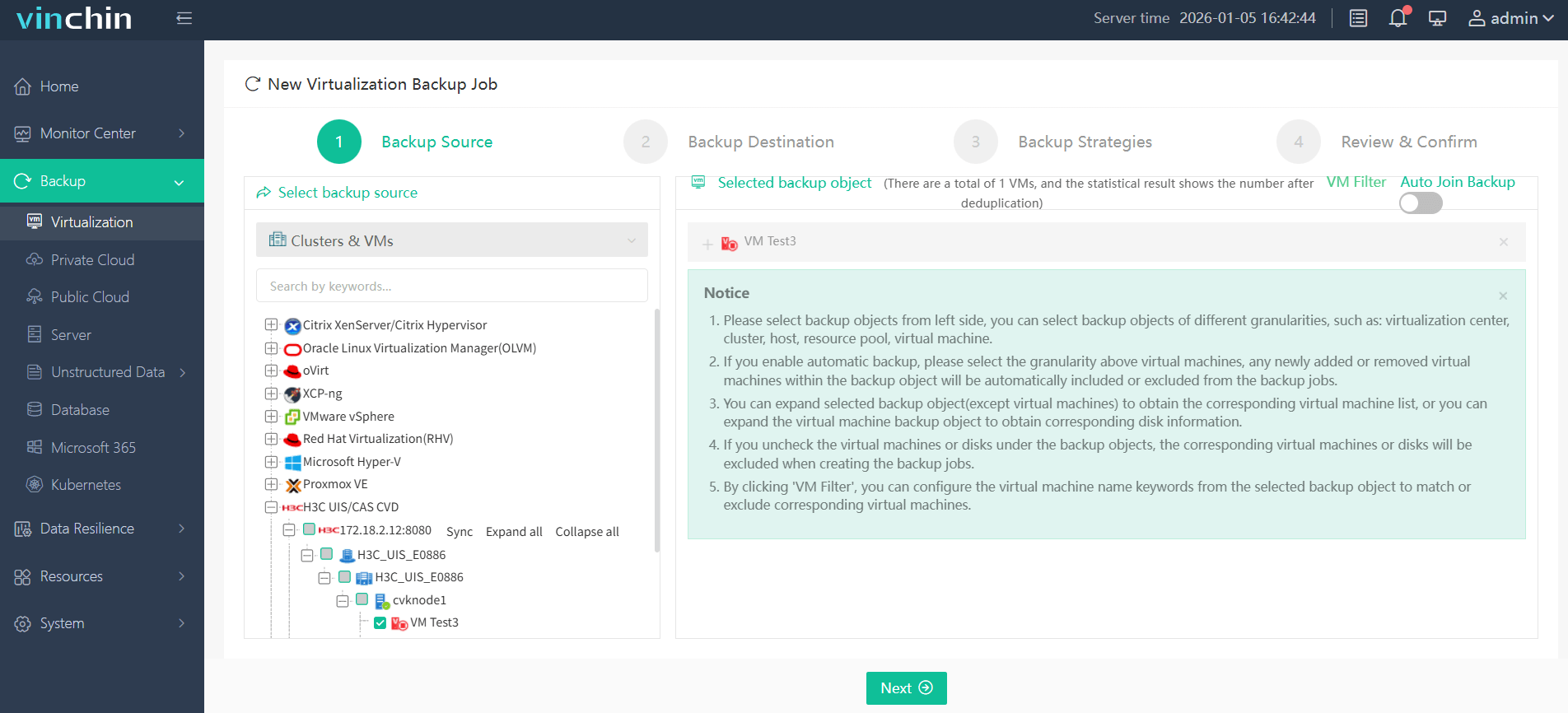
Step 1: Select the H3C CAS/UIS VM(s) you want backed up.
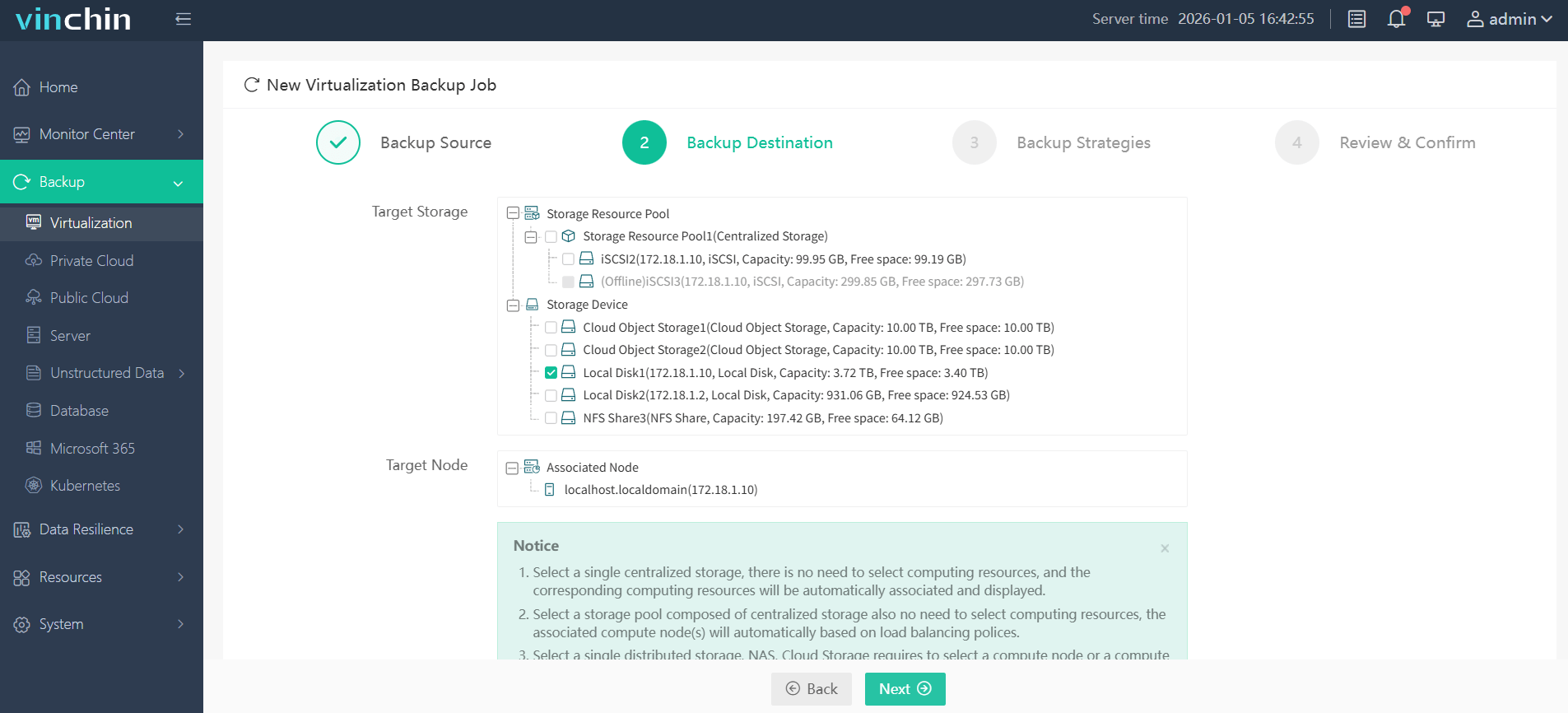
Step 2: Choose your preferred backup storage target.
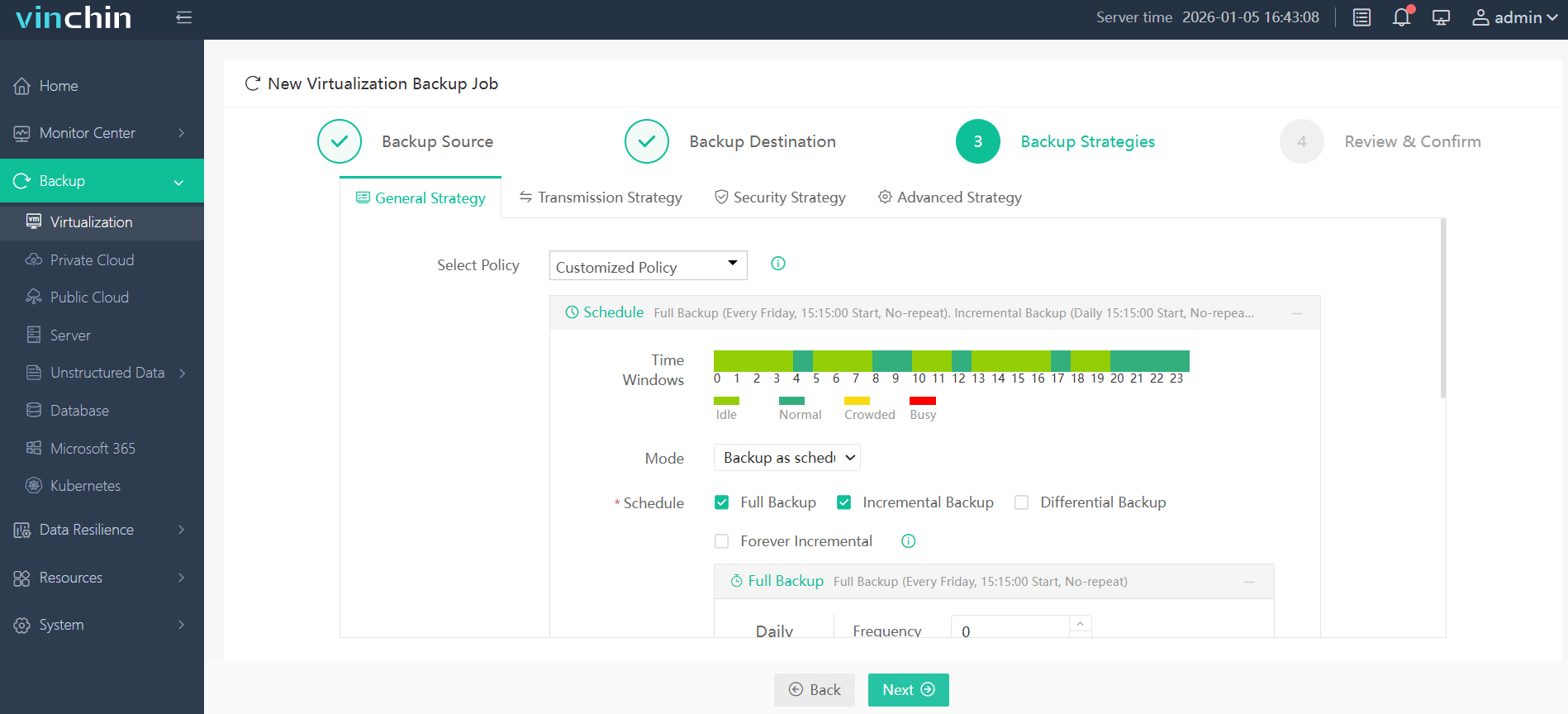
Step 3: Configure a custom strategy—set schedules/policies suited to your SLA.
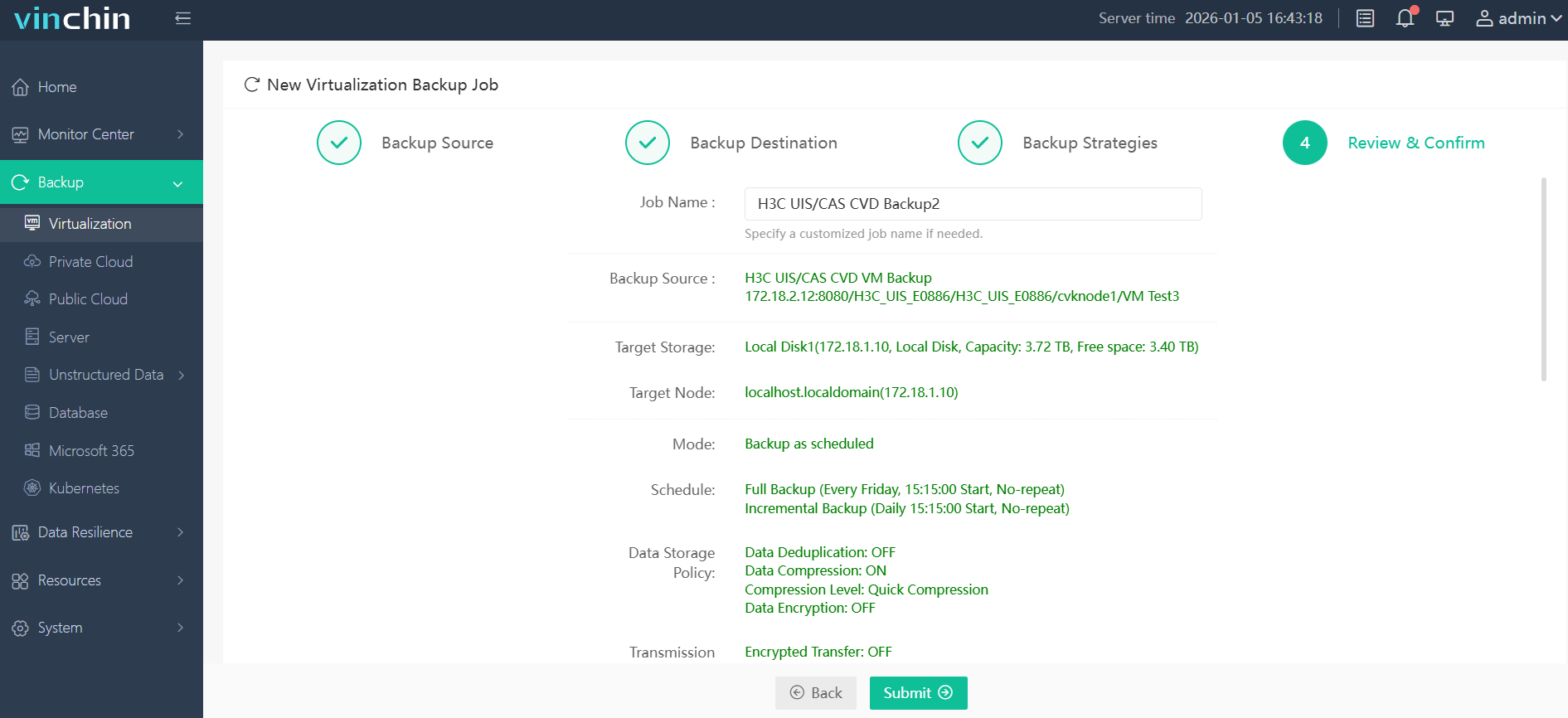
Step 4: Submit the job—and let automation handle the rest.
Recognized globally among enterprise customers with top ratings in industry reviews, Vinchin Backup & Recovery offers a 60-day fully-featured free trial—click below now to experience leading-edge protection firsthand!
Best H3C CAS/UIS Backup Software FAQs
Q1: What ensures the fastest workload recovery on H3C CAS/UIS?
Agentless image-based backups with instant VM recovery deliver rapid restoration times because there’s no need for reinstalling agents or rebuilding VMs from scratch after failure events occur.
Q2: How does backup choice affect compliance?
Efficient solutions help organizations meet their required RTO/RPO targets set by regulations like GDPR while simplifying audit processes through automated reporting features built into centralized management consoles.
Q3: Can the solution scale with infrastructure growth?
Yes—enterprise-grade tools such as Vinchin offer centralized management interfaces alongside scalable architectures allowing seamless addition of new backup nodes whenever environments expand without introducing performance bottlenecks.
Q4: How is data integrity maintained during rapid restores?
Advanced platforms utilize consistent snapshot techniques plus verification mechanisms ensuring restored VMs match original states precisely; granular file-level restores further reduce risk of partial corruption following major incidents.
Q5: Does this method integrate with native H3C management tools/APIs?
Enterprise solutions should provide integration points enabling centralized visibility within existing workflows—including orchestration alongside native tools like UIS Manager via supported APIs—for streamlined monitoring across hybrid deployments.
Conclusion
For minimal downtime on H3C CAS/UIS systems use agentless image-based backup paired with instant VM recovery plus storage replication where needed—delivering speed reliability resilience demanded by modern enterprises.