Protecting enterprise workloads on Oracle Linux Virtualization Manager (OLVM) means keeping downtime as close to zero as possible. The best way to achieve this is by using an image-based, agentless backup method that leverages application-consistent snapshots. This approach enables rapid recovery while preserving data integrity. Services keep running during backups.
Downtime can disrupt business operations and damage customer trust. Even brief outages may break service level agreements (SLAs) or cause financial loss. A strong backup strategy keeps your business resilient against incidents and helps you meet compliance standards set by regulators like NIST.
Image-based, agentless backups with application-consistent snapshots are now considered best practice for virtualized environments such as OLVM. These methods allow you to restore systems quickly without interrupting users or risking data corruption.
Why Minimizing Downtime Matters in Enterprise Environments
Minimizing downtime is critical because every minute lost can have wide-reaching effects on productivity, revenue streams, and reputation. Enterprises run complex applications that often support hundreds or thousands of users at once. If these services go offline—even briefly—the impact ripples across departments and customers.
● Direct Impact on Productivity: When systems are down, employees cannot access essential tools or data. Projects stall, deadlines slip, and teams lose momentum.
● Financial Losses: Outages can halt transactions or production lines. For e-commerce sites or financial institutions, even seconds of downtime may translate into lost sales or penalties.
● Customer Trust Erosion: Clients expect reliable service around the clock. Frequent interruptions drive customers away and harm your brand’s reputation.
● Regulatory Risks: Many industries must comply with strict uptime requirements from bodies like HIPAA or GDPR. Extended outages may lead to audits or fines if you fail to meet these standards.
● Incomplete Recoveries: Poor backup strategies risk restoring outdated data or missing files entirely—making recovery slow and unreliable when it matters most.
Fast backups help ensure that services remain available even during maintenance windows or unexpected failures. In today’s always-on world, enterprises need solutions that restore operations swiftly so they can honor SLAs and keep stakeholders satisfied.
How To Choose The Best Oracle OLVM Backup Solution for Minimal Downtime?
Selecting a backup solution for Oracle OLVM requires careful consideration of several factors that directly affect downtime reduction. Each factor plays a role in how quickly you can recover from disruptions while maintaining operational continuity.
A robust solution should combine ease of management with advanced technology designed specifically for virtualized environments like OLVM. Below are key elements to evaluate:
● Agentless Architecture
Agentless solutions do not require software installation inside each VM guest OS. This reduces resource consumption on hosts and avoids compatibility issues with different operating systems within your environment. By interacting directly with hypervisor APIs, agentless methods streamline deployment and minimize maintenance overheads—keeping workloads undisturbed during backup jobs.
● Instant Recovery Features
Instant recovery allows you to start VMs directly from backup storage without waiting for full restores—a process sometimes called “boot from backup.” This capability slashes recovery time objectives (RTOs) from hours down to minutes or seconds. For mission-critical applications where every second counts, instant recovery ensures business continuity even before full restoration completes in the background.
● Application Consistency
Application-consistent backups guarantee that databases (like Oracle DB), email servers, ERP platforms, and other transactional apps are captured in a valid state—not just at the file system level but also at the application layer. This prevents corruption upon restore—a vital safeguard for enterprise workloads handling sensitive transactions throughout the day.
● Scalability
Backup solutions must scale seamlessly as your infrastructure grows—from dozens to thousands of VMs—without degrading performance or requiring complex reconfiguration steps. Look for centralized management consoles that automate VM discovery across clusters so no workload goes unprotected as your environment expands over time.
● Automation & Policy-Based Management
Automated scheduling ensures regular backups occur without manual intervention—reducing human error risk while freeing up IT staff for higher-value tasks. Policy-driven retention rules help enforce compliance mandates by automatically archiving old backups according to regulatory requirements relevant in your industry sector.
● Security & Compliance Support
Data protection extends beyond simple encryption; deduplication saves storage space while encrypted transmission/storage guards against unauthorized access both onsite and offsite—including public cloud targets if hybrid disaster recovery is part of your plan.
For example: An international retailer running its ERP system on OLVM needs daily application-consistent snapshots stored both locally (for fast restores) and remotely (for disaster scenarios). With instant VM recovery enabled through agentless integration—and automated policies ensuring all new VMs are protected—the IT team meets strict RTO/RPO targets while reducing administrative burden.
Vinchin Backup & Recovery: Enterprise-Grade Protection for Oracle OLVM
For organizations seeking robust protection of their Oracle OLVM environments, Vinchin Backup & Recovery delivers comprehensive enterprise-level virtual machine backup capabilities tailored specifically for OLVM alongside support for 15+ mainstream virtualization platforms including VMware, Hyper-V, Proxmox, oVirt, RHV, XCP-ng, XenServer, OpenStack, ZStack and more. Its seamless integration with OLVM enables agentless image-based backups that reduce complexity while ensuring consistent protection across diverse infrastructures.
Key features such as application-consistent snapshot support on OLVM; instant VM recovery; LAN-free backup; CBT; plus granular restore empower businesses to minimize downtime after incidents while maintaining high availability standards required by modern enterprises. Together with incremental/differential backup modes and advanced deduplication/compression technologies—all managed via policy-driven automation—Vinchin Backup & Recovery streamlines both routine protection tasks and rapid disaster response efforts so critical workloads stay online longer with less manual oversight needed overall.
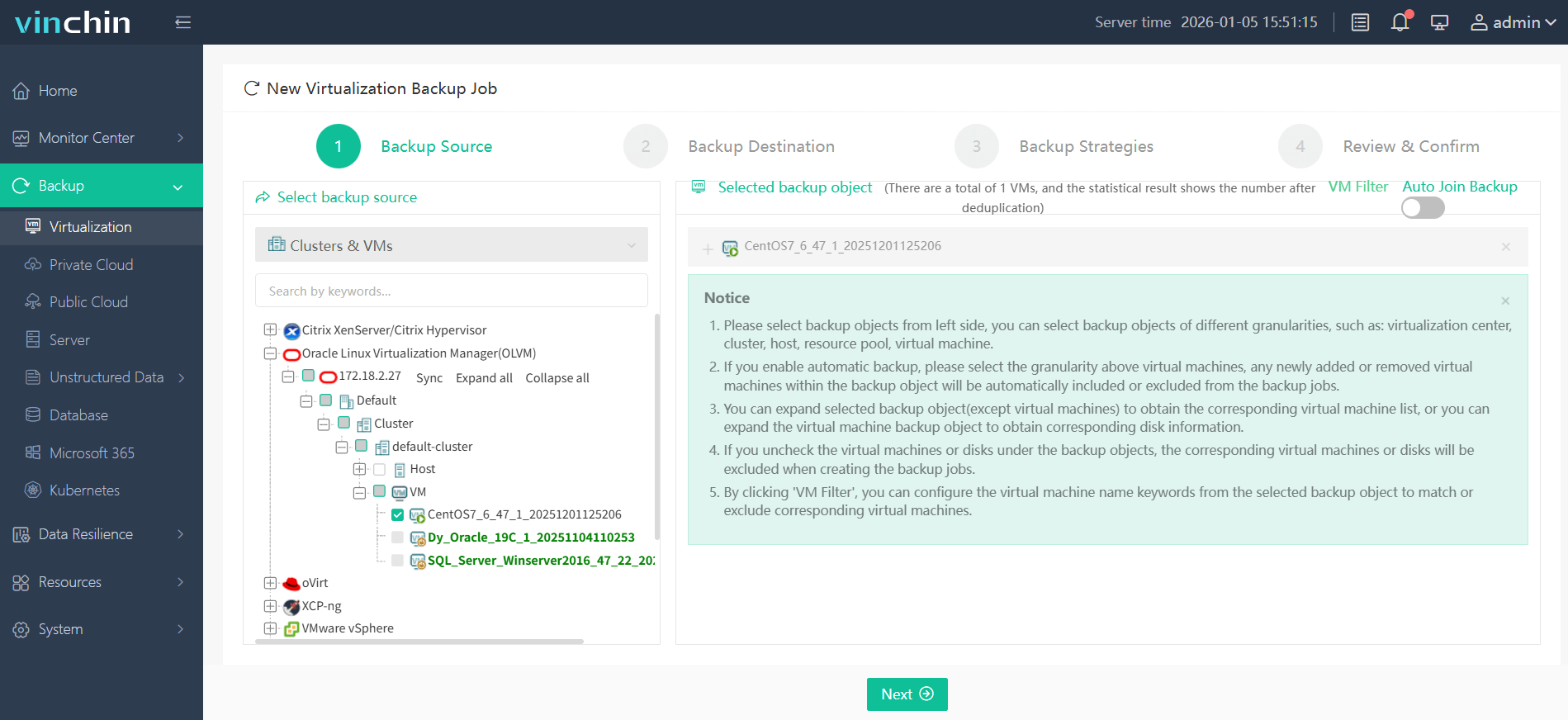
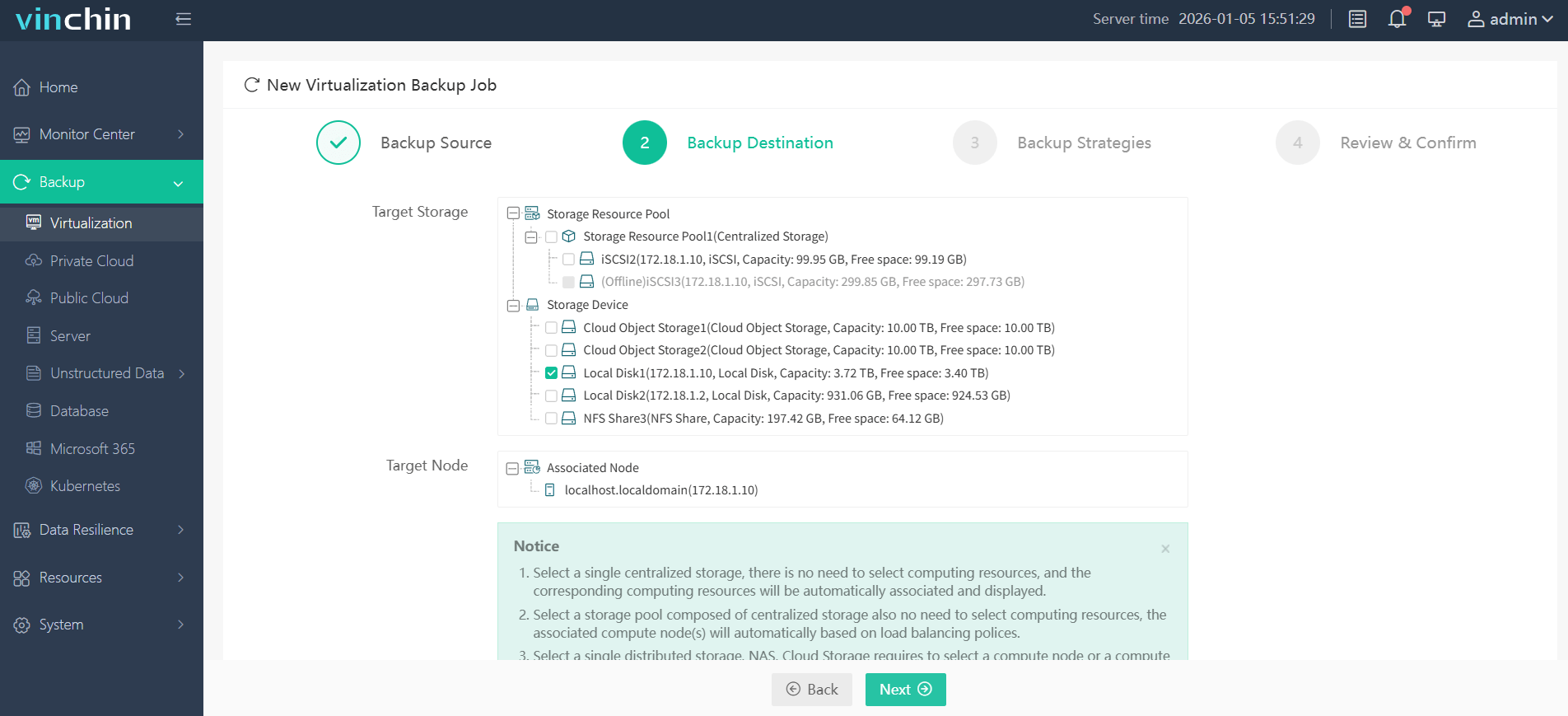
The intuitive web console makes safeguarding your environment straightforward:
Step 1: Select the Oracle OLVM VM to back up.
Step 2: Choose the desired backup storage.
Step 3: Configure a suitable backup strategy.

Step 4: Submit the job—your protection begins immediately!

Recognized globally by thousands of customers with top ratings in enterprise data-protection software reviews—Vinchin Backup & Recovery offers a 60-day full-featured free trial so you can experience its power firsthand; click below to get started today!
Best Oracle OLVM Backup Software FAQs
Q1: What makes agentless backup preferable in minimizing downtime?
Agentless backup leverages native hypervisor APIs within OLVM rather than installing extra software inside each guest OS instance—this reduces resource usage on hosts while avoiding potential conflicts with existing applications inside VMs themselves. As there’s no disruption caused by agents starting/stopping services during jobs—or patching them later—your workloads continue uninterrupted throughout scheduled protection cycles.
Q2: How does instant recovery benefit enterprise workloads?
Instant recovery lets administrators power up virtual machines straight from their latest image-level backup stored outside production storage pools—using features built into modern hypervisors like those found in OLVM clusters. This drastically cuts wait times compared with traditional restores since users regain access almost immediately—even before full background copy completes.
Q3: Is application consistency necessary for all workloads?
Application consistency is crucial whenever transactional systems such as databases handle live updates; it guarantees restored states reflect committed transactions only—not partial writes—which could otherwise corrupt records upon rollback. While some non-critical test/dev VMs might tolerate crash-consistent images alone—for production apps processing financials/orders/email—it’s always safest choosing app-aware snapshotting.
Q4: Can the solution scale with increasing VM counts?
Enterprise-grade solutions like Vinchin offer centralized management interfaces capable of discovering new VMs automatically across multiple clusters—as well as policy-driven automation tools—to ensure expanding infrastructures remain fully protected without sacrificing speed/performance regardless of size growth over time.
Conclusion
Image-based agentless backups using application-consistent snapshots minimize downtime for Oracle OLVM environments while ensuring reliable recoveries every time—with proven results delivered by solutions like Vinchin Backup & Recovery tailored specifically for enterprise needs worldwide.










