Downtime can cripple enterprise operations. Every minute lost means money out the door and trust eroded. In Sangfor HCI environments, picking a backup method that keeps downtime near zero is vital. The best way to achieve this is through agentless, image-based backup with instant VM recovery. This method restores entire virtual machines (VMs) quickly so business continues almost without pause.
Fast recovery matters because it helps you meet service level agreements (SLAs), maintain your reputation, and avoid compliance headaches. When systems go down—whether from hardware failure, ransomware attack, or human error—the right backup solution lets you bounce back fast. According to ITIC’s 2022 Global Server Hardware Security survey, one hour of downtime costs more than $300,000 for 91% of large enterprises. That’s why minimizing downtime isn’t just an IT goal—it’s a business imperative.
Let’s look at why reducing downtime is so critical in enterprise settings, what features matter most in a backup solution for Sangfor HCI, what evidence shows about different methods’ effectiveness, and how Vinchin Backup & Recovery delivers on these needs.
Why Minimizing Downtime Matters in Enterprise Environments
Downtime affects every part of an organization—from revenue streams to customer satisfaction to regulatory standing. Even brief outages can have ripple effects across departments and markets.
● Downtime causes direct financial loss
When applications go offline—even briefly—businesses lose sales opportunities and may face penalties from partners or regulators. For example, Gartner estimates that average downtime costs $5,600 per minute. In sectors like banking or e-commerce where transactions are constant, even seconds matter.
● Downtime damages reputation
Customers expect services to be available around the clock. If they encounter errors or delays due to system outages—even if only for minutes—they may turn to competitors instead. A single incident can lead to negative reviews or lost contracts.
● Downtime increases compliance risk
Many industries must follow strict data protection rules such as GDPR or HIPAA. Extended outages can result in missed reporting deadlines or unauthorized data exposure during recovery efforts. Regulators may impose fines if businesses cannot prove they had robust disaster recovery plans in place.
A reliable backup strategy acts as insurance against these risks by ensuring workloads are restored quickly when disaster strikes—not hours later when damage has already been done.
How To Choose The Best Sangfor HCI Backup Solution for Minimal Downtime?
Selecting a backup solution requires careful consideration of several key factors that directly impact how quickly you can recover from disruptions.
The right choice balances speed with flexibility while keeping management simple as your environment grows.
● Instant VM Recovery and Agentless Backups enable rapid restoration
Agentless backups capture full images of VMs at the hypervisor level without needing software inside each VM guest OS. This reduces complexity and avoids performance slowdowns caused by agents running inside production workloads. Instant VM recovery allows you to boot VMs directly from backup storage within minutes after failure—no waiting for full restores before resuming operations.
● Scalability ensures future-proof protection
Backup solutions must handle growth smoothly as organizations add more VMs or expand storage needs over time. Look for tools tested with hundreds—or thousands—of VMs without bottlenecks during peak usage periods.
● Automation and Centralized Management reduce manual errors
Automated scheduling guarantees backups run consistently according to policy while centralized dashboards make it easy for administrators to monitor job status across multiple clusters or sites from one interface. This supports compliance efforts by enforcing uniform standards everywhere workloads reside.
● Integration and Compliance support regulatory requirements
Seamless integration with Sangfor HCI APIs streamlines deployment while granular restore options let you recover individual files when needed instead of whole VMs every time—a big advantage during audits or legal holds. Encryption both in transit and at rest protects sensitive data throughout its lifecycle.
● Flexible Recovery Options provide tailored responses during crises
Being able to restore everything—from entire VMs down to single files—lets IT teams respond precisely based on incident scope rather than using “one size fits all” approaches that waste time or resources unnecessarily.
By focusing on these features when evaluating solutions for Sangfor HCI environments, enterprises position themselves well against both expected failures (like hardware faults) and unexpected threats (like ransomware).
Vinchin Backup & Recovery: Enterprise-Level Protection Across Virtualization Platforms
To address demanding enterprise requirements in hybrid environments like Sangfor HCI, Vinchin Backup & Recovery stands out as a professional virtual machine backup solution supporting more than 15 mainstream virtualization platforms—including VMware, Hyper-V, Proxmox, oVirt, OLVM, RHV, XCP-ng, XenServer, OpenStack, ZStack—and notably including Sangfor HCI among its supported platforms for comprehensive coverage across diverse infrastructures.
Vinchin Backup & Recovery delivers essential features such as agentless image-based backup for simplified management; LAN-free backup enabling efficient data transfer; granular restore allowing precise item-level recovery; advanced deduplication/compression optimizing storage use; and robust multi-thread transmission accelerating job completion—all designed to maximize uptime while minimizing operational disruption.
With an intuitive web console making administration straightforward even at scale, backing up a Sangfor HCI VM involves four steps:
Step 1: Select the Sangfor HCI VM to back up;
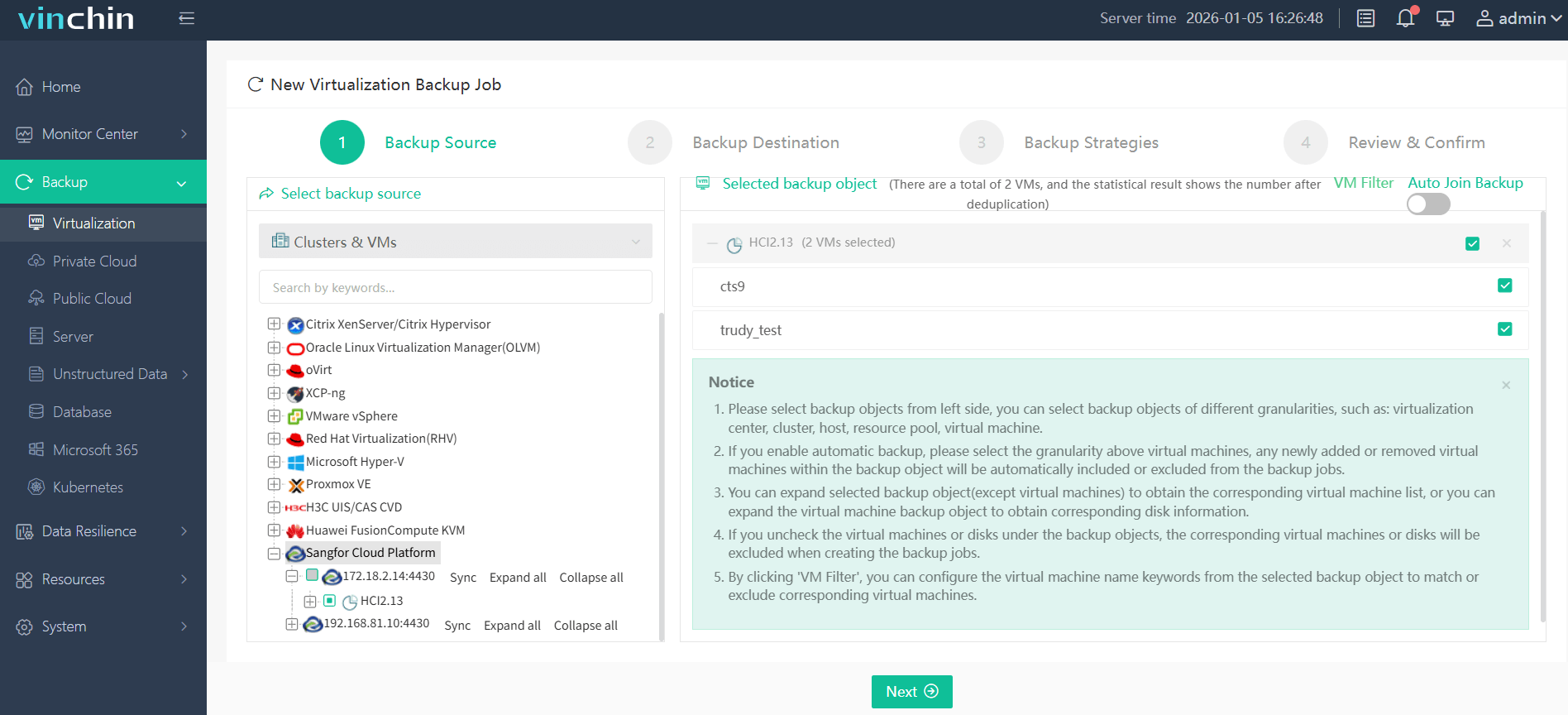
Step 2: Choose the target backup storage;

Step 3: Configure your preferred strategy including schedule and retention policies;

Step 4: Submit the job.
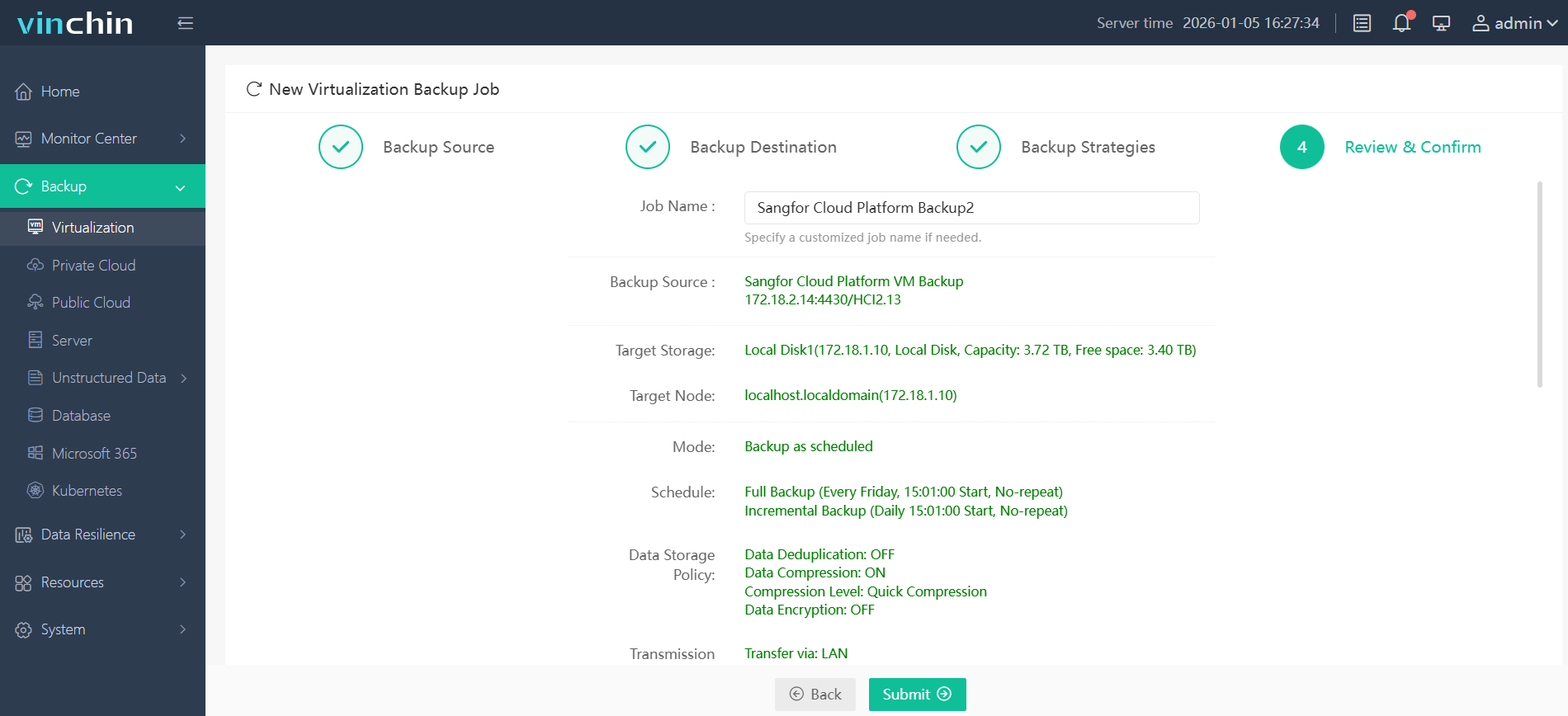
Recognized worldwide with top ratings among enterprise users seeking reliable data protection software, Vinchin Backup & Recovery offers a fully featured 60-day free trial—click below to experience seamless workload resilience firsthand!
Best Sangfor HCI Backup Software FAQs
Q1: What backup method ensures the fastest workload recovery on Sangfor HCI?
Agentless image-based backup with instant VM recovery provides rapid restoration because it eliminates delays caused by installing agents inside each virtual machine; this lets IT teams bring systems online within minutes after failure occurs.
Q2: How does instant VM recovery reduce business risk?
It enables immediate access to protected workloads after any disruption so users continue working almost uninterrupted; this limits financial losses while helping organizations meet SLAs defined in their business continuity plans.
Q3: Is scalability important when choosing a backup solution?
Yes; scalable solutions handle growing numbers of virtual machines efficiently without slowing down jobs—even as environments expand into hundreds/thousands of nodes—which prevents increased risk of extended downtime during large-scale incidents.
Q4: Does centralized management impact compliance?
Centralized policy enforcement maintains consistent protection standards across all workloads making audits easier; administrators track job status/reporting centrally which supports regulatory requirements around documentation/proof-of-protection measures.
Conclusion
Choose agentless image-based backup with instant VM recovery for minimal downtime on Sangfor HCI systems—solutions like Vinchin ensure enterprise-grade resilience so your business stays running no matter what happens.










