Ransomware attacks have become a leading threat to business continuity worldwide. Enterprises running XCP-ng virtualization need robust backup strategies that can withstand even advanced ransomware tactics. The best XCP-ng backup tool for ransomware protection combines immutable backups, air-gapped storage options, rapid recovery capabilities, comprehensive monitoring, and compliance support. These features work together to keep your data secure and recoverable—even if attackers breach your main systems.
Ransomware resilience is now essential for organizations of all sizes. It helps maintain operations during crises, reduces costly downtime, supports regulatory compliance efforts, and protects your reputation from damage caused by data loss or extended outages. Selecting a truly resilient backup solution requires understanding what makes backups resistant to ransomware—and knowing how these defenses fit into an XCP-ng environment.
Why Ransomware Protection Matters in Enterprise Environments
Modern enterprises depend on digital infrastructure for daily operations. When ransomware strikes—encrypting or destroying critical business data—operations can halt instantly. Even short disruptions can lead to lost revenue and customer trust.
● Financial Impact
The financial consequences of ransomware are severe. According to IBM’s Cost of a Data Breach Report 2023, average costs—including downtime and recovery—can reach millions of dollars per incident at large organizations. Expenses often include ransom payments (which are never guaranteed to result in data return), legal fees, system restoration costs, lost productivity, and reputational harm.
● Backup Vulnerability
Backups are often targeted by attackers because they represent the last line of defense against paying ransoms. If malware can access or encrypt your backup files—especially those stored on connected disks or network shares—you may lose all recovery options except paying criminals.
● Regulatory Pressure
Many industries face strict regulations regarding data retention and security (such as GDPR or HIPAA). Failure to protect sensitive information from unauthorized alteration or deletion can result in fines or sanctions from authorities.
● Operational Continuity
A strong backup strategy ensures you can restore services quickly after an attack—minimizing disruption for customers and partners while maintaining business continuity plans.
These realities make it clear: modern backup solutions must go beyond simple file copies—they must actively defend against tampering, deletion attempts by malware or rogue insiders, unauthorized access across networks (including virtualized environments like XCP-ng), and support fast recovery when disaster strikes.
How To Choose The Best XCP-ng Backup Solution for Ransomware Protection?
Selecting an effective XCP-ng backup tool means focusing on features proven to block ransomware threats while enabling quick restoration of services. Each capability below plays a unique role in building true resilience:
Start by considering how well each solution addresses immutability—the ability to prevent changes once backups are written—as this forms the foundation of anti-ransomware defense. Next evaluate isolation methods such as air-gapped storage that physically separates backups from production networks; this limits exposure if attackers breach primary systems. Rapid recovery tools help minimize downtime after incidents occur; comprehensive monitoring detects threats early; compliance support ensures ongoing alignment with industry standards as your environment grows.
● Immutable Backups
Immutability locks down backup files so they cannot be altered or deleted—even by administrators with full system rights or malicious code running inside compromised VMs. Some solutions achieve this through write-once-read-many (WORM) technology at the storage layer; others enforce immutability via software controls integrated with hypervisor APIs like those available in XCP-ng’s snapshot management system. Immutability ensures that even if ransomware gains access credentials it cannot destroy historical restore points needed for safe recovery.
● Isolated Storage Tiers / Air-Gapped Storage
Air-gapped storage refers to keeping at least one copy of your backups completely disconnected from production networks—either offline (on removable media) or offsite (in cloud repositories inaccessible via standard protocols). This approach blocks direct access by malware spreading laterally through compromised systems. Many enterprise-grade tools automate transfer of completed backups onto isolated tiers such as object storage buckets protected by separate credentials—or enable export jobs that move encrypted archives offsite over secure channels like SFTP/SCP.
● Recovery Speed
After an attack every minute counts: slow restores mean longer outages which amplify financial losses. Look for solutions offering instant VM boot capabilities (“Instant Recovery”) so you can bring mission-critical workloads online within seconds—even before full disk images finish copying back from cold storage locations. Also consider granular restore functions which let you recover individual files/folders without waiting on complete VM rebuilds—a key advantage when only part of a dataset is affected by encryption events.
● Comprehensive Monitoring & Alerting
Real-time alerts help detect suspicious activity early—such as unexpected deletions/modifications within protected repositories—or failed job runs which could signal active interference. Integrity checks verify that stored snapshots match original source hashes; audit trails document who accessed what data when—a requirement under many compliance frameworks including ISO 27001 Section A12.
● Compliance With Industry Standards
As environments scale up new regulations may apply: GDPR mandates strict retention/deletion policies across EU-based workloads; HIPAA covers healthcare records in US markets; PCI DSS applies wherever payment card info is processed/stored. Your chosen tool should offer policy-driven scheduling/auditing/reporting features designed specifically around these requirements—and adapt easily as laws evolve over time without major reconfiguration effort.
Vinchin Backup & Recovery: Enterprise-Grade Protection for XCP-ng
For organizations seeking robust protection against ransomware in their XCP-ng environments, Vinchin Backup & Recovery stands out as a professional enterprise-level virtual machine backup solution supporting more than 15 mainstream virtualization platforms—including first-class support for XCP-ng alongside VMware, Hyper-V, Proxmox, oVirt, OLVM, RHV, XenServer, OpenStack, ZStack and more. Designed specifically with complex virtual infrastructures in mind, Vinchin Backup & Recovery delivers seamless integration with diverse hypervisors while providing unified management across hybrid IT landscapes.
Among its most relevant features are immutable backups—which ensure backed-up data cannot be altered post-write—LAN-free backup for efficient high-speed transfers within datacenters without burdening production LANs, instant recovery allowing near-immediate restoration of critical VMs after incidents strike, granular restore enabling selective file-level retrieval instead of full VM rollbacks when only partial data loss occurs, and comprehensive scheduled/incremental/differential backup strategies tailored for enterprise needs. Together these capabilities deliver airtight protection against both external threats like ransomware and internal risks such as accidental deletions—all while streamlining administration through automation and centralized control.
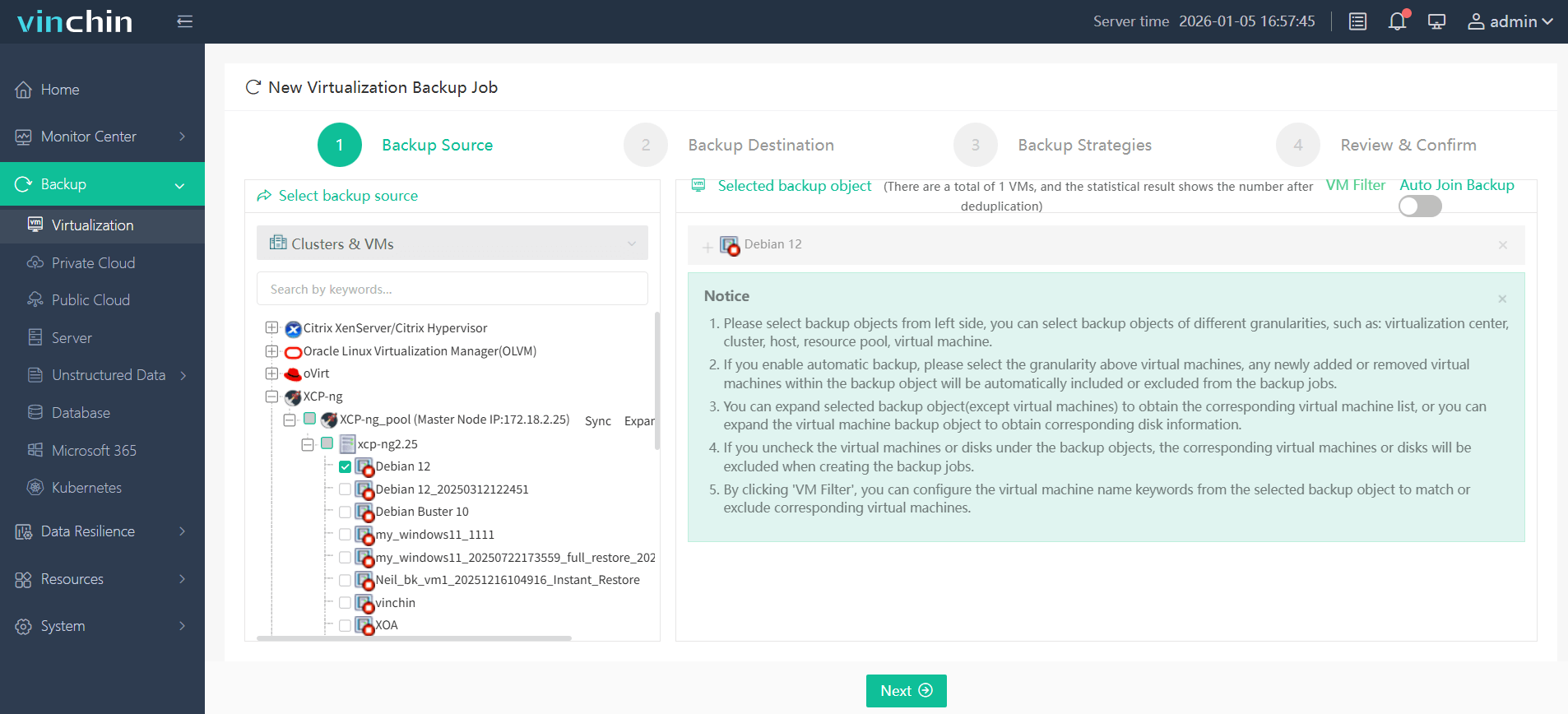
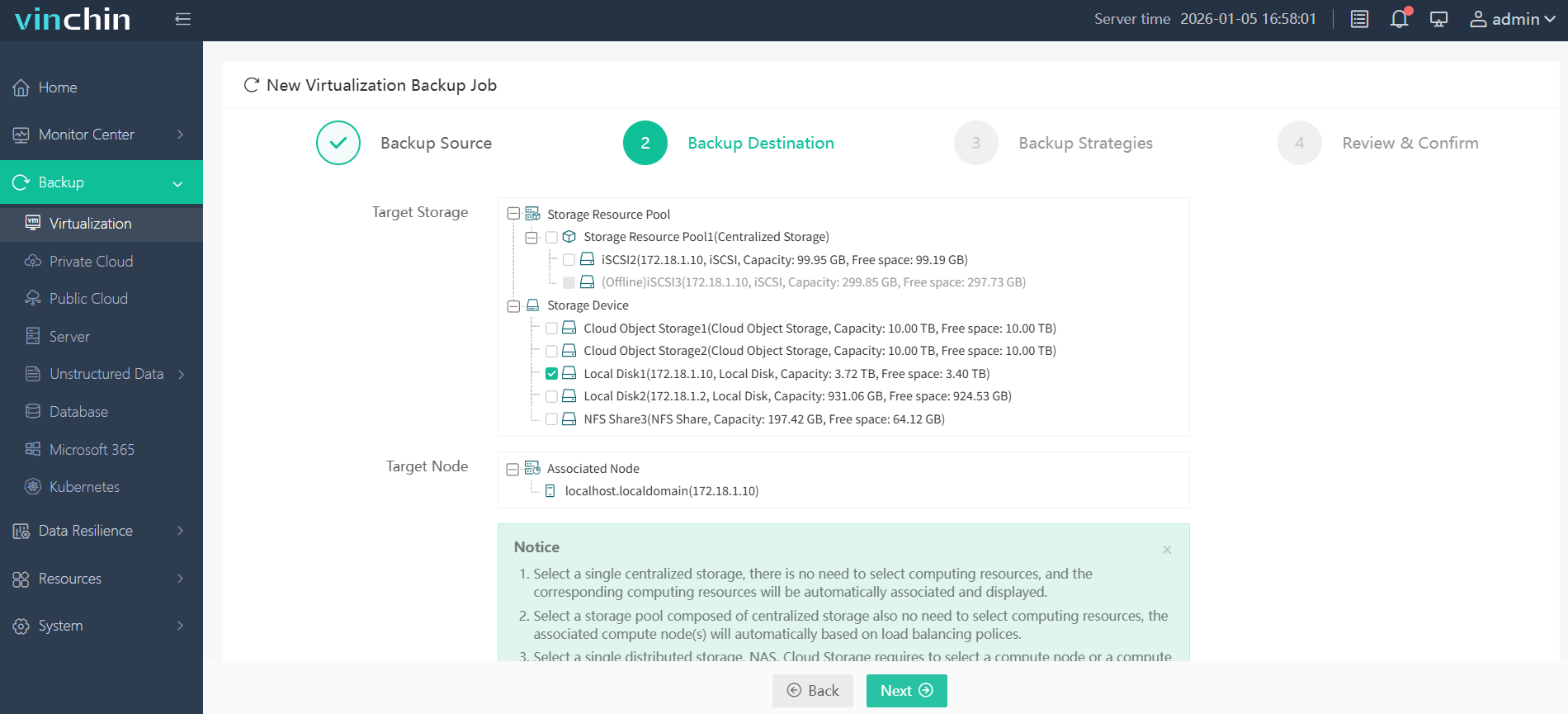
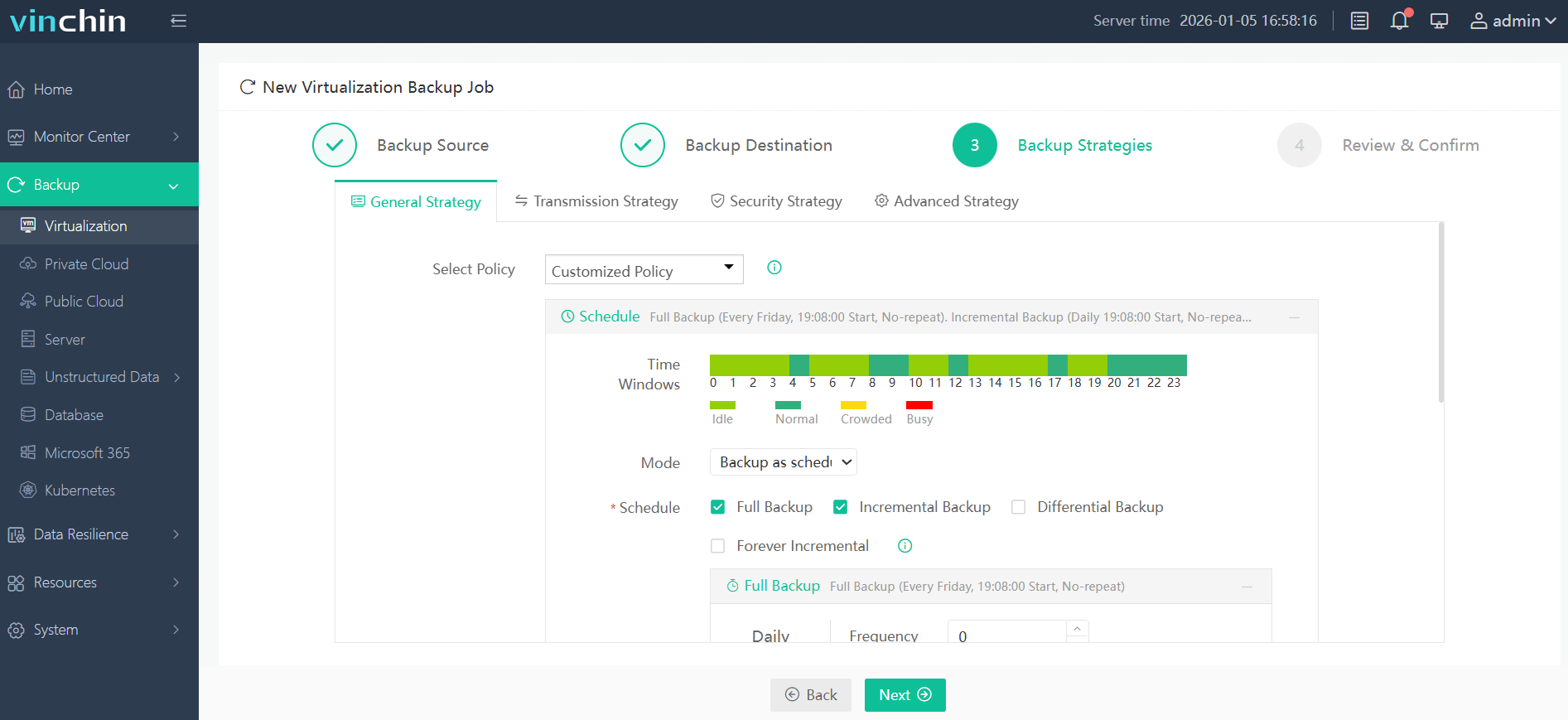
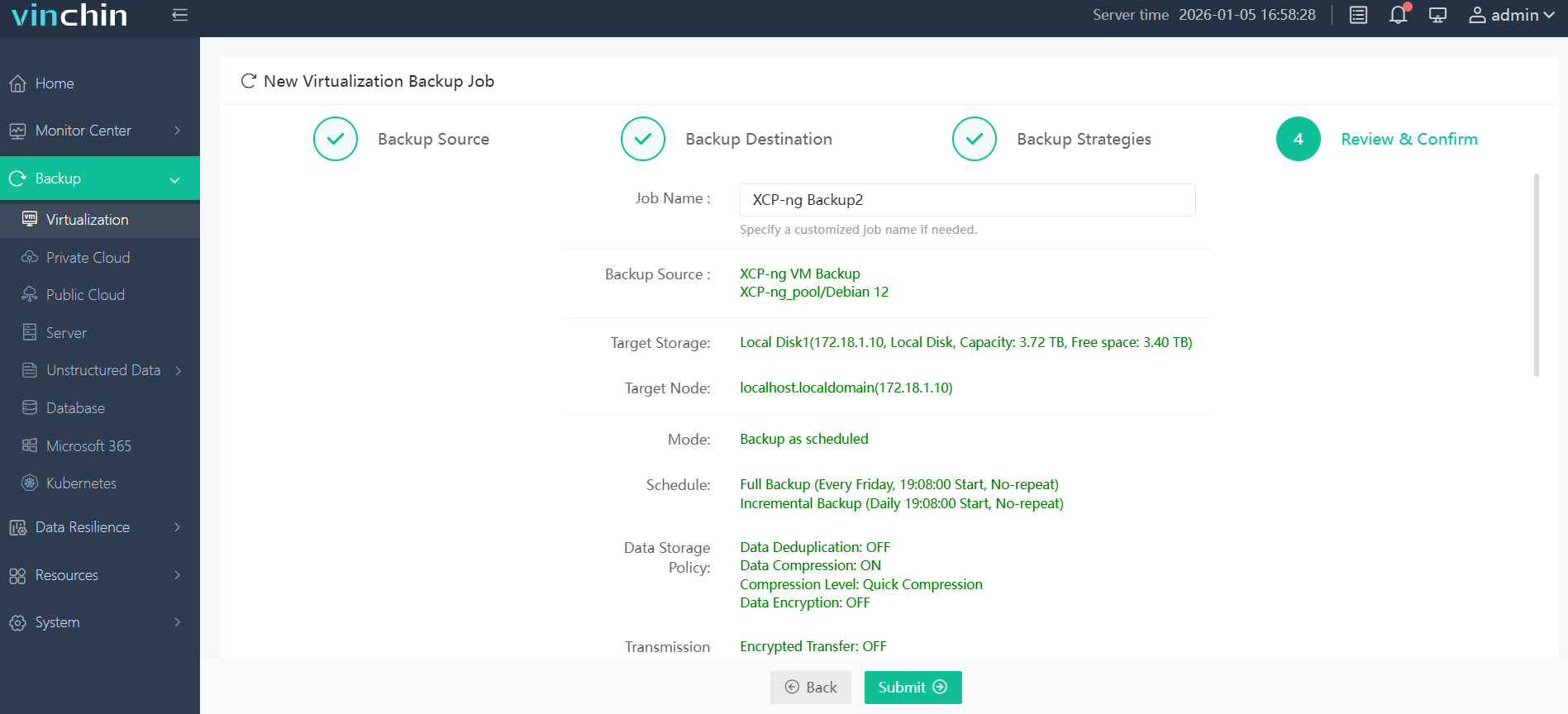
Backing up an XCP-ng VM with Vinchin Backup & Recovery is straightforward thanks to its intuitive web console:
Step 1: Select the XCP-ng VM to back up.
Step 2: Choose the desired backup storage location.
Step 3: Configure the appropriate backup strategy based on organizational policies.
Step 4: Submit the job—and let Vinchin Backup & Recovery handle the rest automatically.
With global recognition among enterprise users and top ratings across industry review sites,Vinchin Backup & Recovery offers a fully featured 60-day free trial so you can experience world-class protection firsthand—click below to get started.
Best XCP-ng Backup Software FAQs
Q1: What makes a backup truly ransomware-proof?
A1: Immutability prevents tampering or deletion—even if attackers gain admin rights—by locking down files at both software level (using WORM principles) or hardware level where supported. This guarantees clean restore points remain available after attacks strike.
Q2: How does air-gapped storage enhance security?
A2: Air-gapped storage keeps at least one copy disconnected from production networks so malware cannot reach it—even during widespread breaches. Offsite/cloud repositories further reduce risk since attackers would need physical access plus valid credentials just to attempt compromise.
Q3: Is fast recovery important after an attack?
A3: Yes—rapid restoration limits operational disruption/losses dramatically compared with slow manual rebuilds. Instant VM boot lets teams resume service delivery within minutes instead of hours/days—a crucial edge during crisis response scenarios common after major incidents hit virtualized infrastructure like XCP-ng clusters.
Q4: Does compliance require specific backup features?
A4: Many regulations demand secure retention policies/audit trails proving integrity over time—for example GDPR Article 32 mandates “the ability…to restore availability/access” promptly following incidents. Automated reporting/scheduling help demonstrate ongoing adherence without manual intervention.
Conclusion
Choosing an XCP-ng backup solution with immutable backups plus isolated storage enables fast recovery after ransomware strikes while meeting regulatory demands—all critical factors for enterprise resilience today.










