XCP-ng is an open-source virtualization platform built on XenServer technology. Many enterprises rely on it to run business-critical applications because it offers flexibility and cost savings. When these applications power daily operations, like finance systems or customer portals. Even a few minutes of downtime can disrupt workflows, cause financial loss, or erode customer trust. Reliable XCP-ng backup method is essential for keeping these workloads available at all times.
Uptime is not just an IT metric, it’s a core business requirement. Modern organizations face strict service-level agreements (SLAs), regulatory compliance demands, and high customer expectations. According to IDC research, unplanned application downtime costs businesses between $100,000 and $1 million per hour depending on company size and industry. The right XCP-ng backup solution helps minimize this risk by ensuring fast recovery from failures or disasters.
Why Maximizing Uptime Matters in Enterprise Environments
Maintaining continuous access to critical systems is vital for every enterprise. Even short outages can have far-reaching effects, from lost revenue to reputational damage or legal penalties. A robust backup strategy supports uninterrupted operations by enabling rapid recovery when things go wrong.
● Downtime Is Expensive
Research shows that average downtime costs can reach thousands of dollars per minute for large organizations. This includes lost sales, missed deadlines, overtime pay for IT staff responding to incidents, and potential fines if compliance obligations are breached.
● Compliance Risks Increase Without Reliable Backups
Many industries must meet regulations like GDPR or HIPAA that require data protection measures, including regular backups and documented recovery plans. Failing to restore data quickly after an incident may result in failed audits or penalties.
● Customer Trust Depends on Availability
When customers cannot access your services due to outages even briefly, they may lose confidence in your brand. Consistent uptime helps retain clients and maintain your competitive edge.
● Employee Productivity Suffers During Outages
If key applications go offline unexpectedly, employees cannot perform their jobs efficiently. This leads to delays across departments and impacts overall business performance.
A well-chosen backup solution reduces these risks by supporting quick restores while meeting both operational needs and compliance standards.
How To Choose The Best XCP-ng Backup Solution for Maximizing Uptime
Selecting effective XCP-ng backup software requires careful evaluation of several factors that directly impact uptime. Each factor plays a unique role in reducing disruption during failures or disasters.
● Instant Recovery Capabilities
Solutions offering instant VM recovery allow you to bring virtual machines back online within seconds after a failure occurs. For example, if your ERP system crashes due to hardware issues, instant recovery lets you resume operations almost immediately, minimizing disruption for users who depend on those services every day.
● Automation Features
Automated scheduling ensures backups happen consistently without manual intervention. By using policy-based automation tools built into modern solutions, such as setting up recurring nightly snapshots, you reduce human error while guaranteeing timely protection of all critical workloads.
● Scalability Across Growing Workloads
As businesses expand their infrastructure by adding more VMs or increasing storage needs over time, which is a scalable backup tool adapts seamlessly without slowing down performance. Look for solutions designed with distributed architectures so they handle larger environments efficiently as demand grows.
● Robust Security Measures
Data integrity during both backup creation and restoration is crucial for protecting sensitive information from threats like ransomware attacks or unauthorized access attempts. End-to-end encryption safeguards data at rest/in transit; immutable storage prevents tampering; audit logs track changes so you always know who accessed what and when.
● Compliance With Industry Standards
Audit-ready reporting capabilities help demonstrate adherence to regulations such as SOX (Sarbanes-Oxley Act), PCI DSS (Payment Card Industry Data Security Standard), HIPAA (Health Insurance Portability & Accountability Act), or GDPR (General Data Protection Regulation). Strong data protection controls ensure you pass audits confidently while avoiding costly non-compliance penalties.
By focusing on these factors when evaluating XCP-ng backup options and confirming compatibility with native APIs like XAPI; you maximize uptime while future-proofing your disaster recovery plan against evolving threats and requirements.
Vinchin Backup & Recovery: Enterprise-Grade Protection for XCP-ng
For organizations seeking reliable data protection across diverse virtual environments, Vinchin Backup & Recovery stands out as an enterprise-level solution supporting XCP-ng alongside 15+ mainstream platforms, including VMware, Hyper-V, Proxmox, Openstack, Zsatck, and XCP-ng, etc. Designed specifically for complex infrastructures like XCP-ng clusters used by many enterprises today, it delivers agentless VM backups that simplify deployment while minimizing resource consumption.
Key features include instant recovery for rapid system restoration; LAN-free backup which accelerates large-scale VM protection; CBT-based incremental backups optimizing efficiency; advanced deduplication/compression saving storage space; plus granular restore capabilities that enable precise file-level recoveries—all contributing toward maximum uptime with minimal overheads.
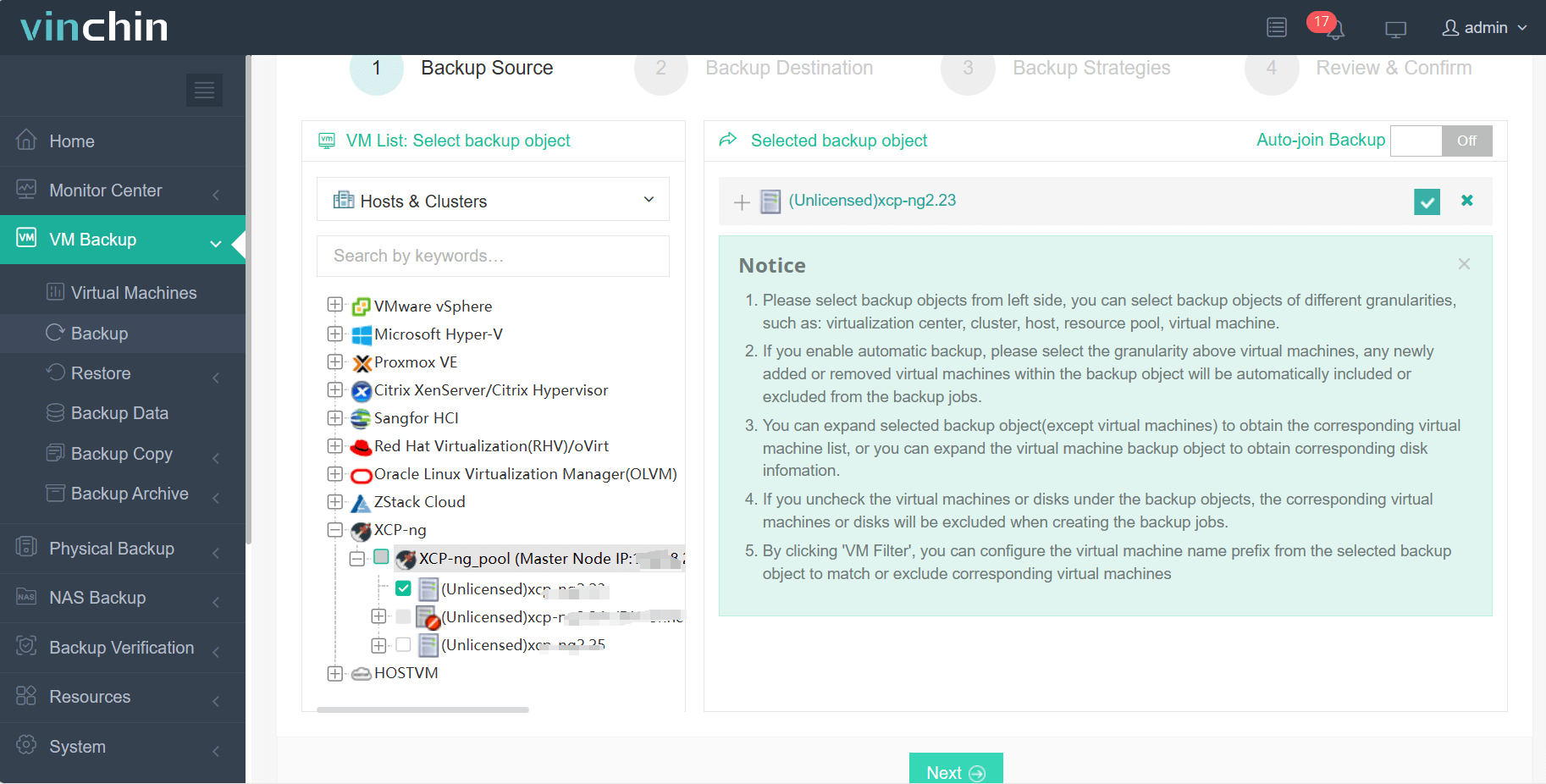
Using the intuitive web console of Vinchin Backup & Recovery makes safeguarding your XCP-ng VMs straightforward: Step 1: Select the XCP-ng VM(s) you wish to protect
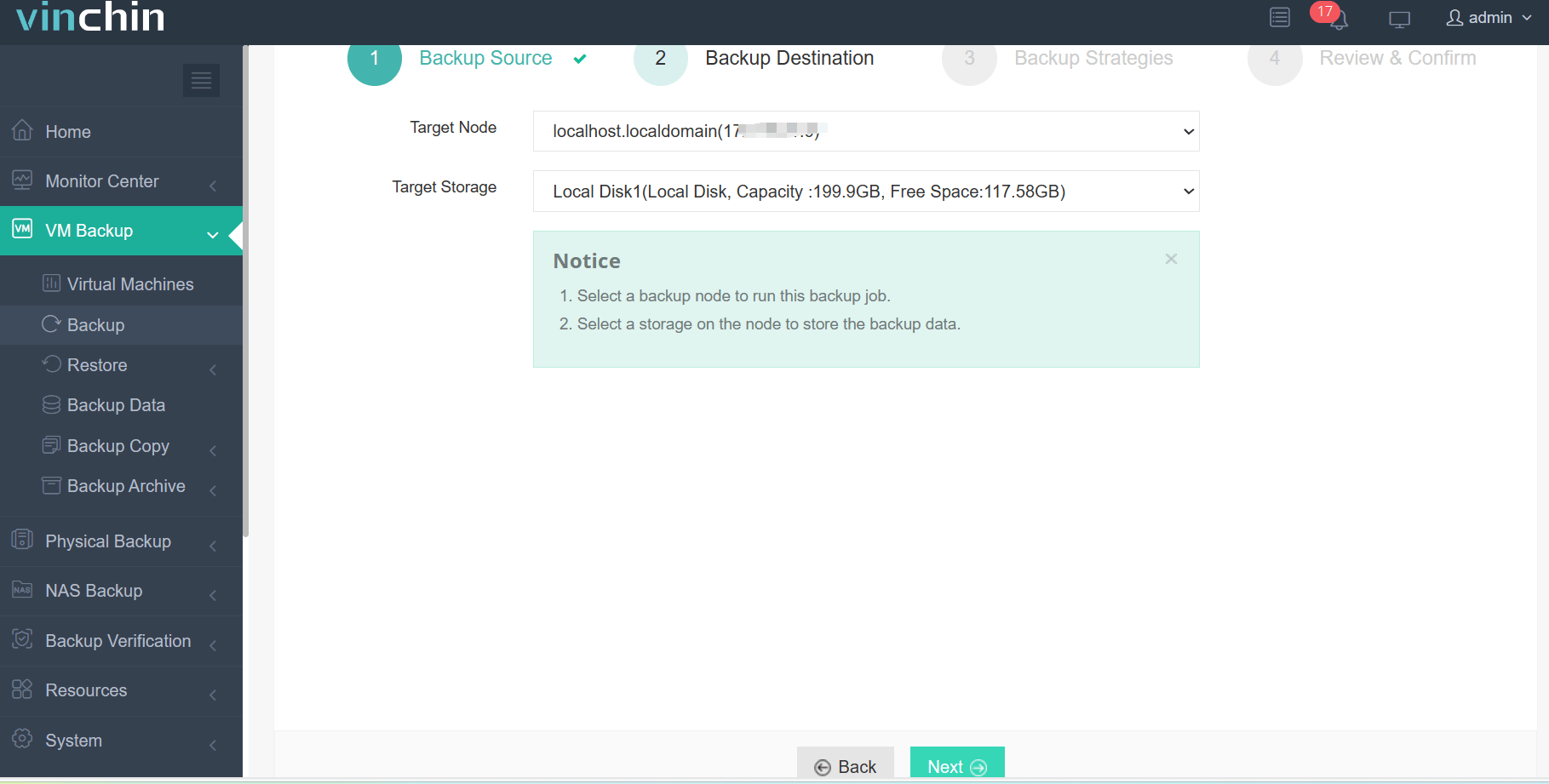
Step 2: Choose appropriate backup storage
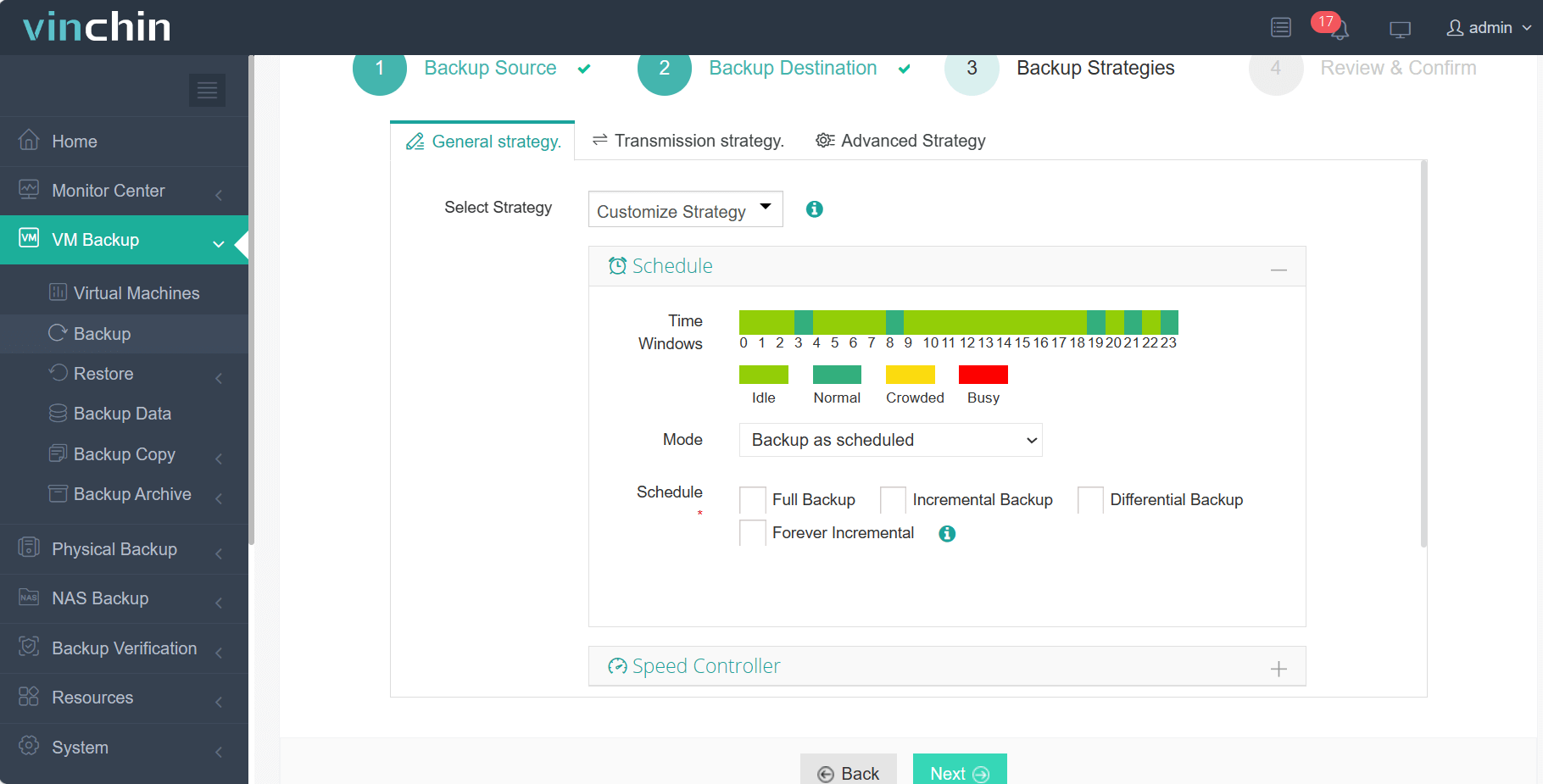
Step 3: Configure scheduling policies and retention strategies tailored to business needs
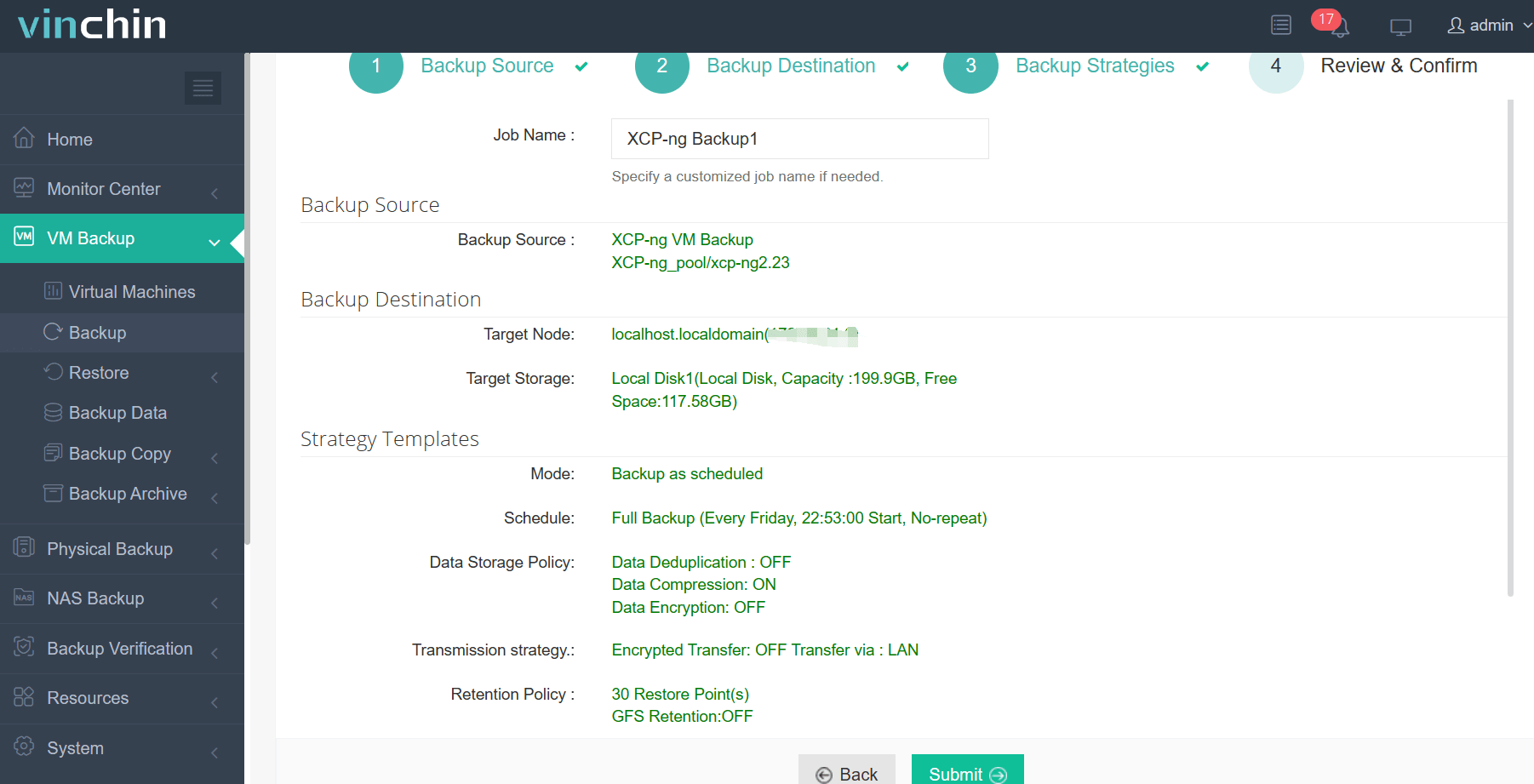
Step 4: Submit the job—ensuring automated ongoing protection
Recognized globally with top ratings among enterprise users across industries,Vinchin Backup & Recovery offers a 60-day full-featured free trial; click below to experience its powerful capabilities firsthand.
Best XCP-ng Backup Software FAQs
Q1: What features are critical for maximizing uptime in XCP-ng backups?
Fast recovery times, such as instant VM restore, automation tools that schedule regular backups without manual work; secure storage management using encryption; scalability across growing workloads; compatibility with compliance policies like GDPR are all essential features that keep systems running smoothly during disruptions.
Q2: How does backup software reduce downtime risk?
Backup software reduces downtime risk by enabling rapid restores through technologies like instant VM booting directly from backup images stored locally or remotely within your environment, so even if production servers fail unexpectedly you can quickly spin up replacements with minimal interruption using automated processes instead of manual rebuilds from scratch.
Q3: Is scalability important when choosing an XCP-ng backup solution?
Yes. Scalable solutions prevent bottlenecks as workloads grow over time by distributing resources efficiently across multiple nodes/storage pools so performance remains consistent regardless how many VMs/data volumes need protecting now or later, as your infrastructure expands organically alongside business growth targets set annually/quarterly/etcetera!
Q4: Does the solution support compliance requirements?
Top-tier options offer audit-ready reporting plus strong controls around user access/data retention policies which help meet industry regulations such as HIPAA/SOX/GDPR more easily than basic alternatives lacking those same governance safeguards built-in natively out-of-the-box.
Conclusion
Effective XCP-ng backup software minimizes downtime while ensuring compliance standards are met at scale, helping protect mission-critical apps around-the-clock with reliable recoveries whenever needed most.For reliable and effective XCP-ng backup software, Vinchin is the best option since it provides robust data protection capability and fast backup and recovery.









