Reliable disaster recovery for Red Hat Virtualization depends on backup software that delivers enterprise-grade protection, rapid restore times, and strong automation. When disaster strikes—whether from hardware failure, ransomware attack, or human error—your business continuity relies on fast recovery. This goes beyond technology; it’s about compliance and keeping your operations running without interruption. If your backup fails at a critical moment, costs can skyrocket. The right solution ensures you meet strict Recovery Time Objectives (RTO) and Recovery Point Objectives (RPO), minimizing both downtime and data loss.
Why Disaster Recovery Matters in Enterprise Environments
Disaster recovery forms the backbone of IT resilience for modern enterprises. Outages or failed restores can lead to lost revenue, damaged reputation, regulatory penalties, or even business closure. In regulated industries like finance or healthcare—or any mission-critical environment—incomplete recoveries or long downtimes are unacceptable risks.
● High Cost of Downtime: According to a 2024 Gartner report, average IT downtime costs $5,600 per minute. For critical sectors such as banking or healthcare, this figure can be much higher due to lost transactions or patient care interruptions.
● Regulatory Compliance Requirements: Many organizations must comply with regulations that mandate specific data retention periods and rapid recovery capabilities. Failing to meet these standards can result in fines or legal action.
● Business Continuity Demands: Enterprises depend on continuous access to applications and data. Even short outages disrupt workflows across departments—from sales teams unable to access customer records to production lines halted by unavailable systems.
● Reputation Management: Customers expect reliability from service providers. Extended downtime erodes trust quickly; news of outages spreads fast through social media and industry channels.
A robust disaster recovery plan backed by reliable software is essential for every organization using Red Hat Virtualization.
How To Choose The Best Red Hat Virtualization Backup Solution for Disaster Recovery?
Selecting a backup solution for Red Hat Virtualization involves careful evaluation of technical capabilities against your operational needs. The best solutions offer more than basic backups—they deliver speed, flexibility, security, scalability, and ease of management across complex environments.
● Fast, Verified Restores at Scale: A top-tier solution restores entire virtual machines (VMs) or individual files rapidly—even across large clusters—helping you meet tight RTOs and RPOs set by business requirements. Automated backup verification ensures your backups are usable when needed most.
● Granular and Full VM Recovery: Flexibility during recovery is vital. Solutions should allow restoration of everything from single files up to full VMs so you can address both minor incidents (like accidental file deletion) and major disasters efficiently.
● Automated Testing: Regular automated tests of backup integrity reduce surprises during real incidents. These tests validate that backups are complete—and that restore processes work as expected—without manual intervention.
● Compatibility and Centralized Management: As infrastructure evolves toward hybrid cloud models or multi-site deployments, centralized management becomes crucial for efficiency. Compatibility with different storage types lets you adapt as your architecture changes over time.
● Built-in Security Controls: Modern threats like ransomware target both production data and backups themselves. Encryption at rest/in transit plus immutable storage options help keep backups safe from tampering or unauthorized access.
● Flexible Scalability: Data volumes grow fast in today’s digital businesses—from new applications to expanding user bases—and your backup platform must scale seamlessly without performance loss or disruption during upgrades/migrations.
When evaluating solutions for Red Hat Virtualization disaster recovery readiness, consider whether each tool supports these core requirements while fitting into your existing workflows.
Vinchin Backup & Recovery: Enterprise-Grade Protection for Red Hat Virtualization
For organizations seeking comprehensive protection for their RHV environments alongside other platforms such as VMware, Hyper-V, Proxmox, oVirt/OLVM, XCP-ng, XenServer, OpenStack, ZStack and more (15+ total), Vinchin Backup & Recovery offers an enterprise-level virtual machine backup solution designed specifically for diverse infrastructures. It provides agentless protection tailored to Red Hat Virtualization while supporting advanced features including instant VM recovery (not available on Hyper-V), CBT tracking (supported on RHV/oVirt/OLVM), LAN-free backup options (available on RHV/oVirt), SpeedKit acceleration (for RHV/oVirt), as well as granular restore capabilities across all supported hypervisors.
Among its many features relevant to enterprise users are instant VM recovery for minimal downtime after failures; CBT-based incremental backups that optimize storage use; LAN-free backup modes reducing network load; granular file-level restores enabling precise recoveries; plus built-in deduplication/compression improving efficiency overall—all contributing to faster operations with reduced risk.
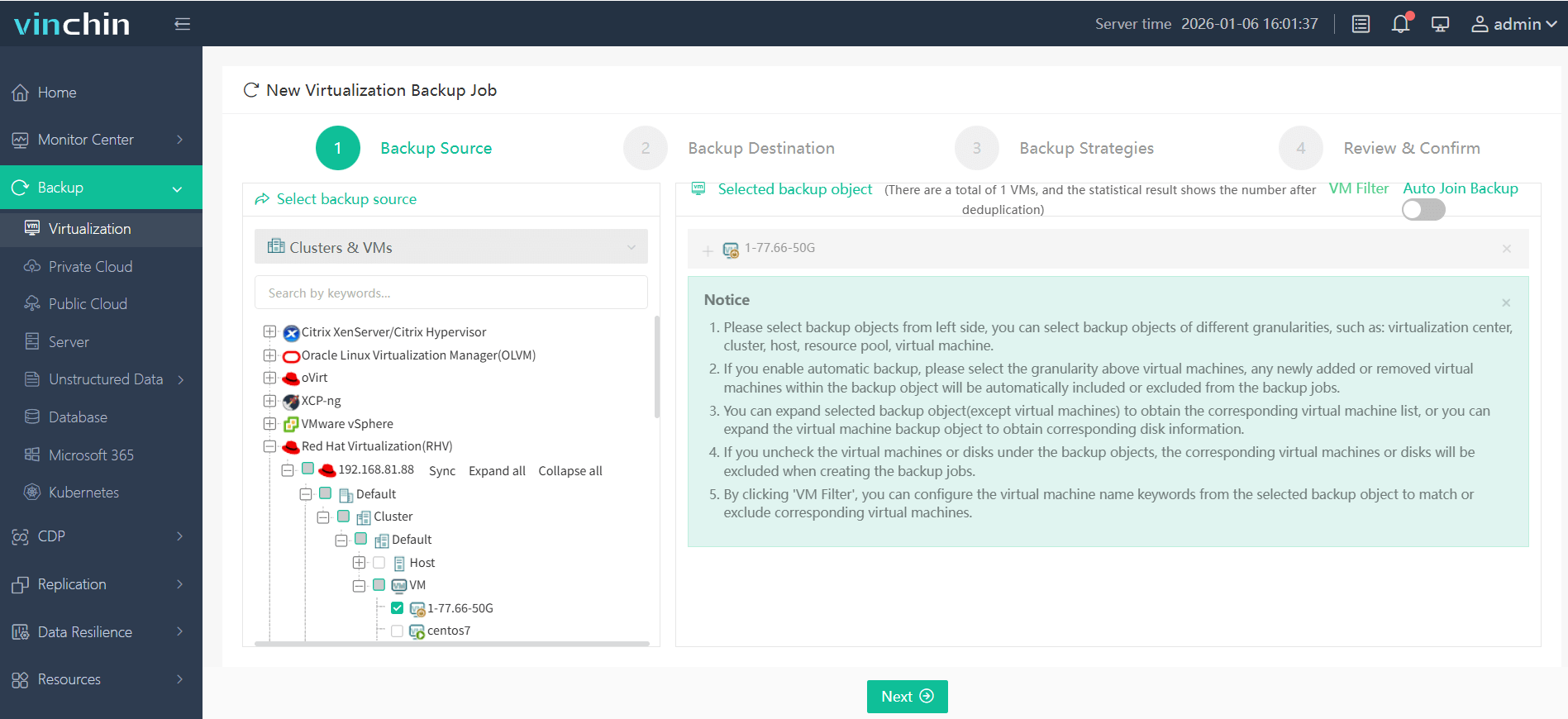
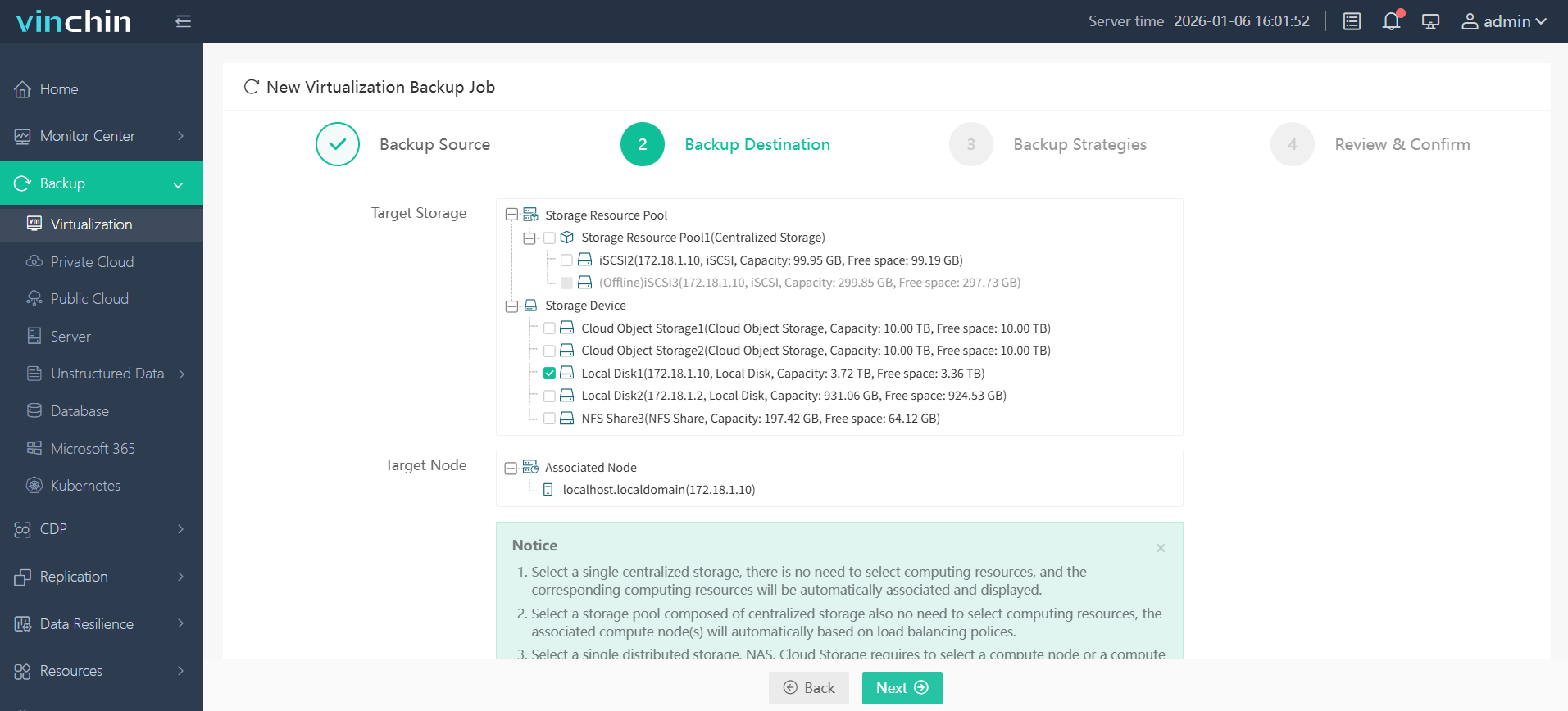
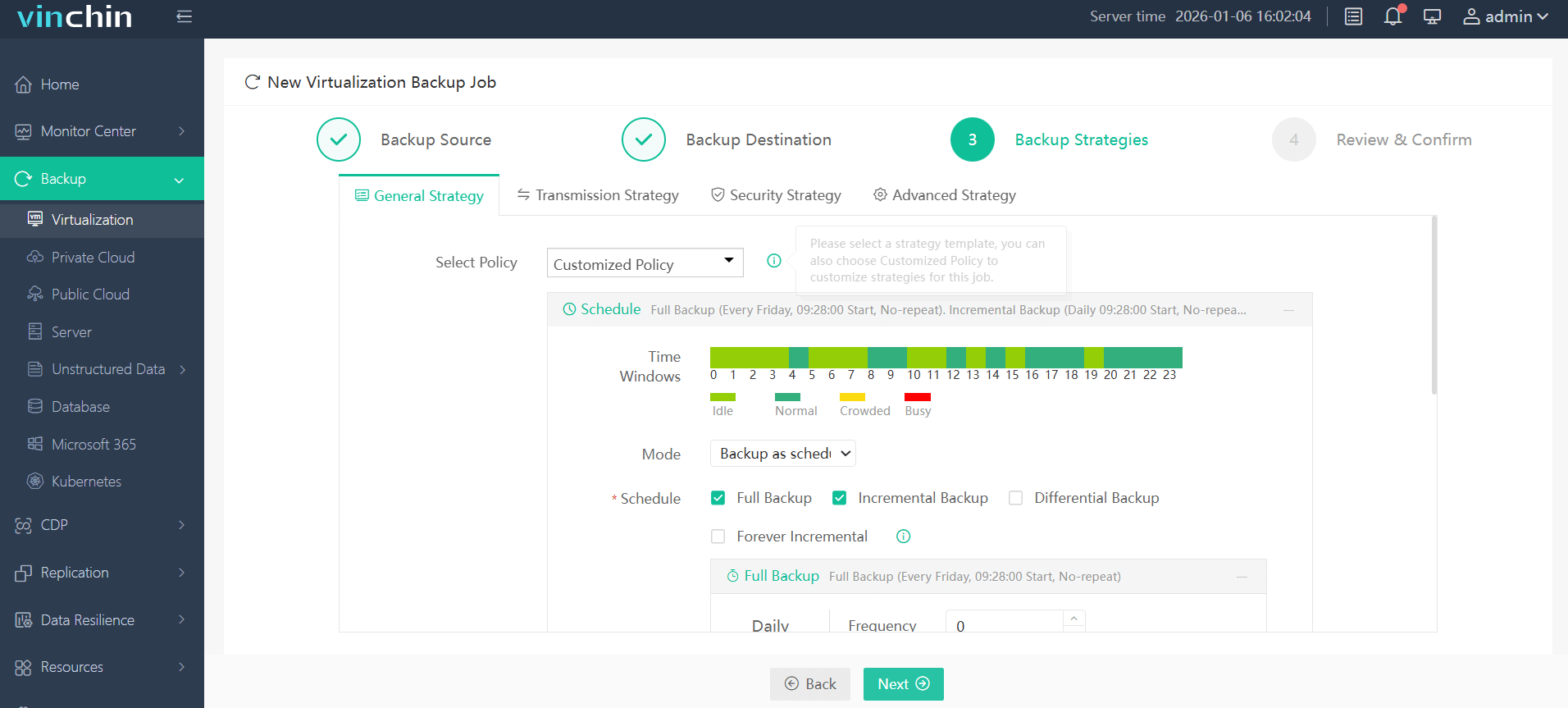
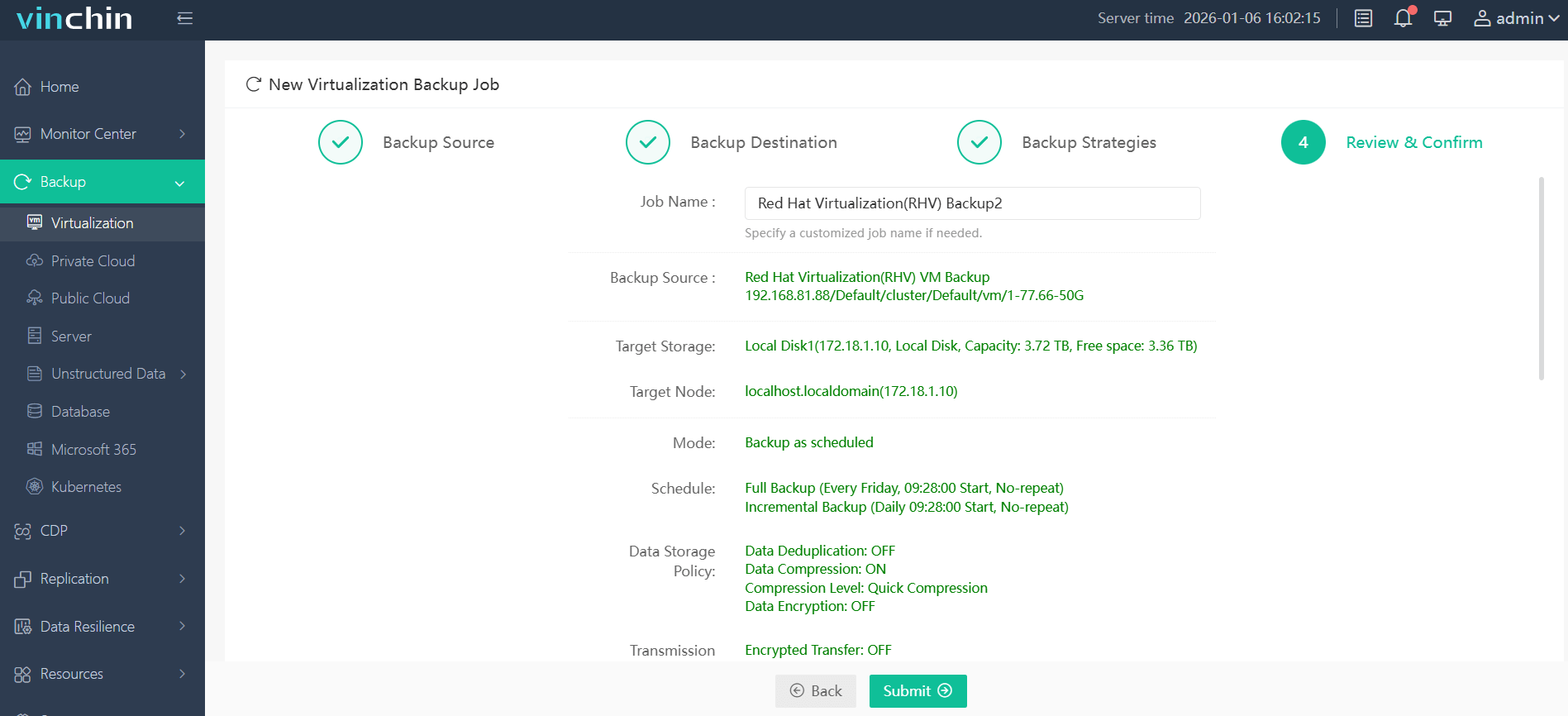
With an intuitive web console interface in Vinchin Backup & Recovery:
Step 1: Select the RHV VM(s) you wish to back up;
Step 2: Choose the appropriate backup storage location;
Step 3: Configure scheduling policies along with retention rules;
Step 4: Submit the job—making robust protection accessible even in complex environments.
Trusted globally by thousands of enterprises with top ratings in independent reviews—try Vinchin Backup & Recovery free for 60 days with all features enabled by clicking below.
Best Red Hat Virtualization Backup Software FAQs
Q1: What makes a backup solution reliable for disaster recovery?
A1: Reliability comes from automated backup verification routines that ensure usability; fast restore speeds meeting defined RTO/RPO metrics; broad workload coverage including granular/file-level/full VM options; plus proven stability IN large-scale enterprise deployments according TO independent certifications/reviews!
Q2: How does scalability affect disaster recovery readiness?
A2: Scalable solutions maintain consistent performance even AS data grows rapidly—which keeps RTO/RPO short DURING major incidents! This means no slowdowns OR bottlenecks WHEN restoring many VMs simultaneously OR handling petabyte-scale archives common IN global enterprises!
Q3: Are security features important in backup software?
A3: Absolutely! Integrated encryption/ransomware protection prevent attackers FROM compromising BOTH live AND archived copies DURING disasters—which preserves last lines OF defense AGAINST cybercrime/data breaches according TO CISA guidelines!
Q4: Can one solution cover multiple virtualization platforms?
A4: Leading platforms like Vinchin support many hypervisors—including KVM/Xen/vSphere/etc.—which simplifies management ACROSS hybrid/multi-cloud setups AND eliminates need FOR separate tools per environment! This unified approach boosts operational efficiency AND reduces training/support overhead too!
Q5: How often should disaster recovery plans and backup integrity be tested?
A5: Industry best practice recommends testing DR plans quarterly AT minimum—with automated integrity checks ON every completed job! Regular drills confirm procedures work AS intended SO there are no surprises WHEN real emergencies occur!
Conclusion
The right Red Hat Virtualization backup solution protects business continuity through speed reliability security—and scales easily as needs grow! Vinchin Backup & Recovery meets demanding requirements so organizations stay ready no matter what happens next!