Downtime in enterprise IT environments disrupts business operations. Every minute lost can mean missed revenue and damaged reputation. For organizations running critical workloads on VMware infrastructure, backup strategy is not just about data protection—it’s about keeping services available. The right backup method ensures you recover fast when disaster strikes.
Image-based, agentless backups using VMware’s native APIs—such as vStorage APIs for Data Protection (VADP)—stand out as the most effective approach. This method allows you to back up entire virtual machines while they run. No need to install agents inside each VM or pause production systems. By leveraging these APIs, your backups are consistent and quick to restore. You meet strict service level agreements without interrupting daily business.
VMware’s VADP enables direct access to VM disk data through snapshots. This means you capture application-consistent images without stopping workloads. Changed Block Tracking (CBT) further speeds up incremental backups by copying only modified data blocks. These technologies together help minimize both backup windows and recovery time objectives.
The importance of minimizing downtime goes beyond IT concerns. It protects your company’s bottom line and reputation in a competitive market.
Why Minimizing Downtime Matters in Enterprise Environments
A robust backup strategy must address more than just restoring files—it must ensure rapid recovery of entire systems. Shortening downtime is essential for several reasons that impact every part of an organization.
● High Financial Cost
Unplanned outages can be devastating financially. According to Gartner research, average IT downtime costs over $5,600 per minute. For large enterprises running mission-critical applications on VMware infrastructure, this figure can climb even higher due to lost productivity across departments and delayed customer transactions.
● Compliance Risks
Many industries face strict regulations around uptime and data availability. Healthcare providers must comply with HIPAA requirements; financial institutions answer to SOX or PCI DSS standards. Extended downtime may result in regulatory violations and hefty fines if systems cannot be restored quickly enough to meet legal obligations.
● Reputation Damage
Customers expect constant access to digital services—whether it’s online banking or e-commerce platforms powered by VMware virtual machines. Prolonged outages erode trust fast; news spreads quickly via social media or industry forums when a major brand experiences disruption.
● Operational Disruption
When core applications go offline—even briefly—employees lose access to tools needed for daily work: email servers stop delivering messages; ERP systems halt order processing; databases become inaccessible for analytics teams. Each minute compounds the operational backlog that IT teams must later resolve under pressure.
● Data Loss Risk
Slow or unreliable backup methods increase risk of incomplete recoveries or outdated restore points. If a ransomware attack encrypts production data but your last usable backup is days old, business continuity suffers greatly—and so does confidence in IT processes.
Modern enterprises cannot afford slow restores or unreliable backups that extend outage duration during incidents like hardware failure or cyberattacks. Fast recovery keeps businesses resilient against both expected disruptions (like scheduled maintenance) and unexpected disasters (like server crashes).
How To Choose The Best VMware Backup Solution for Minimizing Downtime?
Selecting an effective VMware backup solution requires careful evaluation of architecture, automation capabilities, restore flexibility, scalability, and security controls—all focused on reducing downtime during both routine operations and emergencies.
A well-chosen solution should streamline management while ensuring rapid recovery from any scenario affecting your virtualized environment.
● Agentless Architecture Using Native APIs
Agentless solutions leverage VMware’s vStorage APIs for Data Protection (VADP) instead of installing software inside every VM guest OS. This reduces resource overhead on hosts since no extra processes run within VMs themselves—eliminating potential conflicts with applications or operating system updates. Agentless design also simplifies deployment across hundreds of VMs because there are fewer moving parts to maintain over time.
By using image-level snapshots through VADP combined with Changed Block Tracking (CBT), agentless solutions perform full backups initially then switch seamlessly to incremental mode—copying only changed blocks between runs. This minimizes network traffic during backup windows while enabling faster restores since all required data is captured efficiently outside the guest OS layer.
● Automation Capabilities
Backup tasks should not depend on manual intervention from busy administrators who might overlook schedules during peak periods or holidays. Modern solutions support automated job scheduling based on policies set in advance—from nightly full VM images to hourly incrementals covering high-change workloads like SQL databases or mail servers.
Automation extends beyond basic scheduling: advanced platforms offer automated retention policies that prune old backups according to compliance needs; some include built-in verification routines that test restore integrity regularly without user input. Automated reporting provides clear audit trails showing successful jobs versus failures—a key requirement for regulated industries needing proof of resilience planning.
● Granular Restore Options
While full VM restores are vital after catastrophic events like storage array failures or ransomware attacks, many incidents require targeted recovery at file-level granularity—for example when a user accidentally deletes important documents from their home directory inside a Windows Server guest OS hosted on vSphere clusters.
Solutions supporting granular restore allow administrators to mount VM disk images directly from backup repositories then extract individual files/folders without restoring entire machines first. Some platforms extend this capability further by enabling object-level restores within Microsoft Exchange mailboxes or SQL Server databases—minimizing disruption even more by returning only what was lost rather than rolling back whole systems unnecessarily.
● Scalability Across Large Environments
Enterprise infrastructures often span multiple clusters across different sites—with hundreds or thousands of VMs managed centrally via vCenter Server appliances. Your chosen solution should scale easily as new hosts join existing clusters—or as remote offices come online following mergers/acquisitions—without requiring complex reconfiguration steps each time capacity grows.
Look for features like distributed job processing engines capable of balancing load automatically between proxy nodes; centralized dashboards displaying health status across all protected assets regardless of location; flexible licensing models allowing seamless expansion into hybrid cloud deployments if needed later on down the road.
● Security Features Against Modern Threats
Backup repositories have become prime targets for attackers seeking ransom payments—or insiders attempting unauthorized deletions before leaving an organization unexpectedly. Effective solutions incorporate immutable storage options based on WORM principles (“Write Once Read Many”) so backed-up copies cannot be altered/deleted until retention periods expire naturally—even if admin credentials are compromised temporarily during breaches.
Encryption standards such as AES-256 protect sensitive information both at rest within local/NAS/SAN repositories—and in transit over LAN/WAN links connecting branch offices back into central datacenters. Role-based access controls restrict who can initiate restores/downloads from archives containing confidential customer records subject to GDPR/HIPAA privacy mandates worldwide.
Vinchin Backup & Recovery: Enterprise‑Level Protection Across 15+ Virtualization Platforms
To address demanding enterprise requirements around minimizing downtime in VMware environments, Vinchin Backup & Recovery offers comprehensive protection tailored specifically for virtual machine workloads—including those running on VMware first and foremost among its support for 15+ mainstream virtualization platforms such as Hyper‑V, Proxmox, oVirt, OLVM, RHV, XCP-ng, XenServer, OpenStack, ZStack and others.
Vinchin Backup & Recovery delivers agentless image-based backups using native APIs like VADP with features including quiesced snapshot creation for consistency and HotAdd transport mode for efficient data movement within VMware environments.
Key capabilities such as Changed Block Tracking (CBT), instant recovery technology, LAN-free backup options leveraging SAN/NAS connectivity where available—including with VMware—and advanced deduplication/compression ensure minimal impact on production resources while maximizing speed.
For enterprises seeking reliability at scale: Vinchin Backup & Recovery combines forever-incremental strategies with granular restore options plus robust encryption/throttling policies—all managed through an intuitive web console.
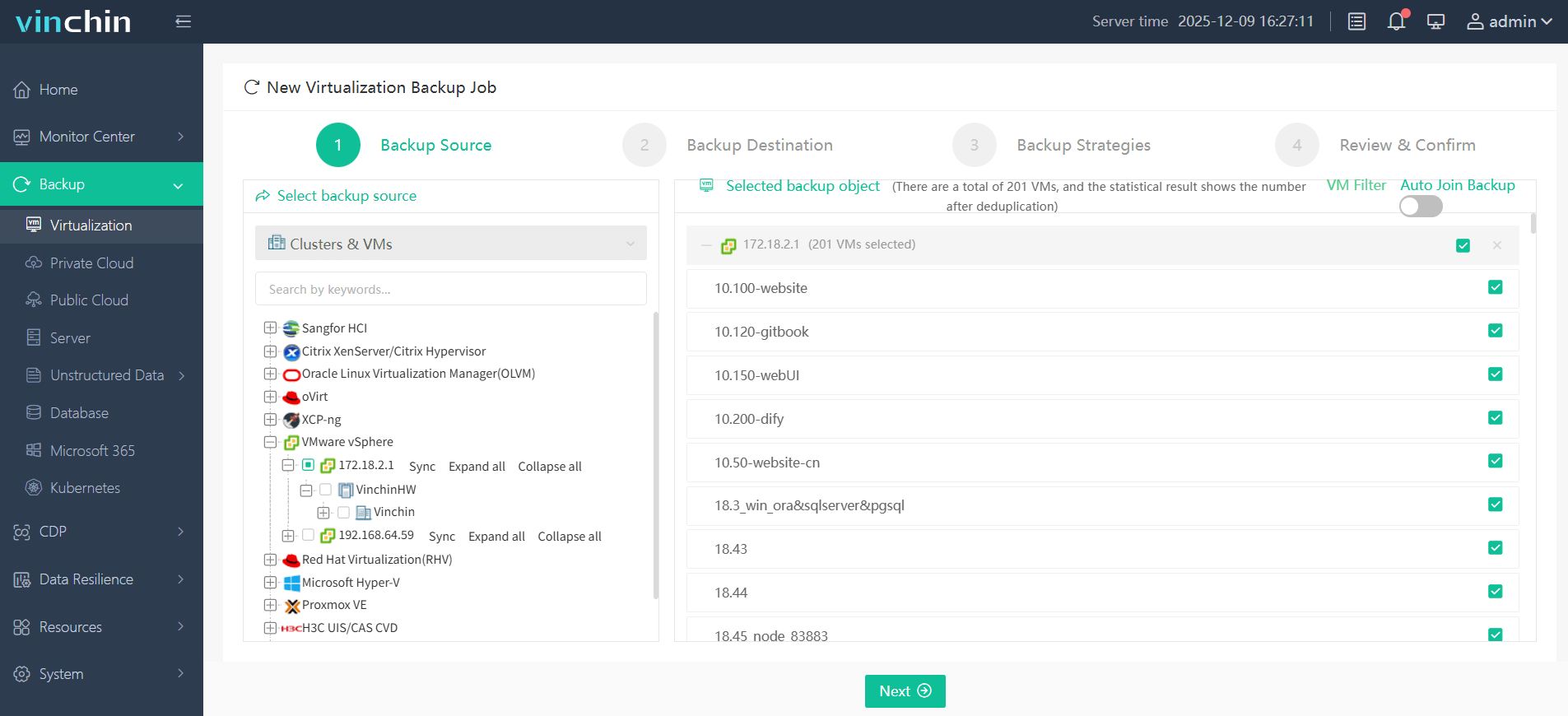
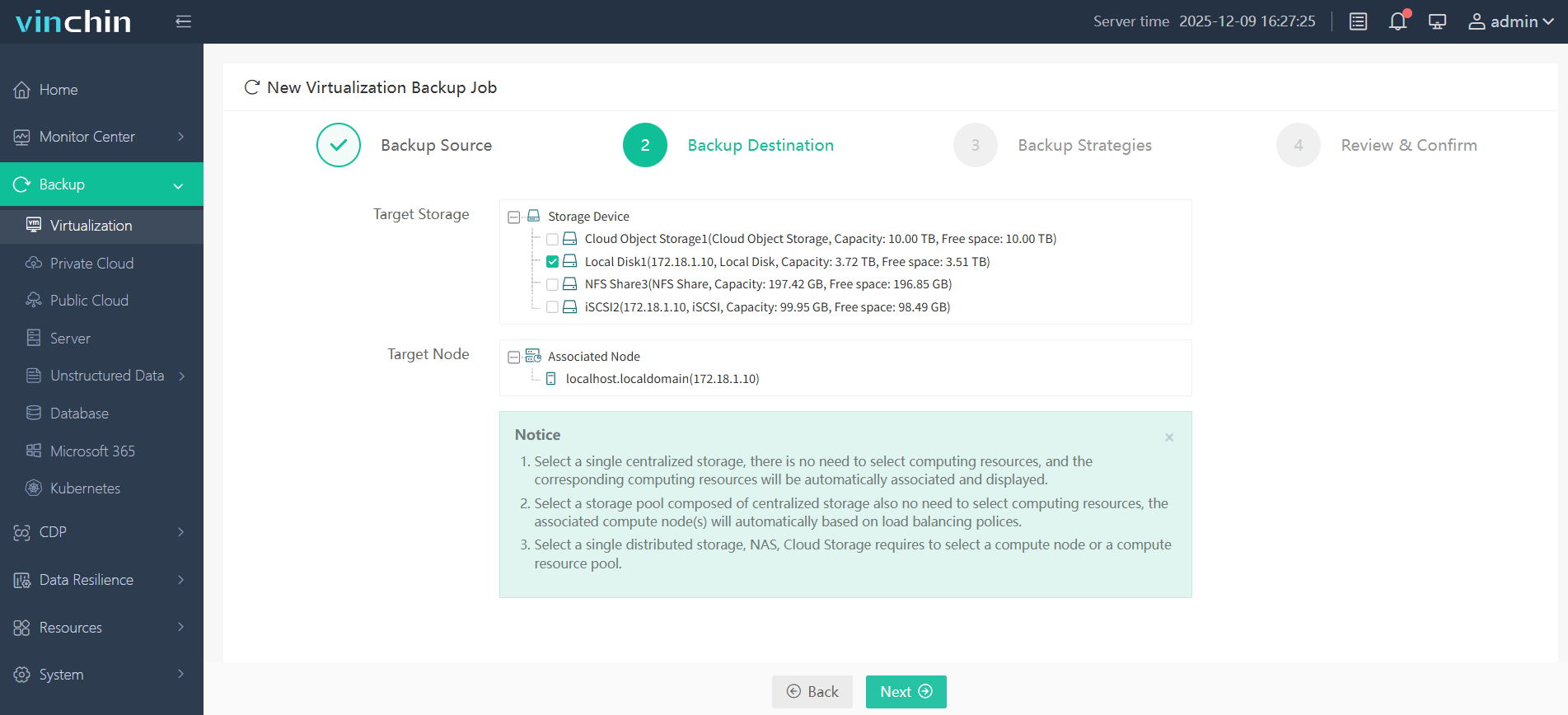
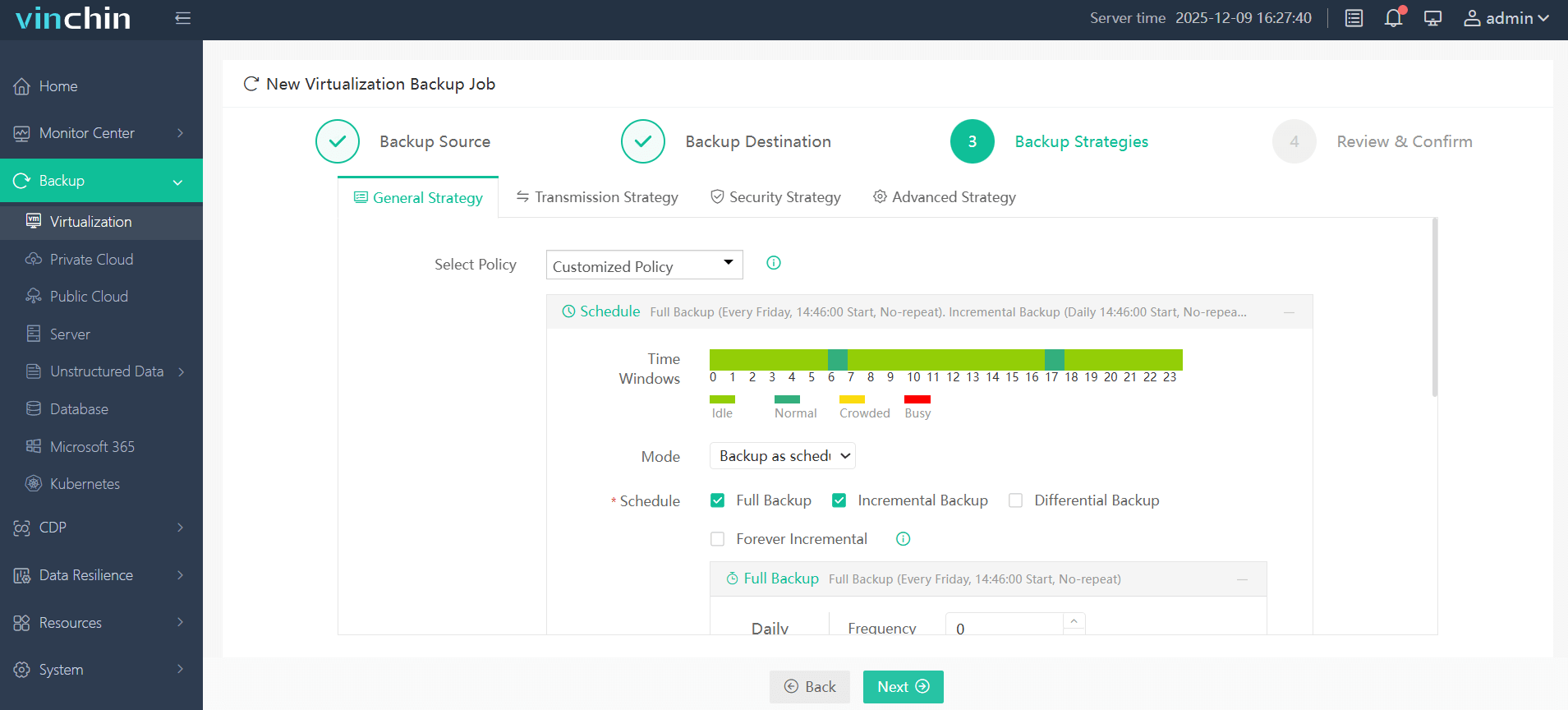
Backing up a VMware VM with Vinchin Backup & Recovery is straightforward:
Step 1: Select the VMware VM you want to protect.
Step 2: Choose your preferred backup storage target.
Step 3: Configure schedule/policy settings according to RPO/RTO needs.
Step 4: Submit the job—the process is fully automated thereafter.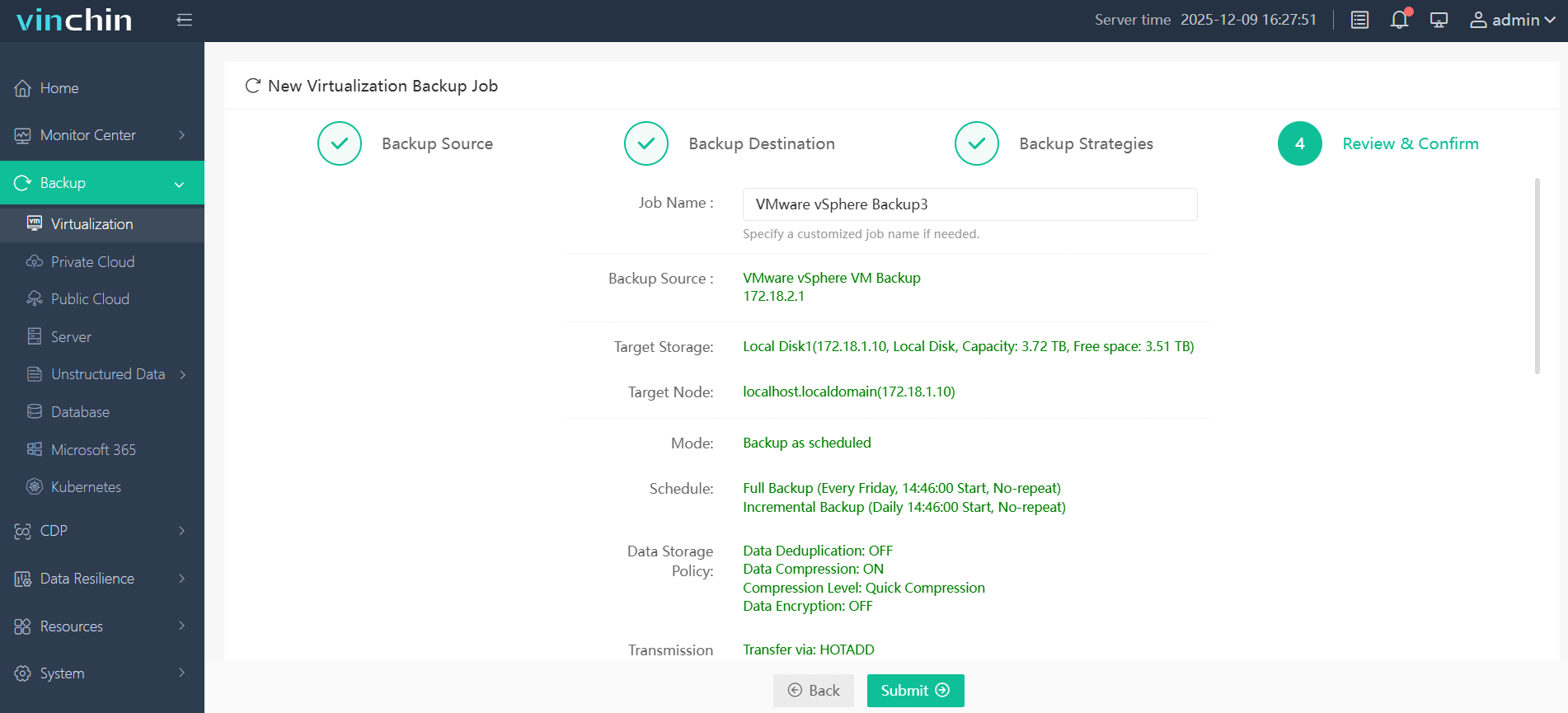
Trusted globally by thousands of organizations—with top ratings from industry analysts—Vinchin Backup & Recovery offers a 60-day full-featured free trial so you can experience enterprise-grade protection firsthand; click below to get started.
Best VMware Backup Software FAQs
Q1: How does agentless backup reduce downtime?
Agentless backup eliminates software installation inside each VM guest OS by leveraging native APIs like VADP instead. This streamlines operations because there are fewer components involved per workload—which means less maintenance overhead—and enables faster snapshot creation/restoration cycles compared with legacy agent-based approaches tied closely into application stacks themselves.
Q2: Is instant recovery available for large VMs?
Yes! Solutions supporting instant recovery use technologies such as direct mount/live boot from deduplicated repositories regardless of underlying disk size, bringing mission-critical servers online rapidly—even multi-terabyte SQL databases—instead of waiting hours/days rebuilding everything manually.
Q3: What security features protect against ransomware?
Enterprise-grade products provide immutable storage options based on WORM technology plus strong encryption standards like AES‑256 recommended by NIST guidelines. These measures prevent unauthorized changes/access—even if attackers breach production networks temporarily.
Q4: Can I scale protection as my environment grows?
Absolutely! Modern platforms offer distributed architectures/load balancing so new hosts/clusters integrate seamlessly into existing workflows without complex manual setup steps every time capacity expands—enabling continuous coverage whether managing dozens/hundreds/thousands+ virtual machines across global datacenters.
Conclusion
Agentless image-based backups via VMware APIs minimize downtime best for enterprise workloads today. Vinchin Backup & Recovery delivers fast restores plus robust security/scalability so organizations stay resilient against disruptions large/small alike—all while meeting compliance demands efficiently every step along their growth journey.










