Downtime can cripple business operations and lead to significant financial losses. Selecting backup software for Proxmox is a strategic move that affects every aspect of your IT environment. The best solution ensures fast recovery, minimal disruption, and continuous access to business-critical applications. Features like instant restore and automated verification are essential in today’s always-on world.
Maximizing uptime supports uninterrupted service delivery and helps organizations meet strict compliance standards. A robust backup strategy reduces operational risk by ensuring data is recoverable after incidents such as ransomware attacks or hardware failures. This article explores what makes a Proxmox backup solution truly enterprise-ready for maximizing uptime.
Why Maximizing Uptime Matters in Enterprise Environments
Maintaining high availability is vital for modern enterprises that rely on digital services around the clock. Even brief outages can disrupt workflows, damage reputation, and result in regulatory penalties. Effective backup solutions play a central role in minimizing these risks by enabling rapid system restoration when disaster strikes.
● Financial Impact
Lost revenue from downtime can escalate quickly. According to Gartner research, average downtime costs can exceed $5,600 per minute for large enterprises. For industries like finance or healthcare where transactions are constant, even short interruptions may have far-reaching consequences.
● Reputational Damage
A single outage can erode customer trust built over years. Clients expect seamless service; repeated disruptions may drive them toward competitors who offer better reliability.
● Regulatory Compliance
Many sectors face strict rules about data protection and availability. Failing to restore systems promptly during an incident could result in fines or legal action under regulations such as GDPR or HIPAA.
● Operational Continuity
Critical applications support everything from payroll processing to supply chain management. Extended downtime forces manual workarounds that slow productivity and increase error rates across departments.
● Cybersecurity Threats
Ransomware remains one of the top threats facing businesses today (ENISA Threat Landscape 2023). Attackers often target backups themselves; only resilient solutions ensure you can recover clean copies without paying ransoms.
By focusing on uptime through reliable backups, organizations protect their bottom line while maintaining customer confidence and meeting legal obligations.
How To Choose The Best Proxmox Backup Solution for Maximizing Uptime
Selecting effective Proxmox backup software means looking beyond basic data copies; it requires evaluating how well the tool supports rapid recovery and ongoing operations at scale. Here are key factors every IT leader should consider:
Rapid recovery capabilities make all the difference when every second counts during an outage. Automation reduces human error while ensuring consistent protection across dynamic environments. Scalability allows your solution to grow alongside your infrastructure without performance loss or complexity spikes.
● Rapid Recovery
Solutions offering instant VM restore and granular file-level recovery help bring critical services back online within minutes rather than hours. Fast recovery time objectives (RTOs) minimize user impact during outages, and look for tools that demonstrate proven RTOs under real-world conditions (Proxmox documentation).
● Automation
Automated scheduling of backups eliminates reliance on manual processes prone to oversight or delay. Built-in restore validation checks ensure backups remain usable over time without requiring constant administrator attention.
● Scalability
Backup systems must handle growing workloads as virtual machines multiply across clusters or sites. Solutions designed with distributed architectures maintain speed even as protected data volumes increase, critical for enterprises scaling rapidly due to mergers or cloud adoption.
● Security and Compliance
Encryption protects sensitive information both at rest and in transit between nodes or storage locations, which is a necessity under most regulatory frameworks (NIST Guidelines). Role-based access controls restrict who can manage backups or initiate restores while audit logs track all activity for compliance reviews.
● Integration
Seamless compatibility with Proxmox VE simplifies deployment by allowing direct management of backup jobs from familiar interfaces like web consoles or APIs. Deep integration also enables advanced features such as snapshot-based protection without extra configuration steps.
When comparing options, assess how each feature addresses practical scenarios: restoring after ransomware using immutable snapshots; recovering individual files following accidental deletion; scaling coverage as new VMs come online; passing audits thanks to detailed reporting capabilities, all contributing directly to maximizing uptime in production environments.
Proxmox Backup Server: Native, High-Performance Backup for Proxmox VE
Proxmox Backup Server (PBS) offers native integration with Proxmox Virtual Environment (VE), providing efficient deduplicated backups tailored specifically for virtualized workloads running on this platform. Its design focuses on speed, security, and ease-of-use; key attributes needed by organizations prioritizing uptime above all else.
Incremental Backups reduce both storage requirements and network load by saving only changed data blocks after the initial full copy completes, a method proven effective at shrinking backup windows even as datasets grow larger over time (Proxmox PBS Docs).
Global Deduplication stores identical blocks just once across all VMs being protected, this not only saves disk space but also accelerates both backup creation and subsequent restores since less redundant data must be processed during any operation involving multiple machines sharing similar filesystems or application stacks.
Compression and Encryption combine fast Zstandard algorithms with client-side AES-256 encryption so that sensitive information remains secure throughout its lifecycle from initial capture through long-term retention without sacrificing throughput performance crucial during peak usage periods when many jobs run concurrently across clusters spread geographically apart.
Granular Restore lets administrators recover entire VMs or drill down into specific files/directories directly via an intuitive web interface accessible from anywhere inside secure networks; this flexibility streamlines response times following accidental deletions/misconfigurations affecting only part of a workload rather than forcing full system rollbacks unnecessarily disruptive elsewhere onsite/offsite teams depend upon continued access.
Vinchin Backup & Recovery: Enterprise-Grade Protection for Proxmox VE
For businesses seeking comprehensive protection beyond native tools, Vinchin Backup & Recovery delivers professional-grade VM backup tailored for enterprise environments running Proxmox VE alongside 15+ leading virtualization platforms including VMware, Hyper-V, oVirt/OLVM/RHV, XenServer/XCP-ng, OpenStack, ZStack, H3C CAS/UIS and more. Designed specifically for complex infrastructures demanding high availability, it integrates seamlessly with diverse hypervisors while supporting agentless architecture to simplify deployment at scale.
Vinchin Backup & Recovery empowers organizations with features such as LAN-free backup (for Proxmox), incremental backup strategies including forever-incremental mode, scheduled automation policies, granular restore capabilities down to file level within VMs even cross-platform V2V migration support, all managed centrally via a unified console.
Backing up a Proxmox VM using Vinchin Backup & Recovery is straightforward thanks to its intuitive web console:
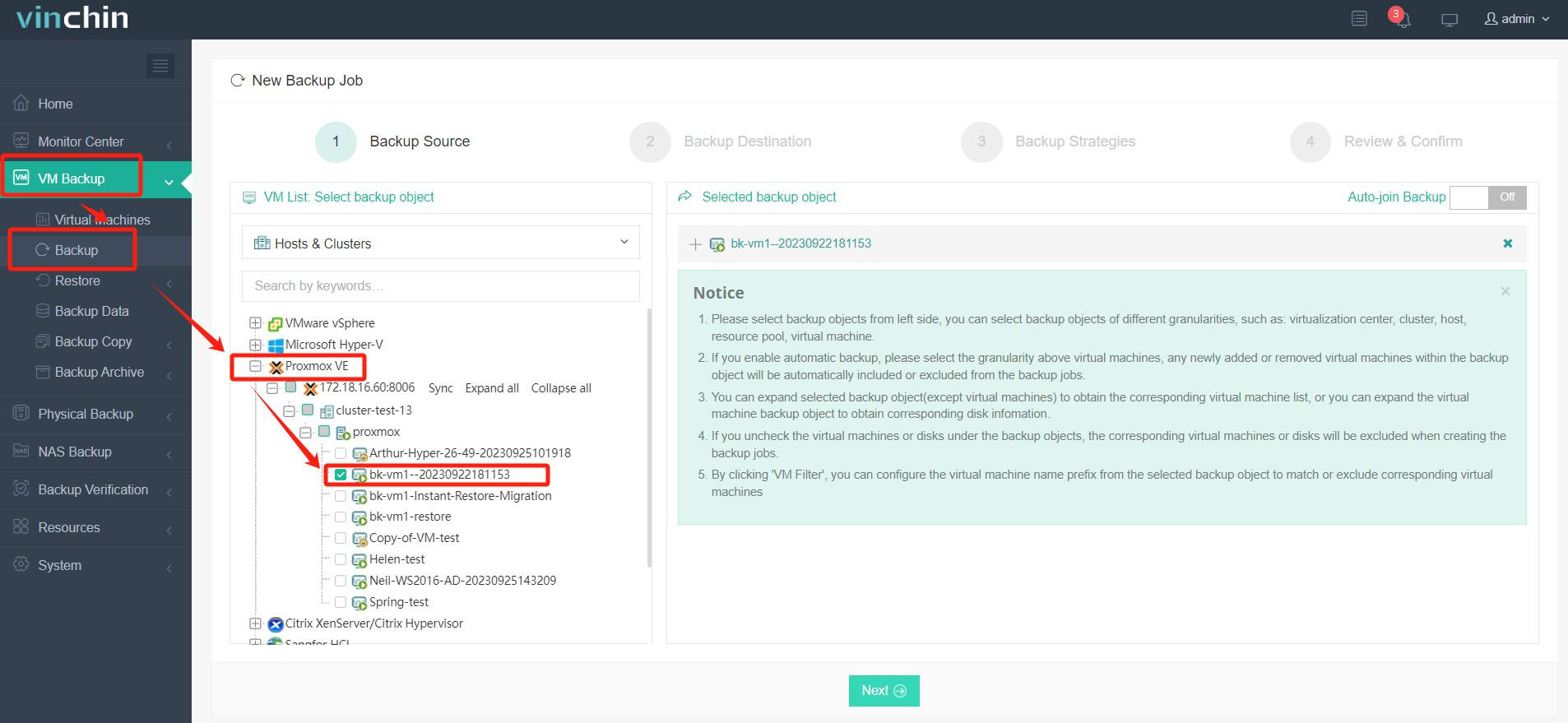
Step 1: Select the Proxmox VM you wish to back up
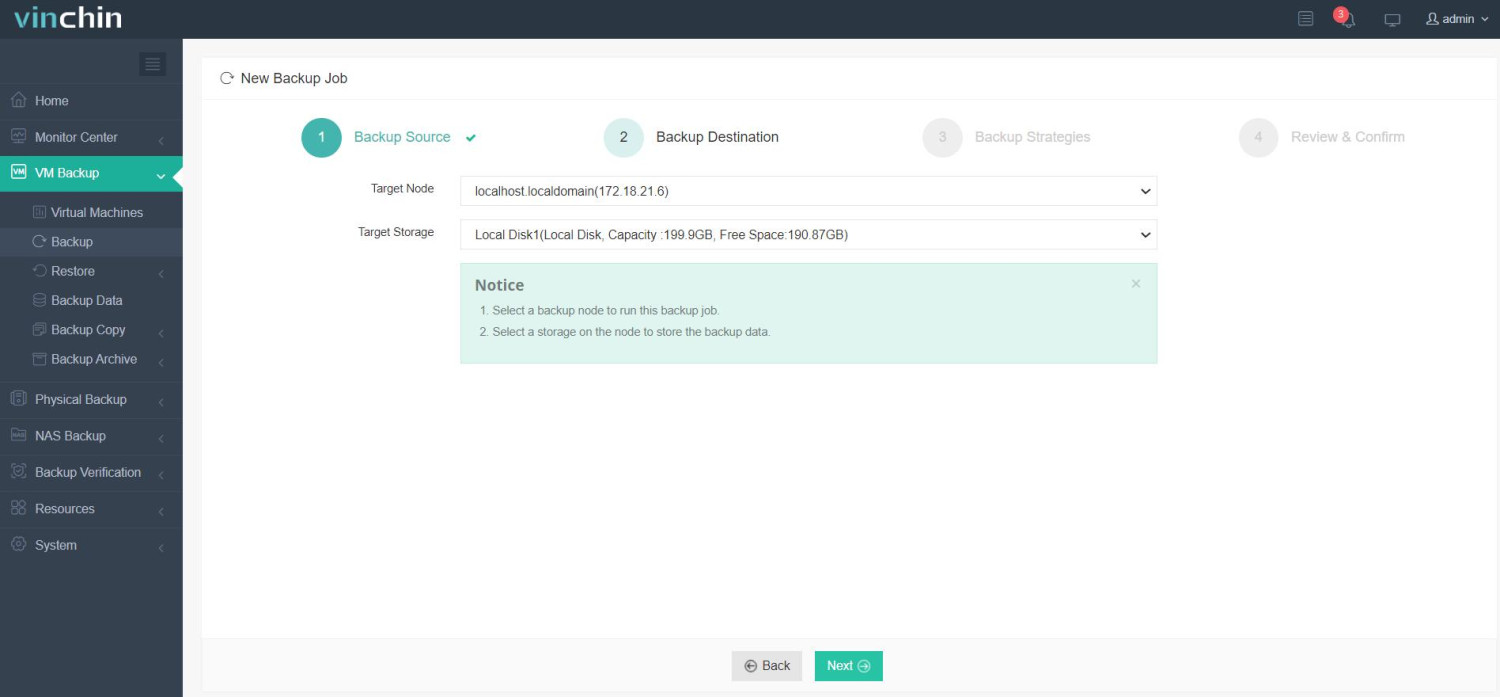
Step 2: Choose your preferred backup storage location
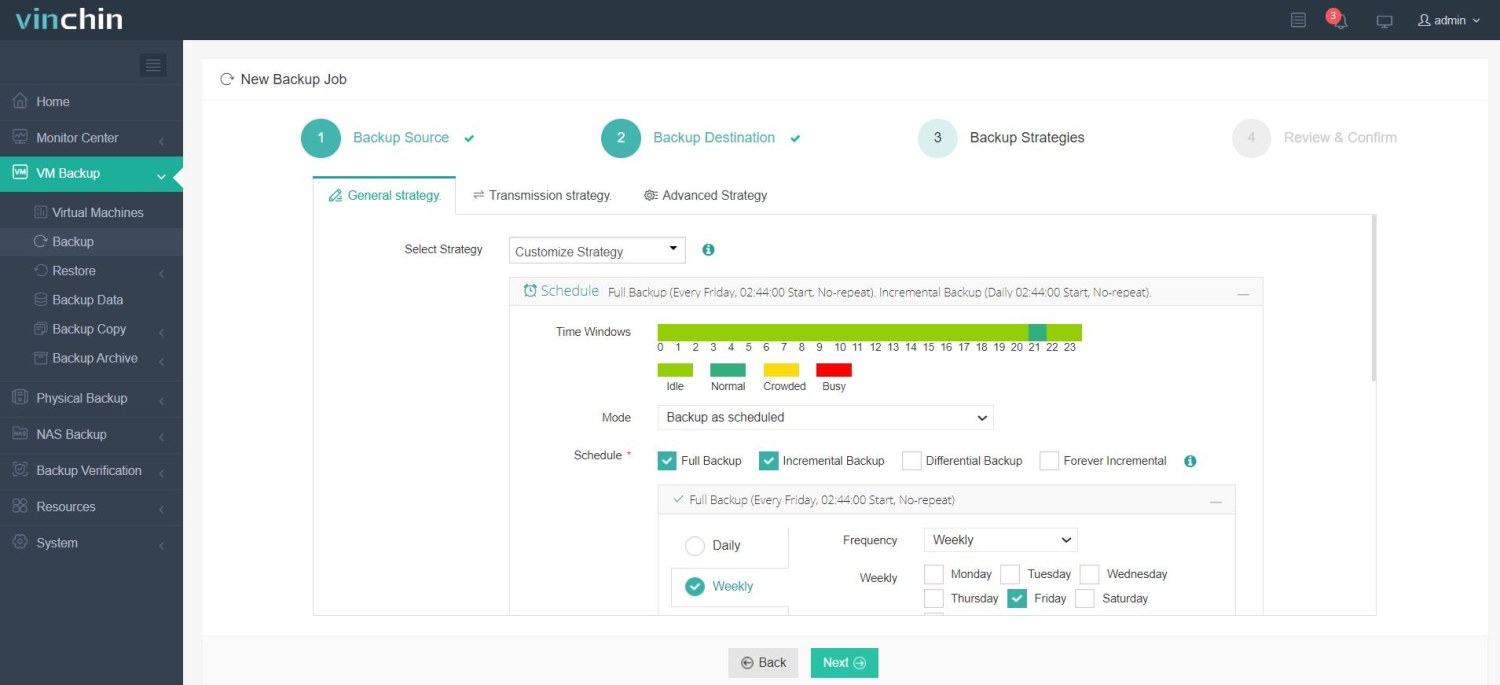
Step 3: Configure automated scheduling along with retention strategies
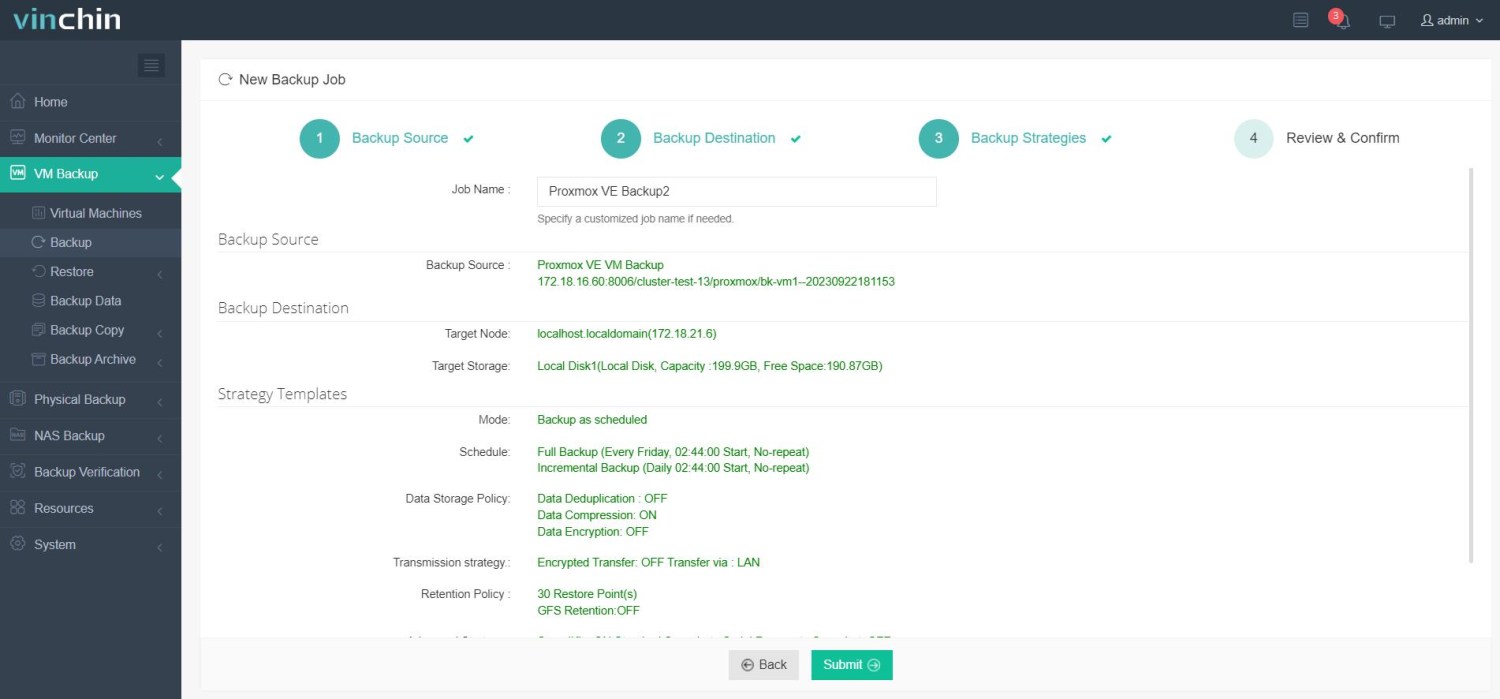
Step 4: Submit the jobpr and protection begins immediately
Recognized globally among enterprise users with strong ratings from thousands of customers, Vinchin Backup & Recovery offers a 60‑day full-featured free trial so you can experience its advantages firsthand before making any commitment.
Best Proxmox Backup Software FAQs
Q1: What features are essential for maximizing uptime in Proxmox backups?
Fast recovery options such as instant VM restore are essential because they dramatically reduce downtime when issues occur.
Q2: Why is automated verification important in Proxmox backup solutions?
Automated verification ensures that backups are usable and reliable, so data can be restored successfully in the event of a disaster.
Q3: How does scalability help maximize uptime in a growing Proxmox environment?
Scalability allows organizations to protect more workloads efficiently as the environment expands, without sacrificing performance or stability.
Conclusion
Choosing reliable backup software safeguards business continuity by reducing downtime risk while supporting compliance needs efficiently. It ensures that critical data and virtual workloads can be quickly restored in the event of system failure, cyberattacks, or accidental loss. When selecting reliable Proxmox backup software, consider Vinchin. It not only strengthens overall resilience but also builds long-term confidence in data protection strategies.









