Oracle Linux Virtualization Manager (OLVM) is a modern platform for managing virtual machines in enterprise data centers. It uses KVM-based virtualization with centralized management through a web interface. Backing up OLVM workloads can be complex because VMs may run critical databases or applications that demand high uptime. When disaster strikes—whether hardware failure or ransomware attack—fast recovery becomes essential. Backup solutions must restore entire VMs or individual files quickly to keep business operations running smoothly. Delays can lead to lost revenue, regulatory penalties, or damaged reputation. Understanding what makes a backup solution fast helps IT teams protect their OLVM environments against these risks.
Why Fast Recovery Matters in Enterprise Environments?
Fast recovery is vital for any organization that relies on digital infrastructure. According to Gartner, the average cost of IT downtime is $5,600 per minute. This figure highlights how even brief outages can have major financial consequences.
● Minimize Business Disruption
Downtime interrupts daily operations across departments—from sales to customer service—and slows productivity company-wide. A slow recovery process extends this disruption and increases costs as employees wait for systems to come back online.
● Protect Revenue Streams
Lost access to core applications means missed transactions and delayed services. For e-commerce sites or financial institutions using OLVM-hosted apps, every minute offline translates directly into lost sales opportunities.
● Maintain Regulatory Compliance
Many industries face strict rules about data availability and retention. Slow restores risk violating service level agreements (SLAs) or legal requirements such as GDPR’s data access mandates , leading to fines or audits.
● Safeguard Reputation
Customers expect reliable service around the clock. Extended outages erode trust and may drive clients toward competitors who offer better reliability—even if only perceived.
● Reduce Risk of Data Loss
The longer it takes to recover from an incident, the greater the chance that recent changes are lost forever. Fast backup solutions minimize gaps between last backup points (RPO) and restoration timeframes (RTO), helping preserve critical information.
How To Choose The Best Oracle OLVM Backup Solution for Fast Recovery?
Selecting an effective backup solution requires careful evaluation of several key factors that impact both speed and reliability during disaster recovery scenarios.
● Restore Speed for VMs and Files
A strong solution delivers near-instant restore capabilities at both VM-level and file-level granularity. This flexibility allows IT teams to recover full systems after major failures or retrieve single files when users accidentally delete important documents—all without lengthy delays.
● Automation Features Reduce Manual Work
Automated orchestration streamlines complex recovery workflows by handling tasks like scheduling backups, verifying integrity checksums, mounting images for instant restore, and updating inventory records automatically through integration with OLVM’s REST API. Automation lowers human error rates while speeding up response times during emergencies.
● Scalability Supports Growing Workloads
Enterprise environments often scale rapidly as new projects launch or user counts grow. A robust backup tool should handle hundreds—or thousands—of VMs without bottlenecks by distributing jobs across multiple nodes or leveraging parallel processing techniques common in modern hypervisor platforms like OLVM.
● Compliance Reporting Built-In
Built-in reporting tools help organizations demonstrate adherence to internal policies or external regulations by tracking backup job status, retention periods, encryption usage, audit logs of restores performed—all mapped against frameworks such as NIST SP 800-209 for data security best practices.
● Proven Reliability Under Real Conditions
Look for solutions validated by third-party benchmarks or case studies showing consistent RPO/RTO metrics under load—for example: restoring dozens of VMs simultaneously after a ransomware event without exceeding SLA thresholds documented in real-world deployments.
Vinchin Backup & Recovery: Enterprise-Grade Protection for Oracle OLVM
For enterprises seeking robust protection of Oracle Linux Virtualization Manager (OLVM) environments, Vinchin Backup & Recovery stands out as a professional virtual machine backup solution supporting over 15 mainstream platforms—including VMware, Hyper-V, Proxmox, oVirt/OLVM/RHV, XCP-ng/XenServer, OpenStack, ZStack and more. With deep integration for OLVM specifically, it offers agentless backups alongside advanced features tailored for large-scale virtualized infrastructures.
Key features include instant recovery for rapid VM restoration; CBT technology enabling efficient incremental backups; LAN-free backup options; granular file-level restore; and powerful deduplication plus compression capabilities—all designed to maximize speed while minimizing storage use and network load in demanding enterprise settings.
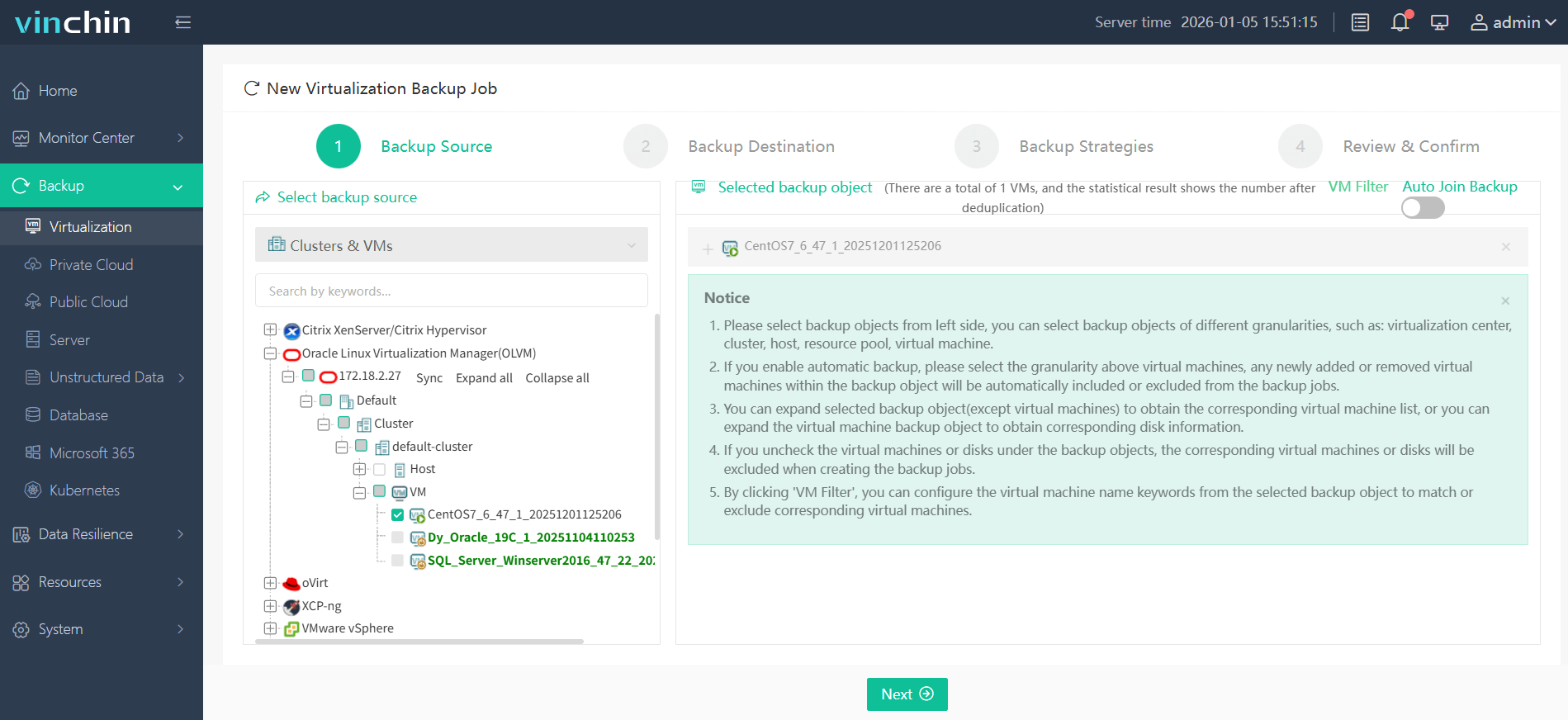
Vinchin Backup & Recovery provides an intuitive web console making operation straightforward:
Step 1: Select the OLVM VM you wish to back up;
Step 2: Choose your preferred backup storage;
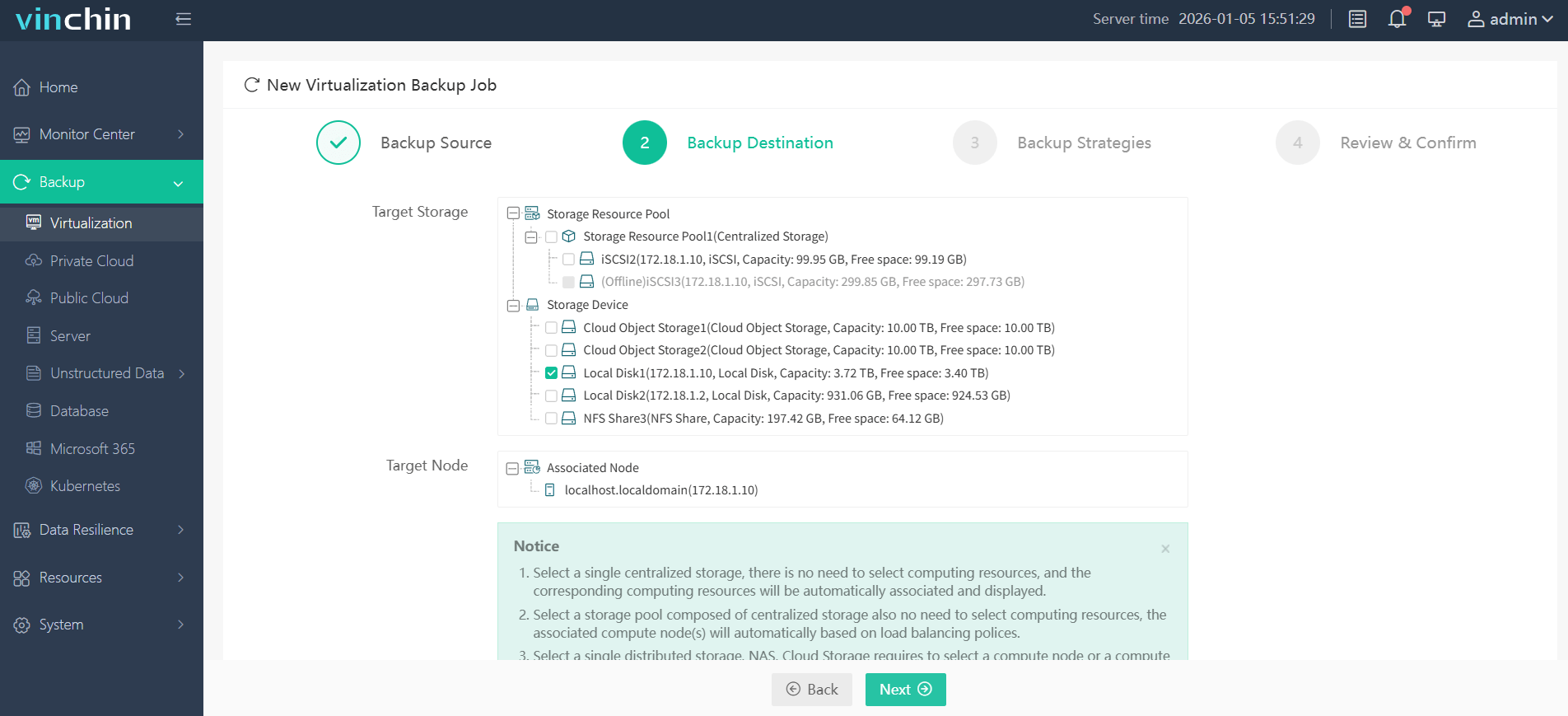
Step 3: Configure your desired backup strategy;

Step 4: Submit the job—ensuring secure protection with minimal effort required from administrators each time.

Trusted worldwide by thousands of organizations with top industry ratings—Vinchin Backup & Recovery offers a 60-day full-featured free trial so you can experience its performance firsthand; click below to get started today!
Best Oracle OLVM Backup Software FAQs
Q1: What defines 'fastest' recovery in an enterprise context?
The fastest recovery means minimizing both RTO (Recovery Time Objective) so workloads are operational quickly after failure detection—and RPO (Recovery Point Objective) so little data is lost between last good copy saved by your system backups on Oracle OLVM infrastructure.
Q2: How does automation impact Oracle OLVM restore times?
Automation integrates with Oracle Linux Virtualization Manager APIs allowing scheduled jobs automatic verification image mounting rapid failover orchestration—all reducing manual intervention so systems return online faster than traditional step-by-step processes would allow even under heavy load conditions typical of large-scale deployments.
Q3: Is instant VM restore reliable at scale for OLVM environments specifically?
Yes; enterprise-grade solutions support distributed storage pools network segmentation live migration compatibility within native KVM-based clusters managed by Oracle Linux Virtualization Manager ensuring consistent performance whether restoring one virtual machine—or many simultaneously—in production settings where uptime matters most.
Q4: Does fast recovery compromise data integrity?
No; advanced solutions validate consistency during both snapshot creation restoration phases using checksum verification metadata comparison mechanisms built into their engines ensuring restored VMs match original state regardless of speed achieved during process thus maintaining trustworthiness required by mission-critical applications hosted on Oracle platforms.
Q5: How does the solution handle application-consistent backups for databases running on OLVM VMs?
Backup tools supporting application-aware snapshots coordinate with guest OS agents via scripts/quiesce commands before capturing images guaranteeing transactional consistency especially important when protecting databases email servers ERP systems inside virtual machines managed by Oracle Linux Virtualization Manager.
Conclusion
Choosing wisely ensures business continuity compliance peace of mind while avoiding costly delays data loss headaches caused by inadequate protection strategies—empowering enterprises relying on Oracle Linux Virtualization Manager infrastructure every day.










