Reliable backup software is vital for any business running critical workloads on H3C CAS (Cloud Automation System) or UIS (Unified Infrastructure System). When systems fail or data gets lost, companies face costly downtime—Gartner estimates the average cost of IT downtime at $5,600 per minute. High-performance backup tools help organizations avoid these losses by ensuring fast recovery and minimal disruption. In regulated industries like finance or healthcare, reliable backups also support compliance by protecting sensitive data from loss or corruption. Efficient backup operations reduce manual work for IT teams while keeping costs predictable as environments grow. As digital transformation accelerates across sectors, scalable protection becomes even more important.
Why H3C CAS/UIS Backup Matters in Enterprise Environments
A robust backup strategy protects virtualized workloads from threats ranging from accidental deletion to ransomware attacks. Enterprises rely on their infrastructure every day; losing access can halt operations instantly.
● Business Continuity
Uninterrupted service is essential for customer trust and revenue flow. If a virtual machine fails without recent backups available for restore, entire departments may lose productivity until recovery completes. Reliable backups ensure that services can resume quickly after hardware failures or cyber incidents.
● Regulatory Compliance
Many industries must follow strict rules about data retention and recoverability. Audit failures due to missing backups can result in fines or legal action. Comprehensive backup solutions help organizations meet these requirements by providing detailed logs and proof of recoverability.
● Data Integrity
Corruption can occur during storage failures or software bugs. Without regular verified backups, restoring clean copies becomes impossible if production data gets damaged. Strong solutions verify both backup completion and integrity so businesses always have usable recovery points.
● Disaster Recovery Readiness
Natural disasters or large-scale outages demand rapid response plans. Enterprises need confidence that they can restore full systems—even across sites—without delay. Scalable backup tools enable disaster recovery drills that prove readiness before an actual crisis strikes.
How To Choose The Best H3C CAS/UIS Backup Solution for Reliability and Performance at Scale?
Selecting enterprise-grade backup software means looking beyond basic features to focus on proven results under pressure. A good solution should handle growth smoothly while minimizing risk of failure as workloads increase.
● Consistent backup success rates under heavy load
Backup jobs must complete reliably even when hundreds of virtual machines are protected simultaneously. Look for published benchmarks showing high job success rates during peak usage periods—such as concurrent VM snapshots exceeding 90% completion within scheduled windows.
● Minimal recovery time objectives (RTOs)
Fast restores keep downtime short when issues arise. Solutions should offer instant VM recovery options so users regain access within minutes rather than hours—a key metric in meeting business SLAs.
● Seamless scalability
As your environment grows from dozens to thousands of VMs, performance should not degrade nor should failure rates rise. Distributed architectures allow adding new nodes easily without reconfiguring existing jobs or incurring extra license fees.
● Centralized management with policy-driven automation
Managing complex environments manually increases error risk. Centralized consoles let administrators set policies once then automate recurring tasks like scheduling full/incremental backups across all clusters—saving time while reducing mistakes.
● Comprehensive reporting
Detailed logs show which jobs succeeded or failed along with reasons why—helpful both for troubleshooting issues quickly and proving compliance during audits.
● Deep integration with H3C platforms
Tight API-level integration ensures compatibility through platform upgrades so you avoid unexpected errors after patching core systems—a common pain point when using generic tools not built specifically for H3C environments.
Evaluating candidates against these criteria helps IT leaders select solutions that deliver reliability today—and scale up tomorrow without sacrificing performance or manageability.
Vinchin Backup & Recovery: Enterprise‑Level Protection for H3C CAS/UIS Virtualization
For enterprises seeking robust protection of their H3C CAS/UIS environments, Vinchin Backup & Recovery delivers professional-grade VM backup capabilities supporting over 15 mainstream virtualization platforms—including seamless support for H3C CAS/UIS itself alongside VMware, Hyper-V, Proxmox, oVirt, OLVM, RHV, XCP-ng, XenServer, OpenStack, ZStack, and more. With this broad compatibility, it’s ideal for hybrid infrastructures where multiple hypervisors coexist under one roof.
Vinchin Backup & Recovery offers agentless operation on supported hypervisors such as H3C CAS/UIS; advanced features like LAN-free backup; flexible incremental and forever-incremental strategies; granular restore; deduplication/compression; V2V migration; GFS retention policy; multi-thread transmission; cloud/tape archive integration—all designed to maximize efficiency while minimizing resource impact and operational complexity in large-scale deployments.
The intuitive web console makes setup straightforward:
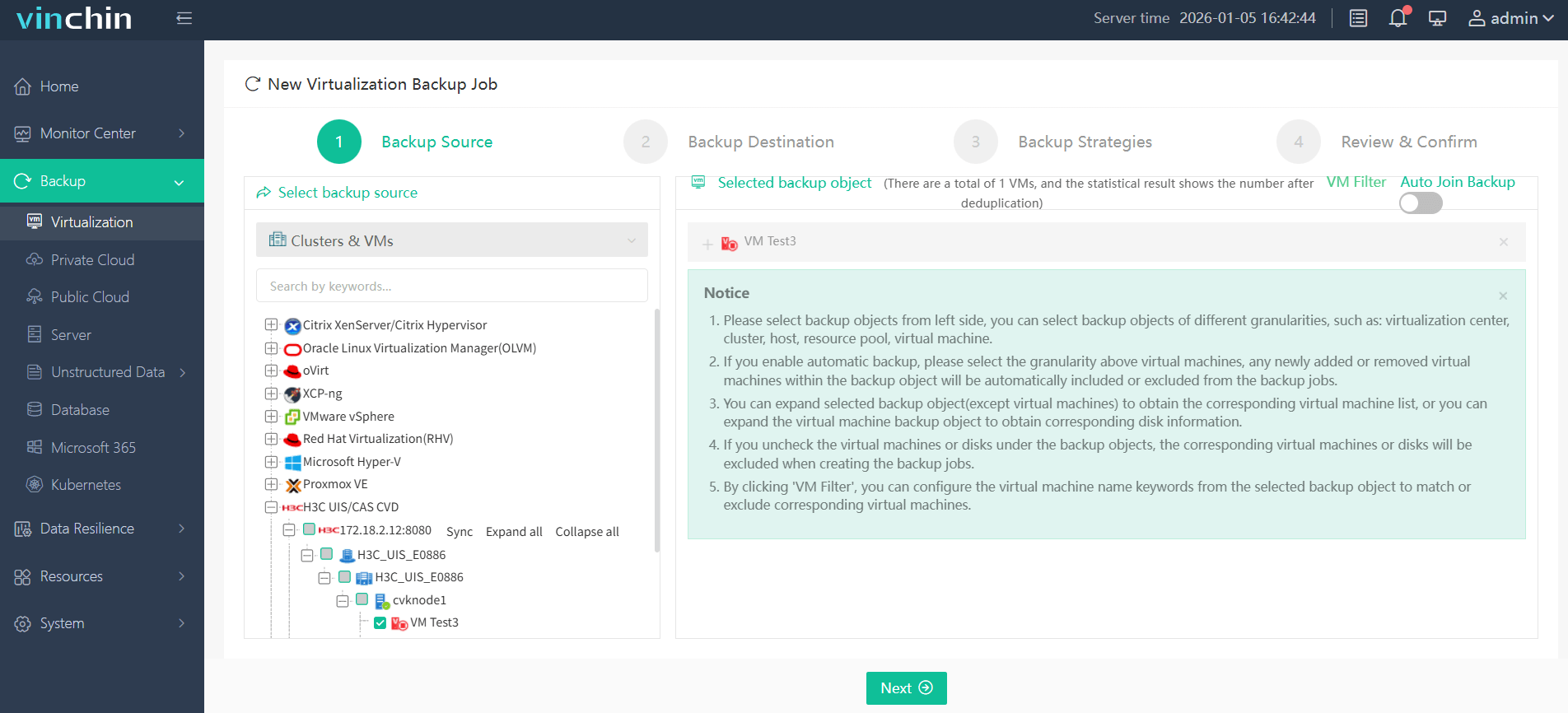
Step 1: Select the H3C CAS/UIS VM to back up;
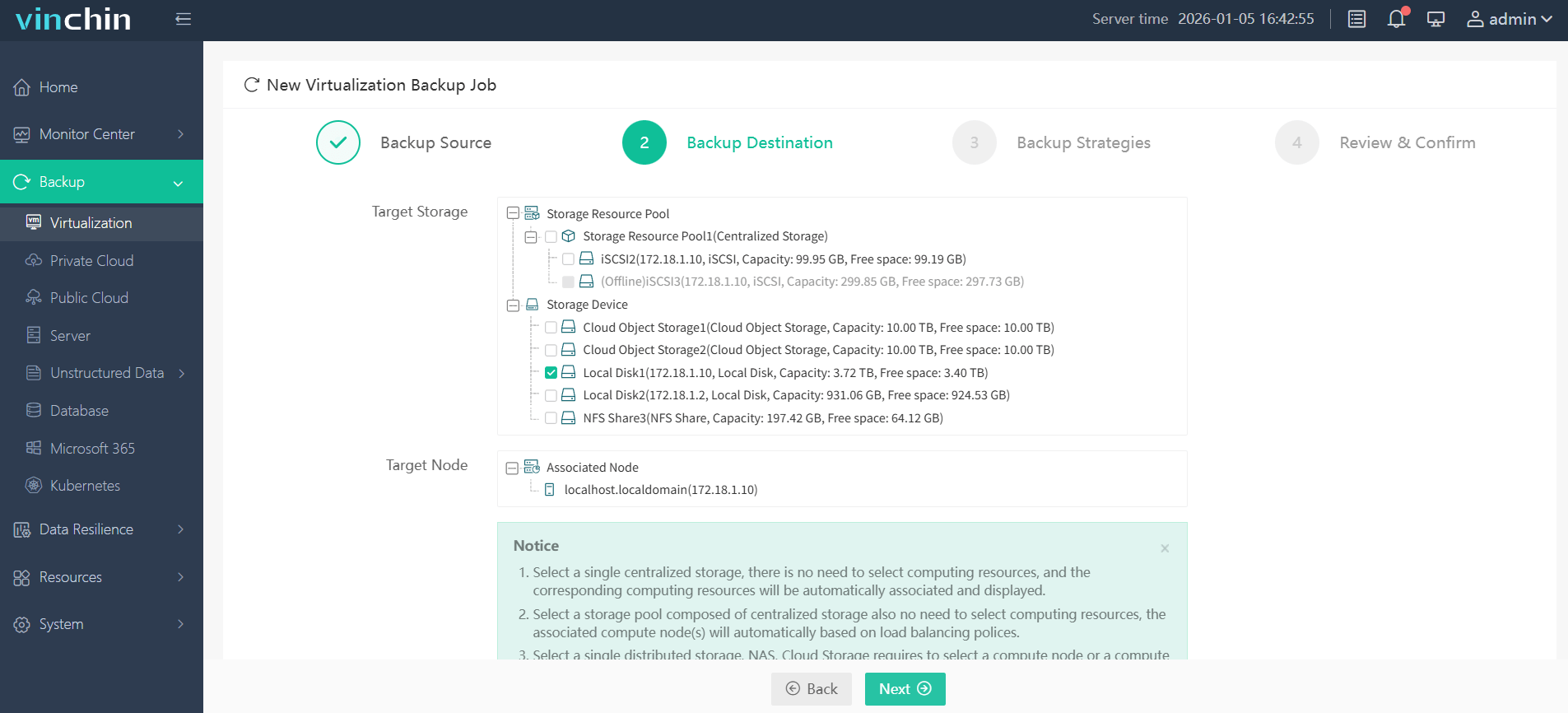
Step 2: Choose the target storage location;
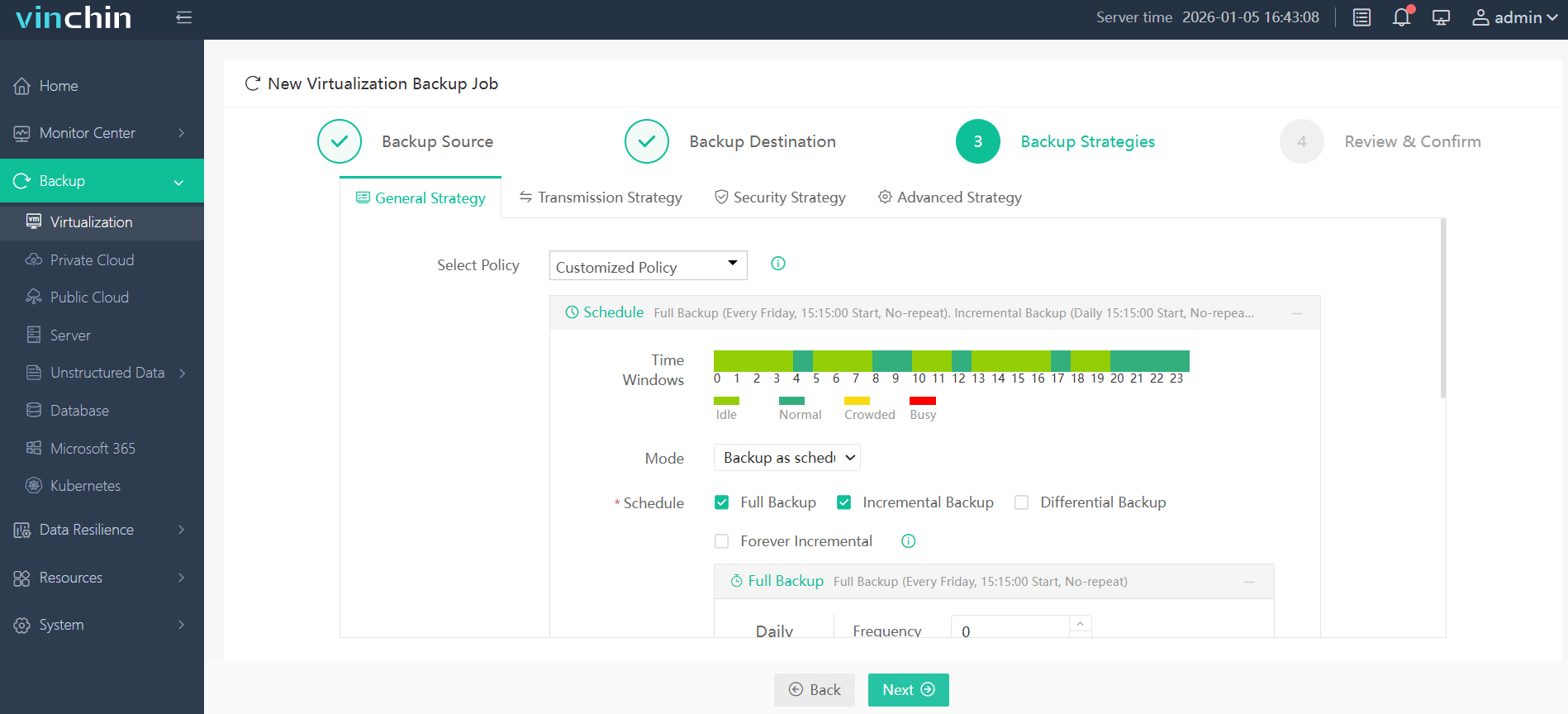
Step 3: Configure your preferred backup strategy (schedule/frequency/policies);
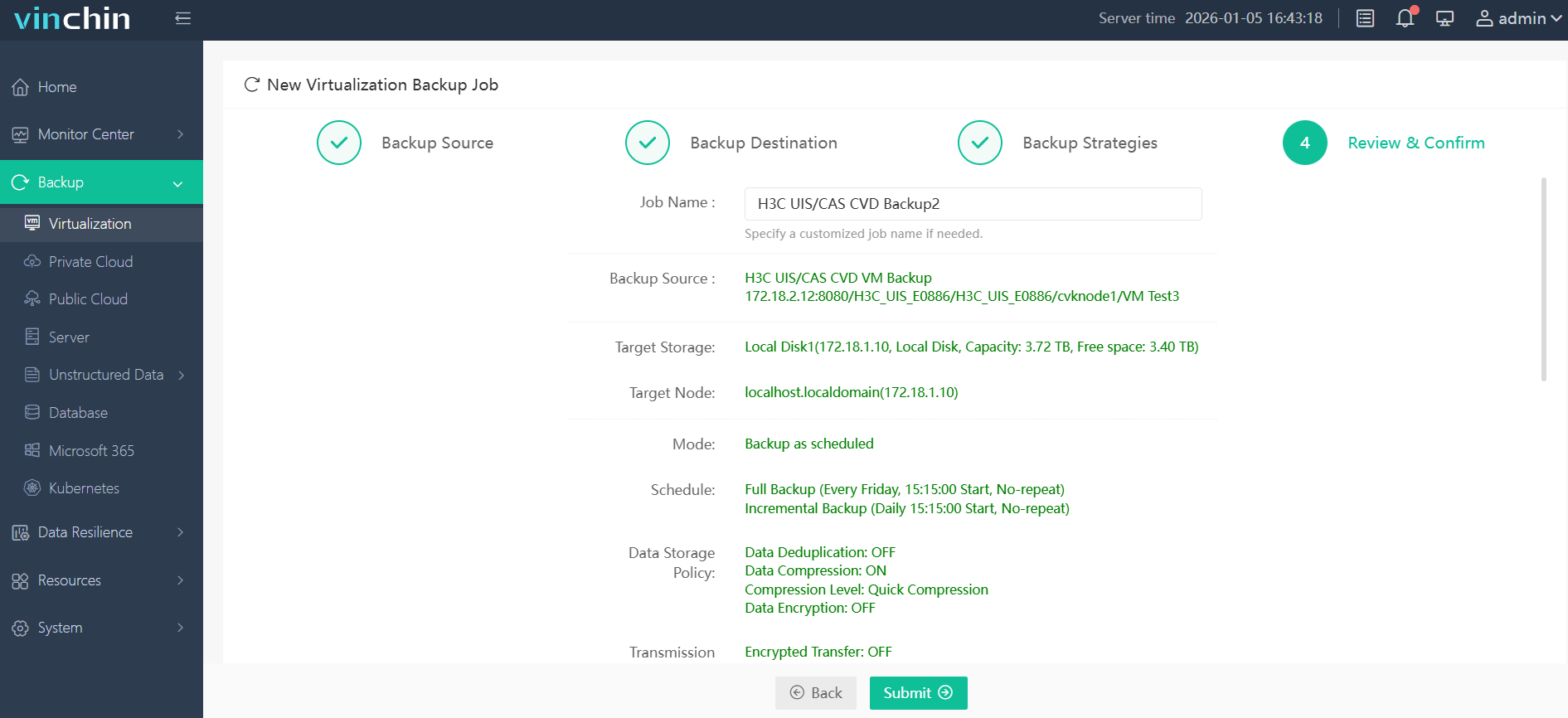
Step 4: Submit the job with a single click—ensuring consistent protection with minimal effort required from IT staff.
Recognized globally with top ratings among enterprise customers across diverse industries, Vinchin Backup & Recovery offers a fully featured 60-day free trial—click below to experience industry-leading data protection firsthand!
Best H3C CAS/UIS Backup Software FAQs
Q1: What makes a backup solution reliable for H3C CAS/UIS?
A1: Reliability depends on deep integration with official H3C APIs plus consistent job success rates under stress testing conditions documented by vendors’ compatibility matrices. Automated verification routines further ensure every restore point works when needed most.
Q2: How does scalability impact enterprise backup selection?
A2: Scalability means supporting growing numbers of VMs without slowing down operations; node-based architectures allow horizontal expansion while maintaining throughput above industry averages—even during concurrent multi-job execution.
Q3: Are advanced security features necessary in an H3C environment?
A3: Yes; modern threats target both production systems and their backups directly via ransomware or privilege escalation attacks specific to virtualization stacks like H3C’s platforms—so encryption at rest/in transit plus role-based controls are essential safeguards against compromise.
Q4: How important is centralized management?
A4: Centralized management streamlines policy enforcement across all clusters while simplifying monitoring/reporting—a necessity when scaling up operations over multiple sites typical in enterprise deployments.
Conclusion
Selecting reliable H3C CAS/UIS backup software ensures quick restores at scale while supporting compliance needs as you grow—all with less manual effort required from IT staff.









