Delivering secure cloud resources across multiple teams or customers is never simple. IT administrators often struggle with balancing scalability, security, and cost control in virtual data centers. VMware vCloud Director was built to address these challenges head-on. But what exactly does it offer? And how can you ensure your workloads inside it stay protected? Let’s explore step by step.
What Is VMware vCloud Director?
VMware vCloud Director is a cloud management platform for enterprises and service providers that enables secure multi-tenant environments on top of VMware vSphere. It allows you to create virtual data centers (VDCs) that combine compute, storage, and networking resources into isolated environments for different users or teams.
Running above vSphere, it abstracts the underlying hardware so users can deploy and manage VMs without dealing with physical infrastructure. Each organization has its own space with role-based access control and resource limits.
It also offers self-service automation, centralized management, and integrates with VMware NSX for advanced networking features. Additionally, it supports Kubernetes via Container Service Extension (CSE), enabling both containerized and traditional workloads.
Why Choose VMware vCloud Director?
Why do so many organizations rely on VMware vCloud Director? First off, it delivers true multi-tenancy out of the box. You can serve multiple clients or business units securely from one shared infrastructure while keeping their data completely separate.
Second comes flexibility in resource allocation: assign CPU cores or memory using different models such as Allocation Pool (predefined pool), Reservation Pool (guaranteed minimums), or Pay-as-you-go (actual usage). This lets you fine-tune costs versus performance based on real needs—a big win when budgets matter!
Third is automation at every level: users get self-service provisioning through web portals; admins set policies that automate workflows like VM deployment or network setup; security rules enforce compliance automatically across tenants.
Fourth, the platform scales easily across sites or even continents thanks to centralized management tools and robust APIs/SDKs that allow deep integration with other systems you may already use.
Finally, proven reliability matters! Many leading public cloud providers trust VMware vCloud Director as their backbone for Infrastructure as a Service (IaaS). Its mature feature set makes it ideal whether you’re running hundreds of VMs locally or thousands globally.
Popular Use Cases for VMware vCloud Director
Where does vmware vcloud director shine most? Service providers leverage it to deliver public/private cloud services tailored per customer—with each client getting their own isolated VDC plus self-service access via web portal or API calls.
Enterprises use it internally too: spin up development/test environments quickly without waiting weeks for hardware procurement; empower business units with dedicated resources yet maintain central governance over everything deployed within your data center walls.
Hybrid cloud scenarios are also popular—move workloads seamlessly between on-premises clusters managed by vSphere/vCenter Server and remote clouds powered by vmware vcloud director itself! Need disaster recovery? Built-in replication tools make cross-site failover straightforward so business keeps running even during outages elsewhere.
Modern app development benefits too: DevOps teams deploy containers using Kubernetes right next door to legacy VMs—all managed under one roof thanks to Container Service Extension integration!
Understanding vCloud Director Resource Allocation Models
Choosing the right resource allocation model is crucial when setting up an efficient vmware vcloud director environment. Each model impacts how resources are reserved and billed for your tenants’ workloads:
Allocation Pool assigns a fixed pool of CPU/memory resources to an organization’s VDC but only reserves part of those physically on hosts beneath it. This means more flexibility but less guarantee if everyone uses their maximum at once—a good fit when workloads are predictable but rarely spike together.
Reservation Pool guarantees all assigned CPU/memory at the host level immediately upon creation of the VDC—no sharing allowed! This ensures consistent performance even during peak times but may lead to higher costs since unused reservations still consume capacity behind-the-scenes; perfect if uptime matters most (think databases).
Pay-as-you-go allocates resources dynamically based on actual VM usage within each tenant’s environment. You pay only for what’s consumed minute-to-minute rather than reserving large pools upfront! Ideal if workloads fluctuate often such as dev/test labs where demand changes daily or hourly!
Selecting wisely helps balance cost efficiency against risk of contention during busy periods, and also affects backup/disaster recovery planning since reservation-heavy setups might need extra storage bandwidth reserved just in case rapid restores become necessary later down the line!
Best Practices for Managing Multi-Tenant Environments in vCloud Director
Managing multiple tenants efficiently requires careful planning beyond just spinning up new VDCs whenever someone asks!
1. Start by enforcing strong role-based access controls so each team sees only its own assets within vmware vcloud director, not anyone else’s sensitive data accidentally exposed due to misconfigured permissions!
2. Set quotas carefully: limit maximum number of CPUs/RAM/storage per tenant based on historical usage patterns plus some buffer room, but avoid overcommitting unless you’re confident underlying hosts have spare cycles available during spikes!
3. Automate routine tasks wherever possible using built-in APIs/scripts. For example, auto-provisioning new networks/VLANs whenever fresh projects launch, or scheduling regular health checks/reports sent straight into your ticketing system via webhook integrations!
4. Monitor activity closely using dashboards provided inside vmware vcloud director itself, or plug telemetry feeds into external SIEM/logging platforms if deeper analysis needed around trends/anomalies over time!
5. Finally, review configurations regularly especially after major upgrades/new feature rollouts since default settings sometimes shift between releases which could open gaps unnoticed until something breaks unexpectedly later down road.
Protecting Virtual Machines in vCloud Director Environments with Vinchin Backup & Recovery
To ensure robust protection for virtual machines running in vmware vcloud director environments, consider using Vinchin Backup & Recovery—a professional enterprise-level solution supporting more than 15 mainstream virtualization platforms including VMware, Hyper-V, Proxmox, oVirt, OLVM, RHV, XCP-ng, XenServer, OpenStack, ZStack and others. For organizations utilizing vmware specifically, Vinchin Backup & Recovery offers seamless compatibility along with advanced backup technologies tailored for complex hybrid infrastructures.
Key features include quiesced snapshot support for consistent backups on VMware environments; CBT technology enabling fast incremental backups; LAN-free backup options that optimize network utilization; instant recovery capabilities ensuring minimal downtime; and comprehensive deduplication/compression mechanisms that reduce storage requirements significantly. Together these features provide reliable data protection while maximizing operational efficiency across diverse cloud deployments.
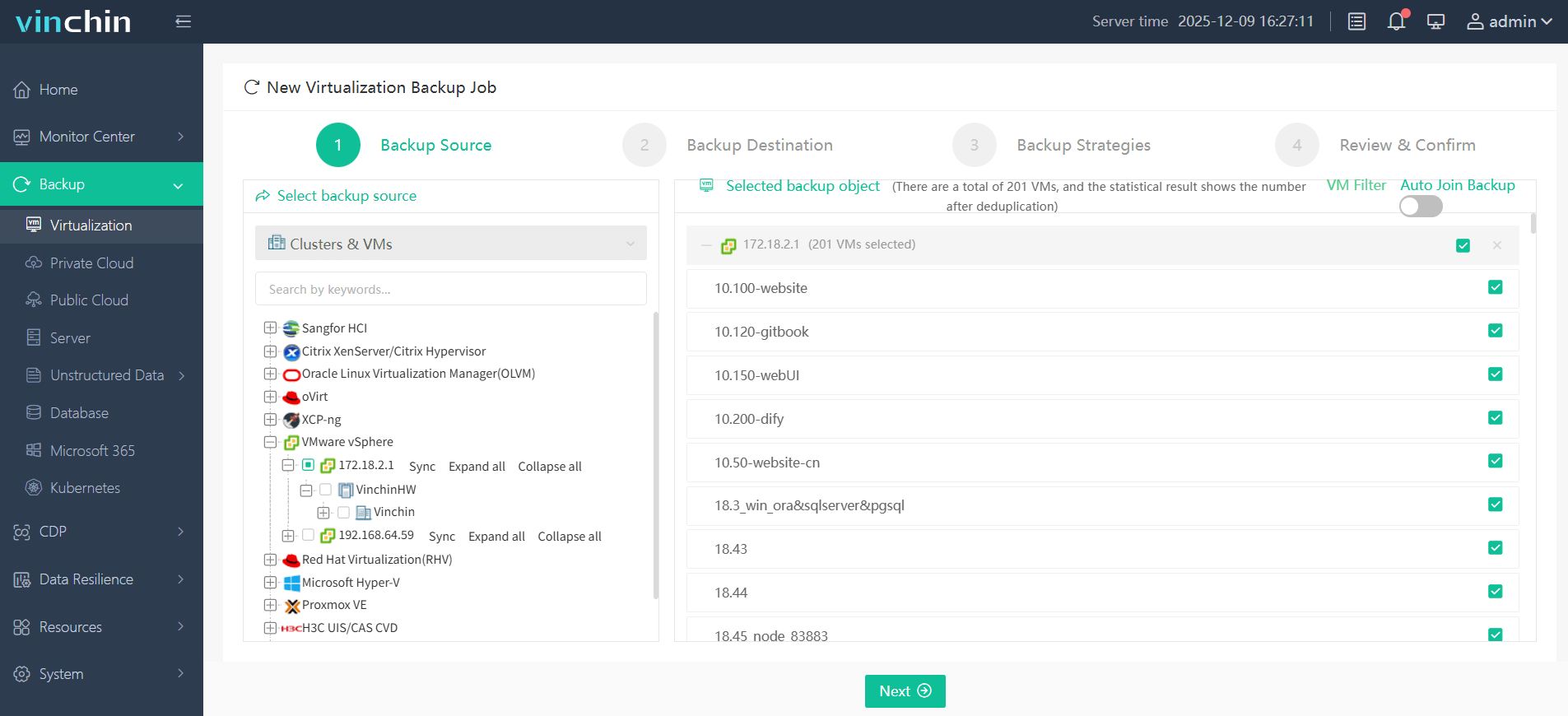
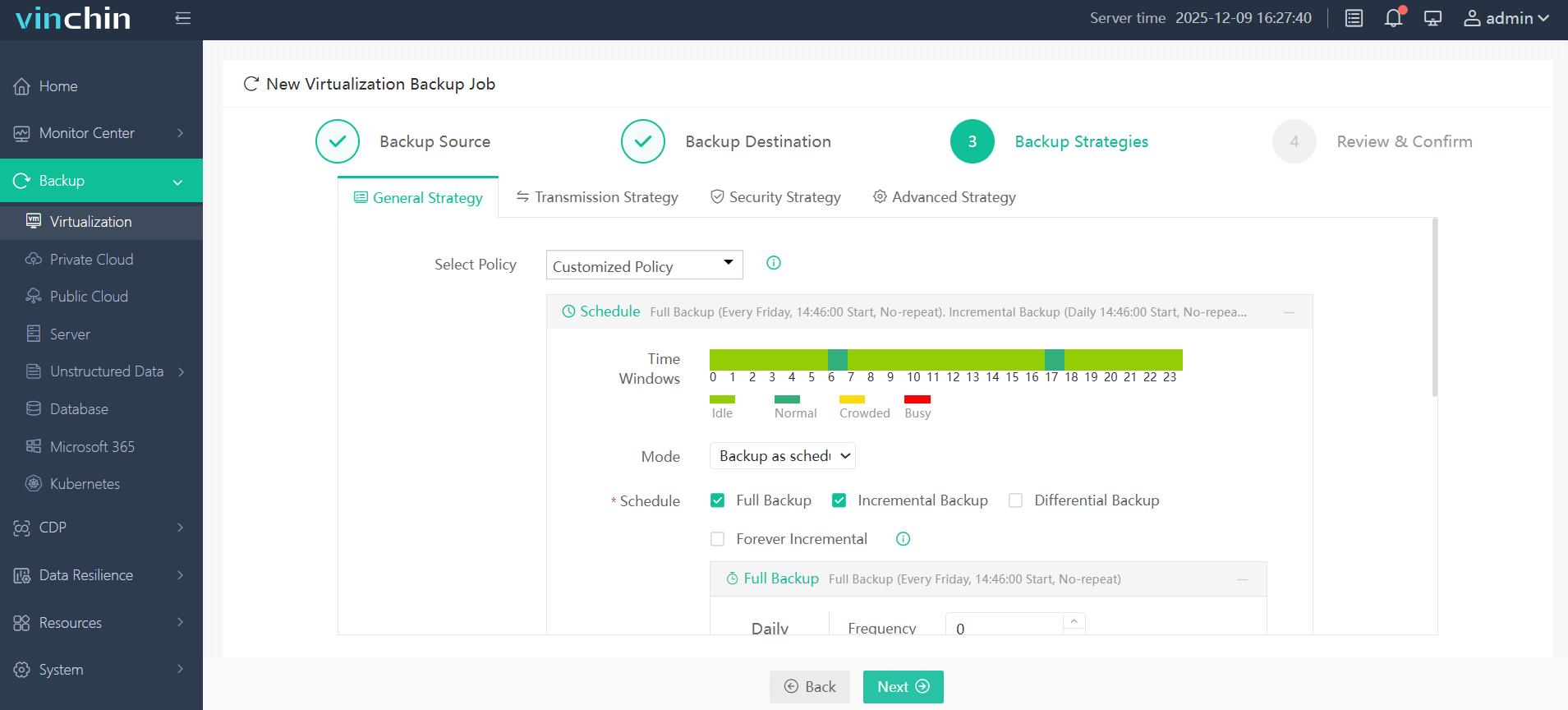
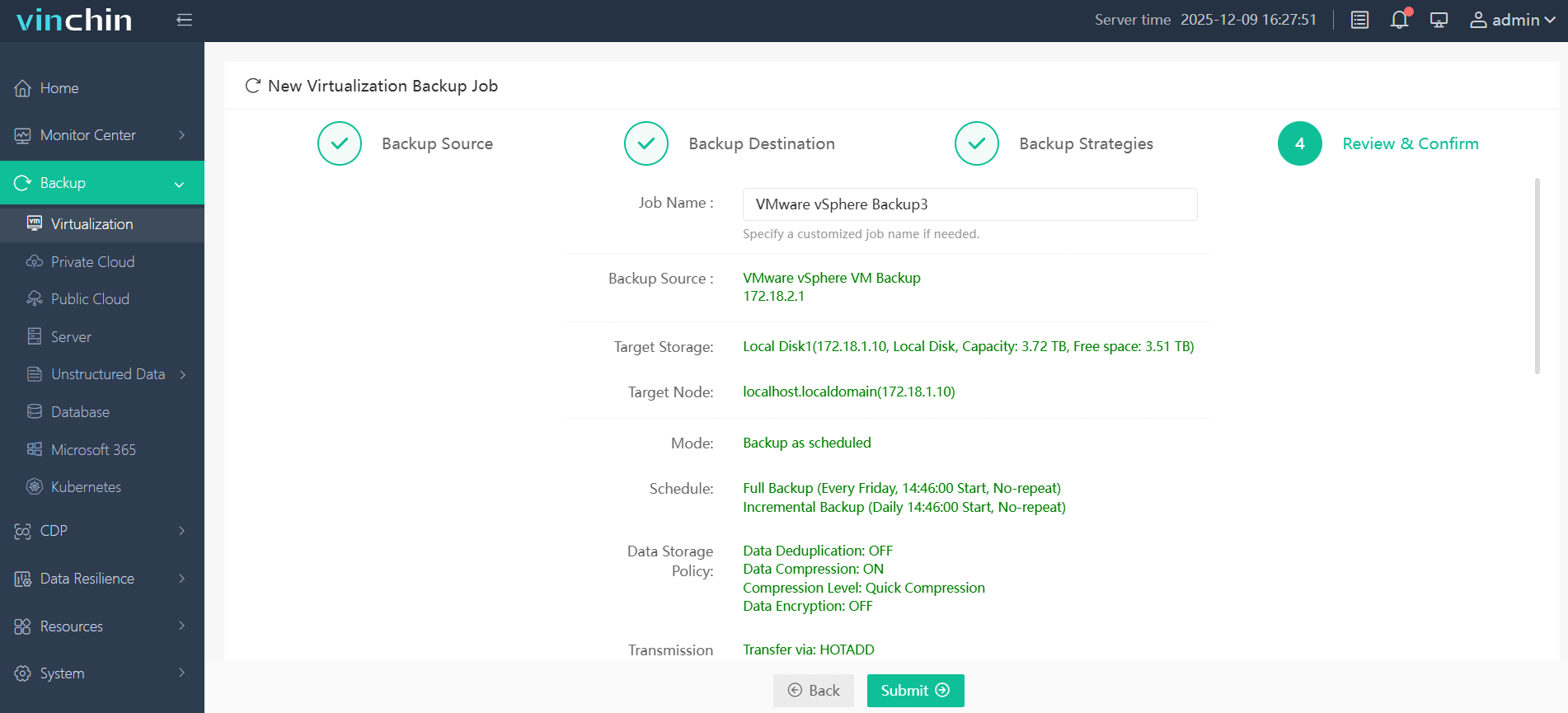
With Vinchin Backup & Recovery's intuitive web console interface, backing up a VM inside vmware vcloud director involves just four steps:
Step 1: Select the VMware VM to back up
Step 2: Choose the backup storage

Step 3: Configure the backup strategy
Step 4: Submit the job
Recognized worldwide by thousands of customers and consistently top-rated among enterprise data-protection solutions, Vinchin Backup & Recovery offers a 60-day full-featured free trial. Click below to experience industry-leading VM protection firsthand today!
VMware vCloud Director FAQs
Q1: Does vmware vcloud director support integrating custom authentication sources?
Yes; administrators can configure LDAP directories or SAML identity providers directly within the admin interface under Authentication settings.
Q2: How do I enable API access securely?
Enable API tokens under System Settings > API Access Control > Generate Token > Assign Roles > Save Changes > Distribute token securely among authorized staff only.
Q3: Can I migrate an entire organization’s workload between sites?
Yes; use Cross-VDC Networking combined with Storage Policies/Migration wizard found under Organization Admin Console > Migrate Workloads tab.
Final Thoughts
VMware vCloud Director streamlines secure multi-tenant cloud management at any scale, from small internal teams to global service provider networks. With its reliable performance and centralized control, organizations can confidently manage complex environments with ease.
For dependable VM protection in any VMware vCloud Director environment, try Vinchin today and experience greater peace of mind from the start.