Large-scale IT environments demand backup solutions that keep pace with rapid data growth. Enterprises running Sangfor HCI need tools that deliver fast backups without disrupting daily operations. The right backup tool must reduce backup windows while ensuring data integrity and compliance. This is vital for meeting recovery objectives and business continuity standards.
Backup window reduction is more than a convenience—it is essential for operational resilience. As organizations scale up their virtual infrastructure, traditional backup methods often fall short. They can lead to long backup times, increased risk of data loss, and missed service-level agreements (SLAs). According to Gartner’s research on enterprise backup strategies, minimizing downtime during backups is now a top priority for IT leaders worldwide.
Selecting an efficient Sangfor HCI backup solution means looking beyond basic functionality. It requires evaluating performance at scale, automation capabilities, security features, and compatibility with complex infrastructures. Let’s explore why reducing the backup window matters so much—and how you can choose a solution that meets these demands.
Why Backup Window Reduction Matters in Enterprise Environments?
Reducing the time needed to complete backups has become critical as businesses rely on uninterrupted access to digital services. Even brief disruptions can have cascading effects across departments and customers.
● Minimized Disruption of Production Workloads
A shorter backup window means less interference with applications running on Sangfor HCI clusters. When backups overlap with business hours or peak usage times, users may notice slowdowns or even outages. By shrinking this window, IT teams ensure smooth operations throughout the day.
● Reduced Risk of Data Loss
Longer backups increase exposure to unprotected changes made during the process. If an incident occurs before completion—such as hardware failure or ransomware attack—recent updates might be lost forever. Fast incremental backups help close this gap by capturing changes quickly and frequently.
● Improved Recovery Point Objectives (RPOs) and Recovery Time Objectives (RTOs)
Meeting strict RPOs/RTOs is non-negotiable in regulated industries like finance or healthcare. A reduced backup window allows organizations to set tighter intervals between restore points while ensuring quick recovery when disaster strikes.
● Compliance With Regulatory Standards
Many regulations require regular proof of timely data protection practices. Prolonged windows make it harder to demonstrate compliance during audits or investigations—potentially resulting in fines or reputational damage.
● Optimized Use of Resources
Efficient backups free up network bandwidth and storage capacity for other tasks. This leads to cost savings over time as hardware investments are better utilized instead of being tied up by lengthy processes.
In large enterprises managing hundreds—or thousands—of VMs across multiple sites, these factors multiply rapidly. IDC reports that global enterprises lose billions annually due to downtime caused by inefficient data protection strategies.
How To Choose The Best Sangfor HCI Backup Solution for Backup Window Reduction
Choosing an effective Sangfor HCI backup solution involves careful evaluation of several core features designed specifically for speed and scalability in large environments. Each capability plays a unique role in reducing overall backup duration while maintaining robust protection standards.
Start your assessment by considering how well each tool handles incremental changes at scale—and whether it automates routine tasks without sacrificing control or visibility over your environment’s health.
● Fast Incremental or Forever-Incremental Backups
Look for solutions offering Incremental forever backup—a method where only one full copy is created initially; all subsequent jobs capture just changed blocks since the last run. Unlike traditional incrementals that periodically require another full copy (which takes longer), forever-incremental keeps processing times low even as datasets grow larger over months or years.
For example: If you have 500 VMs totaling 100TB but only 2% change daily (~2TB), forever-incremental captures just those changes rather than reprocessing everything—saving hours per cycle compared to legacy approaches.
● Efficient Deduplication and Compression
Modern deduplication algorithms identify repeated patterns within files across all protected workloads before writing them into storage repositories. Combined with compression—which shrinks file sizes further—you dramatically cut down both transfer times over networks and required disk space on target devices. This efficiency becomes crucial when backing up petabyte-scale environments distributed across multiple locations.
● Parallel Processing & Multithreading Capabilities
The ability to process many VMs simultaneously ensures no single job becomes a bottleneck. Advanced tools split workloads into parallel streams using multithreading techniques so dozens—or hundreds—of machines can be backed up side-by-side without waiting turns. This approach maximizes throughput regardless of environment size or complexity.
● Policy-driven Automation
Automated scheduling lets you define when jobs run based on business needs—not manual intervention. Verification routines check completed copies against source systems automatically; reporting dashboards summarize results so admins spot issues early without combing through logs line-by-line every morning.
● Enterprise Security Compatibility
Encryption at rest/in transit shields sensitive information from unauthorized access—even if physical media are stolen. Anti-ransomware measures such as immutable storage prevent attackers from tampering with historical copies once written—a growing concern given recent spikes in cyberattacks targeting virtual infrastructure.
Vinchin Backup & Recovery: Enterprise-Level VM Protection Across Platforms
To address demanding enterprise requirements for fast, reliable VM protection—including those running on Sangfor HCI—Vinchin Backup & Recovery delivers comprehensive support across more than 15 mainstream virtualization platforms such as VMware, Hyper-V, XenServer/XCP-ng, oVirt/RHV, OLVM, Proxmox VE, OpenStack, ZStack, Oracle Linux Virtualization Manager (OLVM), Huawei FusionCompute and others—with seamless compatibility tailored for each environment type.
Key features include forever-incremental backup technology that minimizes both time spent on each job and resource consumption; advanced deduplication plus compression which optimize storage use; instant recovery enabling near-zero downtime; granular restore options allowing precise file-level retrieval; policy-based scheduling automating routine tasks—all designed to accelerate enterprise-scale operations while safeguarding critical workloads.
With Vinchin Backup & Recovery's intuitive web console interface you can protect any supported VM in four simple steps:
Step 1: Select the Sangfor HCI VM to back up

Step 2: Choose the backup storage
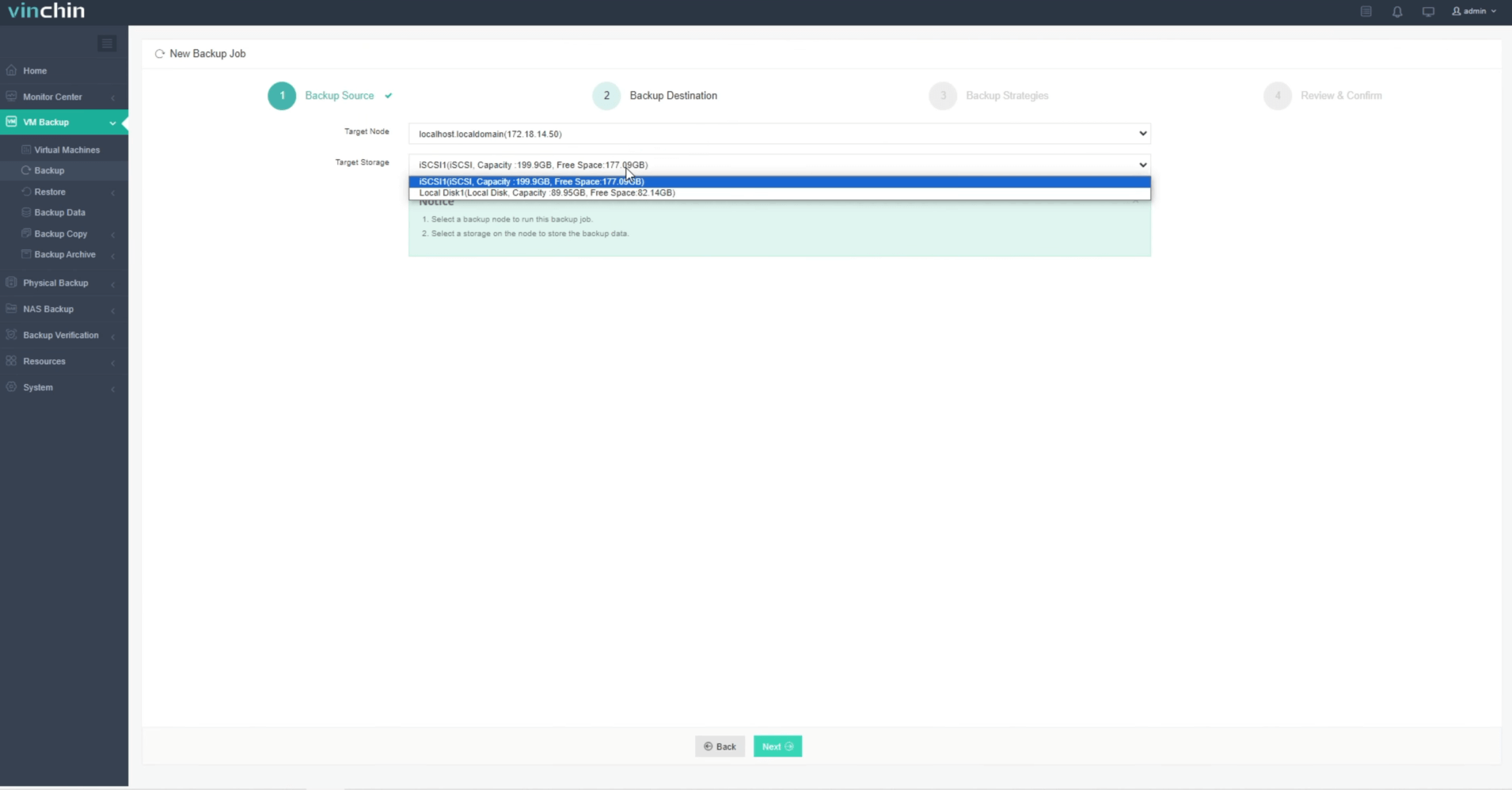
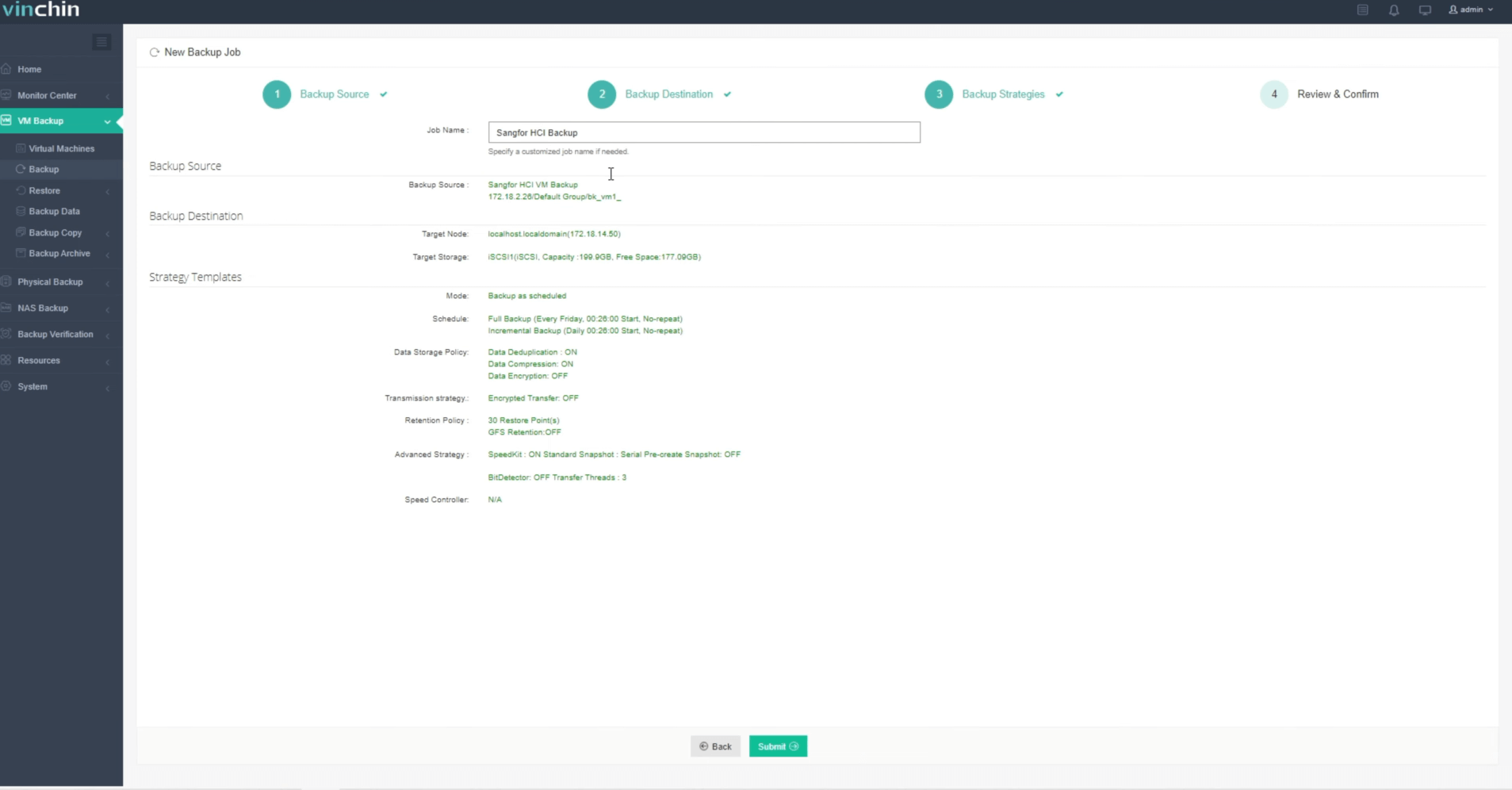
Step 3: Configure the backup strategy

Step 4: Submit the job
Recognized globally among leading enterprise data-protection solutions—with strong customer satisfaction ratings—Vinchin Backup & Recovery offers a fully featured 60-day free trial so you can experience its benefits firsthand; click below to get started.
Best Sangfor HCI Backup Software FAQs
Q1: How does an optimized backup tool reduce the window in large-scale environments?
By leveraging incremental backups such as forever-incremental technology alongside parallel processing capabilities like multithreading which allow simultaneous handling of many VMs,data transfer time drops significantly.This ensures consistent protection across all workloads even when scaling out infrastructure.
Q2: What risks arise from long backup windows?
Extended windows increase exposure periods where new changes remain unprotected.If failures occur during this period,recent updates may be lost. Also, long-running jobs can disrupt mission-critical applications leading potentially costly downtime events.
Q3: Is agentless backup important for reducing the window?
Yes. Agentless technology eliminates software overhead inside production systems speeding both setup execution phases.It also reduces maintenance complexity since there are no agents requiring upgrades patches within guest OSes.
Conclusion
Shortening your Sangfor HCI back-up window protects uptime boosts compliance optimizes resources.Vinchin delivers scalable speed reliability helping enterprises avoid costly disruptions caused by outdated methods.Try it free see difference first-hand today!








