Centralized monitoring is vital for organizations using Sangfor HCI across multiple clusters. It brings all backup operations into one place. This unified view helps IT teams manage data protection more efficiently. With centralized oversight, you reduce complexity and improve response times when issues arise. Enterprises need this approach to maintain strong security and compliance standards as their environments grow.
Centralized monitoring also means fewer missed alerts. You can spot problems early before they become disasters. A single dashboard makes it easier to enforce policies and generate reports for audits. These benefits are crucial for businesses that operate at scale or across several sites.
Why Centralized Monitoring Matters in Enterprise Environments
Centralized monitoring gives enterprises complete visibility over backup operations across every cluster they manage. This approach reduces risk by ensuring no failures go unnoticed and supports consistent policy enforcement.
● Improved Visibility
Centralized monitoring provides a clear overview of all backup activities from one dashboard. IT teams can see which jobs succeeded or failed without logging into each cluster separately. This reduces human error and ensures nothing slips through the cracks.
● Reduced Downtime Risk
With all alerts in one place, administrators respond faster to issues like failed backups or storage shortages. Quick action minimizes downtime during outages or disasters—a key requirement for business continuity planning.
● Consistent Recovery Points
A unified system helps standardize backup schedules across clusters. This consistency ensures recovery points are aligned everywhere—making restores predictable if disaster strikes.
● Simplified Compliance
Auditors often require proof of regular backups and policy enforcement. Centralized reporting makes it easy to provide evidence from every cluster in seconds instead of hours.
● Streamlined Operations
Managing multiple clusters individually wastes time switching between consoles. Centralization lets teams focus on higher-value tasks rather than repetitive checks or manual report generation.
How To Choose The Best Sangfor HCI Backup Solution for Centralized Monitoring?
Selecting a Sangfor HCI backup solution with effective centralized monitoring requires careful consideration of several factors that impact scalability, usability, security, integration capabilities, and operational efficiency.
● Robust Centralized Dashboards
Look for solutions offering dashboards that aggregate real-time status from all clusters into one interface. This allows rapid incident response since administrators do not need to switch between different management consoles to track issues or job statuses.
● Scalability
The solution should handle growth as you add more clusters over time without slowing down performance or missing scheduled backups. Scalability ensures your investment remains valuable even as your infrastructure expands.
● Granular Role-Based Access Controls
Strong access controls protect sensitive data while allowing efficient delegation of responsibilities within large IT teams. For example, some users may only view backup statuses while others can modify policies—this separation limits risk if credentials are compromised.
● Integration With Existing Workflows
Choose platforms that work smoothly with your current IT processes such as ticketing systems or compliance tools like SIEMs (Security Information & Event Management). Seamless integration cuts down on manual effort needed for documentation or reporting during audits.
● Automated Scheduling And Audit Trails
Features like automated scheduling ensure backups run reliably without manual intervention while detailed audit trails help track changes made by users—both critical for meeting regulatory requirements in industries like finance or healthcare.
Sangfor Cloud Platform (SCP): Centralized Monitoring for Multi-Cluster Environments
Sangfor Cloud Platform (SCP) delivers true centralized management across multiple Sangfor HCI clusters—even those spread out over different data centers or regions. SCP unifies compute, storage, networking, security management—and most importantly—backup oversight into a single web-based console designed for enterprise needs.
SCP’s centralized monitoring features make it possible to oversee complex environments from anywhere with an internet connection:
Multi-cluster management enables you to add new clusters easily via the SCP web console by navigating to Resources, then selecting Add Cluster, entering IP addresses and credentials as needed. All managed resources appear under one pane so you never lose track of what’s protected where—even if your company operates globally.
Unified dashboards present health summaries on the Monitoring > Overview page showing virtual machines’ status alongside physical hosts and elastic IPs across every connected cluster at once. Custom panels let you highlight specific workloads or backup jobs important to your business priorities—no more hunting through separate interfaces when something goes wrong late at night!
Real-time alerts arrive instantly through the Monitoring > Alarms section where events are logged both historically and live; filter these by date range/object type/resource pool/tenant so nothing gets overlooked during busy periods—or set up email notifications using SMTP Server configuration so critical incidents reach responsible staff right away regardless of location.
Automated reporting comes built-in via the Monitoring > Report tool which generates downloadable documents covering resource usage trends/backups completed/errors detected per cluster—all supporting compliance reviews/audits without extra effort from IT staff already stretched thin by daily demands.
Role-based access control lets platform admins assign permissions precisely according to organizational structure: platform admins get full rights; tenants see only their own resources; end users have limited views based on job function—all managed centrally within SCP’s user-friendly interface so mistakes don’t expose sensitive information unnecessarily.
Scalability is core: add new clusters anytime—the platform continues providing fast centralized oversight regardless of environment size/growth rate thanks to its distributed architecture optimized specifically for multi-site deployments common among modern enterprises.
Backup/disaster recovery integration is seamless inside SCP’s main console too:
Define backup policies per cluster—or apply global rules spanning all locations—for maximum flexibility depending on local regulations/business needs;
Monitor job progress/statuses live via unified dashboards;
Automate disaster recovery using built-in remote failover tools plus guided drills ensuring readiness before real emergencies strike;
All these functions combine so organizations never have silos between infrastructure management/security/data protection again—a major step forward compared with legacy approaches still common today!
Setting up centralized monitoring takes just a few steps:
Deploy SCP as a VM inside any existing Sangfor HCI environment;
Add additional clusters via Resources > Clusters > Add;
Configure custom panels/dashboards under Monitoring > Overview plus alert thresholds under Alarms & Alarm Options;
Assign roles/users through Operations Center based on internal policies;
Set up comprehensive backup/disaster recovery plans using Reliability Center tailored per site/group/company-wide as required;
Once configured correctly following best practices outlined above/Sangfor official guides, SCP becomes your single source-of-truth dashboard protecting every asset everywhere—saving time/money while boosting confidence in business resilience strategies long-term!
Vinchin Backup & Recovery: Enterprise-Level Protection Across Virtualization Platforms
For organizations seeking advanced data protection beyond native tools, Vinchin Backup & Recovery offers an enterprise-level virtual machine backup solution supporting over 15 mainstream virtualization platforms—including Sangfor HCI, VMware, Hyper-V, Proxmox, oVirt, OLVM, RHV, XCP-ng, XenServer, OpenStack, ZStack and more—with broad compatibility ideal for mixed environments found in many enterprises today.
Vinchin Backup & Recovery stands out with features such as agentless full/incremental/differential backups, granular restore options including file-level recovery directly from VM backups, V2V migration capabilities between supported hypervisors (including cross-platform), LAN-free backup support on select platforms like Sangfor HCI and Proxmox for high-speed transfers without burdening production networks—and robust data deduplication/compression technologies that optimize storage use while maintaining fast performance.
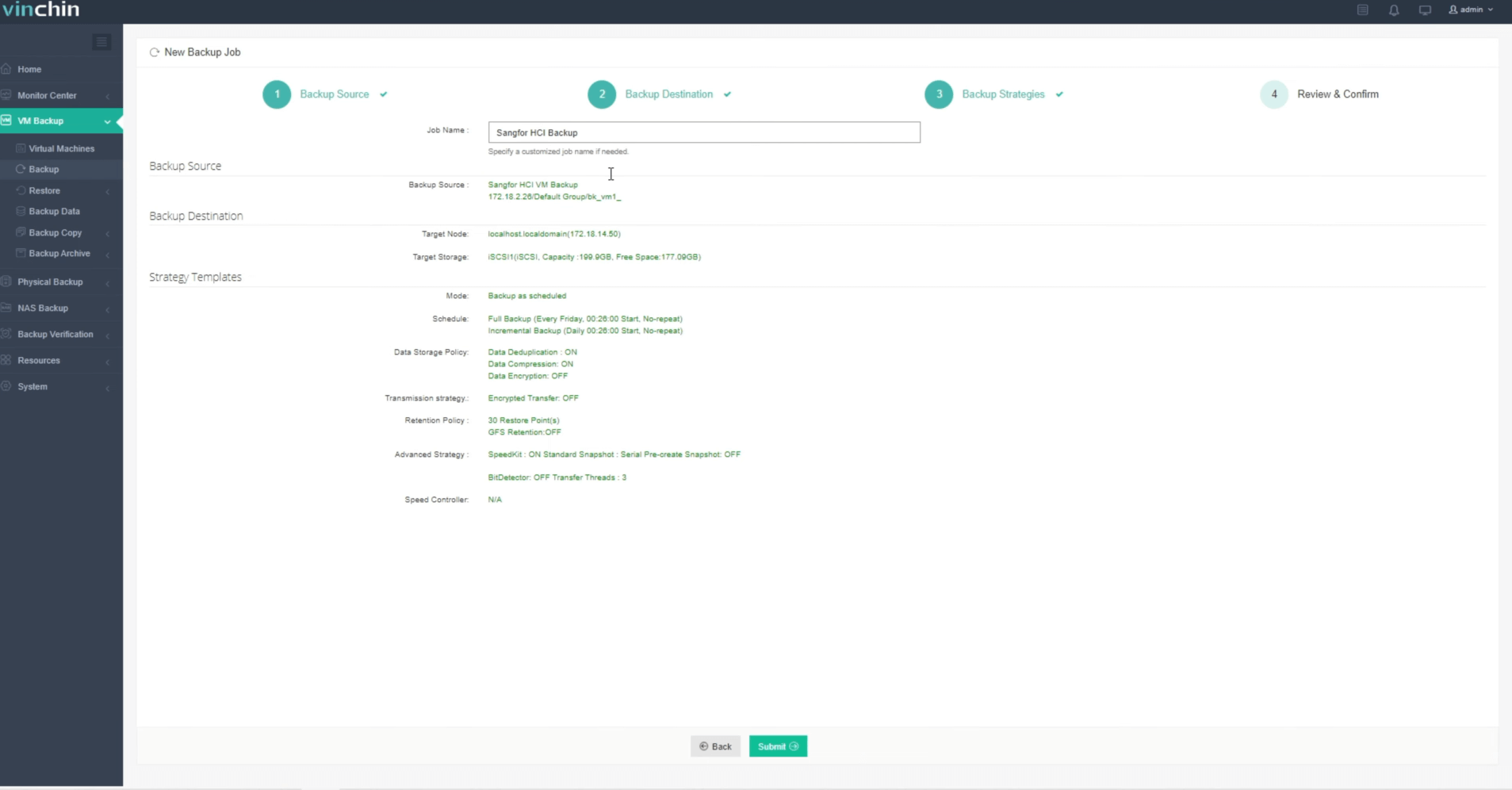
Using Vinchin Backup & Recovery’s intuitive web console simplifies VM protection workflows:
Step 1: Select the Sangfor VM you want to back up.

Step 2: Choose your preferred backup storage.
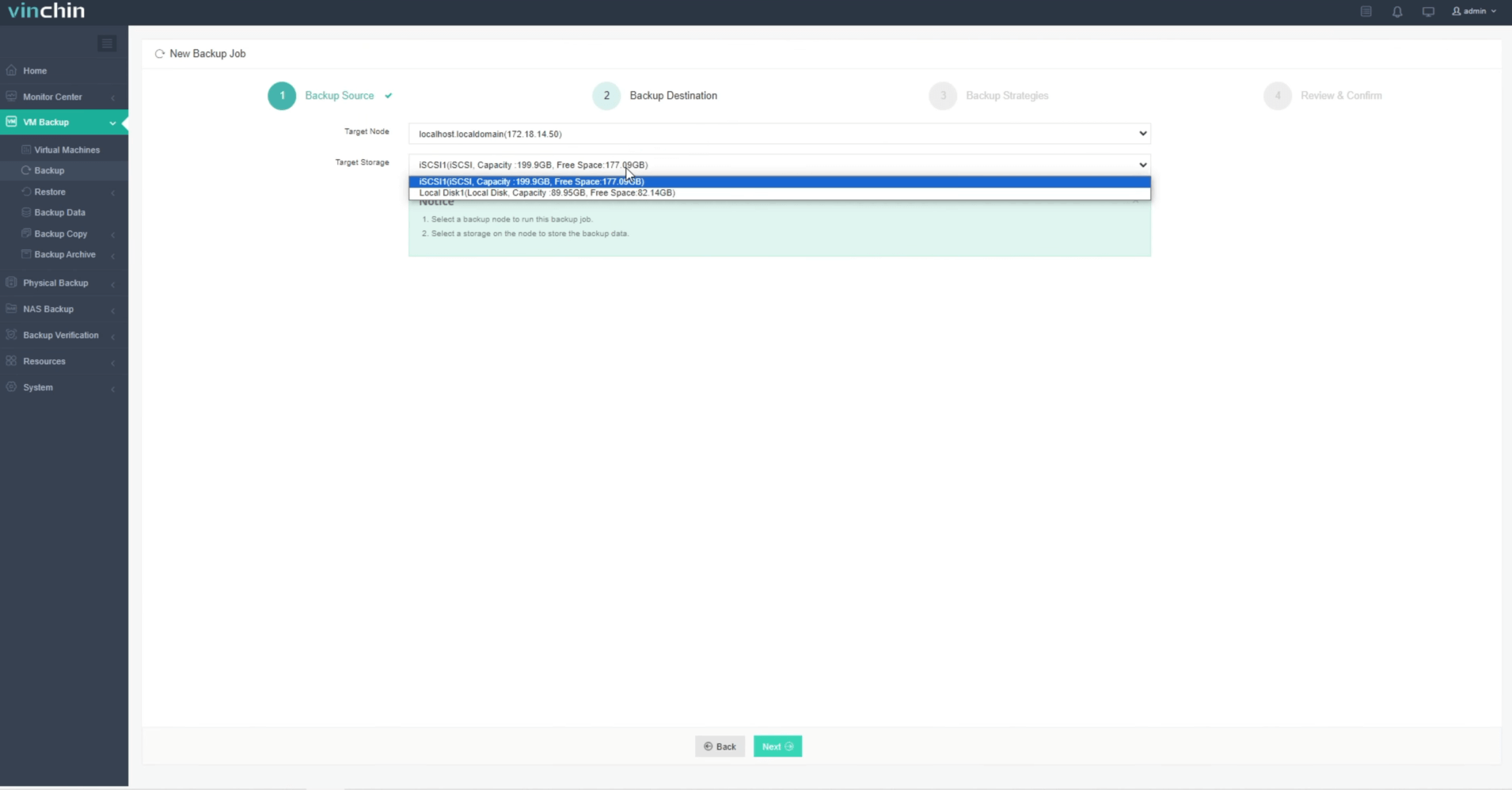
Step 3: Configure the desired backup strategy.

Step 4: Submit the job.
Trusted worldwide by thousands of organizations with top ratings in enterprise data protection software reviews—try Vinchin Backup & Recovery free for 60 days (full-featured). Click below to download now!
Best Sangfor HCI Backup Software FAQs
Q1: Why is centralized monitoring important in multi-cluster environments?
Centralized monitoring ensures consistent policy enforcement and rapid issue detection across all clusters—minimizing risk of data loss or non-compliance.
Q2: Can centralized dashboards scale with additional clusters?
Yes; leading solutions are designed to scale seamlessly as your infrastructure grows without degrading performance or manageability.
Q3: How does centralized monitoring improve compliance?
It consolidates audit trails and reporting from all clusters into one interface—streamlining regulatory checks such as GDPR reviews and internal audits efficiently without manual aggregation efforts required previously by siloed systems.
Q4: Does centralized monitoring increase security risks?
No; modern solutions use strong authentication methods along with role-based access controls following best practices such as NIST's principle of least privilege, maintaining robust security while simplifying oversight.
Conclusion
Centralized monitoring boosts resilience while simplifying compliance tasks across multi-cluster environments—with SCP delivering unified control for Sangfor HCI deployments alongside Vinchin’s advanced enterprise-grade protection capabilities supporting superior outcomes everywhere you operate.









