Modern enterprise IT environments rely on virtualization for agility and scalability. H3C CAS (Cloud Automation System) and UIS (Unified Infrastructure System) are popular platforms for building private clouds and unified data centers. As organizations grow, managing backup operations across multiple clusters becomes complex. Centralized monitoring is vital for ensuring data protection, compliance, and operational efficiency in these distributed environments.
Why Centralized Monitoring Matters in Enterprise Environments?
Centralized monitoring provides a single point of oversight for all backup activities across H3C CAS/UIS clusters. This approach helps organizations maintain consistent protection policies, detect issues quickly, and streamline compliance reporting—even as their infrastructure expands across sites or business units.
● Unified Visibility Reduces Risk: Without centralized monitoring, IT teams may overlook failed backups or configuration drift between clusters. This can lead to unprotected workloads or inconsistent recovery points. A unified dashboard ensures every cluster’s status is visible at a glance.
● Consistent Policy Enforcement: Backup policies often vary when managed separately per cluster. Centralized monitoring enforces uniform schedules, retention rules, and security settings across all environments—reducing human error and supporting regulatory requirements.
● Faster Incident Response: When an issue arises—such as a failed backup job or storage shortage—centralized systems trigger alerts instantly. Teams can respond before problems escalate into outages or data loss events.
● Simplified Compliance Reporting: Regulatory audits demand proof of regular backups and successful restores. Centralized monitoring consolidates logs from every cluster into one location, making evidence collection straightforward during audits.
Centralized monitoring transforms backup management from reactive troubleshooting to proactive control—a necessity for enterprises operating at scale.
How To Choose The Best H3C CAS/UIS Backup Solution for Centralized Monitoring
Selecting the right backup solution requires careful evaluation of features that support multi-cluster oversight while scaling with your environment’s growth. Consider how well each tool integrates with existing workflows and supports your organization’s recovery objectives.
● Multi-Cluster Visibility From One Interface: Solutions should offer a single web console where administrators monitor all clusters' backup jobs, health status, alerts, and reports without switching contexts. This reduces operational overhead as you add new sites or virtual machines.
● Scalability For Growing Environments: As your infrastructure expands—whether adding dozens of VMs or deploying new clusters—the backup system must maintain performance without bottlenecks. Look for solutions proven in large-scale deployments, supporting thousands of workloads if needed.
● Real-Time Alerting And Customizable Reporting: Effective solutions provide instant notifications via email/SMS when failures occur or thresholds are breached. Customizable reports help track trends over time and prepare audit-ready documentation tailored by cluster or business unit.
● Integration With Security And ITSM Tools: Seamless integration with identity management (LDAP/AD), access controls (RBAC), encryption standards (AES256+), and ticketing systems like ServiceNow streamlines operations while meeting compliance mandates.
● Support For Hybrid Or Cross-Site Deployments: Many enterprises operate both on-premises data centers and remote disaster recovery sites. The best solutions unify monitoring across locations—ensuring no workload is left behind regardless of physical site boundaries.
Evaluating tools against these criteria helps ensure your chosen solution meets both current needs and future growth scenarios—including Recovery Point Objective (RPO) / Recovery Time Objective (RTO) targets critical for business continuity planning.
Vinchin Backup & Recovery: Enterprise-Grade Protection for H3C CAS/UIS
To address advanced requirements beyond native tools, many enterprises turn to Vinchin Backup & Recovery—a professional enterprise-level virtual machine backup solution supporting most mainstream virtualization platforms including H3C CAS/UIS, VMware, Hyper-V, Proxmox, oVirt, OLVM, RHV, XCP-ng, XenServer, OpenStack, ZStack and more (15+ environments). For H3C CAS/UIS users seeking robust centralized monitoring across multiple clusters with scalable protection capabilities, this platform stands out among its peers.
Vinchin Backup & Recovery delivers essential features such as full/incremental/differential backups with deduplication and compression; LAN-free backup; forever-incremental strategies; granular restore; cloud/tape archive; V2V migration; GFS retention policy; throttling policy; strong encryption; multi-thread transmission—and more—all accessible through a unified web console designed specifically for large-scale enterprise needs.
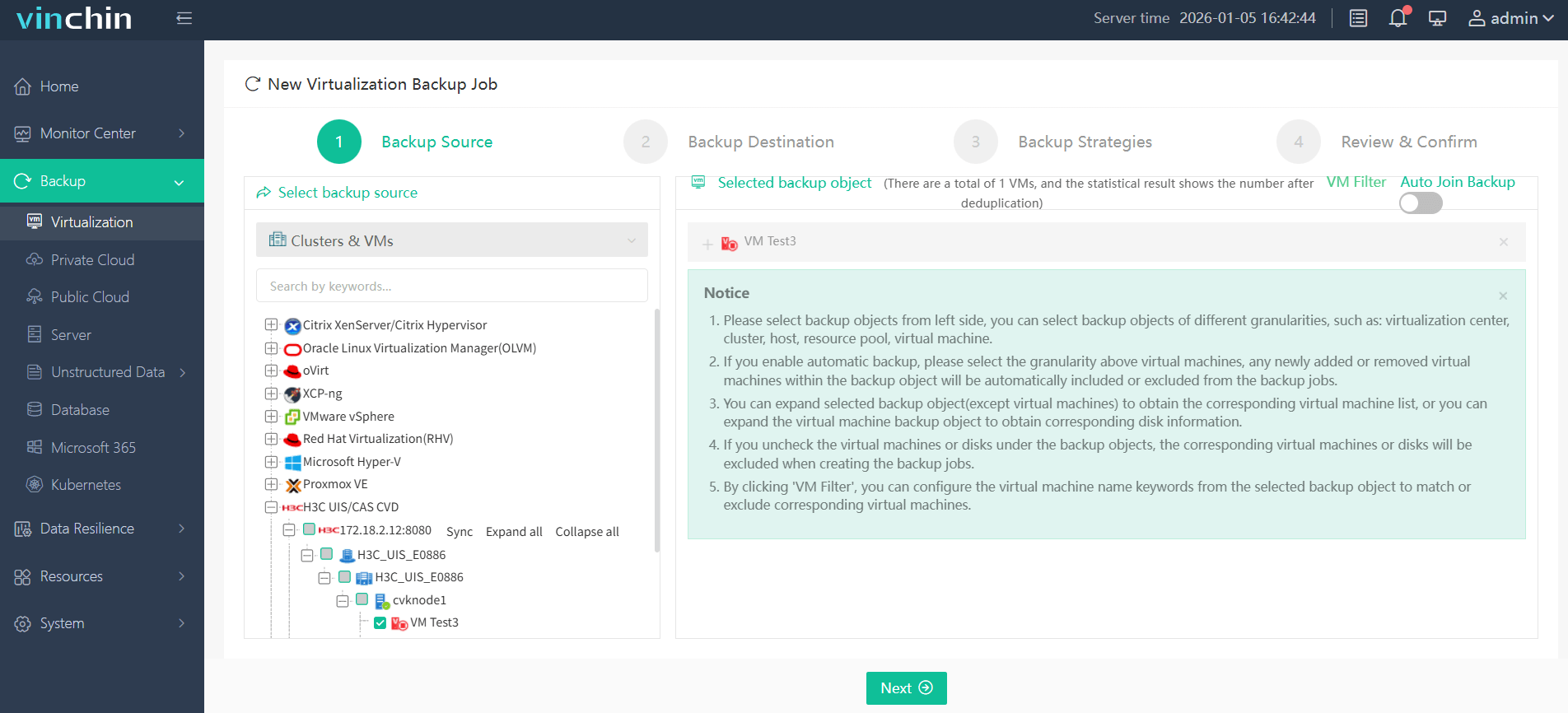
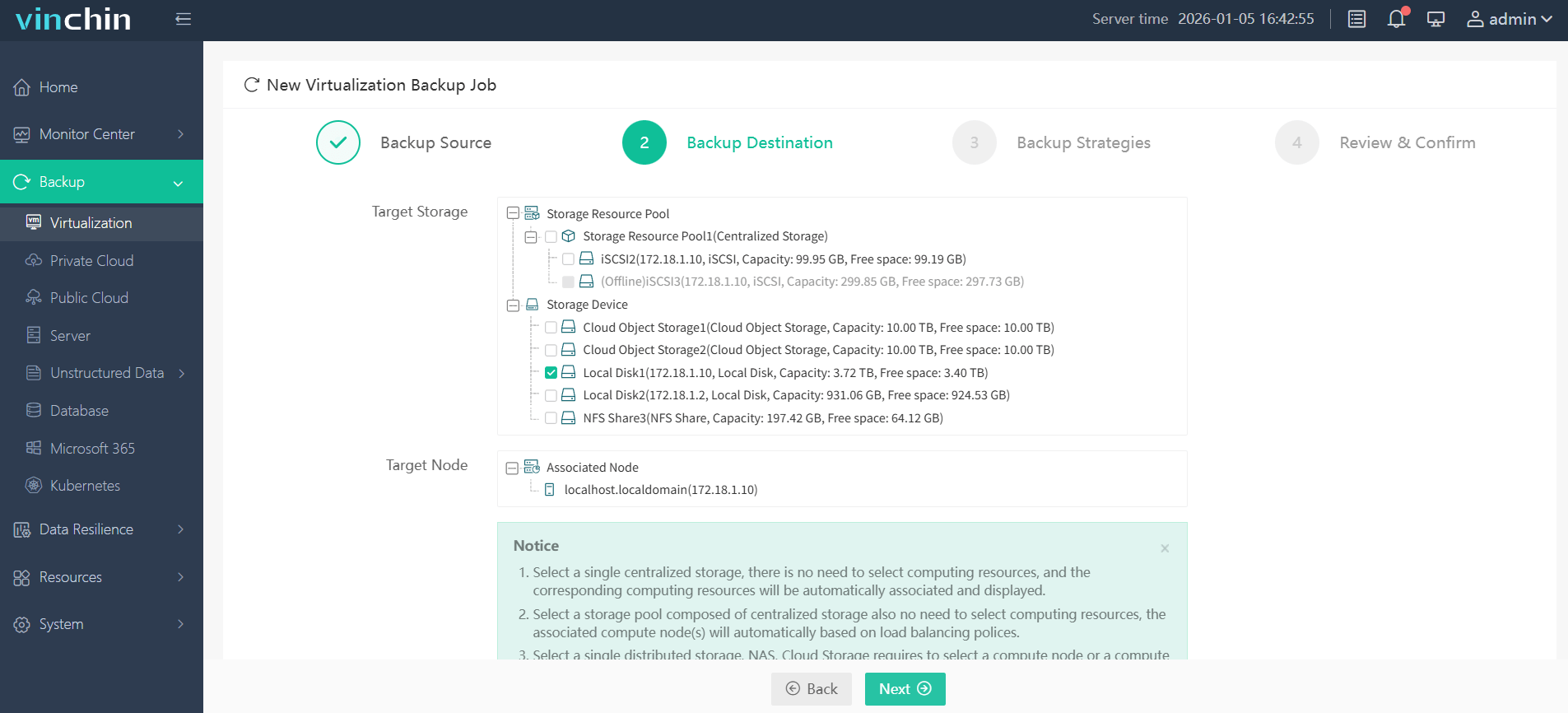
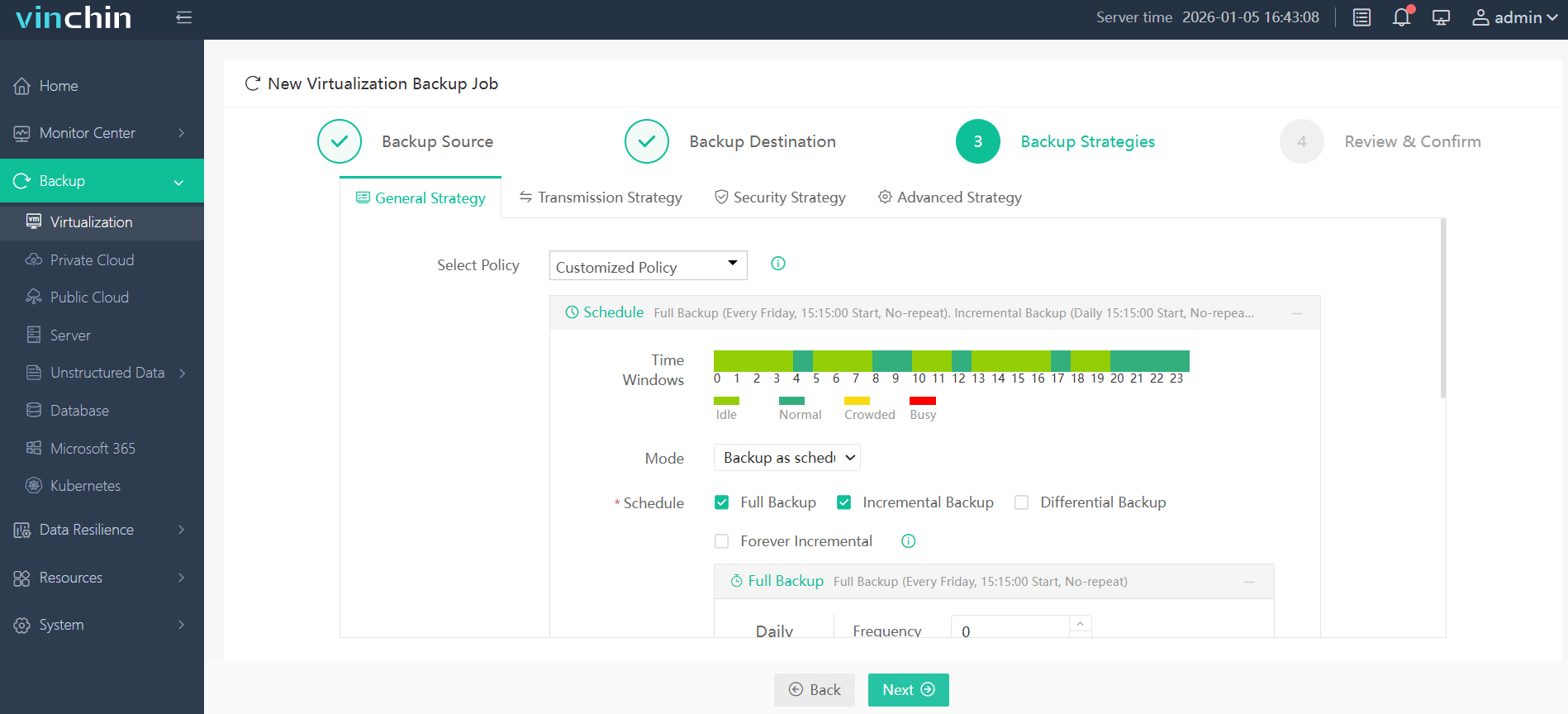
With Vinchin Backup & Recovery's intuitive web console interface backing up an H3C CAS VM takes just four steps:
Step 1: Select the H3C CAS / UIS VM to back up.
Step 2: Choose the target backup storage.
Step 3: Configure your preferred backup strategy.
Step 4: Submit the job—protection begins immediately based on your settings!
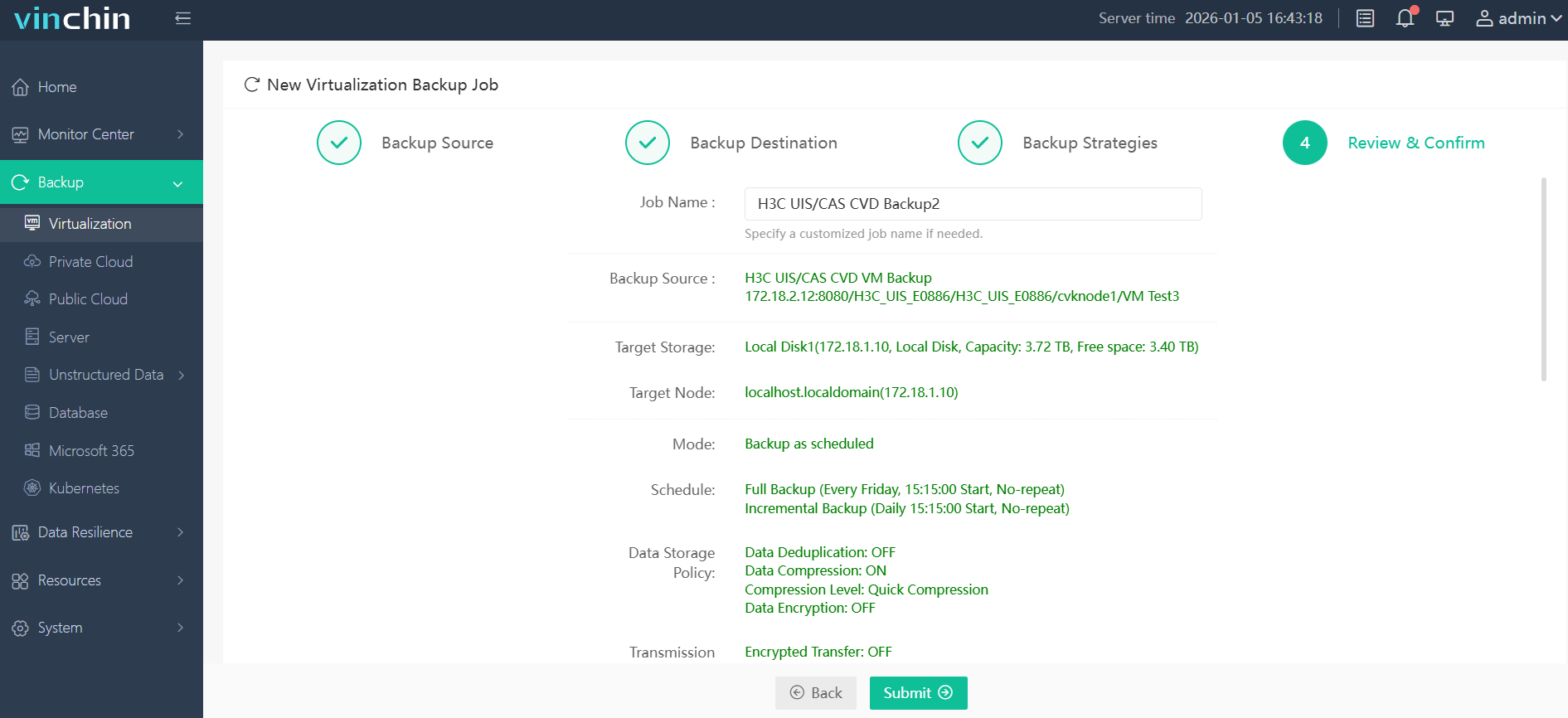
Recognized globally with top ratings among enterprise customers worldwide,Vinchin Backup & Recovery offers a fully featured 60-day free trial—click below to experience industry-leading centralized protection firsthand!
Best H3C CAS/UIS Backup Software FAQs
Q1: Does centralized monitoring support cross-site or hybrid deployments?
Yes; leading solutions enable unified oversight across on-premises datacenters as well as remote DR sites within one dashboard view—even when network topologies differ between locations.
Q2: How does centralized monitoring impact compliance audits?
It streamlines evidence collection by consolidating logs/reports from all managed clusters into one repository—making it easy to demonstrate adherence during regulatory inspections without manual collation efforts required by legacy tools.
Q3: Can alerts be customized per cluster/policy?
Yes; advanced platforms allow fine-tuning notification rules based on workload type/severity level/business priority so only relevant stakeholders receive actionable messages tailored precisely according their responsibilities/job function scope.
Conclusion
Centralized monitoring empowers IT teams with proactive control over multi-cluster backups—cutting costs tied to manual checks while reducing risks linked with missed SLAs/compliance gaps throughout growing hybrid infrastructures.