If you’re responsible for keeping databases available while managing containerized infrastructure, you know the stakes are high. Running Postgres in Kubernetes can boost flexibility and automation—but it also brings new challenges around storage management, networking, and security. This guide walks through deploying Postgres on Kubernetes using two main approaches: Helm charts and StatefulSets. We’ll explore benefits, pitfalls to avoid, production tips, monitoring basics—and how to keep your data safe with Vinchin backup solutions.
What Is Postgres on Kubernetes?
Postgres on Kubernetes means running PostgreSQL inside containers managed by a Kubernetes cluster instead of directly on VMs or physical servers. This shift lets you use modern orchestration tools—like StatefulSets for stable identities or PersistentVolumeClaims for durable storage—to automate scaling and recovery.
Kubernetes offers features such as liveness/readiness probes (for health checks), resource limits (to prevent noisy neighbors), rolling updates (for zero-downtime upgrades), Secrets (for credential management), and Service objects (for stable access). These make database operations more predictable—even as workloads grow or move across environments.
Traditional vs Kubernetes Deployment: Quick Comparison
| Feature | Traditional VM/Postgres | Postgres on Kubernetes |
|---|
| Scaling | Manual | Automated |
| Failover | Manual intervention | Self-healing/rescheduling |
| Storage Management | OS-level disks | PersistentVolumeClaims |
| Configuration | Static files | Declarative YAML |
| Upgrades | Downtime likely | Rolling updates |
Kubernetes brings cloud-native agility to database ops—but also requires new skills around containerization and cluster management.
Method 1: Deploying Postgres with Helm
Helm is the package manager for Kubernetes—it bundles all resources needed to deploy complex apps like Postgres into reusable charts. With Helm charts, you can launch a full-featured database stack using just one command line entry point.
Before starting:
Ensure your cluster is up
Install the latest Helm CLI
Decide which namespace you want to use
Here’s how to get started:
1. Add the Helm repository
Add a repository containing the latest Postgres chart:
   helm repo add bitnami https://charts.bitnami.com/bitnami
   helm repo update
2. Install the chart
If deploying in a new namespace:
   kubectl create namespace postgres-demo
   helm install my-postgres bitnami/postgresql --namespace postgres-demo --create-namespace \
     --set auth.username=myuser \
     --set auth.password=mypassword \
     --set auth.database=mydatabase
This creates Pods with attached PersistentVolumeClaims plus a Service endpoint—all configured from values you set above.
3. Check deployment status
Use:
kubectl get pods -n postgres-demo
Look for my-postgres-0 showing STATUS as Running before proceeding further.
4. Connect locally
Forward port 5432 from your service:
kubectl port-forward svc/my-postgres-postgresql 5432:5432 -n postgres-demo
Then connect using any standard PostgreSQL client at localhost:5432.
Method 2: Deploying Postgres with StatefulSets
StatefulSets provide fine-grained control over stateful applications like databases by giving each Pod its own identity—and ensuring persistent storage survives restarts or rescheduling events.
Let’s walk through deploying vanilla PostgreSQL using native YAML manifests:
1. Create PersistentVolumeClaim
apiVersion: v1
kind: PersistentVolumeClaim
metadata:
  name: postgres-pvc
spec:
  accessModes:
    - ReadWriteOnce
  resources:
    requests:
      storage: 10Gi
Apply it with
kubectl apply -f postgres-pvc.yaml
2. Store credentials securely
apiVersion: v1
kind: Secret
metadata:
  name: postgres-secret
type: Opaque
data:
  POSTGRES_PASSWORD: <base64-password>
Replace <base64-password> with your base64 encoded password string.
Apply it using
kubectl apply -f postgres-secret.yaml
3. Define StatefulSet
apiVersion: apps/v1
kind: StatefulSet
metadata:
  name: postgres-db-set
spec:
  serviceName: "postgres"
  replicas: 1 # Increase if setting up replication later!
  selector:
    matchLabels:
      app: postgres-db-set
  template:
    metadata:
      labels:
        app: postgres-db-set
    spec:
      containers:
      - name: postgres-container
        image: postgres:15 # Update version as needed!
        envFrom:
        - secretRef:
            name: postgres-secret
        ports:
        - containerPort: 5432
          name: pgsql-port
        volumeMounts:
        - mountPath:/var/lib/postgresql/data
          name : pgdata-volume
      volumes : []
volumeClaimTemplates :
- metadata :
    name : pgdata-volume
spec :
    accessModes : [ "ReadWriteOnce" ]
    resources :
      requests :
        storage :10Gi
Apply this manifest using
kubectl apply -f statefulset.yaml
4. Expose Service
apiVersion:v1
kind :Service
metadata :
    name :postgres-service
spec :
    clusterIP :None
    selector :
       app :postgres-db-set
    ports :
       – port :5432
         targetPort :pgsql-port
         protocol :TCP
         name :"pgsql-port"
Apply it via
kubectl apply –f service.yaml
5 .Connect
Use port-forwarding as before—or expose externally via LoadBalancer if needed.
Why Run Postgres on Kubernetes?
Running databases in containers isn’t just hype—it solves real problems:
You gain unified tooling across apps/databases; automate failover/self-healing; scale clusters up/down easily; migrate workloads between clouds without major rewrites; recover quickly after hardware failures thanks to declarative configs.
But there are trade-offs too! You must learn about persistent volume provisioning/storage classes; handle network policies/firewalls carefully; plan backups/restores differently than classic setups.
Considerations & Limitations
Not every workload fits well here:
High-performance OLTP databases may need bare-metal disks—not shared cloud volumes.
Network latency can increase if pods move between nodes often.
Operational complexity rises—you need solid CI/CD pipelines plus regular testing of failover/backups.
Some legacy applications expect static IP addresses—not dynamic endpoints provided by Services!
When Does It Make Sense?
Postgres Kubernetes shines when you want rapid scaling/testing environments—or when managing many small DB instances per team/project makes sense.
It’s less ideal if ultra-low-latency/high-throughput is required—or where regulatory compliance demands fixed infrastructure.
How to Protect Kubernetes with Vinchin Backup & Recovery?
After establishing your Postgres Kubernetes environment, robust data protection becomes critical for operational continuity and compliance requirements. Vinchin Backup & Recovery stands out as an enterprise-level solution purpose-built for comprehensive Kubernetes backup scenarios—including full/incremental backups, granular restore options at various levels (cluster, namespace, application, PVC), policy-based scheduling and retention controls, cross-cluster/cross-version recovery capabilities, and high-speed concurrent backup streams optimized for large-scale persistent volumes. These features together ensure reliable disaster recovery readiness while minimizing administrative overhead through automation and intelligent resource utilization.
The intuitive web console of Vinchin Backup & Recovery streamlines backup operations into four straightforward steps tailored specifically for Kubernetes environments:
Step 1. Select the backup source

Step 2. Choose the backup storage
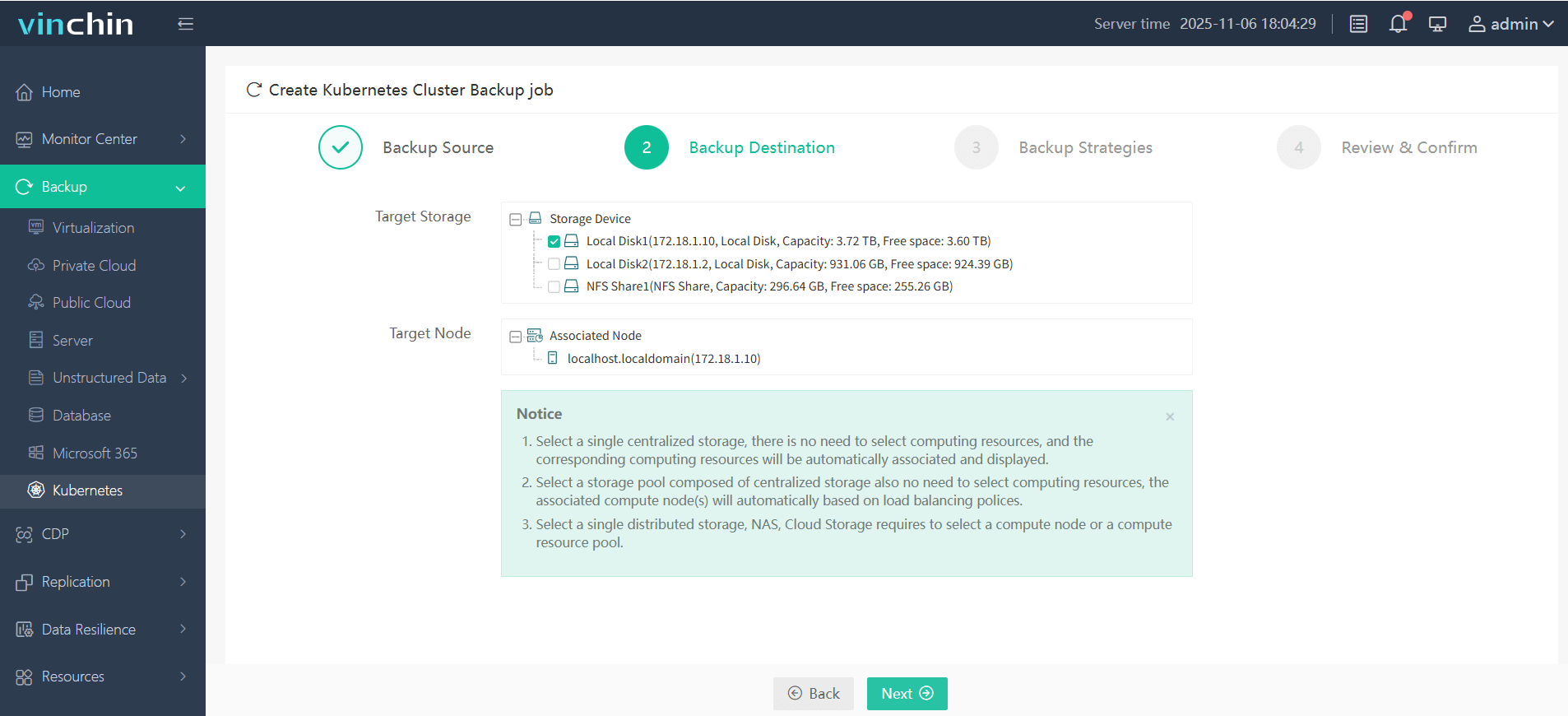
Step 3. Define the backup strategy
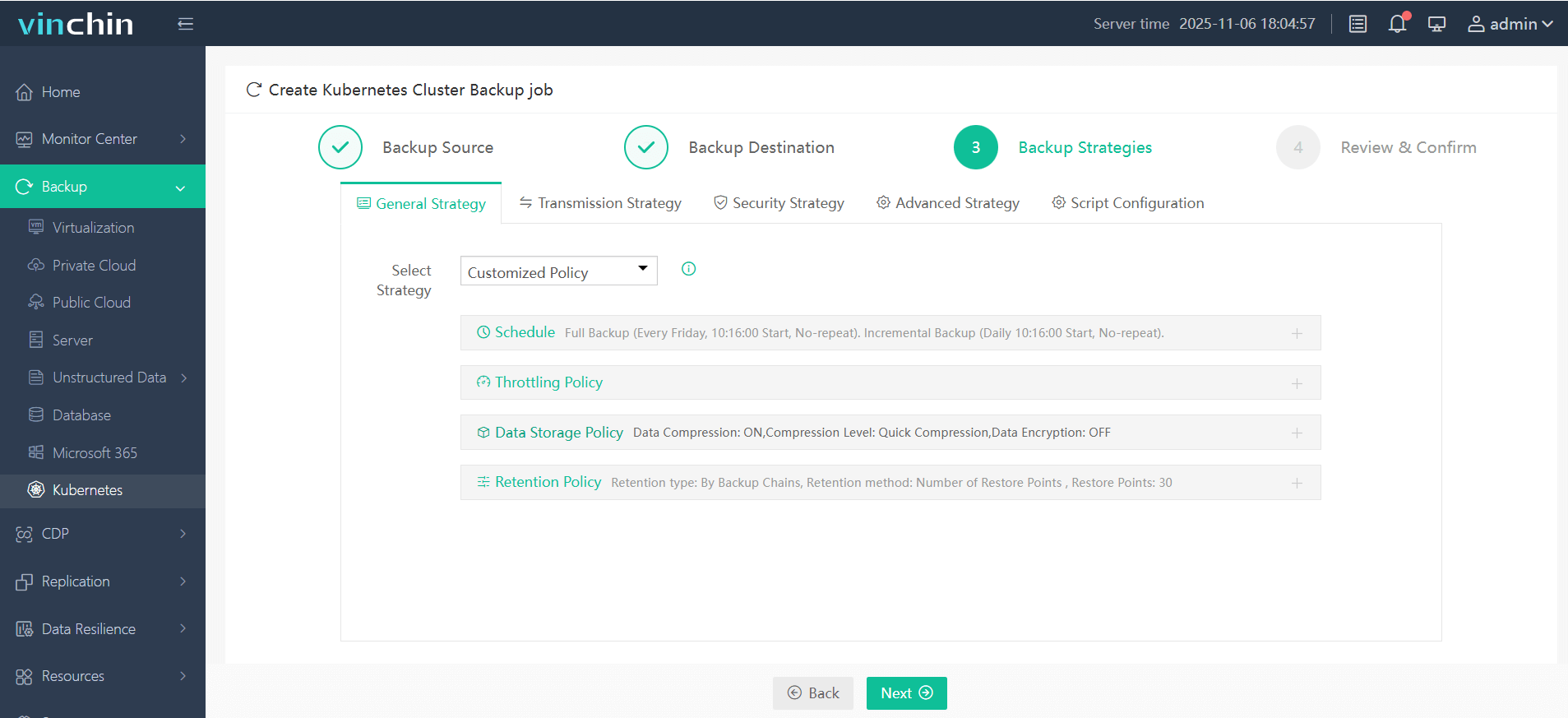
Step 4. Submit the job
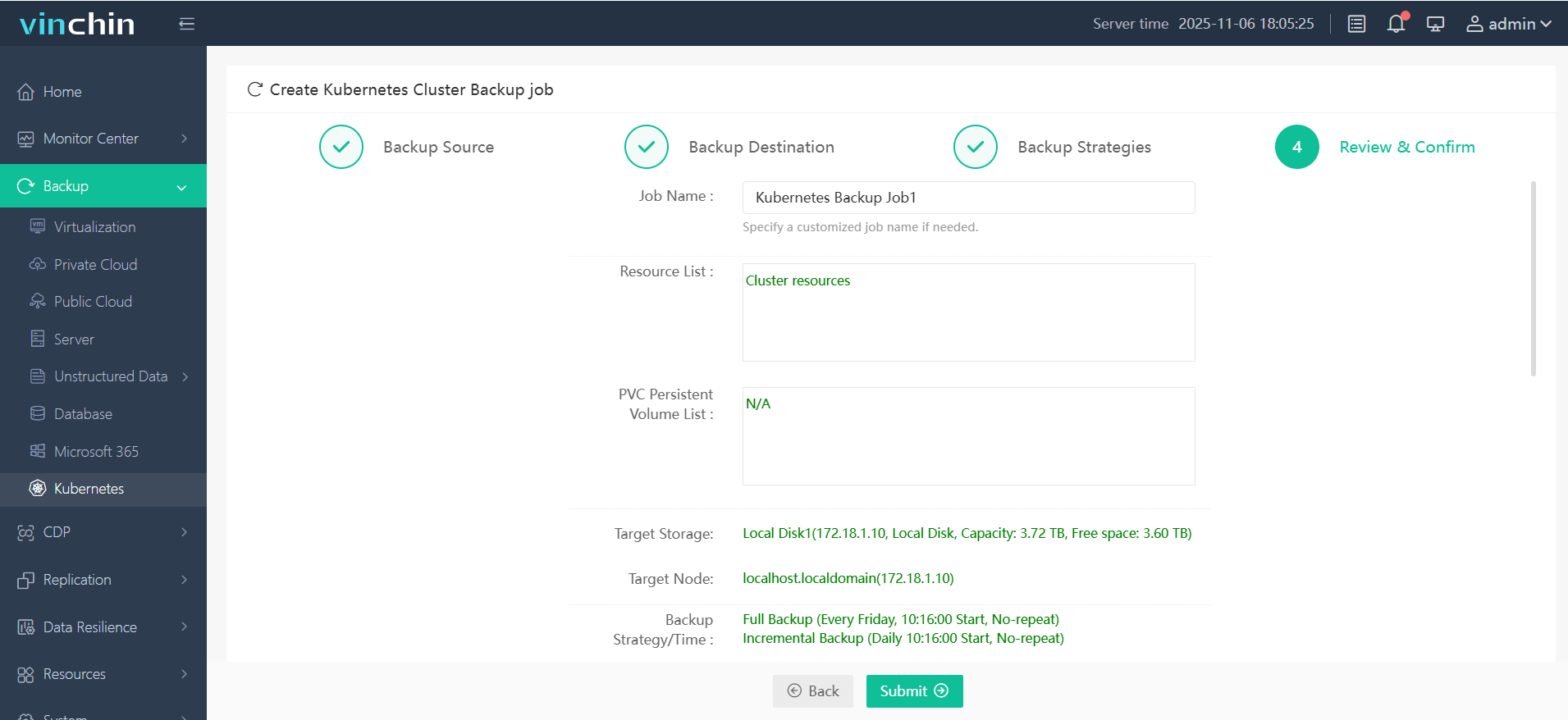
Trusted globally by enterprises of all sizes—with top ratings from industry analysts—Vinchin Backup & Recovery offers a fully featured free trial valid for sixty days; click below to experience seamless data protection firsthand!
Postgres Kubernetes FAQs
Q1. How do I select an optimal StorageClass for my production workload?
A1. Benchmark candidate StorageClasses first using fio within test pods—choose one offering low latency/high throughput that matches budget constraints; always test failover scenarios too!
Q2. What are best practices for monitoring my deployed database?
A2. Enable built-in metrics exporters during install then scrape them via Prometheus/Grafana dashboards—track connection counts/disk usage/query times/error rates regularly!
Q3. How do I rotate credentials stored in Secrets without downtime?
A3. Create new Secret → patch StatefulSet/envFrom reference → rollout restart Pods → verify connections succeed → delete old Secret.
Conclusion
Running Postgres on Kubernetes gives operations teams powerful automation tools but demands careful planning around storage performance/security/backups too! Whether you prefer Helm simplicity or StatefulSet control always protect critical data—with solutions like Vinchin making robust backups easy from day one!










