Hyper-V backup tools that integrate with virtualization management consoles help enterprises manage data protection more efficiently. This integration brings centralized control and automation to backup operations. It reduces manual steps and supports faster recovery. For organizations running large virtual environments, seamless integration is a key factor when choosing a backup solution.
Centralized management through console integration helps IT teams enforce policies across all virtual machines (VMs). It also improves compliance by making sure every VM follows company standards. Integration minimizes human error and streamlines workflows for better operational efficiency.
Why Integration with Virtualization Management Consoles Matters in Enterprise Environments?
Integration between backup tools and virtualization management consoles is vital for modern enterprise IT. When these systems work together, they simplify daily tasks for administrators. The result is improved reliability and reduced risk of mistakes during critical operations.
● Centralized Control allows IT teams to manage backups from the same interface used for other virtualization tasks. This unified approach means less time spent switching between different tools or dashboards. According to Microsoft’s best practices, centralizing tasks increases productivity while reducing complexity.
● Consistent Policy Enforcement ensures that backup schedules, retention rules, and access controls are applied uniformly across all VMs. Without this consistency, some workloads may be left unprotected or not meet compliance requirements set by regulations like GDPR or HIPAA.
● Reduced Administrative Overhead comes from automating routine tasks such as scheduling backups or monitoring job status within a single pane of glass. Automation lowers the chance of missing important steps during configuration or maintenance.
● Faster Incident Response becomes possible because administrators can quickly check backup status or launch restores without navigating multiple interfaces. During outages or cyber incidents like ransomware attacks, speed is crucial for minimizing downtime.
● Improved Auditability results from having detailed logs available in one place. This makes it easier to track who performed which actions on which VMs—an essential requirement for regulated industries.
By integrating backup solutions directly into virtualization management consoles such as Hyper-V Manager or System Center Virtual Machine Manager (SCVMM), organizations gain greater visibility into their infrastructure’s health and data protection status.
How To Choose The Best Hyper-V Backup Solution for Integration with Virtualization Management Consoles?
Selecting a Hyper-V backup tool that integrates well with your virtualization management console requires careful evaluation of several factors beyond basic compatibility. Deep integration delivers real benefits only if it matches your organization’s scale and security needs.
Start by confirming native support for Hyper-V APIs or SDKs within the backup tool. Native integration enables direct communication between your backup software and Hyper-V hosts/clusters through secure channels rather than relying on scripts or manual exports/imports.
Assess whether the solution provides role-based access control (RBAC) so you can assign permissions based on user roles within your team structure. RBAC helps prevent unauthorized changes to critical settings while supporting separation of duties—a common audit requirement in enterprise environments.
Evaluate scalability features by checking if the tool supports distributed architectures capable of handling hundreds or thousands of VMs without performance bottlenecks. Some native tools may struggle at scale due to database limitations or lack of parallel processing capabilities; third-party solutions often address these gaps with optimized engines designed specifically for large deployments.
Look at auditability options such as comprehensive logging—can you easily generate reports showing who ran backups/restores? Are failed jobs flagged clearly? These features are essential during compliance audits or incident investigations.
Finally, consider how well the tool adapts to changes in your environment—for example, does it automatically detect new VMs added via SCVMM? Can it follow live-migrated VMs across hosts without breaking policy assignments?
Vinchin Backup & Recovery: Enterprise-Grade Protection Integrated with Hyper‑V Management Consoles
For organizations seeking advanced protection integrated seamlessly with Microsoft Hyper‑V environments, Vinchin Backup & Recovery stands out as an enterprise-level virtual machine backup solution supporting 15+ mainstream platforms—including VMware, Proxmox VE, oVirt/RHV/OLVM, XCP-ng/XenServer, OpenStack, ZStack, Oracle Linux VM—and most importantly here: Hyper‑V itself. Its broad compatibility ensures consistent data protection across diverse infrastructures found in modern enterprises and service providers alike.
Key features relevant to Hyper‑V include agentless full/incremental/differential backups; scheduled automated jobs; data deduplication/compression; granular restore; cloud/tape archive; LAN-free backup; SpeedKit acceleration; instant recovery (on supported hypervisors); robust RBAC; GFS retention policy; throttling policy; multi-thread transmission; V2V migration; encryption; and comprehensive job verification—all designed to maximize efficiency while minimizing resource impact and administrative effort.
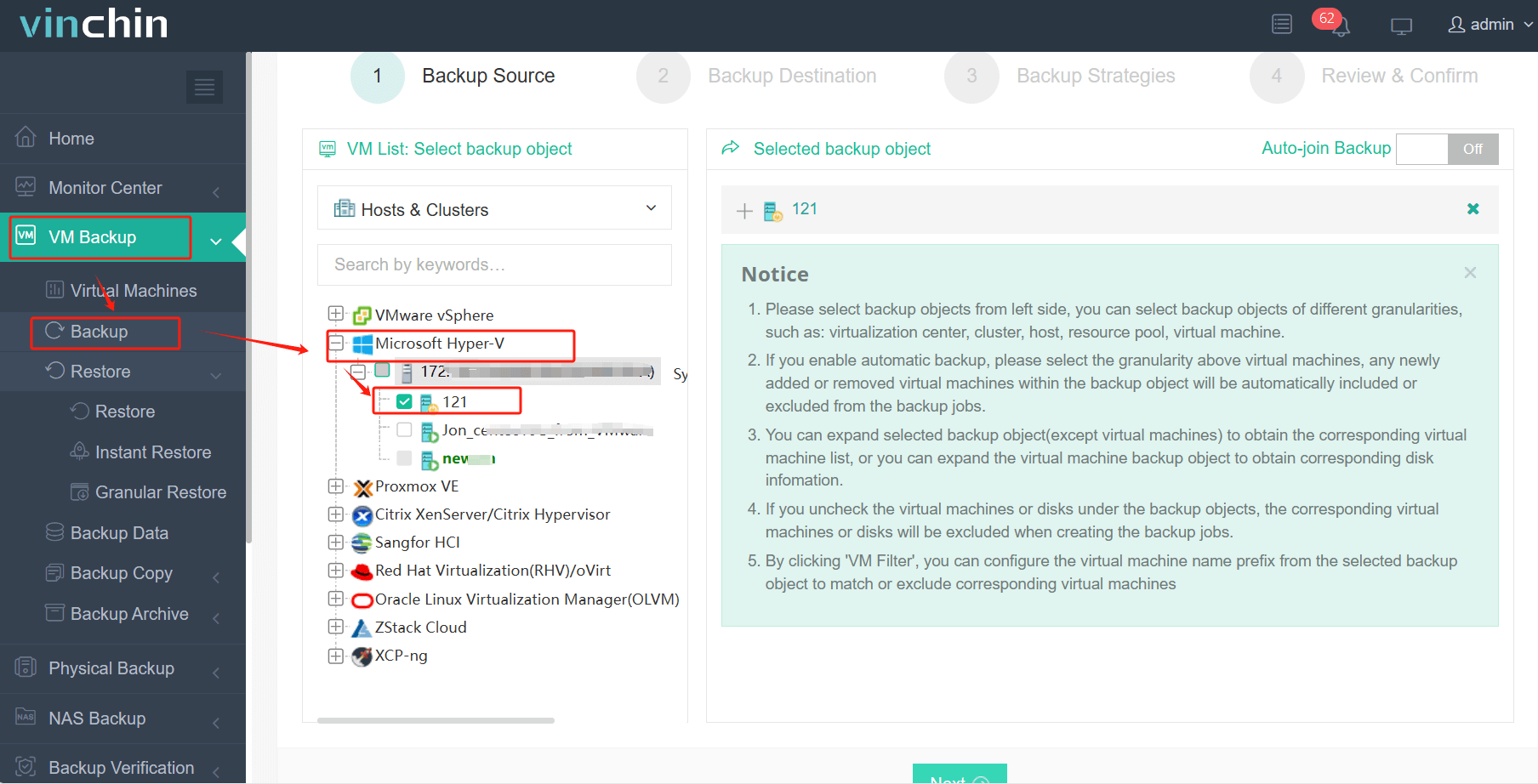
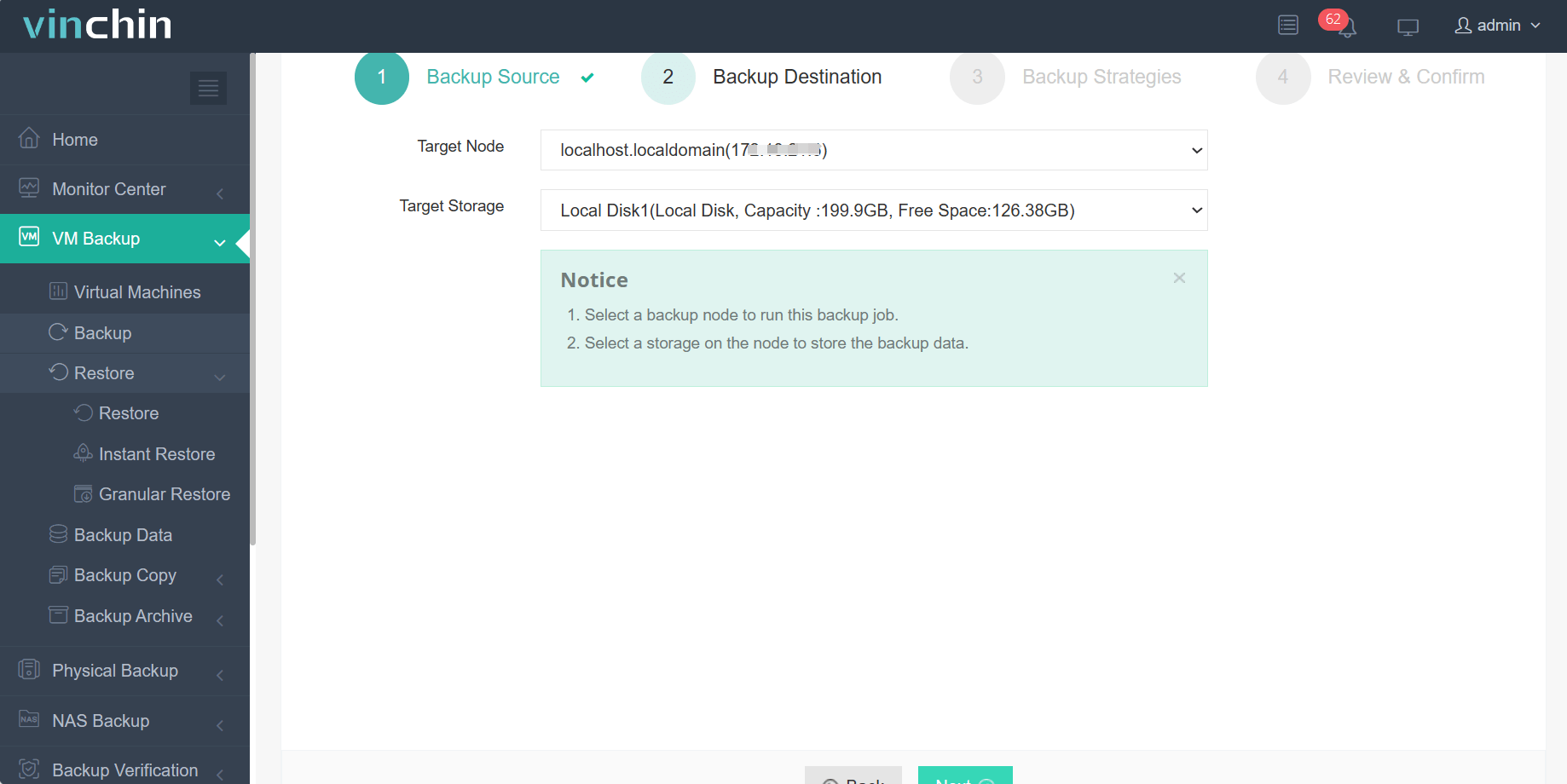
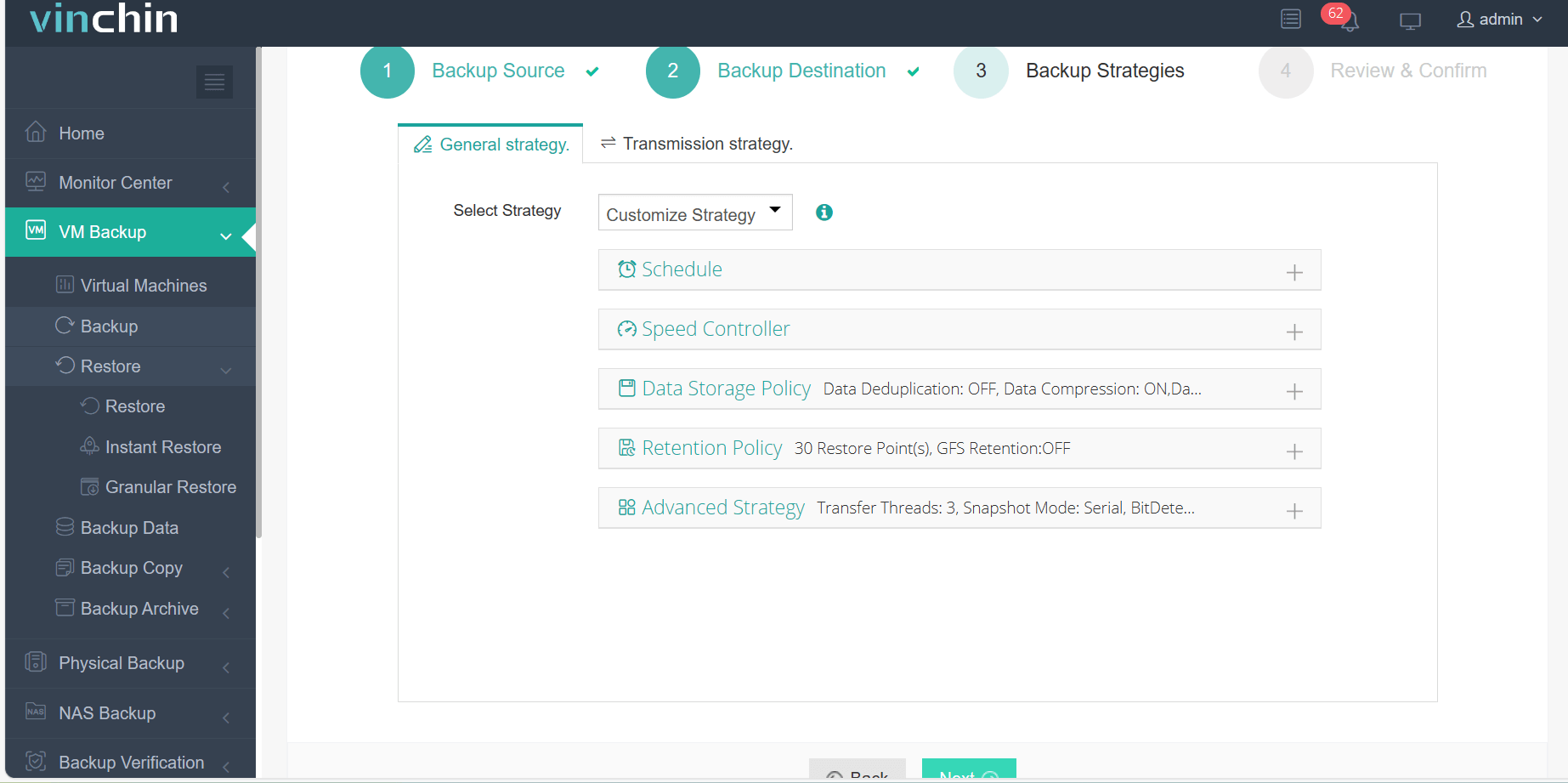
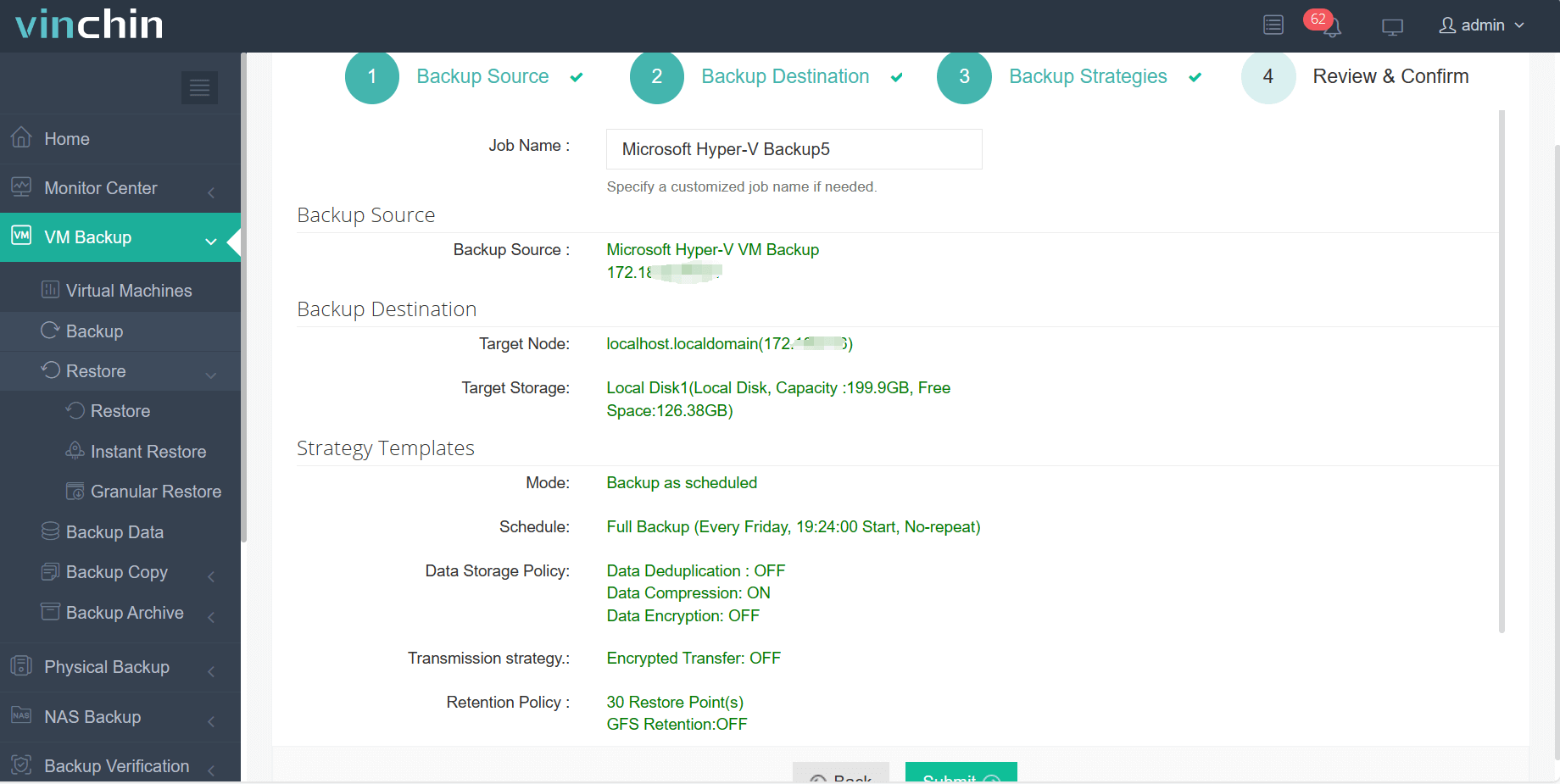
With Vinchin Backup & Recovery’s intuitive web console interface, backing up a Hyper‑V VM takes just four steps:
Step 1: Select the Hyper-V VM to back up.
Step 2: Choose the backup storage.
Step 3: Configure the backup strategy.
Step 4: Submit the job.
Recognized globally among enterprise users—with top ratings and strong customer adoption—Vinchin Backup & Recovery offers a 60-day full-featured free trial so you can experience its power firsthand before purchase.
Best Hyper-V Backup Software FAQs
Q1: Why is console integration important for Hyper-V backup?
It centralizes management within familiar interfaces which reduces errors improves oversight efficiency and simplifies daily operations across all protected workloads
Q2: Does console integration impact security or compliance?
Yes—it enforces consistent policies access controls retention rules across every workload helping meet regulatory requirements such as GDPR HIPAA SOX etc
Q3: Can integrated solutions scale easily as environments grow?
Enterprise-grade tools are designed with distributed architectures allowing them to protect hundreds/thousands of VMs while maintaining high performance levels
Q4: Will integrating backup disrupt existing workflows?
Properly integrated solutions enhance workflows by automating routine tasks providing unified dashboards thus reducing manual intervention not causing disruption
Q5: What are the advantages of agentless backup for Hyper-V?
Agentless architecture eliminates installation/configuration overhead per VM reduces resource consumption lowers maintenance effort decreases attack surface area improving overall system stability
Conclusion
Integrated Hyper-V backup streamlines operations reduces risk improves compliance reporting—and scales effortlessly alongside growing infrastructures Centralized control keeps data safe while simplifying day-to-day IT management









