Kubernetes has changed how we deploy applications. With Oracle Cloud Kubernetes—powered by Oracle Kubernetes Engine (OKE)—you get a managed platform that makes running containers in the cloud simple. Whether you are just starting out or already manage large clusters, OKE helps you scale fast while keeping control.
What is Oracle Cloud Kubernetes?
Oracle Cloud Kubernetes means using the managed Kubernetes service on Oracle Cloud Infrastructure (OCI), called Oracle Kubernetes Engine (OKE). OKE automates cluster setup, scaling, upgrades, and management. You focus on your workloads; Oracle manages the control plane behind the scenes. This service meets standards set by the Cloud Native Computing Foundation (CNCF) and supports both virtual machines and managed nodes.
OKE uses a shared responsibility model. The control plane—including API server, scheduler, controller manager—is fully managed by Oracle. You manage worker nodes that run your application pods. This separation lets you focus on deploying apps while relying on built-in security patches and high availability from OCI.
Why choose Kubernetes on Oracle Cloud?
Running Kubernetes on Oracle Cloud brings many advantages. OKE is fully managed—Oracle handles cluster upgrades and patching so you don’t have to worry about downtime during maintenance windows. Clusters can span multiple availability domains for high availability. Flexible node options let you pick between virtual machines or bare metal shapes depending on workload needs.
OKE also integrates tightly with other OCI services like Identity and Access Management (IAM), Container Registry for images, Block Storage for persistent volumes, Logging for audit trails, and Monitoring for real-time metrics. These integrations make it easier to build secure solutions that scale as your business grows.
For operations teams managing many clusters or complex environments, automation matters. OKE offers automated patching of master components so you always run supported versions without manual intervention. Built-in monitoring tools help track resource usage across clusters in real time. IAM integration enables fine-grained access controls—so only authorized users can create or modify resources within specific compartments.
Cost optimization is another benefit—you pay only for what you use thanks to flexible compute shapes and auto-scaling features that match resources to demand.
Method 1: Deploying OKE via Console
The Oracle Cloud Console gives an easy way to deploy clusters through a web interface. If you prefer visual workflows over command lines—or are new to cloud-native platforms—this method works well.
To deploy an OKE cluster using the Console:
1. Sign in to the Oracle Cloud Console
Go to cloud.oracle.com and log in with your credentials.
2. Create a compartment
In the navigation menu select Identity & Security, then Compartments
Click Create Compartment, enter a name/description, then click Create Compartment
3. Navigate to Container Clusters (OKE)
In navigation select Developer Services, then Container Clusters (OKE)
4. Create a new cluster
Click Create Cluster, choose either Quick Create or Custom Create
Most users start with Quick Create
5. Configure cluster details
Enter cluster name; select compartment; pick desired Kubernetes version
Set number of worker nodes; choose compute shape—note that larger shapes cost more but offer better performance
6. Set up networking
Let OKE create new network resources unless you need custom VCN/subnets
7. Review settings & create cluster
Double-check configuration; click Create Cluster
8. Access your cluster
When status shows Active click cluster name
Download kubeconfig file via Access Cluster > Download Config File
9. Use this config file with kubectl commands locally to manage workloads
This workflow gets most users up-and-running quickly—with minimal risk of misconfiguration since defaults follow best practices from OCI engineers.
Method 2: Deploying OKE via CLI
The OCI Command Line Interface (OCI CLI) provides powerful automation capabilities ideal for intermediate users who want repeatable infrastructure deployments—or need scripting flexibility beyond what GUI offers.
Before starting ensure OCI CLI is installed/configured.
To deploy an oracle cloud kubernetes cluster via CLI:
1. Make sure environment variables point at correct user profile (oci setup config)
2. Create compartment:
oci iam compartment create --name <compartment-name> --description "<description>" --compartment-id <parent-compartment-id>
3. Set up VCN/subnets:
oci network vcn create --compartment-id <compartment-id> --display-name <vcn-name> --cidr-block <cidr>
oci network subnet create --compartment-id <compartment-id> --vcn-id <vcn-id> --display-name <subnet-name> --cidr-block <subnet-cidr>
Ensure subnet CIDRs do not overlap other networks; open ports needed by worker nodes
4. Create K8s cluster:
oci ce cluster create --compartment-id <compartment-id> --name <cluster-name> --vcn-id <vcn-id> --kubernetes-version <version>
5. Add node pool:
oci ce node-pool create --compartment-id <compartment-id> \
--cluster-id <cluster-id> \
--name <node-pool-name> \
--node-shape VM.Standard.E3.Flex \
--node-image-id <image-id> \
--quantity-per-subnet 3 \
--subnet-ids '["<subnet1>", "<subnet2>"]'
6. Download kubeconfig:
oci ce cluster create-kubeconfig --cluster-id <cluster-id> \
--file $HOME/.kube/config \
--region <region>
7.Connect using kubectl get nodes
This approach gives full control over every parameter—and fits well into CI/CD pipelines where infrastructure changes must be tracked alongside code changes.
Method 3: Deploying OKE using Terraform
Terraform lets teams define infrastructure as code—increasing repeatability while reducing drift between environments over time.
This method suits advanced admins managing complex setups who want everything version-controlled alongside application codebases.
To deploy oracle cloud kubernetes clusters with Terraform:
1.Install Terraform binary plus oci provider plugin
Specify provider block like this:
provider "oci" {
 tenancy_ocid     = var.tenancy_ocid
 user_ocid        = var.user_ocid
 fingerprint      = var.fingerprint
 private_key_path = var.private_key_path
 region           = var.region
}
2.Define network resources including VCN/subnets/security lists/internet gateway/routing tables—all as separate resource blocks so they’re reusable later
Example security list allowing K8s API traffic:
resource "oci_core_security_list" "oke_api" {
 vcn_id = oci_core_vcn.main.id

 ingress_security_rules {
 protocol = "6"
 source = "0.0.0.0/0"
 tcp_options {
 min = 6443
 max = 6443
 }
 }
 # add egress rules as needed...
}
3.Declare oke_cluster resource specifying compartment/vcn/version/network details
4.Add oke_node_pool resource referencing above IDs/shapes/images/subnets
5.Initialize/apply configuration:
terraform init && terraform apply
6.Download kubeconfig after completion using outputted OCID value
7.Verify connectivity with kubectl get nodes
Terraform supports modules—so once written these files can be reused across projects saving hours per deployment cycle!
Protecting Your Kubernetes Environment with Vinchin Backup & Recovery
After successfully deploying oracle cloud kubernetes clusters, ensuring robust data protection becomes essential for business continuity and compliance needs alike. Vinchin Backup & Recovery stands out as an enterprise-level solution purpose-built for comprehensive backup and recovery of modern containerized workloads.
Vinchin Backup & Recovery delivers full backups, incremental backups, fine-grained restore options at namespace/application/PVC/resource levels, policy-based automation alongside one-off jobs, cross-cluster/cross-version recovery capabilities, encrypted transmission/storage support, intelligent scheduling features—and much more—to meet diverse operational requirements efficiently while minimizing risk of data loss or downtime.
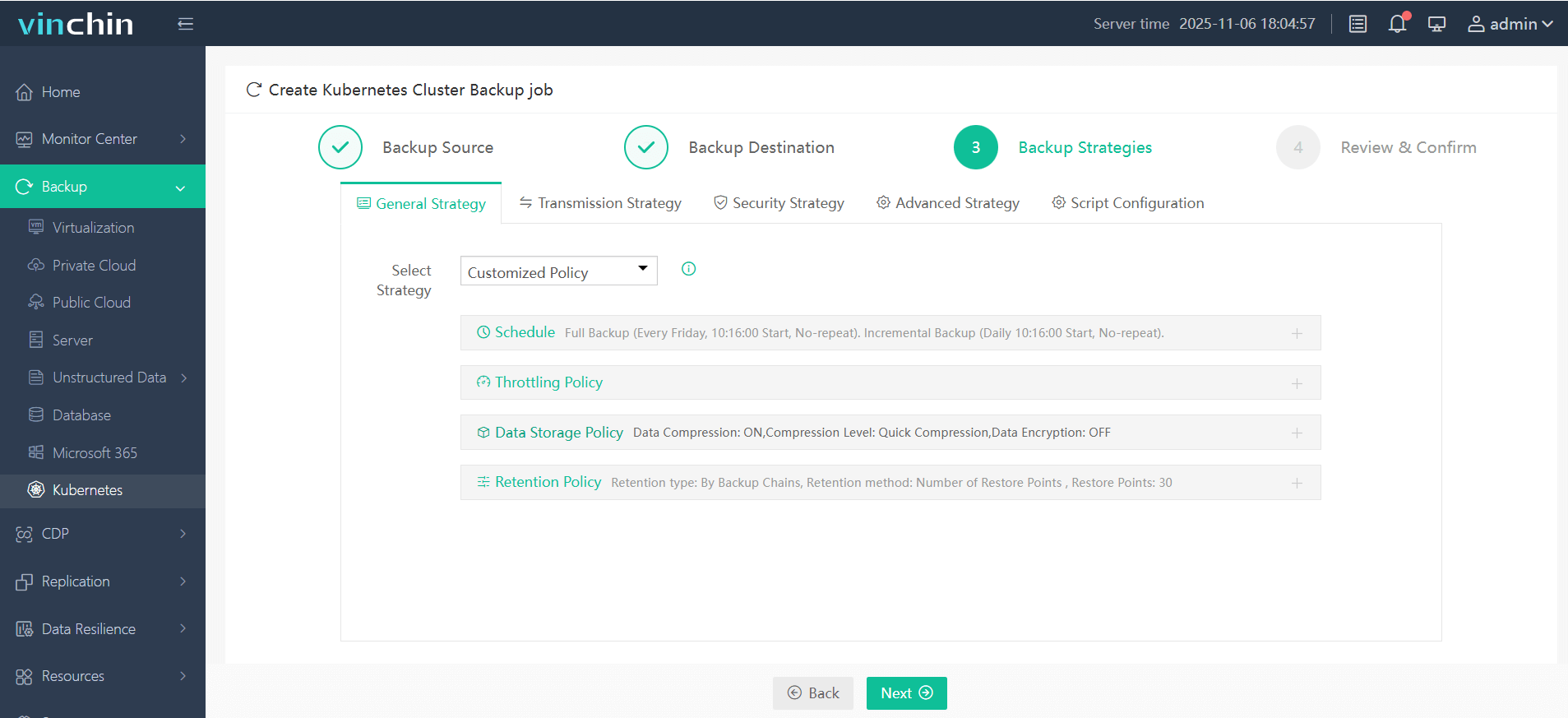
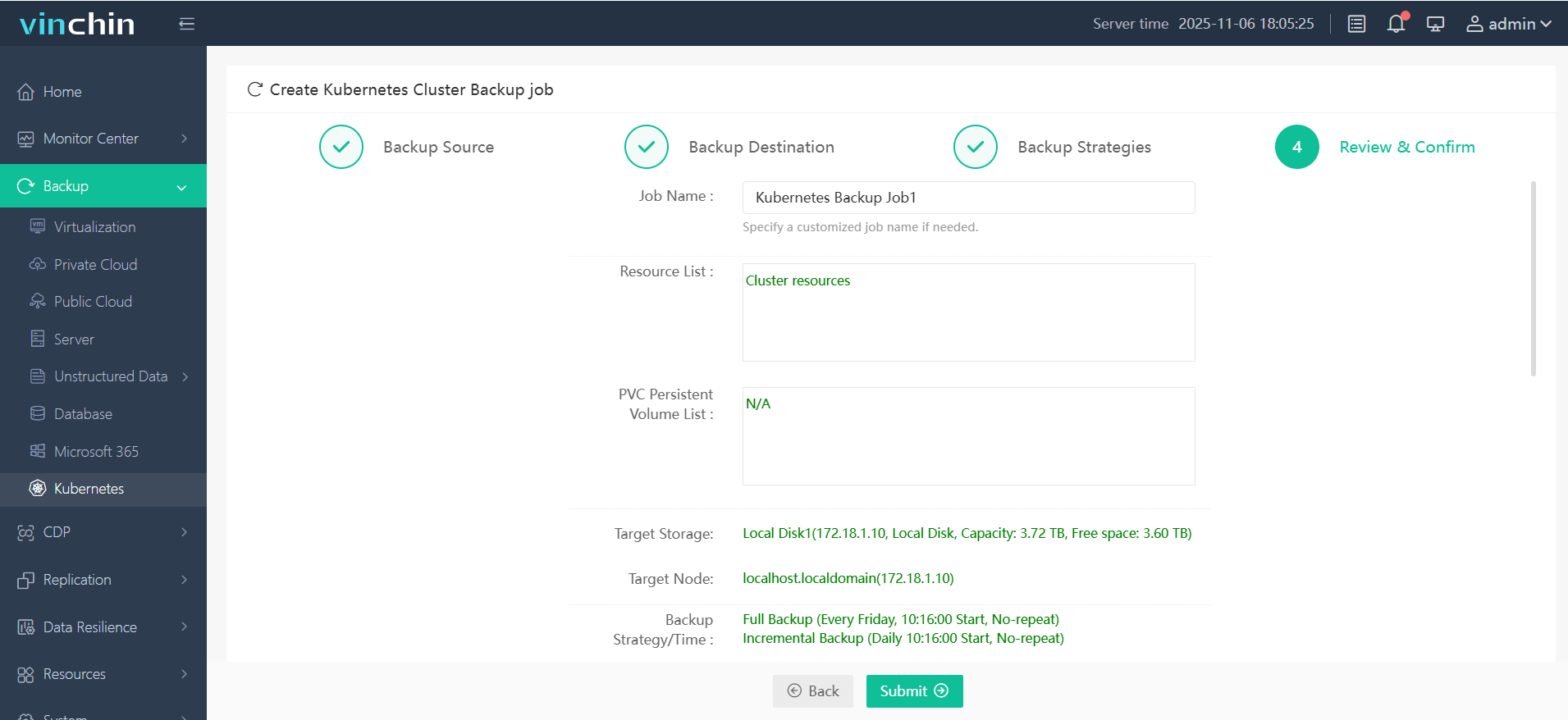
With its intuitive web console designed specifically for simplicity even at scale, protecting kubernetes workloads typically involves just four steps:
1. Select backup source;

2. Choose backup storage;
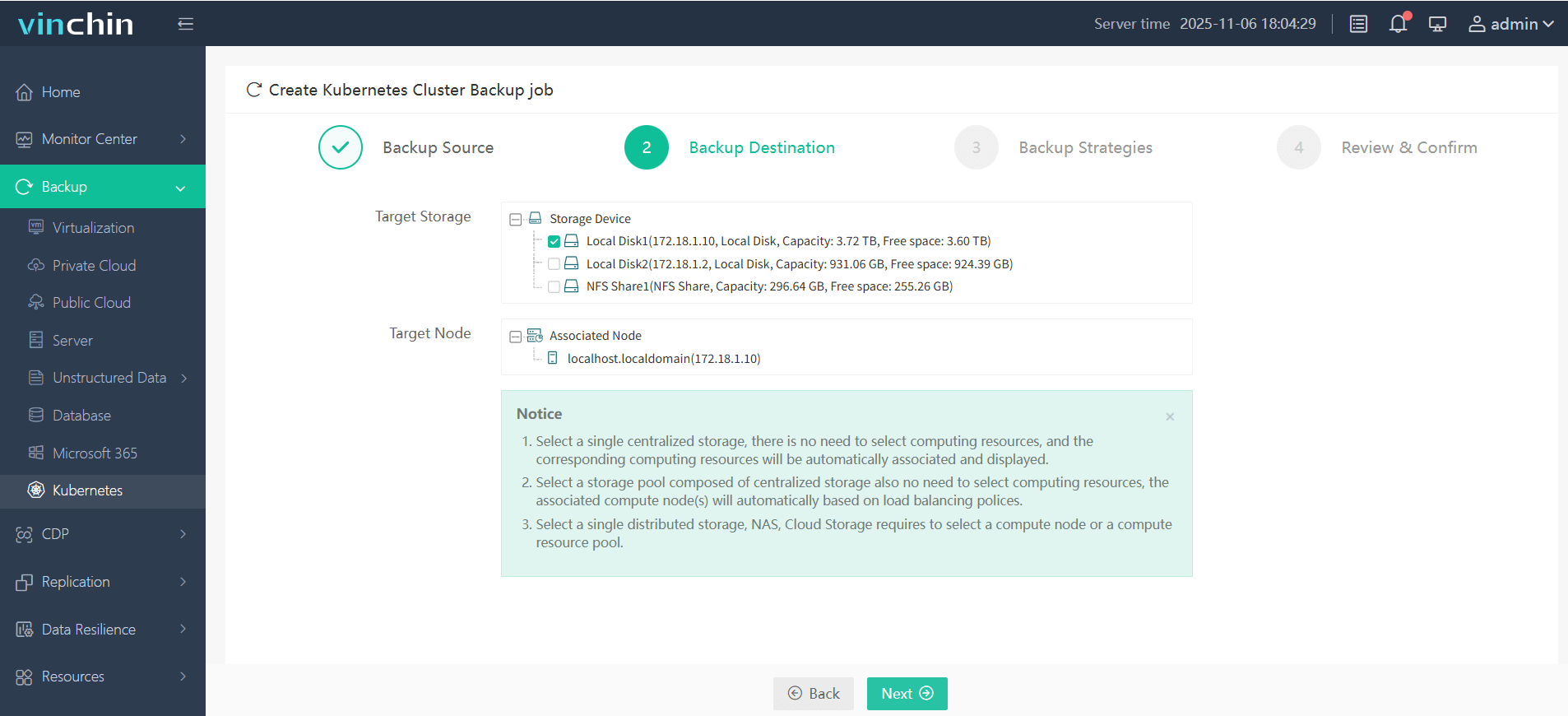
3. Define backup strategy;
4. Submit job.
Recognized globally among leading enterprises for reliability and innovation—and backed by top customer ratings—Vinchin Backup & Recovery offers a free 60-day trial with unrestricted access to all features so you can experience seamless kubernetes-native protection firsthand before making any commitment.
Oracle Cloud Kubernetes FAQs
Q1: How do I automate scaling node pools in my OKE environment?
A1: Use Auto Scaling Groups through Console under Node Pool settings—or update size programmatically via oci ce node-pool update command—or adjust count variable if managing pools through Terraform templates.
Q2: What should I check if my pods fail due to persistent volume errors?
A2: Confirm Block Volume attachments exist; review storage class parameters match available block types; check IAM permissions allow dynamic provisioning actions required by CSI driver components.
Q3: Can I restrict access so only certain users manage specific clusters?
A3: Yes, use IAM policies scoped at compartment level granting granular rights over Container Engine resources—including read/write/admin privileges per group/user role assignment.
Conclusion
Oracle Cloud Kubernetes simplifies container orchestration while offering robust integrations across OCI services. For enterprise-grade backup, Vinchin delivers seamless protection tailored specifically for modern workloads. Explore Vinchin’s free trial now—and keep every deployment safe no matter how fast you scale!











