Data volumes are exploding—and so are threats like ransomware. In this environment, organizations need reliable ways to protect their information. While cloud storage grabs headlines, many IT teams still trust lto tape backup as their last line of defense. Why? Because when disaster strikes or hackers lock down networks, only offline backups can guarantee recovery. Did you know some high-profile companies have avoided total data loss thanks to well-managed tape archives? Let’s explore why lto tape backup remains essential in today’s world.
What Is LTO Tape Backup?
LTO stands for Linear Tape-Open—a magnetic tape technology designed specifically for data storage and backup. Developed as an open standard by leading tech companies, it has become the industry’s go-to format for long-term retention.
An LTO tape backup stores data sequentially on cartridges that come in different generations. Each generation offers higher capacity: for example, LTO-9 holds up to 18 TB uncompressed or 45 TB compressed per cartridge. Earlier versions like LTO-7 offer 6 TB uncompressed (15 TB compressed). This scalability means you can start small but grow as your needs change.
LTO tapes serve many purposes—archiving business records, meeting legal requirements, or creating disaster recovery copies that stay safe from cyberattacks.
Why Choose LTO Tape Backup?
Why do so many organizations stick with lto tape backup? There are several strong reasons:
First is cost efficiency—tape offers one of the lowest prices per terabyte compared to disk or cloud options. Second is durability; properly stored tapes last 15–30 years without losing data integrity. Third is security: when you remove a cartridge from its drive (“air gap”), it becomes immune to malware or ransomware spreading through networks.
Tape also supports hardware encryption and Write Once Read Many (WORM) features—critical for industries facing strict compliance rules like healthcare or finance. Recent generations such as LTO-9 deliver faster transfer rates (up to 400 MB/s native), improved error correction, and even greater resilience against wear-and-tear.
There’s another benefit: energy savings. Unlike spinning disks that consume power around-the-clock—even when idle—tapes use almost no electricity once archived offsite or in a library slot.
Finally, lto tape backup scales easily—from single drives in small offices to massive robotic libraries holding thousands of cartridges in enterprise data centers.
LTO Generations and Compatibility
Choosing the right cartridge isn’t always simple because not all drives work with every generation of tape. Here’s what you need to know:
Each new generation increases both speed and capacity but maintains backward compatibility within limits:
For example: An LTO-8 drive reads LTO-8, LTO-7, and LTO-6 tapes—but writes only to LTO-8 or LTO‑7 media.
Always check your hardware documentation before mixing cartridges across devices; using incompatible combinations may cause errors or even damage media.
This compatibility design helps organizations upgrade gradually without replacing entire archives at once—a major advantage over some other technologies!
How Does LTO Tape Backup Work?
At its core, lto tape backup uses a special drive that writes data sequentially onto magnetic ribbon inside each cartridge. When you launch a job—either manually or through software—the drive loads the selected cartridge then streams information onto it in long blocks rather than random-access chunks like hard disks do.
Because access is sequential rather than instant seek-and-read/write (as with disks), finding specific files takes longer—but this trade-off brings huge gains in reliability and density per dollar spent.
Modern drives include large memory buffers that smooth out bursts of incoming data; this keeps writing speeds consistent even if your network hiccups briefly during transfer.
Many businesses use automated libraries where robotic arms load/unload tapes based on scheduled jobs—making hands-off operation possible even at scale!
Since LTO‑5, Linear Tape File System (LTFS) lets users mount tapes as if they were external USB drives; files appear just like folders on your desktop so copying/moving becomes much simpler than older command-line methods required.
Routine maintenance matters too: clean your drive heads regularly using manufacturer-supplied cleaning cartridges—and store unused tapes upright in cool dry places away from magnets or sunlight!
Method 1: Using Bacula for LTO Tape Backup
Many IT teams automate their lto tape backups using open-source tools such as Bacula (though remember not all environments allow third-party software). Before starting setup:
1. Make sure your operating system recognizes the connected tape device—for Linux users this might mean checking /dev/nst0 exists after installing mt-st.
2. Install Bacula following official documentation instructions tailored for your OS.
3. Configure Bacula’s Storage resource so it points directly at your physical device path (e.g., /dev/nst0).
4. Define a Pool grouping together all volumes you plan to rotate through regular jobs; label each new cartridge using Bacula’s built-in labeling command.
5. Create one or more Job resources specifying which directories/files should be protected—and link them back to both pool/storage settings above.
6. Run an initial test job first! This confirms everything works before committing critical production data.
7. Monitor logs carefully after each run; successful completion means files are now safely archived offsite—or ready for restore if needed later!
Method 2: Manual Data Archiving to Tape
Prefer hands-on control? With newer cartridges supporting LTFS you can treat an lto tape almost like any removable disk:
Start by inserting a blank cartridge into your drive then mount it using LTFS utilities (ltfs -o devname=/dev/nst0 /mnt/ltfs). Once mounted copy files/folders via standard commands (cp, rsync) straight onto the visible directory tree under /mnt/ltfs.
When finished always unmount cleanly (umount /mnt/ltfs) before ejecting physically—this prevents corruption due incomplete writes! For older models lacking LTFS support try classic archive tools instead:
tar -cvf /dev/nst0 /data/to/archive
or
cpio -ov > /dev/nst0
After writing large datasets consider splitting archives into manageable sizes—or verify integrity by generating checksums (md5sum) before AND after transfer then comparing results between source/destination locations!
Manual archiving gives maximum flexibility but requires discipline around labeling/cataloging each volume used so nothing gets lost over time.
Best Practices for LTO Tape Management
Protecting valuable backups goes beyond just writing them once! Follow these proven strategies:
Rotate media regularly using schemes such as Grandfather-Father-Son (GFS)—this means keeping daily (“son”), weekly (“father”), plus monthly (“grandfather”) sets onsite/offsite at different intervals so accidental deletions don’t wipe out everything at once.
Store all cartridges vertically inside dust-free cases within temperature/humidity ranges recommended by manufacturers—typically between 16–32°C (60–90°F) at less than 50% relative humidity. Avoid stacking heavy objects atop boxes since pressure warps delicate reels inside!
Monitor error rates reported by drives during routine operations; rising numbers suggest either cleaning is overdue OR media itself needs retiring soon.
If encrypting sensitive content always document key management procedures clearly—including how keys get rotated/recovered if staff leave unexpectedly! Losing decryption credentials renders entire archives unreadable regardless how well preserved physically.
Regular audits help catch problems early before they threaten recoverability years down line!
Protect Your Data with Vinchin
Vinchin Backup & Recovery supports both physical and virtual tape libraries as backup storage options, allowing you to store backups on a reliable, long-lasting medium. It supports several types of tape libraries and standlone drives including LTO6 - LTO9, IBM, Hewlett Packard Enterprise, DELL and Quantum.
Vinchin focuses on virtual machine backup, recovery and migration, and supports more than 10 popular virtualization platforms, such as VMware, Hyper-V, Proxmox, XenServer, oVirt, XCP-ng, etc. With Vinchin, you can easily copy and archive important backup data to tape libraries for long-term retention.
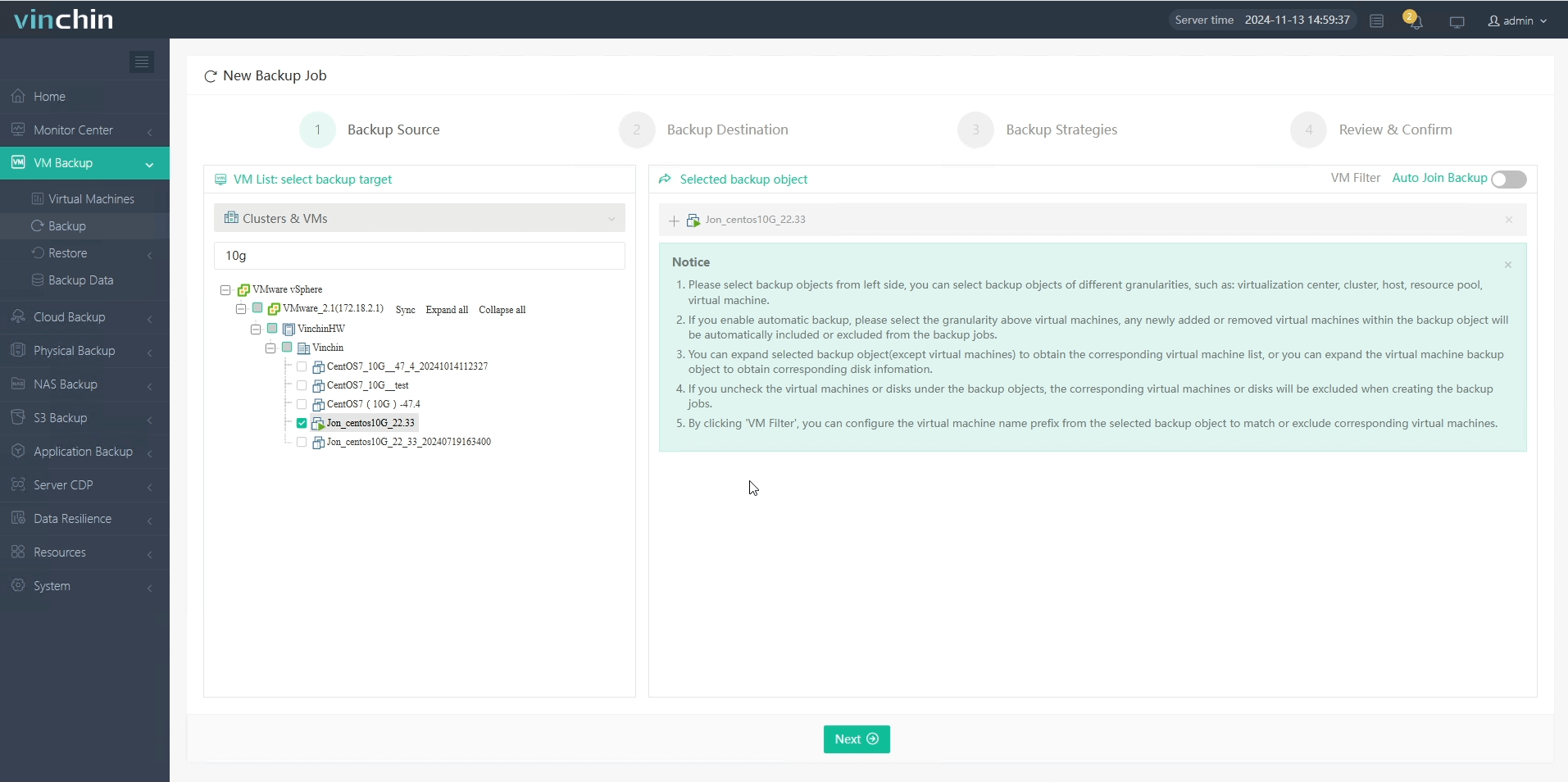
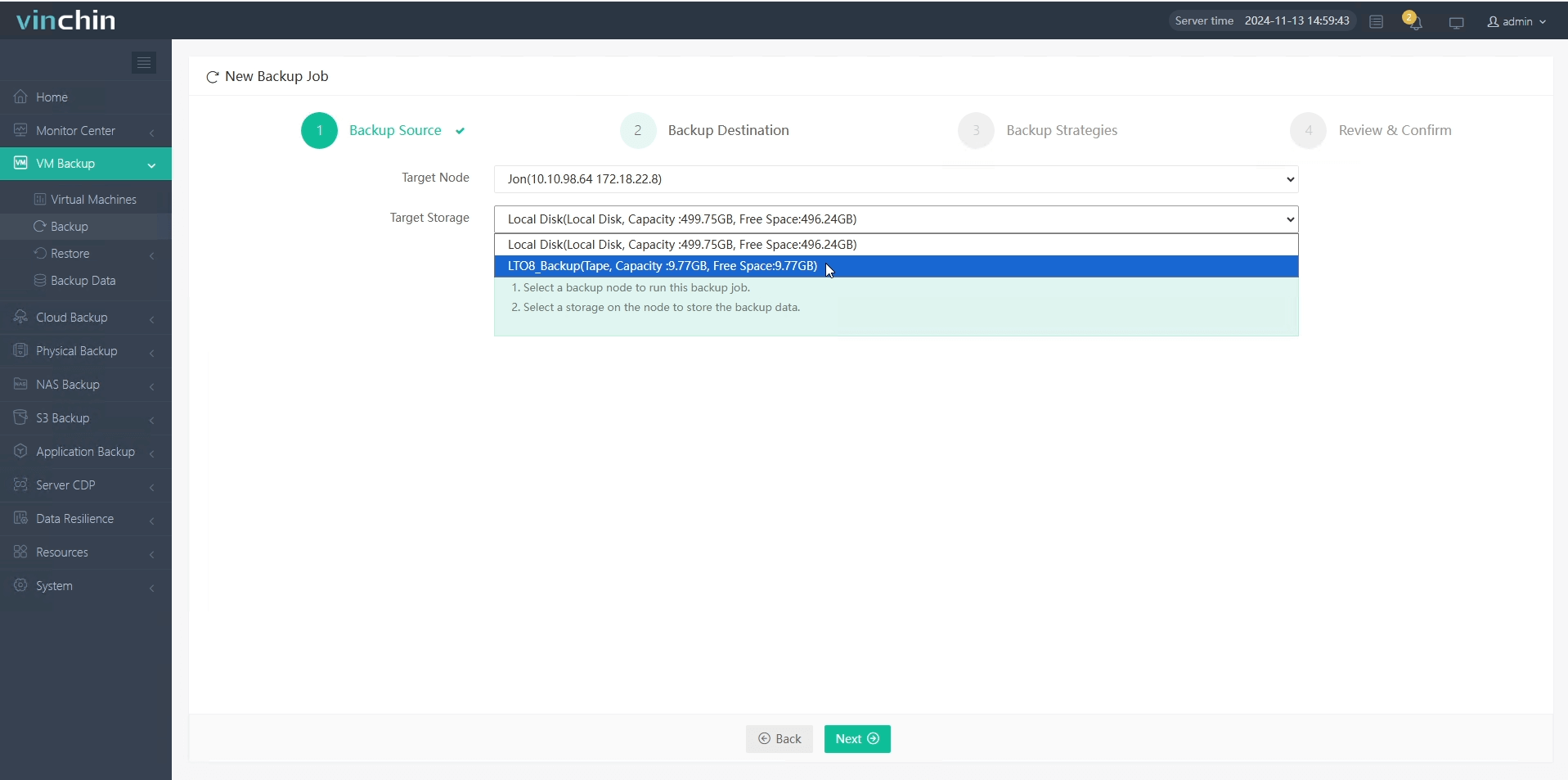
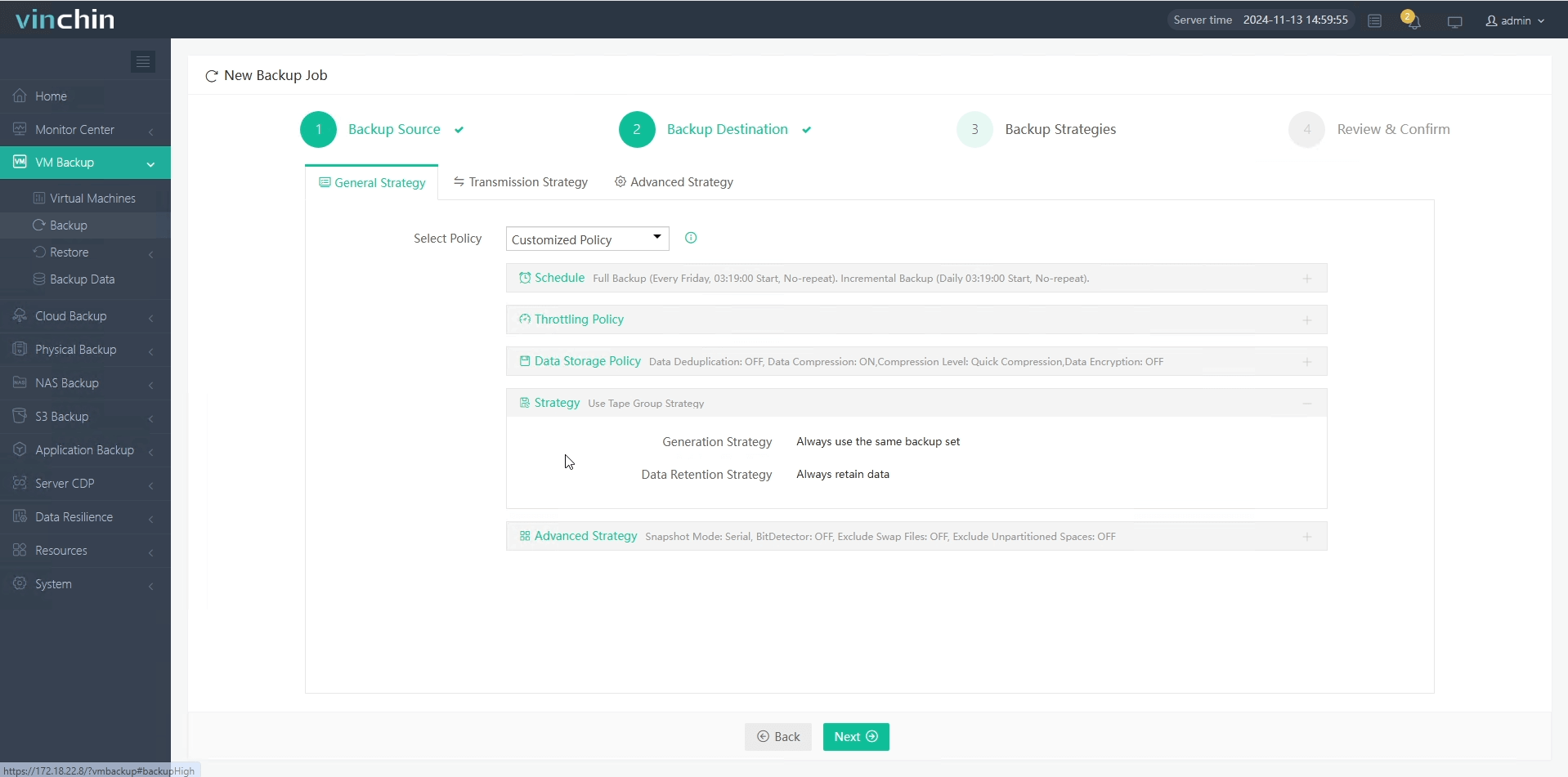
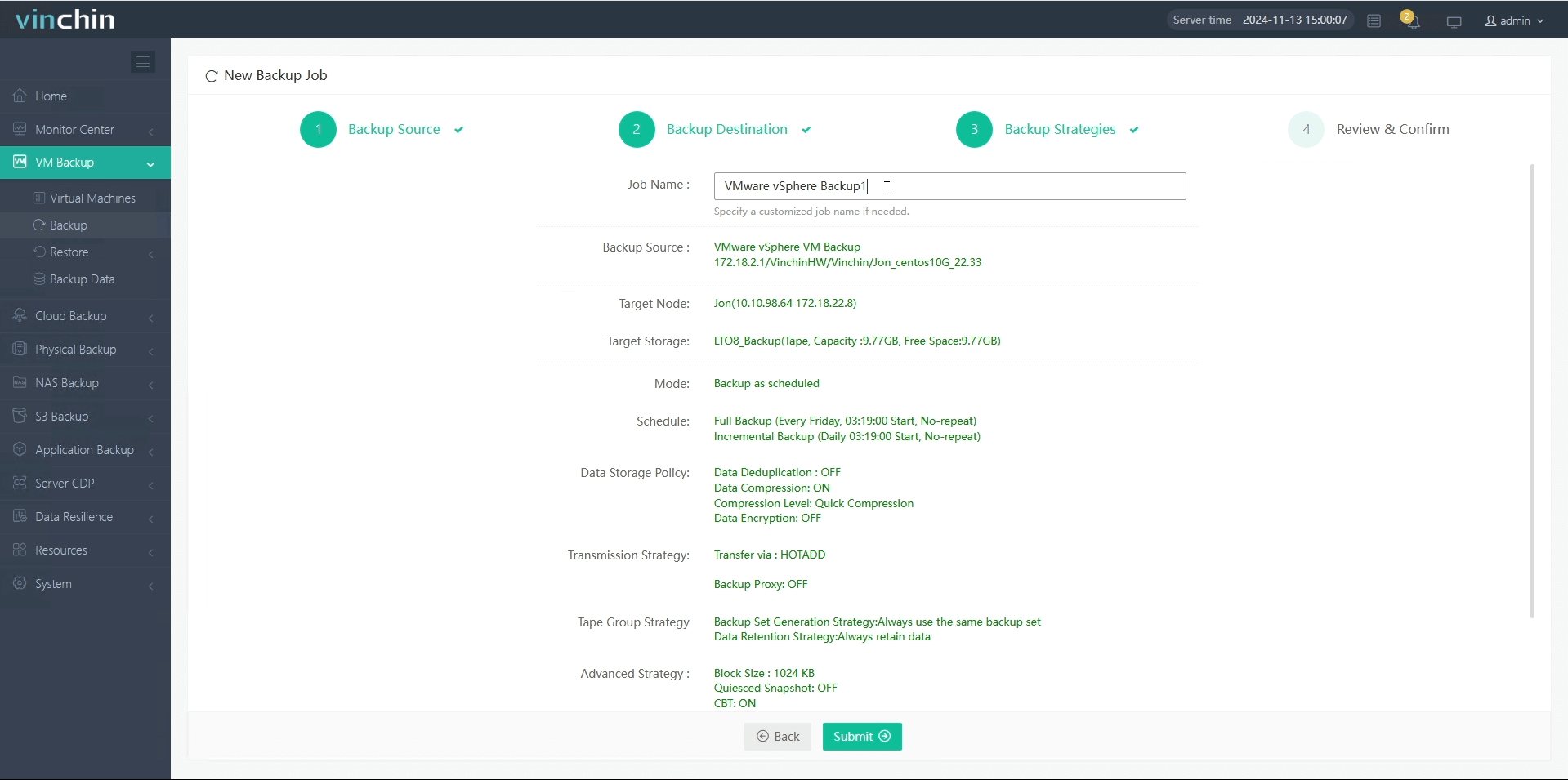
It takes you 4 steps to back up virtual machines to tape storage using Vinchin Backup & Recovery:
1.Select the virtual machine to be backed up.
2.Select the backup storage for it.
3.Configure the backup strategies.
4.Submit the job.
You can click the download button below to try it for 60 days for free and experience more features.
LTO Tape Backup FAQs
Q1: Can I use lto tape backup solutions across mixed Windows/Linux environments?
A1: Yes—as long as chosen software supports both platforms most modern drives/cartridges work seamlessly between them regardless underlying OS differences.
Q2: How do I confirm my specific cartridge matches installed drive model/generation?
A2: Check manufacturer charts online since most drives read two prior generations but write only one back; mismatches risk errors/data loss if ignored!
Q3: What should I do if my system fails detecting newly attached lto hardware?
A3: Inspect cables/power connections first then verify drivers loaded correctly via Device Manager (Windows) OR lsblk/dmesg output (Linux) next reboot if needed.
Q4: How often should I replace my active-use lto tapes?
A4: Most experts recommend retiring after about 20–30 full write cycles OR every ten years whichever comes sooner—but always monitor error logs closely just in case earlier swap-out warranted!
Conclusion
In today’s threat-filled world reliable offline backups matter more than ever—and nothing beats proven performance/cost-effectiveness offered by modern lto solutions! Vinchin makes deploying/managing these workflows effortless whether scaling up/down over time. Try it yourself risk-free today!






