Have you ever wondered if your Oracle RMAN backups are really there when you need them? As an operations administrator, you know that backup records and actual files can drift out of sync. The CROSSCHECK command in Oracle RMAN helps you keep your backup catalog honest. But what does "crosscheck all" really do, and how should you use it? Let’s break it down step by step.
What Is Oracle RMAN Crosscheck All?
Oracle RMAN’s CROSSCHECK command checks the status of backups and copies recorded in the RMAN repository against what actually exists on disk or tape. When people say “crosscheck all,” they mean running a set of commands,such as CROSSCHECK BACKUP, CROSSCHECK ARCHIVELOG ALL, and CROSSCHECK DATAFILECOPY ALL to verify every type of backup object managed by RMAN.
RMAN performs this check by scanning its repository records for each backup piece or archived log. It then queries the operating system or storage device to confirm whether those files exist at their recorded locations. If a file is missing or inaccessible, RMAN marks its status as EXPIRED. If found, it stays AVAILABLE. This process updates only the status in the repository. It never deletes files or records directly. Later, you can use DELETE EXPIRED to remove expired entries from both disk (if possible) and catalog.
This verification ensures that your backup catalog reflects reality before any restore operation. Without regular crosschecks, you might try to restore from backups that no longer exist.
Why Use Crosscheck All in RMAN?
Backup environments change over time. Files may be moved due to storage upgrades or deleted because of retention policies, or even accidentally removed through manual intervention. However, unless told otherwise, the RMAN repository assumes these files still exist.
Running “crosscheck all” helps you:
1. Identify missing or moved backup files before they cause restore failures.
2. Clean up expired records so your backup catalog remains accurate and uncluttered.
3. Enforce compliance with data retention policies by ensuring only valid backups are tracked.
4. Avoid confusion during audits or disaster recovery drills caused by stale catalog entries.
Should you run crosschecks as part of every backup job? Not always. Frequent crosschecking can slow down large environments because each scan involves checking many files across multiple devices. Most experts recommend scheduling crosschecks separately from regular backups. This approach lets you monitor expired objects without impacting daily backup performance.
How to Run Crosscheck All in Oracle RMAN
Running a crosscheck is straightforward but understanding each command’s scope is important for accuracy.
First, connect to your target database using RMAN:
rman TARGET /
This connects locally as SYSDBA on Unix-like systems where OS authentication is configured. For remote databases or explicit credentials:
rman TARGET sys/password@ORCL
Once connected, use these commands:
To check all backups (backup sets and image copies):
RMAN> CROSSCHECK BACKUP;
To check all archived redo logs:
RMAN> CROSSCHECK ARCHIVELOG ALL;
To check all datafile copies:
RMAN> CROSSCHECK DATAFILECOPY ALL;
After running these commands, review which items have been marked as EXPIRED (missing) versus those still available:
RMAN> LIST EXPIRED BACKUP;
When ready to clean up expired entries from both disk (if possible) and catalog:
RMAN> DELETE EXPIRED BACKUP;
Note: The CROSSCHECK command only updates statuses. It never removes physical files itself. Only after confirming expiration should you run delete operations.
Tips for Efficient Crosschecking
Crosschecking is essential but must be balanced against system load.
Schedule maintenance windows during off-hours when user activity is low. This avoids unnecessary I/O contention with production workloads.
Avoid embedding crosschecks inside every routine backup script unless required for strict compliance reasons. Instead, treat them as periodic health checks aligned with your environment’s needs.
Monitor expired objects regularly so that missing files don’t accumulate unnoticed. You'd better investigate causes before deleting anything critical.
If managing very large catalogs across multiple disks or storage arrays, ensure your channel configuration supports parallelism where appropriate, but remember that parallelism settings mainly affect active data movement rather than metadata scans like crosschecks themselves.
Performance Considerations and Scheduling
Crosschecking thousands of backups can create significant I/O load on both storage systems and network links if using remote devices. Each file checked requires an access attempt, even if just reading headers to confirm existence against catalog records.
For small databases with few daily changes, weekly full crosschecks may suffice. Larger installations generating many archived logs might benefit from daily archive log checks but less frequent full backup scans.
Consider aligning your schedule with other maintenance tasks such as log purges or control file autobackups so resource usage peaks do not overlap unnecessarily.
If using automated job schedulers like cron on Linux/Unix or Task Scheduler on Windows Server platforms:
1. Create an executable shell script containing your desired sequence of CROSSCHECK commands followed by DELETE EXPIRED.
2. Schedule this script outside peak business hours based on observed system utilization trends.
3. Review logs after each run for unexpected spikes in expired objects, which could signal underlying hardware issues or accidental deletions outside of RMAN control.
By planning ahead and tuning frequency based on actual workload, you maintain high availability while minimizing operational risk during restores.
Troubleshooting Common Crosscheck Issues
Even experienced administrators encounter problems when running “oracle rman crosscheck all.” Here are some typical challenges:
Permissions errors often cause legitimate files to appear missing: If the Oracle software owner cannot read a directory due to changed permissions or unmounted NFS shares/disks, those pieces will be marked EXPIRED even though they still exist physically elsewhere.
Manual deletions outside of RMAN, using OS tools like rm, leave orphaned records behind until detected via crosschecking. Always use proper delete procedures within RMAN whenever possible for safe cleanup workflows.
Stale repository data can occur if relying solely on control file-based catalogs rather than dedicated recovery catalogs. Restoring from older snapshots may not reflect current storage state accurately until after a fresh round of CROSSCHECK commands has been executed post-recovery.
If repeated expirations occur unexpectedly:
1. Double-check mount points are active before starting maintenance jobs.
2. Verify directory permissions allow read access for oracle processes across all involved paths/devices.
3. Investigate recent changes in storage topology including SAN migrations that might have altered logical paths referenced by earlier backups.
By addressing these root causes promptly and documenting findings, you reduce future surprises during urgent restores.
Enhance Your Oracle Database Backup Strategy with Vinchin Backup & Recovery
Although native tools like RMAN provide foundational protection through features such as crosschecking, comprehensive enterprise-level database protection requires more advanced capabilities tailored for modern IT environments supporting 10g, 11g/11g R2, 12c, 18c, 19c, 21c, Oracle RAC, MySQL, SQL Server, MariaDB, PostgreSQL, PostgresPro, and TiDB.
Vinchin Backup & Recovery delivers robust support for these mainstream platforms with features including batch database backup management, granular data retention policy enforcement (including GFS), cloud/tape archiving integration for offsite safety, WORM protection against ransomware threats.
It provides more advanced backup verification method than using RMAN CROSSCHECK command. It helpes easily deploy test environment to restore the backup data to see whether it is usable.
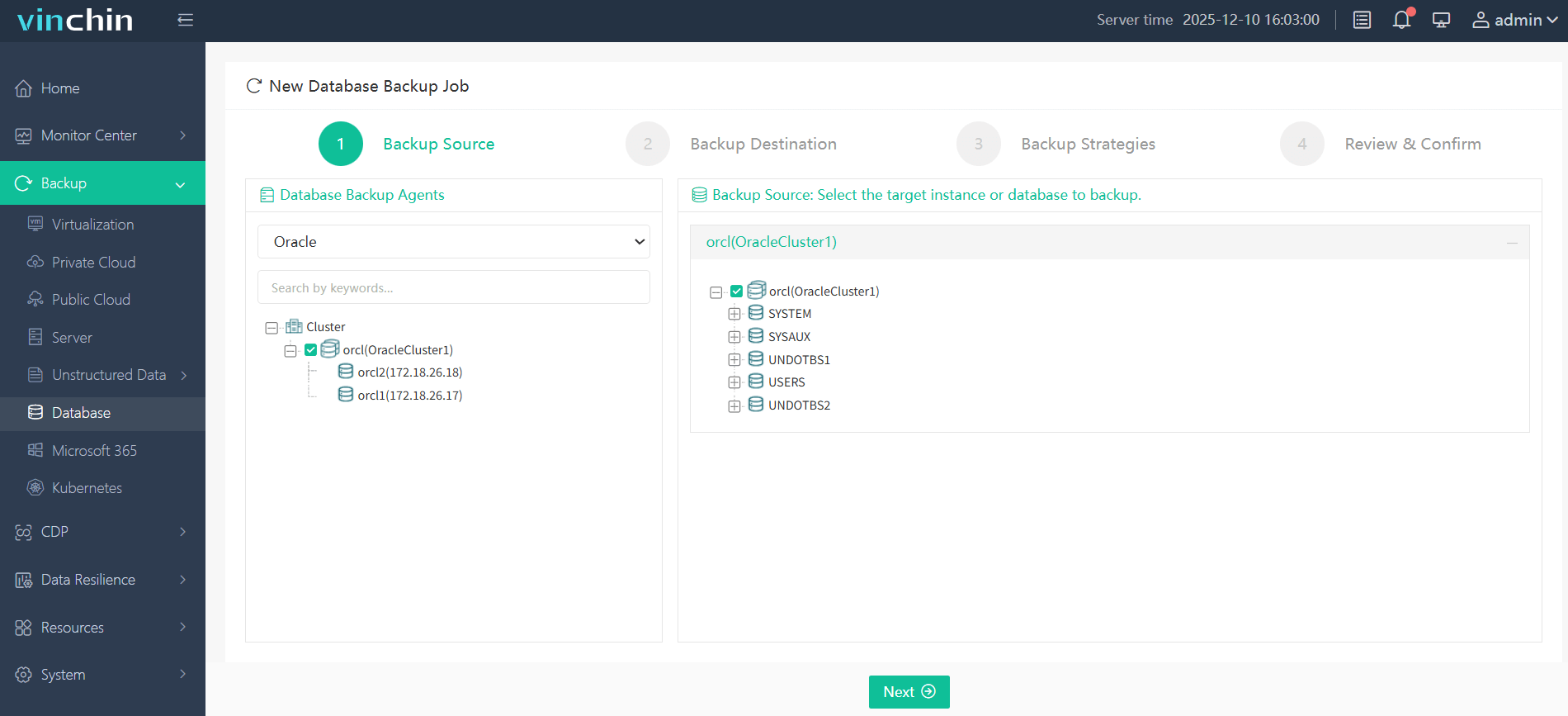
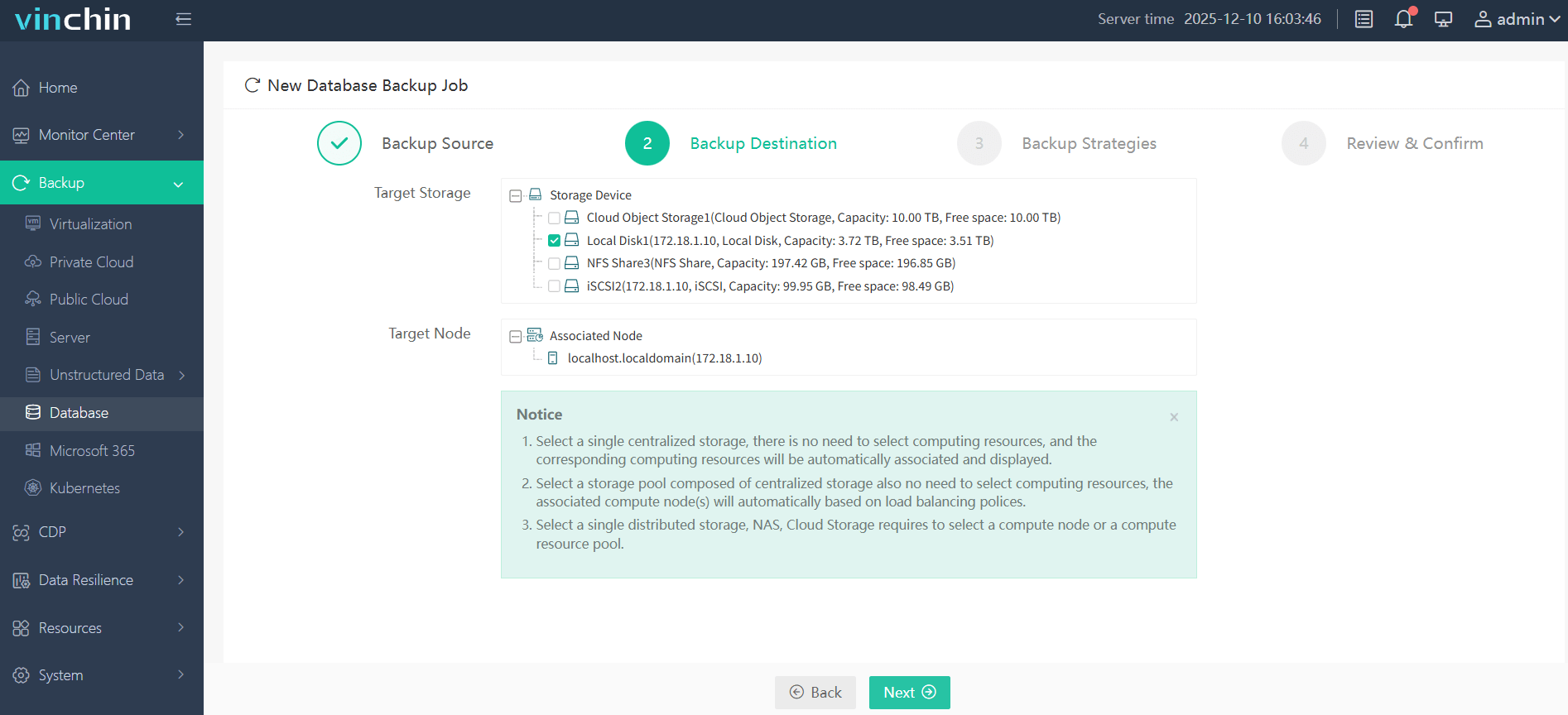
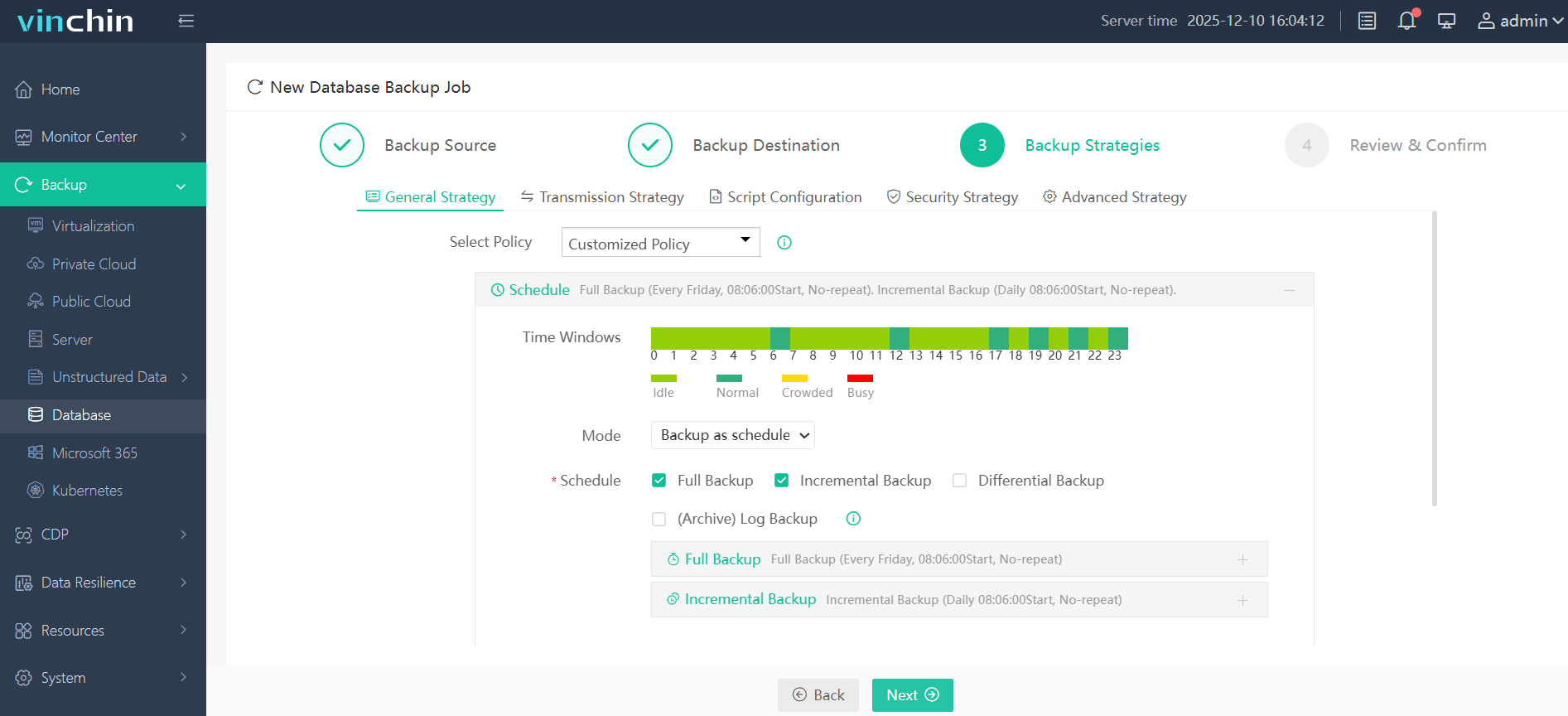
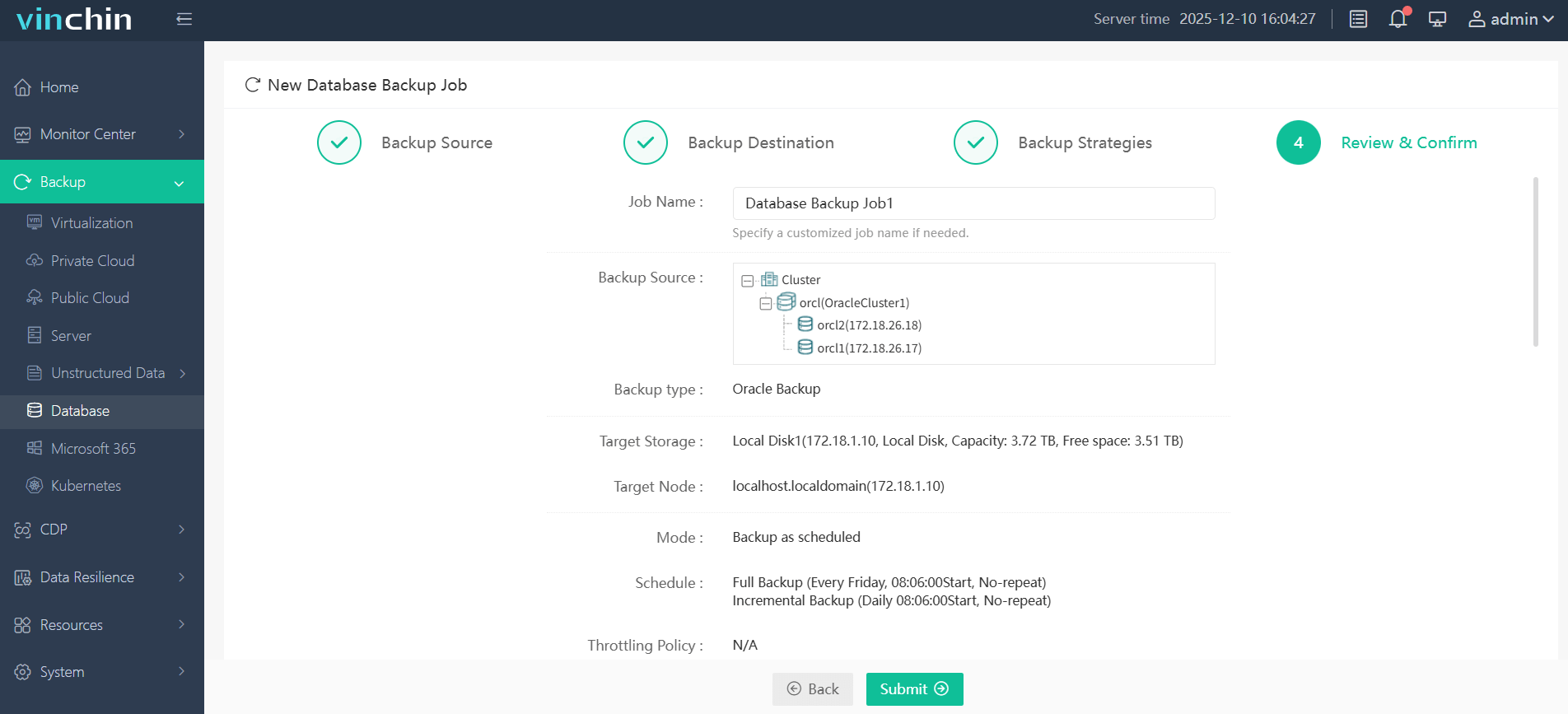
The intuitive web console makes safeguarding your Oracle environment remarkably simple:
Step 1: Select the Oracle database to backup
Step 2: Choose the backup storage
Step 3: Define the backup strategy
Step 4: Submit the job
Vinchin Backup & Recovery is trusted globally by enterprises seeking reliable data protection. With top ratings and a strong customer base worldwide, experience every feature free for 60 days. Click download now to see why leading organizations choose Vinchin Backup & Recovery.
Oracle RMAN Crosscheck All FAQs
Q1: Can I automate regular crosschecks along with cleanup?
A1: Yes—create an RMAN script block containing CROSSCHECK BACKUP; CROSSCHECK ARCHIVELOG ALL; DELETE NOPROMPT EXPIRED BACKUP; DELETE NOPROMPT EXPIRED ARCHIVELOG ALL;, then schedule it via cron or DBMS_SCHEDULER according to site policy requirements.
Q2: Why do some valid-looking backups show up as expired after moving disks?
A2: If mount points change location/names without updating references in either OS fstab/NFS config or within recovery catalog/control file mappings. The original paths become inaccessible so those pieces appear expired until corrected.
Q3: Is there any way to monitor failed crosschecks automatically?
A3: Yes. Parse output logs generated by scheduled scripts for lines indicating "EXPIRED" status changes then trigger alerts through existing monitoring tools like email/SNMP/syslog integration.
Conclusion
Oracle RMAN’s crosscheck commands keep your catalog synchronized with real-world storage conditions so restores succeed when needed most, use them wisely alongside scheduled maintenance routines tailored for scale/performance balance at every stage of growth. For advanced automation beyond native tools alone consider trying Vinchin’s robust enterprise-grade solution today.